display Lexus ES300 1995 Air Conditioning And Audio
[x] Cancel search | Manufacturer: LEXUS, Model Year: 1995, Model line: ES300, Model: Lexus ES300 1995Pages: 21, PDF Size: 2.94 MB
Page 16 of 21
AIR CONDITIONING AND AUDIO
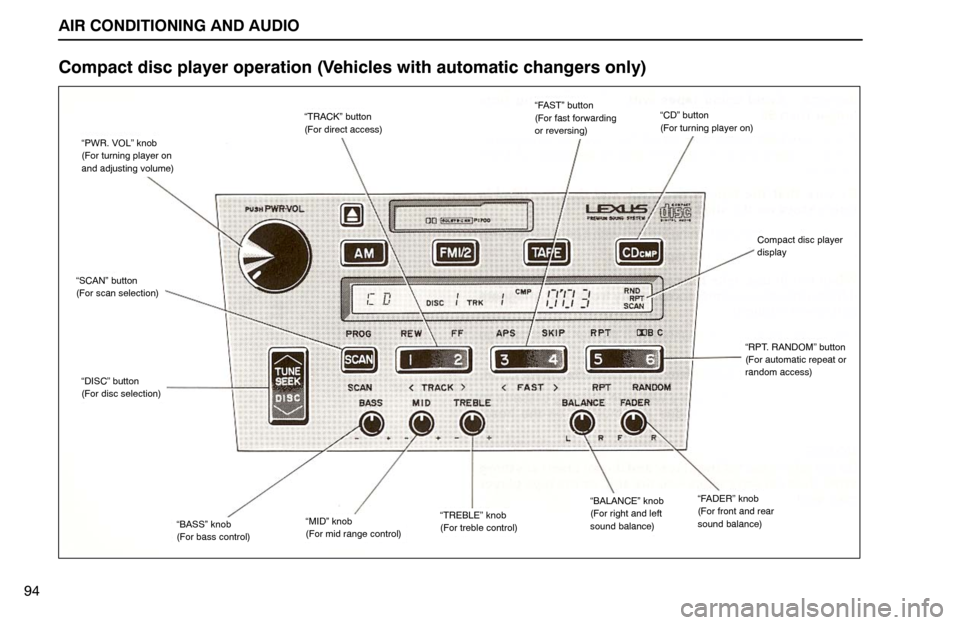
“TRACK” button
(For direct access)
“DISC” button
(For disc selection)
“PWR. VOL” knob
(For turning player on
and adjusting volume)
“MID” knob
(For mid range control)“TREBLE” knob
(For treble control)“BASS” knob
(For bass control)
“CD” button
(For turning player on)
“SCAN” button
(For scan selection)
“FAST” button
(For fast forwarding
or reversing)
“FADER” knob
(For front and rear
sound balance)“BALANCE” knob
(For right and left
sound balance)
“RPT. RANDOM” button
(For automatic repeat or
random access)
Compact disc player
display
94
Compact disc player operation (Vehicles with automatic changers only)
Page 17 of 21
AIR CONDITIONING AND AUDIO
95 The compact disc player of this system is provided with an
automatic changer which can play selected discs or 6 discs
continuously. The player is mounted in the trunk, on the left and
is operated from the driver’s seat.
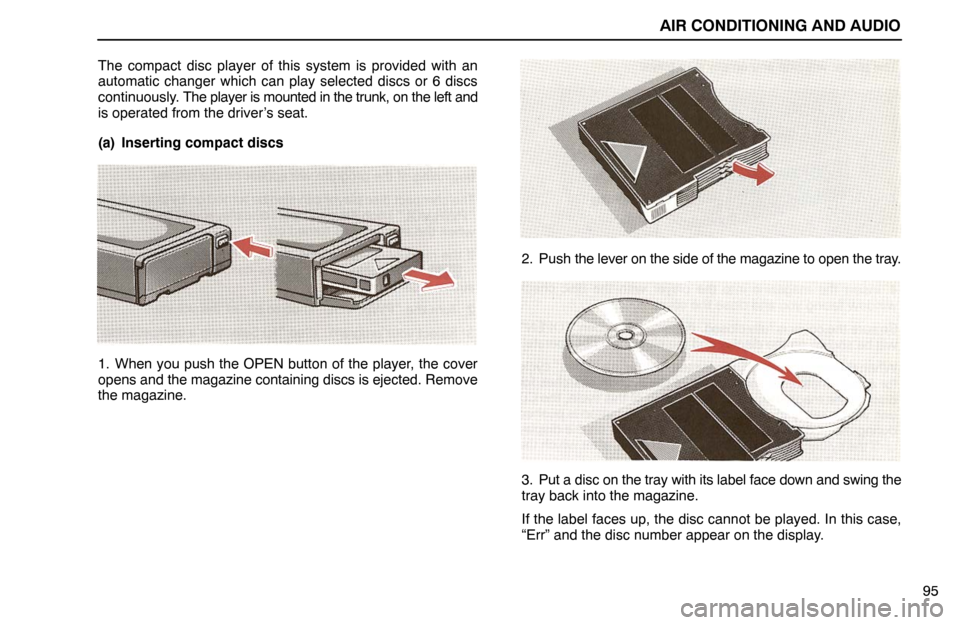
(a) Inserting compact discs
1. When you push the OPEN button of the player, the cover
opens and the magazine containing discs is ejected. Remove
the magazine.2. Push the lever on the side of the magazine to open the tray.
3. Put a disc on the tray with its label face down and swing the
tray back into the magazine.
If the label faces up, the disc cannot be played. In this case,
“Err” and the disc number appear on the display.
Page 18 of 21
AIR CONDITIONING AND AUDIO
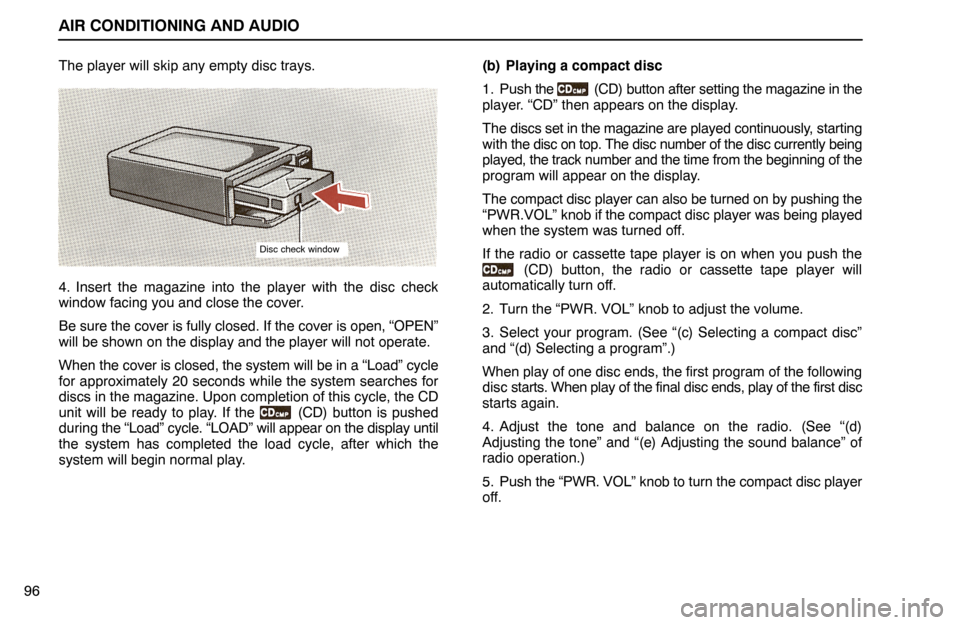
Disc check window
96The player will skip any empty disc trays.
4. Insert the magazine into the player with the disc check
window facing you and close the cover.
Be sure the cover is fully closed. If the cover is open, “OPEN”
will be shown on the display and the player will not operate.
When the cover is closed, the system will be in a “Load” cycle
for approximately 20 seconds while the system searches for
discs in the magazine. Upon completion of this cycle, the CD
unit will be ready to play. If the
(CD) button is pushed
during the “Load” cycle. “LOAD” will appear on the display until
the system has completed the load cycle, after which the
system will begin normal play.(b) Playing a compact disc
1. Push the
(CD) button after setting the magazine in the
player. “CD” then appears on the display.
The discs set in the magazine are played continuously, starting
with the disc on top. The disc number of the disc currently being
played, the track number and the time from the beginning of the
program will appear on the display.
The compact disc player can also be turned on by pushing the
“PWR.VOL” knob if the compact disc player was being played
when the system was turned off.
If the radio or cassette tape player is on when you push the
(CD) button, the radio or cassette tape player will
automatically turn off.
2. Turn the “PWR. VOL” knob to adjust the volume.
3. Select your program. (See “(c) Selecting a compact disc”
and “(d) Selecting a program”.)
When play of one disc ends, the first program of the following
disc starts. When play of the final disc ends, play of the first disc
starts again.
4. Adjust the tone and balance on the radio. (See “(d)
Adjusting the tone” and “(e) Adjusting the sound balance” of
radio operation.)
5. Push the “PWR. VOL” knob to turn the compact disc player
off.
Page 19 of 21
AIR CONDITIONING AND AUDIO
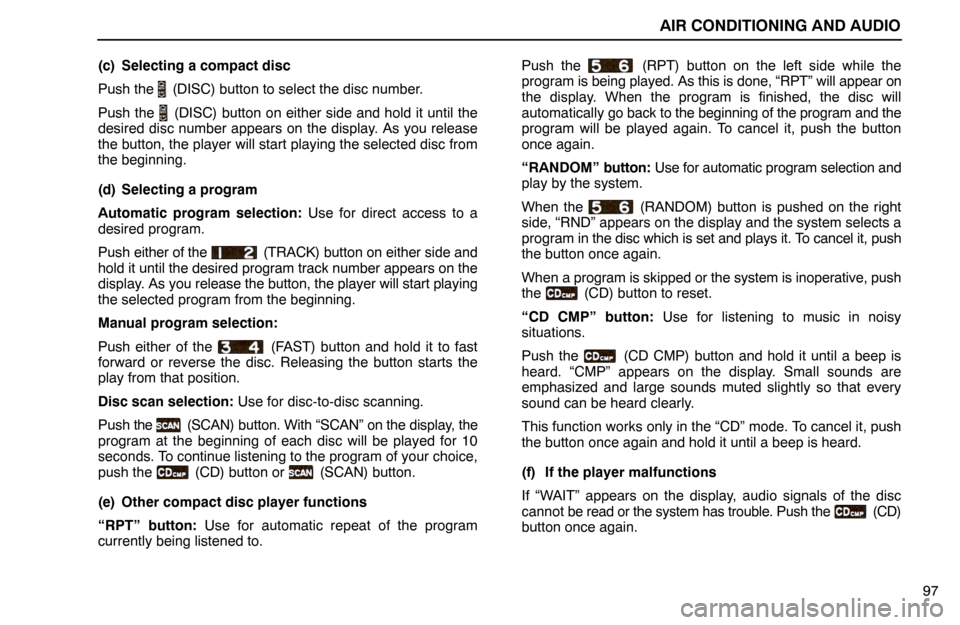
97 (c) Selecting a compact disc
Push the
(DISC) button to select the disc number.
Push the
(DISC) button on either side and hold it until the
desired disc number appears on the display. As you release
the button, the player will start playing the selected disc from
the beginning.
(d) Selecting a program
Automatic program selection: Use for direct access to a
desired program.
Push either of the
(TRACK) button on either side and
hold it until the desired program track number appears on the
display. As you release the button, the player will start playing
the selected program from the beginning.
Manual program selection:
Push either of the
(FAST) button and hold it to fast
forward or reverse the disc. Releasing the button starts the
play from that position.
Disc scan selection: Use for disc-to-disc scanning.
Push the
(SCAN) button. With “SCAN” on the display, the
program at the beginning of each disc will be played for 10
seconds. To continue listening to the program of your choice,
push the
(CD) button or (SCAN) button.
(e) Other compact disc player functions
“RPT” button: Use for automatic repeat of the program
currently being listened to.Push the
(RPT) button on the left side while the
program is being played. As this is done, “RPT” will appear on
the display. When the program is finished, the disc will
automatically go back to the beginning of the program and the
program will be played again. To cancel it, push the button
once again.
“RANDOM” button: Use for automatic program selection and
play by the system.
When the
(RANDOM) button is pushed on the right
side, “RND” appears on the display and the system selects a
program in the disc which is set and plays it. To cancel it, push
the button once again.
When a program is skipped or the system is inoperative, push
the
(CD) button to reset.
“CD CMP” button: Use for listening to music in noisy
situations.
Push the
(CD CMP) button and hold it until a beep is
heard. “CMP” appears on the display. Small sounds are
emphasized and large sounds muted slightly so that every
sound can be heard clearly.
This function works only in the “CD” mode. To cancel it, push
the button once again and hold it until a beep is heard.
(f) If the player malfunctions
If “WAIT” appears on the display, audio signals of the disc
cannot be read or the system has trouble. Push the
(CD)
button once again.