ignition LEXUS ES300 2005 Manual PDF
[x] Cancel search | Manufacturer: LEXUS, Model Year: 2005, Model line: ES300, Model: LEXUS ES300 2005Pages: 969, PDF Size: 24.08 MB
Page 894 of 969

PRE±DELIVERY SERVICE (PDS) INFORMATION FOR ES 330 ± PD002-03 August 26, 2003
Page 7 of 9
INITIAL CALIBRATION OF COMPASS (Continued)
1. Turn the ignition switch to the ªONº
position and check that the direction
(N, NE, E, SE, S, SW, W, NW)
appears on the compass display.
NOTE:
Pushing the ªCOMPº switch turns on
or off the compass display.
2. Push the ªCOMPº switch for
approximately 3 seconds until the
zone number (1 ± 15) appears on the
display. Then push the switch to
select the number of the zone where
the vehicle is located.
See the map below for zone reference.
Hawaii: 5
Puerto Rico: 10
A. Samoa: 5
Guam: 8
Saipan: 8
Taiwan: 9
Korea: 10 North America
ITEM NO. 5:
Compass
Calibration
Procedure
Page 899 of 969

Lexus Supports ASE CertificationPage 1 of 1
Title:
INITIALIZATION OF MOON ROOF
DURING PDS
Models:
'05 ± '06 ES 330
Technical Service
Information Bulletin
August 22, 2005
PD033-05
The moon roof is controlled by the sliding roof ECU, which detects and memorizes the
moon roof position by counting pulses of its motor from the fully ªTILT-UPº position as
the start position. Once the battery terminal has been disconnected and reconnected,
the sliding roof ECU does not detect and memorize the moon roof position, resulting in
no functions of the ªone-touch tilt up and down,º ªone-touch slide open and close,º and
ªjam protection.º Initialize the moon roof position after reconnecting the battery terminal
as outlined below.
NOTE:
Any time the battery terminal has been disconnected, initialize the moon roof after
reconnecting the battery terminal.
2005 ± 2006 model year ES 330 vehicles.
1. Turn the ignition switch to the
ªONº position.
2. Push and hold the moon roof switch
to the ªTILT-UPº side until the moon
roof tilts all the way up and then tilts
down slightly (approximately 10 mm
[0.39 in.] at rear end).
3. Check for proper operation of the
ªone-touch slide open and closeº and
ªone-touch tilt up and downº functions
by pushing the switch briefly to the
ªSLIDE OPENº and ªTILT-UPº positions.
NOTE:
Jam protection function becomes
effective through the above
initialization procedure.
OP CODEDESCRIPTIONTIMEOFPT1T2
N/ANot Applicable to Warranty±±±±
PRE-DELIVERY SERVICE
Introduction
Applicable
Vehicles
Initialization
Procedure
Approx. 10 mm
Warranty
Information
Page 901 of 969

INITIAL CALIBRATION OF COMPASS DURING PDS ± PD034-05 August 22, 2005
Page 2 of 3
1. Turn the ignition switch to the ªONº
position and check that the direction
(N, NE, E, SE, S, SW, W, NW)
appears on the compass display.
NOTE:
Pushing the ªCOMPº switch turns the
compass display ON or OFF.
2. Push the ªCOMPº switch for
approximately 3 seconds until the
zone number (1 ± 15) appears on the
display. Then push the switch to
select the number of the zone where
the vehicle is located.
See the map below for zone reference.
Hawaii: 5
Puerto Rico: 10
A. Samoa: 5
Guam: 8
Saipan: 8
Taiwan: 9
Korea: 10 North America
Compass
Calibration
Procedure
Page 926 of 969
August 26, 2002IMMOBILIZER KEY CODE RESET ± SS002-01 Revised
Page 3 of 6
NOTE:
Ensure that the Diagnostic Tester is equipped with the latest version of software (13.0a
or later).
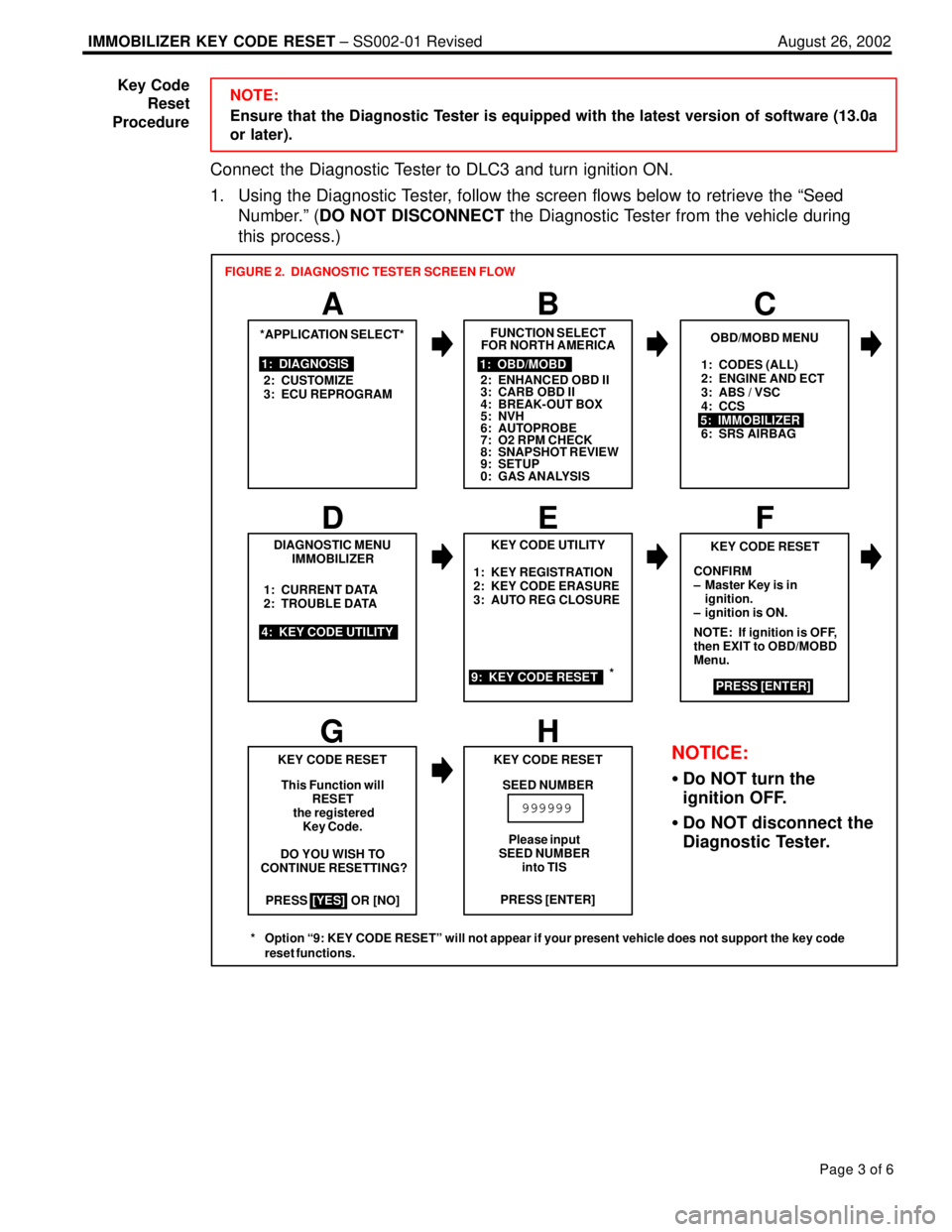
Connect the Diagnostic Tester to DLC3 and turn ignition ON.
1. Using the Diagnostic Tester, follow the screen flows below to retrieve the ªSeed
Number.º (DO NOT DISCONNECT the Diagnostic Tester from the vehicle during
this process.)
1: CODES (ALL)
2: ENGINE AND ECT
3: ABS / VSC
4: CCS
6: SRS AIRBAG
PRESS OR [NO]1: KEY REGISTRATION
2: KEY CODE ERASURE
3: AUTO REG CLOSURE
*APPLICATION SELECT*
1: DIAGNOSIS
2: CUSTOMIZE
3: ECU REPROGRAM
A
FUNCTION SELECT
FOR NORTH AMERICA
BC
1: OBD/MOBD
2: ENHANCED OBD II
3: CARB OBD II
4: BREAK-OUT BOX
5: NVH
6: AUTOPROBE
7: O2 RPM CHECK
8: SNAPSHOT REVIEW
9: SETUP
0: GAS ANALYSIS
OBD/MOBD MENU
5: IMMOBILIZER
DIAGNOSTIC MENU
IMMOBILIZER
4: KEY CODE UTILITY1: CURRENT DATA
2: TROUBLE DATA
D
KEY CODE UTILITY
EF
9: KEY CODE RESET
KEY CODE RESET
CONFIRM
± Master Key is in
ignition.
± ignition is ON.
NOTE: If ignition is OFF,
then EXIT to OBD/MOBD
Menu.
PRESS [ENTER]
GH
KEY CODE RESET
This Function will
RESET
the registered
Key Code.
DO YOU WISH TO
CONTINUE RESETTING?
[YES]PRESS [ENTER] KEY CODE RESET
SEED NUMBER
999999
FIGURE 2. DIAGNOSTIC TESTER SCREEN FLOW
Please input
SEED NUMBER
into TIS
NOTICE:
Do NOT turn the
ignition OFF.
Do NOT disconnect the
Diagnostic Tester.
*
* Option ª9: KEY CODE RESETº will not appear if your present vehicle does not support the key code
reset functions.
Key Code
Reset
Procedure
Page 935 of 969
DIAGNOSTIC TESTER IMMOBILIZER FUNCTIONS ± SS005-01 Revised July 6, 2001
Page 4 of 14
1. Transponder Key Type
Before any Immobilizer functions are performed, verify the type of transponder key
that you are attempting to use for the service operation. Some functions may only be
performed with a registered Master Key.
A. Insert the current key into the ignition cylinder and turn to the ON position.
HINT:
The Immobilizer key blanks are preconfigured as Master or Sub Keys. Master Key
blanks cannot be registered as Sub Keys nor can Sub Key blanks be registered as
Master Keys. Also, the flat key is now enabled as a full function Master Key that must
be registered.
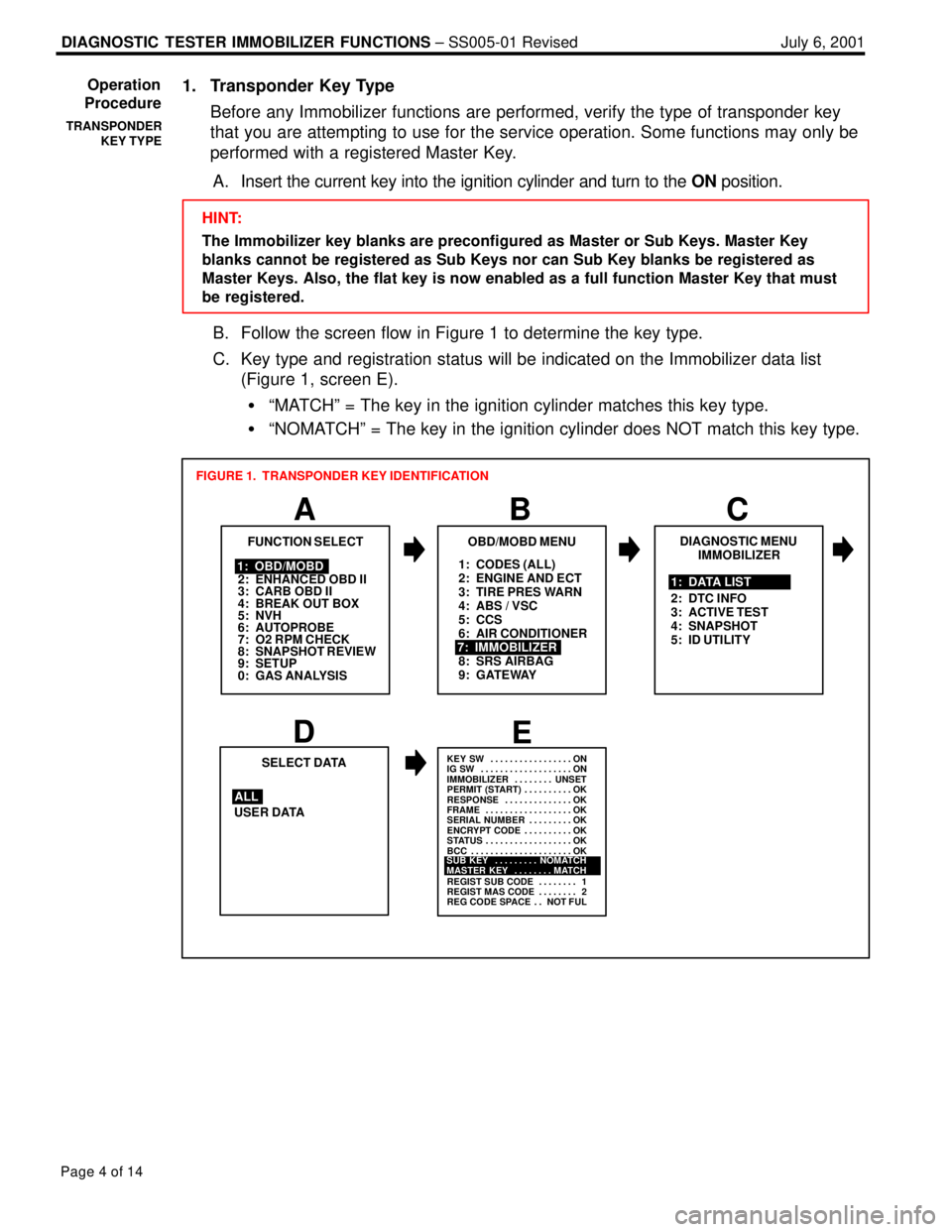
B. Follow the screen flow in Figure 1 to determine the key type.
C. Key type and registration status will be indicated on the Immobilizer data list
(Figure 1, screen E).
ªMATCHº = The key in the ignition cylinder matches this key type.
ªNOMATCHº = The key in the ignition cylinder does NOT match this key type.
1: CODES (ALL)
2: ENGINE AND ECT
3: TIRE PRES WARN
4: ABS / VSC
5: CCS
6: AIR CONDITIONER
8: SRS AIRBAG
9: GATEWAY
A
FUNCTION SELECT
B
1: OBD/MOBD
2: ENHANCED OBD II
3: CARB OBD II
4: BREAK OUT BOX
5: NVH
6: AUTOPROBE
7: O2 RPM CHECK
8: SNAPSHOT REVIEW
9: SETUP
0: GAS ANALYSIS
OBD/MOBD MENU
7: IMMOBILIZER
FIGURE 1. TRANSPONDER KEY IDENTIFICATION
DE
USER DATASELECT DATA
ALL
KEY SW ON. . . . . . . . . . . . . . . . .
IG SW ON. . . . . . . . . . . . . . . . . . .
IMMOBILIZER UNSET. . . . . . . .
PERMIT (START) OK. . . . . . . . . .
RESPONSE OK. . . . . . . . . . . . . .
FRAME OK. . . . . . . . . . . . . . . . . .
SERIAL NUMBER OK. . . . . . . . .
ENCRYPT CODE OK. . . . . . . . . .
STATUS OK. . . . . . . . . . . . . . . . . .
BCC OK. . . . . . . . . . . . . . . . . . . . .
REGIST SUB CODE 1. . . . . . . .
REGIST MAS CODE 2. . . . . . . .
REG CODE SPACE NOT FUL. .
SUB KEY NOMATCH. . . . . . . . .
MASTER KEY MATCH. . . . . . . .
C
DIAGNOSTIC MENU
IMMOBILIZER
1: DATA LIST
2: DTC INFO
3: ACTIVE TEST
4: SNAPSHOT
5: ID UTILITY
Operation
Procedure
TRANSPONDER
KEY TYPE
Page 936 of 969

DIAGNOSTIC TESTER IMMOBILIZER FUNCTIONS ± SS005-01 Revised July 6, 2001
Page 5 of 14
2. Transponder Code Registration
This function allows the normal registration of additional transponder keys (Master or
Sub) using a registered Master Key.
NOTE:
This function requires the use of one registered Master Key. The use of a Sub Key will
NOT complete Transponder Code Registration. Attempting registration of additional
keys with only a Sub Key will result in errors and incomplete registration.
HINT:
The Immobilizer key blanks are preconfigured as Master or Sub Keys. Master Key
blanks cannot be registered as Sub Keys nor can Sub Key blanks be registered as
Master Keys. Also, the flat key is now enabled as a full function Master Key that must
be registered.
A. Insert a registered Master Key into the ignition cylinder and turn to the ON position.
B. Follow the screen flow in Figure 2 to register new Master or Sub keys. It is
possible to register up to 5 Master Keys and 3 Sub Keys.
C. Be sure to follow the instructions on key insertion, ignition ON/OFF and key
removal exactly as described on the Diagnostic Tester.
Blinks Code 2±2Code 2±1
1.8 sec
0.2
sec0.25 sec
0.25
sec1 sec
0.5
sec0.25 sec
0.25
sec1 sec
0.5
sec
HINT:
The security indicator light reveals the following information:
Always ON and NO key in IG
* = Transponder ECU in Auto Registration mode
Blinking and NO key in IG = Normal operation
Blinking Code 21 = Transponder Code Registration failed
Blinking Code 22 = Attempt was made to register an already
registered Transponder Code
* Immediately after the transponder ECU is installed, the security indicator will blink.
Operation
Procedure
(Continued)
TRANSPONDER
CODE
REGISTRATION
Page 937 of 969

DIAGNOSTIC TESTER IMMOBILIZER FUNCTIONS ± SS005-01 Revised July 6, 2001
Page 6 of 14
1: CODES (ALL)
2: ENGINE AND ECT
3: TIRE PRES WARN
4: ABS / VSC
5: CCS
6: AIR CONDITIONER
7: IMMOBILIZER
8: SRS AIRBAG
9: GATEWAY
A
FUNCTION SELECT
B
1: OBD/MOBD
2: ENHANCED OBD II
3: CARB OBD II
4: BREAK OUT BOX
5: NVH
6: AUTOPROBE
7: O2 RPM CHECK
8: SNAPSHOT REVIEW
9: SETUP
0: GAS ANALYSIS
OBD/MOBD MENU
FIGURE 2. REGISTRATION OF ADDITIONAL TRANSPONDER KEY
1: TRANSP CODE REG
2: TRANSP CODE ERS
D
ID UTILITY
IMMOBILIZER
EF
GH
THIS FUNCTION WILL
REGISTER THE
TRANSPONDER CODE.
Do you wish to
continue the
registration?
PRESS [YES] OR [NO] 9: TRANSP CODE RESETPlease remove the
Master Key from
the IG cylinder,
insert it again,
and turn the IG ON
within 120 seconds.
Then press [ENTER]
Remaining Time:
[120] Seconds
Please remove the Master
Key from the IG cylinder
within 20 seconds.
Then press [ENTER]
Remaining Time:
[20] SecondsPlease insert the New Key
into the IG cylinder within
10 seconds.
Remaining Time:
[10] Seconds
I
**NOW REGISTERING**
[60] SecondsPlease wait.
J
K
THE TRANSPONDER
CODE WAS REGISTERED
CORRECTLY.Please insert a
Master Key and
turn the IG to
ON.
If the ignition
is already ON,
please turn it
OFF and back to
ON.
DO NOT TURN IG ON
PRESS [ENTER]
PRESS [ENTER]
C
DIAGNOSTIC MENU
IMMOBILIZER
5: ID UTILITY 1: DATA LIST
2: DTC INFO
3: ACTIVE TEST
4: SNAPSHOT
Operation
Procedure
(Continued)
TRANSPONDER
CODE
REGISTRATION
Page 938 of 969

DIAGNOSTIC TESTER IMMOBILIZER FUNCTIONS ± SS005-01 Revised July 6, 2001
Page 7 of 14
3. Transponder Code Erasure
This function allows the user to erase all the transponder keys except the registered
Master Key used during this function.
NOTE:
This function requires the use of one registered Master Key. The use of a Sub Key will
NOT complete Transponder Code Erasure.
A. Insert a registered Master Key into the ignition cylinder and turn to the ON position.
B. Follow the screen flow in Figure 3 below to erase all Master or Sub keys, except
the registered Master Key used for this procedure.
1: CODES (ALL)
2: ENGINE AND ECT
3: TIRE PRES WARN
4: ABS / VSC
5: CCS
6: AIR CONDITIONER
8: SRS AIRBAG
9: GATEWAY
A
FUNCTION SELECT
B
1: OBD/MOBD
2: ENHANCED OBD II
3: CARB OBD II
4: BREAK OUT BOX
5: NVH
6: AUTOPROBE
7: O2 RPM CHECK
8: SNAPSHOT REVIEW
9: SETUP
0: GAS ANALYSIS
OBD/MOBD MENU
7: IMMOBILIZER
FIGURE 3. ERASING TRANSPONDER CODES
1: TRANSP CODE REG
D
ID UTILITY
IMMOBILIZER
EF
GH
This function will
ERASE ALL
TRANSPONDER CODES
except the
Master key in the
IG cylinder.
PRESS OR [NO]
[YES]
2: TRANSP CODE ERS
9: TRANSP CODE RESETRemaining Time:
[120] Seconds
***NOW ERASING***
WARNING: Master Key
must be removed from
IG cylinder within 10
seconds or erasure will
not complete.ALL TRANSPONDER
CODES EXCEPT THE
INSERTED MASTER
KEY'S TRANSPONDER
CODE WERE ERASED.
PRESS DO YOU WISH TO
CONTINUE ERASING?
Remaining Time:
[10] Seconds
[ENTER]Please remove the
Master Key from
the IG cylinder,
insert it again,
and turn the IG ON
within 120 seconds.
Then press [ENTER]
C
DIAGNOSTIC MENU
IMMOBILIZER
5: ID UTILITY1: DATA LIST
2: DTC INFO
3: ACTIVE TEST
4: SNAPSHOT
Operation
Procedure
(Continued)
TRANSPONDER
CODE ERASURE
Page 940 of 969
DIAGNOSTIC TESTER IMMOBILIZER FUNCTIONS ± SS005-01 Revised July 6, 2001
Page 9 of 14
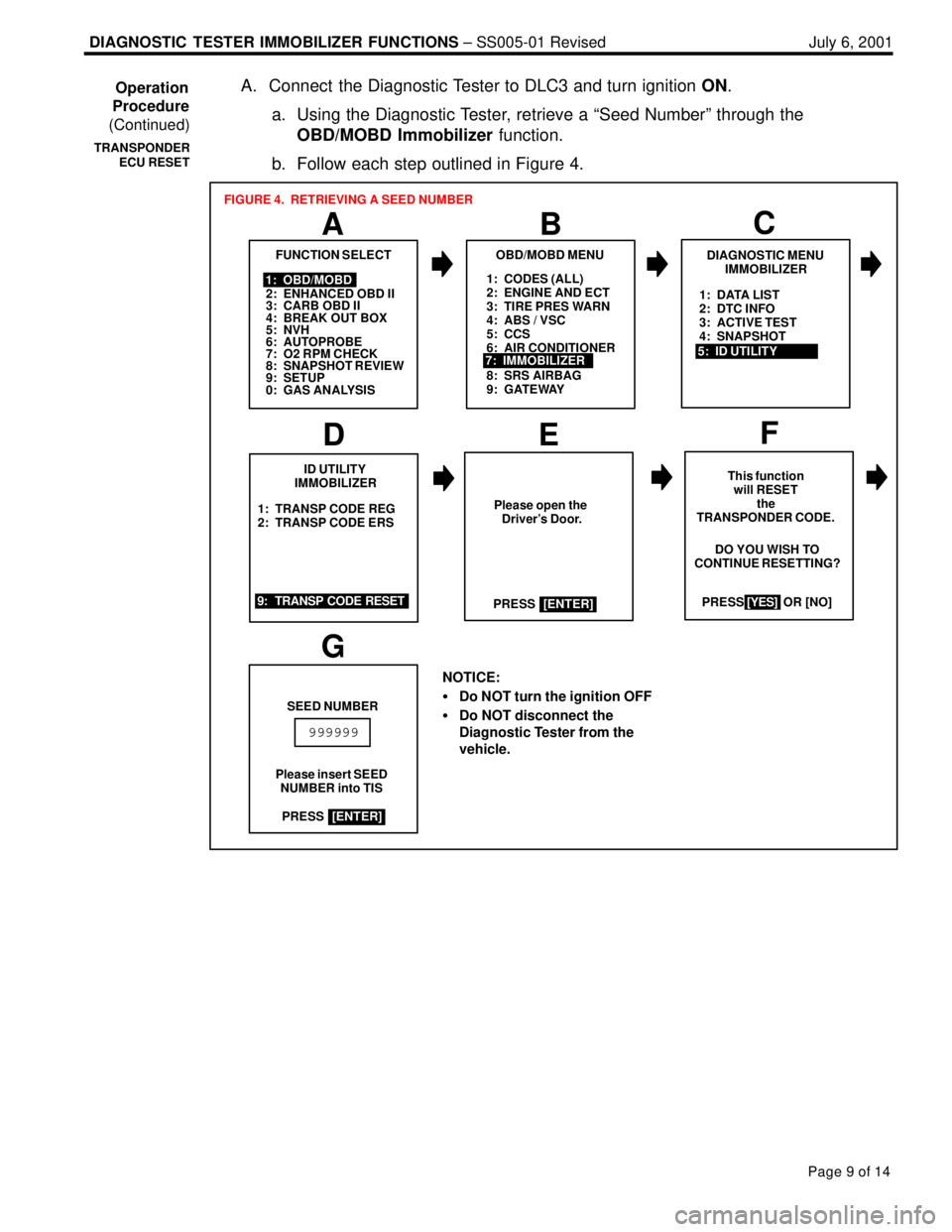
A. Connect the Diagnostic Tester to DLC3 and turn ignition ON.
a. Using the Diagnostic Tester, retrieve a ªSeed Numberº through the
OBD/MOBD Immobilizer function.
b. Follow each step outlined in Figure 4.
1: CODES (ALL)
2: ENGINE AND ECT
3: TIRE PRES WARN
4: ABS / VSC
5: CCS
6: AIR CONDITIONER
8: SRS AIRBAG
9: GATEWAY
A
FUNCTION SELECT
B
1: OBD/MOBD
2: ENHANCED OBD II
3: CARB OBD II
4: BREAK OUT BOX
5: NVH
6: AUTOPROBE
7: O2 RPM CHECK
8: SNAPSHOT REVIEW
9: SETUP
0: GAS ANALYSIS
OBD/MOBD MENU
7: IMMOBILIZER
FIGURE 4. RETRIEVING A SEED NUMBER
1: TRANSP CODE REG
2: TRANSP CODE ERS
D
ID UTILITY
IMMOBILIZER
EF
This function
will RESET
the
TRANSPONDER CODE.
PRESS [YES] OR [NO]
9: TRANSP CODE RESETDO YOU WISH TO
CONTINUE RESETTING?
NOTICE:
Do NOT turn the ignition OFF
Do NOT disconnect the
Diagnostic Tester from the
vehicle.
[YES]
G
SEED NUMBER
Please insert SEED
NUMBER into TIS
999999
Please open the
Driver's Door.
PRESS
[ENTER]
PRESS
[ENTER]
C
DIAGNOSTIC MENU
IMMOBILIZER
5: ID UTILITY1: DATA LIST
2: DTC INFO
3: ACTIVE TEST
4: SNAPSHOT
Operation
Procedure
(Continued)
TRANSPONDER
ECU RESET
Page 943 of 969

DIAGNOSTIC TESTER IMMOBILIZER FUNCTIONS ± SS005-01 Revised July 6, 2001
Page 12 of 14
C. Using the numbered keys (0±9) on the Diagnostic Tester, enter the ªPasscode
Numberº received from TIS into the Diagnostic Tester (see Figure 9 below).
Press ENTER to clear all registered transponder codes except the Master key in
the ignition cylinder.
NOTE:
During the reset process do not remove the key from the ignition.
This step takes approximately 16 minutes.
ABC
RESETTING SUCCEEDEDPlease insert PASSCODE
NUMBER from TIS
PASSCODE NUMBER**NOW RESETTING**
Remaining Time
<16> Min.
000414
FIGURE 9. PASSCODE ENTRY
All TRANSPONDER
CODES were successfully
reset.
If a key remains in the IG
cylinder, please remove it. If the key was in the IG
cylinder, do not remove it.
PRESS
[ENTER]
PRESS[ENTER]
Master Keys and Sub key
may be registered by
inserting keys into IG.
*INSERT KEYS NOW*
To turn off auto±
matic registration,
insert a Master key
and cycle IG 5 times
within 10 seconds.
[HINT] On automatic
registration mode,
the security indicator
remains on unless a
key is in the IG
cylinder.
PRESS[ENTER]
PRESS[ENTER]
DE
Following a reset, the Transponder ECU is in auto registration mode.
Auto registration mode allows 3 Master Keys and one Sub Key to register
automatically.
To register additional keys, remove the Master Key currently in the ignition.
Insert keys (Master or Sub) into the ignition cylinder without turning the
ignition on or off ± simply insert and remove. (See Figure 9, screen D.)
NOTE:
If 4 keys are registered at this time, auto registration mode is automatically closed.
If less than 4 keys are registered at this time, auto registration mode must be closed
manually by cycling the ignition ON/OFF more than 5 times in 10 seconds. (See
Figure 9, screen E.)
If more than 4 keys need to be registered, use Transponder Code Registration. Operation
Procedure
(Continued)
TRANSPONDER
ECU RESET