starting engine Lexus ES300h 2013 2013-2015 ES350/300h TVIP V4 Remote Engine Starter (RES) Owners / Owner's Manual (OM33A01U)
[x] Cancel search | Manufacturer: LEXUS, Model Year: 2013, Model line: ES300h, Model: Lexus ES300h 2013Pages: 908, PDF Size: 11.09 MB
Page 18 of 908
18Pictorial index
ES350 300h_OM_OM33A01U_(U)
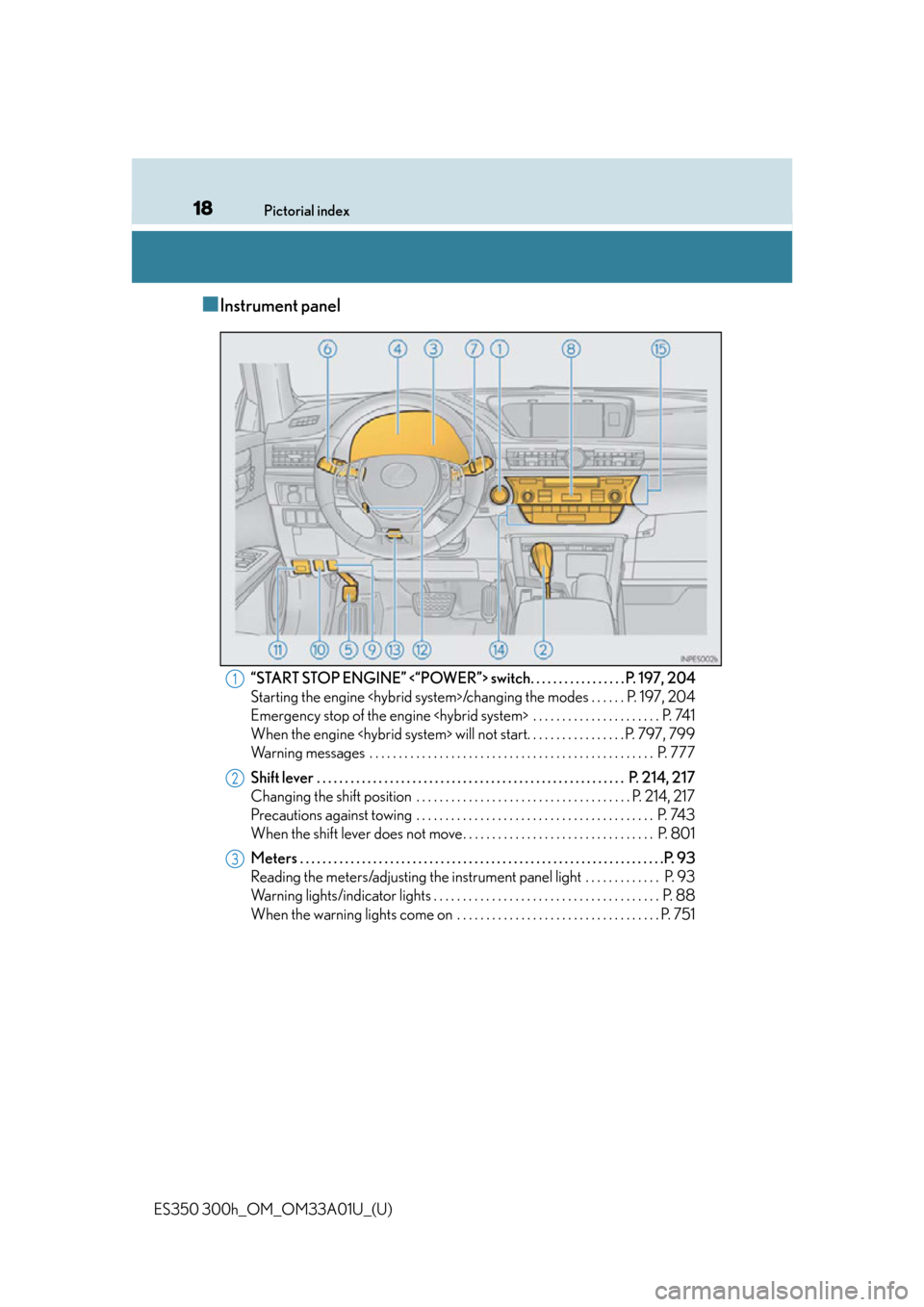
■Instrument panel
“START STOP ENGINE” <“POWER”> switch. . . . . . . . . . . . . . . . . P. 197, 204
Starting the engine
Emergency stop of the engine
When the engine
Warning messages . . . . . . . . . . . . . . . . . . . . . . . . . . . . . . . . . . . . . . . . . . . . . . . . . P. 777
Shift lever . . . . . . . . . . . . . . . . . . . . . . . . . . . . . . . . . . . . . . . . . . . . . . . . . . . . . . . P. 21 4, 217
Changing the shift position . . . . . . . . . . . . . . . . . . . . . . . . . . . . . . . . . . . . . P. 214, 217
Precautions against towing . . . . . . . . . . . . . . . . . . . . . . . . . . . . . . . . . . . . . . . . . P. 743
When the shift lever does not move . . . . . . . . . . . . . . . . . . . . . . . . . . . . . . . . . P. 801
Meters . . . . . . . . . . . . . . . . . . . . . . . . . . . . . . . . . . . . . . . . . . . . . . . . . . . . . . . . . . . . . . . . .P. 93
Reading the meters/adjusting the instrument panel light . . . . . . . . . . . . . P. 93
Warning lights/indicator lights . . . . . . . . . . . . . . . . . . . . . . . . . . . . . . . . . . . . . . . P. 88
When the warning lights come on . . . . . . . . . . . . . . . . . . . . . . . . . . . . . . . . . . . P. 7511
2
3
Page 80 of 908
801-3. Theft deterrent system
ES350 300h_OM_OM33A01U_(U)
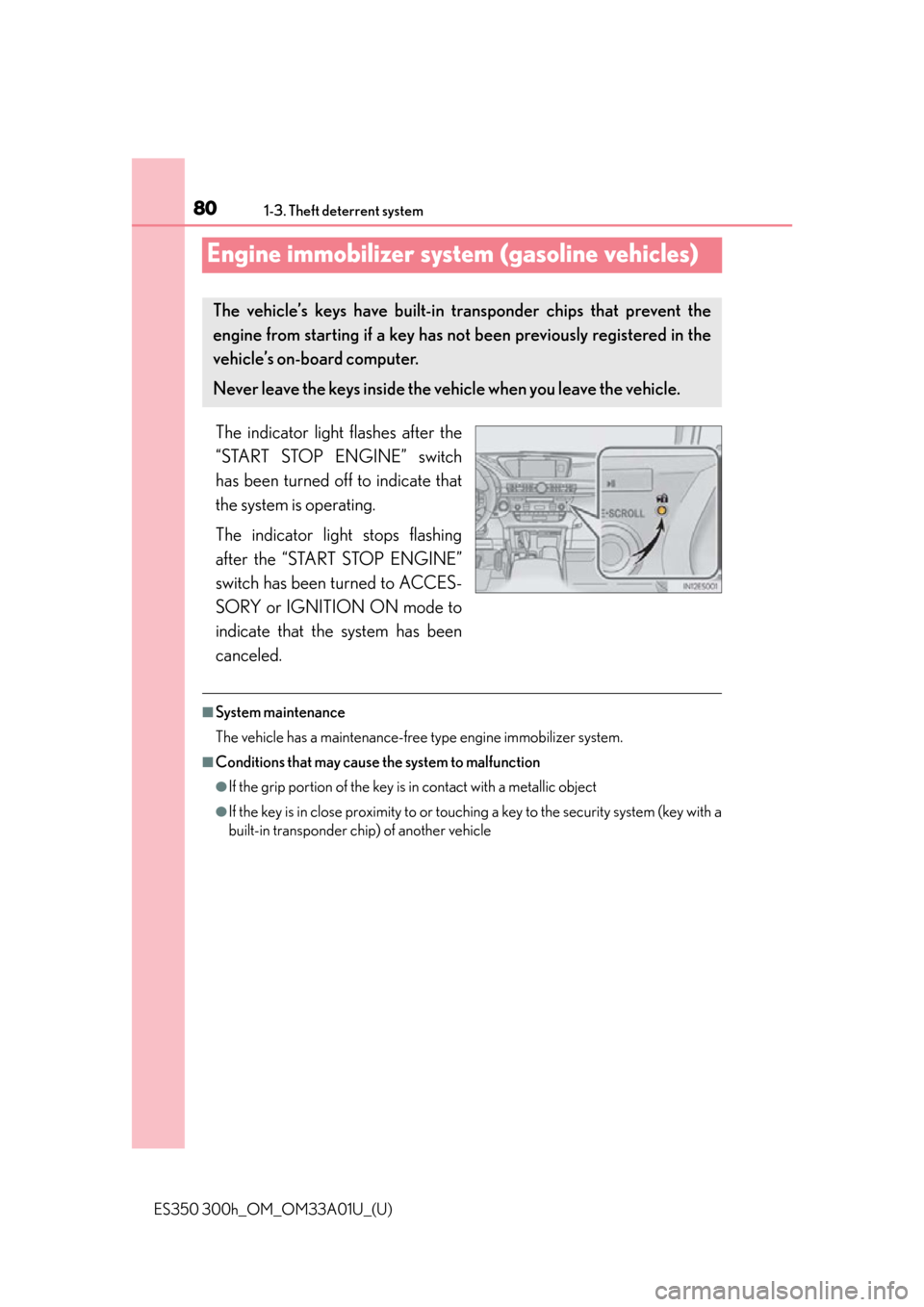
Engine immobilizer system (gasoline vehicles)
The indicator light flashes after the
“START STOP ENGINE” switch
has been turned off to indicate that
the system is operating.
The indicator light stops flashing
after the “START STOP ENGINE”
switch has been turned to ACCES-
SORY or IGNITION ON mode to
indicate that the system has been
canceled.
■System maintenance
The vehicle has a maintenance-free type engine immobilizer system.
■Conditions that may cause the system to malfunction
●If the grip portion of the key is in contact with a metallic object
●If the key is in close proximity to or touching a key to the security system (key with a
built-in transponder chip) of another vehicle
The vehicle’s keys have built-in tr ansponder chips that prevent the
engine from starting if a key has not been previously registered in the
vehicle’s on-board computer.
Never leave the keys inside the vehicle when you leave the vehicle.
Page 126 of 908
126
ES350 300h_OM_OM33A01U_(U)
3-2. Opening, closing and locking the doors and trunk
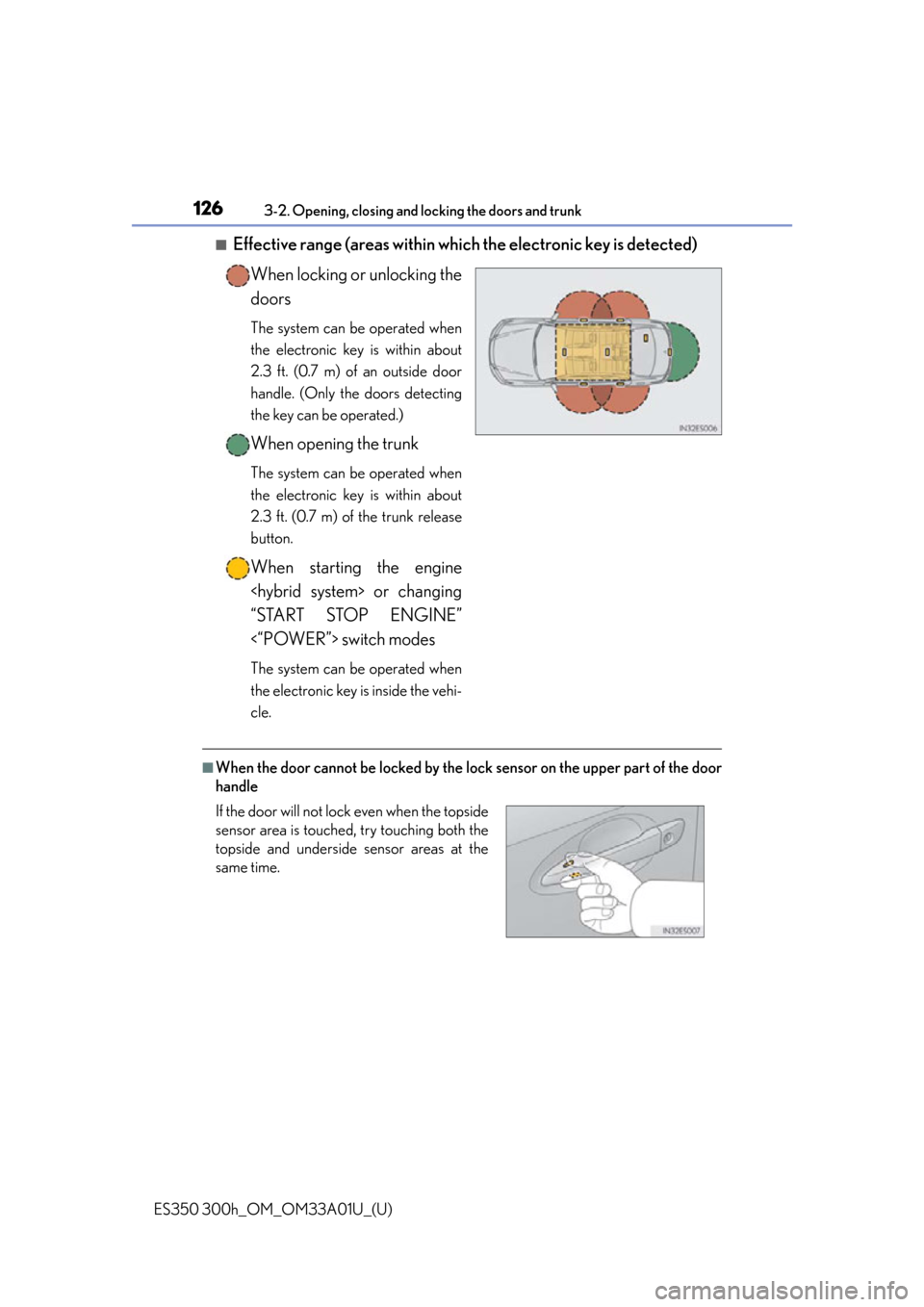
■Effective range (areas within which the electronic key is detected)
When locking or unlocking the
doors
The system can be operated when
the electronic key is within about
2.3 ft. (0.7 m) of an outside door
handle. (Only the doors detecting
the key can be operated.)
When opening the trunk
The system can be operated when
the electronic key is within about
2.3 ft. (0.7 m) of the trunk release
button.
When starting the engine
“START STOP ENGINE”
<“POWER”> switch modes
The system can be operated when
the electronic key is inside the vehi-
cle.
■When the door cannot be locked by the lock sensor on the upper part of the door
handle
If the door will not lock even when the topside
sensor area is touched, try touching both the
topside and underside sensor areas at the
same time.
Page 133 of 908

ES350 300h_OM_OM33A01U_(U)
1333-2. Opening, closing and locking the doors and trunk
3
Operation of each component
■When the vehicle is not driven for extended periods
●To prevent theft of the vehicle, do not leave the electronic key within 6 ft. (2 m) of
the vehicle.
●The smart access system with push-button start can be deactivated in advance.
( P. 8 5 2 )
■Alarm
Using the smart access system with push-but ton start to lock the doors will set the
alarm system. ( P. 8 4 )
■To operate the system properly
●Make sure to carry the electronic key wh en operating the system. Do not get the
electronic key too close to the vehicle wh en operating the system from the outside
of the vehicle.
Depending on the position and holding co ndition of the electronic key, the key
may not be detected correctly and the system may not operate properly. (The
alarm may go off accidentally, or the door lock prevention function may not oper-
ate.)
●Do not leave the electronic key inside the luggage compartment.
The key confinement prevention function may not operate, depending on the loca-
tion of the key (close to a spare tire, th e inside edge of the luggage compartment),
conditions (inside a metal bag, close to me tallic objects) and the radio waves in the
surrounding area. ( P. 1 4 6 )
■If the smart access system with push-button start does not operate properly
●Locking and unlocking the doors and opening the trunk: Use the mechanical key.
( P. 8 0 2 )
●Starting the engine
Page 134 of 908

134
ES350 300h_OM_OM33A01U_(U)
3-2. Opening, closing and locking the doors and trunk
■Electronic key battery depletion
●The standard battery life is 1 to 2 years.
●If the battery becomes low, an alarm will sound in the cabin when the engine
●As the electronic key always receives radio waves, the battery will become
depleted even if the electronic key is not used. The following symptoms indicate
that the electronic key battery may be depleted. Replace the battery when neces-
sary. ( P. 7 1 0 )
• The smart access system with push-button start or the wireless remote control does not operate.
• The detection area becomes smaller.
• The LED indicator on the key surface does not turn on.
●To avoid serious deterioration, do not leave the electronic key within 3 ft. (1 m) of
the following electrical appliances that produce a magnetic field:
•TVs
•Personal computers
• Cellular phones, cordless phones and battery chargers
• Recharging cellular phones or cordless phones
•Table lamps
• Induction cookers
■When the electronic key battery is fully depleted
P. 7 1 0
■Customization
Settings (e. g. smart access system with push-button start) can be changed.
(Customizable features: P. 8 5 2 )
■If the smart access system with push-but ton start has been deactivated in a cus-
tomized setting
●Locking and unlocking the doors and opening the trunk:
Use the wireless remote control or mechanical key. ( P. 1 3 6 , 8 0 2 )
●Starting the engine and changing “S TART STOP ENGINE” <“POWER”> switch
modes: P. 8 0 3
●Stopping the engine
Page 180 of 908
180
ES350 300h_OM_OM33A01U_(U)
4-1. Before driving
Driving the vehicle
P. 197, 204
With the brake pedal depressed, shift the shift lever to D.
( P. 214, 217)
Release the parking brake. ( P. 222)
Gradually release the brake pedal an d gently depress the accelerator
pedal to accelerate the vehicle.
With the shift lever in D, depress the brake pedal.
If necessary, set the parking brake.
Gasoline vehicles: If the vehicle is to be stopped for an extended period of time,
shift the shift lever to P or N. ( P. 2 1 4 )
Hybrid vehicles: If the vehicle is to be stopped for an extended period of time, shift
the shift lever to P. ( P. 2 1 7 )
The following procedures should be observed to ensure safe driving:
Starting the engine
Driving
Stopping
1
2
3
1
2
Page 181 of 908

ES350 300h_OM_OM33A01U_(U)
1814-1. Before driving
4
Driving
With the shift lever in D, depress the brake pedal.
Shift the shift lever to P. (P. 214, 217)
Set the parking brake. ( P. 222)
Press the “START STOP ENGINE” <“POWER”> switch to stop the
engine
Lock the door, making sure that y ou have the electronic key on your
person.
If parking on a hill, block the wheels as needed.
Make sure that the parking brake is set and shift the shift lever to D.
Gently depress the accelerator pedal.
Release the parking brake.
■When starting off on a uphill (hybrid vehicles)
The hill-start assist control is available. ( P. 3 0 4 )
■Driving in the rain
●Drive carefully when it is raining, because visibility will be reduced, the windows
may become fogged-up, and the road will be slippery.
●Drive carefully when it starts to rain, because the road surface will be especially
slippery.
●Refrain from high speeds when driving on an expressway in the rain, because there
may be a layer of water between the tires and the road surface, preventing the
steering and brakes from operating properly.
■Engine speed while driving
In the following conditions, the engine speed may become high while driving. This is
due to automatic up-shifting control or do wn-shifting implementation to meet driv-
ing conditions. It does not indicate sudden acceleration.
●The vehicle is judged to be driving uphill or downhill
●When the accelerator pedal is released
●When sport mode is selected ( P. 2 9 6 )
Pa r k i n g t h e ve h i c l e
Starting off on a steep uphill
1
2
3
4
5
1
2
3
Page 183 of 908

ES350 300h_OM_OM33A01U_(U)
1834-1. Before driving
4
Driving
■Eco-friendly driving
Gasoline vehicles: P. 1 0 5
Hybrid vehicles: P. 9 6
■Customization (gasoline vehicles)
Setting of Eco Driving Indi cator Light can be changed.
(Customizable features P. 8 5 2 )
CAUTION
Observe the following precautions.
Failure to do so may result in death or serious injury.
■When starting the vehicle
Always keep your foot on the brake pedal while stopped with the engine running
■When driving the vehicle
●Do not drive if you are unfamiliar with the location of the brake and accelerator
pedals to avoid depressing the wrong pedal.
• Accidentally depressing the accelerator pedal instead of the brake pedal will
result in sudden acceleration that may lead to an accident.
• When backing up, you may twist your body around, leading to a difficulty in operating the pedals. Make sure to operate the pedals properly.
• Make sure to keep a correct driving posture even when moving the vehicle only slightly. This allows you to depres s the brake and accelerator pedals prop-
erly.
• Depress the brake pedal using your right foot. Depressing the brake pedal using your left foot may delay response in an emergency, resulting in an acci-
dent.
●Hybrid vehicles only: When the hybrid vehicles are driven using the electric
motor only, no engine noise is made. As such, pedestrians, people riding bicycles
or other people and vehicles in the su rrounding area may not realize that the
vehicle is approaching. Even with the vehicle proximity notification system active,
people may not realize the vehicle is approaching when the surrounding area is
noisy and so forth. Therefore, take extra care while driving.
●Do not drive the vehicle over or stop the vehicle near flammable materials.
The exhaust system and exhaust gases can be extremely hot. These hot parts may
cause a fire if there is any flammable material nearby.
Page 197 of 908
197
ES350 300h_OM_OM33A01U_(U)
4-2. Driving procedures
4
Driving
Engine (ignition) switch (gasoline vehicles)
Check that the parking brake is set.
Check that the shift lever is set in P.
Firmly depress the brake pedal.
will be displayed on the multi-information display.
If it is not displayed, the engine cannot be started.
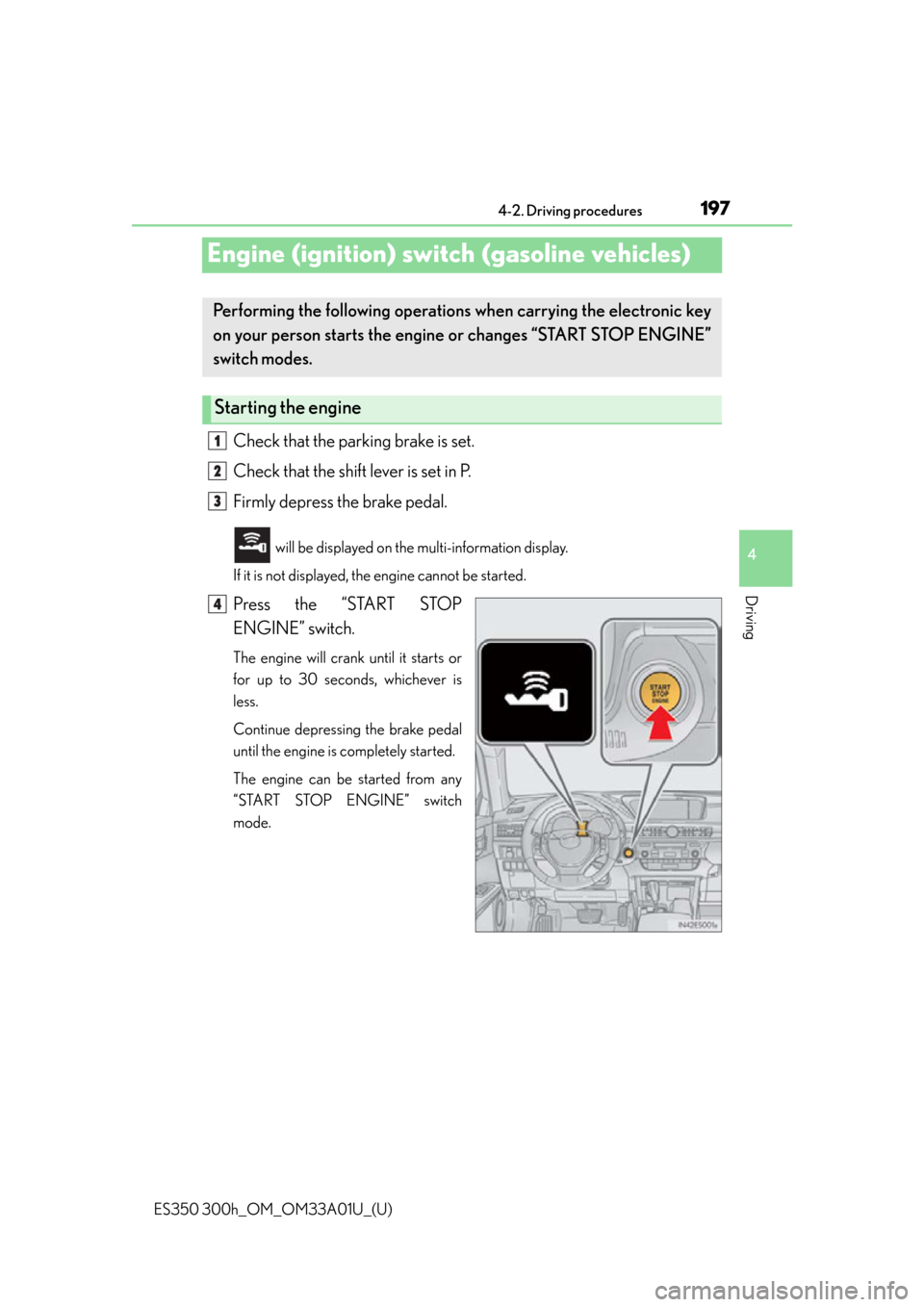
Press the “START STOP
ENGINE” switch.
The engine will crank until it starts or
for up to 30 seconds, whichever is
less.
Continue depressing the brake pedal
until the engine is completely started.
The engine can be started from any
“START STOP ENGINE” switch
mode.
Performing the following operations when carrying the electronic key
on your person starts the engine or changes “START STOP ENGINE”
switch modes.
Starting the engine
1
2
3
4
Page 201 of 908
ES350 300h_OM_OM33A01U_(U)
2014-2. Driving procedures
4
Driving
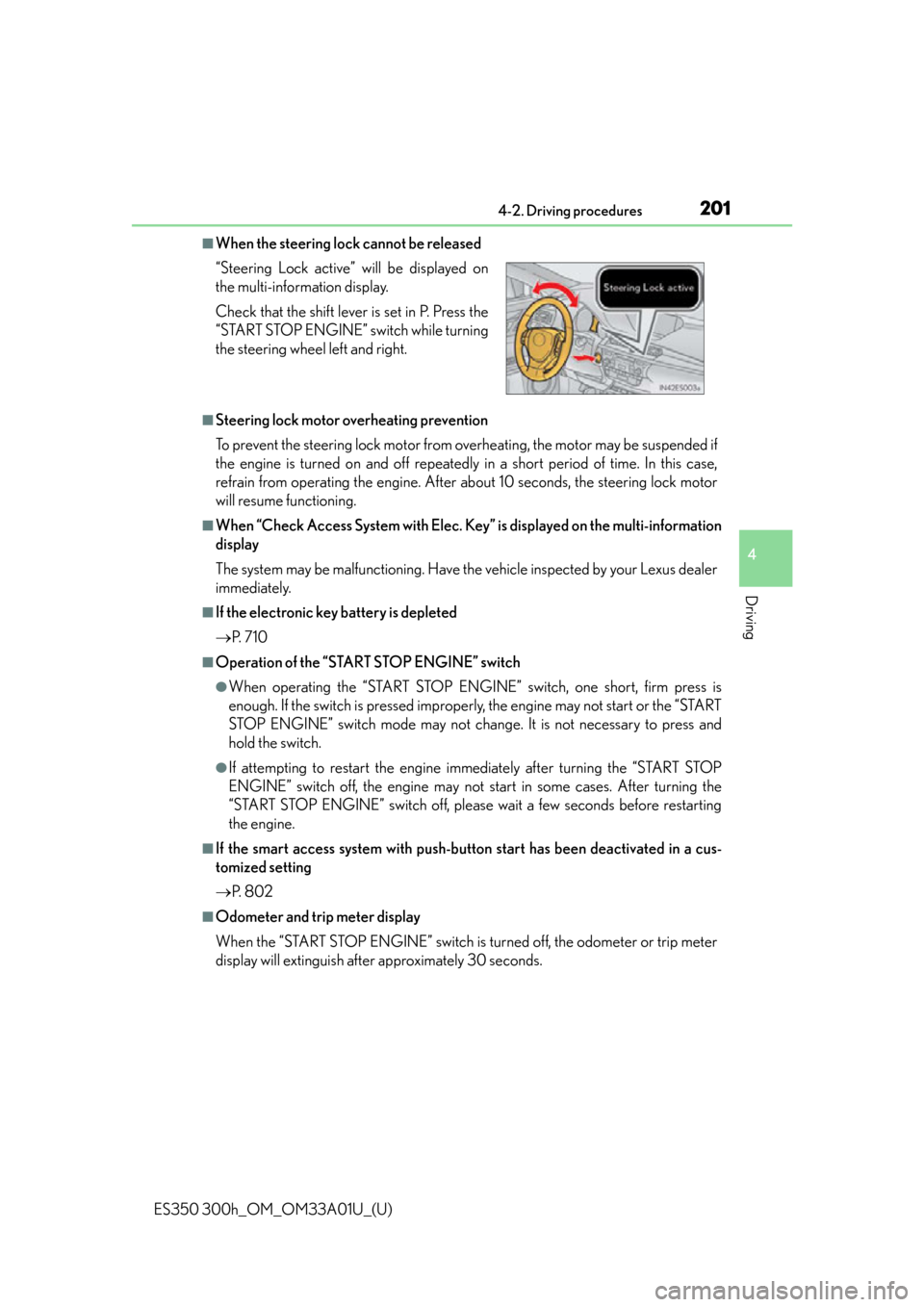
■When the steering lock cannot be released
■Steering lock motor overheating prevention
To prevent the steering lock motor from overheating, the motor may be suspended if
the engine is turned on and off repeatedly in a short period of time. In this case,
refrain from operating the engine. After about 10 seconds, the steering lock motor
will resume functioning.
■When “Check Access System with Elec. Key” is displayed on the multi-information
display
The system may be malfunctio ning. Have the vehicle inspected by your Lexus dealer
immediately.
■If the electronic key battery is depleted
P. 7 1 0
■Operation of the “START STOP ENGINE” switch
●When operating the “START STOP ENGINE” switch, one short, firm press is
enough. If the switch is pressed improper ly, the engine may not start or the “START
STOP ENGINE” switch mode may not chan ge. It is not necessary to press and
hold the switch.
●If attempting to restart the engine immediately after turning the “START STOP
ENGINE” switch off, the en gine may not start in some cases. After turning the
“START STOP ENGINE” switch off, please wait a few seconds before restarting
the engine.
■If the smart access system with push-but ton start has been deactivated in a cus-
tomized setting
P. 8 0 2
■Odometer and trip meter display
When the “START STOP ENGINE” switch is turned off, the odometer or trip meter
display will extinguish afte r approximately 30 seconds.
“Steering Lock active” will be displayed on
the multi-information display.
Check that the shift lever is set in P. Press the
“START STOP ENGINE” switch while turning
the steering wheel left and right.