phone Lexus ES300h 2013 Owners Manual
[x] Cancel search | Manufacturer: LEXUS, Model Year: 2013, Model line: ES300h, Model: Lexus ES300h 2013Pages: 910, PDF Size: 9.95 MB
Page 596 of 910
595
ES350 300h_OM_OM33A01U_(U)
5-4. Using the audio system
5
Interior features
Using the phone book
To enter the menu for each function, follow the steps below using a voice
command or :
●Adding a new phone number
1. “Phonebook” → 2. “Add Entry”
●Changing the registered name in the phone book
1. “Phonebook” → 2. “Change Name”
●Listing the registered data
1. “Phonebook” → 2. “List Names”
●Setting speed dials
1. “Phonebook” → 2. “Set Speed Dial (Speed Dial)”
●Deleting the registered data
1. “Phonebook” → 2. “Delete Entry”
●Deleting speed dials
1. “Phonebook” → 2. “Delete Speed Dial (Del Spd Dial)”
The following methods can be used to add a new phone number:
●Inputting a phone number using a voice command
●Transferring data from the cellular phone
●Inputting a phone number using
●Selecting a phone number from the outgoing or incoming call history
Phonebook items and operation procedures
Adding a new phone number
Page 597 of 910
596
ES350 300h_OM_OM33A01U_(U)
5-4. Using the audio system
■Adding procedureSelect “Add Entry” using a voice command or .
Use one of the following methods to input a telephone number:
Inputting a telephone number using a voice command:
STEP2-1 Select “By Voice” using a voice command or .
STEP2-2 Press the talk switch, say the desired number, and select “Confirm” using a voice command.
Transferring data from the cellular phone:
STEP2-1 Select “By Phone” and then “Confirm” using a voice com-
mand or .
STEP2-2 Transfer the data from the cellular phone.
Refer to the manual that comes with the cellular phone for details
on transferring data.
STEP2-3 Select the data to be registered by either of the following methods:
a. Say “Previous” or “Next” until the desired data is dis-played, and select “Confirm” using a voice command.
b. Select the desired data using .
1
2
Page 598 of 910
ES350 300h_OM_OM33A01U_(U)
5975-4. Using the audio system
5
Interior features
Inputting a phone number using :STEP2-1 Select “Manual Input” using .
STEP2-2 Input a phone number using , and press again.
Input the phone number 1 digit at a time.
Selecting a phone number from the outgoing or incoming call history:
STEP2-1 Select “Call History” using a voice command or .
STEP2-2 Select “Outgoing” or “Incoming” using a voice command or .
STEP2-3 Select the data to be registered by either of the following methods:
a. Say “Previous” or “Go back” until the desired data isdisplayed, and select “Confirm” using a voice com-
mand.
b. Select the desired data using .
Page 599 of 910
598
ES350 300h_OM_OM33A01U_(U)
5-4. Using the audio system
Select the name to be registered by either of the following methods,
and select “Confirm” using a voice command or :
a. Press the talk switch and say the desired name.
b. Select “Record Name” using and say the desired name.
Select “Confirm” using a voice command or .
In , selecting “Set Speed Dial (Speed Dial)” instead of “Confirm” registers
the newly added phone number as a speed dial.
3
4
4
Page 600 of 910
ES350 300h_OM_OM33A01U_(U)
5995-4. Using the audio system
5
Interior features
Select “Change Name” using a voice command or .
XPattern A
Select the name to be changed by either of the following methods, and
select “Confirm” using a voice command or :
a. Press the talk switch and say the desired name.
b. Press the talk switch and say “List Names”. When the desired nameis read aloud, press the talk switch.
XPattern B
Select the desired name to be changed using .
Press the talk switch or select “Record Name” using and say
the new name.
Select “Confirm” using a voice command or .
Changing the registered name in the phone book
1
2
2
3
4
Page 601 of 910
600
ES350 300h_OM_OM33A01U_(U)
5-4. Using the audio system
Select “List Names” using a voice command or . The list of the
registered data will be read aloud.
When listing is complete, the system returns to the “Phonebook”.
Pressing the talk switch while the desired data is being read aloud selects
the data, and the following function will become available:
●Dialing: “Dial”
●Changing a registered name: “Change Name”
●Deleting an entry: “Delete Entry”
●Setting a speed dial: “Set Speed Dial (Speed Dial)”
Select “Set Speed Dial (Speed Dial)” using a voice command or.
XPattern A
Select the data to be registered as a speed dial by either of the follow-
ing methods and select “Confirm” using a voice command or :
a. Press the talk switch and say the desired name.
b. Press the talk switch and say “List Names”. When the desired nameis read aloud, press the talk switch.
XPattern B
Select the desired data using .
Listing the registered data
Setting speed dials
1
2
2
Page 602 of 910
ES350 300h_OM_OM33A01U_(U)
6015-4. Using the audio system
5
Interior features
Select the desired preset button and register the data into speed dial by
either of the following methods:
a. Press the desired preset button and select “Confirm” by using a voicecommand or .
b. Press and hold the desired preset button.
Select “Delete Entry” using a voice command or .
XPattern A
Select the data to be deleted by either of the following methods and
select “Confirm” using a voice command or :
a. Press the talk switch and say the name of the desired phone number.
b. Press the talk switch and say “List Names”. When the name of the desired phone number is read aloud, press the talk switch.
XPattern B
Select the desired data to be deleted using .
Deleting the registered data
3
1
2
2
Page 603 of 910
602
ES350 300h_OM_OM33A01U_(U)
5-4. Using the audio system
Select “Delete Speed Dial (Del Spd Dial)” using a voice command or.
Press the preset button to which the desired speed dial is registered
and select “Confirm” using a voice command or .
■Limitation of number of digits
A phone number that exceeds 24 digits cannot be registered.
Deleting speed dials
1
2
Page 642 of 910
641
ES350 300h_OM_OM33A01U_(U)
5-7. Other interior features
5
Interior features
Safety Connect∗
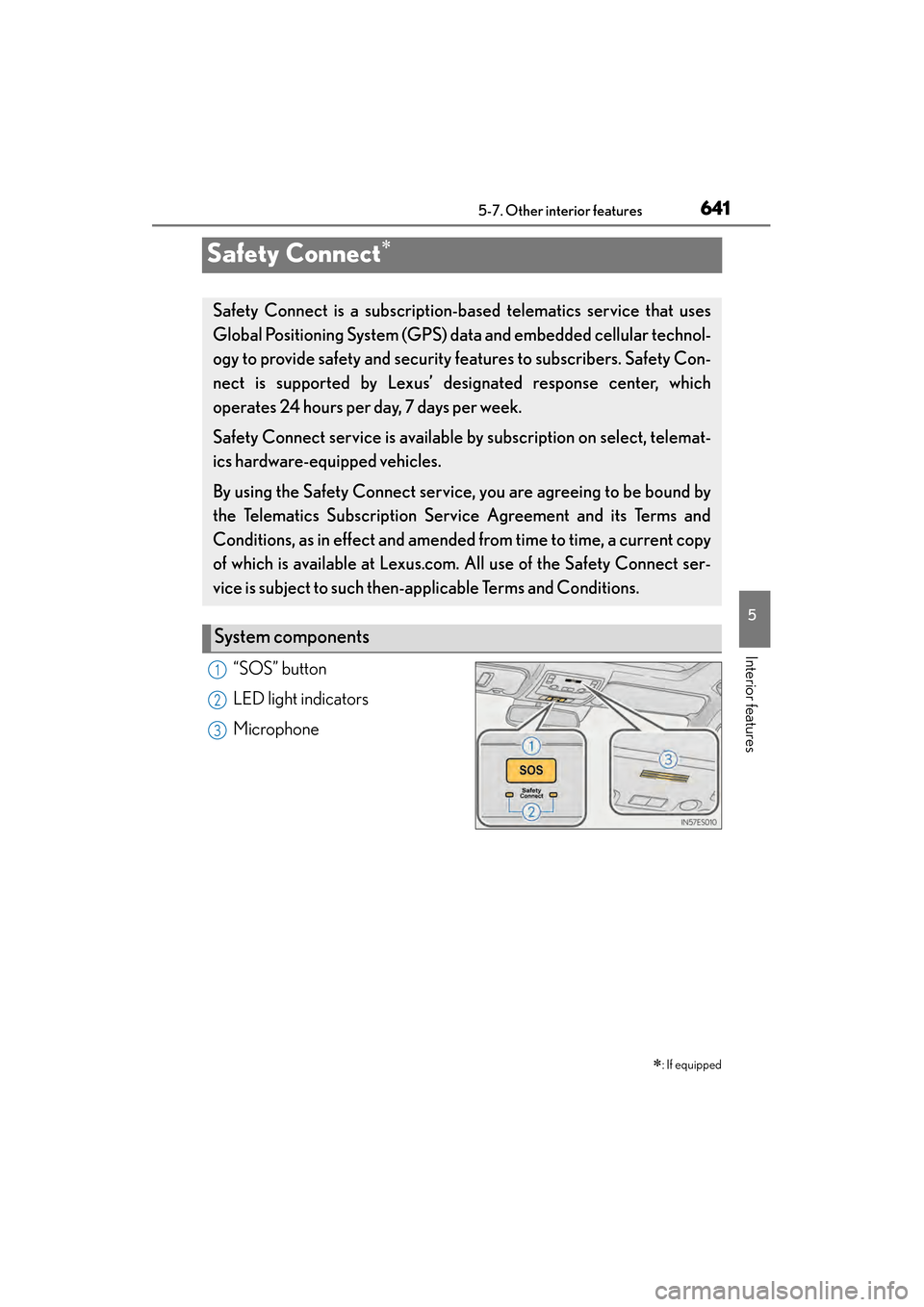
“SOS” button
LED light indicators
Microphone∗
: If equipped
Safety Connect is a subscription-based telematics service that uses
Global Positioning System (GPS) data and embedded cellular technol-
ogy to provide safety and security features to subscribers. Safety Con-
nect is supported by Lexus’ de signated response center, which
operates 24 hours per day, 7 days per week.
Safety Connect service is available by subscription on select, telemat-
ics hardware-equipped vehicles.
By using the Safety Connect service, you are agreeing to be bound by
the Telematics Subscription Ser vice Agreement and its Terms and
Conditions, as in effect and amended from time to time, a current copy
of which is available at Lexus.com. All use of the Safety Connect ser-
vice is subject to such then-app licable Terms and Conditions.
System components
1
2
3
Page 644 of 910
ES350 300h_OM_OM33A01U_(U)
6435-7. Other interior features
5
Interior features
■Safety Connect Services Information
●Phone calls using the vehicles Bluetooth® technology will not be possible during
Safety Connect.
●Safety Connect is available beginning Fall 2009 on select Lexus models. Contact
with the Safety Connect response center is dependent upon the telematics device
being in operative condition, cellular connection availability, and GPS satellite sig-
nal reception, which can limit the ability to reach the response center or receive
emergency service support. Enrollment and Telematics Subscription Service
Agreement required. A variety of subscription terms is available; charges vary by
subscription term selected.
●Automatic Collision Notification, Emergency Assistance and Stolen Vehicle Loca-
tion will function in the United States, including Hawaii and Alaska, and in Canada,
and Enhanced Roadside Assistance will function in the United States (except
Hawaii) and in Canada. No Safety Connect services will function outside of the
United States in countries other than Canada.
●Safety Connect services are not subject to section 255 of the Telecommunications
Act and the device is not TTY compatible.
■Languages
The Safety Connect response center will offer support in multiple languages. The
Safety Connect system will offer voice prompts in English and Spanish. Please indi-
cate your language of choice when enrolling.
■When contacting the response center
You may be unable to contact the response center if the network is busy.