phone Lexus ES300h 2013 User Guide
[x] Cancel search | Manufacturer: LEXUS, Model Year: 2013, Model line: ES300h, Model: Lexus ES300h 2013Pages: 910, PDF Size: 9.95 MB
Page 344 of 910
ES350 300h_OM_OM33A01U_(U)
3435-1. Lexus Display Audio system
5
Interior features
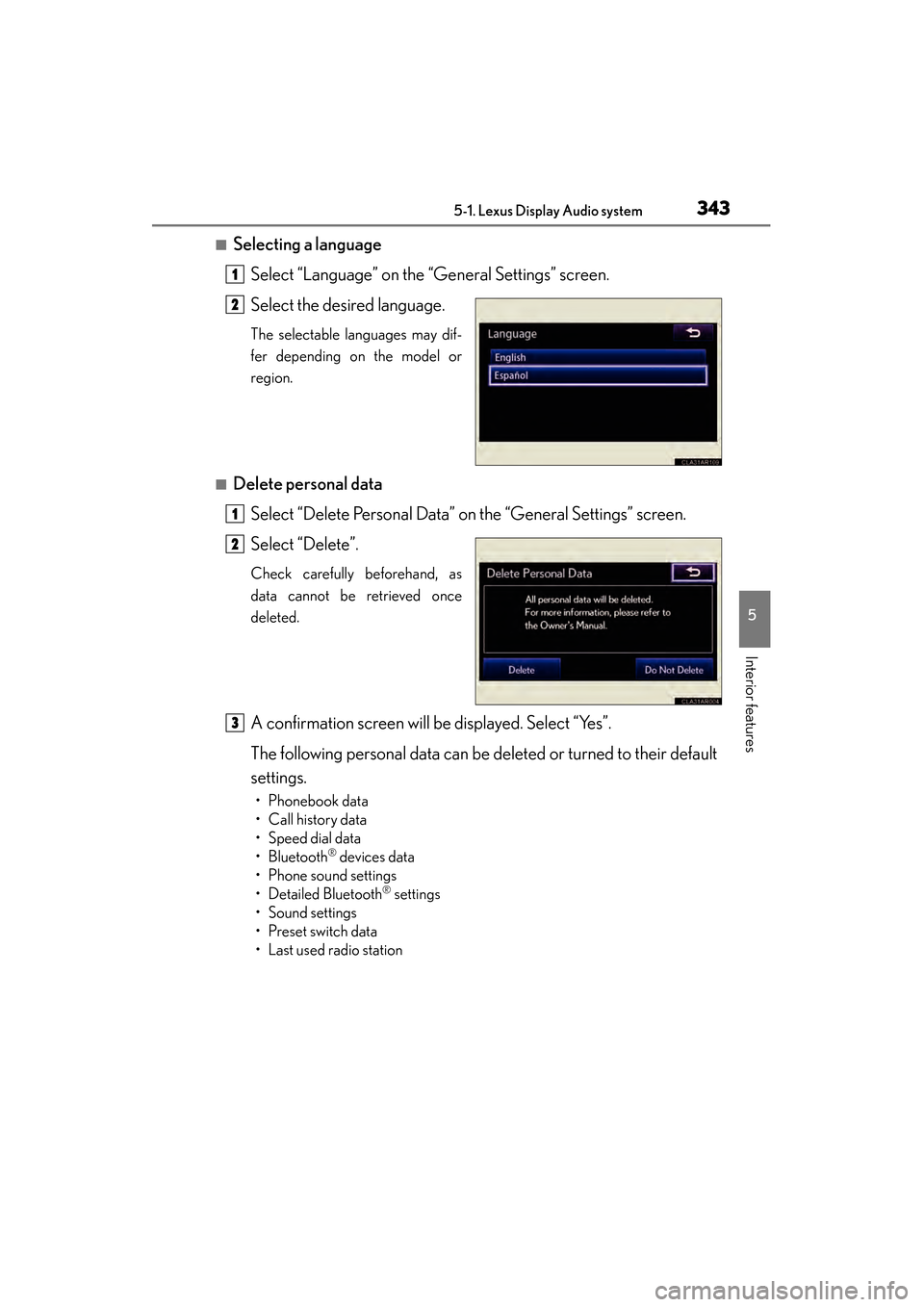
■Selecting a languageSelect “Language” on the “General Settings” screen.
Select the desired language.
The selectable languages may dif-
fer depending on the model or
region.
■Delete personal dataSelect “Delete Personal Data” on the “General Settings” screen.
Select “Delete”.
Check carefully beforehand, as
data cannot be retrieved once
deleted.
A confirmation screen will be displayed. Select “Yes”.
The following personal data can be deleted or turned to their default
settings.
• Phonebook data
•Call history data
• Speed dial data
•Bluetooth
® devices data
• Phone sound settings
• Detailed Bluetooth
® settings
•Sound settings
• Preset switch data
• Last used radio station
1
2
1
2
3
Page 378 of 910
ES350 300h_OM_OM33A01U_(U)
3775-3. Using the Lexus Display Audio system
5
Interior features
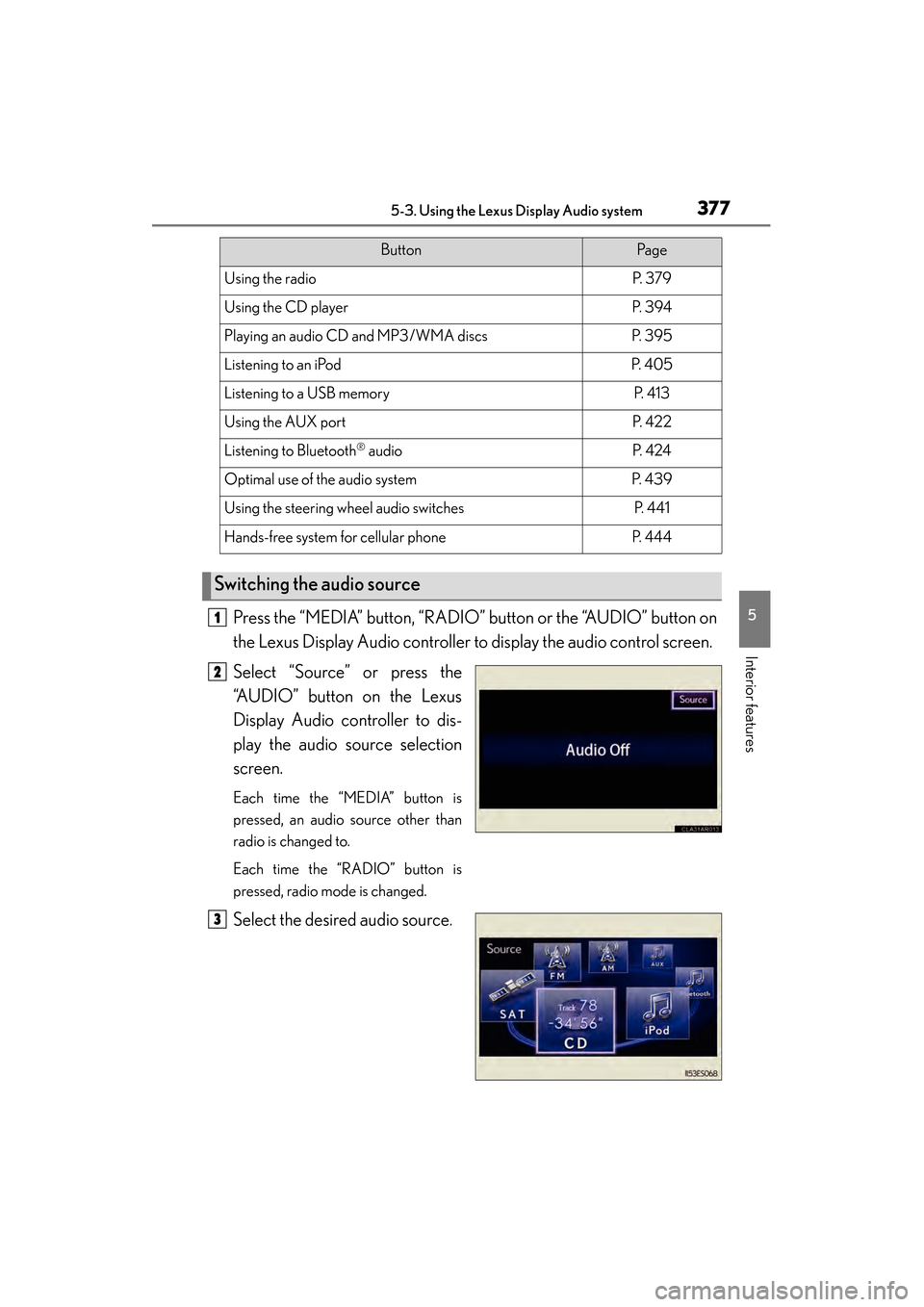
Press the “MEDIA” button, “RADIO” button or the “AUDIO” button on
the Lexus Display Audio controller to display the audio control screen.
Select “Source” or press the
“AUDIO” button on the Lexus
Display Audio controller to dis-
play the audio source selection
screen.
Each time the “MEDIA” button is
pressed, an audio source other than
radio is changed to.
Each time the “RADIO” button is
pressed, radio mode is changed.
Select the desired audio source.
ButtonPa g e
Using the radioP. 3 7 9
Using the CD playerP. 3 9 4
Playing an audio CD and MP3/WMA discsP. 3 9 5
Listening to an iPodP. 4 0 5
Listening to a USB memoryP. 4 1 3
Using the AUX portP. 4 2 2
Listening to Bluetooth® audioP. 4 2 4
Optimal use of the audio systemP. 4 3 9
Using the steering wheel audio switchesP. 4 4 1
Hands-free system for cellular phoneP. 4 4 4
Switching the audio source
1
2
3
Page 379 of 910
378
ES350 300h_OM_OM33A01U_(U)
5-3. Using the Lexus Display Audio system
■Using cellular phones
Interference may be heard through the audio system’s speakers if a cellular phone is
being used inside or close to the vehicle while the audio system is operating.
CAUTION
■Certification
●Part 15 of the FCC Rules
FCC Warning:
Any unauthorized changes or modifications to this equipment will void the user’s
authority to operate this device.
●Laser products
• USE OF CONTROL OR ADJUSTMENT OR PERFORMANCE OF PRO-CEDURES OTHER THAN THOSE SPECIFIED HEREIN MAY RESULT IN
HAZARDOUS RADIATION EXPOSURE.
• THE USE OF OPTICAL INSTRUMENTS WITH THIS PRODUCT WILL INCREASE EYE HAZARD.
NOTICE
■To prevent 12-volt battery discharge
Do not leave the audio system on longer than necessary when the engine
■To avoid damaging the audio system
Take care not to spill drinks or other fluids on the audio system.
Page 411 of 910
410
ES350 300h_OM_OM33A01U_(U)
5-3. Using the Lexus Display Audio system
■About iPod
●“Made for iPod” and “Made for iPhone” mean that an electronic accessory has
been designed to connect specifically to iPod, or iPhone, respectively, and has
been certified by the developer to meet Apple performance standards.
●Apple is not responsible for the operation of this device or its compliance with
safety and regulatory standards. Please note that the use of this accessory with
iPod or iPhone may affect wireless performance.
●iPhone, iPod, iPod classic, iPod nano and iPod touch are trademarks of Apple Inc.,
registered in the U.S. and other countries.
■iPod cover art
●Depending on the iPod and songs in the iPod, iPod cover art may be displayed.
●This function can be changed to “On” or “Off”. (→P. 3 4 5 )
●It may take time to display iPod cover art, and the iPod may not be operated while
the cover art display is in process.
●Only iPod cover art that is saved in a JPEG format can be displayed.
■iPod functions
●When the iPod connected to the system includes iPod video, the system can only
output the sound by selecting on the “iPod” screen.
●Depending on the iPod, the video sound may not be able to be heard.
●When an iPod is connected and the audio source is changed to iPod mode, the
iPod will resume play from the same point in which it was last used.
●Depending on the iPod that is connected to the system, certain functions may not
be available. If a function is unavailable due to a malfunction (as opposed to a sys-
tem specification), disconnecting the device and reconnecting it once again may
resolve the problem.
●While connected to the system, the iPod cannot be operated with its own controls.
It is necessary to use the controls of the vehicle’s audio system instead.
●When the battery level of an iPod is very low, the iPod may not operate. If so, charge
the iPod before use.
●Supported models ( →P. 4 1 1 )
Page 412 of 910
ES350 300h_OM_OM33A01U_(U)
4115-3. Using the Lexus Display Audio system
5
Interior features
■iPod problems
To resolve most problems encountered when using your iPod, disconnect your iPod
from the vehicle iPod connection and reset it. For instructions on how to reset your
iPod, refer to your iPod Owner’s Manual.
■Error messages
“Connection error. Please consult your Owner’s Manual for instructions on how to
connect the iPod.”:
This indicates a problem in the iPod or its connection.
“There are no songs available for playback. Please load compatible media to your
iPod.”:
This indicates that there is no music data in the iPod.
■Compatible models
The following iPod
®, iPod nano®, iPod classic®, iPod touch® and iPhone® devices
can be used with this system.
●Made for
• iPod touch (4th generation)
• iPod touch (3rd generation)
• iPod touch (2nd generation)
• iPod touch (1st generation)
•iPod classic
• iPod with video
• iPod nano (6th generation)
• iPod nano (5th generation)
• iPod nano (4th generation)
• iPod nano (3rd generation)
• iPod nano (2nd generation)
• iPod nano (1st generation)
•iPhone 4
•iPhone 3GS
•iPhone 3G
•iPhone
Depending on differences between models or software versions etc., some models
might be incompatible with this system.
Page 435 of 910
434
ES350 300h_OM_OM33A01U_(U)
5-3. Using the Lexus Display Audio system
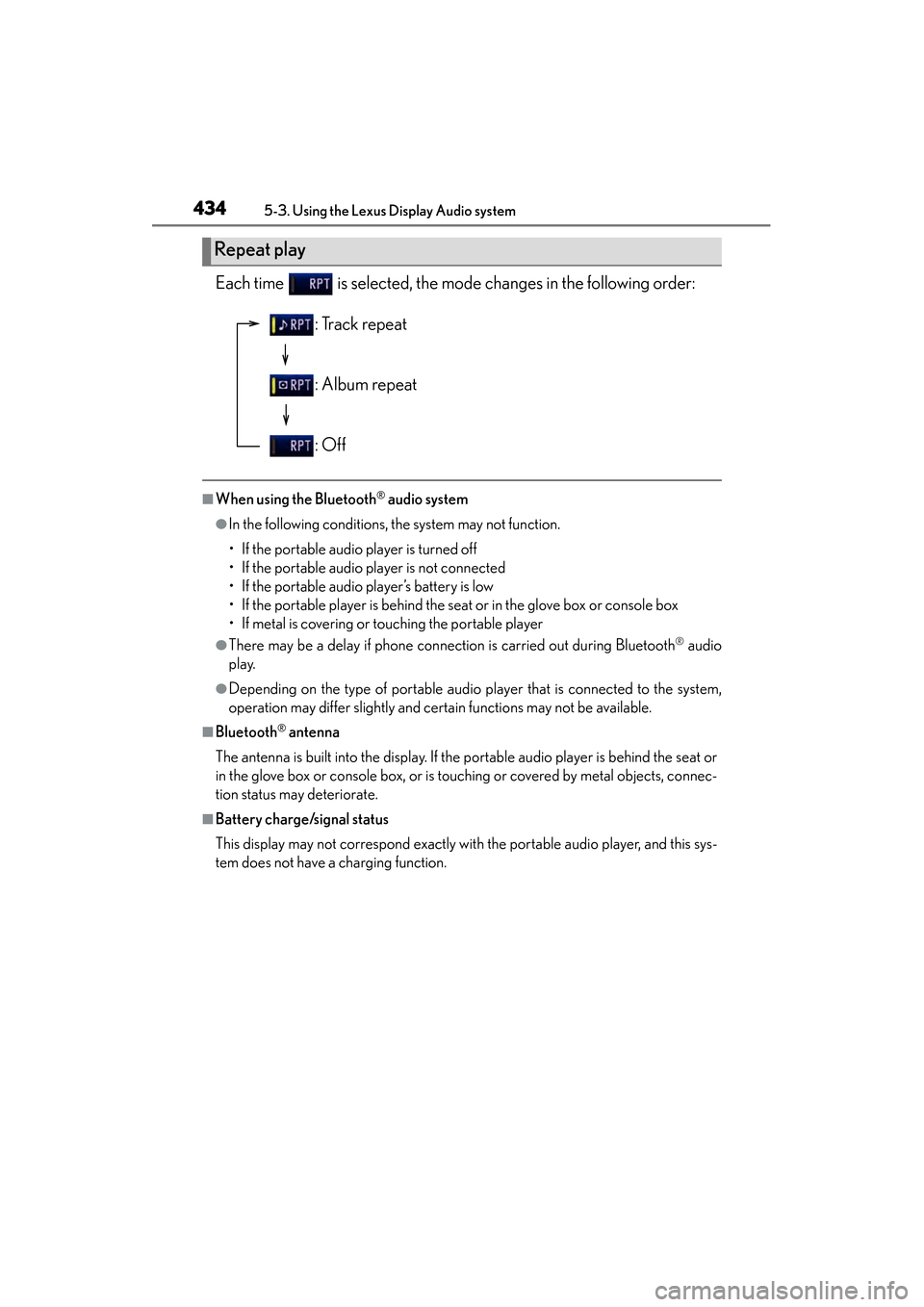
Each time is selected, the mode changes in the following order:
■When using the Bluetooth® audio system
●In the following conditions, the system may not function.
• If the portable audio player is turned off
• If the portable audio player is not connected
• If the portable audio player’s battery is low
• If the portable player is behind the seat or in the glove box or console box
• If metal is covering or touching the portable player
●There may be a delay if phone connection is carried out during Bluetooth® audio
play.
●Depending on the type of portable audio player that is connected to the system,
operation may differ slightly and certain functions may not be available.
■Bluetooth® antenna
The antenna is built into the display. If the portable audio player is behind the seat or
in the glove box or console box, or is touching or covered by metal objects, connec-
tion status may deteriorate.
■Battery charge/signal status
This display may not correspond exactly with the portable audio player, and this sys-
tem does not have a charging function.
Repeat play
: Track repeat
: Album repeat
: Off
Page 436 of 910
ES350 300h_OM_OM33A01U_(U)
4355-3. Using the Lexus Display Audio system
5
Interior features
■About Bluetooth®
■Compatible models
Portable audio players must correspond to the specifications.
●Bluetooth® specifications:
Ver. 1.1, or higher (Recommended: Ver. 2.1 + EDR or higher)
●Profiles:
• A2DP (Advanced Audio Distribution Profile) Ver. 1.0, or higher (Recommended: Ver. 1.2 or higher)
This is a profile to transmit stereo audio or high quality sounds to the headphone.
• AVRCP (Audio/Video Remote Control Profile) Ver. 1.0 or higher (Recommended: Ver. 1.4 or higher)
This is a profile to remote control the A/V equipment.
However, please note that some functions may be limited depending on the type of
portable audio player. The Bluetooth
® word mark and logos are
registered trademarks owned by Bluetooth
SIG, Inc. and any use of such marks by
PIONEER CORPORATION is under
license. Other trademarks and trade names
are those of their respective owners.
Page 445 of 910
444
ES350 300h_OM_OM33A01U_(U)
5-3. Using the Lexus Display Audio system
Hands-free system (for cellular phone)
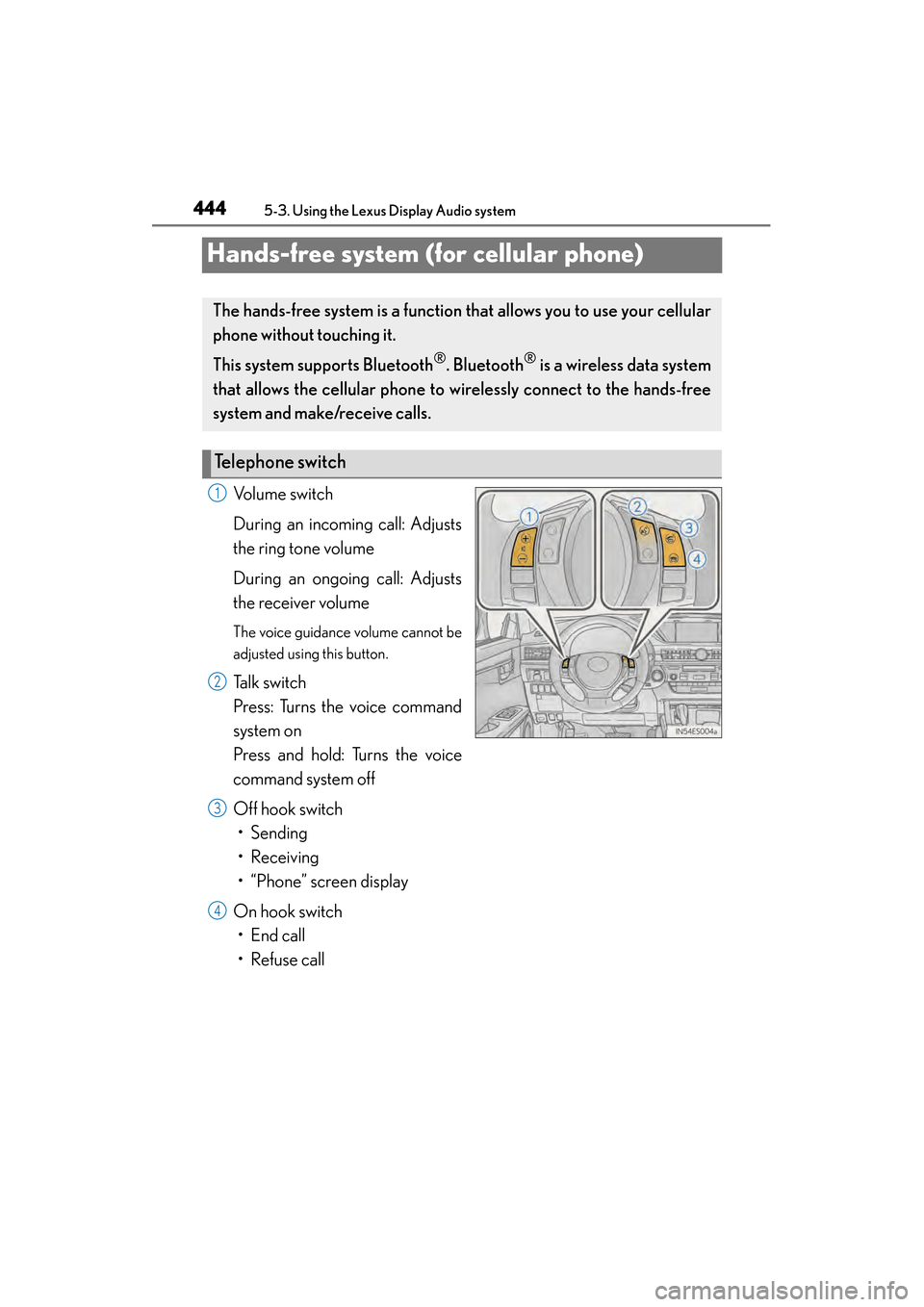
Volume switch
During an incoming call: Adjusts
the ring tone volume
During an ongoing call: Adjusts
the receiver volume
The voice guidance volume cannot be
adjusted using this button.
Talk switch
Press: Turns the voice command
system on
Press and hold: Turns the voice
command system off
Off hook switch• Sending
• Receiving
• “Phone” screen display
On hook switch • End call
• Refuse call
The hands-free system is a function th at allows you to use your cellular
phone without touching it.
This system supports Bluetooth
®. Bluetooth® is a wireless data system
that allows the cellular phone to wirelessly connect to the hands-free
system and make/receive calls.
Te l e p h o n e s w i t c h
1
2
3
4
Page 446 of 910
ES350 300h_OM_OM33A01U_(U)
4455-3. Using the Lexus Display Audio system
5
Interior features
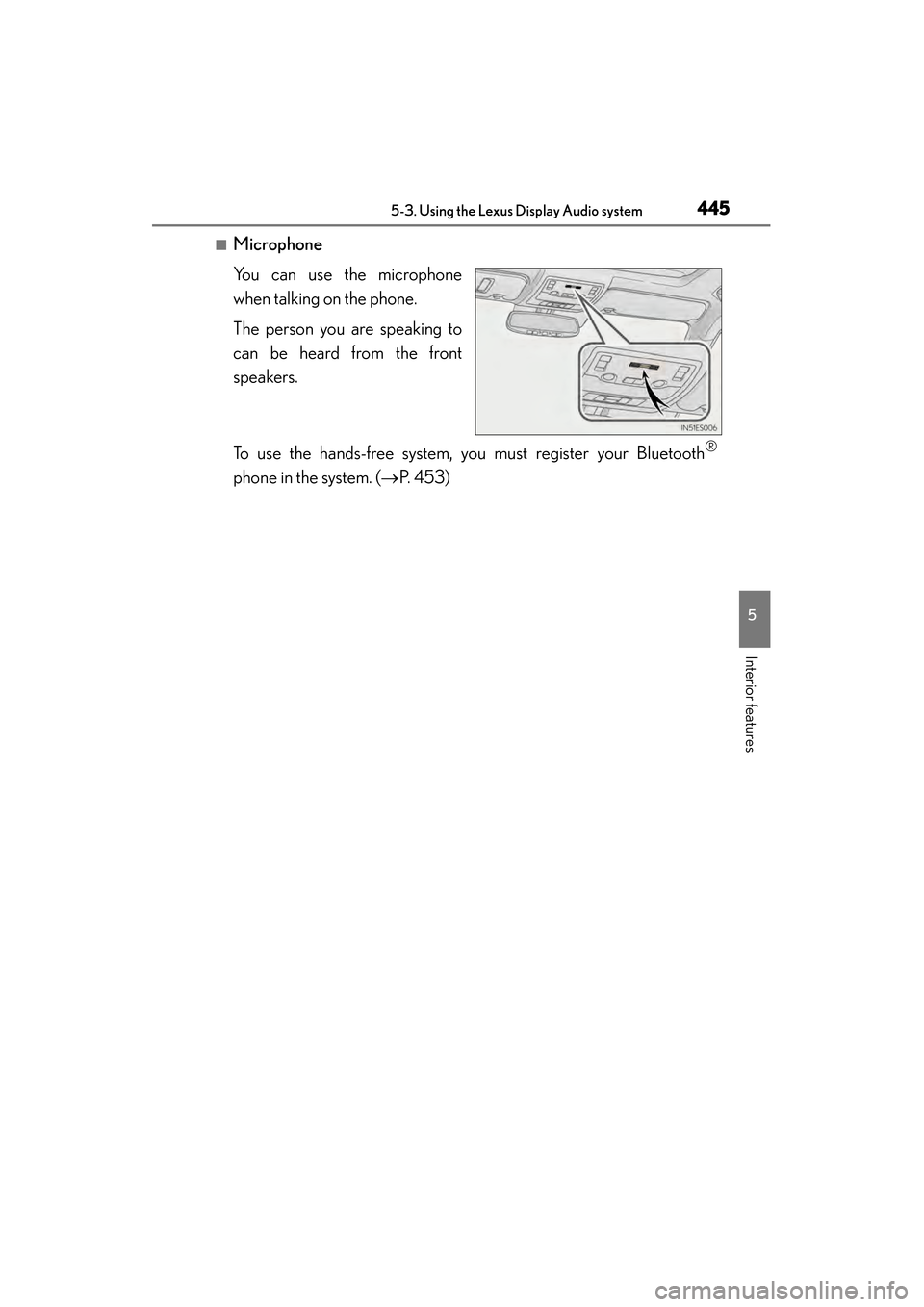
■Microphone
You can use the microphone
when talking on the phone.
The person you are speaking to
can be heard from the front
speakers.
To use the hands-free system, you must register your Bluetooth
®
phone in the system. (→P. 453)
Page 447 of 910
446
ES350 300h_OM_OM33A01U_(U)
5-3. Using the Lexus Display Audio system
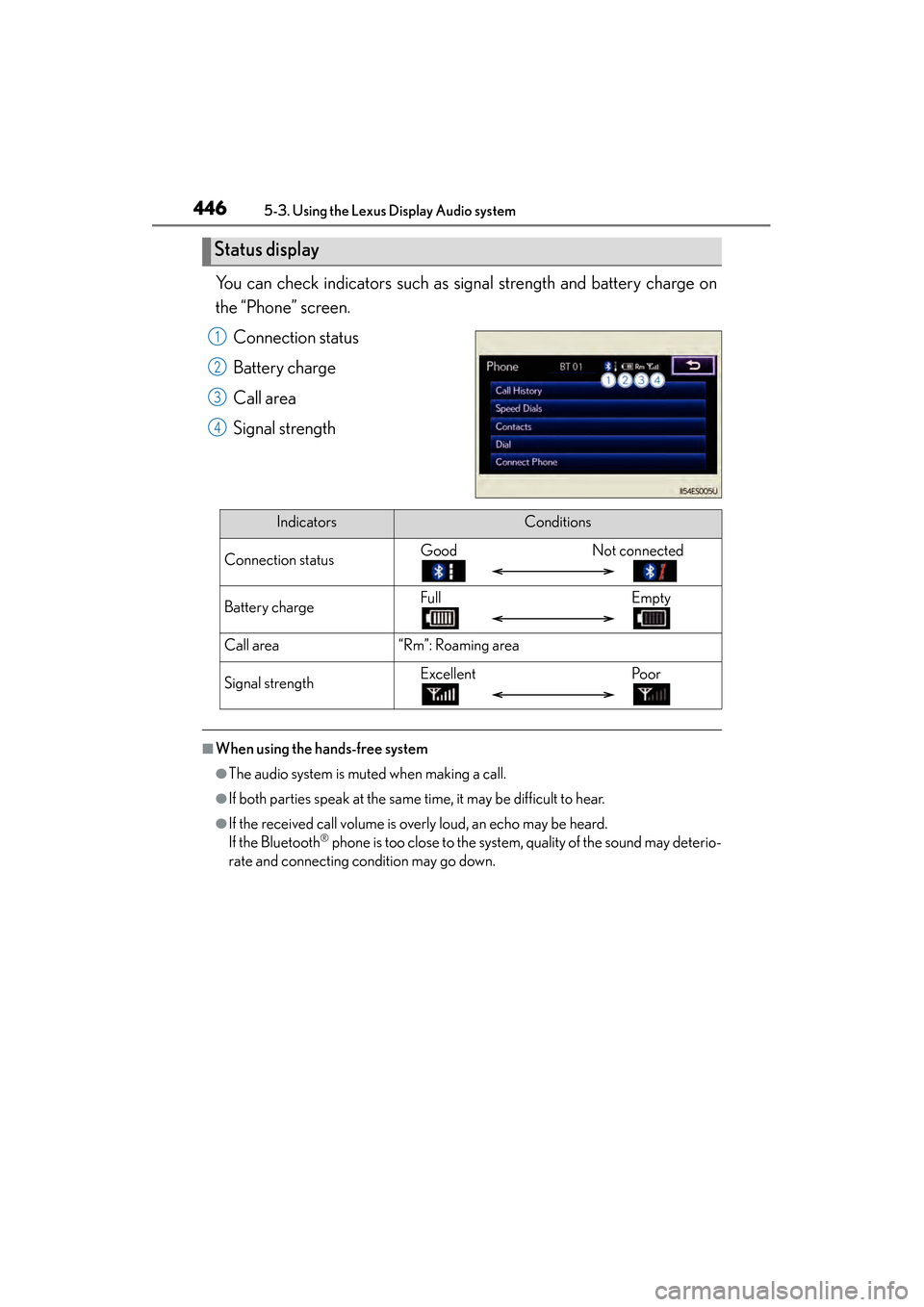
You can check indicators such as signal strength and battery charge on
the “Phone” screen.Connection status
Battery charge
Call area
Signal strength
■When using the hands-free system
●The audio system is muted when making a call.
●If both parties speak at the same time, it may be difficult to hear.
●If the received call volume is overly loud, an echo may be heard.
If the Bluetooth® phone is too close to the system, quality of the sound may deterio-
rate and connecting condition may go down.
Status display
1
2
3
4
IndicatorsConditions
Connection statusGood Not connected
Battery chargeFull Empty
Call area“Rm”: Roaming area
Signal strengthExcellentPoor