reset Lexus ES300h 2013 User Guide
[x] Cancel search | Manufacturer: LEXUS, Model Year: 2013, Model line: ES300h, Model: Lexus ES300h 2013Pages: 910, PDF Size: 9.95 MB
Page 381 of 910
380
ES350 300h_OM_OM33A01U_(U)
5-3. Using the Lexus Display Audio system
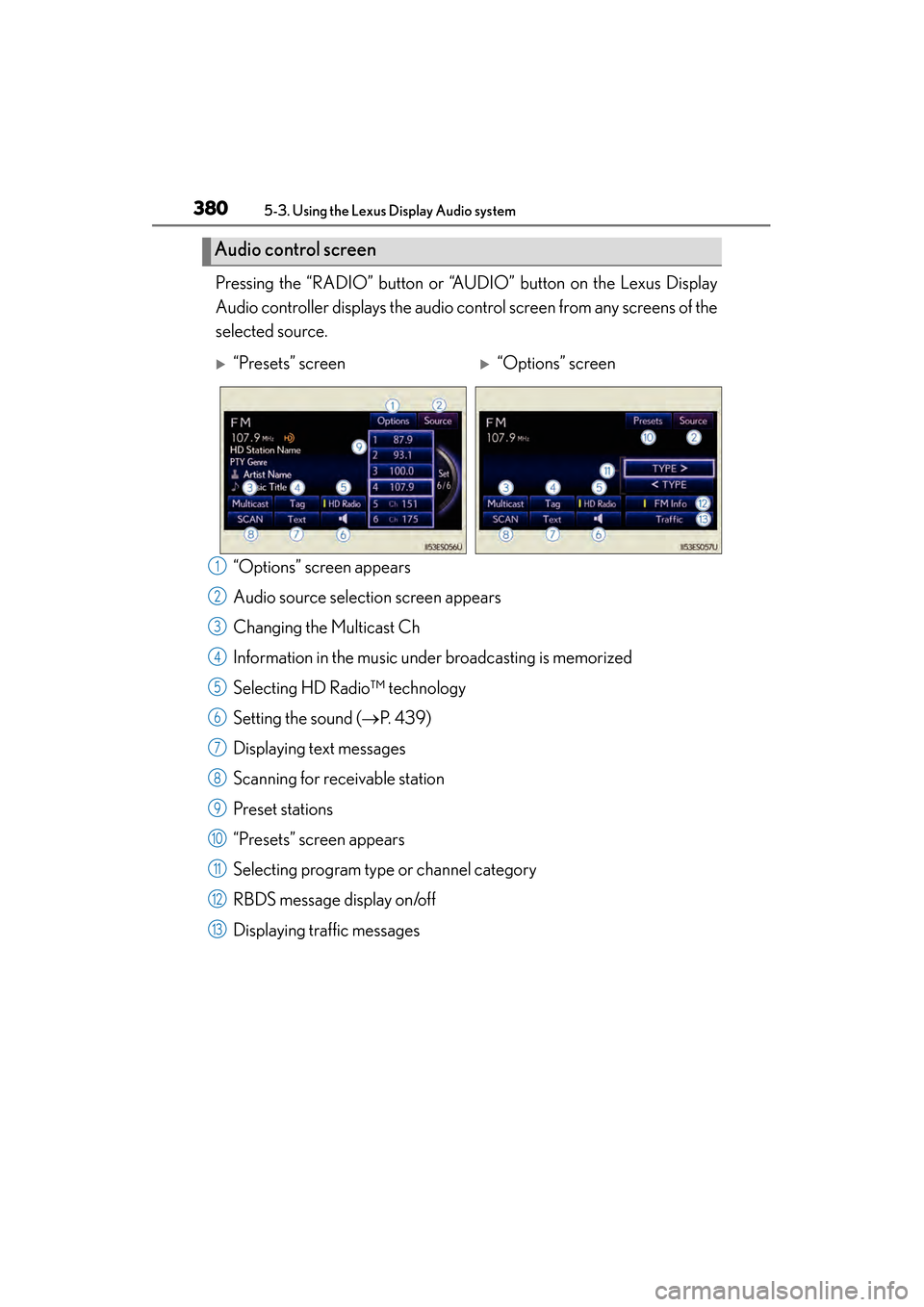
Pressing the “RADIO” button or “AUDIO” button on the Lexus Display
Audio controller displays the audio control screen from any screens of the
selected source.“Options” screen appears
Audio source selection screen appears
Changing the Multicast Ch
Information in the music under broadcasting is memorized
Selecting HD Radio™ technology
Setting the sound ( →P. 4 3 9 )
Displaying text messages
Scanning for receivable station
Preset stations
“Presets” screen appears
Selecting program type or channel category
RBDS message display on/off
Displaying traffic messages
Audio control screen
X“Presets” screenX“Options” screen
1
2
3
4
5
6
7
8
9
10
11
12
13
Page 382 of 910
ES350 300h_OM_OM33A01U_(U)
3815-3. Using the Lexus Display Audio system
5
Interior features
■Seek tuning
Press and hold “∧” or “ ∨” on the “PRST•TRACK” button.
■Manual tuning
Turn the “TUNE•SCROLL” knob.
■Preset stations
Press “ ∧” or “ ∨” on the “PRST•TRACK” button or select desired preset
stations.
Radio mode has a mix preset function, which can store up to 36 stations
(6 station per page × 6 page) from any of the AM, FM or SAT bands.
Search for desired stations by turning the “TUNE•SCROLL” knob or
pressing and holding “ ∧” or “ ∨” on the “PRST•TRACK” button.
Select and hold one of the preset stations (1-6 every page).
Select “SCAN” on the screen.
“SCAN” appears on the screen. The radio will find the next station and stay there
for 10 seconds if “All” or “HD Only” is selected, or 5 seconds if “Analog” is
selected ( →P. 385), and then scan again.
Select “SCAN” once again when the desired station is reached.
Selecting a station
Setting station presets (excluding XM® Satellite Radio)
Scanning radio stations (excluding XM® Satellite Radio)
1
2
1
2
Page 389 of 910
388
ES350 300h_OM_OM33A01U_(U)
5-3. Using the Lexus Display Audio system
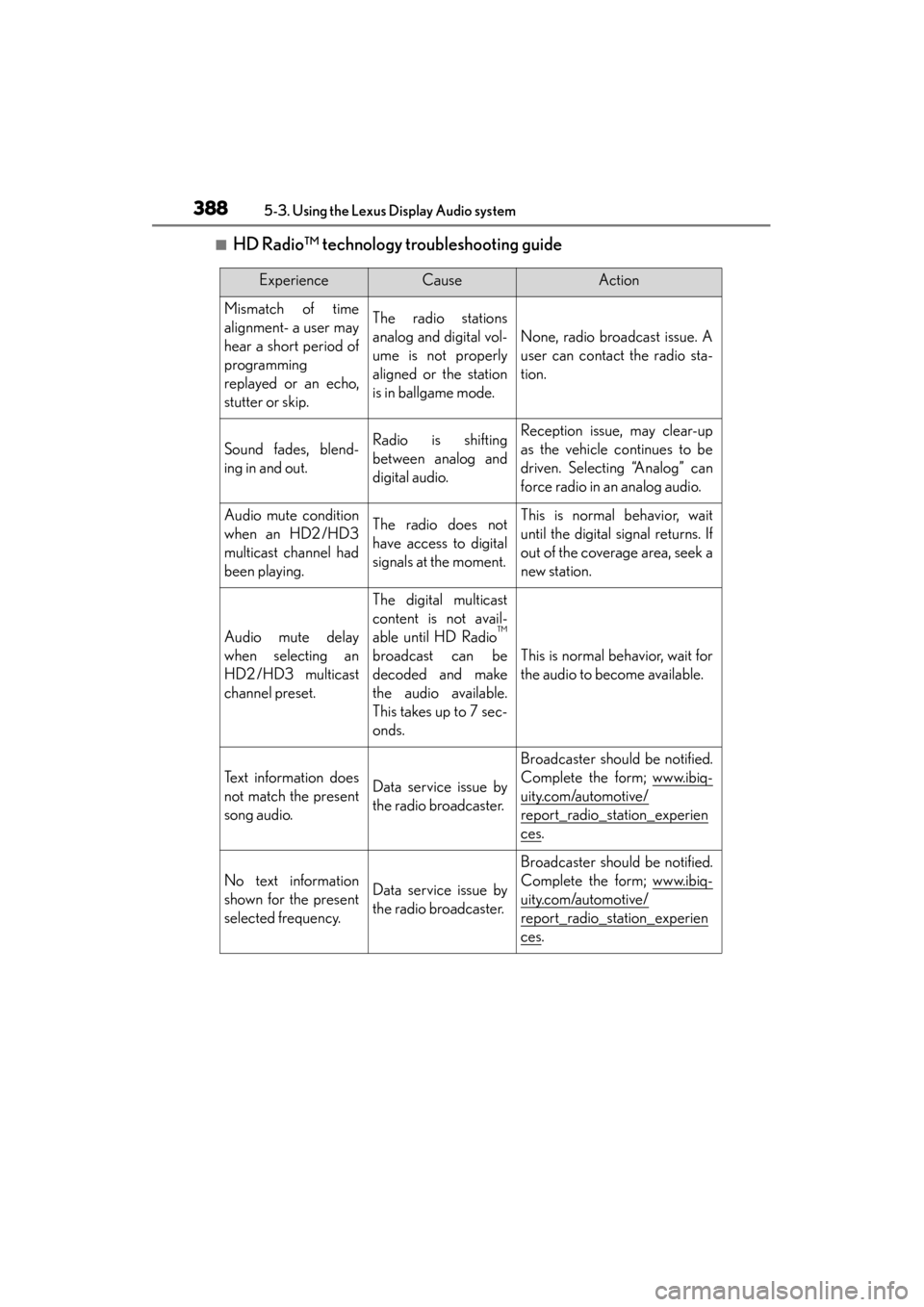
■HD Radio™ technology troubleshooting guide
ExperienceCauseAction
Mismatch of time
alignment- a user may
hear a short period of
programming
replayed or an echo,
stutter or skip.The radio stations
analog and digital vol-
ume is not properly
aligned or the station
is in ballgame mode.
None, radio broadcast issue. A
user can contact the radio sta-
tion.
Sound fades, blend-
ing in and out.Radio is shifting
between analog and
digital audio.Reception issue, may clear-up
as the vehicle continues to be
driven. Selecting “Analog” can
force radio in an analog audio.
Audio mute condition
when an HD2 /HD3
multicast channel had
been playing.The radio does not
have access to digital
signals at the moment.This is normal behavior, wait
until the digital signal returns. If
out of the coverage area, seek a
new station.
Audio mute delay
when selecting an
HD2 /HD3 multicast
channel preset.
The digital multicast
content is not avail-
able until HD Radio
™
broadcast can be
decoded and make
the audio available.
This takes up to 7 sec-
onds.This is normal behavior, wait for
the audio to become available.
Text information does
not match the present
song audio.Data service issue by
the radio broadcaster.
Broadcaster should be notified.
Complete the form; www.ibiq-
uity.com/automotive/
report_radio_station_experien
ces.
No text information
shown for the present
selected frequency.Data service issue by
the radio broadcaster.
Broadcaster should be notified.
Complete the form; www.ibiq-
uity.com/automotive/
report_radio_station_experien
ces.
Page 390 of 910
ES350 300h_OM_OM33A01U_(U)
3895-3. Using the Lexus Display Audio system
5
Interior features
■Receiving XM® Satellite Radio
Press the “RADIO” button or select “SAT” on the audio source
selection.
Turn the “TUNE•SCROLL” knob to select the desired channel in the
all categories or press and hold “ ∧” or “ ∨” on the “PRST•TRACK”
button to select the desired channel in the current category.
■Setting XM® Satellite Radio channel presets
Select the desired channel. Select and hold one of the preset stations
(1-6 every page).
XM® Satellite Radio (if equipped)
1
2
Page 392 of 910
ES350 300h_OM_OM33A01U_(U)
3915-3. Using the Lexus Display Audio system
5
Interior features
■When the 12-volt battery is disconnected
All preset stations are erased.
■Reception sensitivity
●Cargo loaded on the roof luggage carrier, especially metal objects, may adversely
affect the reception of XM® Satellite Radio.
●It is difficult to maintain perfect radio reception at all times due to the continually
changing position of the antenna, differences in signal strength and surrounding
objects, such as trains and transmitters.
●The radio antenna is mounted inside the trunk and the rear window. To maintain
clear radio reception, do not attach metallic window tinting or other metallic
objects to the antenna wire mounted inside the rear window.
■XM® Satellite Radio
An XM
® Satellite Radio is a tuner designed exclusively to receive broadcasts pro-
vided under a separate subscription. Availability is limited to the 48 contiguous
states and 10 Canadian provinces.
●XM® subscriptions
For detailed information about XM® Satellite Radio or to subscribe:
U.S.A.
Visit on the web at www.siriusxm.com
or call 1-866-635-2349.
Canada
Visit on the web at www.xmradio.ca
or call 1-877-438-9677.
●Radio ID
You will need the radio ID when activating XM® service or reporting a problem.
Select “CH000” using the “TUNE•SCROLL” knob, and the receiver’s 8-charac-
ter ID number will appear.
●Satellite tuner
The tuner supports only Audio Services (Music and Talk) and the accompanying
Te x t I n f o r m a t i o n o f X M
® Satellite Radio.
Page 412 of 910
ES350 300h_OM_OM33A01U_(U)
4115-3. Using the Lexus Display Audio system
5
Interior features
■iPod problems
To resolve most problems encountered when using your iPod, disconnect your iPod
from the vehicle iPod connection and reset it. For instructions on how to reset your
iPod, refer to your iPod Owner’s Manual.
■Error messages
“Connection error. Please consult your Owner’s Manual for instructions on how to
connect the iPod.”:
This indicates a problem in the iPod or its connection.
“There are no songs available for playback. Please load compatible media to your
iPod.”:
This indicates that there is no music data in the iPod.
■Compatible models
The following iPod
®, iPod nano®, iPod classic®, iPod touch® and iPhone® devices
can be used with this system.
●Made for
• iPod touch (4th generation)
• iPod touch (3rd generation)
• iPod touch (2nd generation)
• iPod touch (1st generation)
•iPod classic
• iPod with video
• iPod nano (6th generation)
• iPod nano (5th generation)
• iPod nano (4th generation)
• iPod nano (3rd generation)
• iPod nano (2nd generation)
• iPod nano (1st generation)
•iPhone 4
•iPhone 3GS
•iPhone 3G
•iPhone
Depending on differences between models or software versions etc., some models
might be incompatible with this system.
Page 497 of 910
496
ES350 300h_OM_OM33A01U_(U)
5-4. Using the audio system
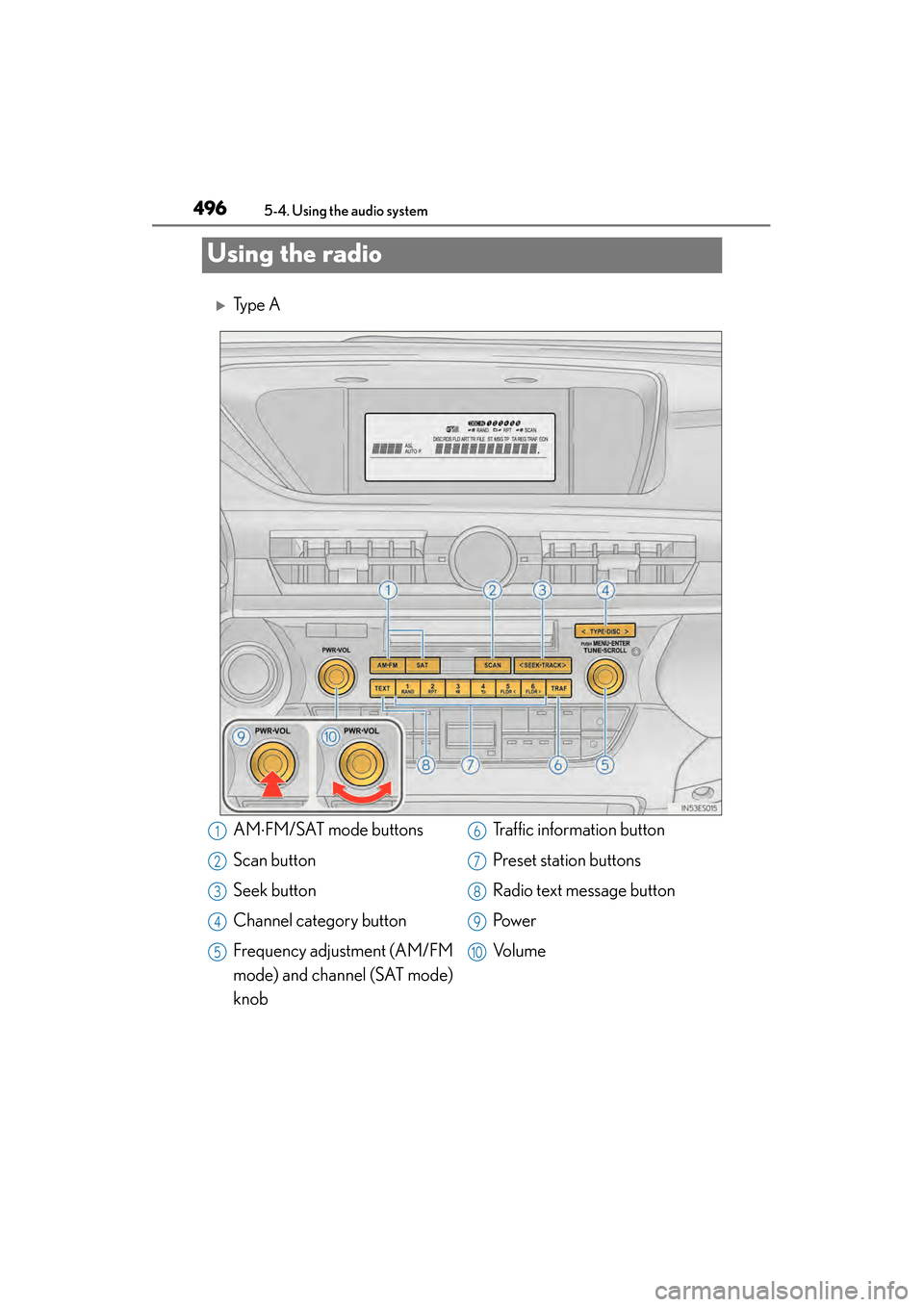
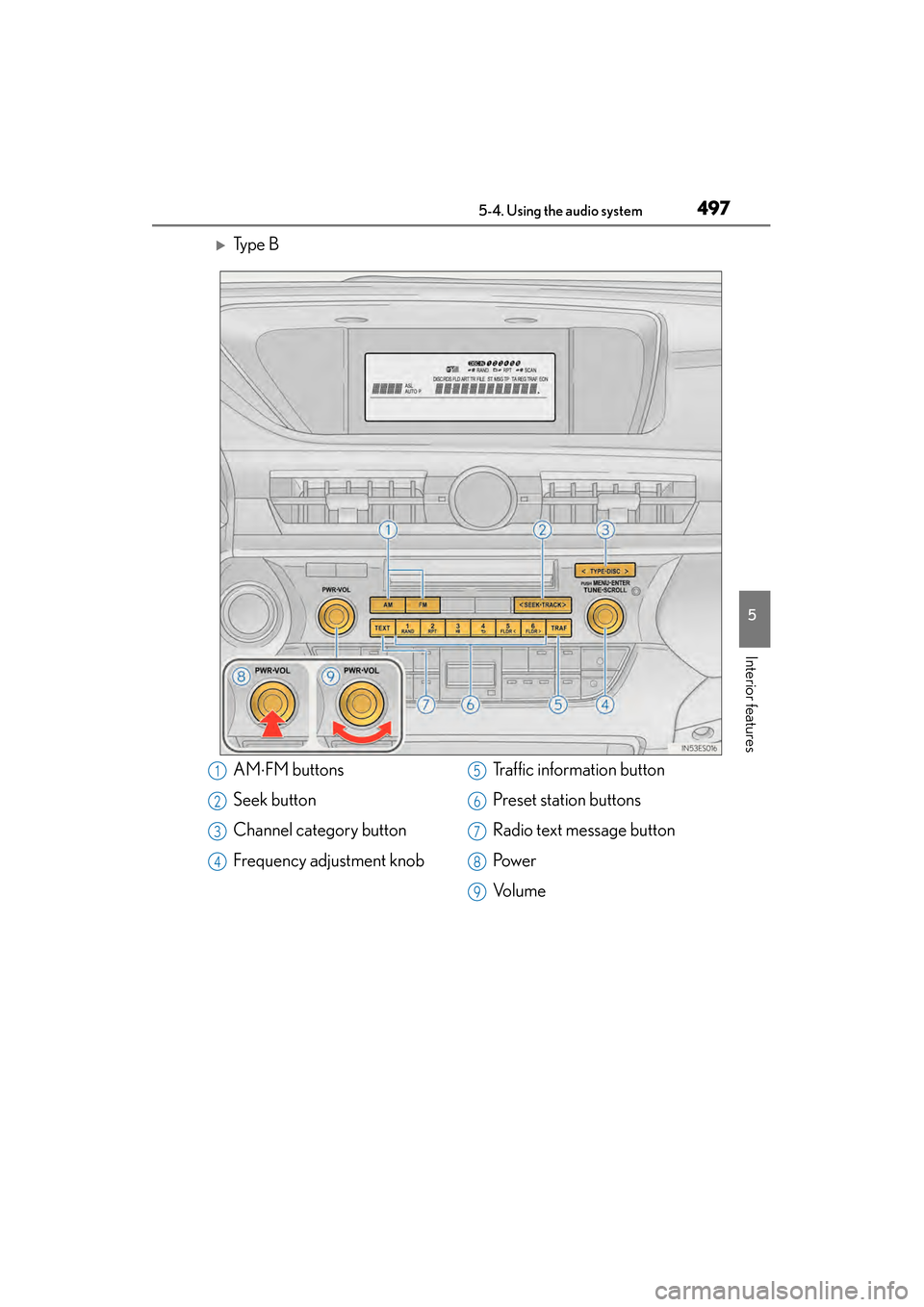
Using the radio
XTy p e A
AM⋅FM/SAT mode buttons
Scan button
Seek button
Channel category button
Frequency adjustment (AM/FM
mode) and channel (SAT mode)
knob Traffic information button
Preset station buttons
Radio text message button
Pow e r
Vo l u m e1
2
3
4
5
6
7
8
9
10
Page 498 of 910
ES350 300h_OM_OM33A01U_(U)
4975-4. Using the audio system
5
Interior features
XTy p e B
AM⋅FM buttons
Seek button
Channel category button
Frequency adjustment knob Traffic information button
Preset station buttons
Radio text message button
Pow e r
Vo l u m e1
2
3
4
5
6
7
8
9
Page 499 of 910
498
ES350 300h_OM_OM33A01U_(U)
5-4. Using the audio system
Search for the desired stations by turning or pressing “>” or “< ”
on .
Press and hold the button (from to ) the station is to be set
to until you hear a beep.
■Scanning the preset radio stations Press and hold until you hear a beep.
Preset stations will be played for 5 seconds each.
When the desired station is reached, press the button again.
■Scanning all the radio st ations within range
Press .
All the stations with reception will be played for 5 seconds each.
When the desired station is reached, press the button again.
Setting station presets (excluding XM® Satellite Radio)
Scanning radio stations (excluding XM® Satellite Radio) (type A)
1
2
1
2
1
2
Page 501 of 910
500
ES350 300h_OM_OM33A01U_(U)
5-4. Using the audio system
■Receiving XM® Satellite Radio
Press .
The display changes as follows each time the button is pressed:
“SAT1” → “SAT2” → “SAT3”
Turn to select the desired channel in all the categories or
press “ >” or “ <” on to select the desired channel in the
current category.
■Setting XM® Satellite Radio channel presets
Select the desired channel. Press and hold the button (from to ) the channel is to be set to until you hear a beep.
■Changing the channel category
Press “>” or “ <” on .
XM® Satellite Radio (type A)
1
2