display Lexus ES300h 2013 Owner's Manual
[x] Cancel search | Manufacturer: LEXUS, Model Year: 2013, Model line: ES300h, Model: Lexus ES300h 2013Pages: 910, PDF Size: 9.95 MB
Page 474 of 910
ES350 300h_OM_OM33A01U_(U)
4735-3. Using the Lexus Display Audio system
5
Interior features
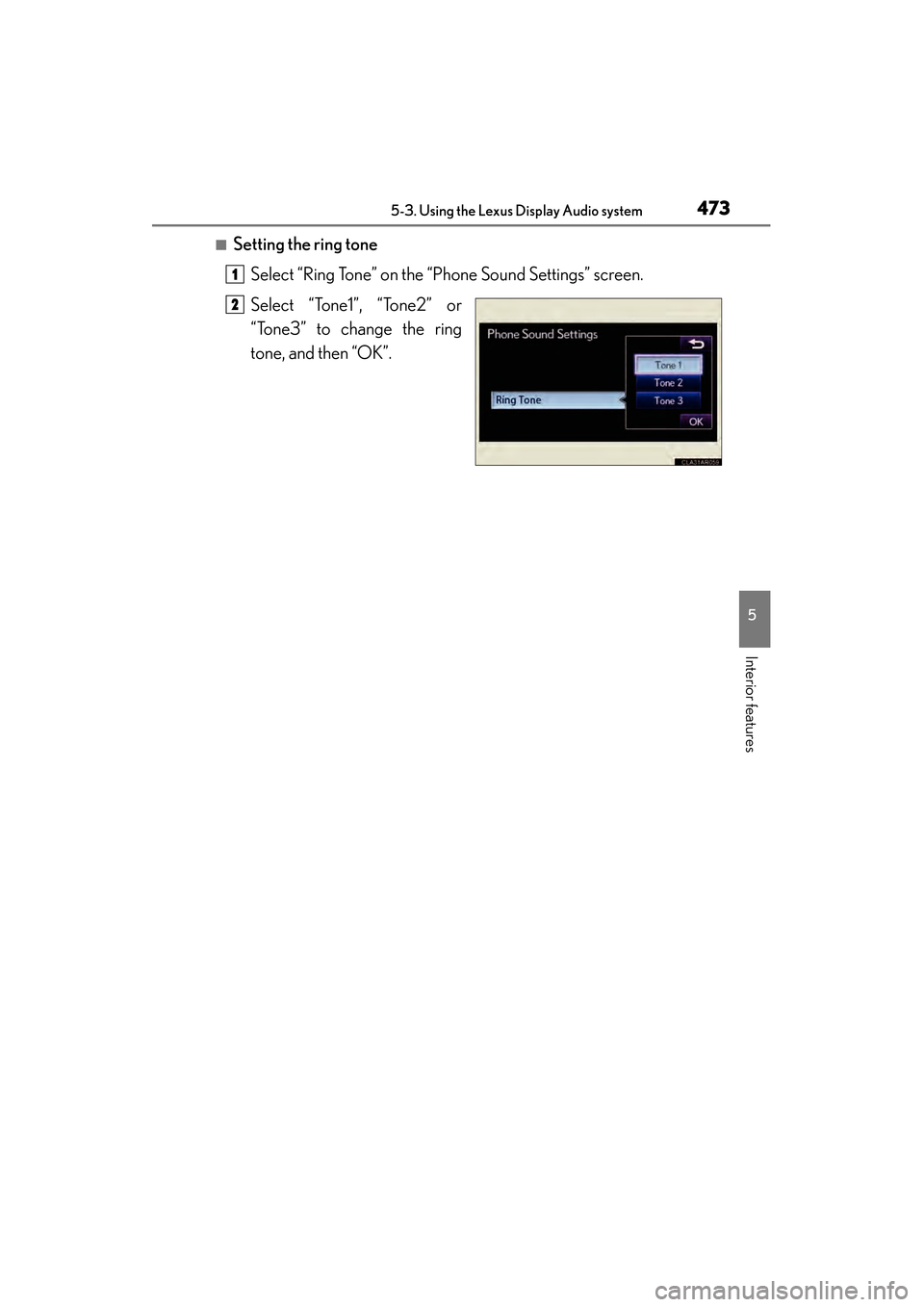
■Setting the ring toneSelect “Ring Tone” on the “Phone Sound Settings” screen.
Select “Tone1”, “Tone2” or
“Tone3” to change the ring
tone, and then “OK”.
1
2
Page 475 of 910
474
ES350 300h_OM_OM33A01U_(U)
5-3. Using the Lexus Display Audio system
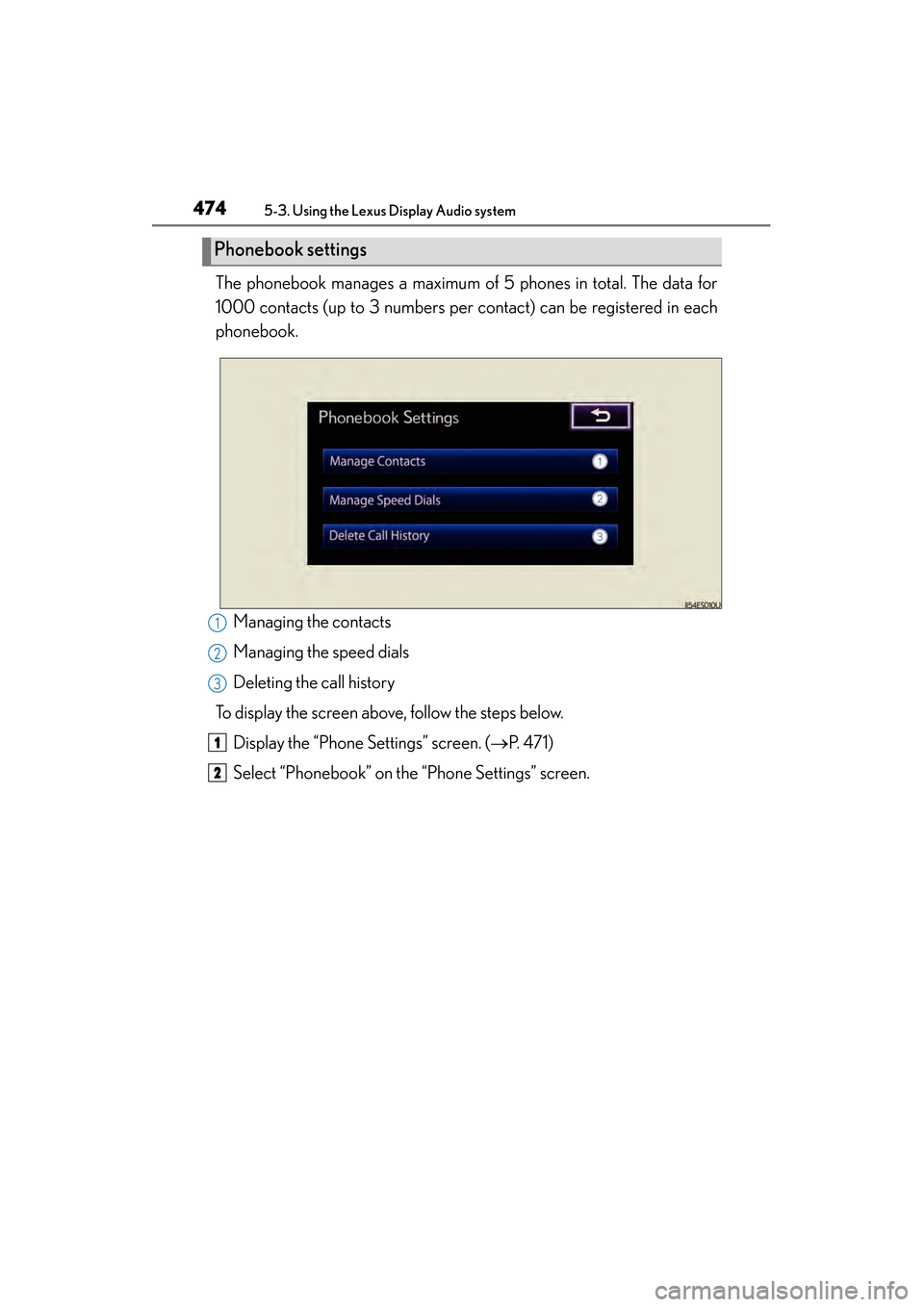
The phonebook manages a maximum of 5 phones in total. The data for
1000 contacts (up to 3 numbers per contact) can be registered in each
phonebook.Managing the contacts
Managing the speed dials
Deleting the call history
To display the screen above, follow the steps below.
Display the “Phone Settings” screen. ( →P. 4 7 1 )
Select “Phonebook” on the “Phone Settings” screen.
Phonebook settings
1
2
3
1
2
Page 476 of 910
ES350 300h_OM_OM33A01U_(U)
4755-3. Using the Lexus Display Audio system
5
Interior features
■Managing the contacts
●Transferring a phone number
You can transfer the phone numbers in your Bluetooth
® phone to the
system. Operation methods differ between PBAP compatible and
PBAP incompatible Bluetooth
® phones. If your cellular phone does
not support either PBAP or OPP services, you cannot transfer con-
tacts.
Display the “Phonebook Settings” screen. ( →P. 4 74 )
Select “Manage Contacts” on the “Phonebook Settings” screen.
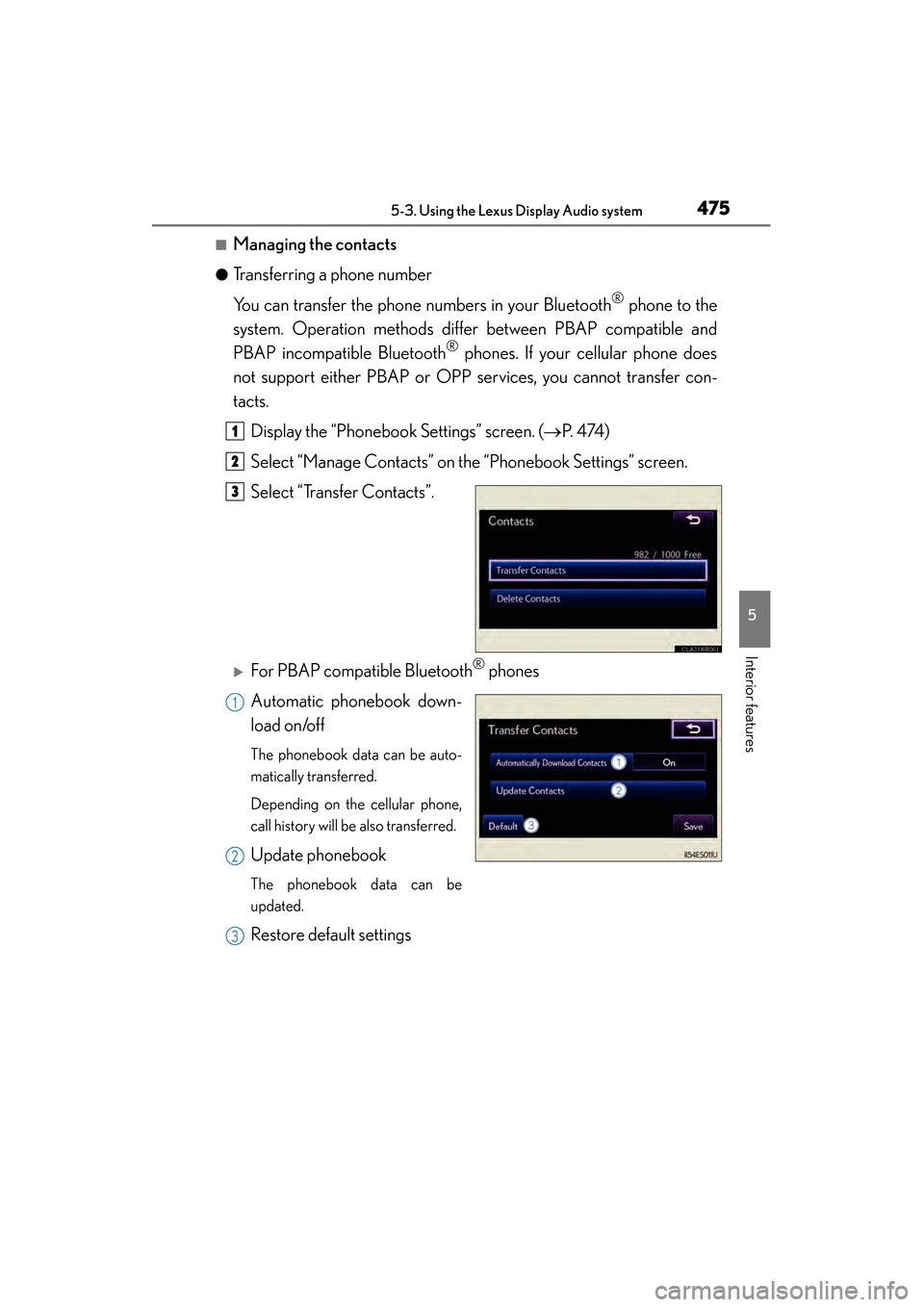
Select “Transfer Contacts”.
XFor PBAP compatible Bluetooth® phones
Automatic phonebook down-
load on/off
The phonebook data can be auto-
matically transferred.
Depending on the cellular phone,
call history will be also transferred.
Update phonebook
The phonebook data can be
updated.
Restore default settings
1
2
3
1
2
3
Page 477 of 910
476
ES350 300h_OM_OM33A01U_(U)
5-3. Using the Lexus Display Audio system
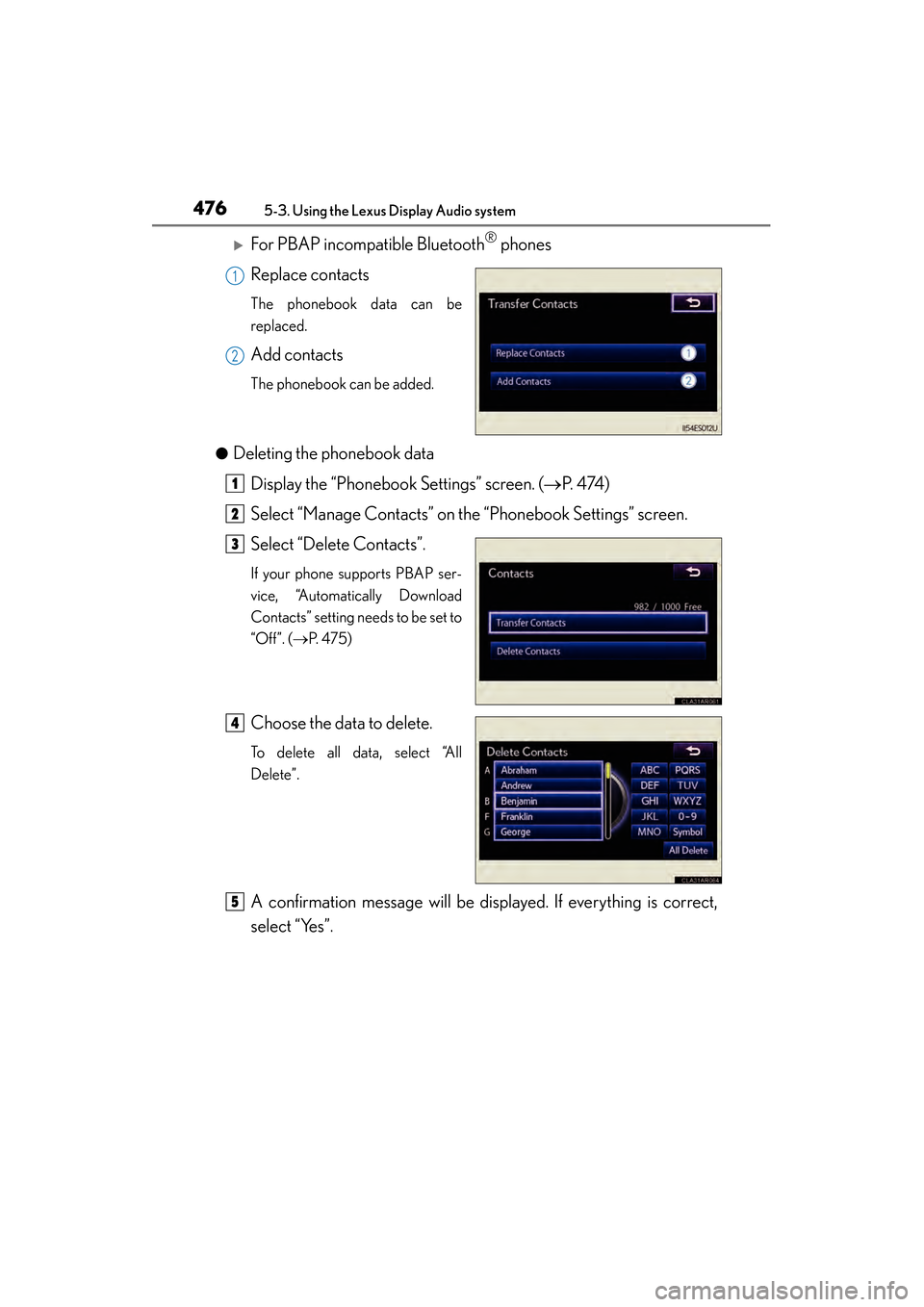
XFor PBAP incompatible Bluetooth® phones
Replace contacts
The phonebook data can be
replaced.
Add contacts
The phonebook can be added.
●
Deleting the phonebook data Display the “Phonebook Settings” screen. ( →P. 4 74 )
Select “Manage Contacts” on the “Phonebook Settings” screen.
Select “Delete Contacts”.
If your phone supports PBAP ser-
vice, “Automatically Download
Contacts” setting needs to be set to
“Off”. ( →P. 4 7 5 )
Choose the data to delete.
To delete all data, select “All
Delete”.
A confirmation message will be displayed. If everything is correct,
select “Yes”.
1
2
1
2
3
4
5
Page 478 of 910
ES350 300h_OM_OM33A01U_(U)
4775-3. Using the Lexus Display Audio system
5
Interior features
■Phonebook data
Phonebook data is managed for every registered phone. When another phone is
connecting, you cannot read the registered data.
■Setting the phonebook in a different way (To display the “Contacts” screen)Display the “Phone” screen. ( →P. 4 5 2 )
Select “Contacts” on the “Phone” screen.
Select “Options” on the “Contacts” screen.
Select “Manage Contacts” on the “Contacts” screen.
■When transferring a phone number
Transfer the phone number while engine is running
If your cellular phone is OPP or PBAP compatible, you may need to input “1234” by
your cellular phone for OBEX certification.
■When you have selected “Update Contacts” to transfer the phone number
●If your cellular phone does not support PBAP service, you cannot use this function.
●If your phone supports PBAP service, you can transfer the phonebook data with-
out operating your phone.
■When you have selected “Replace Contacts” or “Add Contacts” to transfer the
phone number
If your cellular phone does not support OPP service, you cannot use these functions.
You can transfer the phonebook data only by operating your phone.
■Transferring the phone number in a different way (To display the “Transfer Con-
tacts” screen) Display the “Phone” screen. ( →P. 4 5 2 )
Select “Contacts” on the “Phone” screen.
Select “Transfer” on the “Contacts” screen.
■Transferring the phone number while Bluetooth® audio is playing
Bluetooth
® audio will disconnect. It will reconnect automatically when data transfer
finishes. It will not be reconnected depending on the phone you are using.
1
2
3
4
1
2
3
Page 479 of 910
478
ES350 300h_OM_OM33A01U_(U)
5-3. Using the Lexus Display Audio system
■Deleting the phonebook data in a different wayDisplay the “Phone” screen. ( →P. 4 5 2 )
Select “Contacts” on the “Phone” screen.
Choose the desired data from the list.
Select “Options” on the “Contact” screen.
Select “Delete” on the “Contact” screen.
A confirmation message will be displayed. If everything is correct, select “Yes”.
If your phone supports PBAP service, “Automatically Download Contacts” setting
needs to be set to “Off”. ( →P. 4 7 5 )
When you delete a Bluetooth
® phone, the phonebook data will be deleted at the
same time.
1
2
3
4
5
6
Page 480 of 910
ES350 300h_OM_OM33A01U_(U)
4795-3. Using the Lexus Display Audio system
5
Interior features
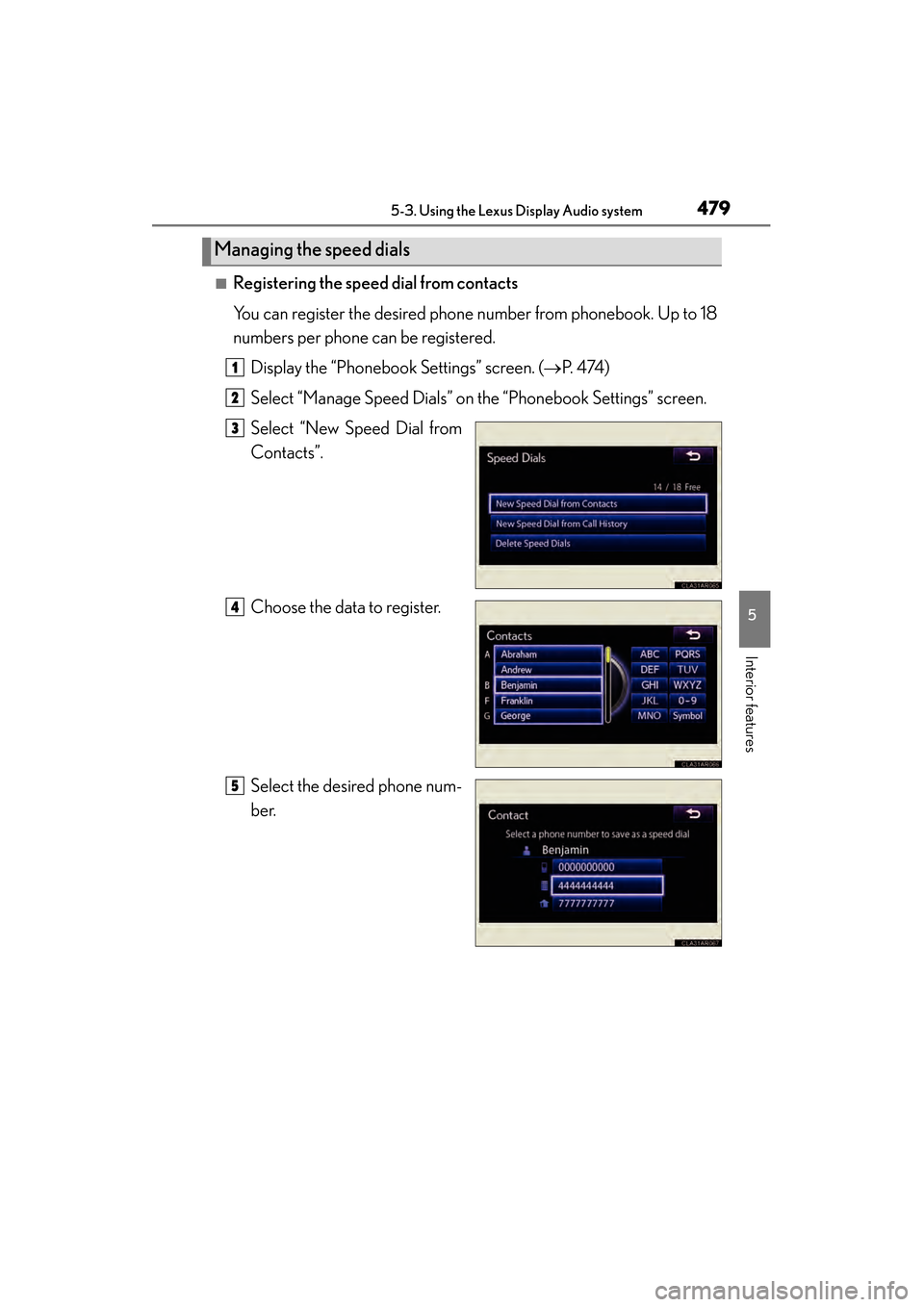
■Registering the speed dial from contacts
You can register the desired phone number from phonebook. Up to 18
numbers per phone can be registered.Display the “Phonebook Settings” screen. ( →P. 4 74 )
Select “Manage Speed Dials” on the “Phonebook Settings” screen.
Select “New Speed Dial from
Contacts”.
Choose the data to register.
Select the desired phone num-
ber.
Managing the speed dials
1
2
3
4
5
Page 481 of 910
480
ES350 300h_OM_OM33A01U_(U)
5-3. Using the Lexus Display Audio system
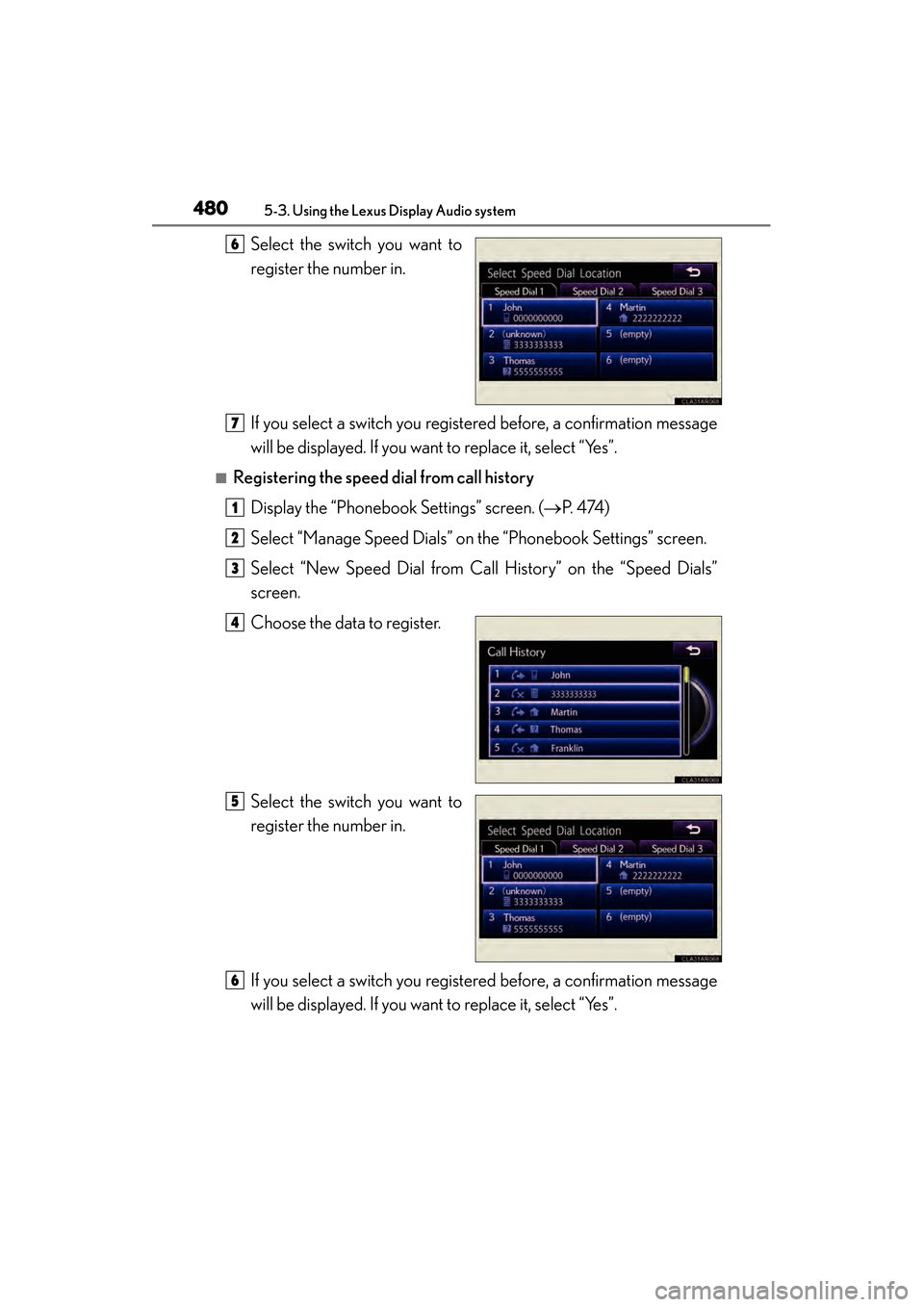
Select the switch you want to
register the number in.
If you select a switch you registered before, a confirmation message
will be displayed. If you want to replace it, select “Yes”.
■Registering the speed dial from call historyDisplay the “Phonebook Settings” screen. ( →P. 4 74 )
Select “Manage Speed Dials” on the “Phonebook Settings” screen.
Select “New Speed Dial from Call History” on the “Speed Dials”
screen.
Choose the data to register.
Select the switch you want to
register the number in.
If you select a switch you registered before, a confirmation message
will be displayed. If you want to replace it, select “Yes”.
6
7
1
2
3
4
5
6
Page 482 of 910
ES350 300h_OM_OM33A01U_(U)
4815-3. Using the Lexus Display Audio system
5
Interior features
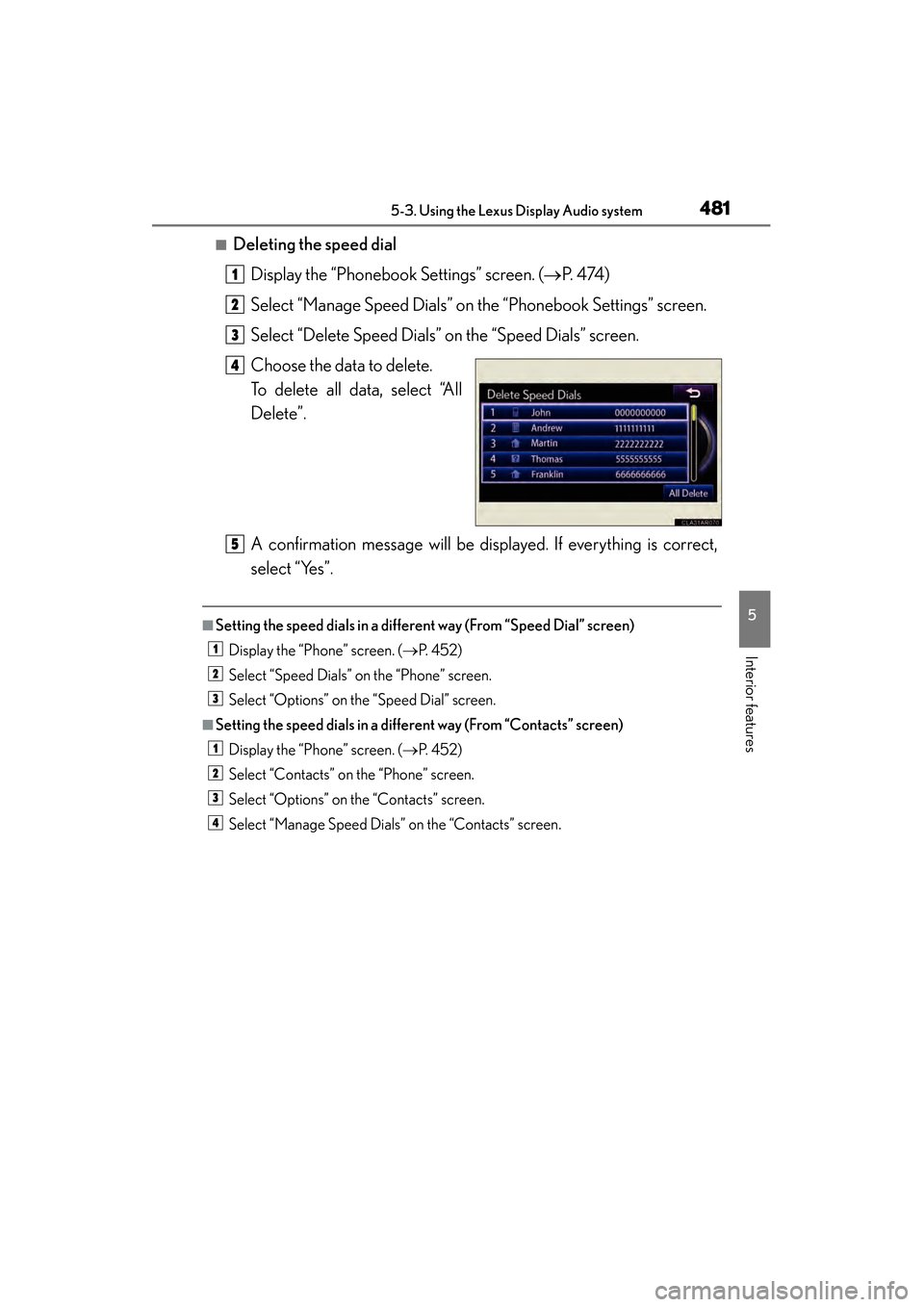
■Deleting the speed dialDisplay the “Phonebook Settings” screen. ( →P. 4 74 )
Select “Manage Speed Dials” on the “Phonebook Settings” screen.
Select “Delete Speed Dials” on the “Speed Dials” screen.
Choose the data to delete.
To delete all data, select “All
Delete”.
A confirmation message will be displayed. If everything is correct,
select “Yes”.
■Setting the speed dials in a different way (From “Speed Dial” screen) Display the “Phone” screen. ( →P. 4 5 2 )
Select “Speed Dials” on the “Phone” screen.
Select “Options” on the “Speed Dial” screen.
■Setting the speed dials in a different way (From “Contacts” screen) Display the “Phone” screen. ( →P. 4 5 2 )
Select “Contacts” on the “Phone” screen.
Select “Options” on the “Contacts” screen.
Select “Manage Speed Dials” on the “Contacts” screen.
1
2
3
4
5
1
2
3
1
2
3
4
Page 483 of 910
482
ES350 300h_OM_OM33A01U_(U)
5-3. Using the Lexus Display Audio system
■Registering the speed dial in a different way (From “Speed Dial” screen)Display the “Phone” screen. ( →P. 4 5 2 )
Select “Speed Dials” on the “Phone” screen.
Select “(add new)” on the “Speed Dial” screen.
Select “Contacts” or “History” to set new speed dial.
Select “Cancel” to cancel it.
Choose the desired data from the list.
Select the desired phone number.
■Registering the speed dial in a different way (From “Contact” screen) Display the “Phone” screen. ( →P. 4 5 2 )
Select “Contacts” on the “Phone” screen.
Choose the desired data from the list.
Select “Options” on the “Contact” screen.
Select “Set Speed Dial” on the “Contact” screen.
Select the desired telephone number.
Follow the steps “Registering the speed dial from contacts” from
( → P. 4 7 9 ) .
■Registering the speed dial in a different way (From “Call History” screen)
Display the “Phone” screen. ( →P. 4 5 2 )
Select “Call History” on the “Phone” screen.
Choose the desired data from the list.
Select “Add Speed Dial” on the “Call History” screen.
Follow the steps “Registering the speed dial from call history” from .
( → P. 4 8 0 )
1
2
3
4
5
6
1
2
3
4
5
6
76
1
2
3
4
55