audio Lexus ES300h 2013 Owner's Manual
[x] Cancel search | Manufacturer: LEXUS, Model Year: 2013, Model line: ES300h, Model: Lexus ES300h 2013Pages: 910, PDF Size: 9.95 MB
Page 597 of 910
596
ES350 300h_OM_OM33A01U_(U)
5-4. Using the audio system
■Adding procedureSelect “Add Entry” using a voice command or .
Use one of the following methods to input a telephone number:
Inputting a telephone number using a voice command:
STEP2-1 Select “By Voice” using a voice command or .
STEP2-2 Press the talk switch, say the desired number, and select “Confirm” using a voice command.
Transferring data from the cellular phone:
STEP2-1 Select “By Phone” and then “Confirm” using a voice com-
mand or .
STEP2-2 Transfer the data from the cellular phone.
Refer to the manual that comes with the cellular phone for details
on transferring data.
STEP2-3 Select the data to be registered by either of the following methods:
a. Say “Previous” or “Next” until the desired data is dis-played, and select “Confirm” using a voice command.
b. Select the desired data using .
1
2
Page 598 of 910
ES350 300h_OM_OM33A01U_(U)
5975-4. Using the audio system
5
Interior features
Inputting a phone number using :STEP2-1 Select “Manual Input” using .
STEP2-2 Input a phone number using , and press again.
Input the phone number 1 digit at a time.
Selecting a phone number from the outgoing or incoming call history:
STEP2-1 Select “Call History” using a voice command or .
STEP2-2 Select “Outgoing” or “Incoming” using a voice command or .
STEP2-3 Select the data to be registered by either of the following methods:
a. Say “Previous” or “Go back” until the desired data isdisplayed, and select “Confirm” using a voice com-
mand.
b. Select the desired data using .
Page 599 of 910
598
ES350 300h_OM_OM33A01U_(U)
5-4. Using the audio system
Select the name to be registered by either of the following methods,
and select “Confirm” using a voice command or :
a. Press the talk switch and say the desired name.
b. Select “Record Name” using and say the desired name.
Select “Confirm” using a voice command or .
In , selecting “Set Speed Dial (Speed Dial)” instead of “Confirm” registers
the newly added phone number as a speed dial.
3
4
4
Page 600 of 910
ES350 300h_OM_OM33A01U_(U)
5995-4. Using the audio system
5
Interior features
Select “Change Name” using a voice command or .
XPattern A
Select the name to be changed by either of the following methods, and
select “Confirm” using a voice command or :
a. Press the talk switch and say the desired name.
b. Press the talk switch and say “List Names”. When the desired nameis read aloud, press the talk switch.
XPattern B
Select the desired name to be changed using .
Press the talk switch or select “Record Name” using and say
the new name.
Select “Confirm” using a voice command or .
Changing the registered name in the phone book
1
2
2
3
4
Page 601 of 910
600
ES350 300h_OM_OM33A01U_(U)
5-4. Using the audio system
Select “List Names” using a voice command or . The list of the
registered data will be read aloud.
When listing is complete, the system returns to the “Phonebook”.
Pressing the talk switch while the desired data is being read aloud selects
the data, and the following function will become available:
●Dialing: “Dial”
●Changing a registered name: “Change Name”
●Deleting an entry: “Delete Entry”
●Setting a speed dial: “Set Speed Dial (Speed Dial)”
Select “Set Speed Dial (Speed Dial)” using a voice command or.
XPattern A
Select the data to be registered as a speed dial by either of the follow-
ing methods and select “Confirm” using a voice command or :
a. Press the talk switch and say the desired name.
b. Press the talk switch and say “List Names”. When the desired nameis read aloud, press the talk switch.
XPattern B
Select the desired data using .
Listing the registered data
Setting speed dials
1
2
2
Page 602 of 910
ES350 300h_OM_OM33A01U_(U)
6015-4. Using the audio system
5
Interior features
Select the desired preset button and register the data into speed dial by
either of the following methods:
a. Press the desired preset button and select “Confirm” by using a voicecommand or .
b. Press and hold the desired preset button.
Select “Delete Entry” using a voice command or .
XPattern A
Select the data to be deleted by either of the following methods and
select “Confirm” using a voice command or :
a. Press the talk switch and say the name of the desired phone number.
b. Press the talk switch and say “List Names”. When the name of the desired phone number is read aloud, press the talk switch.
XPattern B
Select the desired data to be deleted using .
Deleting the registered data
3
1
2
2
Page 603 of 910
602
ES350 300h_OM_OM33A01U_(U)
5-4. Using the audio system
Select “Delete Speed Dial (Del Spd Dial)” using a voice command or.
Press the preset button to which the desired speed dial is registered
and select “Confirm” using a voice command or .
■Limitation of number of digits
A phone number that exceeds 24 digits cannot be registered.
Deleting speed dials
1
2
Page 657 of 910
656
ES350 300h_OM_OM33A01U_(U)
6-1. Maintenance and care
NOTICE
■Cleaning detergents
●Do not use the following types of detergent, as they may discolor the vehicle inte-
rior or cause streaks or damage to painted surfaces:
• Non-seat portions: Organic substances such as benzene or gasoline, alkalineor acidic solutions, dye, and bleach
• Seats: Alkaline or acidic solutions, such as thinner, benzene, and alcohol
●Do not use polish wax or polish cleaner. The instrument panel’s or other interior
part’s painted surface may be damaged.
■Preventing damage to leather surfaces
Observe the following precautions to avoid damage to and deterioration of
leather surfaces:
●Remove any dust or dirt from leather surfaces immediately.
●Do not expose the vehicle to direct sunlight for extended periods of time. Park
the vehicle in the shade, especially during summer.
●Do not place items made of vinyl, plastic, or containing wax on the upholstery, as
they may stick to the leather surface if the vehicle interior heats up significantly.
■Water on the floor
Do not wash the vehicle floor with water.
Vehicle systems such as the audio system may be damaged if water comes into
contact with electrical components such as the audio system above or under the
floor of the vehicle. Water may also cause the body to rust.
■When cleaning the inside of the windshield (vehicles with LDA [Lane Departure
Alert] and Automatic High Beam)
Be careful not to touch the camera sensor ( →P. 2 6 9 ) .
If the camera is accidentally scratched or hit, LDA and Automatic High Beam sys-
tem may not operate properly or may cause a malfunction.
■Cleaning the inside of the rear window
●Do not use glass cleaner to clean the rear window, as this may cause damage to
the rear window defogger heater wires or antenna. Use a cloth dampened with
lukewarm water to gently wipe the window clean. Wipe the window in strokes
running parallel to the heater wires or antenna.
●Be careful not to scratch or damage the heater wires or antenna.
Page 717 of 910
716
ES350 300h_OM_OM33A01U_(U)
6-3. Do-it-yourself maintenance
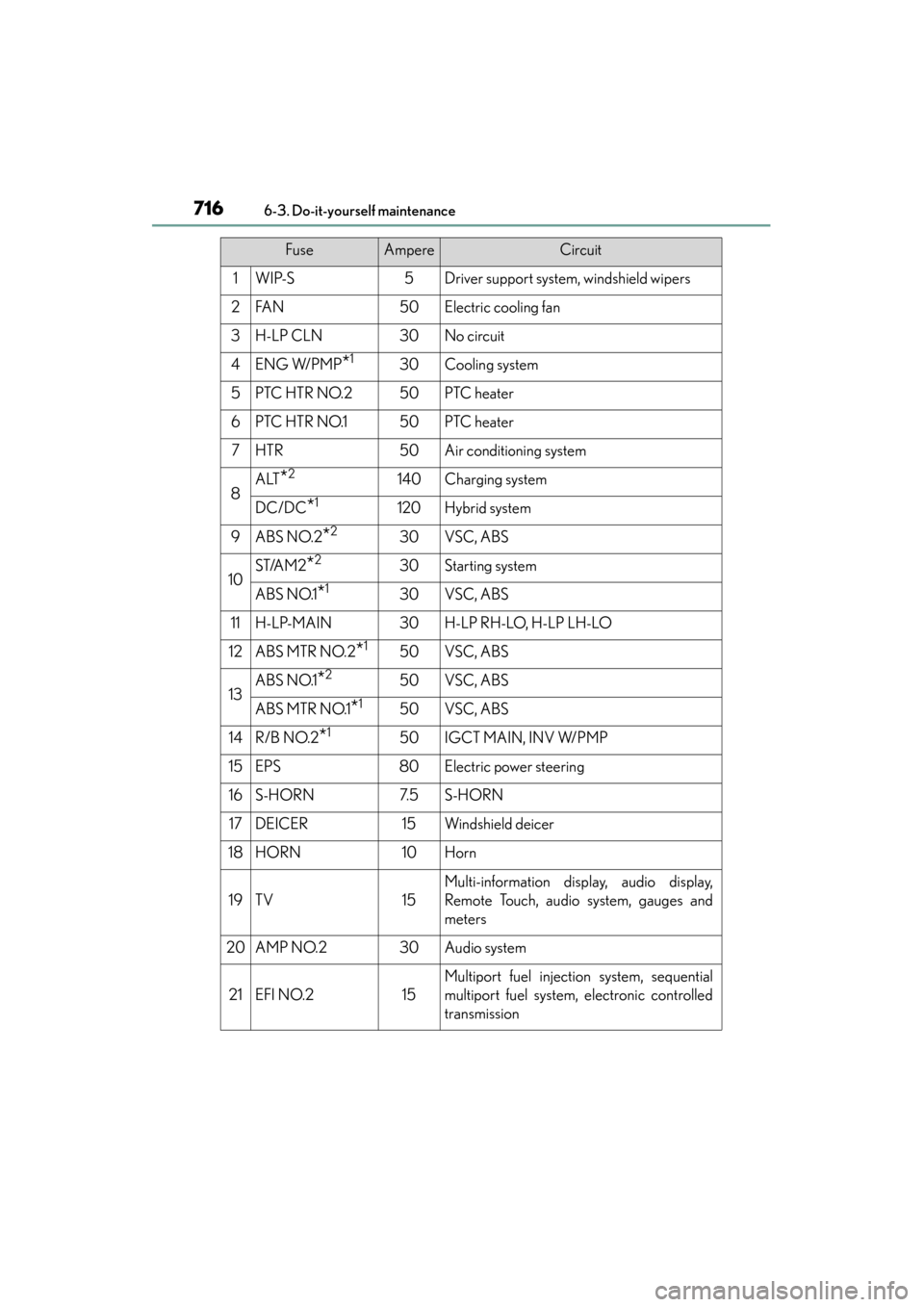
FuseAmpereCircuit
1WIP-S5Driver support system, windshield wipers
2FA N50Electric cooling fan
3H-LP CLN30No circuit
4ENG W/PMP*130Cooling system
5PTC HTR NO.250PTC heater
6PTC HTR NO.150PTC heater
7HTR50Air conditioning system
8ALT*2140Charging system
DC/DC*1120Hybrid system
9ABS NO.2*230VSC, ABS
10ST/AM2*230Starting system
ABS NO.1*130VSC, ABS
11H-LP-MAIN30H-LP RH-LO, H-LP LH-LO
12ABS MTR NO.2*150VSC, ABS
13ABS NO.1*250VSC, ABS
ABS MTR NO.1*150VSC, ABS
14R/B NO.2*150IGCT MAIN, INV W/PMP
15EPS80Electric power steering
16S-HORN7. 5S-HORN
17DEICER15Windshield deicer
18HORN10Horn
19TV15
Multi-information display, audio display,
Remote Touch, audio system, gauges and
meters
20AMP NO.230Audio system
21EFI NO.215
Multiport fuel injection system, sequential
multiport fuel system, electronic controlled
transmission
Page 718 of 910
ES350 300h_OM_OM33A01U_(U)
7176-3. Do-it-yourself maintenance
6
Maintenance and care
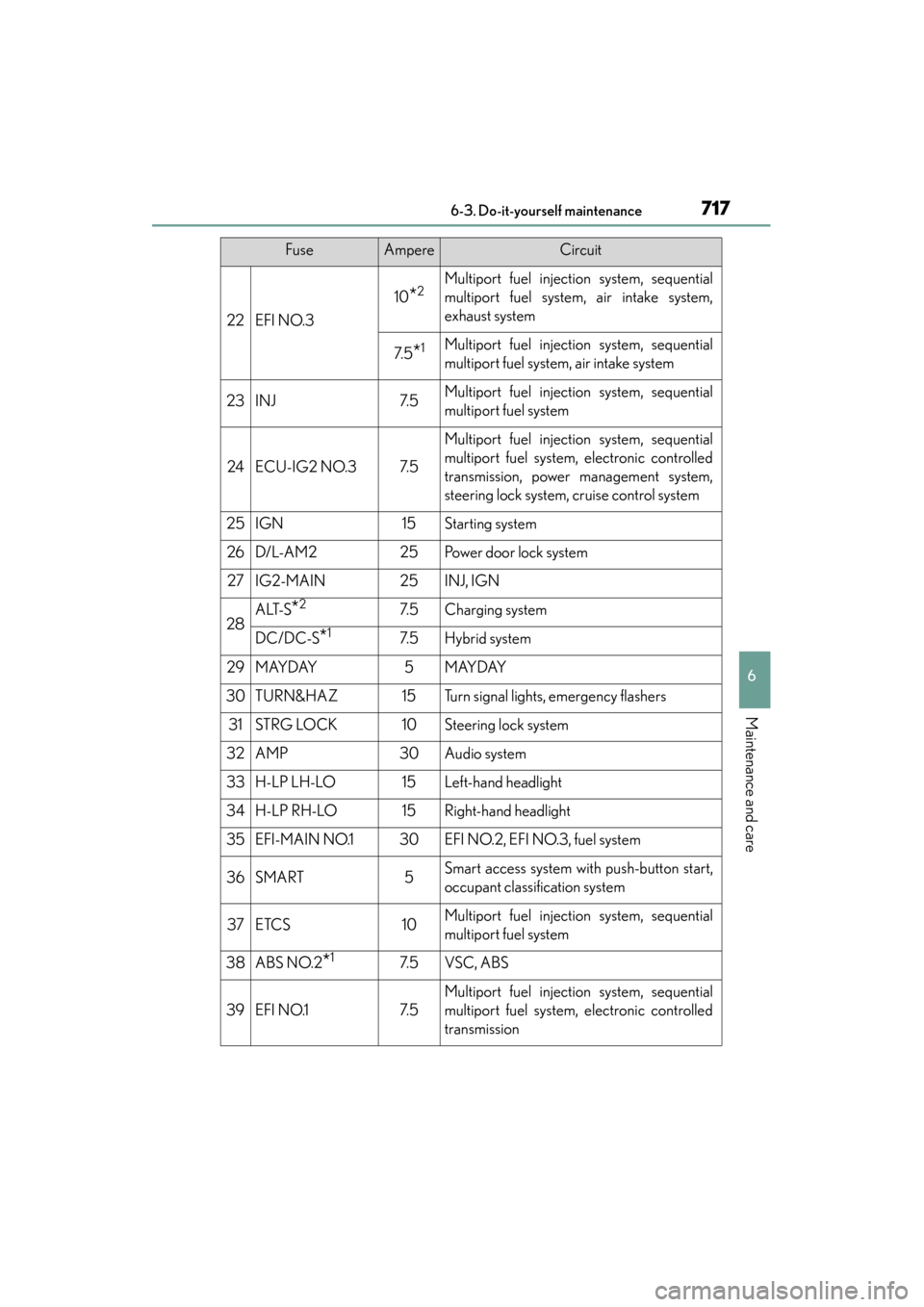
22EFI NO.3
10*2Multiport fuel injection system, sequential
multiport fuel system, air intake system,
exhaust system
7. 5*1Multiport fuel injection system, sequential
multiport fuel system, air intake system
23INJ7. 5Multiport fuel injection system, sequential
multiport fuel system
24ECU-IG2 NO.37. 5
Multiport fuel injection system, sequential
multiport fuel system, electronic controlled
transmission, power management system,
steering lock system, cruise control system
25IGN15Starting system
26D/L-A M225Po w e r d o o r l o c k s y s t e m
27IG2-MAIN25INJ, IGN
28ALT-S*27. 5Charging system
DC/DC-S*17. 5Hybrid system
29MAYDAY5MAYDAY
30TURN&HAZ15Turn signal lights, emergency flashers
31STRG LOCK10Steering lock system
32AMP30Audio system
33H-LP LH-LO15Left-hand headlight
34H-LP RH-LO15Right-hand headlight
35EFI-MAIN NO.130EFI NO.2, EFI NO.3, fuel system
36SMART5Smart access system with push-button start,
occupant classification system
37ETCS10Multiport fuel injection system, sequential
multiport fuel system
38ABS NO.2*17. 5VSC, ABS
39EFI NO.17. 5
Multiport fuel injection system, sequential
multiport fuel system, electronic controlled
transmission
FuseAmpereCircuit