Touch Lexus ES300h 2013 Owner's Guide
[x] Cancel search | Manufacturer: LEXUS, Model Year: 2013, Model line: ES300h, Model: Lexus ES300h 2013Pages: 910, PDF Size: 9.95 MB
Page 210 of 910
ES350 300h_OM_OM33A01U_(U)
2094-2. Driving procedures
4
Driving
■Odometer and trip meter display
When the “POWER” switch is turned off, the odometer or trip meter display will
extinguish after approximately 30 seconds.
CAUTION
■When starting the hybrid system
Always start the hybrid system while sitting in the driver’s seat. Do not depress the
accelerator pedal while starting the hybrid system under any circumstances.
Doing so may cause an accident resulting in death or serious injury.
■Caution while driving
If hybrid system failure occurs while the vehicle is moving, do not lock or open the
doors until the vehicle reaches a safe and complete stop. Activation of the steering
lock in this circumstance may lead to an accident, resulting in death or serious
injury.
■Stopping the hybrid system in an emergency
If you want to stop the hybrid system in an emergency while driving the vehicle,
press and hold the “POWER” switch for more than 2 seconds, or press it briefly 3
times or more in succession. (→P. 74 1 )
However, do not touch the “POWER” switch while driving except in an emer-
gency. Turning the hybrid system off while driving will not cause loss of steering or
braking control, but the power assist to these systems will be lost. This will make it
more difficult to steer and brake, so you should pull over and stop the vehicle as
soon as it is safe to do so.
Page 234 of 910
ES350 300h_OM_OM33A01U_(U)
2334-3. Operating the lights and wipers
4
Driving
CAUTION
■Limitations of the Automatic High Beam
Do not rely on the Automatic High Beam. Always drive safely, taking care to
observe your surroundings and turning high beam on or off manually if necessary.
NOTICE
■Notes when using the Automatic High Beam system
Observe the following to ensure that the Automatic High Beam functions cor-
rectly.
●Do not place items on the dashboard. There is a possibility that the camera sensor
will mistake items reflected in the windshield for streetlights, the headlights of
other vehicles, etc.
●Do not install a parking tag or any other accessories near or around the camera
sensor.
●Do not overload the vehicle.
●Do not modify the vehicle.
●Do not replace windshield with non-genuine windshield.
Contact your Lexus dealer.
●Do not replace headlights with non-genuine headlights.
Contact your Lexus dealer.
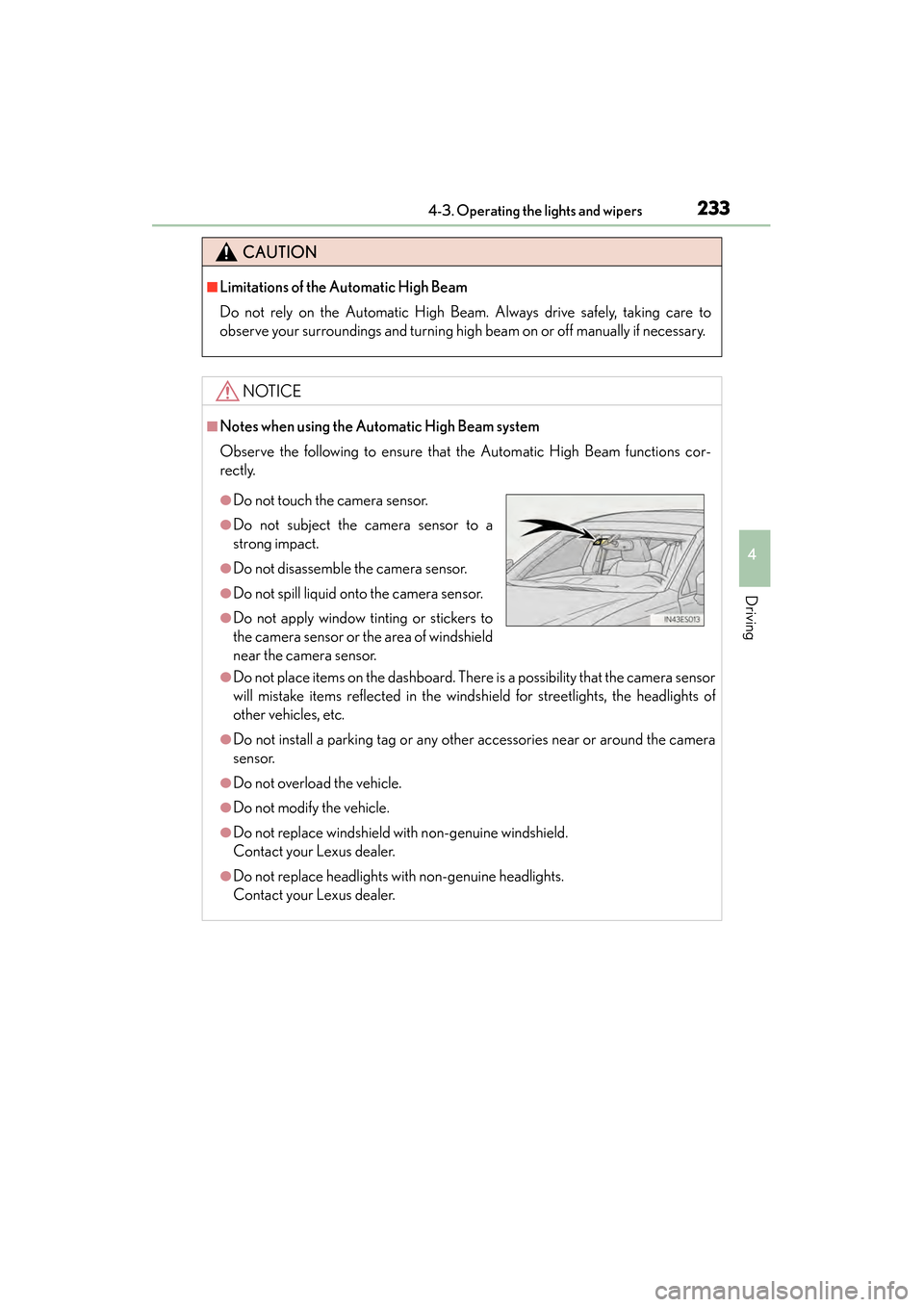
●Do not touch the camera sensor.
●Do not subject the camera sensor to a
strong impact.
●Do not disassemble the camera sensor.
●Do not spill liquid onto the camera sensor.
●Do not apply window tinting or stickers to
the camera sensor or the area of windshield
near the camera sensor.
Page 238 of 910
ES350 300h_OM_OM33A01U_(U)
2374-3. Operating the lights and wipers
4
Driving
■Raindrop sensor (vehicles with rain-sensing windshield wipers)
●If the wiper switch is turned to AUTO position while the “START STOP ENGINE”
<“POWER”> switch is in IGNITION ON
to show that AUTO mode is activated.
●When the sensor sensitivity ring is turned toward high while in AUTO mode, the
wipers will operate once to indicate that the sensor sensitivity is enhanced.
●If the temperature of the raindrop sensor is 185°F (85°C) or higher, or -22°F
(-30°C) or lower, automatic operation may not occur. In this case, operate the
wipers in any mode other than AUTO mode.
■If no windshield washer fluid sprays
Check that the washer nozzles are not blocked if there is washer fluid in the wind-
shield washer fluid reservoir.
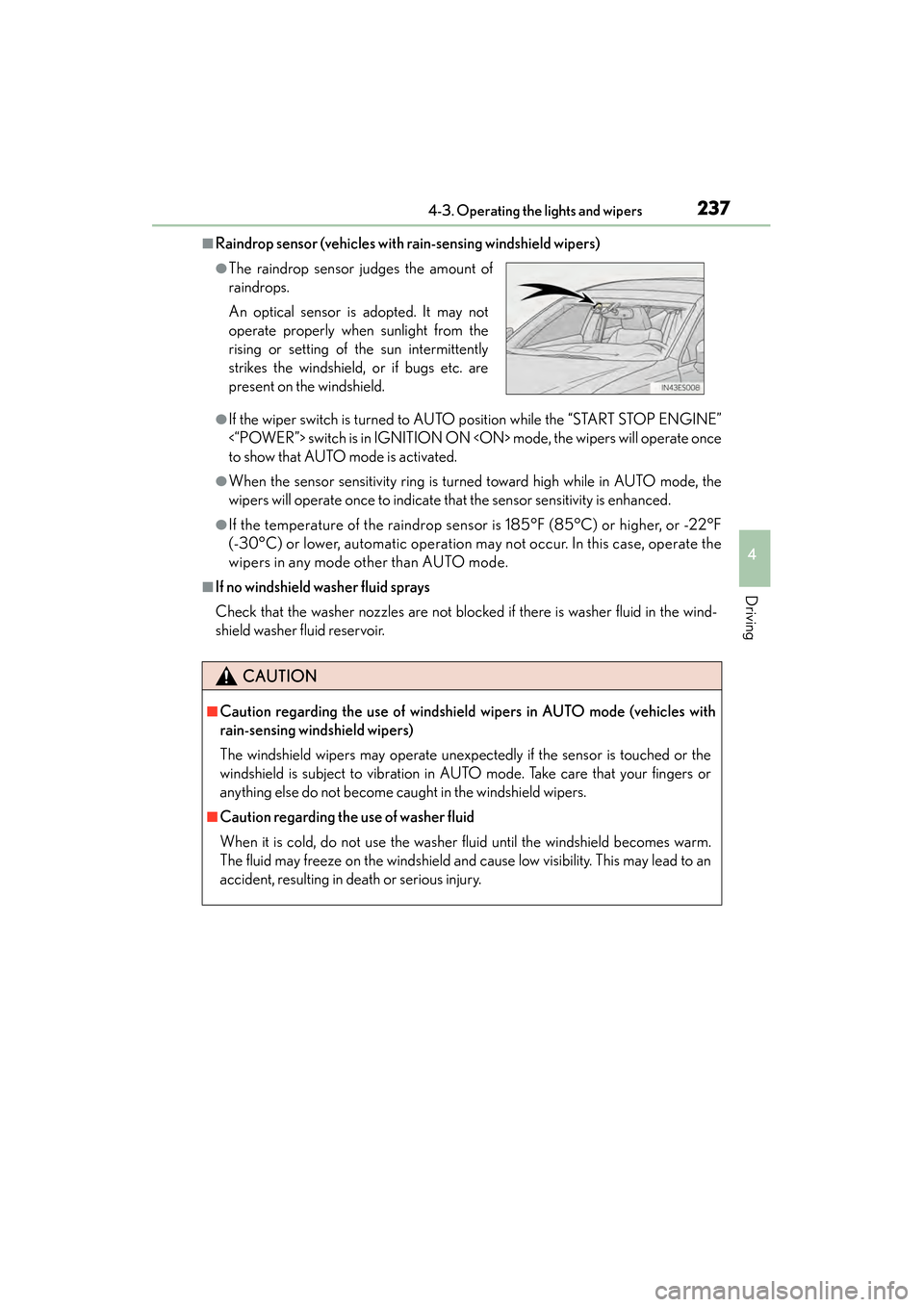
●The raindrop sensor judges the amount of
raindrops.
An optical sensor is adopted. It may not
operate properly when sunlight from the
rising or setting of the sun intermittently
strikes the windshield, or if bugs etc. are
present on the windshield.
CAUTION
■Caution regarding the use of windshield wipers in AUTO mode (vehicles with
rain-sensing windshield wipers)
The windshield wipers may operate unexpectedly if the sensor is touched or the
windshield is subject to vibration in AUTO mode. Take care that your fingers or
anything else do not become caught in the windshield wipers.
■Caution regarding the use of washer fluid
When it is cold, do not use the washer fluid until the windshield becomes warm.
The fluid may freeze on the windshield and cause low visibility. This may lead to an
accident, resulting in death or serious injury.
Page 241 of 910
240
ES350 300h_OM_OM33A01U_(U)
4-4. Refueling
CAUTION
■When refueling the vehicle
Observe the following precautions while refueling the vehicle. Failure to do so may
result in death or serious injury.
●After exiting the vehicle and before opening the fuel door, touch an unpainted
metal surface to discharge any static electricity. It is important to discharge static
electricity before refueling because sparks resulting from static electricity can
cause fuel vapors to ignite while refueling.
●Always hold the grips on the fuel tank cap and turn it slowly to remove it.
A whooshing sound may be heard when the fuel tank cap is loosened. Wait until
the sound cannot be heard before fully removing the cap. In hot weather, pressur-
ized fuel may spray out the filler neck and cause injury.
●Do not allow anyone that has not discharged static electricity from their body to
come close to an open fuel tank.
●Do not inhale vaporized fuel.
Fuel contains substances that are harmful if inhaled.
●Do not smoke while refueling the vehicle.
Doing so may cause the fuel to ignite and cause a fire.
●Do not return to the vehicle or touch any person or object that is statically
charged.
This may cause static electricity to build up, resulting in a possible ignition hazard.
■When refueling
Observe the following precautions to prevent fuel overflowing from the fuel tank:
●Securely insert the fuel nozzle into the fuel filler neck.
●Stop filling the tank after the fuel nozzle automatically clicks off.
●Do not top off the fuel tank.
NOTICE
■Refueling
Do not spill fuel during refueling.
Doing so may damage the vehicle, such as causing the emission control system to
operate abnormally or damaging fuel system components or the vehicle’s painted
surface.
Page 271 of 910
270
ES350 300h_OM_OM33A01U_(U)
4-5. Using the driving support systems
NOTICE
●Do not scratch the camera lens, or let it get dirty.
When cleaning the inside of the windshield, be careful not to get any glass
cleaner etc. on the lens. Also, do not touch the lens.
For lens repair, contact your Lexus dealer.
●Do not change the installation position or direction of the camera sensor or
remove it. The direction of the camera sensor is precisely adjusted.
●Do not subject the camera sensor to strong impact or force, and do not disas-
semble the camera sensor.
●Do not replace windshield with non-genuine windshield.
Contact your Lexus dealer.
Page 280 of 910
ES350 300h_OM_OM33A01U_(U)
2794-5. Using the driving support systems
4
Driving
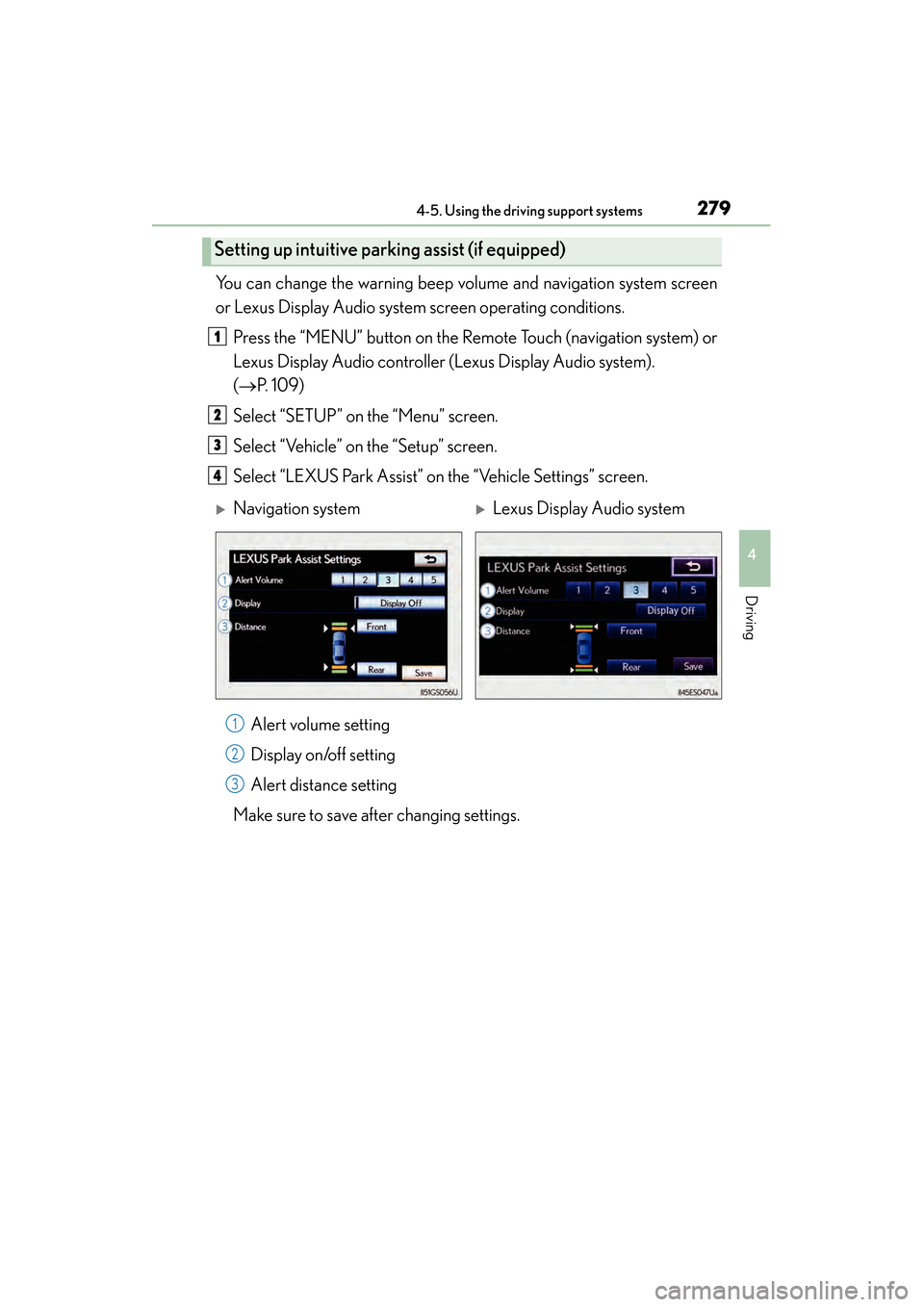
You can change the warning beep volume and navigation system screen
or Lexus Display Audio system screen operating conditions.Press the “MENU” button on the Remote Touch (navigation system) or
Lexus Display Audio controller (Lexus Display Audio system).
(→ P. 1 0 9 )
Select “SETUP” on the “Menu” screen.
Select “Vehicle” on the “Setup” screen.
Select “LEXUS Park Assist” on the “Vehicle Settings” screen.
Alert volume setting
Display on/off setting
Alert distance setting
Make sure to save after changing settings.
Setting up intuitive parking assist (if equipped)
1
2
3
4
XNavigation systemXLexus Display Audio system
1
2
3
Page 339 of 910
3385-1. Lexus Display Audio system
ES350 300h_OM_OM33A01U_(U)
■When using the screen
●Under extremely cold conditions, the Lexus Display Audio controller may react
slowly.
●If the screen is cold, the display may be dark, or the system may seem to be operat-
ing slightly slower than normal.
●The screen may seem dark and hard to see when viewed through sunglasses.
Change your angle of viewing, adjust the display on the “Display Settings” screen
(→ P. 339) or remove your sunglasses.
CAUTION
■Using the Lexus Display Audio controller
●Do not allow fingers, fingernails or hair to become caught in the Lexus Display
Audio controller as this may cause an injury.
●Be careful when touching the Lexus Display Audio controller in extreme temper-
atures as it may become very hot or cold due to the temperature inside the vehi-
cle.
NOTICE
■To prevent the Lexus Display Audio controller malfunction
●Do not allow the Lexus Display Audio controller to come into contact with food,
liquid, stickers or lit cigarettes as doing so may cause it to change color, emit a
strange odor or stop functioning.
●Do not subject the Lexus Display Audio controller to excessive pressure or
strong impact as the controller may bend or break off.
●Do not allow coins, contact lenses or other such items to become caught in the
Lexus Display Audio controller as this may cause it to stop functioning.
●Items of clothing may rip if they become caught on the Lexus Display Audio con-
troller.
●If your hand or any object is on the Lexus Display Audio controller when the
“START STOP ENGINE” <“POWER”> switch is turned to ACCESSORY mode,
the Lexus Display Audio controller may not operate properly.
Page 374 of 910
ES350 300h_OM_OM33A01U_(U)
3735-2. Using the air conditioning system and defogger
5
Interior features
■Operating conditions
The “START STOP ENGINE” <“POWER”> switch must be in the IGNITION ON
CAUTION
■When the outside rear view mirror defoggers are on
Do not touch the rear view mirror surfaces, as they can become very hot and burn
you.
NOTICE
■To prevent 12-volt battery discharge
Turn the defoggers off when the engine
Page 376 of 910
ES350 300h_OM_OM33A01U_(U)
3755-2. Using the air conditioning system and defogger
5
Interior features
■Operating conditions
The “START STOP ENGINE” <“POWER”> switch must be in the IGNITION ON
CAUTION
■When the windshield wiper de-icer is on
Do not touch the glass at the lower part of the windshield or to the side of the front
pillars as the surfaces can become very hot and burn you.
Page 411 of 910
410
ES350 300h_OM_OM33A01U_(U)
5-3. Using the Lexus Display Audio system
■About iPod
●“Made for iPod” and “Made for iPhone” mean that an electronic accessory has
been designed to connect specifically to iPod, or iPhone, respectively, and has
been certified by the developer to meet Apple performance standards.
●Apple is not responsible for the operation of this device or its compliance with
safety and regulatory standards. Please note that the use of this accessory with
iPod or iPhone may affect wireless performance.
●iPhone, iPod, iPod classic, iPod nano and iPod touch are trademarks of Apple Inc.,
registered in the U.S. and other countries.
■iPod cover art
●Depending on the iPod and songs in the iPod, iPod cover art may be displayed.
●This function can be changed to “On” or “Off”. (→P. 3 4 5 )
●It may take time to display iPod cover art, and the iPod may not be operated while
the cover art display is in process.
●Only iPod cover art that is saved in a JPEG format can be displayed.
■iPod functions
●When the iPod connected to the system includes iPod video, the system can only
output the sound by selecting on the “iPod” screen.
●Depending on the iPod, the video sound may not be able to be heard.
●When an iPod is connected and the audio source is changed to iPod mode, the
iPod will resume play from the same point in which it was last used.
●Depending on the iPod that is connected to the system, certain functions may not
be available. If a function is unavailable due to a malfunction (as opposed to a sys-
tem specification), disconnecting the device and reconnecting it once again may
resolve the problem.
●While connected to the system, the iPod cannot be operated with its own controls.
It is necessary to use the controls of the vehicle’s audio system instead.
●When the battery level of an iPod is very low, the iPod may not operate. If so, charge
the iPod before use.
●Supported models ( →P. 4 1 1 )