audio Lexus ES300h 2013 Owner's Guide
[x] Cancel search | Manufacturer: LEXUS, Model Year: 2013, Model line: ES300h, Model: Lexus ES300h 2013Pages: 910, PDF Size: 9.95 MB
Page 316 of 910
ES350 300h_OM_OM33A01U_(U)
3154-5. Using the driving support systems
4
Driving
■The outside rear view mirror indicators visibility
When under strong sunlight, the outside rear view mirror indicator may be difficult to
see.
■Rear Cross Traffic Alert buzzer hearing
Rear Cross Traffic Alert function may be difficult to hear over loud noises such as
high audio volume.
■When there is a malfunction in the Blind Spot Monitor system
If a system malfunction is detected due to any of the following reasons, warning mes-
sages will be displayed: (→P. 76 5 )
●There is a malfunction with the sensors
●The sensors have become dirty
●The outside temperature is extremely high or low
●The sensor voltage has become abnormal
■Certification for the Blind Spot Monitor system
XFor vehicles sold in the U.S.A.
FCC ID: OAYSRR2A
This device complies with part 15 of the FCC Rules. Operation is subject to the fol-
lowing two conditions:
(1) This device may not cause harmful interference, and
(2) this device must accept any interference received, including interference that may cause undesired operation.
FCC WARNING
Changes or modifications not expressly approved by the party responsible for com-
pliance could void the user’s authority to operate the equipment.
XFor vehicles sold in Canada
Applicable law: Canada 310
This device complies with Industry Canada licence-exempt RSS standard(s). Oper-
ation is subject to the following two condit ions: (1) this device may not cause interfer-
ence, and (2) this device must accept any interference, including interference that
may cause undesired operation of the device.
Frequency bands: 24.05-24.25 GHz
Output power: less than 20 milliwatts
Page 333 of 910
332
ES350 300h_OM_OM33A01U_(U)
5-1. Lexus Display Audio systemLexus Display Audio system ..........................................334
Display settings ...........................339
Setup menu.................................... 341
5-2. Using the air conditioning system and defogger
Automatic air conditioning system (with the Lexus
Display Audio system) .......... 347
Automatic air conditioning system (without a navigation
system or the Lexus
Display Audio system) ..........359
Rear window and outside rear view mirror defoggers........... 372
Windshield wiper de-icer ........374 5-3. Using the Lexus
Display Audio system
Audio system (with the Lexus Display Audio system) ........... 376
Using the radio............................ 379
Using the CD player................. 394
Playing an audio CD and MP3/WMA discs .................. 395
Listening to an iPod ...................405
Listening to a USB memory ......................... 413
Using the AUX port ................. 422
Listening to Bluetooth
® audio ................... 424
Optimal use of the audio system...................... 439
Using the steering wheel audio switches ............................441
Hands-free system (for cellular phone)................. 444
Using the Bluetooth
®
phone ........................................... 452
Setting the hands-free system ............................................ 471
Bluetooth
® settings .................. 484
Page 334 of 910
333
ES350 300h_OM_OM33A01U_(U)
5Interior features
5-4. Using the audio systemAudio system (without a navigation system or
the Lexus Display
Audio system) ........................... 493
Using the radio ............................ 496
Using the CD player ................ 505
Playing MP3 and WMA discs................................. 514
Operating an iPod ..................... 522
Operating a USB memory.....532
Bluetooth
® audio system ........ 541
Using the Bluetooth
®
audio system..............................545
Operating a Bluetooth
®
enabled portable player ...... 550
Setting up a Bluetooth
®
enabled portable player .......554
Bluetooth
® audio
system setup ............................... 561
Optimal use of the audio system.............................. 562
Using the AUX port..................564
Using the steering wheel audio switches ..........................565
Hands-free system (for cellular phone) ................ 568
Using the hands-free system (for cellular phones) ............... 573
Making a phone call ...................581
Setting a cellular phone .......... 585
Security and system setup ..... 590
Using the phone book..............595 5-5. Using the interior lights
Interior lights list ......................... 603• Interior light ............................604
• Personal lights .......................604
5-6. Using the storage features List of storage features ............606• Glove box .............................. 608
• Console box...........................609
• Cup holders ............................ 610
• Auxiliary box ............................. 611
Trunk features ................................612
5-7. Other interior features Sun visors and vanity mirrors .....................614
Clock.................................................615
Power outlets .................................616
Heated steering wheel ............. 618
Seat heaters/ seat ventilators ......................... 620
Armrest .......................................... 622
Rear sunshade/ rear door sunshades .............. 623
Trunk storage extension .......... 626
Coat hooks ....................................627
Assist grips.................................... 628
Garage door opener................ 629
Compass ....................................... 636
Safety Connect .............................641
Page 335 of 910
334
ES350 300h_OM_OM33A01U_(U)
5-1. Lexus Display Audio system
Lexus Display Audio system∗
∗: If equipped
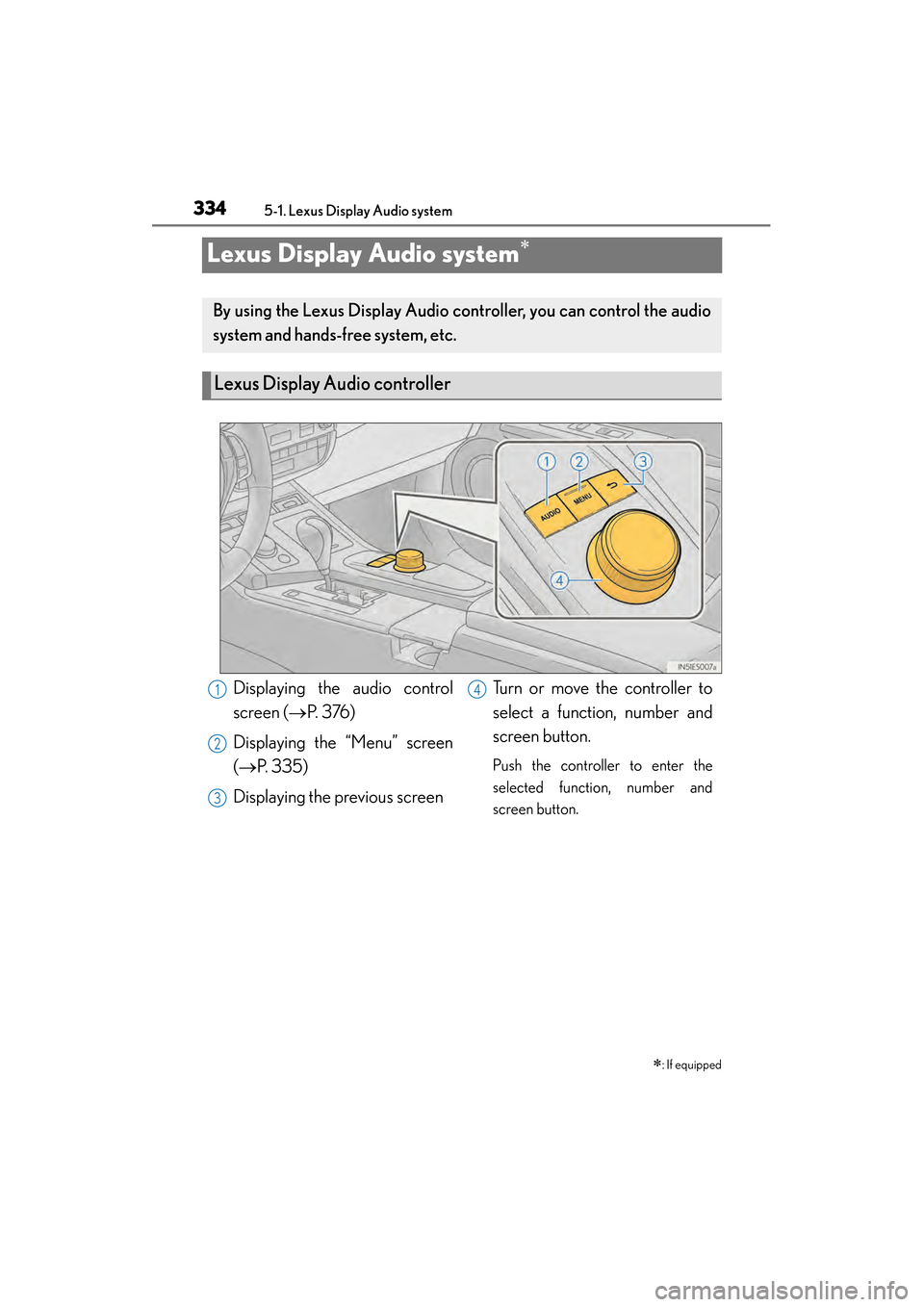
By using the Lexus Display Audio controller, you can control the audio
system and hands-free system, etc.
Lexus Display Audio controller
Displaying the audio control
screen (→ P. 3 76 )
Displaying the “Menu” screen
(→ P. 335)
Displaying the previous screen Turn or move the controller to
select a function, number and
screen button.
Push the controller to enter the
selected function, number and
screen button.
1
2
3
4
Page 336 of 910
ES350 300h_OM_OM33A01U_(U)
3355-1. Lexus Display Audio system
5
Interior features
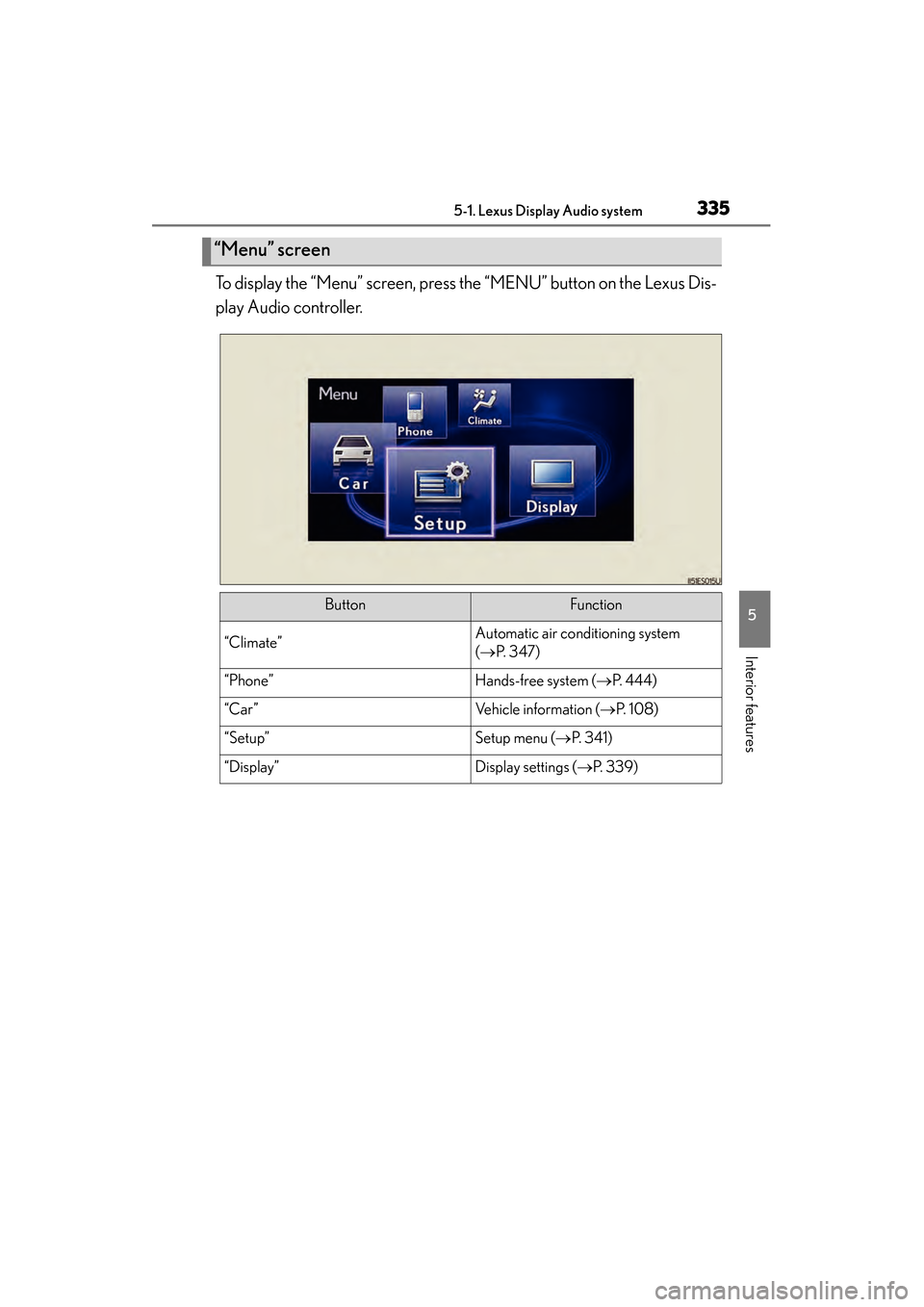
To display the “Menu” screen, press the “MENU” button on the Lexus Dis-
play Audio controller.
“Menu” screen
ButtonFunction
“Climate”Automatic air conditioning system
(→ P. 3 4 7 )
“Phone”Hands-free system ( →P. 444)
“Car ”Vehicle information ( →P. 1 0 8 )
“Setup”Setup menu ( →P. 3 4 1 )
“Display”Display settings ( →P. 3 3 9 )
Page 337 of 910
3365-1. Lexus Display Audio system
ES350 300h_OM_OM33A01U_(U)
If the “START STOP ENGINE”
<“POWER”> switch is turned to
ACCESSORY or IGNITION ON
be displayed for a few seconds as
the system starts up.
Images shown on the initial screen can
be changed to image1 or image2.
(→ P. 3 4 2 )
Initial screen
Page 338 of 910
ES350 300h_OM_OM33A01U_(U)
3375-1. Lexus Display Audio system
5
Interior features
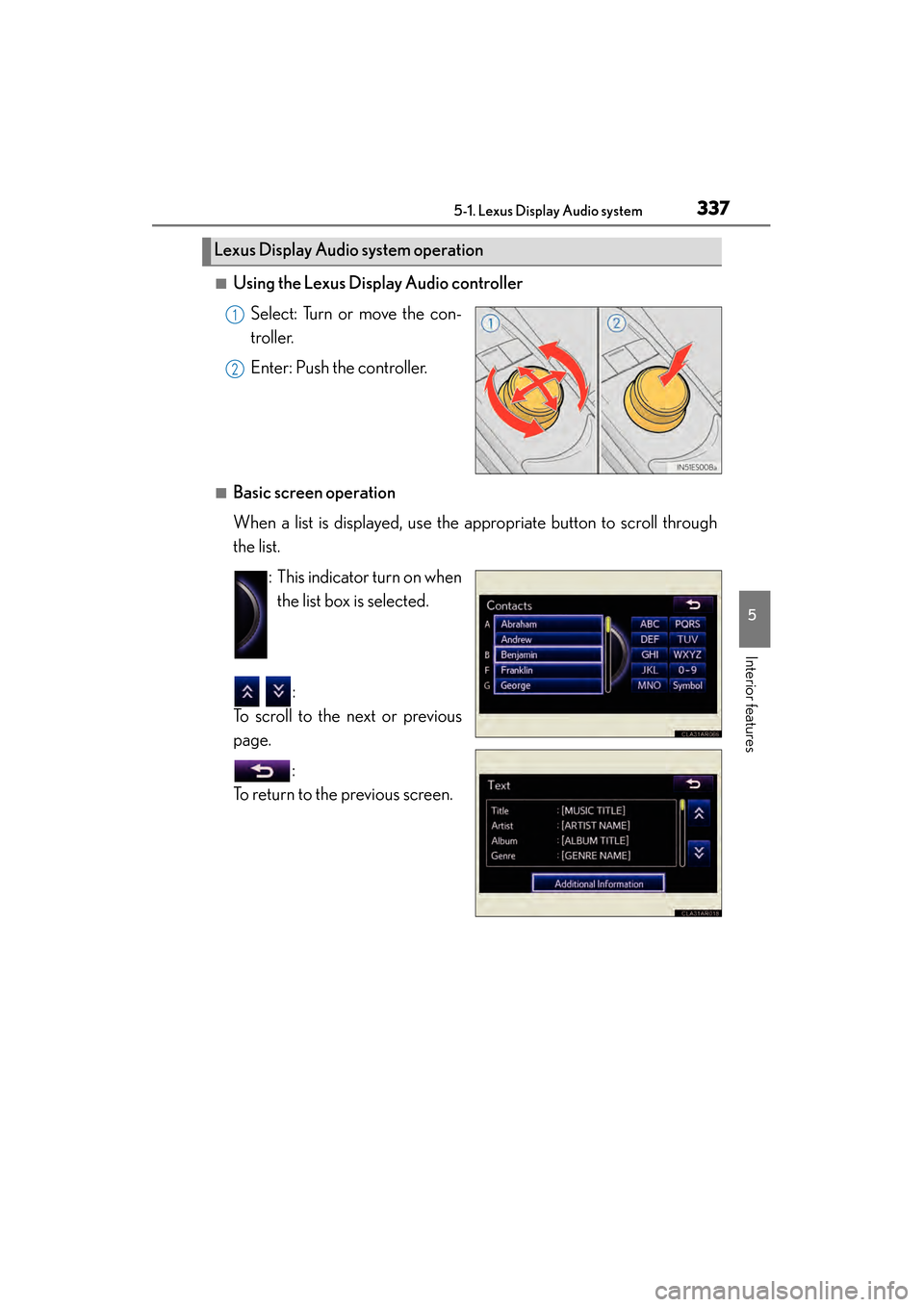
■Using the Lexus Display Audio controllerSelect: Turn or move the con-
troller.
Enter: Push the controller.
■Basic screen operation
When a list is displayed, use the appropriate button to scroll through
the list. : This indicator turn on whenthe list box is selected.
:
To scroll to the next or previous
page.
:
To return to the previous screen.
Lexus Display Audio system operation
1
2
Page 339 of 910
3385-1. Lexus Display Audio system
ES350 300h_OM_OM33A01U_(U)
■When using the screen
●Under extremely cold conditions, the Lexus Display Audio controller may react
slowly.
●If the screen is cold, the display may be dark, or the system may seem to be operat-
ing slightly slower than normal.
●The screen may seem dark and hard to see when viewed through sunglasses.
Change your angle of viewing, adjust the display on the “Display Settings” screen
(→ P. 339) or remove your sunglasses.
CAUTION
■Using the Lexus Display Audio controller
●Do not allow fingers, fingernails or hair to become caught in the Lexus Display
Audio controller as this may cause an injury.
●Be careful when touching the Lexus Display Audio controller in extreme temper-
atures as it may become very hot or cold due to the temperature inside the vehi-
cle.
NOTICE
■To prevent the Lexus Display Audio controller malfunction
●Do not allow the Lexus Display Audio controller to come into contact with food,
liquid, stickers or lit cigarettes as doing so may cause it to change color, emit a
strange odor or stop functioning.
●Do not subject the Lexus Display Audio controller to excessive pressure or
strong impact as the controller may bend or break off.
●Do not allow coins, contact lenses or other such items to become caught in the
Lexus Display Audio controller as this may cause it to stop functioning.
●Items of clothing may rip if they become caught on the Lexus Display Audio con-
troller.
●If your hand or any object is on the Lexus Display Audio controller when the
“START STOP ENGINE” <“POWER”> switch is turned to ACCESSORY mode,
the Lexus Display Audio controller may not operate properly.
Page 340 of 910
339
ES350 300h_OM_OM33A01U_(U)
5-1. Lexus Display Audio system
5
Interior features
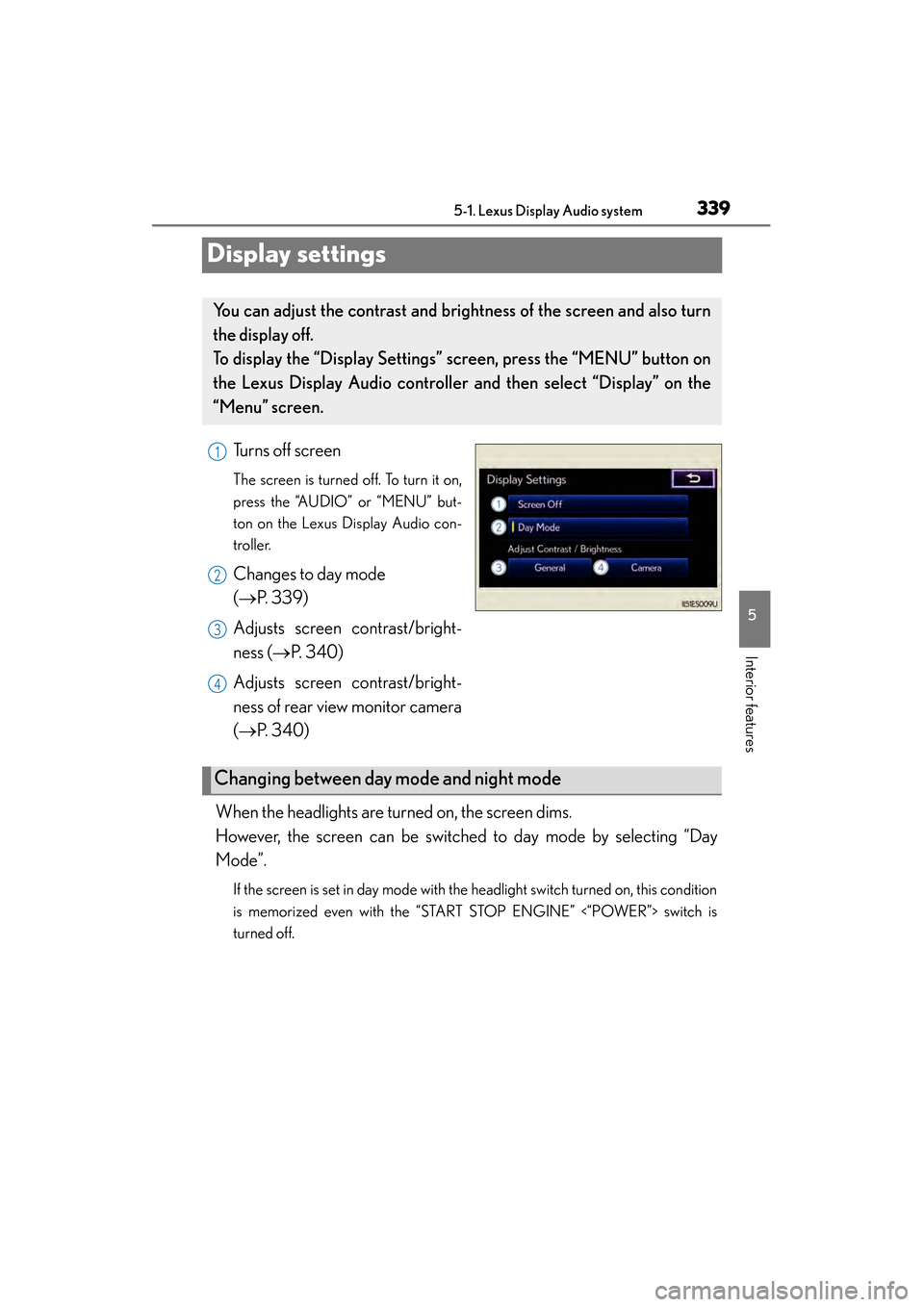
Display settings
Turns off screen
The screen is turned off. To turn it on,
press the “AUDIO” or “MENU” but-
ton on the Lexus Display Audio con-
troller.
Changes to day mode
(→P. 3 3 9 )
Adjusts screen contrast/bright-
ness ( →P. 3 4 0 )
Adjusts screen contrast/bright-
ness of rear view monitor camera
(→ P. 3 4 0 )
When the headlights are turned on, the screen dims.
However, the screen can be switched to day mode by selecting “Day
Mode”.
If the screen is set in day mode with the headlight switch turned on, this condition
is memorized even with the “START STOP ENGINE” <“POWER”> switch is
turned off.
You can adjust the contrast and brightness of the screen and also turn
the display off.
To display the “Display Settings” screen, press the “MENU” button on
the Lexus Display Audio controller and then select “Display” on the
“Menu” screen.
1
2
3
4
Changing between day mode and night mode
Page 341 of 910
3405-1. Lexus Display Audio system
ES350 300h_OM_OM33A01U_(U)
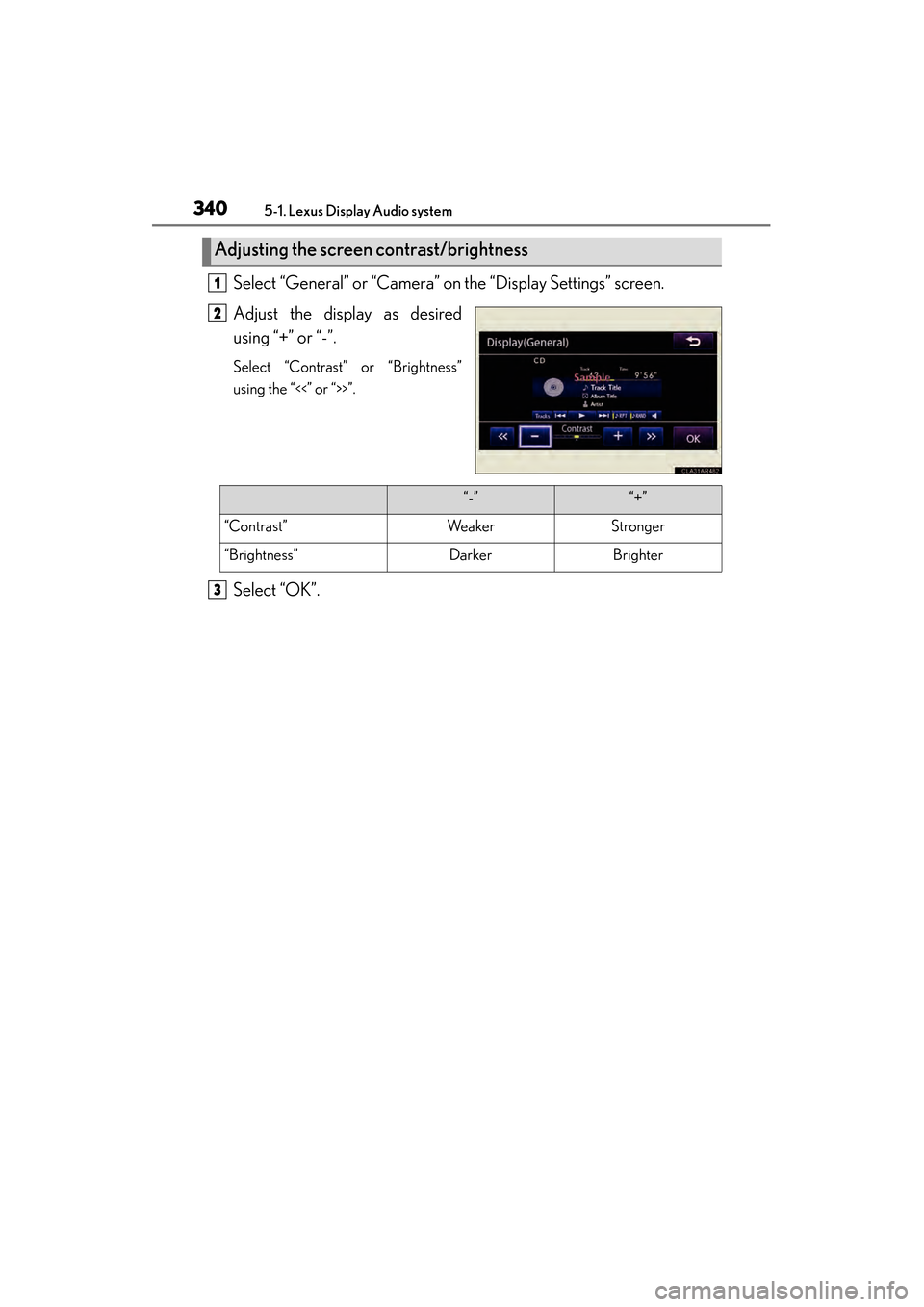
Select “General” or “Camera” on the “Display Settings” screen.
Adjust the display as desired
using “+” or “-”.
Select “Contrast” or “Brightness”
using the “<<” or “>>”.
Select “OK”.
Adjusting the screen contrast/brightness
1
2
“-”“+”
“Contrast”WeakerStronger
“Brightness”DarkerBrighter
3