key Lexus ES300h 2013 Workshop Manual
[x] Cancel search | Manufacturer: LEXUS, Model Year: 2013, Model line: ES300h, Model: Lexus ES300h 2013Pages: 910, PDF Size: 9.95 MB
Page 579 of 910
578
ES350 300h_OM_OM33A01U_(U)
5-4. Using the audio system
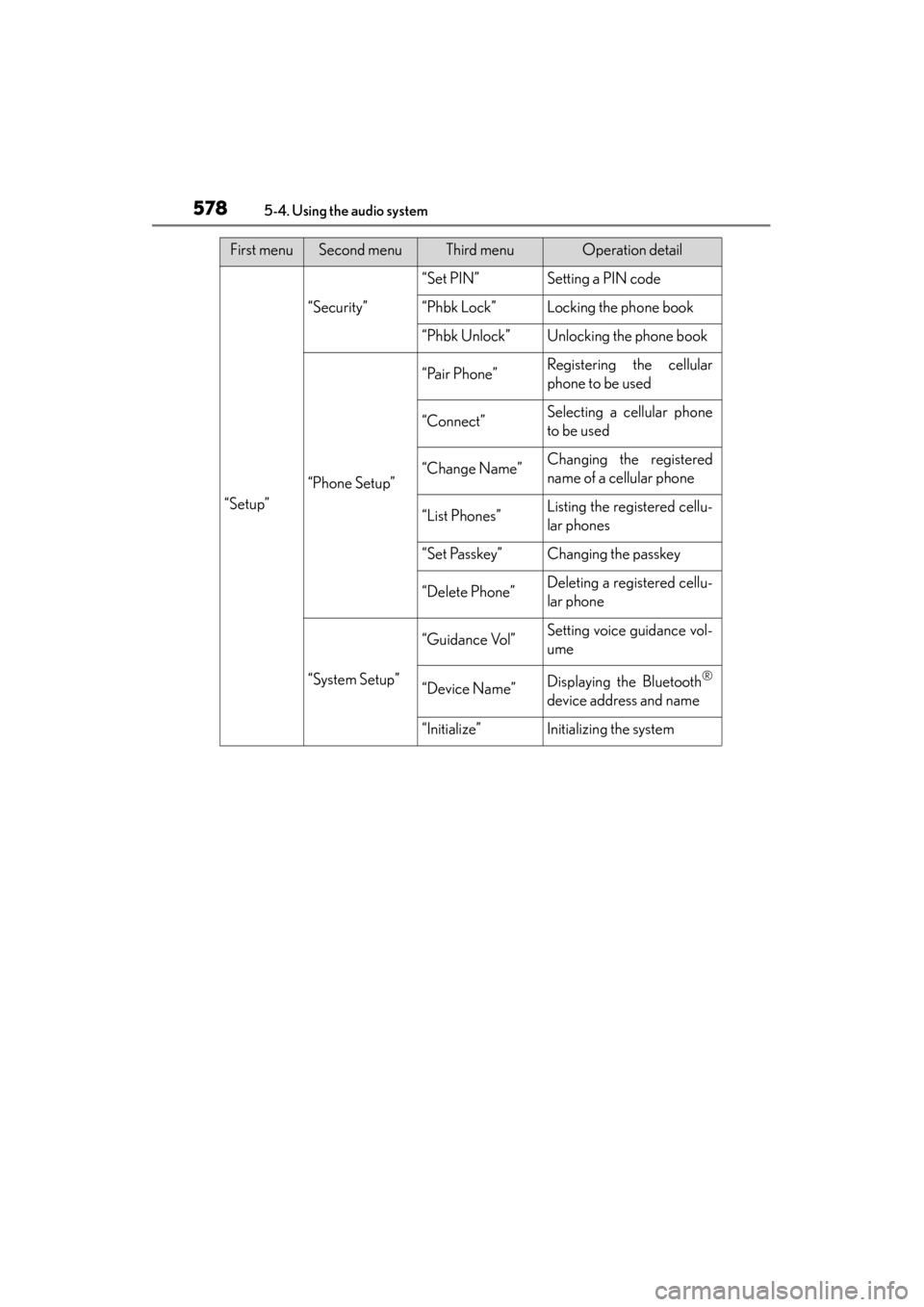
“Setup”
“Security”
“Set PIN”Setting a PIN code
“Phbk Lock”Locking the phone book
“Phbk Unlock”Unlocking the phone book
“Phone Setup”
“Pair Phone”Registering the cellular
phone to be used
“Connect”Selecting a cellular phone
to be used
“Change Name”Changing the registered
name of a cellular phone
“List Phones”Listing the registered cellu-
lar phones
“Set Passkey”Changing the passkey
“Delete Phone”Deleting a registered cellu-
lar phone
“System Setup”
“Guidance Vol”Setting voice guidance vol-
ume
“Device Name”Displaying the Bluetooth®
device address and name
“Initialize”Initializing the system
First menuSecond menuThird menuOperation detail
Page 580 of 910
ES350 300h_OM_OM33A01U_(U)
5795-4. Using the audio system
5
Interior features
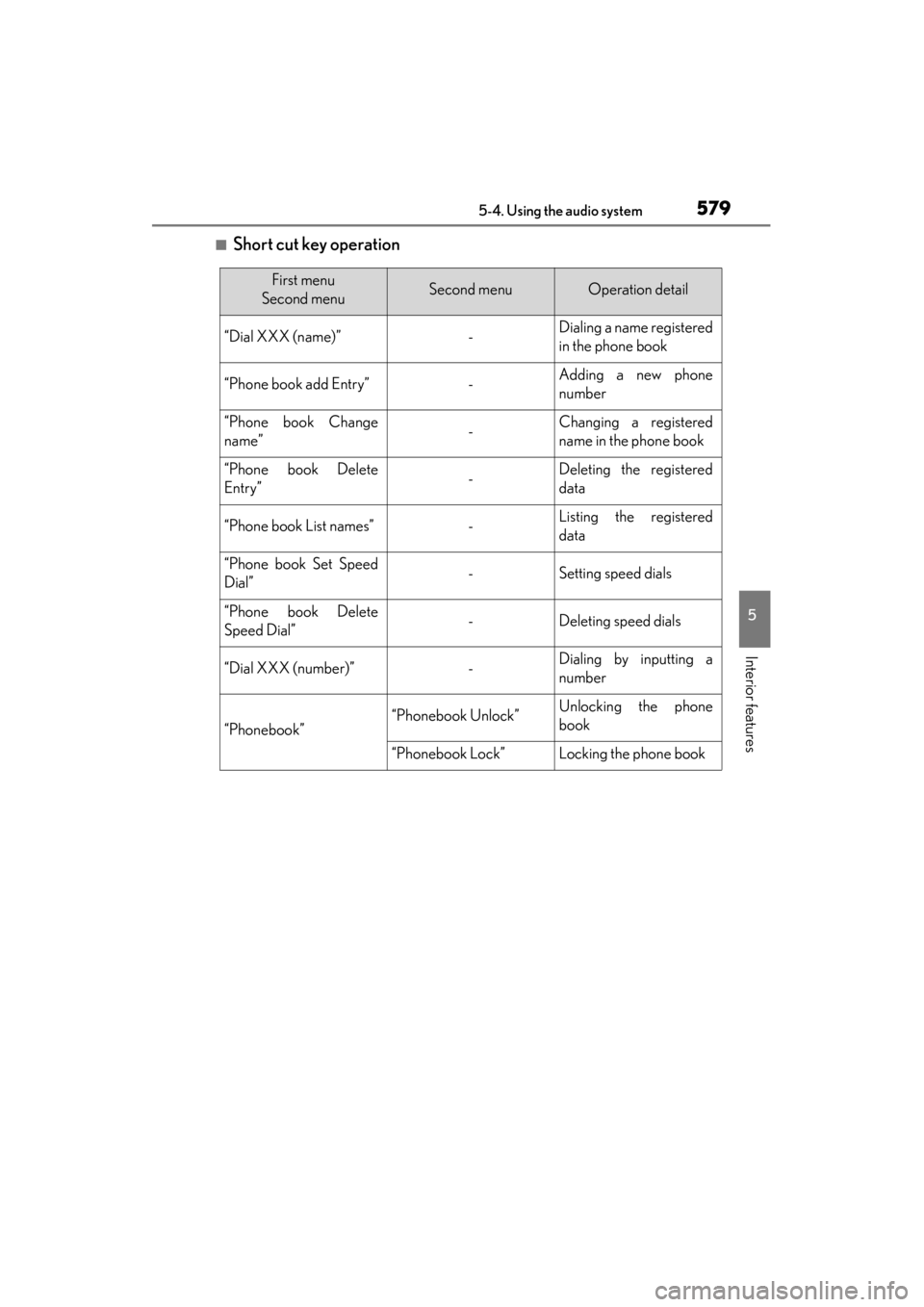
■Short cut key operation
First menu
Second menuSecond menuOperation detail
“Dial XXX (name)”-Dialing a name registered
in the phone book
“Phone book add Entry”-Adding a new phone
number
“Phone book Change
name”-Changing a registered
name in the phone book
“Phone book Delete
Entry”-Deleting the registered
data
“Phone book List names”-Listing the registered
data
“Phone book Set Speed
Dial”-Setting speed dials
“Phone book Delete
Speed Dial”-Deleting speed dials
“Dial XXX (number)”-Dialing by inputting a
number
“Phonebook”“Phonebook Unlock”Unlocking the phone
book
“Phonebook Lock”Locking the phone book
Page 581 of 910
580
ES350 300h_OM_OM33A01U_(U)
5-4. Using the audio system
■Automatic volume adjustment
When vehicle speed reaches 50 mph (80 km/h) or more, the volume automatically
increases. The volume returns to the previous volume setting when vehicle speed
drops to 43 mph (70 km/h) or less.
■When using a voice command
For numbers, say a combination of single digits from zero to nine, # (pound),
∗ (star), and + (plus).
Say the command correctly and clearly.
■Situations in which the system may not recognize your voice
●When driving on rough roads
●When driving at high speeds
●When air is blowing out of the vents onto the microphone
●When the air conditioning fan emits a loud noise
■Operations that cannot be performed while driving
●Operating the system with
●Registering a cellular phone to the system
■Changing the passkey
→ P. 5 8 8
Page 586 of 910
585
ES350 300h_OM_OM33A01U_(U)
5-4. Using the audio system
5
Interior features
Setting a cellular phone
To enter the menu for each function, follow the steps below using a voice
command or :
●Registering a cellular phone
1. “Setup” → 2. “Phone Setup” → 3. “Pair Phone”
●Selecting a cellular phone to be used
1. “Setup” → 2. “Phone Setup” → 3. “Connect Phone (Connect)”
●Changing the registered name of a cellular phone
1. “Setup” → 2. “Phone Setup” → 3. “Change Name”
●Listing the registered cellular phones
1. “Setup” → 2. “Phone Setup” → 3. “List Phones”
●Changing the passkey
1. “Setup” → 2. “Phone Setup” → 3. “Set Passkey”
●Deleting a registered cellular phone
1. “Setup” → 2. “Phone Setup” → 3. “Delete Phone”
Select “Pair Phone” using a voice command or , and perform the
procedure for registering a cellular phone. ( →P. 5 76 )
Registering a cellular phone in the hands-free phone system allows the
system to function. The following functions can be used for registered
cellular phones:
Functions and operation procedures
Registering a cellular phone
Page 589 of 910
588
ES350 300h_OM_OM33A01U_(U)
5-4. Using the audio system
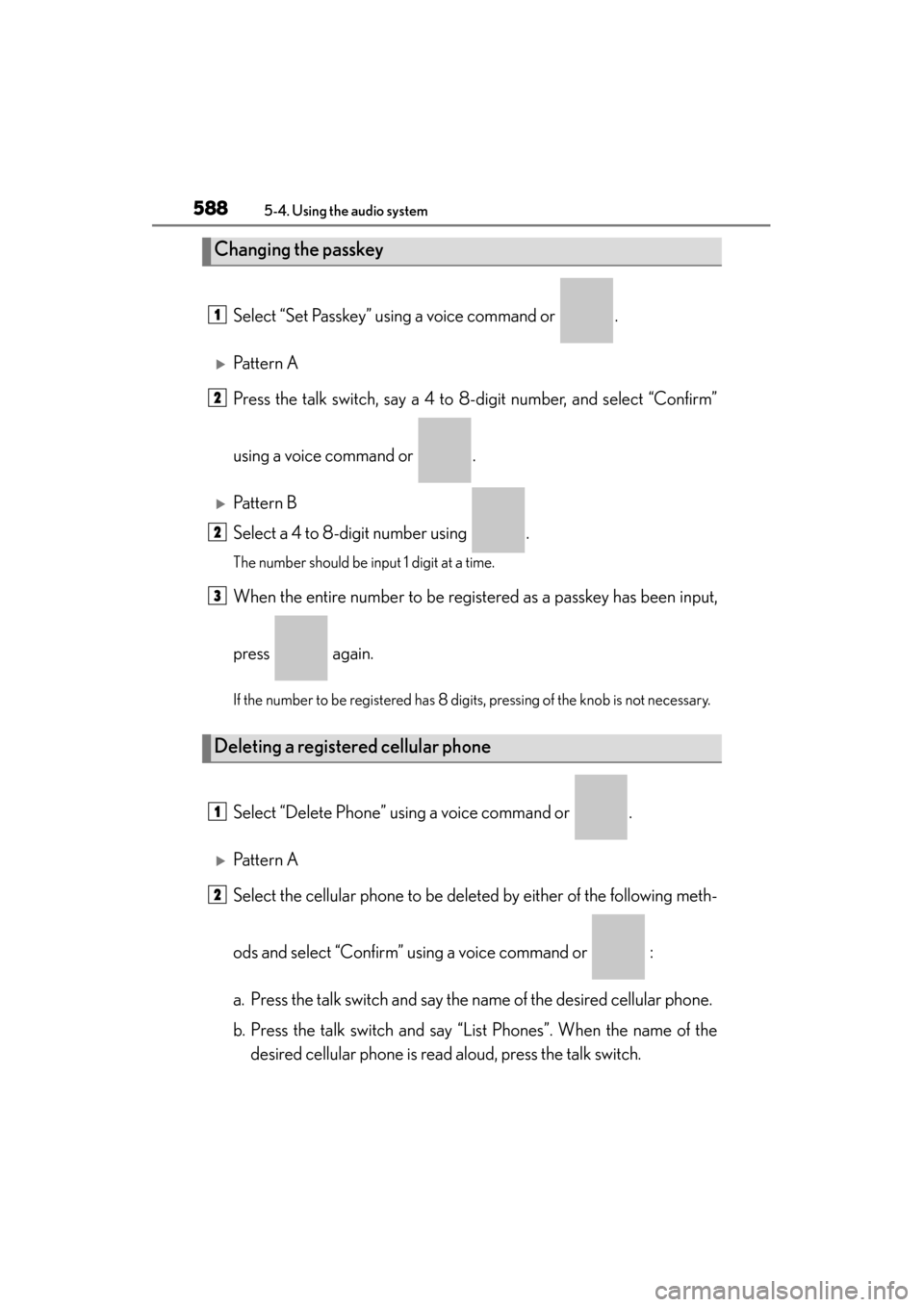
Select “Set Passkey” using a voice command or .
XPattern A
Press the talk switch, say a 4 to 8-digit number, and select “Confirm”
using a voice command or .
XPattern B
Select a 4 to 8-digit number using .
The number should be input 1 digit at a time.
When the entire number to be registered as a passkey has been input,
press again.
If the number to be registered has 8 digits, pressing of the knob is not necessary.
Select “Delete Phone” using a voice command or .
XPattern A
Select the cellular phone to be deleted by either of the following meth-
ods and select “Confirm” using a voice command or :
a. Press the talk switch and say the name of the desired cellular phone.
b. Press the talk switch and say “List Phones”. When the name of thedesired cellular phone is read aloud, press the talk switch.
Changing the passkey
Deleting a registered cellular phone
1
2
2
3
1
2
Page 595 of 910
594
ES350 300h_OM_OM33A01U_(U)
5-4. Using the audio system
■Initialization
●The following data in the system can be initialized:
• Phone book
• Outgoing and incoming call history
• Speed dials
• Registered cellular phone data
•Security code
• Registered Bluetooth
® enabled portable player data
• Passkey for the cellular phones
• Passkey for the Bluetooth
® audio players
•Guidance volume
• Receiver volume
• Ring tone volume
●Once the initialization has been completed, the data cannot be restored to its orig-
inal state.
■When the phone book is locked
The following functions cannot be used:
●Dialing by inputting a name
●Speed dialing
●Dialing a number stored in the call history memory
●Using the phone book
Page 606 of 910
ES350 300h_OM_OM33A01U_(U)
6055-5. Using the interior lights
5
Interior features
■Illuminated entry system
The lights automatically turn on/off according to “START STOP ENGINE”
<“POWER”> switch mode, the presence of the electronic key, whether the doors are
locked/unlocked, and whether the doors are opened/closed.
■To prevent 12-volt battery discharge
If the following lights remain on when the door is not fully closed and the personal/
interior light main switch is in the door position, the lights will go off automatically
after 20 minutes:
●Outer foot lights
●Personal/interior light
●Door courtesy lights
●Ornament lights (if equipped)
●Footwell lights
■Customization
Setting (e.g. the time elapsed before lights turn off) can be changed.
(Customizable features: →P. 8 5 2 )
Page 609 of 910
608
ES350 300h_OM_OM33A01U_(U)
5-6. Using the storage features
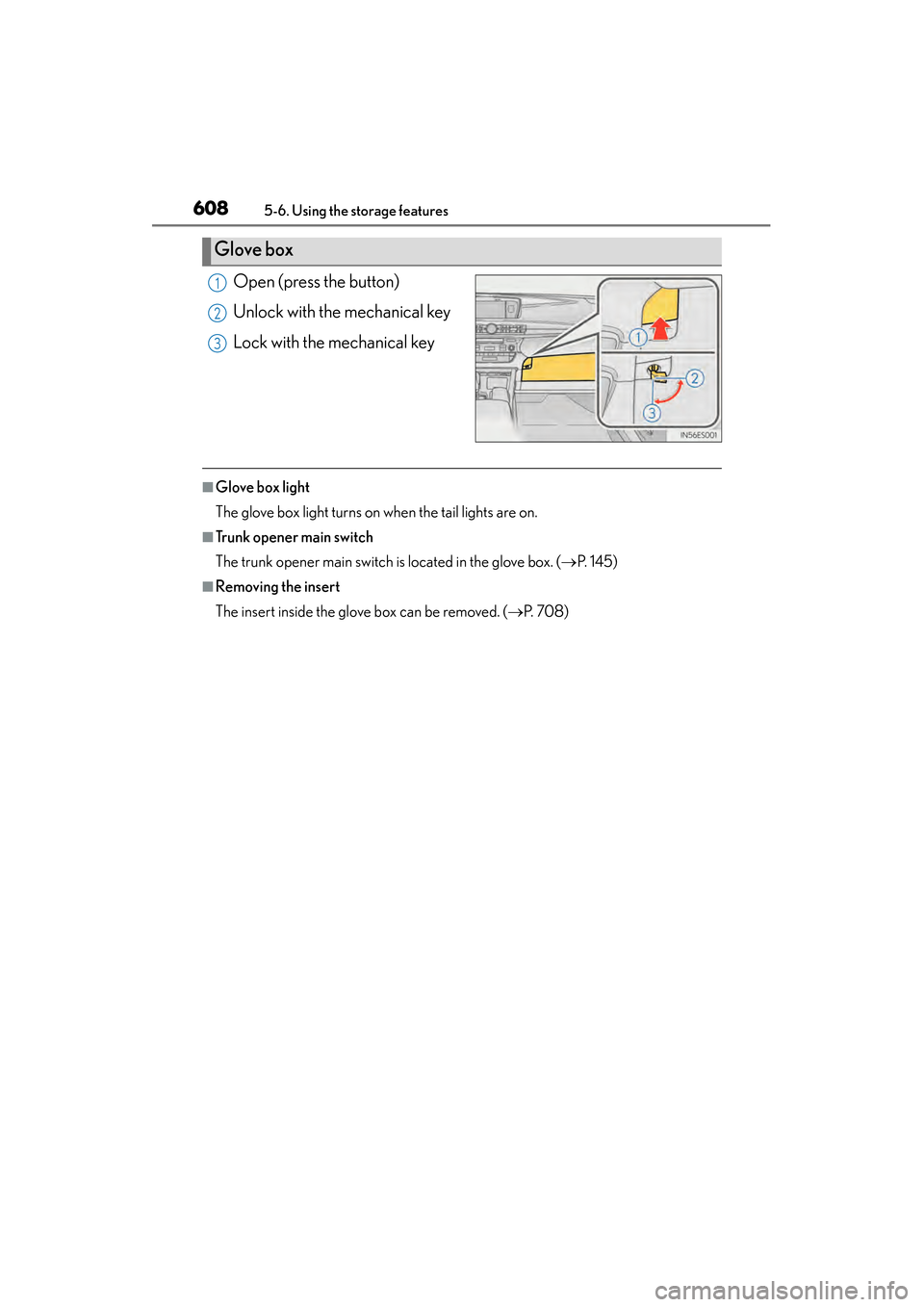
Open (press the button)
Unlock with the mechanical key
Lock with the mechanical key
■Glove box light
The glove box light turns on when the tail lights are on.
■Trunk opener main switch
The trunk opener main switch is located in the glove box. (→P. 1 4 5 )
■Removing the insert
The insert inside the glove box can be removed. ( →P. 7 0 8 )
Glove box
1
2
3
Page 650 of 910
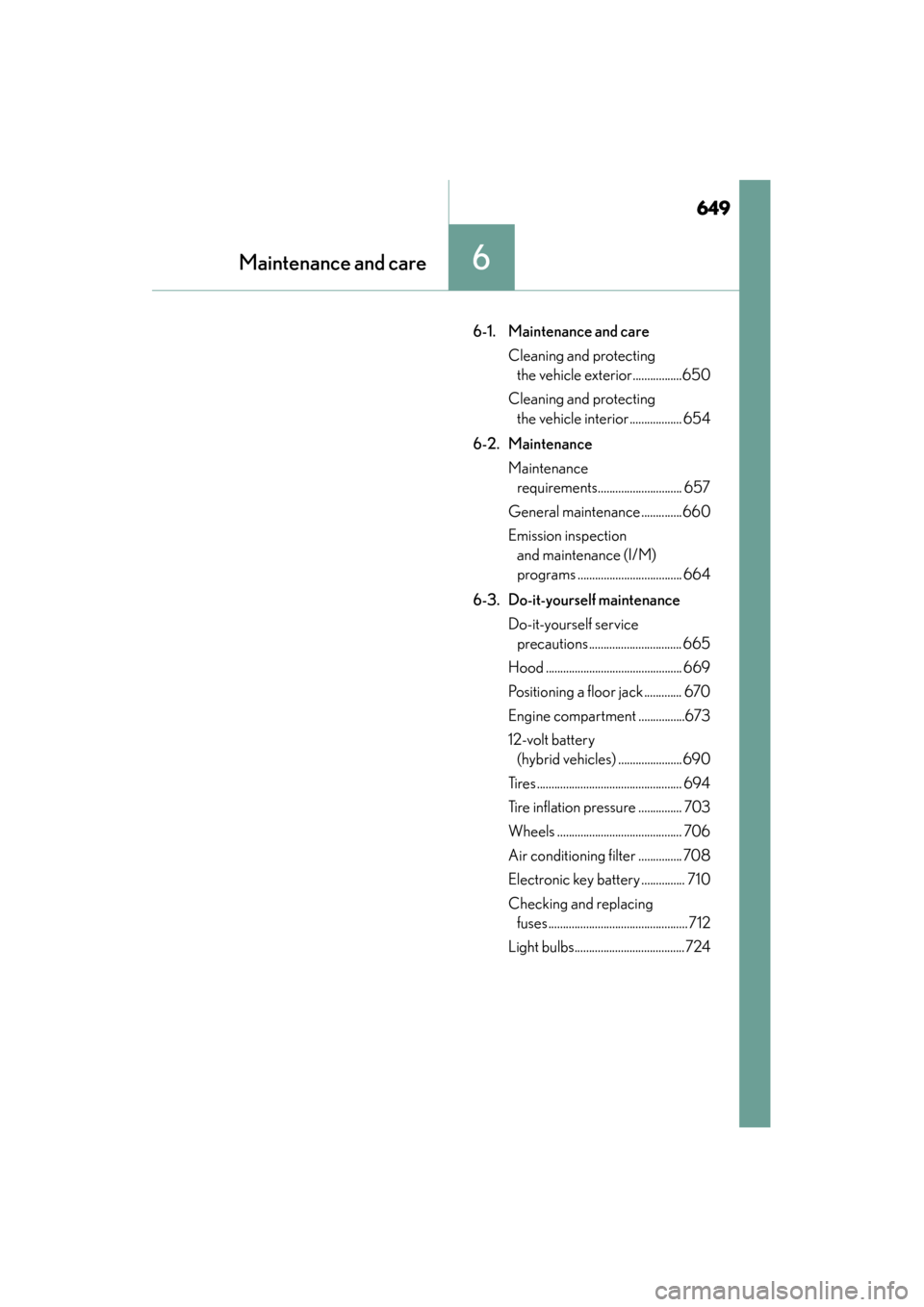
649
ES350 300h_OM_OM33A01U_(U)
6Maintenance and care
6-1. Maintenance and careCleaning and protecting the vehicle exterior.................650
Cleaning and protecting the vehicle interior .................. 654
6-2. Maintenance Maintenance requirements............................. 657
General maintenance ..............660
Emission inspection and maintenance (I/M)
programs .................................... 664
6-3. Do-it-yourself maintenance Do-it-yourself service precautions................................ 665
Hood ............................................... 669
Positioning a floor jack ............. 670
Engine compartment ................673
12-volt battery (hybrid vehicles) ......................690
Tires.................................................. 694
Tire inflation pressure ............... 703
Wheels ........................................... 706
Air conditioning filter ............... 708
Electronic key battery ............... 710
Checking and replacing fuses................................................712
Light bulbs......................................724
Page 652 of 910
ES350 300h_OM_OM33A01U_(U)
6516-1. Maintenance and care
6
Maintenance and care
■When using a car wash
If the door handle becomes wet while the electronic key is within the effective range,
the door may lock and unlock repeatedly. In that case, follow the following correc-
tion procedures to wash the vehicle:
●Place the key in a position 6 ft. (2 m) or more separate from the vehicle while the
vehicle is being washed. (Take care to ensure that the key is not stolen.)
●Set the electronic key to battery-saving mode to disable the smart access system
with push-button start. (→P. 1 2 9 )
■Aluminum wheels
●Remove any dirt immediately by using a neutral detergent. Do not use hard
brushes or abrasive cleaners. Do not use strong or harsh chemical cleaners.
Use the same mild detergent and wax as used on the paint.
●Do not use detergent on the wheels when th ey are hot, for example after driving for
long distance in the hot weather.
●Wash detergent from the wheels immediately after use.
■Bumpers and side moldings
Do not scrub with abrasive cleaners.