steering Lexus ES300h 2013 Repair Manual
[x] Cancel search | Manufacturer: LEXUS, Model Year: 2013, Model line: ES300h, Model: Lexus ES300h 2013Pages: 910, PDF Size: 9.95 MB
Page 469 of 910
468
ES350 300h_OM_OM33A01U_(U)
5-3. Using the Lexus Display Audio system
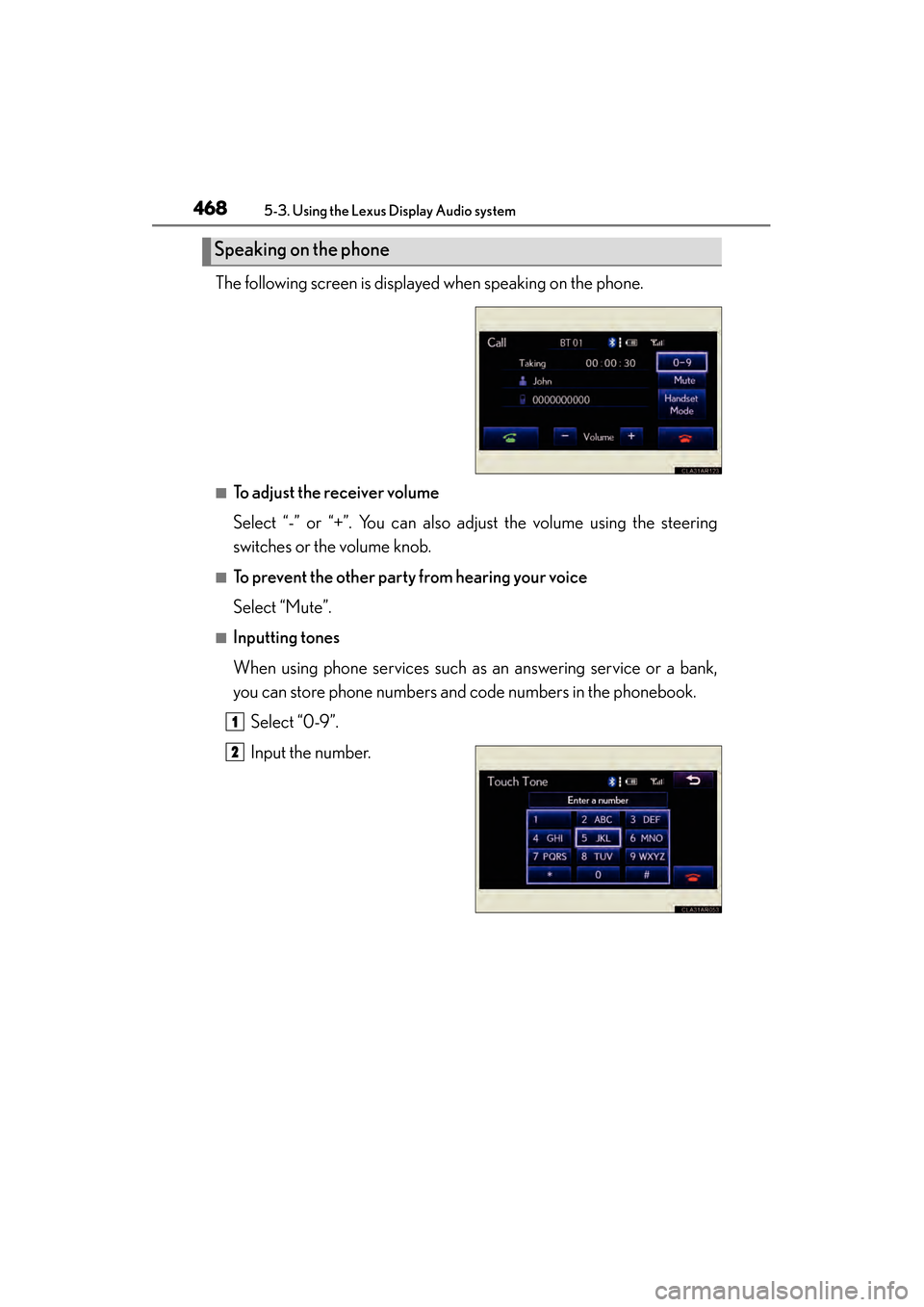
The following screen is displayed when speaking on the phone.
■To adjust the receiver volume
Select “-” or “+”. You can also adjust the volume using the steering
switches or the volume knob.
■To prevent the other party from hearing your voice
Select “Mute”.
■Inputting tones
When using phone services such as an answering service or a bank,
you can store phone numbers and code numbers in the phonebook.Select “0-9”.
Input the number.
Speaking on the phone
1
2
Page 470 of 910
ES350 300h_OM_OM33A01U_(U)
4695-3. Using the Lexus Display Audio system
5
Interior features
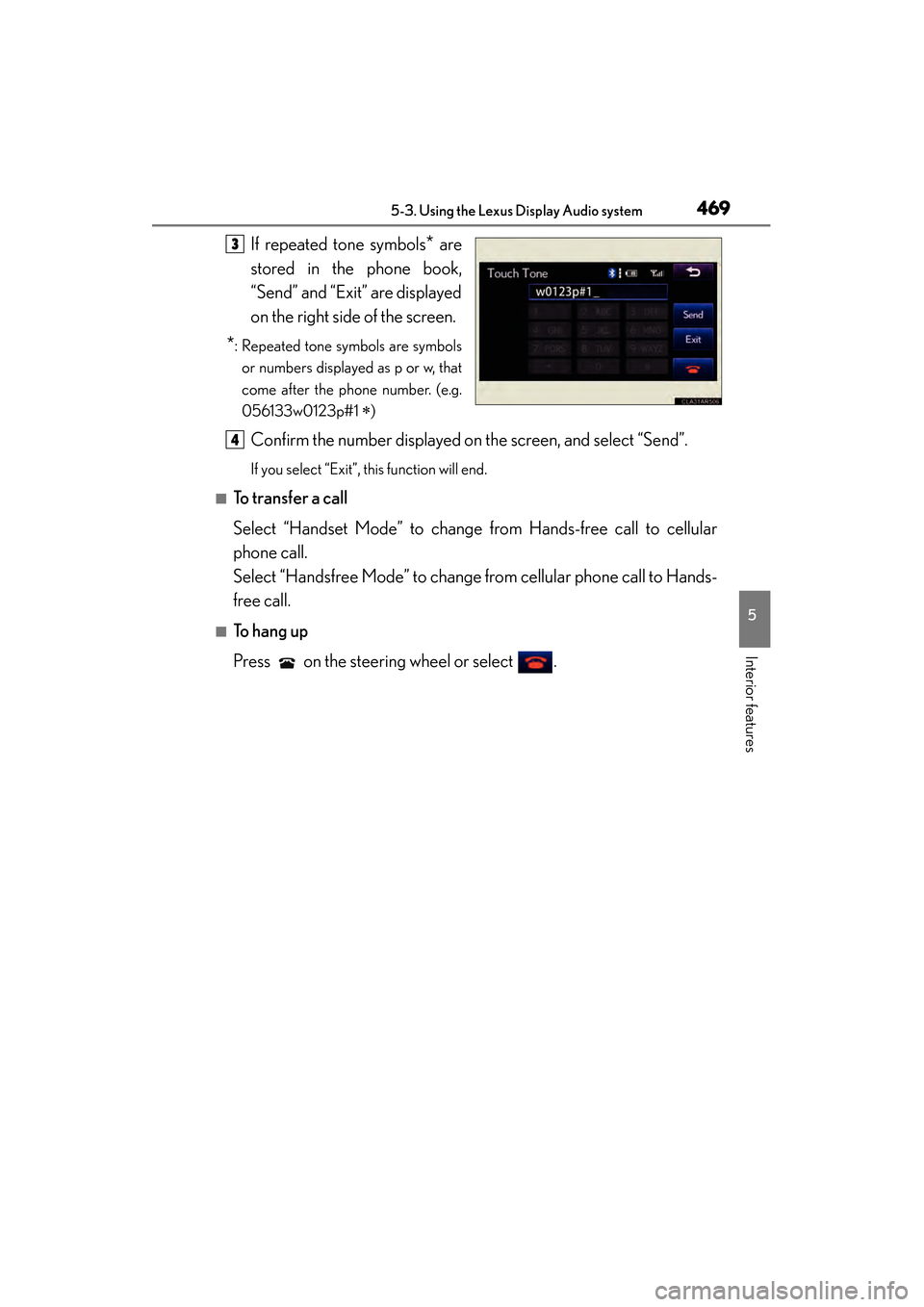
If repeated tone symbols* are
stored in the phone book,
“Send” and “Exit” are displayed
on the right side of the screen.
*: Repeated tone symbols are symbols
or numbers displayed as p or w, that
come after the phone number. (e.g.
056133w0123p#1
∗)
Confirm the number displayed on the screen, and select “Send”.
If you select “Exit”, this function will end.
■To transfer a call
Select “Handset Mode” to change from Hands-free call to cellular
phone call.
Select “Handsfree Mode” to change from cellular phone call to Hands-
free call.
■To h a n g u p
Press on the steering wheel or select .
3
4
Page 471 of 910
470
ES350 300h_OM_OM33A01U_(U)
5-3. Using the Lexus Display Audio system
■Call waiting
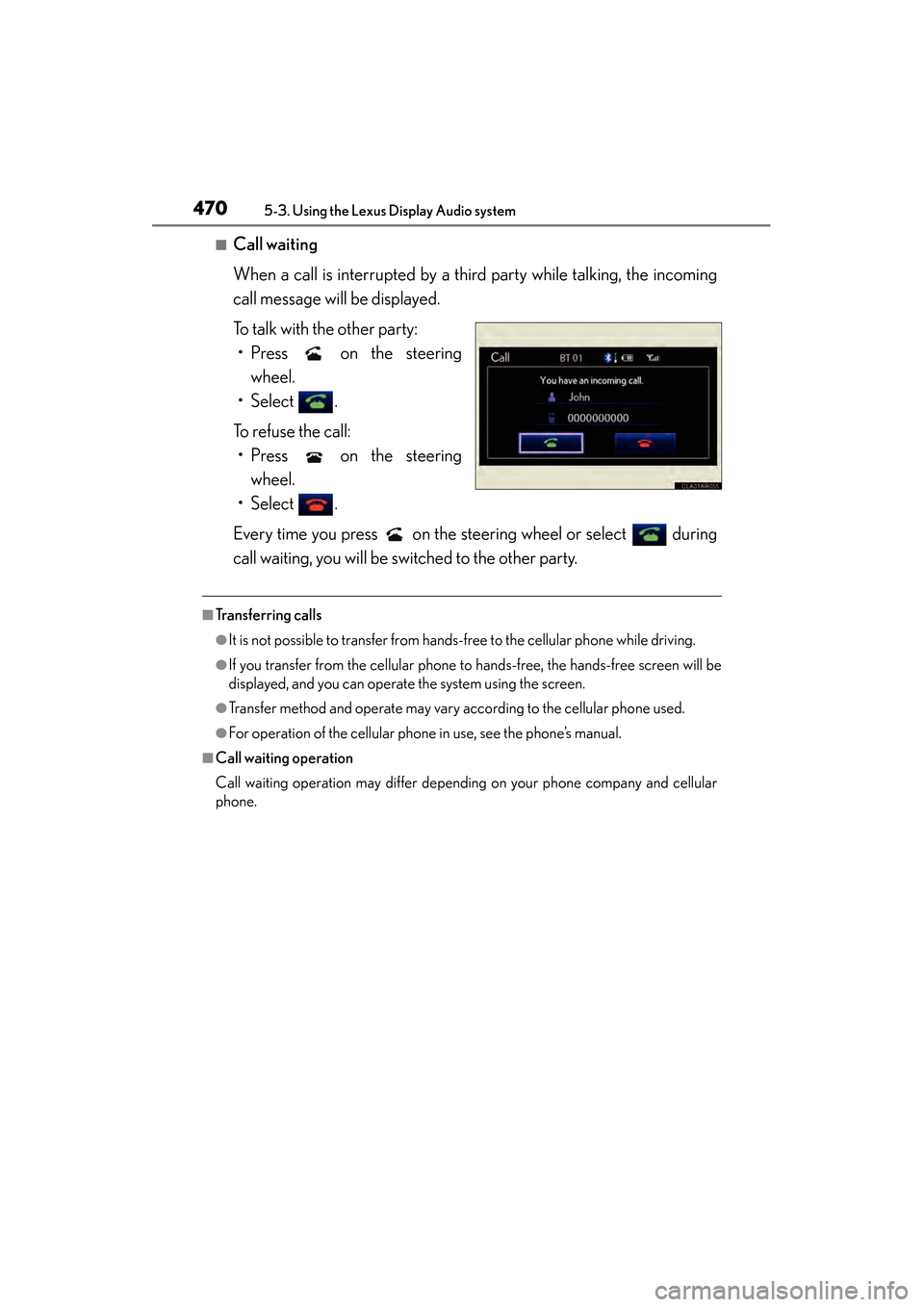
When a call is interrupted by a third party while talking, the incoming
call message will be displayed.
To talk with the other party:• Press on the steering wheel.
• Select .
To refuse the call: • Press on the steering wheel.
• Select .
Every time you press on the steering wheel or select during
call waiting, you will be switched to the other party.
■Transferring calls
●It is not possible to transfer from hand s-free to the cellular phone while driving.
●If you transfer from the cellular phone to hands-free, the hands-free screen will be
displayed, and you can operate the system using the screen.
●Transfer method and operate may vary according to the cellular phone used.
●For operation of the cellular phone in use, see the phone’s manual.
■Call waiting operation
Call waiting operation may differ depending on your phone company and cellular
phone.
Page 495 of 910
494
ES350 300h_OM_OM33A01U_(U)
5-4. Using the audio system
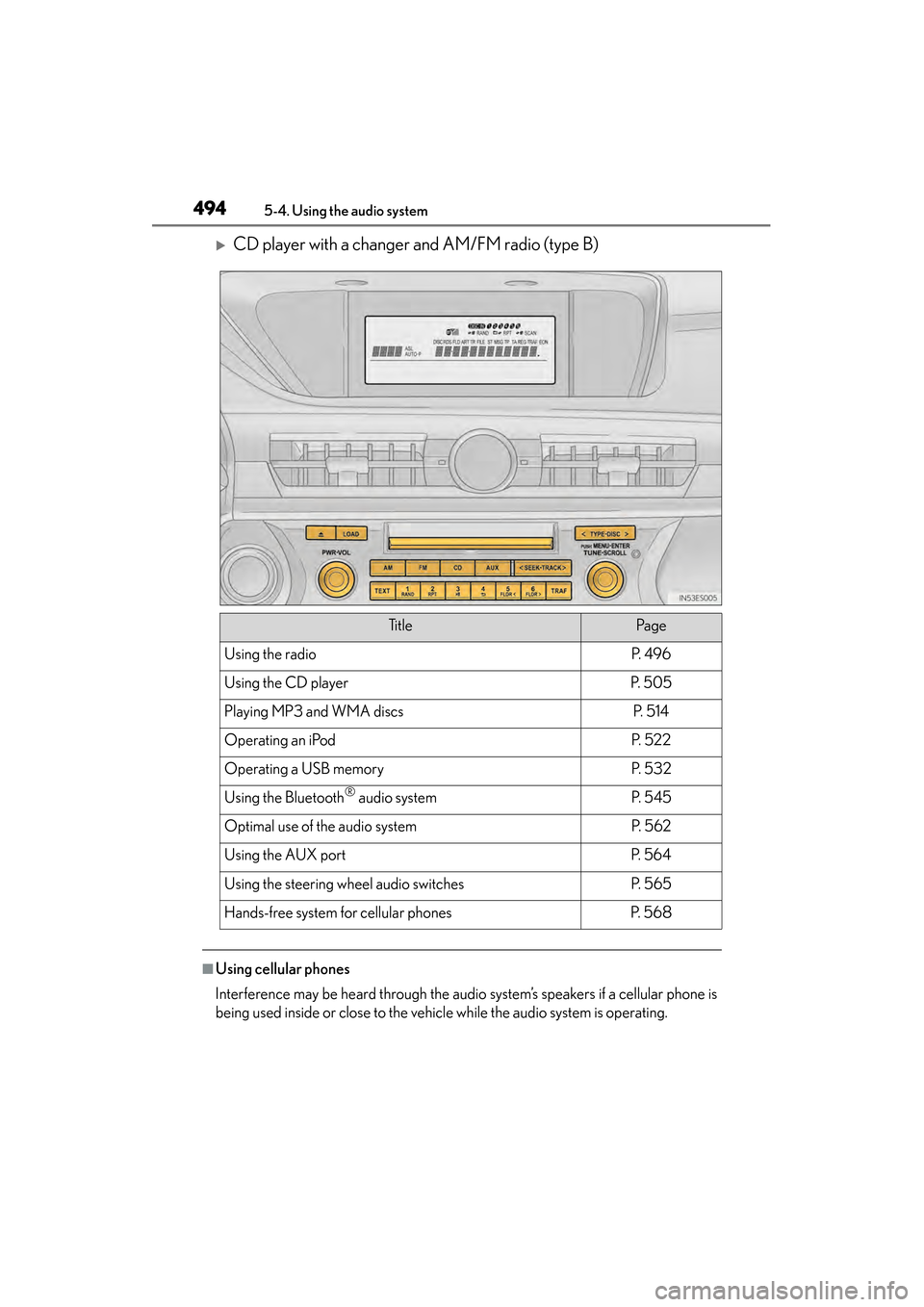
XCD player with a changer and AM/FM radio (type B)
■Using cellular phones
Interference may be heard through the audio system’s speakers if a cellular phone is
being used inside or close to the vehicle while the audio system is operating.
Ti t l ePa g e
Using the radioP. 4 9 6
Using the CD playerP. 5 0 5
Playing MP3 and WMA discsP. 5 1 4
Operating an iPodP. 5 2 2
Operating a USB memoryP. 5 3 2
Using the Bluetooth® audio systemP. 5 4 5
Optimal use of the audio systemP. 5 6 2
Using the AUX portP. 5 6 4
Using the steering wheel audio switchesP. 5 6 5
Hands-free system for cellular phonesP. 5 6 8
Page 566 of 910
565
ES350 300h_OM_OM33A01U_(U)
5-4. Using the audio system
5
Interior features
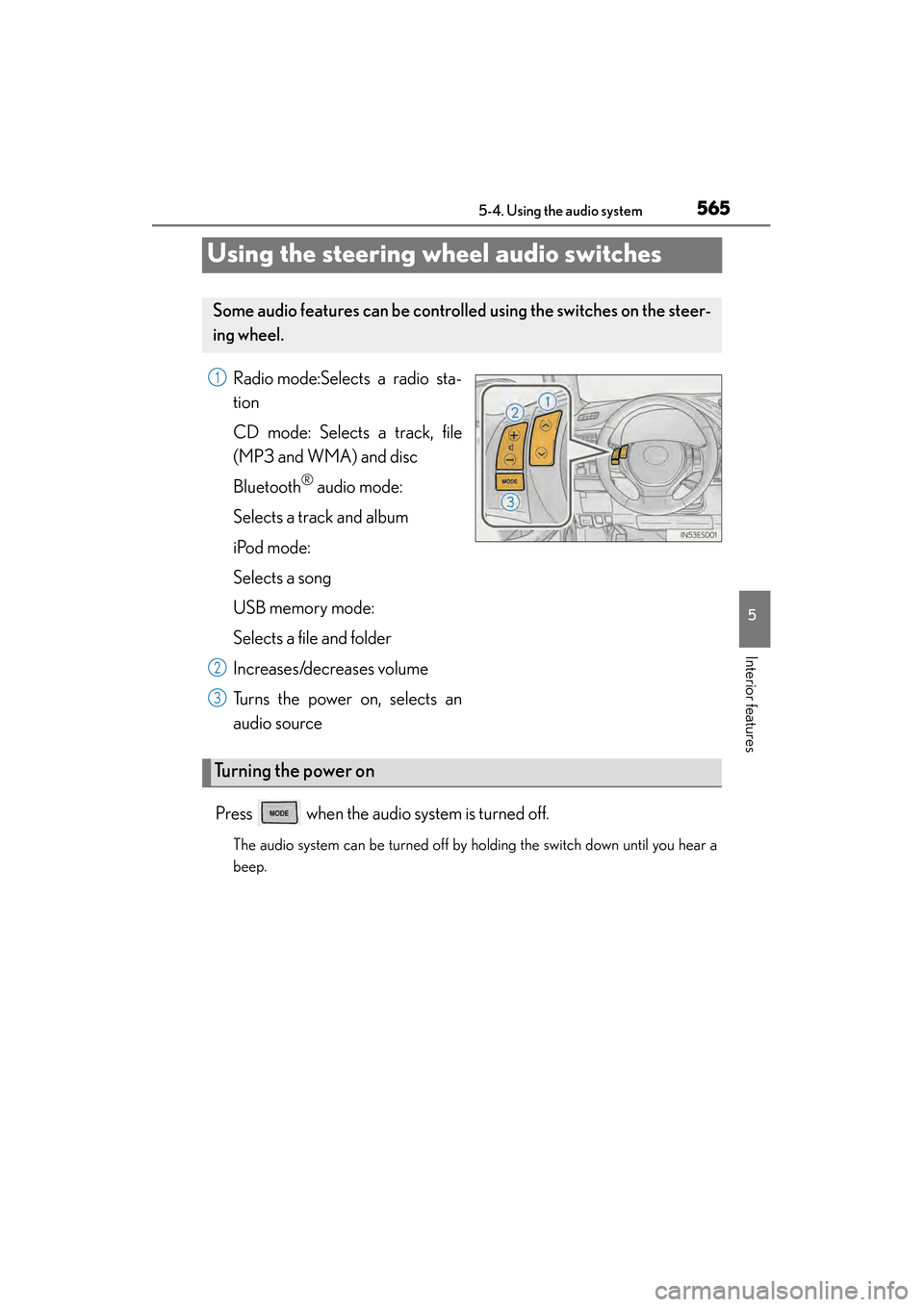
Using the steering wheel audio switches
Radio mode:Selects a radio sta-
tion
CD mode: Selects a track, file
(MP3 and WMA) and disc
Bluetooth
® audio mode:
Selects a track and album
iPod mode:
Selects a song
USB memory mode:
Selects a file and folder
Increases/decreases volume
Turns the power on, selects an
audio source
Press when the audio system is turned off.
The audio system can be turned off by holding the switch down until you hear a
beep.
Some audio features can be controll ed using the switches on the steer-
ing wheel.
1
2
3
Turning the power on
Page 568 of 910
ES350 300h_OM_OM33A01U_(U)
5675-4. Using the audio system
5
Interior features
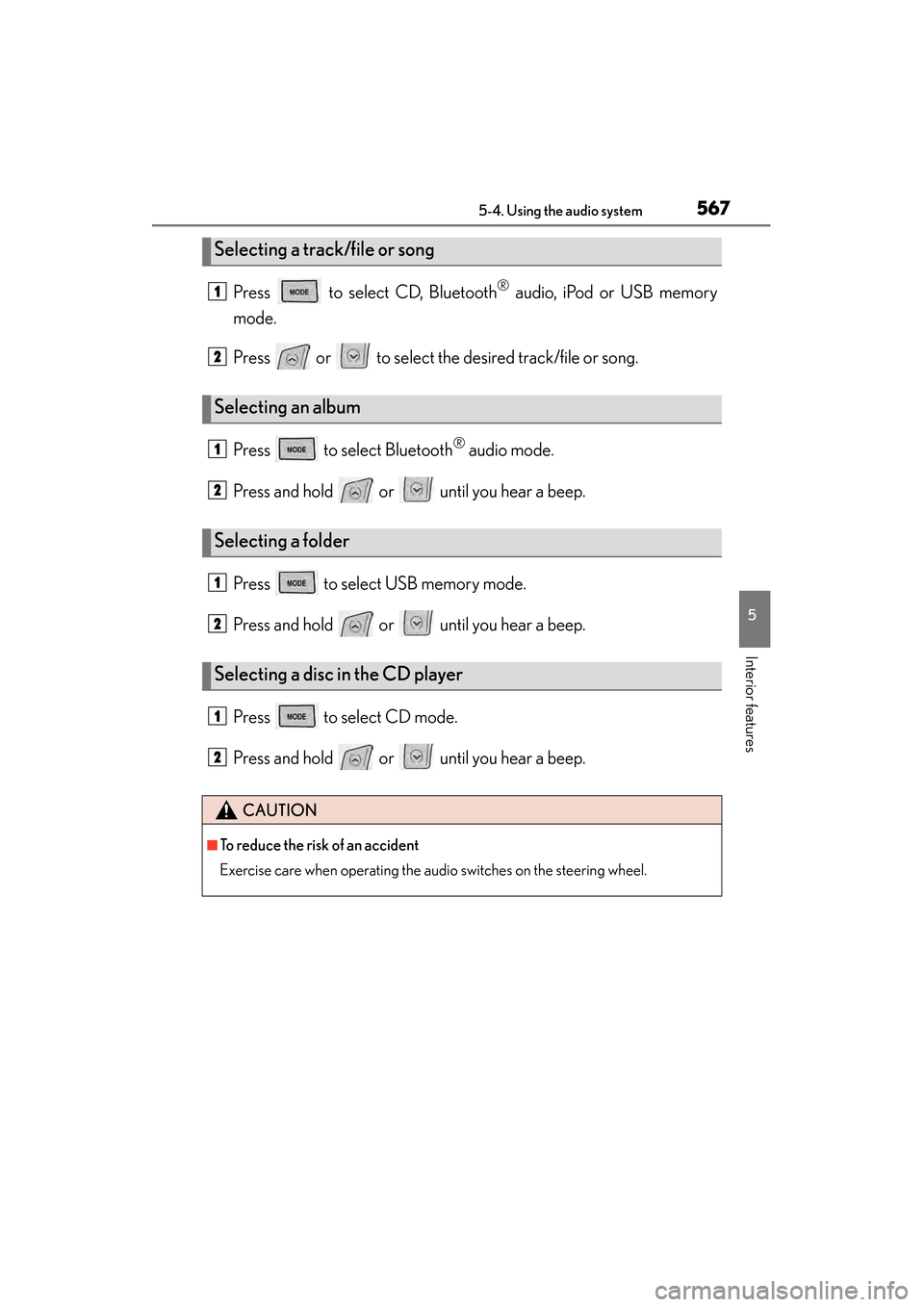
Press to select CD, Bluetooth® audio, iPod or USB memory
mode.
Press or to select the desired track/file or song.
Press to select Bluetooth
® audio mode.
Press and hold or until you hear a beep.
Press to select USB memory mode.
Press and hold or until you hear a beep.
Press to select CD mode.
Press and hold or until you hear a beep.
Selecting a track/file or song
Selecting an album
Selecting a folder
Selecting a disc in the CD player
CAUTION
■To reduce the risk of an accident
Exercise care when operating the audio switches on the steering wheel.
1
2
1
2
1
2
1
2
Page 575 of 910
574
ES350 300h_OM_OM33A01U_(U)
5-4. Using the audio system
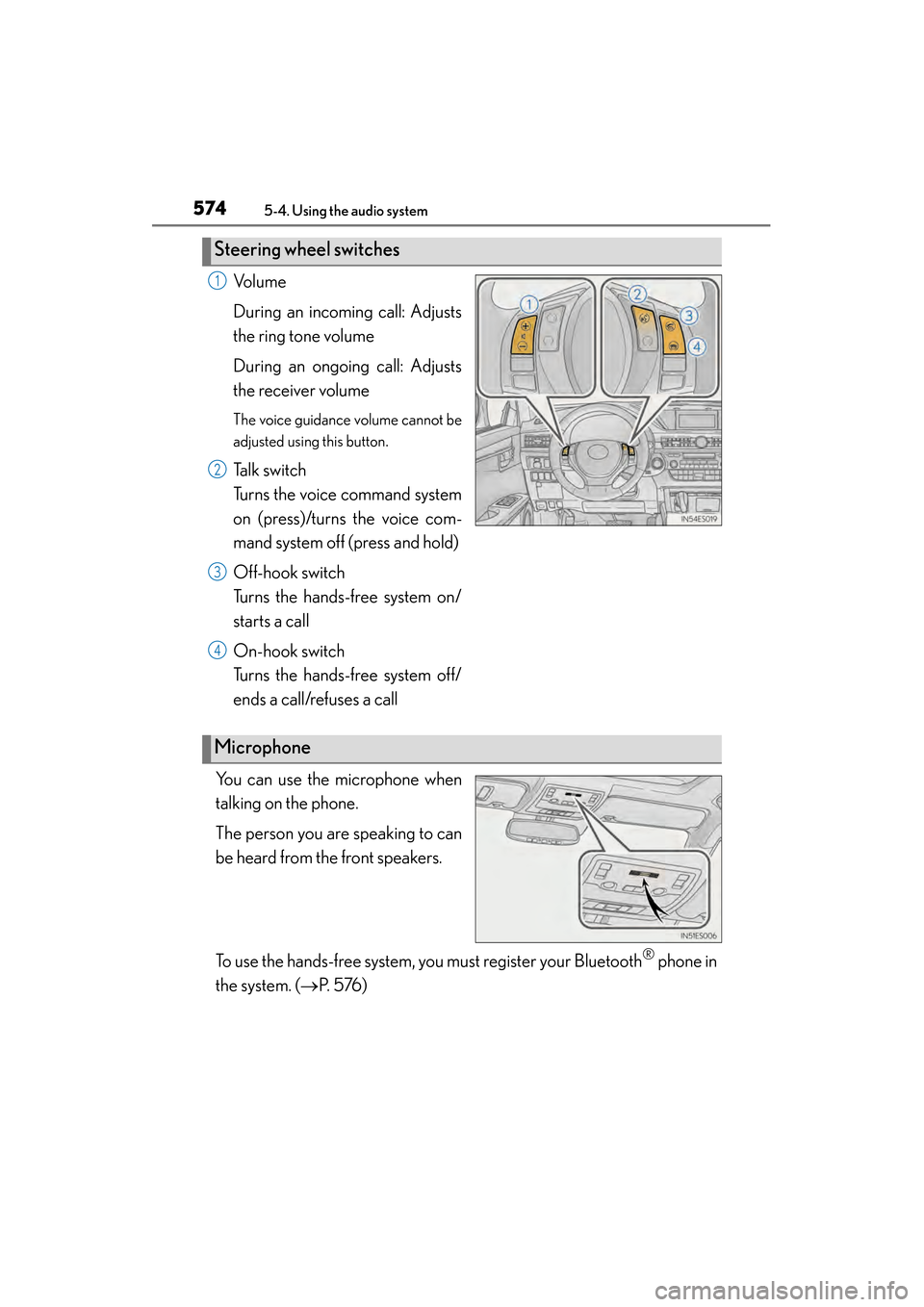
Vo l u m e
During an incoming call: Adjusts
the ring tone volume
During an ongoing call: Adjusts
the receiver volume
The voice guidance volume cannot be
adjusted using this button.
Talk switch
Turns the voice command system
on (press)/turns the voice com-
mand system off (press and hold)
Off-hook switch
Turns the hands-free system on/
starts a call
On-hook switch
Turns the hands-free system off/
ends a call/refuses a call
You can use the microphone when
talking on the phone.
The person you are speaking to can
be heard from the front speakers.
To use the hands-free system, you must register your Bluetooth
® phone in
the system. ( →P. 5 76 )
Steering wheel switches
1
2
3
4
Microphone
Page 619 of 910
618
ES350 300h_OM_OM33A01U_(U)
5-7. Other interior features
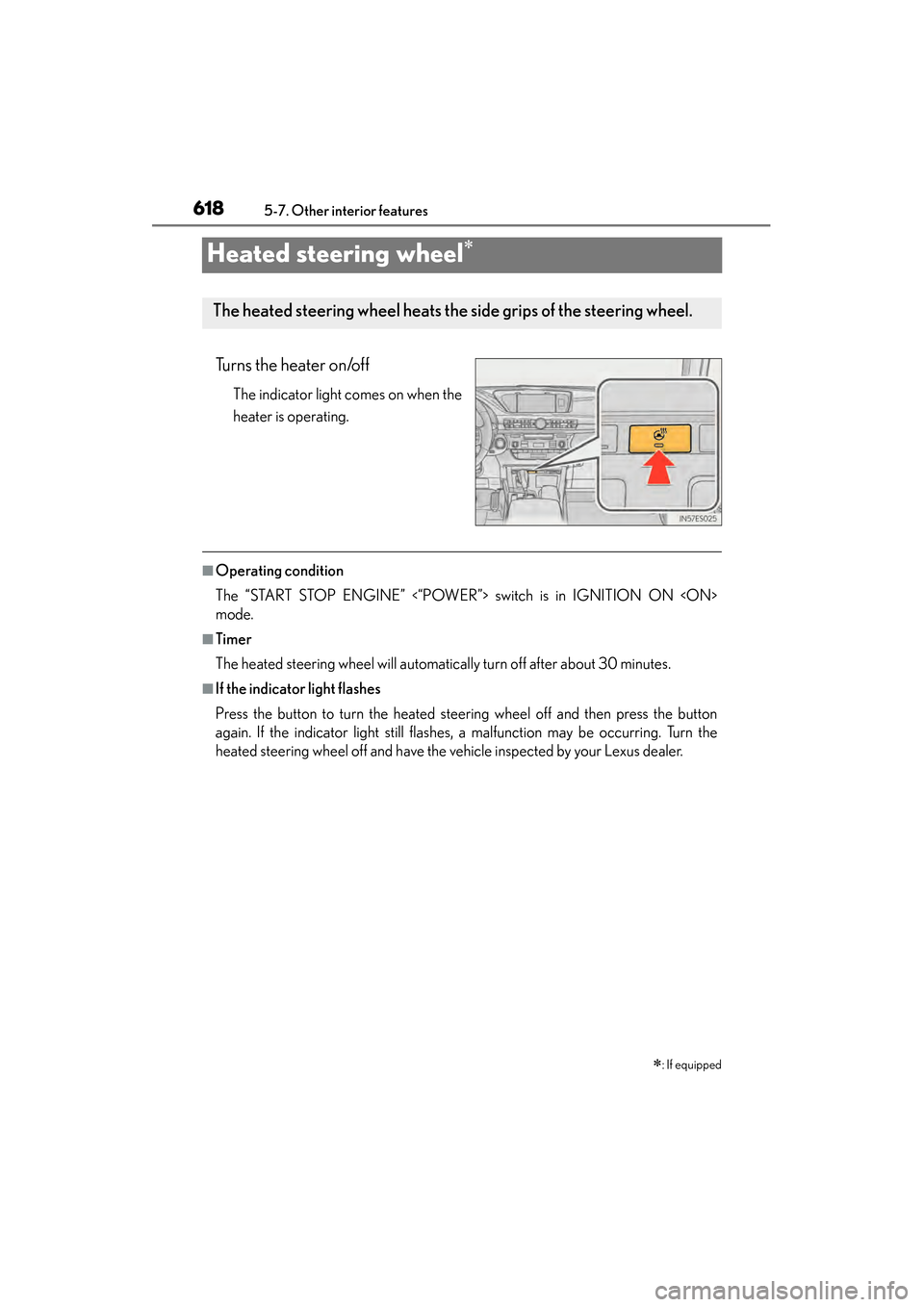
Heated steering wheel∗
Turns the heater on/off
The indicator light comes on when the
heater is operating.
■Operating condition
The “START STOP ENGINE” <“POWER”> switch is in IGNITION ON
mode.
■Timer
The heated steering wheel will automatically turn off after about 30 minutes.
■If the indicator light flashes
Press the button to turn the heated steering wheel off and then press the button
again. If the indicator light still flashes, a malfunction may be occurring. Turn the
heated steering wheel off and have the vehicle inspected by your Lexus dealer.
∗: If equipped
The heated steering wheel heats the side grips of the steering wheel.
Page 620 of 910
ES350 300h_OM_OM33A01U_(U)
6195-7. Other interior features
5
Interior features
CAUTION
■Burns
Care should be taken to prevent injury if anyone in the following categories comes
in contact with the steering wheel when the heated steering wheel is on:
●Babies, small children, the elderly, the sick and the physically challenged
●Persons with sensitive skin
●Persons who are fatigued
●Persons who have taken alcohol or drugs that induce sleep (sleeping drugs, cold
remedies, etc.)
NOTICE
■To prevent 12-volt battery discharge
Turn the switch off when the engine is not running
Page 663 of 910
662
ES350 300h_OM_OM33A01U_(U)
6-2. Maintenance
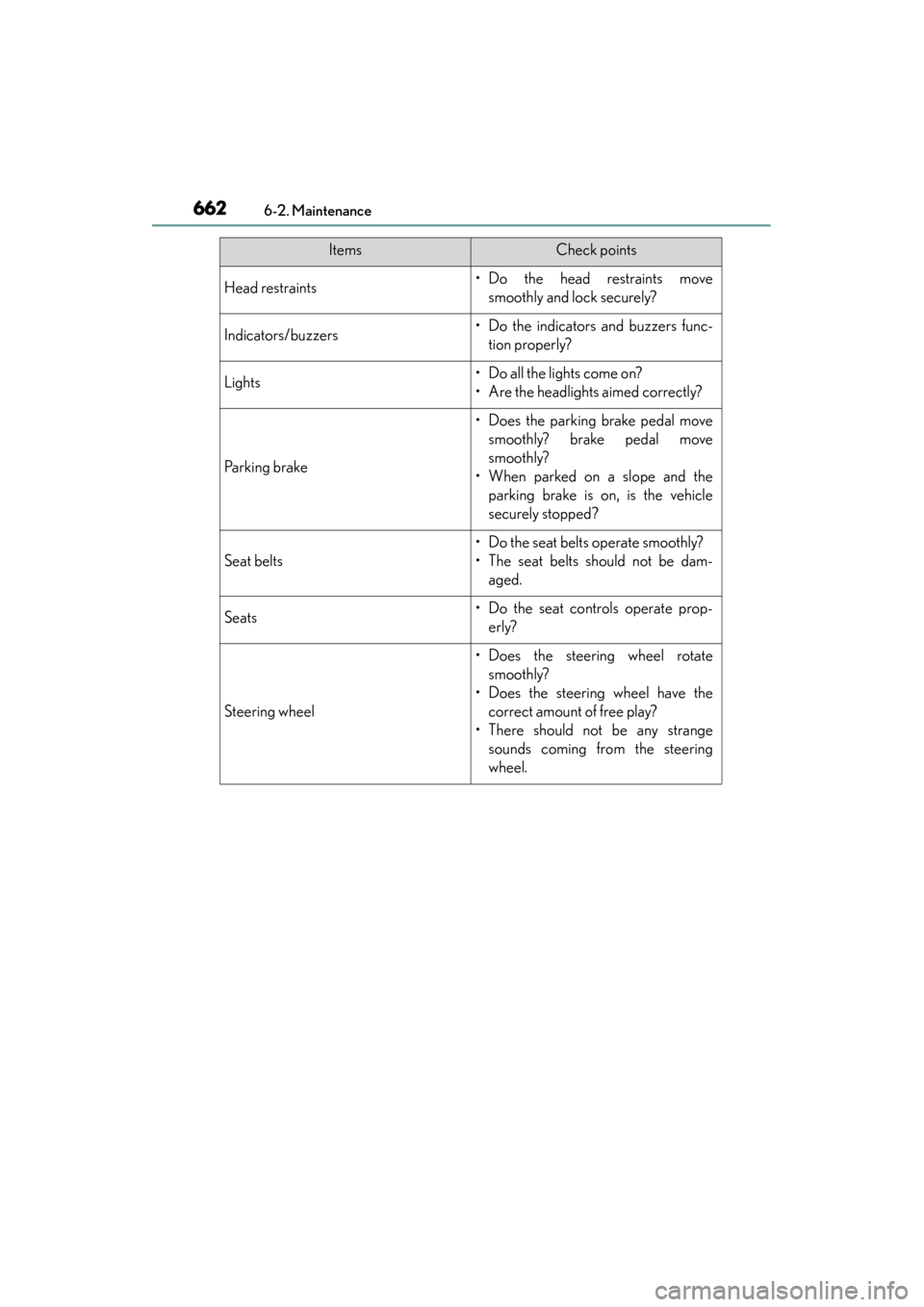
Head restraints• Do the head restraints movesmoothly and lock securely?
Indicators/buzzers• Do the indicators and buzzers func-tion properly?
Lights• Do all the lights come on?
• Are the headlights aimed correctly?
Parking brake
• Does the parking brake pedal movesmoothly? brake pedal move
smoothly?
• When parked on a slope and the parking brake is on, is the vehicle
securely stopped?
Seat belts
• Do the seat belts operate smoothly?
• The seat belts should not be dam-aged.
Seats• Do the seat controls operate prop-erly?
Steering wheel
• Does the steering wheel rotatesmoothly?
• Does the steering wheel have the correct amount of free play?
• There should not be any strange sounds coming from the steering
wheel.
ItemsCheck points