lock Lexus ES300h 2013 Manual Online
[x] Cancel search | Manufacturer: LEXUS, Model Year: 2013, Model line: ES300h, Model: Lexus ES300h 2013Pages: 910, PDF Size: 9.95 MB
Page 330 of 910
ES350 300h_OM_OM33A01U_(U)
3294-6. Driving tips
4
Driving
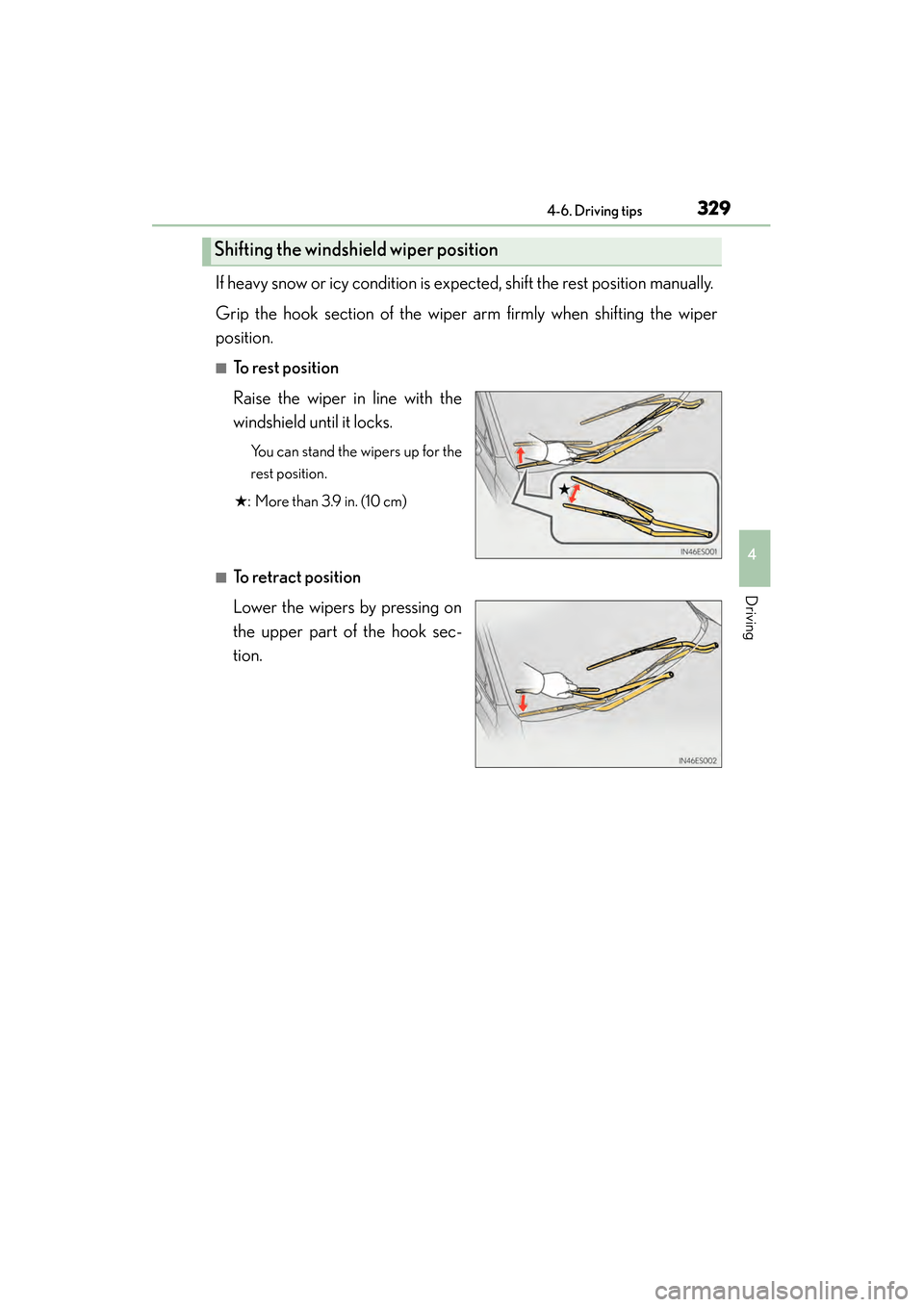
If heavy snow or icy condition is expected, shift the rest position manually.
Grip the hook section of the wiper arm firmly when shifting the wiper
position.
■To rest position
Raise the wiper in line with the
windshield until it locks.
You can stand the wipers up for the
rest position.
★ : More than 3.9 in. (10 cm)
■To retract position
Lower the wipers by pressing on
the upper part of the hook sec-
tion.
Shifting the windshield wiper position
Page 334 of 910
333
ES350 300h_OM_OM33A01U_(U)
5Interior features
5-4. Using the audio systemAudio system (without a navigation system or
the Lexus Display
Audio system) ........................... 493
Using the radio ............................ 496
Using the CD player ................ 505
Playing MP3 and WMA discs................................. 514
Operating an iPod ..................... 522
Operating a USB memory.....532
Bluetooth
® audio system ........ 541
Using the Bluetooth
®
audio system..............................545
Operating a Bluetooth
®
enabled portable player ...... 550
Setting up a Bluetooth
®
enabled portable player .......554
Bluetooth
® audio
system setup ............................... 561
Optimal use of the audio system.............................. 562
Using the AUX port..................564
Using the steering wheel audio switches ..........................565
Hands-free system (for cellular phone) ................ 568
Using the hands-free system (for cellular phones) ............... 573
Making a phone call ...................581
Setting a cellular phone .......... 585
Security and system setup ..... 590
Using the phone book..............595 5-5. Using the interior lights
Interior lights list ......................... 603• Interior light ............................604
• Personal lights .......................604
5-6. Using the storage features List of storage features ............606• Glove box .............................. 608
• Console box...........................609
• Cup holders ............................ 610
• Auxiliary box ............................. 611
Trunk features ................................612
5-7. Other interior features Sun visors and vanity mirrors .....................614
Clock.................................................615
Power outlets .................................616
Heated steering wheel ............. 618
Seat heaters/ seat ventilators ......................... 620
Armrest .......................................... 622
Rear sunshade/ rear door sunshades .............. 623
Trunk storage extension .......... 626
Coat hooks ....................................627
Assist grips.................................... 628
Garage door opener................ 629
Compass ....................................... 636
Safety Connect .............................641
Page 356 of 910
ES350 300h_OM_OM33A01U_(U)
3555-2. Using the air conditioning system and defogger
5
Interior features
■Registering air conditioning settings to electronic keys
●Unlocking the vehicle using an electronic key and turning the “START STOP
ENGINE” <“POWER”> switch to IGNITION ON
registered air conditioning settings.
●When the “START STOP ENGINE” <“POWER”> is turned off, the current air con-
ditioning settings will automatically be registered to the electronic key that was
used to unlock the vehicle.
The system may not operate correctly if more than one electronic key is in the vicinity
or if the smart access system with push-button start is used to unlock a passenger
door.
■Air conditioning system settings
●When the “START STOP ENGINE” <“POWER”> switch is turned on, the air condi-
tioning system settings will be set to those that were in use the last time the “START
STOP ENGINE” <“POWER”> switch was turned off.
●Air conditioning system settings are memorized individually on each electronic
key, so the settings reproduced will be specific to the key that is used.
●This feature is customizable at your Lexus dealer.
■Using automatic mode
Fan speed is adjusted automatically according to the temperature setting and the
ambient conditions.
Therefore, the fan may stop for a while until warm or cool air is ready to flow immedi-
ately after is pressed.
■Fogging up of the windows
●The windows will easily fog up when the humidity in the vehicle is high. Selecting on will dehumidify the air from the outlets and defog the windshield effec-
tively.
●If you turn off, the windows may fog up more easily.
●The windows may fog up if the recirculated air mode is used.
■Windshield fog detection function (if equipped)
When automatic mode is set, the humidity sensor ( →P. 358) detects fog on the
windshield and controls the air conditioning system to prevent fog.
■Outside/recirculated air mode
●When driving on dusty roads such as tunnels or in heavy traffic, set the outside/
recirculated air mode button to the recirculated air mode. This is effective in pre-
venting outside air from entering the vehicl e interior. During cooling operation, set-
ting the recirculated air mode will also cool the vehicle interior effectively.
●Outside/recirculated air mode may automatically switch depending on the tem-
perature setting or the inside temperature.
Page 358 of 910
ES350 300h_OM_OM33A01U_(U)
3575-2. Using the air conditioning system and defogger
5
Interior features
■Air conditioning odors
●During use, various odors from inside and outside the vehicle may enter into and
accumulate in the air conditioning system. This may then cause odor to be emitted
from the vents.
●To reduce potential odors from occurring:
• It is recommended that the air conditioning system be set to outside air modeprior to turning the vehicle off.
• The start timing of the blower may be delayed for a short period of time immedi-
ately after the air conditioning system is started in automatic mode.
■Air conditioning filter
→ P. 7 0 8
■Customization
Settings (e.g. exhaust gas sensor sensitivity) can be changed.
(Customizable features →P. 8 5 3 )
CAUTION
■To prevent the windshield from fogging up
Do not use during cool air operation in extremely humid weather. The differ-
ence between the temperature of the outside air and that of the windshield can
cause the outer surface of the windshield to fog up, blocking your vision.
Page 369 of 910
368
ES350 300h_OM_OM33A01U_(U)
5-2. Using the air conditioning system and defogger
■Registering air conditioning settings to electronic keys
●Unlocking the vehicle using an electronic key and turning the “START STOP
ENGINE” <“POWER”> switch to IGNITION ON
registered air conditioning settings.
●When the “START STOP ENGINE” <“POWER”> is turned off, the current air con-
ditioning settings will automatically be registered to the electronic key that was
used to unlock the vehicle.
The system may not operate correctly if more than one electronic key is in the vicinity
or if the smart access system with push-button start is used to unlock a passenger
door.
■Air conditioning system settings
●When the “START STOP ENGINE” <“POWER”> switch is turned on, the air condi-
tioning system settings will be set to those that were in use the last time the “START
STOP ENGINE” <“POWER”> switch was turned off.
●Air conditioning system settings are memorized individually on each electronic
key, so the settings reproduced will be specific to the key that is used.
●This feature is customizable at your Lexus dealer.
■Using automatic mode
Fan speed is adjusted automatically according to the temperature setting and the
ambient conditions.
Therefore, the fan may stop for a while until warm or cool air is ready to flow immedi-
ately after is pressed.
■Fogging up of the windows
●The windows will easily fog up when the humidity in the vehicle is high. Selecting
on will dehumidify the air from the outlets and defog the windshield effectively.
●If you turn off, the windows may fog up more easily.
●The windows may fog up if the recirculated air mode is used.
■Windshield fog detection function (if equipped)
When automatic mode is set, the humidity sensor ( →P. 371) detects fog on the wind-
shield and controls the air conditioning system to prevent fog.
■Outside/recirculated air mode
●When driving on dusty roads such as tunnels or in heavy traffic, set the outside/
recirculated air mode button to the recirculated air mode. This is effective in pre-
venting outside air from entering the vehicl e interior. During cooling operation, set-
ting the recirculated air mode will also cool the vehicle interior effectively.
●Outside/recirculated air mode may automatically switch depending on the tem-
perature setting or the inside temperature.
Page 371 of 910
370
ES350 300h_OM_OM33A01U_(U)
5-2. Using the air conditioning system and defogger
■Air conditioning odors
●During use, various odors from inside and outside the vehicle may enter into and
accumulate in the air conditioning system. This may then cause odor to be emitted
from the vents.
●To reduce potential odors from occurring:
• It is recommended that the air conditioning system be set to outside air modeprior to turning the vehicle off.
• The start timing of the blower may be delayed for a short period of time immedi-
ately after the air conditioning system is started in automatic mode.
■Air conditioning filter
→ P. 7 0 8
■Customization
Settings (e.g. exhaust gas sensor sensitivity) can be changed.
(Customizable features →P. 8 5 3 )
CAUTION
■To prevent the windshield from fogging up
Do not use during cool air operation in extremely humid weather. The differ-
ence between the temperature of the outside air and that of the windshield can
cause the outer surface of the windshield to fog up, blocking your vision.
Page 406 of 910
405
ES350 300h_OM_OM33A01U_(U)
5-3. Using the Lexus Display Audio system
5
Interior features
Listening to an iPod
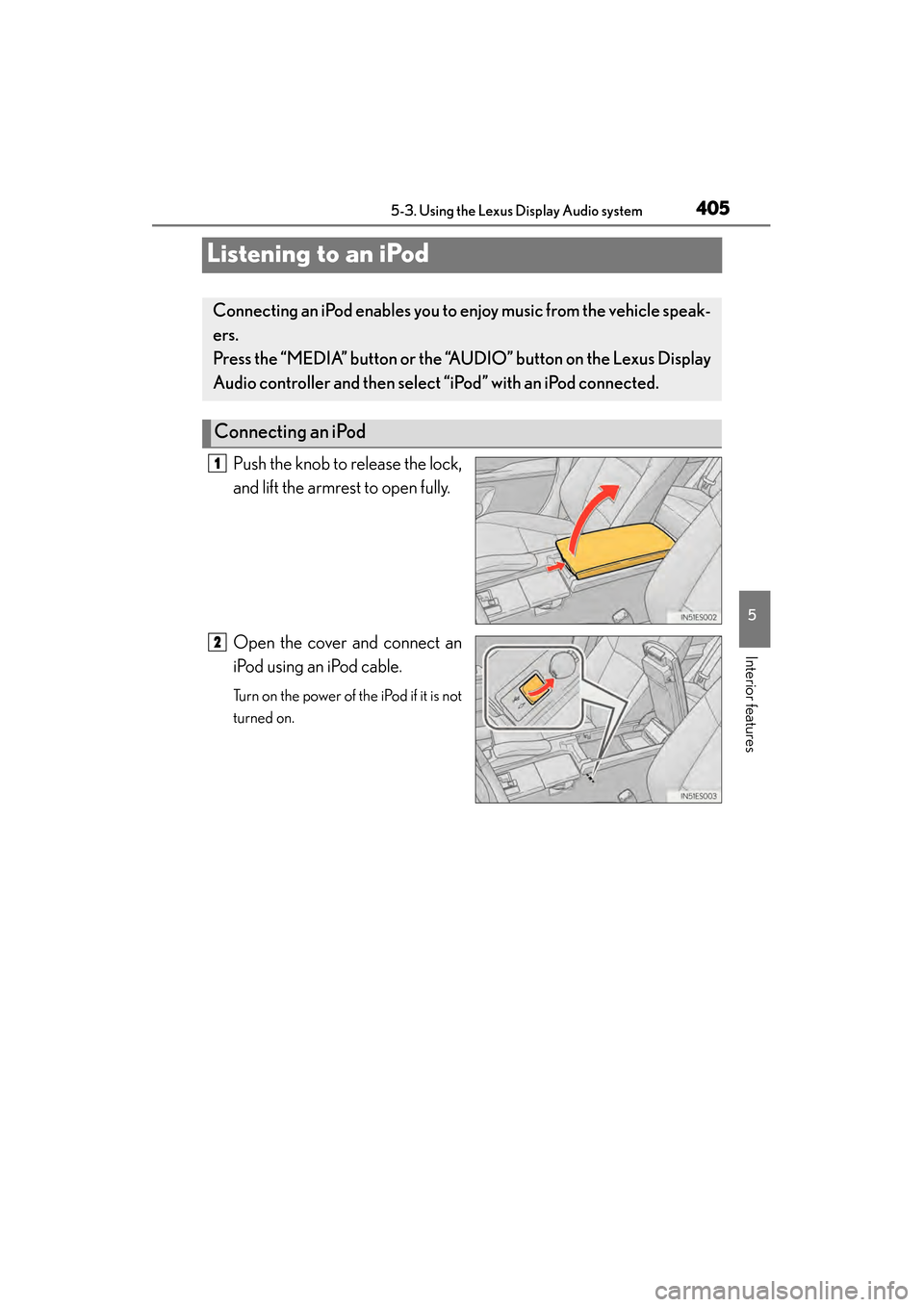
Push the knob to release the lock,
and lift the armrest to open fully.
Open the cover and connect an
iPod using an iPod cable.
Turn on the power of the iPod if it is not
turned on.
Connecting an iPod enables you to enjoy music from the vehicle speak-
ers.
Press the “MEDIA” button or the “AUDIO” button on the Lexus Display
Audio controller and then select “iPod” with an iPod connected.
Connecting an iPod
1
2
Page 414 of 910
413
ES350 300h_OM_OM33A01U_(U)
5-3. Using the Lexus Display Audio system
5
Interior features
Listening to a USB memory
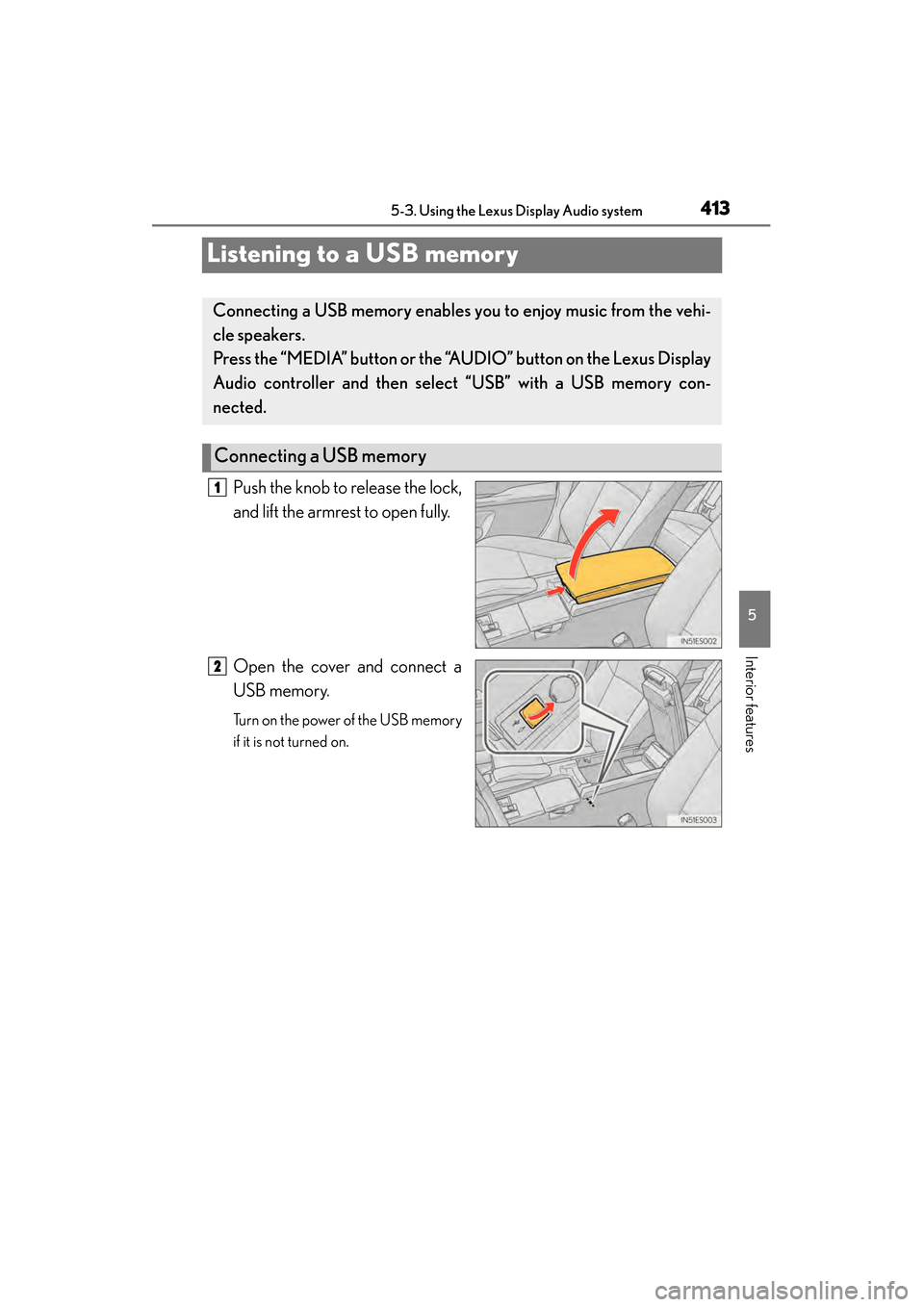
Push the knob to release the lock,
and lift the armrest to open fully.
Open the cover and connect a
USB memory.
Turn on the power of the USB memory
if it is not turned on.
Connecting a USB memory enables you to enjoy music from the vehi-
cle speakers.
Press the “MEDIA” button or the “AUDIO” button on the Lexus Display
Audio controller and then select “USB” with a USB memory con-
nected.
Connecting a USB memory
1
2
Page 423 of 910
422
ES350 300h_OM_OM33A01U_(U)
5-3. Using the Lexus Display Audio system
Using the AUX port
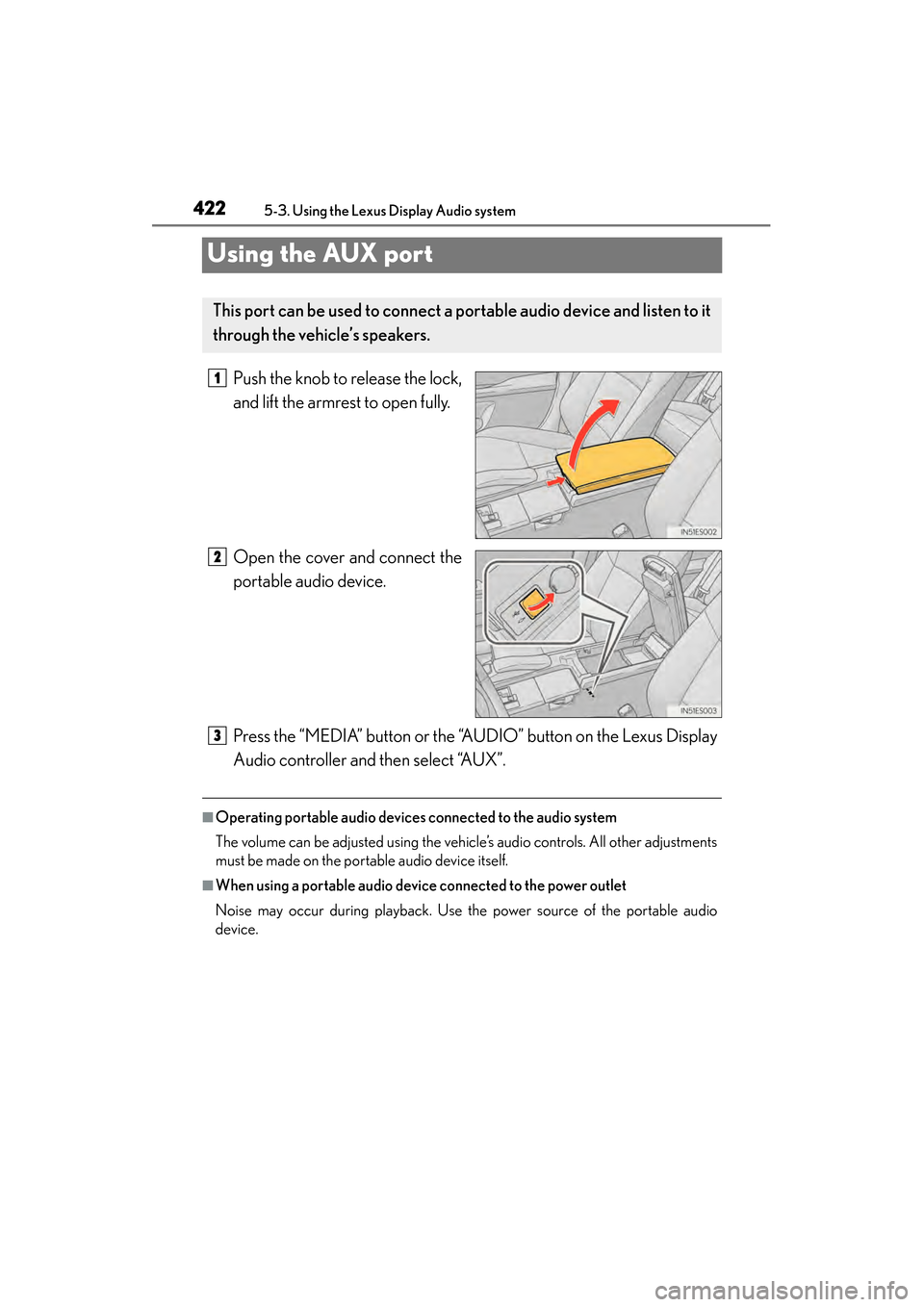
Push the knob to release the lock,
and lift the armrest to open fully.
Open the cover and connect the
portable audio device.
Press the “MEDIA” button or the “AUDIO” button on the Lexus Display
Audio controller and then select “AUX”.
■Operating portable audio devices connected to the audio system
The volume can be adjusted using the vehicle’s audio controls. All other adjustments
must be made on the portable audio device itself.
■When using a portable audio device connected to the power outlet
Noise may occur during playback. Use the power source of the portable audio
device.
This port can be used to connect a portable audio device and listen to it
through the vehicle’s speakers.
1
2
3
Page 525 of 910
524
ES350 300h_OM_OM33A01U_(U)
5-4. Using the audio system
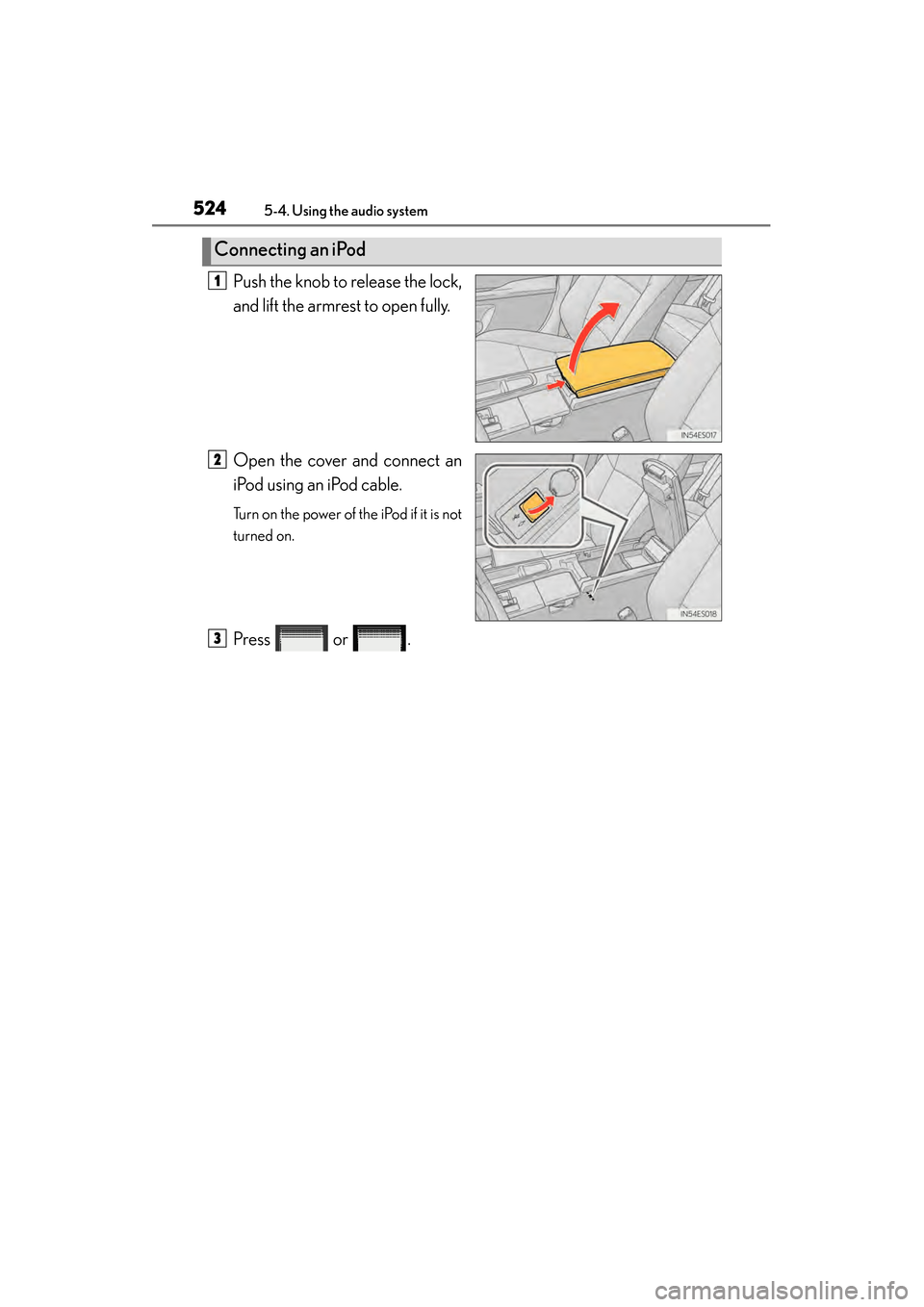
Push the knob to release the lock,
and lift the armrest to open fully.
Open the cover and connect an
iPod using an iPod cable.
Turn on the power of the iPod if it is not
turned on.
Press or .
Connecting an iPod
1
2
3