brake Lexus ES300h 2014 Instrument cluster / (OM33A60U) Owner's Guide
[x] Cancel search | Manufacturer: LEXUS, Model Year: 2014, Model line: ES300h, Model: Lexus ES300h 2014Pages: 917, PDF Size: 11.11 MB
Page 194 of 917

194
ES350_300h_OM_OM33A60U_(U)
4-1. Before driving
NOTICE
■When encountering flooded roads
Do not drive on a road that has flooded after heavy rain etc. Doing so may cause
the following serious damage to the vehicle:
●Engine stalling
●Short in electrical components
●Engine damage caused by water immersion
In the event that you drive on a flooded road and the vehicle is flooded, be sure to
have your Lexus dealer check the following:
●Brake function
●Changes in quantity and quality of engine oil, fluid used for automatic transaxle
●Lubricant condition for the bearings and su spension joints (where possible), and
the function of all joints, bearings, etc.
Page 201 of 917

201
ES350_300h_OM_OM33A60U_(U)
4-2. Driving procedures
4
Driving
Engine (ignition) switch (gasoline vehicles)
Check that the parking brake is set.
Check that the shift lever is set in P.
Firmly depress the brake pedal.
will be displayed on the multi-information display.
If it is not displayed, the engine cannot be started.
Press the “START STOP
ENGINE” switch.
The engine will crank until it starts or
for up to 30 seconds, whichever is
less.
Continue depressing the brake pedal
until the engine is completely started.
The engine can be started from any
“START STOP ENGINE” switch
mode.
Performing the following operations when carrying the electronic key
on your person starts the engine or changes “START STOP ENGINE”
switch modes.
Starting the engine
1
2
3
4
Page 202 of 917

202
ES350_300h_OM_OM33A60U_(U)
4-2. Driving procedures
Stop the vehicle.
Shift the shift lever to P.
Set the parking brake. (P. 2 2 6 )
Press the “START STOP ENGINE” switch.
Release the brake pedal and check that “POWER ON” on the multi-
information display is off.
Modes can be changed by pressing the “START STOP ENGINE” switch
with brake pedal released. (The mode changes each time the switch is
pressed.)
Off*
The emergency flashers can be used.
The multi-information display will not
be displayed.
ACCESSORY mode
Some electrical components such as
the audio system can be used.
“POWER ON” will be displayed on
the multi-information display.
IGNITION ON mode
All electrical components can be
used.
“POWER ON” will be displayed on
the multi-information display.
*: If the shift lever is in a position other
than P when turning off the engine, the
“START STOP ENGINE” switch will
be turned to ACCESSORY mode,
not to off.
Stopping the engine
Changing “START STOP ENGINE” switch modes
1
2
3
4
5
Page 203 of 917

ES350_300h_OM_OM33A60U_(U)
2034-2. Driving procedures
4
Driving
If the engine is stopped with the shift lever in a position other than P, the
“START STOP ENGINE” switch will not be turned off but instead be
turned to ACCESSORY mode. Perfo rm the following procedure to turn
the switch off:
Check that the parking brake is set.
Shift the shift lever to P.
Check that “POWER ON” and “Turn Power OFF” are displayed alter-
nately on the multi-information d isplay and then press the “START
STOP ENGINE” switch once.
Check that “POWER ON” and “Tur n Power OFF” on the multi-infor-
mation display are off.
When stopping the engine with the shift lever in a position other
than P
1
2
3
4
Page 206 of 917

206
ES350_300h_OM_OM33A60U_(U)
4-2. Driving procedures
CAUTION
■When starting the engine
Always start the engine while sitting in the driver’s seat. Do not depress the accel-
erator pedal while starting the engine under any circumstances.
Doing so may cause an accident resulting in death or serious injury.
■Caution while driving
If engine failure occurs while the vehicle is moving, do not lock or open the doors
until the vehicle reaches a safe and complete stop. Activation of the steering lock in
this circumstance may lead to an accident, resulting in death or serious injury.
■Stopping the engine in an emergency
If you want to stop the engine in an emergency while driving the vehicle, press and
hold the “START STOP ENGINE” switch for more than 2 seconds, or press it
briefly 3 times or more in succession. (P. 74 9 )
However, do not touch the “START STOP ENGINE” switch while driving except in
an emergency. Turning the en gine off while driving will not cause loss of steering or
braking control, but the power assist to these systems will be lost. This will make it
more difficult to steer and brake, so you should pull over and stop the vehicle as
soon as it is safe to do so.
Page 208 of 917

208
ES350_300h_OM_OM33A60U_(U)
4-2. Driving procedures
Power (ignition) switch (hybrid vehicles)
Check that the parking brake is set.
Check that the shift lever is set in P.
Firmly depress the brake pedal.
will be displayed on the multi-information display.
If it is not displayed, the hybrid system cannot be started.
Press the “POWER” switch.
Continue depressing the brake pedal
until the hybrid system is completely
started.
The hybrid system can be started from
any “POWER” switch mode.
Check that the “READY” indica-
tor is on.
The vehicle will not move when the
“READY” indicator is off.
Performing the following operations when carrying the electronic key
on your person starts the hybrid system or changes “POWER” switch
modes.
Starting the hybrid system
1
2
3
4
5
Page 209 of 917

ES350_300h_OM_OM33A60U_(U)
2094-2. Driving procedures
4
Driving
Stop the vehicle.
Shift the shift lever to P.
Set the parking brake. (P. 2 2 6 )
Press the “POWER” switch.
Release the brake pedal and check that “POWER ON” on the multi-
information display is off.
Modes can be changed by pressing the “POWER” switch with brake
pedal released. (The mode changes each time the switch is pressed.)
Off*
The emergency flashers can be used.
The multi-information display will not
be displayed.
ACCESSORY mode
Some electrical components such as
the audio system can be used.
“POWER ON” will be displayed on
the multi-information display.
ON mode
All electrical components can be
used.
“POWER ON” will be displayed on
the multi-information display.
*: If the shift lever is in a position other than P when turning off the hybrid sys-
tem, the “POWER” switch will be
turned to ACCESSORY mode, not to
off.
Stopping the hybrid system
Changing “POWER” switch modes
1
2
3
4
5
Page 210 of 917

210
ES350_300h_OM_OM33A60U_(U)
4-2. Driving procedures
If the hybrid system is stopped with the shift lever in a position other than P,
the “POWER” switch will not be tu rned off but instead be turned to
ACCESSORY mode. Perform the follow ing procedure to turn the switch
off:
Check that the parking brake is set.
Shift the shift lever to P.
Check that “POWER ON” and “Turn Power OFF” are displayed alter-
nately on the multi-information disp lay and then press the “POWER”
switch once.
Check that “POWER ON” and “Tur n Power OFF” on the multi-infor-
mation display are off.
When stopping the hybrid system wi th the shift lever in a position
other than P
1
2
3
4
Page 212 of 917

212
ES350_300h_OM_OM33A60U_(U)
4-2. Driving procedures
■When the steering lock cannot be released
■Steering lock motor overheating prevention
To prevent the steering lock motor from overheating, the motor may be suspended if
the hybrid system is turned on and off repeatedly in a short period of time. In this
case, refrain from operating the hybrid sy stem. After about 10 seconds, the steering
lock motor will resume functioning.
■When “Check Access System with Elec. Key” is displayed on the multi-information
display
The system may be malfunctio ning. Have the vehicle inspected by your Lexus dealer
immediately.
■If the “READY” indicator does not come on
If the “READY” indicator does not come on when you press the “POWER” switch
with the shift lever in P and the brake pedal depressed, contact your Lexus dealer
immediately.
■If the hybrid system is malfunctioning
P. 7 7 0
■If the electronic key battery is depleted
P. 7 1 9
■Operation of the “POWER” switch
●When operating the “POWER” switch, one shor t, firm press is enough. If the switch
is pressed improperly, the hybrid system may not start or the “POWER” switch
mode may not change. It is not necessary to press and hold the switch.
●If attempting to restart the hybrid syst em immediately after turning the “POWER”
switch off, the hybrid system may not start in some cases. After turning the
“POWER” switch off, please wait a few se conds before restarting the hybrid sys-
tem.
■If the smart access system with push-but ton start has been deactivated in a cus-
tomized setting
P. 8 1 0
“Steering Lock active” will be displayed on
the multi-information display.
Check that the shift lever is set in P. Press the
“POWER” switch while
turning the steering
wheel left and right.
Page 218 of 917
218
ES350_300h_OM_OM33A60U_(U)
4-2. Driving procedures
Automatic transmission (gasoline vehicles)
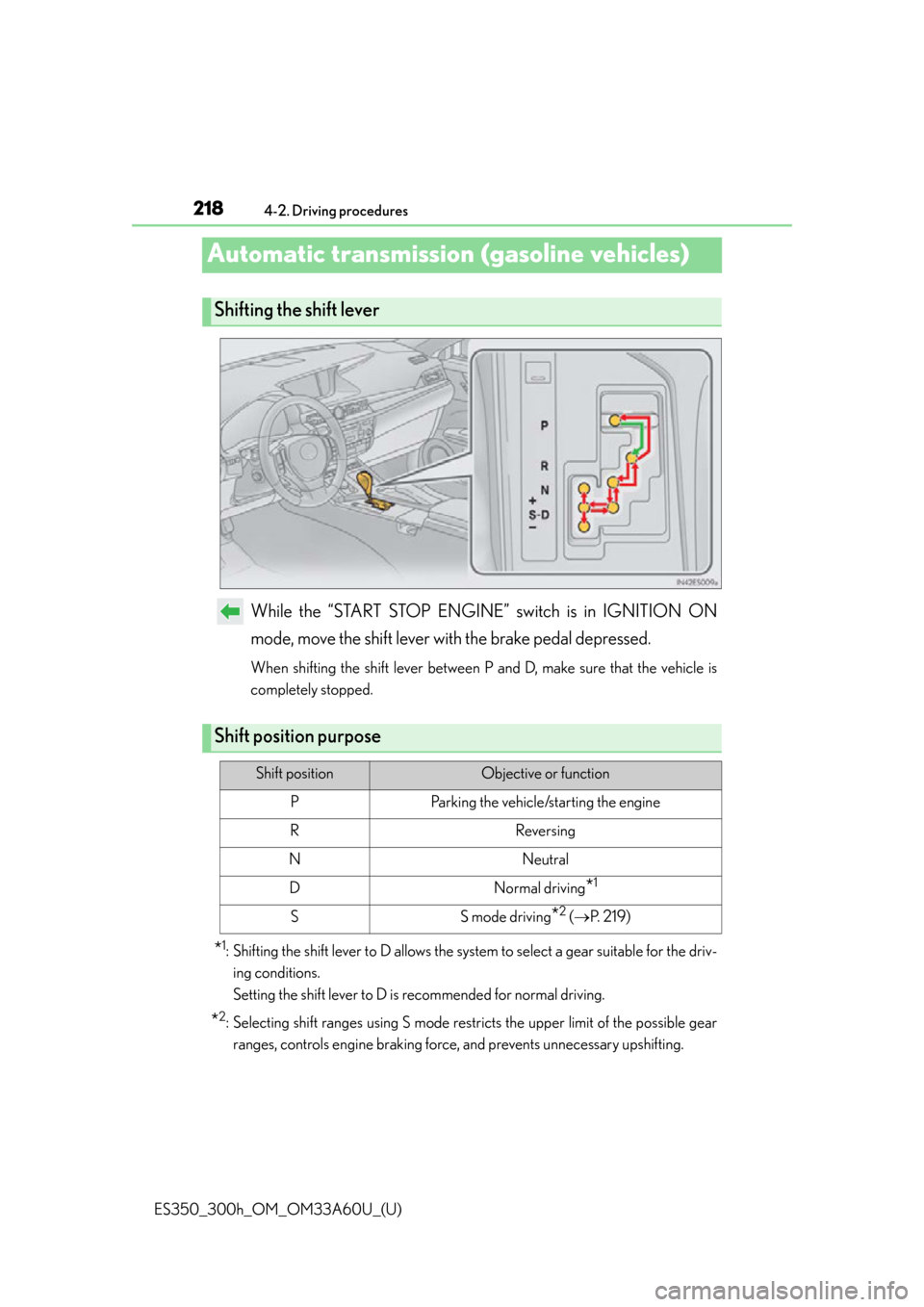
While the “START STOP ENGINE” switch is in IGNITION ON
mode, move the shift lever with the brake pedal depressed.
When shifting the shift lever between P and D, make sure that the vehicle is
completely stopped.
*1: Shifting the shift lever to D allows the system to select a gear suitable for the driv- ing conditions.
Setting the shift lever to D is recommended for normal driving.
*2: Selecting shift ranges using S mode rest ricts the upper limit of the possible gear
ranges, controls engine braking force, and prevents unnecessary upshifting.
Shifting the shift lever
Shift position purpose
Shift positionObjective or function
PParking the vehicle/starting the engine
RReversing
NNeutral
DNormal driving*1
SS mode driving*2 ( P. 2 1 9 )