CD player Lexus ES300h 2014 User Guide
[x] Cancel search | Manufacturer: LEXUS, Model Year: 2014, Model line: ES300h, Model: Lexus ES300h 2014Pages: 918, PDF Size: 25.26 MB
Page 410 of 918
ES350_300h_OM_OM33A60U_(U)
4095-3. Using the Lexus Display Audio system
5
Interior features
NOTICE
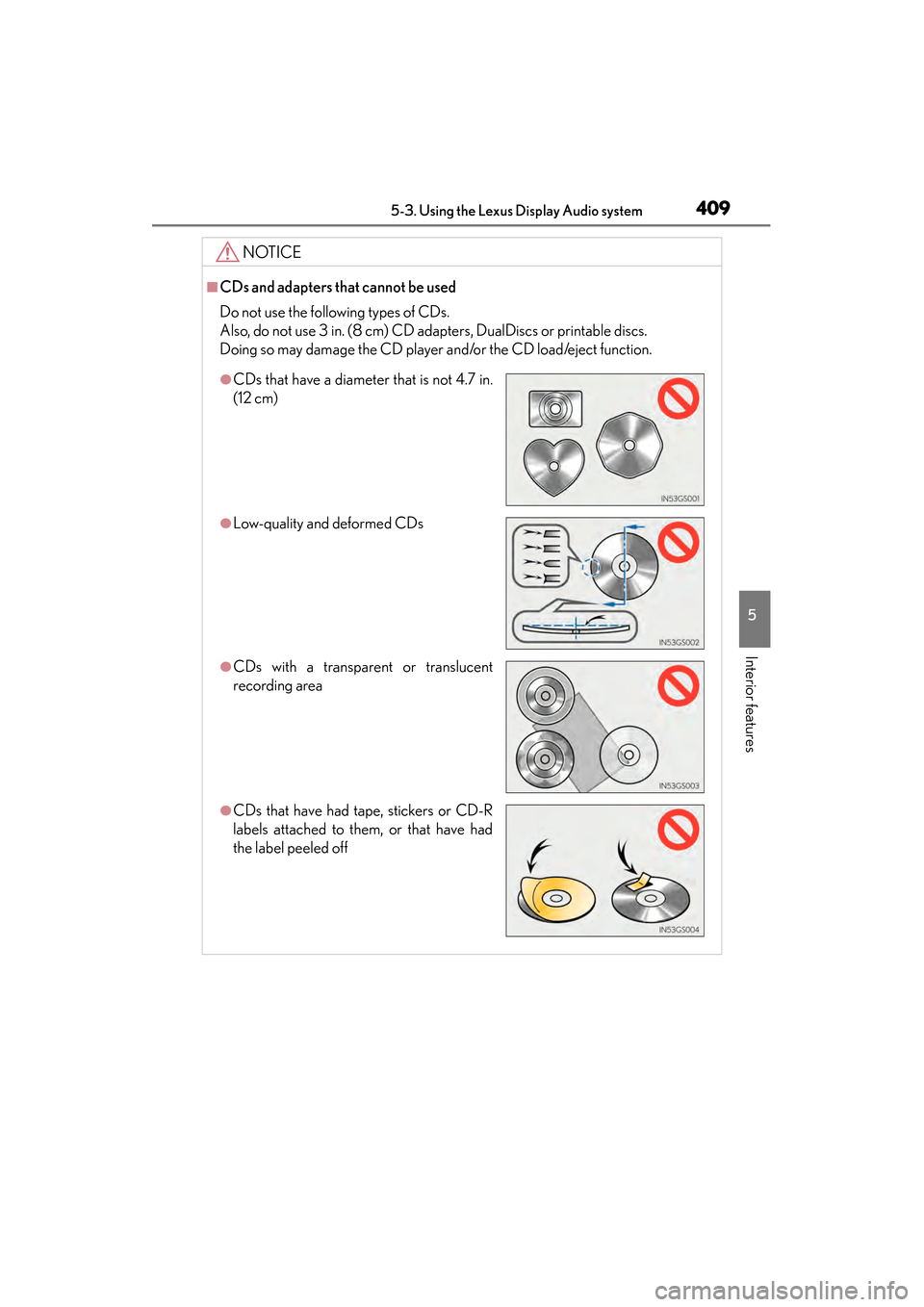
■CDs and adapters that cannot be used
Do not use the following types of CDs.
Also, do not use 3 in. (8 cm) CD adapters, DualDiscs or printable discs.
Doing so may damage the CD player and/or the CD load/eject function.
●CDs that have a diameter that is not 4.7 in.
(12 cm)
●Low-quality and deformed CDs
●CDs with a transparent or translucent
recording area
●CDs that have had tape, stickers or CD-R
labels attached to them, or that have had
the label peeled off
Page 411 of 918
410
ES350_300h_OM_OM33A60U_(U)
5-3. Using the Lexus Display Audio system
NOTICE
■CD player precautions
Failure to follow the precautions below may result in serious damage to the CDs or
the player itself.
●Do not insert anything other than CDs into the CD slot.
●Do not apply oil to the CD player.
●Store CDs away from direct sunlight.
●Never try to disassemble any part of the CD player.
Page 419 of 918
418
ES350_300h_OM_OM33A60U_(U)
5-3. Using the Lexus Display Audio system
CAUTION
■Caution while driving
Do not connect iPod or operate the controls.
NOTICE
■If the armrest cannot be fully closed
Depending on the size and shape of the iPod that is connected to the system, the
armrest may not close fully. In this case, do not forcibly close the armrest as this
may damage the iPod or the terminal, etc.
■To prevent damage to iPod
●Do not leave iPod in the vehicle. The temperature inside the vehicle may become
high, resulting in damage to the player.
●Do not push down on or apply unnecessary pressure to the iPod while it is con-
nected as this may damage the iPod or its terminal.
●Do not insert foreign objects into the port as this may damage the iPod or its ter-
minal.
Page 429 of 918
428
ES350_300h_OM_OM33A60U_(U)
5-3. Using the Lexus Display Audio system
NOTICE
■If the armrest cannot be fully closed
Depending on the size and shape of the USB memory that is connected to the sys-
tem, the armrest may not close fully. In this case, do not forcibly close the armrest
as this may damage the USB memory or the terminal, etc.
■To prevent damage to USB memories
●Do not leave USB memories in the vehicle. The temperature inside the vehicle
may become high, resulting in damage to the player.
●Do not push down on or apply unnecessary pressure to the USB memory while it
is connected as this may damage the USB memory or its terminal.
●Do not insert foreign objects into the port as this may damage the USB memory
or its terminal.
Page 431 of 918
430
ES350_300h_OM_OM33A60U_(U)
5-3. Using the Lexus Display Audio system
CAUTION
■Caution while driving
Do not connect portable audio device or operate the controls.
NOTICE
■If the armrest cannot be fully closed
Depending on the size and shape of the portable audio device that is connected to
the system, the armrest may not close fully. In this case, do not forcibly close the
armrest as this may damage the portable audio device or the terminal, etc.
■To prevent damage to portable audio device
●Do not leave portable audio device in the vehicle. The temperature inside the
vehicle may become high, resulting in damage to the player.
●Do not push down on or apply unnecessary pressure to the portable audio
device while it is connected as this may damage the portable audio device or its
terminal.
●Do not insert foreign objects into the port as this may damage the portable audio
device or its terminal.
Page 432 of 918
431
ES350_300h_OM_OM33A60U_(U)
5-3. Using the Lexus Display Audio system
5
Interior features
Listening to Bluetooth® audio
The Bluetooth® audio system enables users to enjoy music played on a
portable player from the vehicle speaker via wireless communication.
This audio system supports Bluetooth
®, a wireless data system capable
of playing portable audio music with out cables. If your portable player
does not support Bluetooth
®, the Bluetooth® audio system will not
function.
Press the “MEDIA” button or the “AUDIO” button on the Lexus Display
Audio controller and then select “Bluetooth
*”.
*: Bluetooth is a registered trademark of Bluetooth SIG, Inc.
Page 434 of 918
ES350_300h_OM_OM33A60U_(U)
4335-3. Using the Lexus Display Audio system
5
Interior features
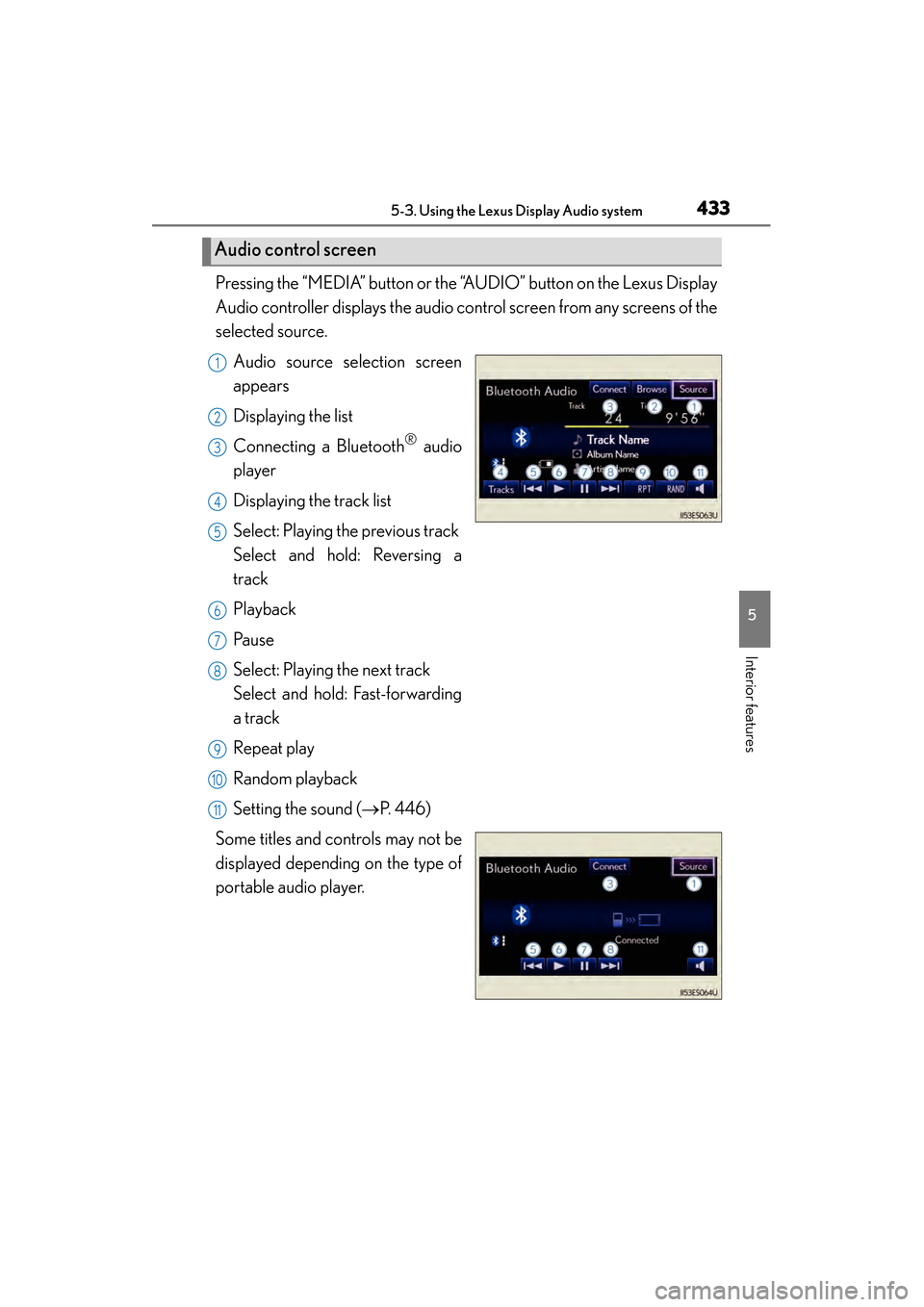
Pressing the “MEDIA” button or the “AUDIO” button on the Lexus Display
Audio controller displays the audio control screen from any screens of the
selected source.Audio source selection screen
appears
Displaying the list
Connecting a Bluetooth
® audio
player
Displaying the track list
Select: Playing the previous track
Select and hold: Reversing a
track
Playback
Pa u s e
Select: Playing the next track
Select and hold: Fast-forwarding
a track
Repeat play
Random playback
Setting the sound ( →P. 4 4 6 )
Some titles and controls may not be
displayed depending on the type of
portable audio player.
Audio control screen
1
2
3
4
5
6
7
8
9
10
11
Page 436 of 918
ES350_300h_OM_OM33A60U_(U)
4355-3. Using the Lexus Display Audio system
5
Interior features
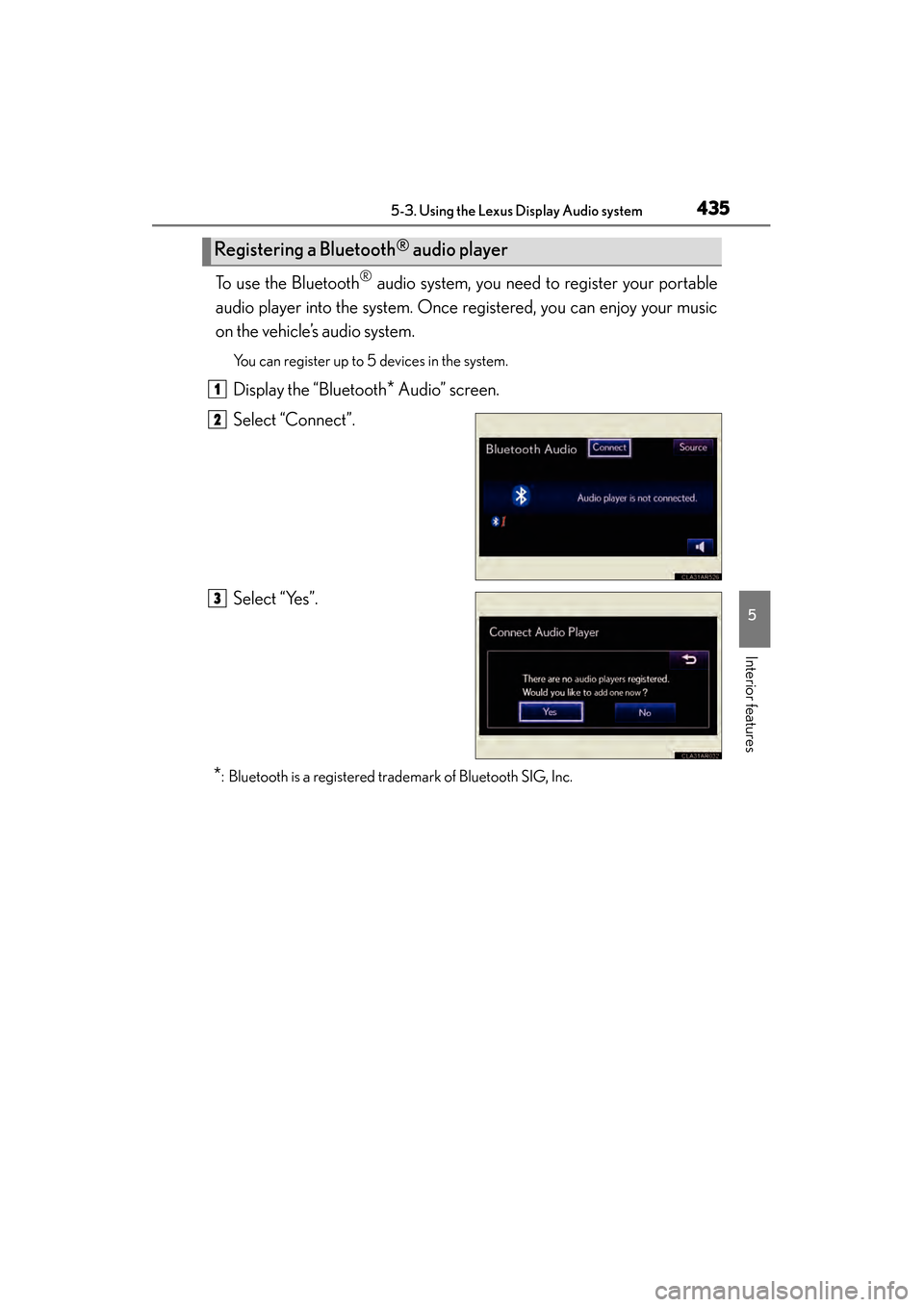
To use the Bluetooth® audio system, you need to register your portable
audio player into the system. Once registered, you can enjoy your music
on the vehicle’s audio system.
You can register up to 5 devices in the system.
Display the “Bluetooth* Audio” screen.
Select “Connect”.
Select “Yes”.
*: Bluetooth is a registered trademark of Bluetooth SIG, Inc.
Registering a Bluetooth® audio player
1
2
3
Page 437 of 918
436
ES350_300h_OM_OM33A60U_(U)
5-3. Using the Lexus Display Audio system
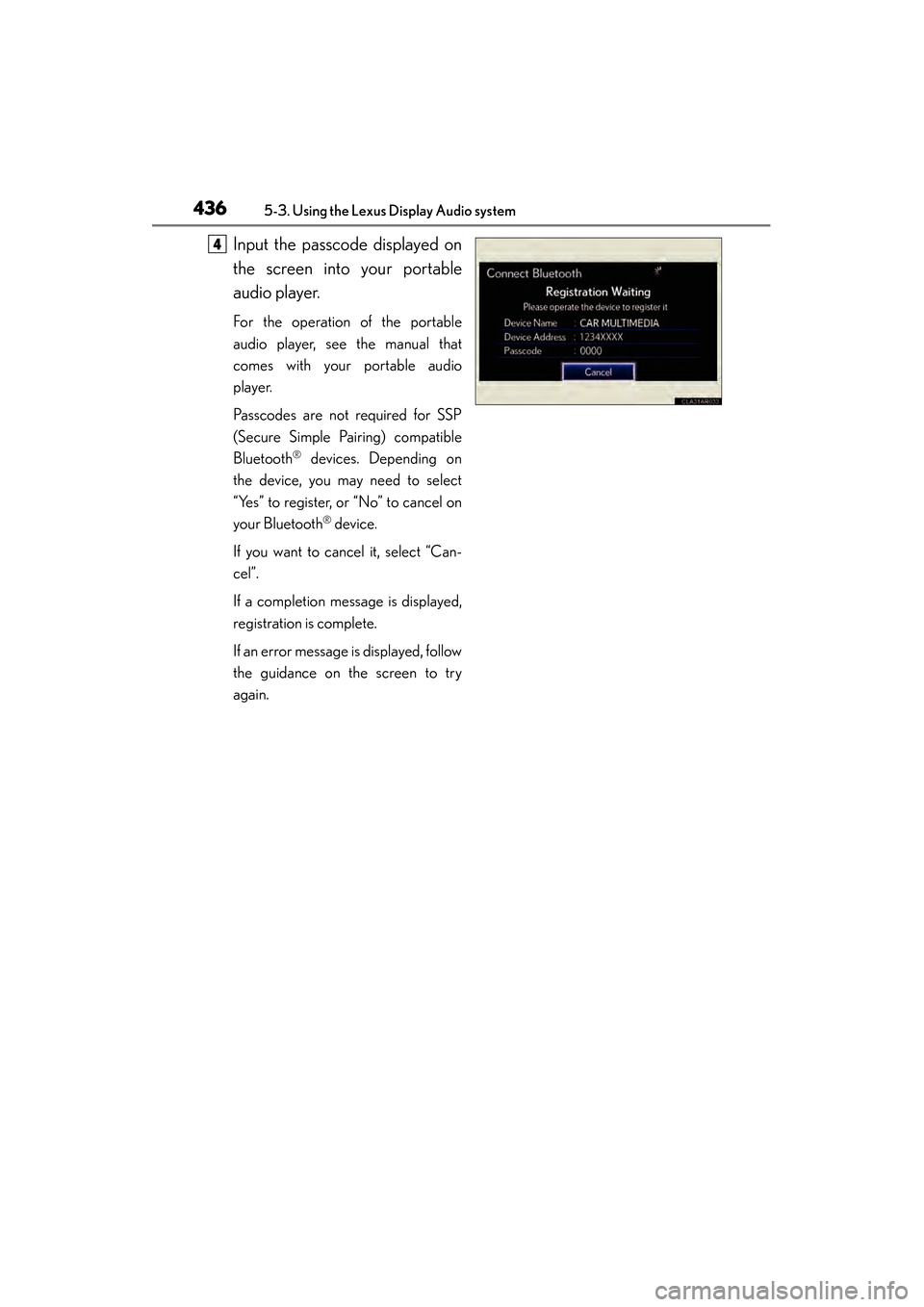
Input the passcode displayed on
the screen into your portable
audio player.
For the operation of the portable
audio player, see the manual that
comes with your portable audio
player.
Passcodes are not required for SSP
(Secure Simple Pairing) compatible
Bluetooth
® devices. Depending on
the device, you may need to select
“Yes” to register, or “No” to cancel on
your Bluetooth
® device.
If you want to cancel it, select “Can-
cel”.
If a completion message is displayed,
registration is complete.
If an error message is displayed, follow
the guidance on the screen to try
again.
4
Page 438 of 918
ES350_300h_OM_OM33A60U_(U)
4375-3. Using the Lexus Display Audio system
5
Interior features
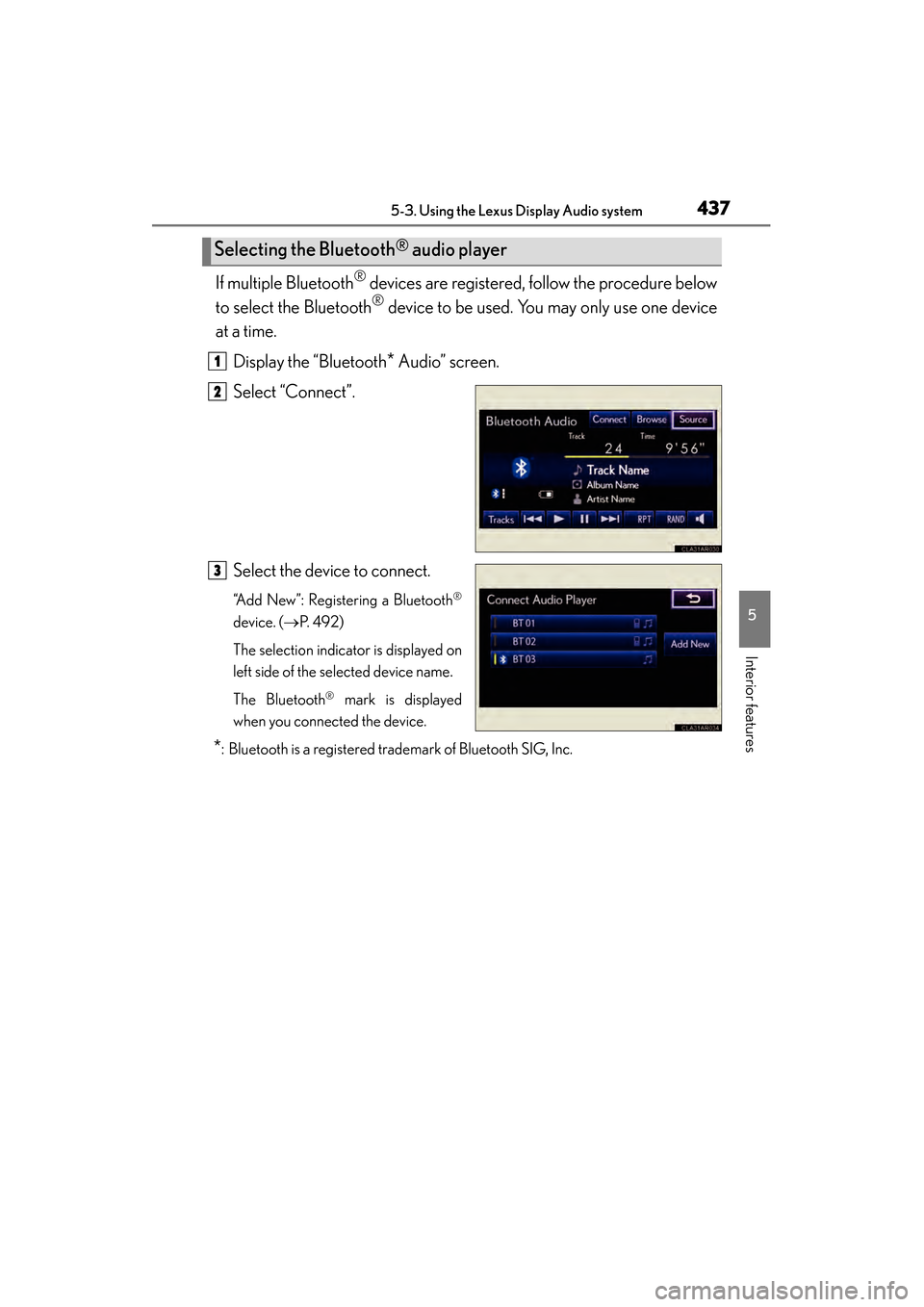
If multiple Bluetooth® devices are registered, follow the procedure below
to select the Bluetooth
® device to be used. You may only use one device
at a time.
Display the “Bluetooth
* Audio” screen.
Select “Connect”.
Select the device to connect.
“Add New”: Registering a Bluetooth®
device. ( →P. 4 9 2 )
The selection indicator is displayed on
left side of the selected device name.
The Bluetooth
® mark is displayed
when you connected the device.
*: Bluetooth is a registered trademark of Bluetooth SIG, Inc.
Selecting the Bluetooth® audio player
1
2
3