radio Lexus ES300h 2014 Owner's Guide
[x] Cancel search | Manufacturer: LEXUS, Model Year: 2014, Model line: ES300h, Model: Lexus ES300h 2014Pages: 918, PDF Size: 25.26 MB
Page 350 of 918
ES350_300h_OM_OM33A60U_(U)
3495-1. Lexus Display Audio system
5
Interior features
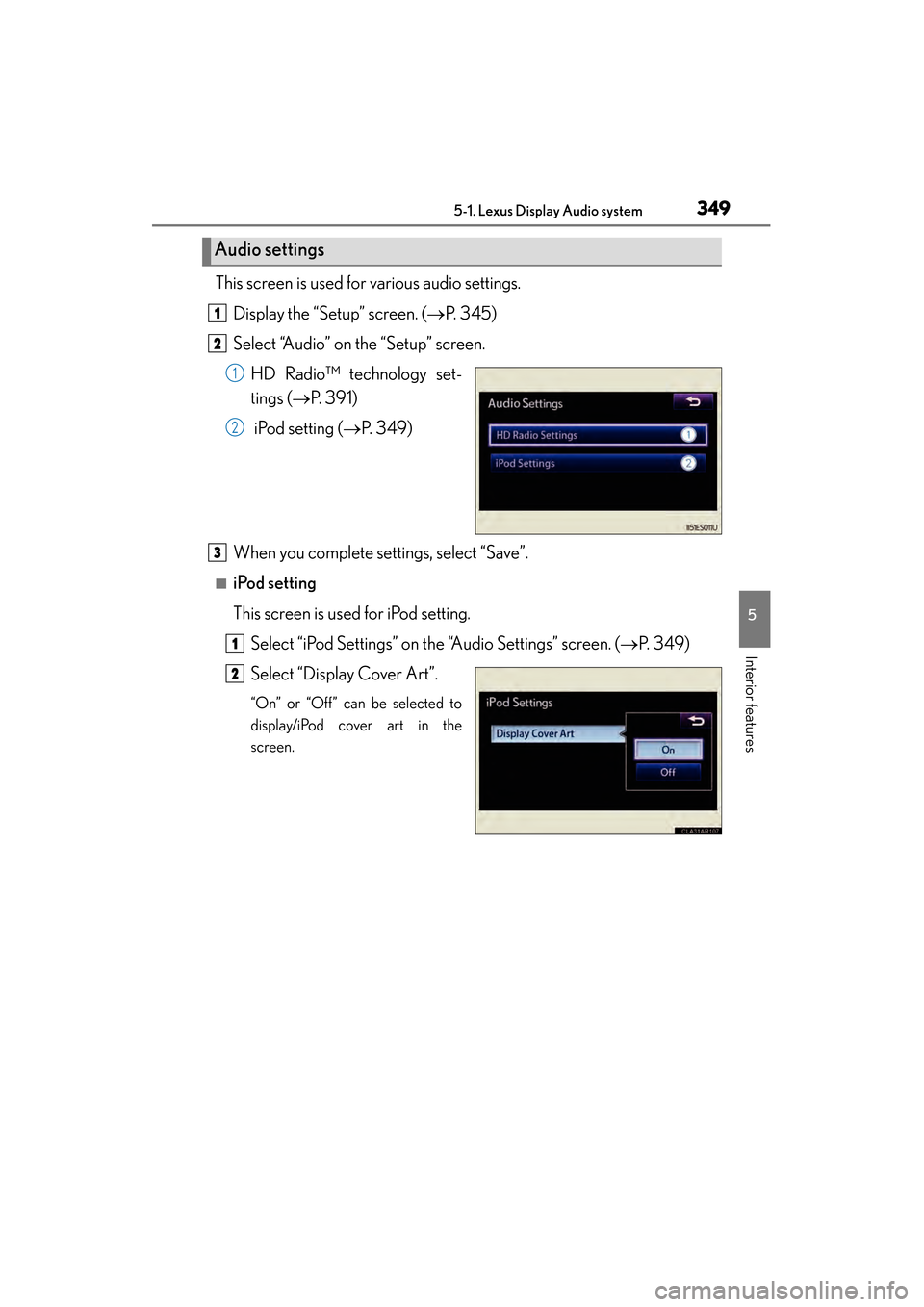
This screen is used for various audio settings.Display the “Setup” screen. ( →P. 345)
Select “Audio” on the “Setup” screen.
HD Radio™ technology set-
tings ( →P. 391)
iPod setting ( →P. 3 4 9 )
When you complete settings, select “Save”.
■iPod setting
This screen is used for iPod setting. Select “iPod Settings” on the “Audio Settings” screen. ( →P. 3 4 9 )
Select “Display Cover Art”.
“On” or “Off” can be selected to
display/iPod cover art in the
screen.
Audio settings
1
2
1
2
3
1
2
Page 383 of 918
382
ES350_300h_OM_OM33A60U_(U)
5-3. Using the Lexus Display Audio system
Audio system (with the Lexus Display Audio
system)
XVehicles with a navigation system
Owners of models equipped with a navigation system should refer to
the “Navigation System Owner’s Manual”.
XVehicles without a navigation system or a Lexus Display Audio system
→P. 500
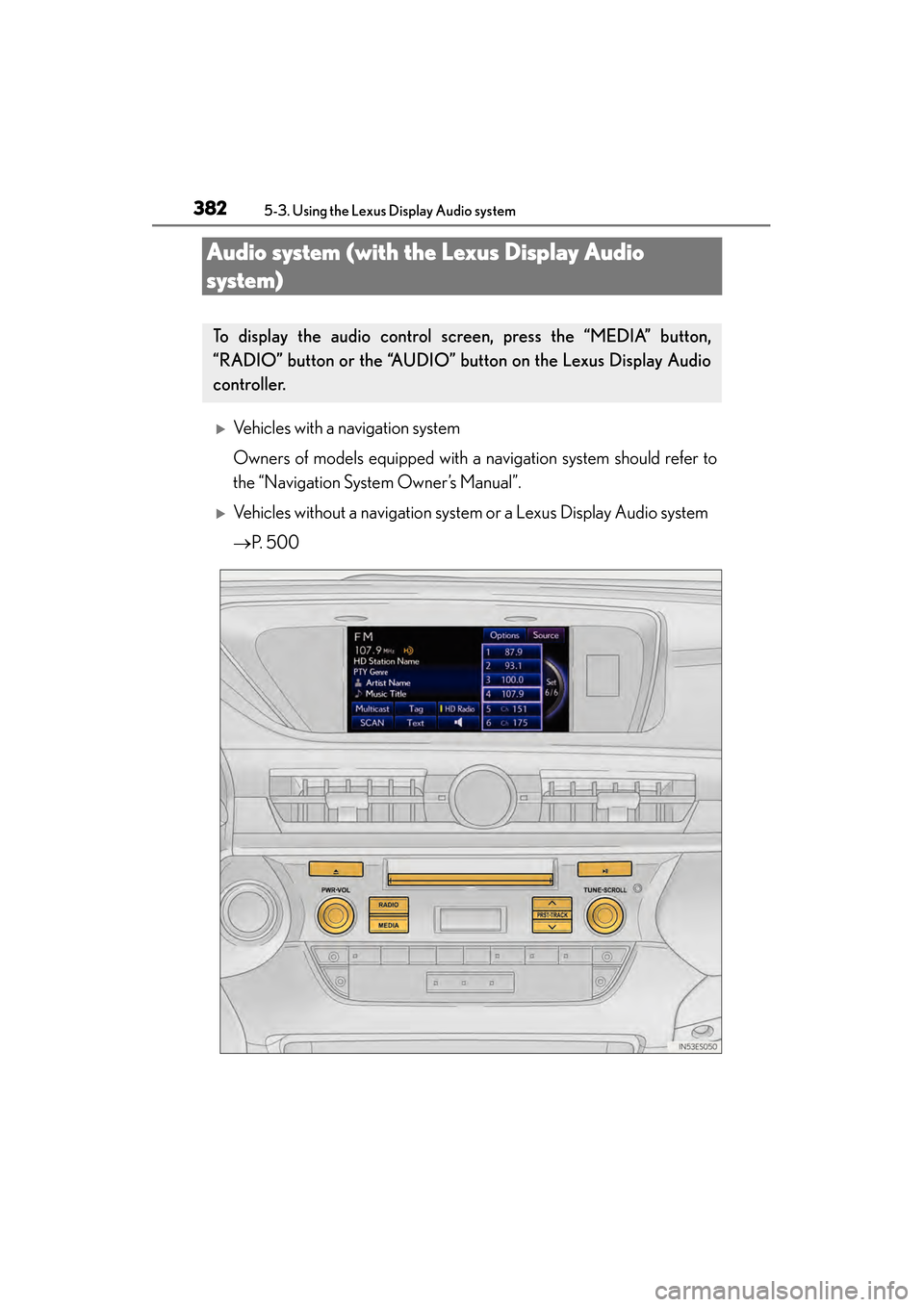
To display the audio control screen, press the “MEDIA” button,
“RADIO” button or the “AUDIO” button on the Lexus Display Audio
controller.
Page 384 of 918
ES350_300h_OM_OM33A60U_(U)
3835-3. Using the Lexus Display Audio system
5
Interior features
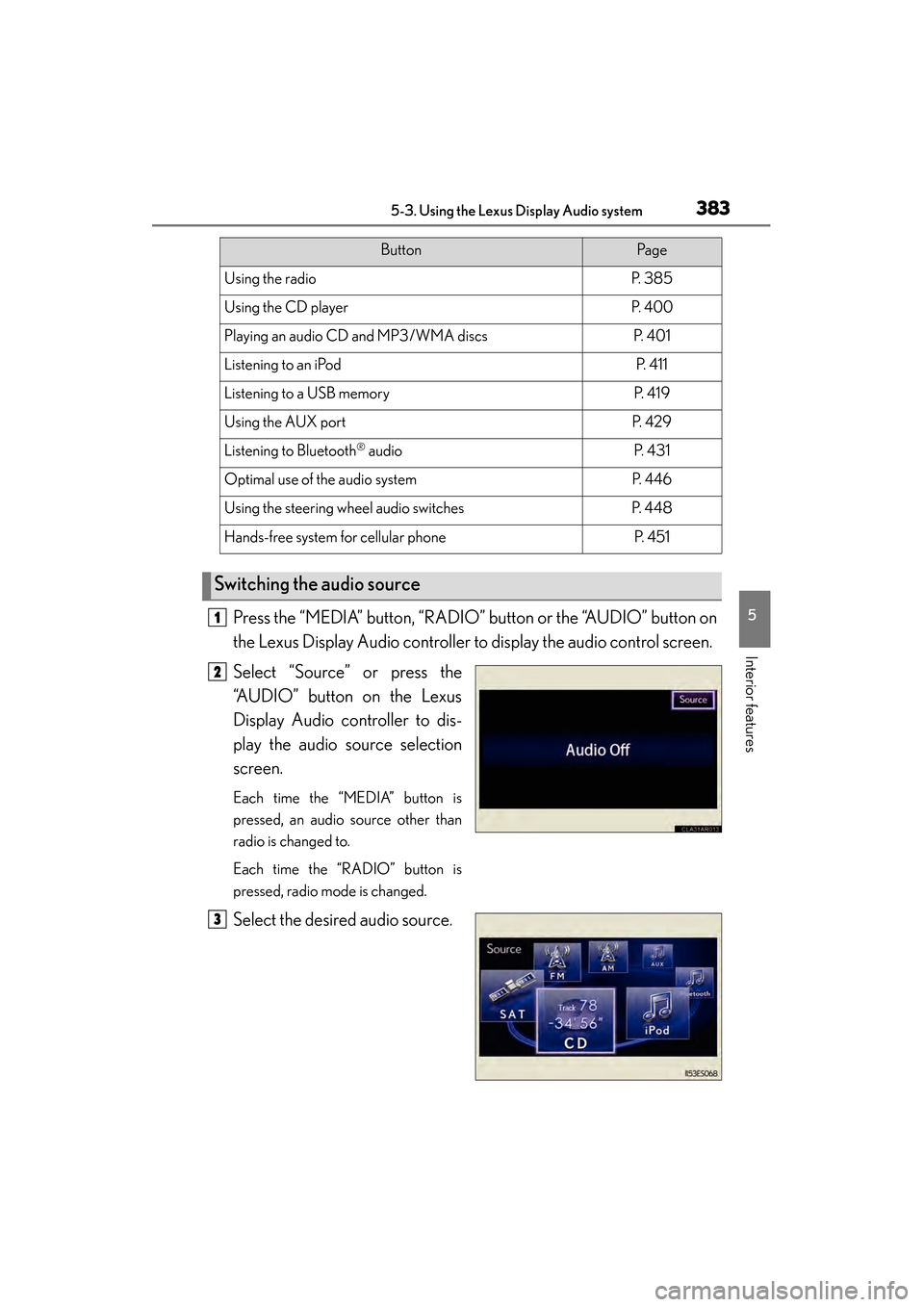
Press the “MEDIA” button, “RADIO” button or the “AUDIO” button on
the Lexus Display Audio controller to display the audio control screen.
Select “Source” or press the
“AUDIO” button on the Lexus
Display Audio controller to dis-
play the audio source selection
screen.
Each time the “MEDIA” button is
pressed, an audio source other than
radio is changed to.
Each time the “RADIO” button is
pressed, radio mode is changed.
Select the desired audio source.
ButtonPa g e
Using the radioP. 3 8 5
Using the CD playerP. 4 0 0
Playing an audio CD and MP3/WMA discsP. 4 0 1
Listening to an iPodP. 4 1 1
Listening to a USB memoryP. 4 1 9
Using the AUX portP. 4 2 9
Listening to Bluetooth® audioP. 4 3 1
Optimal use of the audio systemP. 446
Using the steering wheel audio switchesP. 4 4 8
Hands-free system for cellular phoneP. 4 5 1
Switching the audio source
1
2
3
Page 386 of 918
385
ES350_300h_OM_OM33A60U_(U)
5-3. Using the Lexus Display Audio system
5
Interior features
Using the radio
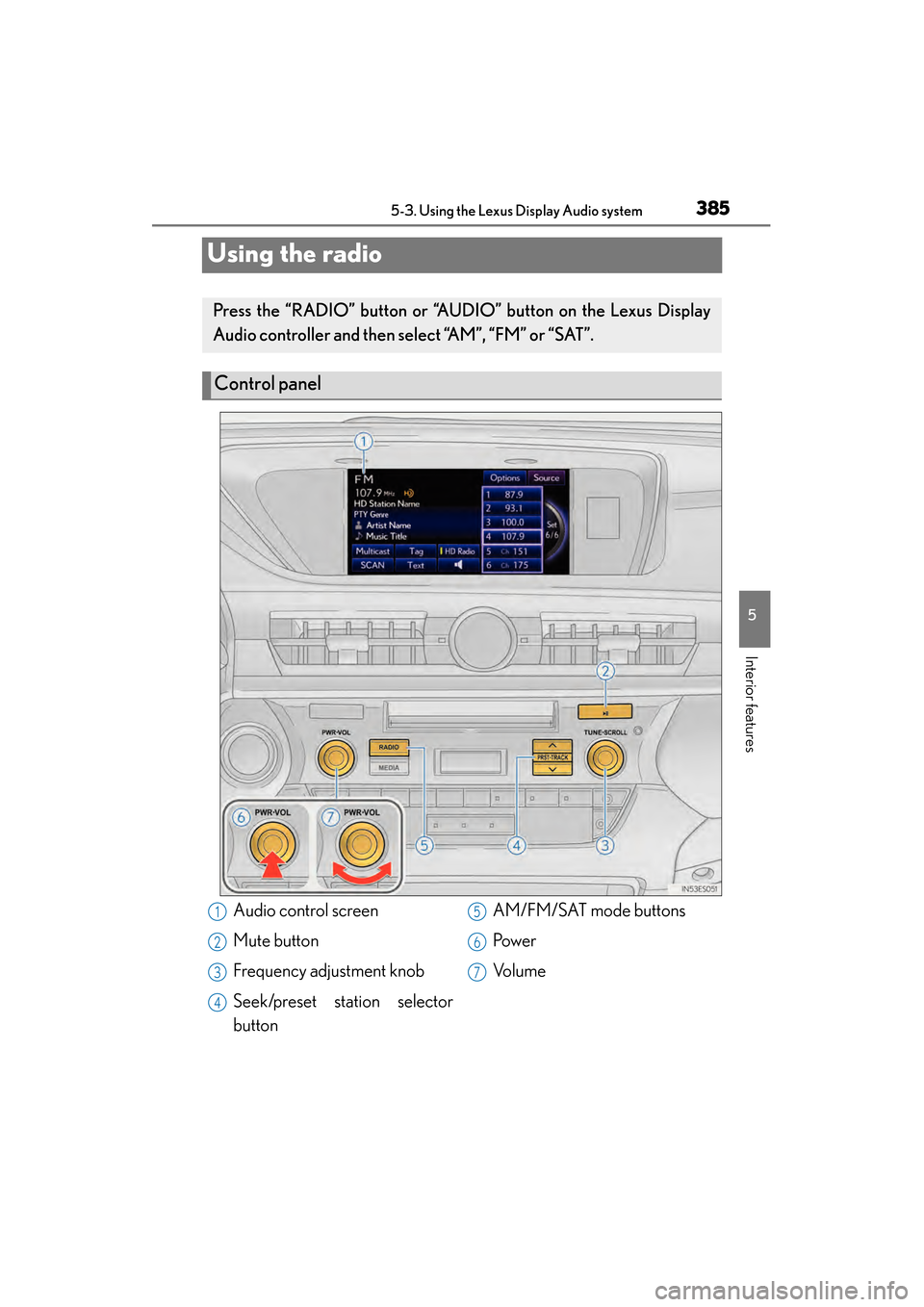
Press the “RADIO” button or “AUDIO” button on the Lexus Display
Audio controller and then select “AM”, “FM” or “SAT”.
Control panel
Audio control screen
Mute button
Frequency adjustment knob
Seek/preset station selector
buttonAM/FM/SAT mode buttons
Pow e r
Vo l u m e1
2
3
4
5
6
7
Page 387 of 918
386
ES350_300h_OM_OM33A60U_(U)
5-3. Using the Lexus Display Audio system
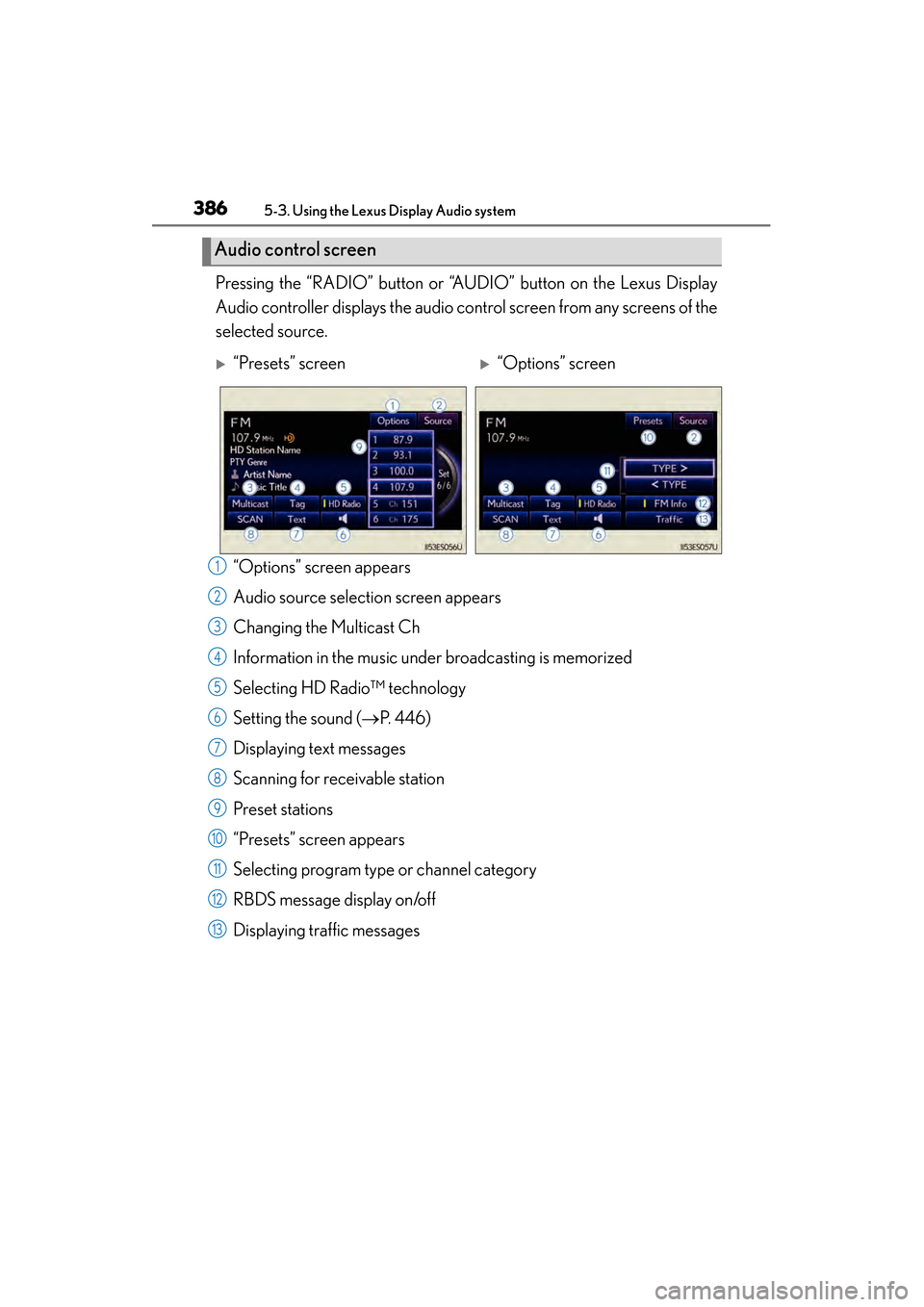
Pressing the “RADIO” button or “AUDIO” button on the Lexus Display
Audio controller displays the audio control screen from any screens of the
selected source.“Options” screen appears
Audio source selection screen appears
Changing the Multicast Ch
Information in the music under broadcasting is memorized
Selecting HD Radio™ technology
Setting the sound ( →P. 4 4 6 )
Displaying text messages
Scanning for receivable station
Preset stations
“Presets” screen appears
Selecting program type or channel category
RBDS message display on/off
Displaying traffic messages
Audio control screen
X“Presets” screenX“Options” screen
1
2
3
4
5
6
7
8
9
10
11
12
13
Page 388 of 918
ES350_300h_OM_OM33A60U_(U)
3875-3. Using the Lexus Display Audio system
5
Interior features
■Seek tuning
Press and hold “∧” or “ ∨” on the “PRST•TRACK” button.
■Manual tuning
Turn the “TUNE•SCROLL” knob.
■Preset stations
Press “ ∧” or “ ∨” on the “PRST•TRACK” button or select desired preset
stations.
Radio mode has a mix preset function, which can store up to 36 stations
(6 station per page × 6 page) from any of the AM, FM or SAT bands.
Search for desired stations by turning the “TUNE•SCROLL” knob or
pressing and holding “ ∧” or “ ∨” on the “PRST•TRACK” button.
Select and hold one of the preset stations (1-6 every page).
Select “SCAN” on the screen.
“SCAN” appears on the screen. The radio will find the next station and stay there
for 10 seconds if “All” or “HD Only” is selected, or 5 seconds if “Analog” is
selected ( →P. 391), and then scan again.
Select “SCAN” once again when the desired station is reached.
Selecting a station
Setting station presets (excluding XM® Satellite Radio)
Scanning radio stations (excluding XM® Satellite Radio)
1
2
1
2
Page 389 of 918
388
ES350_300h_OM_OM33A60U_(U)
5-3. Using the Lexus Display Audio system
This feature allows your radio to receive station identification information
and program information (classical, jazz, etc.) from radio stations which
broadcast this information. RBDS features are available only when listen-
ing to an FM station that broadcasts RBDS information and the “FM Info”
indicator is on.
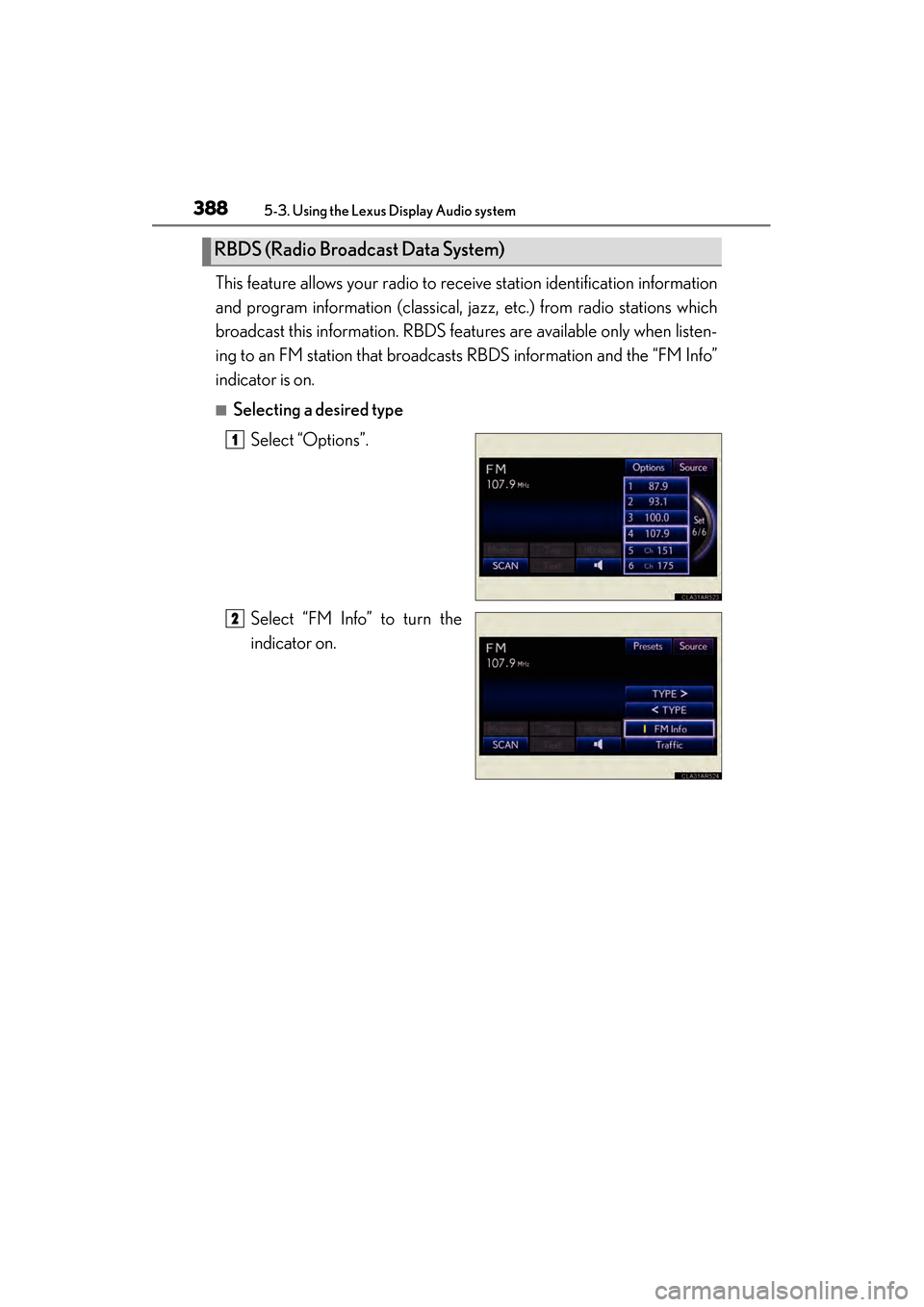
■Selecting a desired typeSelect “Options”.
Select “FM Info” to turn the
indicator on.
RBDS (Radio Broadcast Data System)
1
2
Page 390 of 918
ES350_300h_OM_OM33A60U_(U)
3895-3. Using the Lexus Display Audio system
5
Interior features
Select “TYPE >” or “ < TYPE” to select program types.
The type of program changes each time the button is selected.
• Classical
•Country
• EasyLis (Easy Listening)
• Inform (Information)
•Jazz
•News
• Oldies
•Other
•Pop Music
•Religion
•Rock
•R&B (Rhythm and Blues)
•Sports
•Talk
• Traffic (Not available when “HD Radio Settings” are set to analog)
• Alert (Emergency Alert)
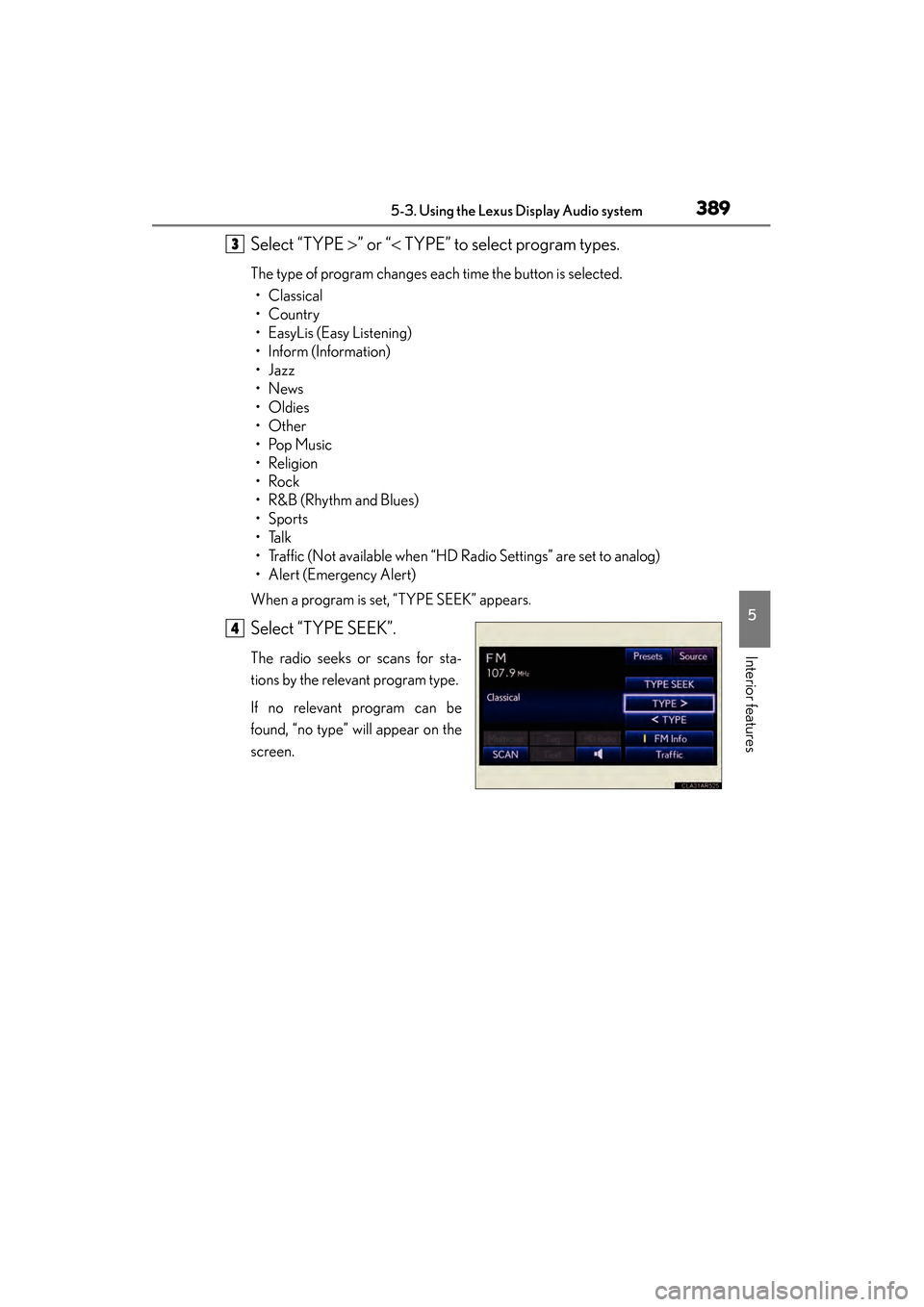
When a program is set, “TYPE SEEK” appears.
Select “TYPE SEEK”.
The radio seeks or scans for sta-
tions by the relevant program type.
If no relevant program can be
found, “no type” will appear on the
screen.
3
4
Page 391 of 918
390
ES350_300h_OM_OM33A60U_(U)
5-3. Using the Lexus Display Audio system
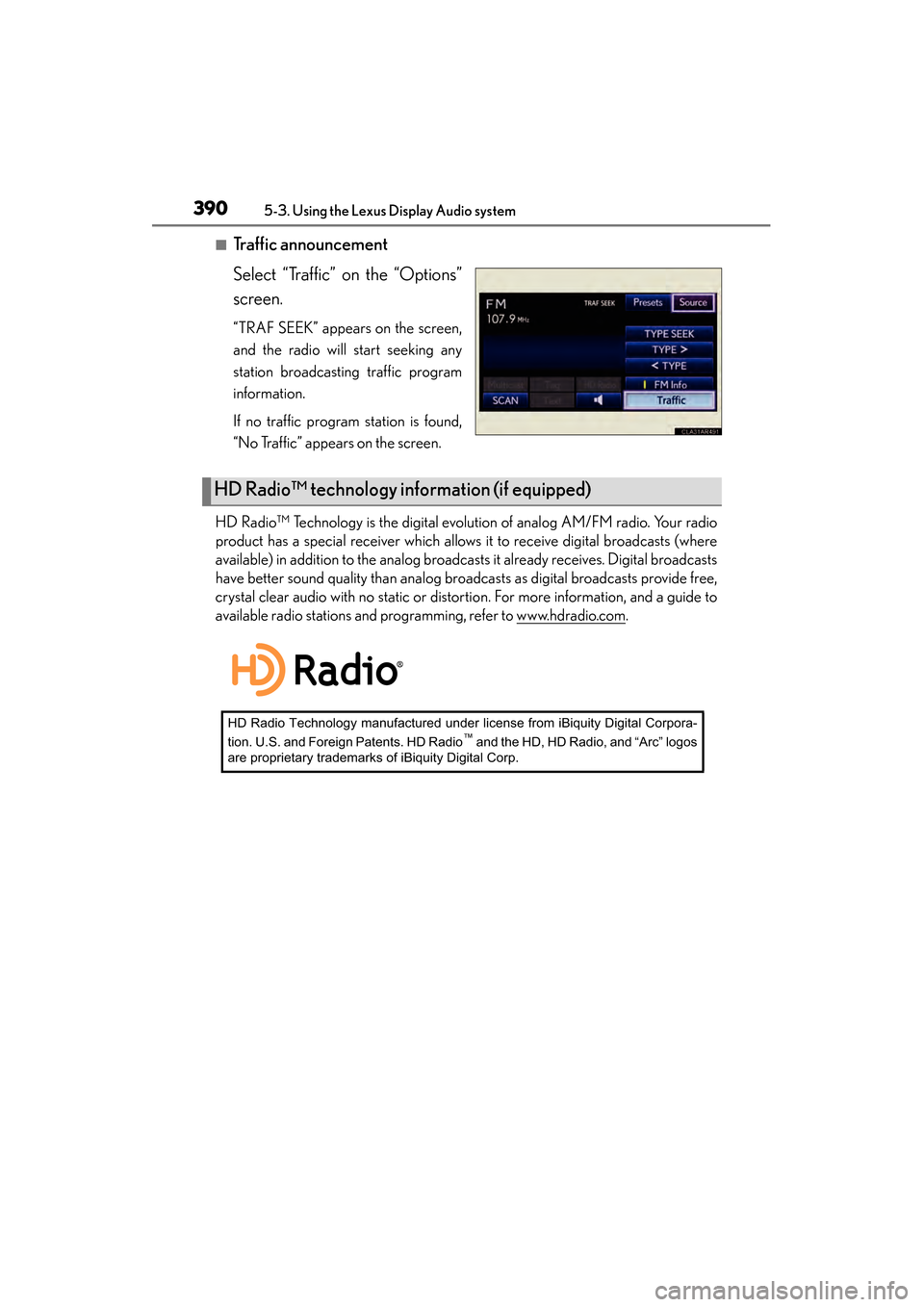
■Traffic announcement
Select “Traffic” on the “Options”
screen.
“TRAF SEEK” appears on the screen,
and the radio will start seeking any
station broadcasting traffic program
information.
If no traffic program station is found,
“No Traffic” appears on the screen.
HD Radio™ Technology is the digital evolution of analog AM/FM radio. Your radio
product has a special receiver which allows it to receive digital broadcasts (where
available) in addition to the analog broadcasts it already receives. Digital broadcasts
have better sound quality than analog broadcasts as digital broadcasts provide free,
crystal clear audio with no static or distortion. For more information, and a guide to
available radio stations and programming, refer to www.hdradio.com
.
HD Radio™ technology information (if equipped)
HD Radio Technology manufactured under license from iBiquity Digital Corpora-
tion. U.S. and Foreign Patents. HD Radio™ and the HD, HD Radio, and “Arc” logos
are proprietary trademarks of iBiquity Digital Corp.
Page 392 of 918
ES350_300h_OM_OM33A60U_(U)
3915-3. Using the Lexus Display Audio system
5
Interior features
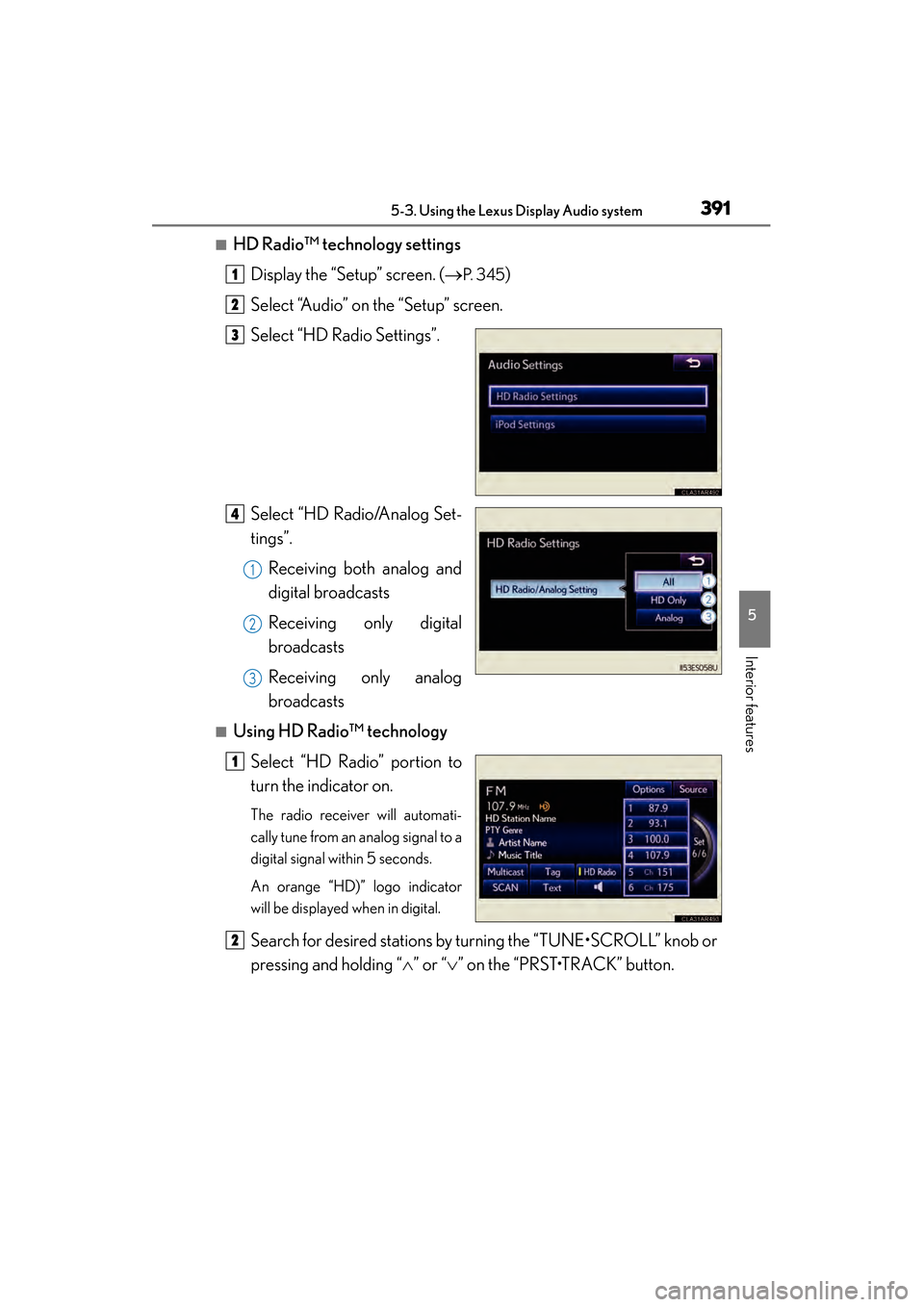
■HD Radio™ technology settingsDisplay the “Setup” screen. ( →
P. 3 4 5)
Select “Audio” on the “Setup” screen.
Select “HD Radio Settings”.
Select “HD Radio/Analog Set-
tings”. Receiving both analog and
digital broadcasts
Receiving only digital
broadcasts
Receiving only analog
broadcasts
■Using HD Radio™ technology
Select “HD Radio” portion to
turn the indicator on.
The radio receiver will automati-
cally tune from an analog signal to a
digital signal within 5 seconds.
An orange “HD)” logo indicator
will be displayed when in digital.
Search for desired stations by turning the “TUNE•SCROLL” knob or
pressing and holding “ ∧” or “ ∨” on the “PRST•TRACK” button.
1
2
3
4
1
2
3
1
2