reset Lexus ES300h 2014 Owner's Guide
[x] Cancel search | Manufacturer: LEXUS, Model Year: 2014, Model line: ES300h, Model: Lexus ES300h 2014Pages: 918, PDF Size: 25.26 MB
Page 509 of 918
508
ES350_300h_OM_OM33A60U_(U)
5-4. Using the audio system
■Scanning the XM® Satellite Radio channels
●Scanning the channels in the current categoryPress .
When the desired channel is reached, press the button again.
●Scanning the preset channelsPress and hold until you hear a beep.
When the desired channel is reached, press the button again.
■Displaying text information
Press .
The display will show up to 10 characters.
The display changes as follows each time the button is pressed:
●
CH NAME
●TITLE (SONG/PROGRAM TITLE)
●NAME (ARTIST NAME/FEATURE)
●CH NUMBER
1
2
1
2
Page 510 of 918
ES350_300h_OM_OM33A60U_(U)
5095-4. Using the audio system
5
Interior features
■When the 12-volt battery is disconnected
All preset stations are erased.
■Reception sensitivity
●Cargo loaded on the roof luggage carrier, especially metal objects, may adversely
affect the reception of XM® Satellite Radio.
●It is difficult to maintain perfect radio reception at all times due to the continually
changing position of the antenna, differences in signal strength and surrounding
objects, such as trains and transmitters.
●The radio antenna is mounted inside the trunk and the rear window. To maintain
clear radio reception, do not attach metallic window tinting or other metallic
objects to the antenna wire mounted inside the rear window.
■Receiving XM® Satellite Radio
An XM
® Satellite Radio is a tuner designed exclusively to receive broadcasts pro-
vided under a separate subscription. Availability is limited to the 48 contiguous
states and 10 Canadian provinces.
●XM® subscriptions
For detailed information about XM® Satellite Radio or to subscribe:
U.S.A.
Visit on the web at www.siriusxm.com
or call 1-866-635-2349.
Canada
Visit on the web at www.xmradio.ca
or call 1-877-438-9677.
●Radio ID
You will need the radio ID when activating XM
® service or reporting a problem.
Select “CH000” using , and the receiver’s 8-character ID number will
appear.
●Satellite tuner
The tuner supports only Audio Services (Music and Talk) and the accompanying
Te x t I n f o r m a t i o n o f X M
® Satellite Radio.
Page 537 of 918
536
ES350_300h_OM_OM33A60U_(U)
5-4. Using the audio system
■iPod problems
To resolve most problems encountered when using your iPod, disconnect your iPod
from the vehicle iPod connection and reset it.
For instructions on how to reset your iPod, refer to your iPod Owner’s Manual.
■Display
→P. 5 1 8
■Error messages
“ERROR”:
This indicates a problem in the iPod or its connection.
“NO MUSIC”:
This indicates that there is no music data in the iPod.
“EMPTY”:
This indicates that some available songs are not found in a selected playlist.
“UPDATE”:
This indicates that the version of the iPod is not compatible. Upgrade your iPod soft-
ware to the latest version.
Page 591 of 918
590
ES350_300h_OM_OM33A60U_(U)
5-4. Using the audio system
Press the talk switch and say “Dial by number”.
Press the talk switch and say the phone number.
Dial by one of the following methods:
a. Press the off-hook switch.
b. Press the talk switch and say “Dial”.
c. Select “Dial” using .
Press the talk switch and say “Dial by name”.
Select a registered name to be input by either of the following methods:
a. Press the talk switch and say a registered name.
b. Press the talk switch and say “List Names”. Press the talk switch whenthe desired name is read aloud.
Dial by one of the following methods:
a. Press the off-hook switch.
b. Press the talk switch and say “Dial”.
c. Select “Dial” using .
Press the off-hook switch.
Press the preset button in which the desired number is registered.
Press the off-hook switch.
Dialing by inputting a number
Dialing by inputting a name
Speed dialing
1
2
3
1
2
3
1
2
3
Page 610 of 918
ES350_300h_OM_OM33A60U_(U)
6095-4. Using the audio system
5
Interior features
Select the desired preset button and register the data into speed dial by
either of the following methods:
a. Press the desired preset button and select “Confirm” by using a voicecommand or .
b. Press and hold the desired preset button.
Select “Delete Entry” using a voice command or .
XPattern A
Select the data to be deleted by either of the following methods and
select “Confirm” using a voice command or :
a. Press the talk switch and say the name of the desired phone number.
b. Press the talk switch and say “List Names”. When the name of the desired phone number is read aloud, press the talk switch.
XPattern B
Select the desired data to be deleted using .
Deleting the registered data
3
1
2
2
Page 611 of 918
610
ES350_300h_OM_OM33A60U_(U)
5-4. Using the audio system
Select “Delete Speed Dial (Del Spd Dial)” using a voice command or.
Press the preset button to which the desired speed dial is registered
and select “Confirm” using a voice command or .
■Limitation of number of digits
A phone number that exceeds 24 digits cannot be registered.
Deleting speed dials
1
2
Page 667 of 918
666
ES350_300h_OM_OM33A60U_(U)
6-2. Maintenance
■Repair and replacement
It is recommended that genuine Lexus parts be used for repairs to ensure perfor-
mance of each system. If non-Lexus parts are used in replacement or if a repair shop
other than a Lexus dealer performs repairs, confirm the warranty coverage.
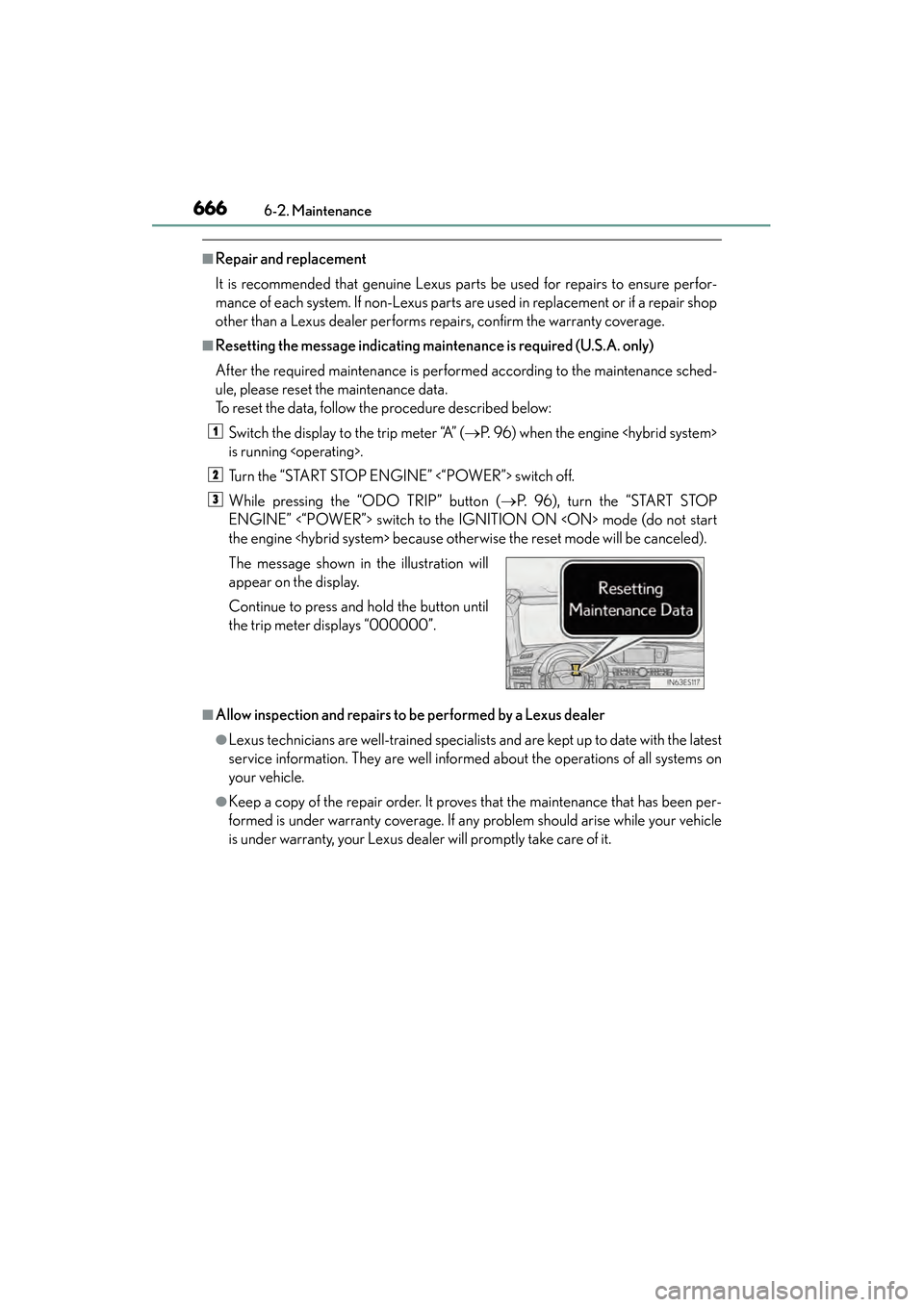
■Resetting the message indicating maintenance is required (U.S.A. only)
After the required maintenance is performed according to the maintenance sched-
ule, please reset the maintenance data.
To reset the data, follow the procedure described below:Switch the display to the trip meter “A” ( →P. 96) when the engine
is running
Turn the “START STOP ENGINE” <“POWER”> switch off.
While pressing the “ODO TRIP” button ( →P. 96), turn the “START STOP
ENGINE” <“POWER”> switch to the IGNITION ON
the engine
■Allow inspection and repairs to be performed by a Lexus dealer
●Lexus technicians are well-trained specialists and are kept up to date with the latest
service information. They are well informed about the operations of all systems on
your vehicle.
●Keep a copy of the repair order. It proves that the maintenance that has been per-
formed is under warranty coverage. If any problem should arise while your vehicle
is under warranty, your Lexus dealer will promptly take care of it. The message shown in the illustration will
appear on the display.
Continue to press and hold the button until
the trip meter displays “000000”.
1
2
3
Page 705 of 918
704
ES350_300h_OM_OM33A60U_(U)
6-3. Do-it-yourself maintenance
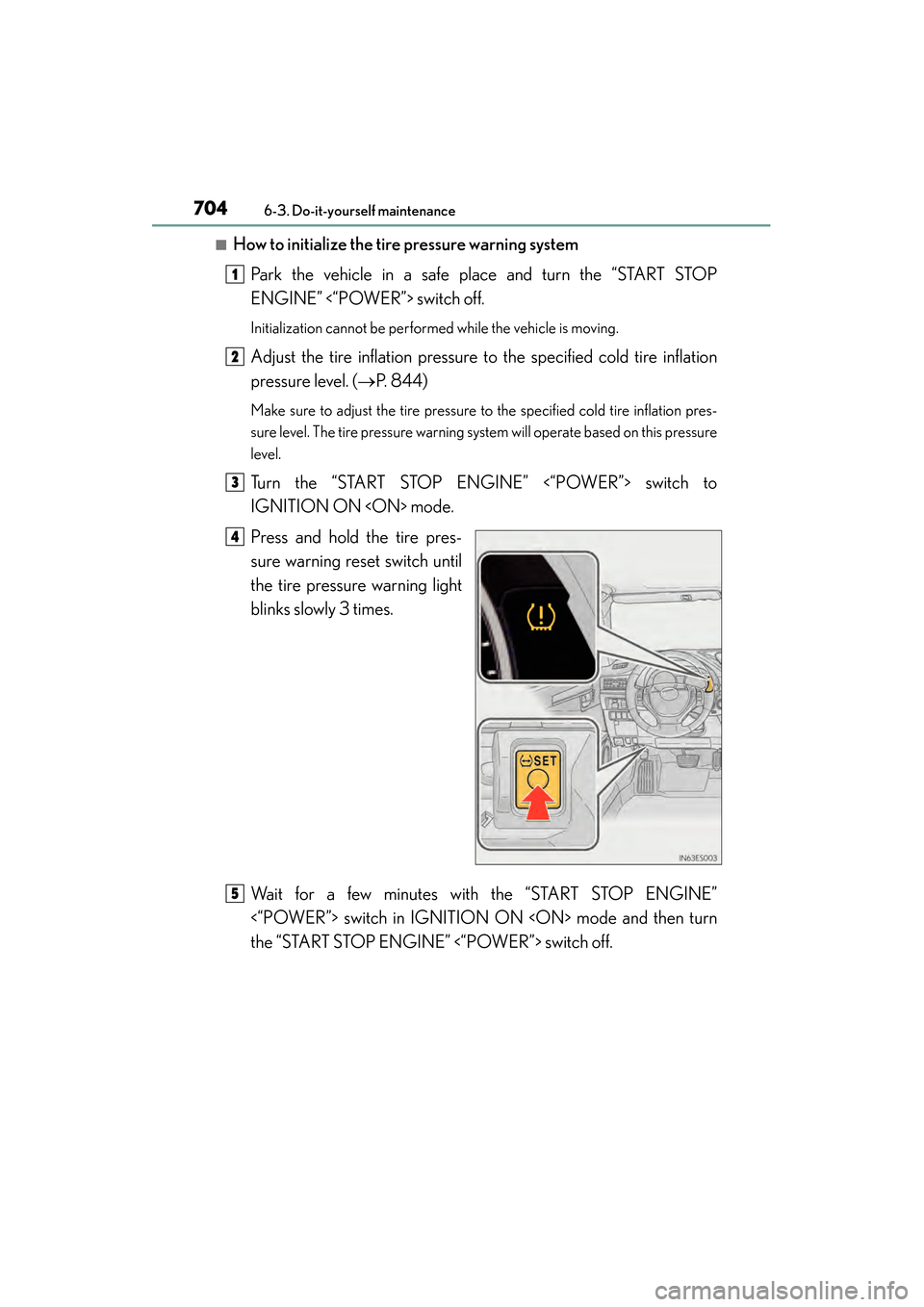
■How to initialize the tire pressure warning system
Park the vehicle in a safe place and turn the “START STOP
ENGINE” <“POWER”> switch off.
Initialization cannot be performed while the vehicle is moving.
Adjust the tire inflation pressure to the specified cold tire inflation
pressure level. ( →P. 844)
Make sure to adjust the tire pressure to the specified cold tire inflation pres-
sure level. The tire pressure warning system will operate based on this pressure
level.
Turn the “START STOP ENGINE” <“POWER”> switch to
IGNITION ON
Press and hold the tire pres-
sure warning reset switch until
the tire pressure warning light
blinks slowly 3 times.
Wait for a few minutes with the “START STOP ENGINE”
<“POWER”> switch in IGNITION ON
the “START STOP ENGINE” <“POWER”> switch off.
1
2
3
4
5
Page 709 of 918
708
ES350_300h_OM_OM33A60U_(U)
6-3. Do-it-yourself maintenance
■The initialization operation
●Make sure to carry out initialization after adjusting the tire inflation pressure.
Also, make sure the tires are cold before carrying out initialization or tire inflation
pressure adjustment.
●If you have accidentally turned the “START STOP ENGINE” <“POWER”> switch
off during initialization, it is not necessary to press the reset switch again as initial-
ization will restart automatically when the “START STOP ENGINE” <“POWER”>
switch has been turned to IGNITION ON
●If you accidentally press the reset switch when initialization is not necessary, adjust
the tire inflation pressure to the specified level when the tires are cold, and conduct
initialization again.
■When initialization of the tire pressure warning system has failed
Initialization can be completed in a few minutes. However, in the following cases, the
settings have not been recorded and the system will not operate properly. If
repeated attempts to record tire inflation pressure settings are unsuccessful, have
the vehicle inspected by your Lexus dealer.
●When operating the tire pressure warning reset switch, the tire pressure warning
light does not blink 3 times.
●After carrying out the initialization procedure, the tire pressure warning light blinks
for 1 minute then stays on after driving for 20 minutes.
Page 711 of 918
710
ES350_300h_OM_OM33A60U_(U)
6-3. Do-it-yourself maintenance
CAUTION
■When inspecting or replacing tires
Observe the following precautions to prevent accidents.
Failure to do so may cause damage to parts of the drive train as well as dangerous
handling characteristics, which may lead to an accident resulting in death or seri-
ous injury.
●Do not mix tires of different makes, models or tread patterns.
Also, do not mix tires of remarkably different treadwear.
●Do not use tire sizes other than those recommended by Lexus.
●Do not mix differently constructed tires (radial, bias-belted or bias-ply tires).
●Do not mix summer, all season and snow tires.
●Do not use tires that have been used on another vehicle.
Do not use tires if you do not know how they were used previously.
●Do not tow if your vehicle has a compact spare tire (if equipped) installed.
■When initializing the tire pressure warning system
Do not operate the tire pressure warning reset switch without first adjusting the tire
inflation pressure to the specified level. Otherwise, the tire pressure warning light
may not come on even if the tire inflation pressure is low, or it may come on when
the tire inflation pressure is actually normal.
■Caution regarding interference with electronic devices
●Users of any electrical medical device other than implantable cardiac pacemak-
ers, cardiac resynchronization therapy-pacemakers or implantable cardioverter
defibrillators should consult the manufacturer of the device for information about
its operation under the influence of radio waves.
Radio waves could have unexpected effects on the operation of such medical
devices.
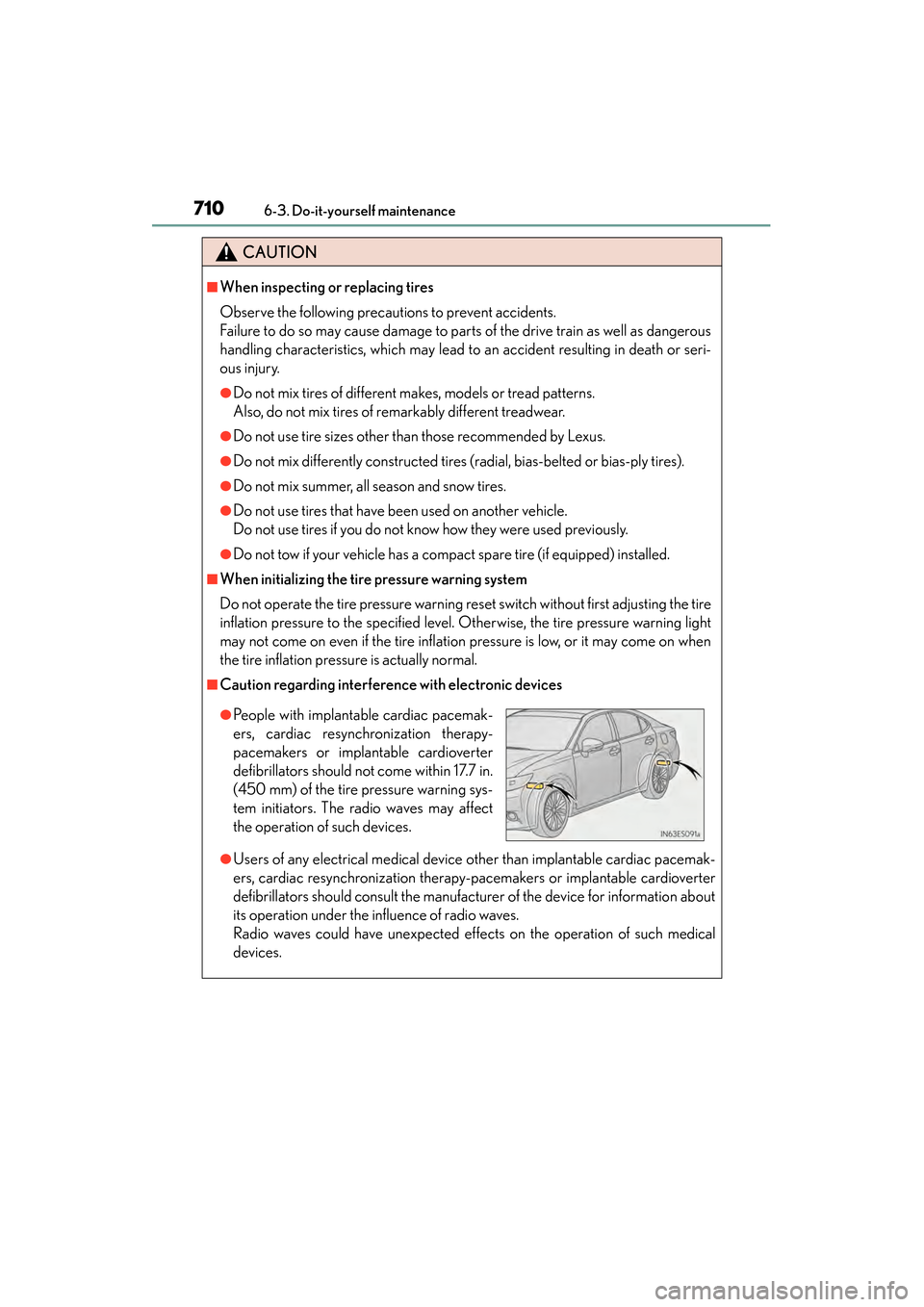
●People with implantable cardiac pacemak-
ers, cardiac resynchronization therapy-
pacemakers or implantable cardioverter
defibrillators should not come within 17.7 in.
(450 mm) of the tire pressure warning sys-
tem initiators. The radio waves may affect
the operation of such devices.