phone Lexus ES300h 2014 Workshop Manual
[x] Cancel search | Manufacturer: LEXUS, Model Year: 2014, Model line: ES300h, Model: Lexus ES300h 2014Pages: 918, PDF Size: 25.26 MB
Page 486 of 918
ES350_300h_OM_OM33A60U_(U)
4855-3. Using the Lexus Display Audio system
5
Interior features
■Deleting the phonebook data in a different wayDisplay the “Phone” screen. ( →P. 4 5 9 )
Select “Contacts” on the “Phone” screen.
Choose the desired data from the list.
Select “Options” on the “Contact” screen.
Select “Delete” on the “Contact” screen.
A confirmation message will be displayed. If everything is correct, select “Yes”.
If your phone supports PBAP service, “Automatically Download Contacts” setting
needs to be set to “Off”. ( →P. 4 8 2 )
When you delete a Bluetooth
® phone, the phonebook data will be deleted at the
same time.
1
2
3
4
5
6
Page 487 of 918
486
ES350_300h_OM_OM33A60U_(U)
5-3. Using the Lexus Display Audio system
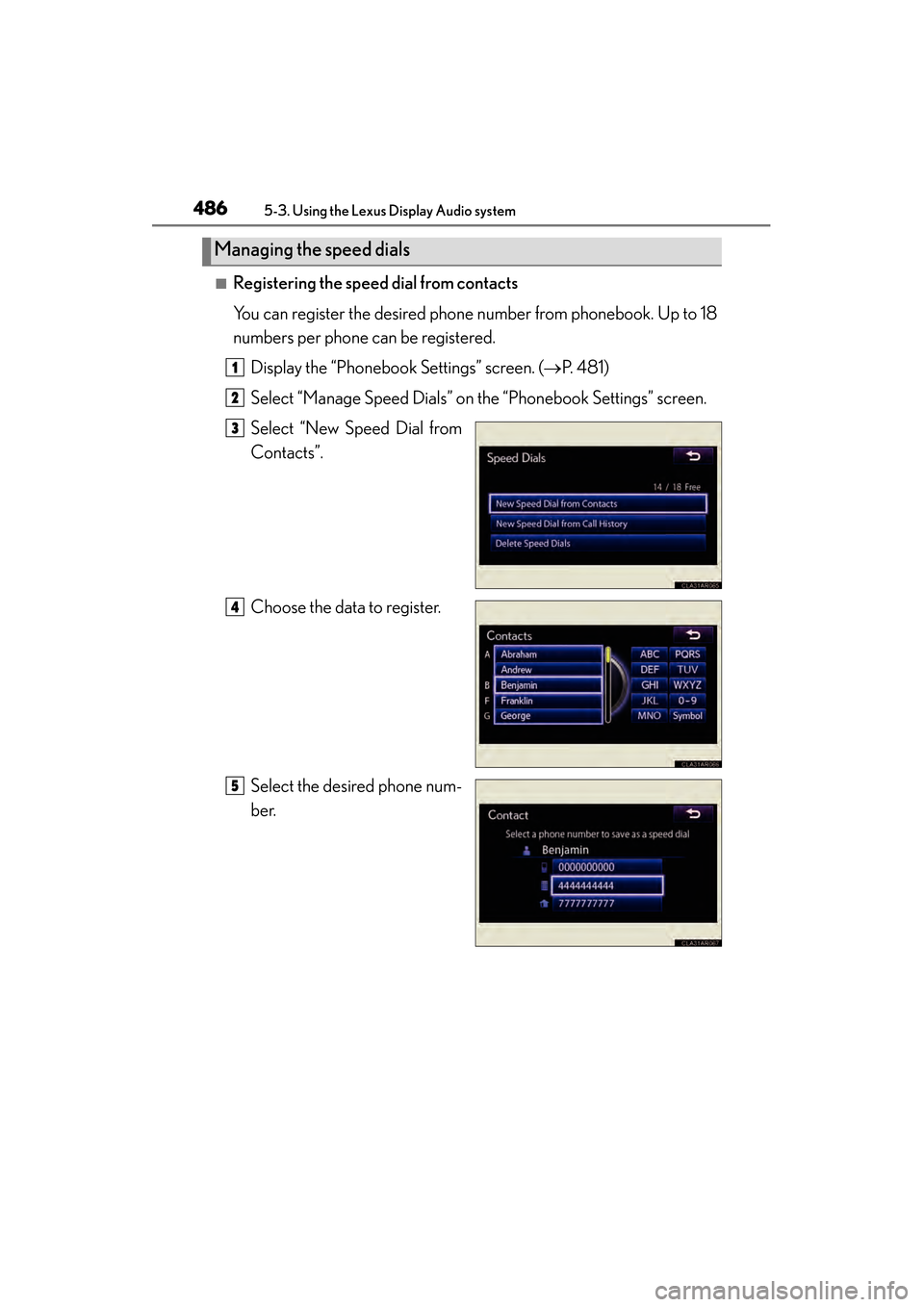
■Registering the speed dial from contacts
You can register the desired phone number from phonebook. Up to 18
numbers per phone can be registered.Display the “Phonebook Settings” screen. ( →P. 4 8 1 )
Select “Manage Speed Dials” on the “Phonebook Settings” screen.
Select “New Speed Dial from
Contacts”.
Choose the data to register.
Select the desired phone num-
ber.
Managing the speed dials
1
2
3
4
5
Page 488 of 918
ES350_300h_OM_OM33A60U_(U)
4875-3. Using the Lexus Display Audio system
5
Interior features
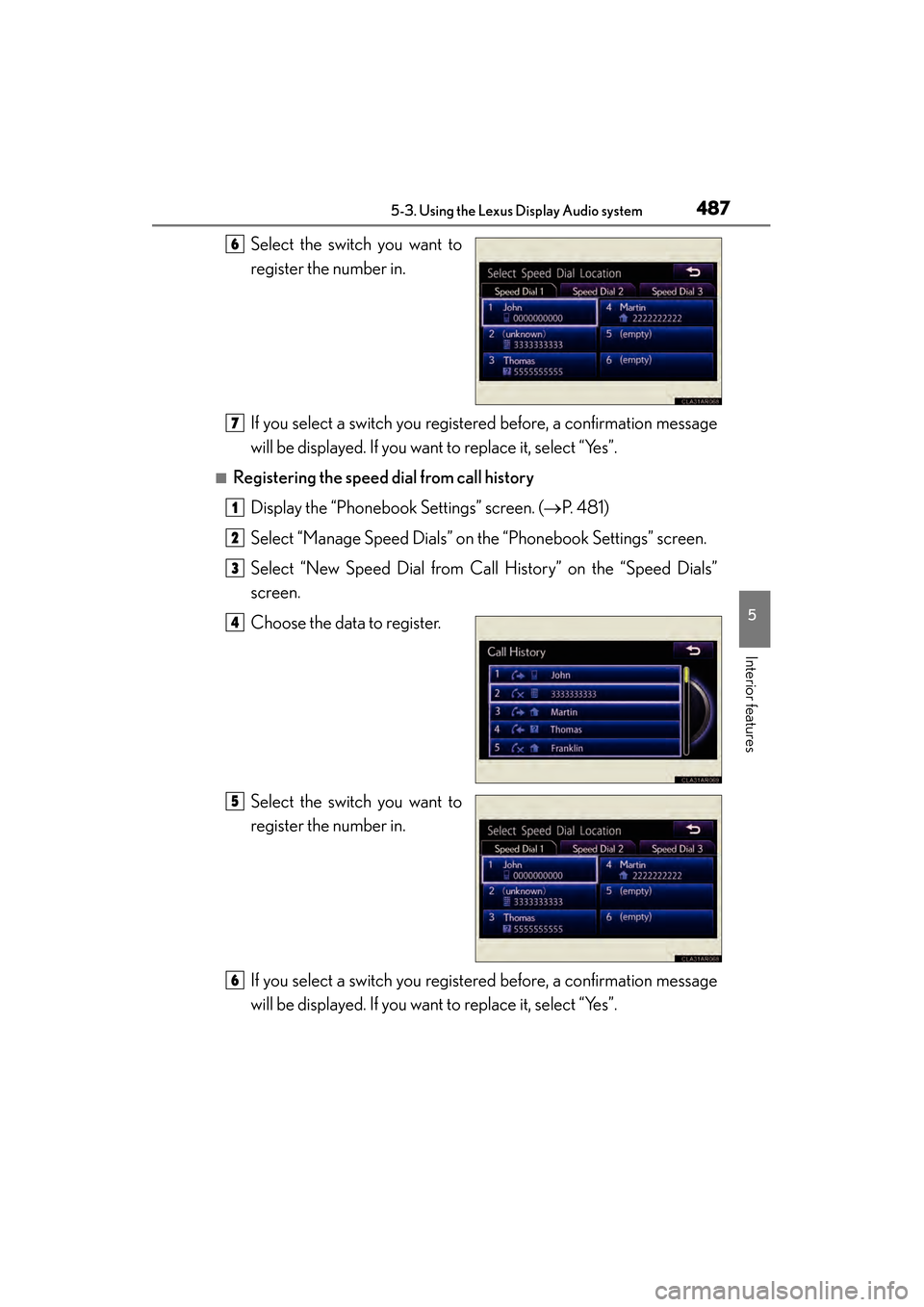
Select the switch you want to
register the number in.
If you select a switch you registered before, a confirmation message
will be displayed. If you want to replace it, select “Yes”.
■Registering the speed dial from call historyDisplay the “Phonebook Settings” screen. ( →P. 4 8 1 )
Select “Manage Speed Dials” on the “Phonebook Settings” screen.
Select “New Speed Dial from Call History” on the “Speed Dials”
screen.
Choose the data to register.
Select the switch you want to
register the number in.
If you select a switch you registered before, a confirmation message
will be displayed. If you want to replace it, select “Yes”.
6
7
1
2
3
4
5
6
Page 489 of 918
488
ES350_300h_OM_OM33A60U_(U)
5-3. Using the Lexus Display Audio system
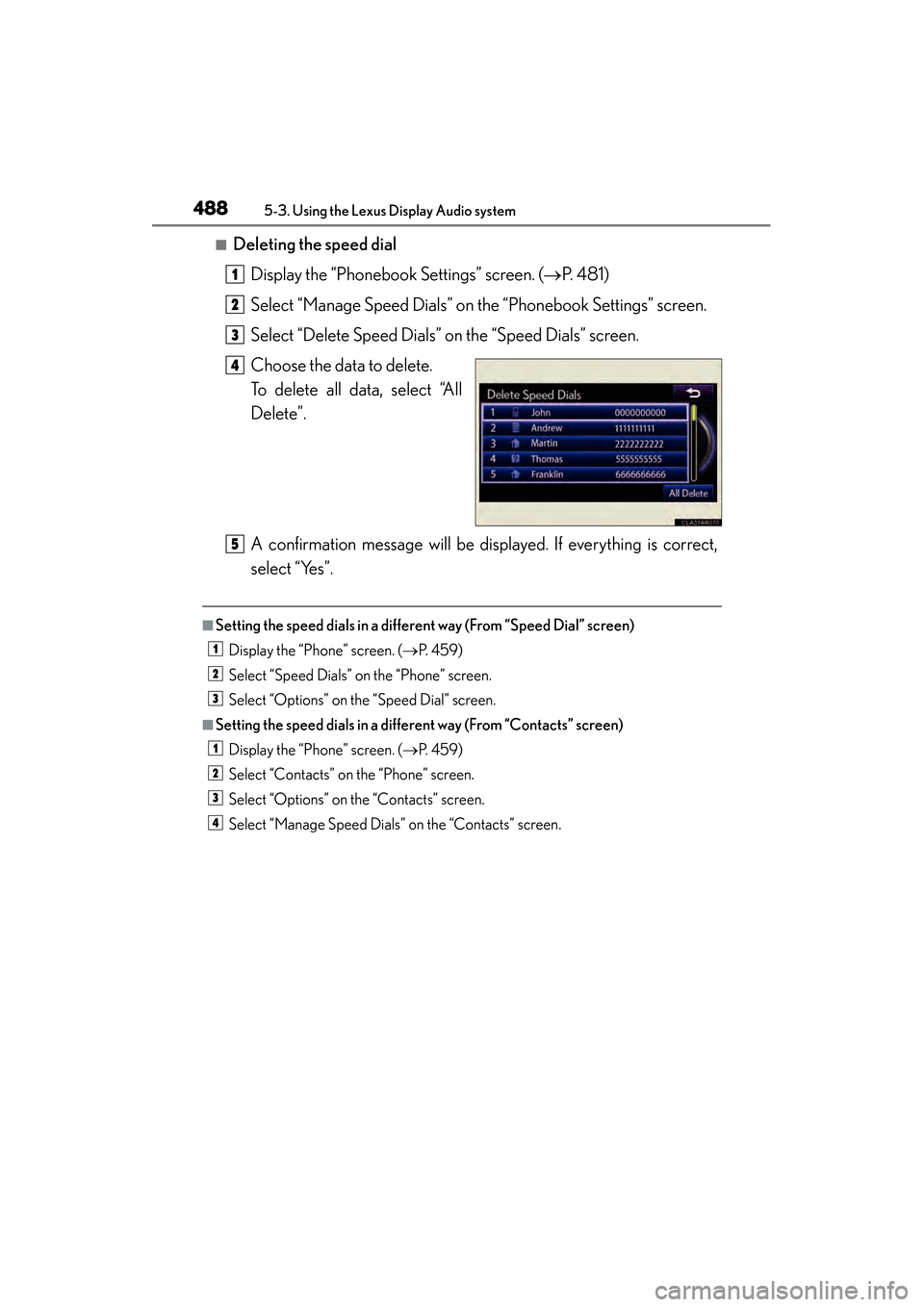
■Deleting the speed dialDisplay the “Phonebook Settings” screen. ( →P. 4 8 1 )
Select “Manage Speed Dials” on the “Phonebook Settings” screen.
Select “Delete Speed Dials” on the “Speed Dials” screen.
Choose the data to delete.
To delete all data, select “All
Delete”.
A confirmation message will be displayed. If everything is correct,
select “Yes”.
■Setting the speed dials in a different way (From “Speed Dial” screen) Display the “Phone” screen. ( →P. 4 5 9 )
Select “Speed Dials” on the “Phone” screen.
Select “Options” on the “Speed Dial” screen.
■Setting the speed dials in a different way (From “Contacts” screen) Display the “Phone” screen. ( →P. 4 5 9 )
Select “Contacts” on the “Phone” screen.
Select “Options” on the “Contacts” screen.
Select “Manage Speed Dials” on the “Contacts” screen.
1
2
3
4
5
1
2
3
1
2
3
4
Page 490 of 918
ES350_300h_OM_OM33A60U_(U)
4895-3. Using the Lexus Display Audio system
5
Interior features
■Registering the speed dial in a different way (From “Speed Dial” screen)Display the “Phone” screen. ( →P. 4 5 9 )
Select “Speed Dials” on the “Phone” screen.
Select “(add new)” on the “Speed Dial” screen.
Select “Contacts” or “History” to set new speed dial.
Select “Cancel” to cancel it.
Choose the desired data from the list.
Select the desired phone number.
■Registering the speed dial in a different way (From “Contact” screen) Display the “Phone” screen. ( →P. 4 5 9 )
Select “Contacts” on the “Phone” screen.
Choose the desired data from the list.
Select “Options” on the “Contact” screen.
Select “Set Speed Dial” on the “Contact” screen.
Select the desired telephone number.
Follow the steps “Registering the speed dial from contacts” from
( → P. 4 8 6 ) .
■Registering the speed dial in a different way (From “Call History” screen)
Display the “Phone” screen. ( →P. 4 5 9 )
Select “Call History” on the “Phone” screen.
Choose the desired data from the list.
Select “Add Speed Dial” on the “Call History” screen.
Follow the steps “Registering the speed dial from call history” from .
( → P. 4 8 7 )
1
2
3
4
5
6
1
2
3
4
5
6
76
1
2
3
4
55
Page 491 of 918
490
ES350_300h_OM_OM33A60U_(U)
5-3. Using the Lexus Display Audio system
Display the “Phonebook Settings” screen. (→P. 4 8 1 )
Select “Delete Call History” on the “Phonebook Settings” screen.
If your phone supports PBAP service, the “Automatically Download Contacts”
setting needs to be set to “Off”. ( →P. 4 8 2 )
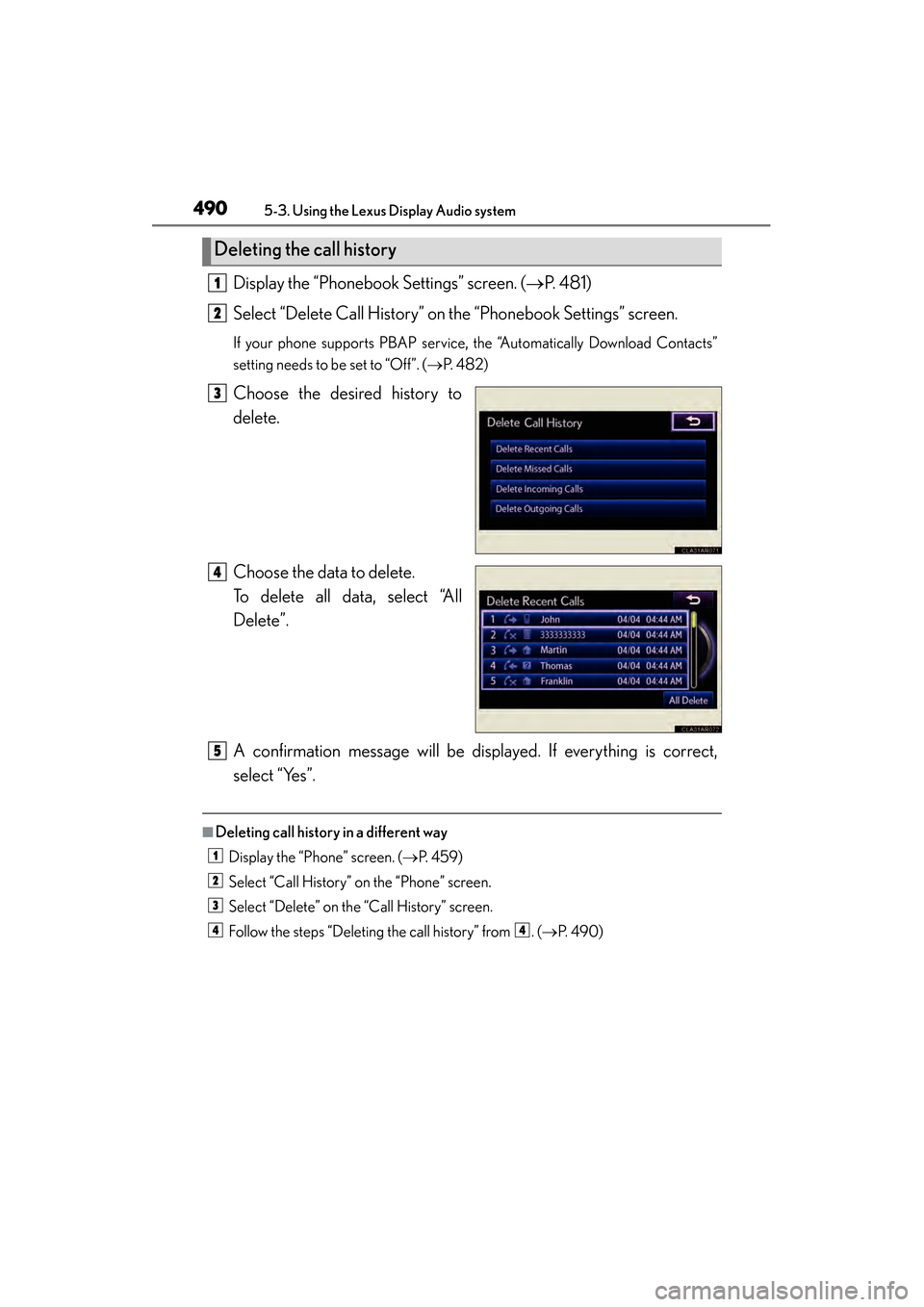
Choose the desired history to
delete.
Choose the data to delete.
To delete all data, select “All
Delete”.
A confirmation message will be displayed. If everything is correct,
select “Yes”.
■Deleting call history in a different way
Display the “Phone” screen. ( →P. 4 5 9 )
Select “Call History” on the “Phone” screen.
Select “Delete” on the “Call History” screen.
Follow the steps “Deleting the call history” from . (→ P. 4 9 0 )
Deleting the call history
1
2
3
4
5
1
2
3
44
Page 492 of 918
491
ES350_300h_OM_OM33A60U_(U)
5-3. Using the Lexus Display Audio system
5
Interior features
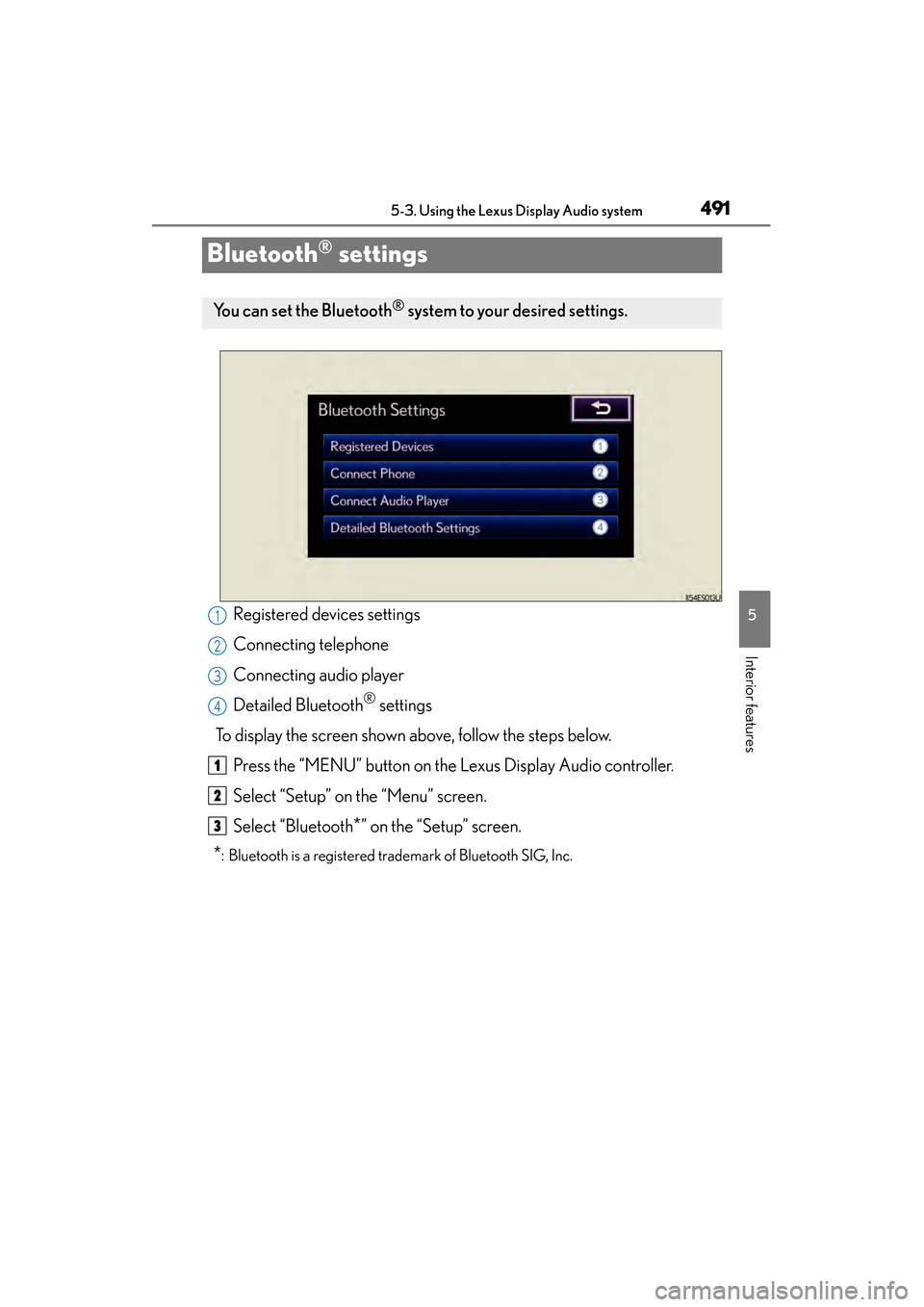
Bluetooth® settings
Registered devices settings
Connecting telephone
Connecting audio player
Detailed Bluetooth
® settings
To display the screen shown above, follow the steps below. Press the “MENU” button on the Lexus Display Audio controller.
Select “Setup” on the “Menu” screen.
Select “Bluetooth
*” on the “Setup” screen.
*: Bluetooth is a registered trademark of Bluetooth SIG, Inc.
You can set the Bluetooth® system to your desired settings.
1
2
3
4
1
2
3
Page 493 of 918
492
ES350_300h_OM_OM33A60U_(U)
5-3. Using the Lexus Display Audio system
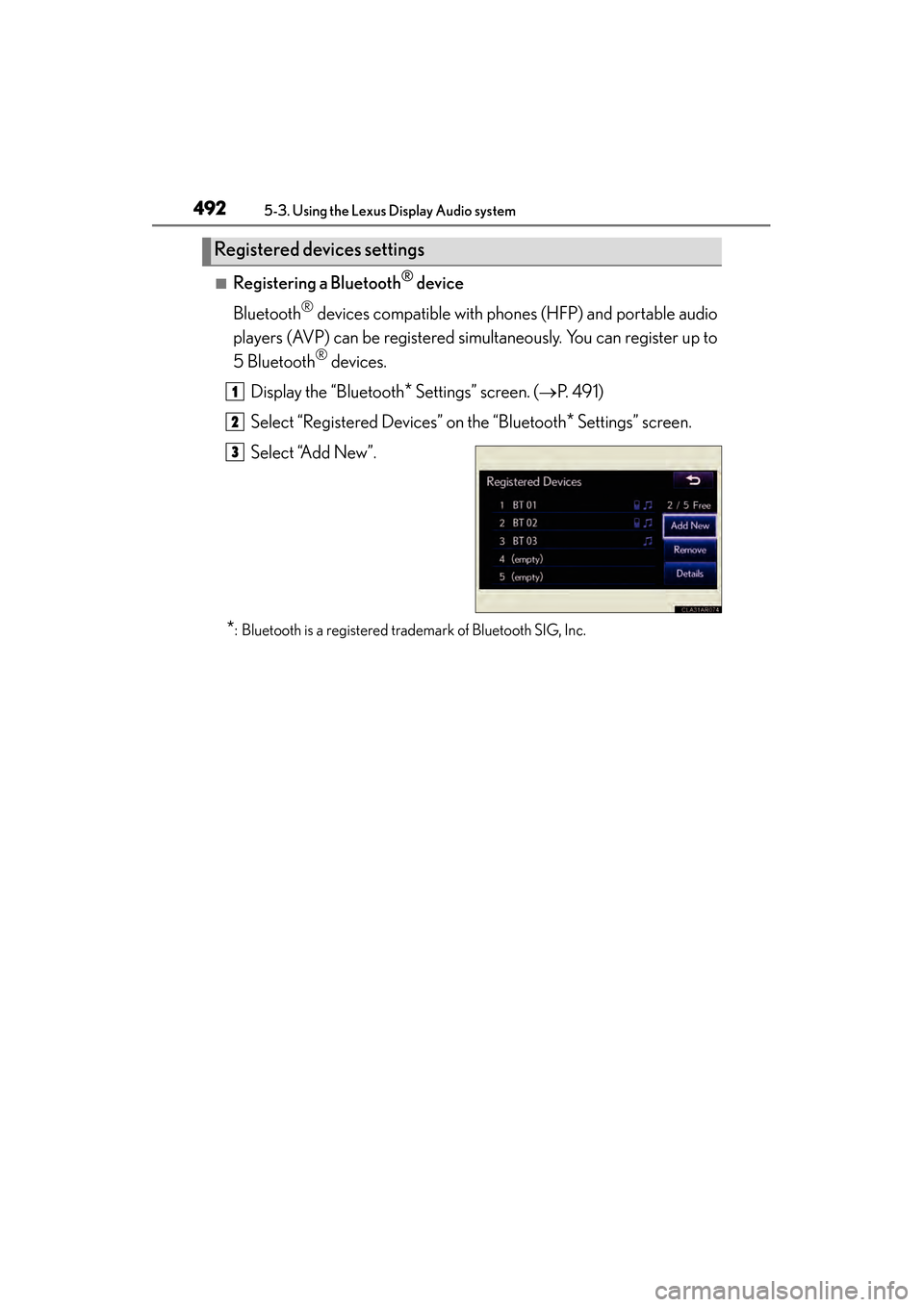
■Registering a Bluetooth® device
Bluetooth
® devices compatible with phones (HFP) and portable audio
players (AVP) can be registered simultaneously. You can register up to
5 Bluetooth
® devices.
Display the “Bluetooth
* Settings” screen. ( →P. 4 9 1 )
Select “Registered Devices” on the “Bluetooth
* Settings” screen.
Select “Add New”.
*: Bluetooth is a registered trademark of Bluetooth SIG, Inc.
Registered devices settings
1
2
3
Page 494 of 918
ES350_300h_OM_OM33A60U_(U)
4935-3. Using the Lexus Display Audio system
5
Interior features
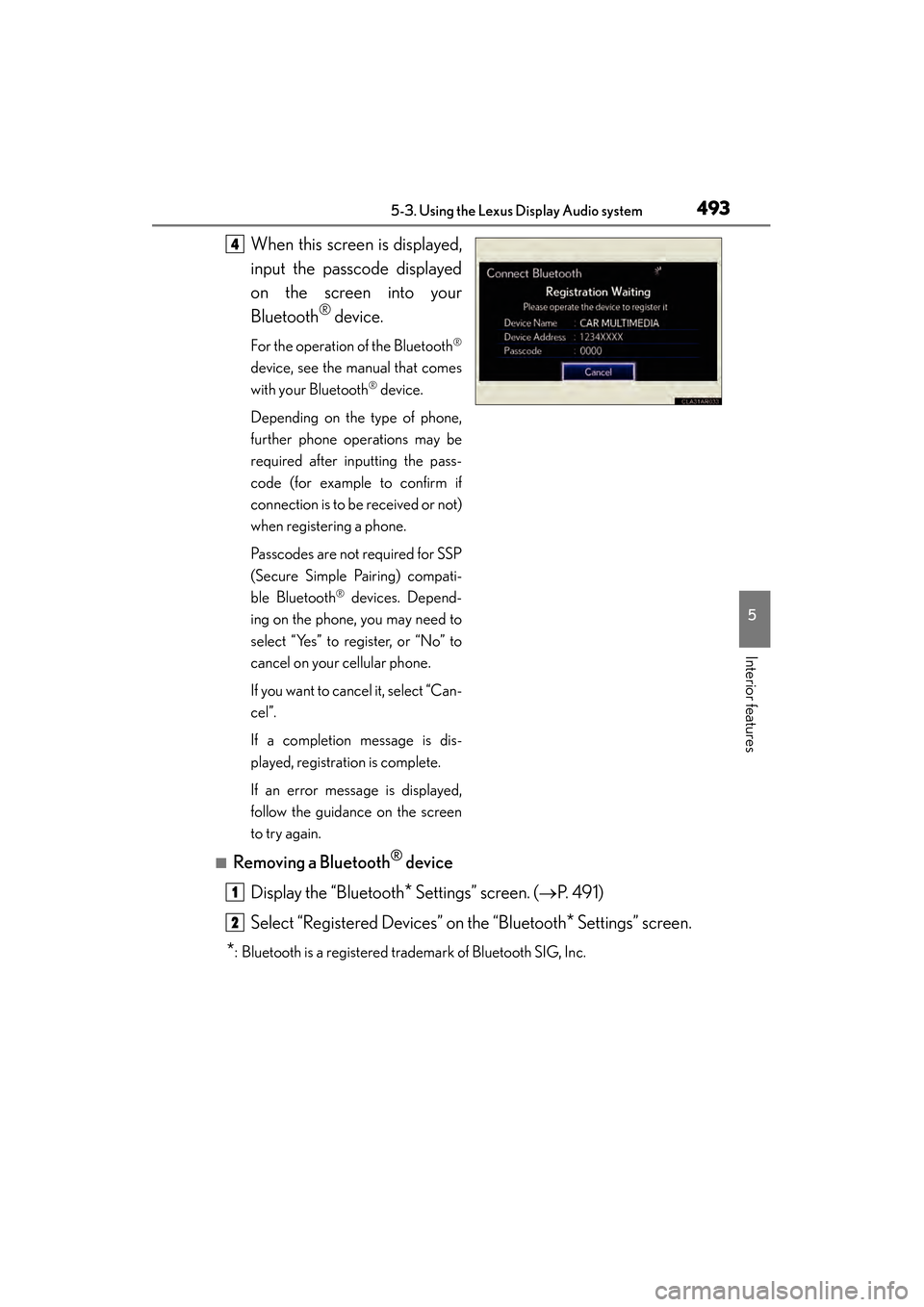
When this screen is displayed,
input the passcode displayed
on the screen into your
Bluetooth
® device.
For the operation of the Bluetooth®
device, see the manual that comes
with your Bluetooth
® device.
Depending on the type of phone,
further phone operations may be
required after inputting the pass-
code (for example to confirm if
connection is to be received or not)
when registering a phone.
Passcodes are not required for SSP
(Secure Simple Pairing) compati-
ble Bluetooth
® devices. Depend-
ing on the phone, you may need to
select “Yes” to register, or “No” to
cancel on your cellular phone.
If you want to cancel it, select “Can-
cel”.
If a completion message is dis-
played, registration is complete.
If an error message is displayed,
follow the guidance on the screen
to try again.
■Removing a Bluetooth® device
Display the “Bluetooth
* Settings” screen. ( →P. 4 9 1 )
Select “Registered Devices” on the “Bluetooth
* Settings” screen.
*: Bluetooth is a registered trademark of Bluetooth SIG, Inc.
4
1
2
Page 496 of 918
ES350_300h_OM_OM33A60U_(U)
4955-3. Using the Lexus Display Audio system
5
Interior features
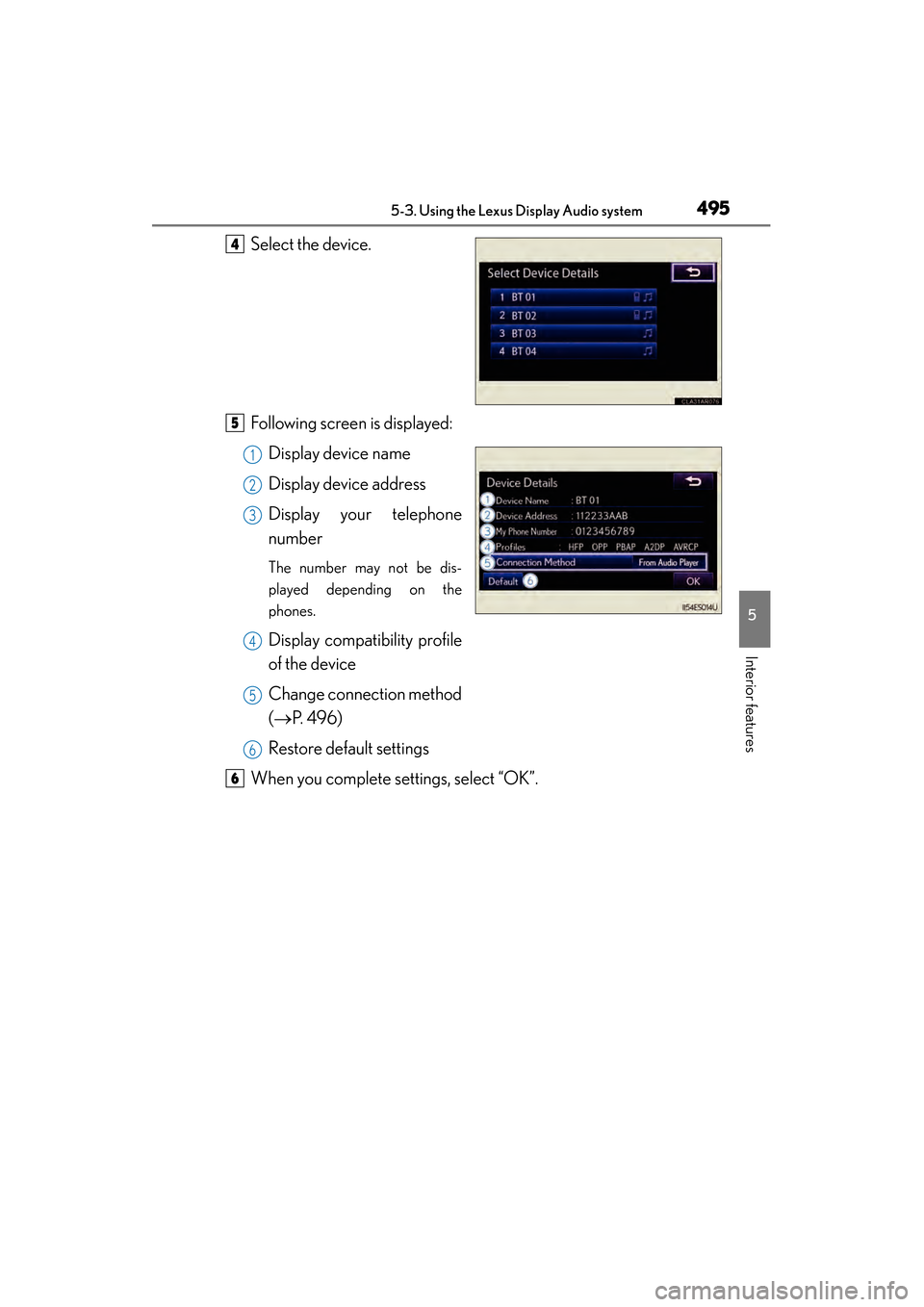
Select the device.
Following screen is displayed:Display device name
Display device address
Display your telephone
number
The number may not be dis-
played depending on the
phones.
Display compatibility profile
of the device
Change connection method
(→ P. 496)
Restore default settings
When you complete settings, select “OK”.
4
5
1
2
3
4
5
6
6