Hybrid system Lexus ES300h 2014 Manual Online
[x] Cancel search | Manufacturer: LEXUS, Model Year: 2014, Model line: ES300h, Model: Lexus ES300h 2014Pages: 918, PDF Size: 25.26 MB
Page 378 of 918
ES350_300h_OM_OM33A60U_(U)
3775-2. Using the air conditioning system and defogger
5
Interior features
NOTICE
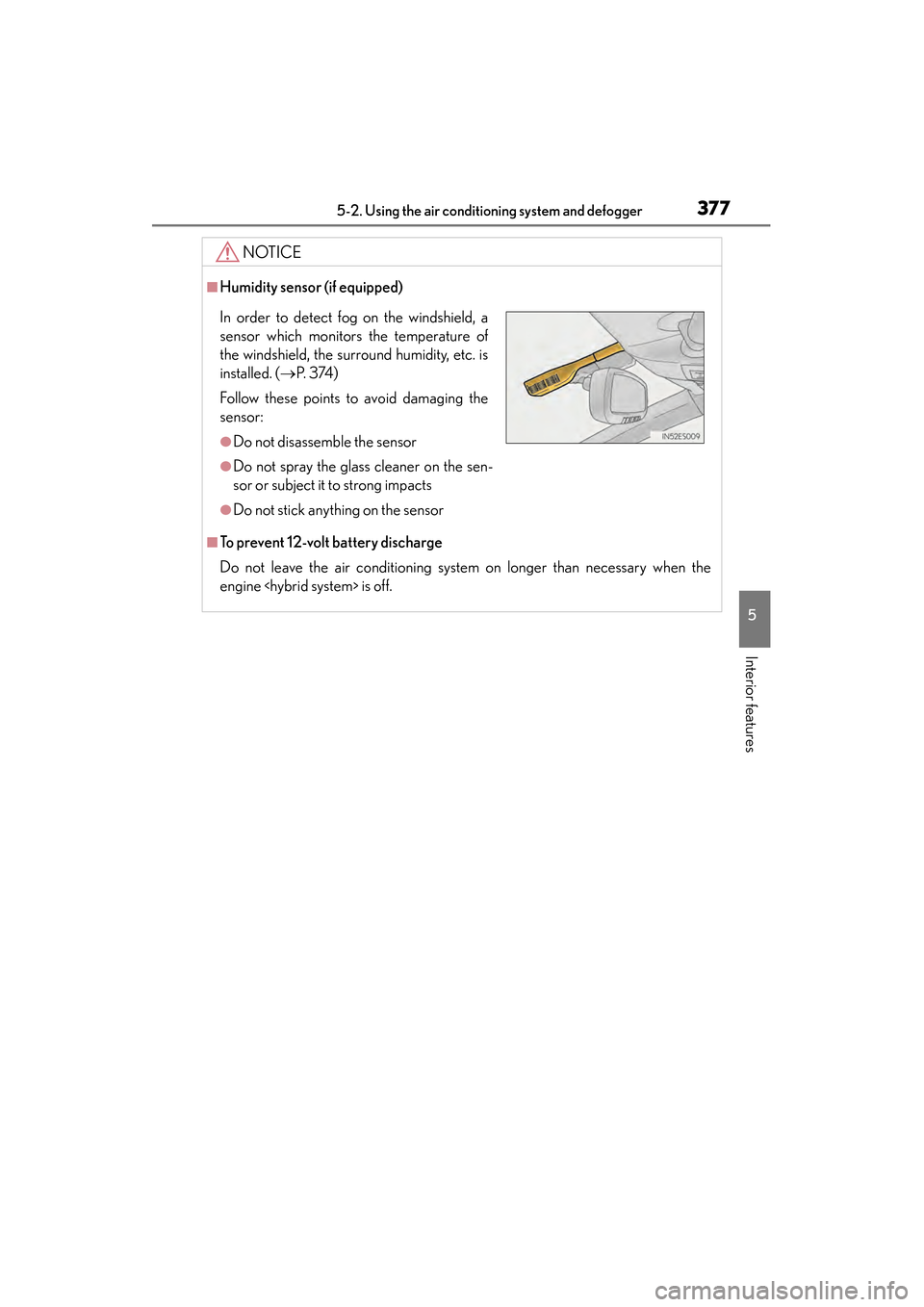
■Humidity sensor (if equipped)
■To prevent 12-volt battery discharge
Do not leave the air conditioning system on longer than necessary when the
engine
In order to detect fog on the windshield, a
sensor which monitors the temperature of
the windshield, the surround humidity, etc. is
installed. ( →P. 3 74 )
Follow these points to avoid damaging the
sensor:
●Do not disassemble the sensor
●Do not spray the glass cleaner on the sen-
sor or subject it to strong impacts
●Do not stick anything on the sensor
Page 380 of 918
ES350_300h_OM_OM33A60U_(U)
3795-2. Using the air conditioning system and defogger
5
Interior features
■Operating conditions
The “START STOP ENGINE” <“POWER”> switch must be in the IGNITION ON
CAUTION
■When the outside rear view mirror defoggers are on
Do not touch the rear view mirror surfaces, as they can become very hot and burn
you.
NOTICE
■To prevent 12-volt battery discharge
Turn the defoggers off when the engine
Page 385 of 918
384
ES350_300h_OM_OM33A60U_(U)
5-3. Using the Lexus Display Audio system
■Using cellular phones
Interference may be heard through the audio system’s speakers if a cellular phone is
being used inside or close to the vehicle while the audio system is operating.
CAUTION
■Certification
●Part 15 of the FCC Rules
FCC Warning:
Any unauthorized changes or modifications to this equipment will void the user’s
authority to operate this device.
●Laser products
• USE OF CONTROL OR ADJUSTMENT OR PERFORMANCE OF PRO-CEDURES OTHER THAN THOSE SPECIFIED HEREIN MAY RESULT IN
HAZARDOUS RADIATION EXPOSURE.
• THE USE OF OPTICAL INSTRUMENTS WITH THIS PRODUCT WILL INCREASE EYE HAZARD.
NOTICE
■To prevent 12-volt battery discharge
Do not leave the audio system on longer than necessary when the engine
■To avoid damaging the audio system
Take care not to spill drinks or other fluids on the audio system.
Page 485 of 918
484
ES350_300h_OM_OM33A60U_(U)
5-3. Using the Lexus Display Audio system
■Phonebook data
Phonebook data is managed for every registered phone. When another phone is
connecting, you cannot read the registered data.
■Setting the phonebook in a different way (To display the “Contacts” screen)Display the “Phone” screen. ( →P. 4 5 9 )
Select “Contacts” on the “Phone” screen.
Select “Options” on the “Contacts” screen.
Select “Manage Contacts” on the “Contacts” screen.
■When transferring a phone number
Transfer the phone number while engine is running
If your cellular phone is OPP or PBAP compatible, you may need to input “1234” by
your cellular phone for OBEX certification.
■When you have selected “Update Contacts” to transfer the phone number
●If your cellular phone does not support PBAP service, you cannot use this function.
●If your phone supports PBAP service, you can transfer the phonebook data with-
out operating your phone.
■When you have selected “Replace Contacts” or “Add Contacts” to transfer the
phone number
If your cellular phone does not support OPP service, you cannot use these functions.
You can transfer the phonebook data only by operating your phone.
■Transferring the phone number in a different way (To display the “Transfer Con-
tacts” screen) Display the “Phone” screen. ( →P. 4 5 9 )
Select “Contacts” on the “Phone” screen.
Select “Transfer” on the “Contacts” screen.
■Transferring the phone number while Bluetooth® audio is playing
Bluetooth
® audio will disconnect. It will reconnect automatically when data transfer
finishes. It will not be reconnected depending on the phone you are using.
1
2
3
4
1
2
3
Page 503 of 918
502
ES350_300h_OM_OM33A60U_(U)
5-4. Using the audio system
CAUTION
■Certification
●Part 15 of the FCC Rules
FCC Warning:
Any unauthorized changes or modifications to this equipment will void the user’s
authority to operate this device.
●Laser products
• USE OF CONTROL OR ADJUSTMENT OR PERFORMANCE OF PRO-CEDURES OTHER THAN THOSE SPECIFIED HEREIN MAY RESULT IN
HAZARDOUS RADIATION EXPOSURE.
• THE USE OF OPTICAL INSTRUMENTS WITH THIS PRODUCT WILL INCREASE EYE HAZARD.
NOTICE
■To prevent 12-volt battery discharge
Do not leave the audio system on longer than necessary when the engine
■To avoid damaging the audio system
Take care not to spill drinks or other fluids over the audio system.
Page 623 of 918
622
ES350_300h_OM_OM33A60U_(U)
5-7. Other interior features
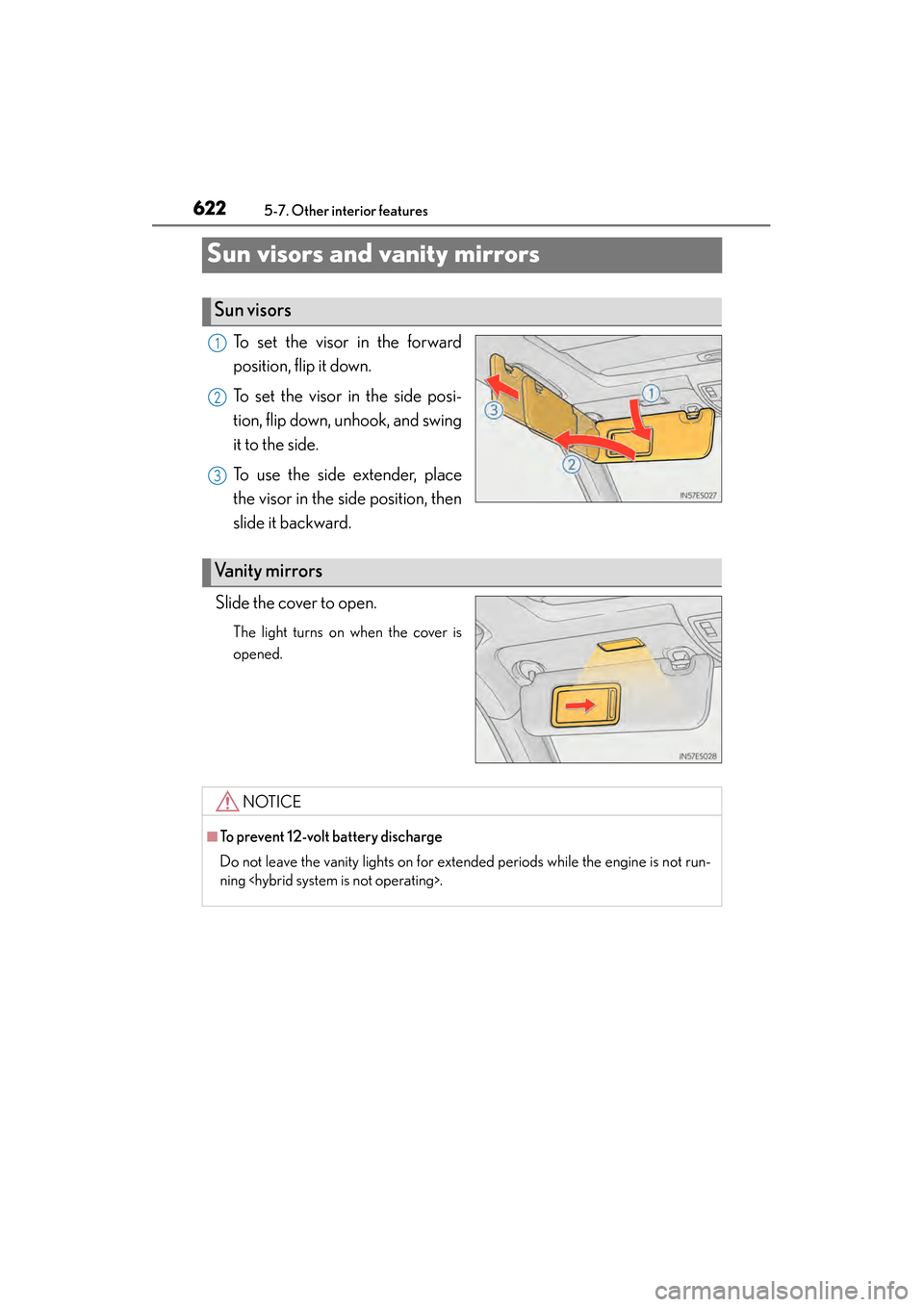
Sun visors and vanity mirrors
To set the visor in the forward
position, flip it down.
To set the visor in the side posi-
tion, flip down, unhook, and swing
it to the side.
To use the side extender, place
the visor in the side position, then
slide it backward.
Slide the cover to open.
The light turns on when the cover is
opened.
Sun visors
1
2
3
Va n i t y m i r r o r s
NOTICE
■To prevent 12-volt battery discharge
Do not leave the vanity lights on for extended periods while the engine is not run-
ning
Page 626 of 918
ES350_300h_OM_OM33A60U_(U)
6255-7. Other interior features
5
Interior features
NOTICE
■To avoid damaging the power outlets
Close the power outlet lids when the power outlets are not in use.
Foreign objects or liquids that enter the power outlets may cause a short circuit.
■To prevent blown fuse
Do not use an accessory that uses more than 12V 10A.
■To prevent 12-volt battery discharge
Do not use the power outlets longer than necessary when the engine is not running
Page 628 of 918
ES350_300h_OM_OM33A60U_(U)
6275-7. Other interior features
5
Interior features
CAUTION
■Burns
Care should be taken to prevent injury if anyone in the following categories comes
in contact with the steering wheel when the heated steering wheel is on:
●Babies, small children, the elderly, the sick and the physically challenged
●Persons with sensitive skin
●Persons who are fatigued
●Persons who have taken alcohol or drugs that induce sleep (sleeping drugs, cold
remedies, etc.)
NOTICE
■To prevent 12-volt battery discharge
Turn the switch off when the engine is not running
Page 630 of 918
ES350_300h_OM_OM33A60U_(U)
6295-7. Other interior features
5
Interior features
CAUTION
■Burns
●Use caution when seating the following persons in a seat with the seat heater on
to avoid the possibility of burns:
• Babies, small children, the elderly, the sick and the physically challenged
• Persons with sensitive skin
• Persons who are fatigued
• Persons who have taken alcohol or drugs that induce sleep (sleeping drugs,cold remedies, etc.)
●Do not cover the seat with anything when using the seat heater.
Using the seat heater with a blanket or cushion increases the temperature of the
seat and may lead to overheating.
●Do not use seat heater more than necessary. Doing so may cause minor burns or
overheating.
NOTICE
■To prevent damage to the seat heaters/seat ventilators
Do not put heavy objects that have an uneven surface on the seat and do not stick
sharp objects (needles, nails, etc.) into the seat.
■To prevent 12-volt battery discharge
Turn the seat heaters/seat ventilators off when the engine is not running
Page 633 of 918
632
ES350_300h_OM_OM33A60U_(U)
5-7. Other interior features
■The rear sunshade can be used when
The “START STOP ENGINE” <“POWER”> switch is in IGNITION ON
mode.
■Operating the rear sunshade after the engine
The rear sunshade can be operated for approximately 1 minute even after the
“START STOP ENGINE” <“POWER”> switch is turned to ACCESSORY mode or
turned off.
■Reverse operation feature
To ensure adequate rear visibility, the rear sunshade automatically lowers when the
shift lever is shifted to R.
However, the rear sunshade is raised again if any of the following occurs:
●The button is pressed again.*
●Shift the shift lever into P.
●The shift lever is shifted out of R, and the vehicle reaches a speed of 9 mph
(15 km/h).
If the engine
to the reverse operation feature, it will not be raised even when the engine
km/h). To raise the sunshade again, press the button.
*: Occasionally, the reverse function may not be carried out after the switch has been pressed. Repeat the above operation to operate the function.
■Customization
Time elapsed before the reverse operation feature activates can be changed.
(Customizable features: → P. 8 6 2 )