phone Lexus ES300h 2015 Navigation Manual
[x] Cancel search | Manufacturer: LEXUS, Model Year: 2015, Model line: ES300h, Model: Lexus ES300h 2015Pages: 409, PDF Size: 24.08 MB
Page 359 of 409
358
1. LEXUS ENFORM-OVERVIEW
ES350/300h_Navi_OM33B43U_(U)14.06.23 09:44
zUser registration is required to start using
the App Suite function. ( →P. 3 5 9 )
z App Suite does not require an activation
fee or monthly recurring fees.
z Services requiring a separate contract can
also be used.*
*: For details, refer to
http://www.lexus.com/enform/
or call
1-800-255-3987.
z LEXUS App Suite is available in the contig-
uous United States, Washington D.C. and
Alaska. z
The following personal data can be deleted
and returned to their default settings:
• Downloaded contents
• Radio stations that were listened to
•Input history
BEFORE USING THE
FUNCTION
SUBSCRIPTION
AVAILABILITY OF FUNCTION
INFORMATION
●Data usage fees may apply while using
App Suite function. Confirm data usage
fees before using this function.
● The required operations to activate appli-
cations and connect a cellular phone to
the navigation system, and the registra-
tion steps for the App Suite are explained
in this section. For details regarding oper-
ation of the App Suite and the applica-
tions, refer to
http://www.lexus.com/enform/
.
● Availability of functions of the Lexus
Enform service is dependent on network
reception level.
INITIALIZING PERSONAL
DATA
The personal data used in applications
can be reset. ( →P.73)
INFORMATION
●Once initialized, data will be erased. Pay
close attention when initializing data.
Page 360 of 409

359
1. LEXUS ENFORM-OVERVIEW
ES350/300h_Navi_OM33B43U_(U)14.06.23 09:44
LEXUS ENFORM
9
Perform the settings in the following order.
In order to use App Suite, the following
must first be performed:
zUser registration with the service
(→ P. 3 5 9 )
z Download the App Suite application onto
your cellular phone, and login to the appli-
cation. ( →P. 3 5 9 )
z Register the cellular phone, on which the
App Suite application was installed, with
the navigation system. ( →P. 3 5 9 )
z Register a Bluetooth
® phone with the
hands-free system. ( →P. 4 8 )
1Perform user registration at
http://www.lexus.com/enform/
.
1Download the App Suite application to
your cellular phone.
2Run the App Suite application on your
cellular phone.
3Enter the information required into the
App Suite application. Login to the ap-
plication.
PREPARATION BEFORE
USING LEXUS App Suite
SETTINGS REQUIRED TO USE
LEXUS App Suite
USER REGISTRATION
1User registration
2Download the App Suite application to
your cellular phone.
3Register the cellular phone with the
navigation system.
REGISTERING THE LEXUS App
Suite APPLICATION
INFORMATION
●Applications can only be used when the
App Suite application has been down-
loaded to your cellular phone and the
application is running.
● App Suite operational procedures can
also be confirmed by visiting
http://www.lexus.com/enform/
.
● In order to use applications, it is neces-
sary to run the App Suite application on
your cellular phone.
● If an iPhone is connected via Bluetooth
®
and USB at the same time, system opera-
tion may become unstable. For known
phone compatibility information, refer to
http://www.lexus.com/enform/
.
● If a App Suite application is used while
iPod audio/video is being played back,
system operation may become unstable.
Page 363 of 409

362
1. LEXUS ENFORM-OVERVIEW
ES350/300h_Navi_OM33B43U_(U)14.06.23 09:44
INFORMATION
●Exposure to radio frequency signals:
The Lexus Enform system installed in
your vehicle includes a low power radio
transmitter and receiver. The system
receives and also sends out radio fre-
quency (RF) signals.
● In August 1996, the Federal Communi-
cations Commission (FCC) adopted RF
exposure guidelines with safety levels for
mobile wireless phones. Those guidelines
are consistent with the safety standards
previously set by both U.S. and interna-
tional standards bodies.
• ANSI (American National Standards
Institute) C95.1 [1992]
• NCRP (National Council on Radiation Protection and Measurement) Report
86 [1986]
• ICNIRP (International Commission on Non-Ionizing Radiation Protection)
[1996]
● These standards are based on compre-
hensive and periodic evaluations of the
relevant scientific literature. Over 120
scientists, engineers, and physicians from
universities, government health agen-
cies, and industry reviewed the available
body of research to develop the ANSI
Standard (C95.1).
● The design of Lexus Enform system com-
plies with the FCC guidelines in addition
to those standards.
INFORMATION
●Available beginning Fall 2009 on select
Lexus models. Contact with the Lexus
response center is dependent upon the
telematics device being in operative con-
dition, cellular connection availability,
navigation map data, and GPS satellite
signal reception, which can limit the abil-
ity to reach the response center or
receive support. Enrollment and Telemat-
ics Subscription Service Agreement
required. A variety of subscription terms
are available; charges vary by subscrip-
tion term selected.
● The Lexus response center offers sup-
port in multiple languages.
● Select Lexus Enform Safety Connect-
subscribed vehicles are capable of com-
municating vehicle information. Please
see the terms and conditions for addi-
tional details.
Owners who do not wish to have their
vehicle transmit this information can opt
out at the time of enrollment or by calling
1-800-255-3987 and following the
prompts for Lexus Enform Safety Con-
nect.
● For further details about the service, con-
tact your Lexus dealer.
● Lexus Enform functions are not subject to
section 255 of the Telecommunications
Act and the system is not TTY compati-
ble.
Page 365 of 409

364
ES350/300h_Navi_OM33B43U_(U)14.06.23 09:44
2. LEXUS ENFORM OPERATION
1. LEXUS Enform Remote
zAfter you sign the Telematics Subscription Service Agreement (see the LEXUS Enform
Safety Connect section in “Owner’s Manual”), download the LEXUS Enform Remote
app from your cellular phone’s app store, and register within the app (or enroll and com-
plete registration at the dealer), you can begin using these services.
z A variety of subscription terms are available. Contact your Lexus dealer, or call
1-800-25-LEXUS (1-800-255-3987) for further subscription details.
z Lexus Enform Remote is available in the co ntiguous United States, Washington D.C.,
and Alaska.
For details about the functions and services provided by this app, refer to
http://www.lexus.com/enform/
.
SUBSCRIPTION
AVAILABILITY OF FUNCTION
INFORMATION
● Lexus Enform Remote should only be used by authorized users.
● Laws in some communities may require that the vehicle be within view of the user when
operating Lexus Enform Remote.
In some states, use of Lexus Enform Remote may violate state or local laws. Before using
Lexus Enform Remote, check your state and local laws.
● Any malfunction of the Lexus should be repaired by your Lexus dealer.
● Lexus Enform Remote is designed to work at temperatures above -22 °F (-30 °C). This
specification is related to the Lexus Enform Remote operation, but is dependent on the
vehicle’s operating temperature range which may be different.
● Content is subject to change without notice.
● Some features of the Lexus Enform Remote may not be available on some models.
● Additional information can be found at www.lexus.com/enform/
.
Page 366 of 409
365
2. LEXUS ENFORM OPERATION
ES350/300h_Navi_OM33B43U_(U)14.06.23 09:44
LEXUS ENFORM
9
2. LEXUS App Suite
1Press the “MENU” button on the
Remote Touch.
2Select “LEXUS App Suite” .
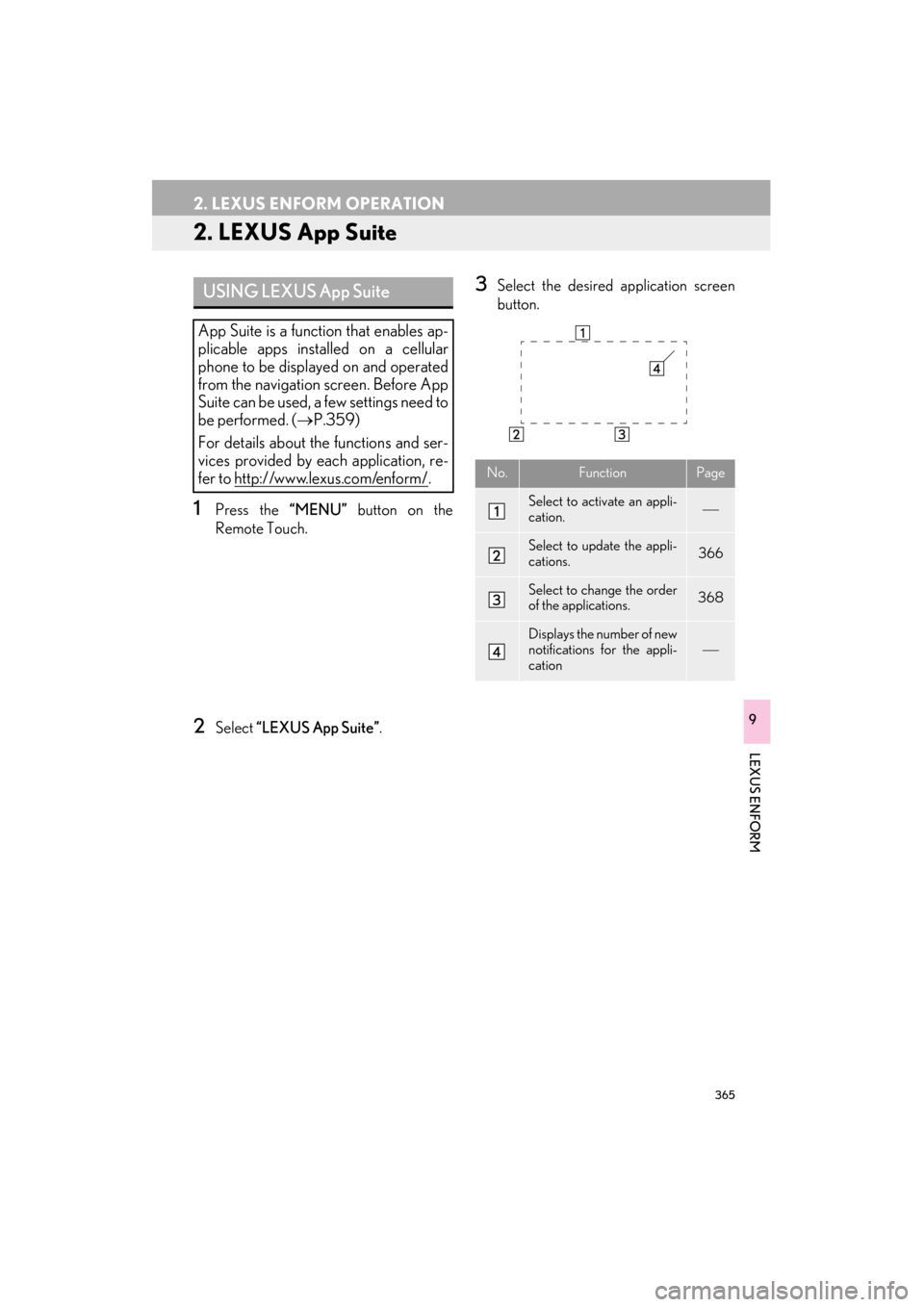
3Select the desired application screen
button.USING LEXUS App Suite
App Suite is a function that enables ap-
plicable apps installed on a cellular
phone to be displayed on and operated
from the navigation screen. Before App
Suite can be used, a few settings need to
be performed. (→P.359)
For details about the functions and ser-
vices provided by each application, re-
fer to http://www.lexus.com/enform/
.No.FunctionPage
Select to activate an appli-
cation.
Select to update the appli-
cations.366
Select to change the order
of the applications.368
Displays the number of new
notifications for the appli-
cation
Page 370 of 409
369
2. LEXUS ENFORM OPERATION
ES350/300h_Navi_OM33B43U_(U)14.06.23 09:44
LEXUS ENFORM
9
IF A MESSAGE APPEARS ON THE SCREEN
When problems occur with starting the application player, a message will appear on
the screen. Referring to the table below, identify the problem and take the suggested
corrective action.
MessageDisplay conditionsCorrective action
“This feature is unavailable
during an emergency call.”Safety Connect is being im-
plemented.After the Safety Connect call
is finished, perform the opera-
tion again.
“This feature is unavailable
while transferring contacts.”Contacts are being trans-
ferred manually from the
phonebook.When the transfer of contacts
is complete, perform the op-
eration again.
“Unable to connect to a
Bluetooth* phone. For trou-
bleshooting assistance,
please visit the Lexus website
or contact your dealer.”
The cellular phone cannot be
connected.
Refer to http://
www.lexus.com/enform/ to
confirm if the phone is com-
patible or not.
“This feature is unavailable
during a handsfree call.”A hands-free call is in
progress.After the hands-free call is fin-
ished, perform the operation.
“To use the services, an active
application needs to be run-
ning on your phone. For more
information, please visit
lexus.com.”The LEXUS App Suite appli-
cation cannot be connected
to Bluetooth
® SPP.
Refer to http://www.lexus.com/enform/ to
confirm if the phone is
Bluetooth
® SPP compatible
or not, and then activate the
App Suite application.
“Communication error.
Please try again.”Communication was discon-
nected.After a few moments, retry the
operation.
*: Bluetooth is a registered trademark of Bluetooth SIG, Inc.
Page 373 of 409
372
2. LEXUS ENFORM OPERATION
ES350/300h_Navi_OM33B43U_(U)14.06.23 09:44
1Display the “Web Search” screen.
(→ P.370)
2Select the desired application screen
button to perform search.
3Enter a search term, and select “Go”.
4Select “Call”.
5Select “Yes”.
“Cancel” : Select to cancel making a phone
call.
6Check that the “Call” screen is dis-
played.
MAKING A PHONE CALL
USING LEXUS App Suite
Phone calls can be made to locations
which were searched for using App
Suite.
z For phone operation and the function of
each screen button: →P. 3 1 9
Page 377 of 409
376
2. LEXUS ENFORM OPERATION
ES350/300h_Navi_OM33B43U_(U)14.06.23 09:44
5When an agent comes on the line, tell
the agent the address, business name,
or the type of POI or service.
To adjust the volume of a received call : Use
the volume control switch on the steering
wheel.
z To hang up the phone, select “Disconnect”
or press the switch on the steering
wheel.
6After the agent helps you determine
your location of choice, this screen is
displayed. Select the screen button of
the desired action.
z Locations can be organized into up to 20
personalized folders.
“Mark” : Select to mark the POI on the
map screen.
“Enter ” : Select to set as a destination.
“Detail” : Select to display detailed infor-
mation.
z If is selected, the registered phone
number can be called.
eDestination
With the eDestination feature, you can
go online, and via the Lexus.com own-
er’s Web site, select and organize desti-
nations of your choice and then
wirelessly send them to your vehicle’s
navigation system. Up to 200 locations
can be stored online and accessed or
updated at any time.
INFORMATION
●You must first go online at
www.lexus.com/drivers/ to view the
Owners site where you will need to regis-
ter and log in. After this, personalized
folders that contain the locations to be
sent to your vehicle can be created. (See
Lexus Enform Guide for more informa-
tion.)
Page 380 of 409

379
2. LEXUS ENFORM OPERATION
ES350/300h_Navi_OM33B43U_(U)14.06.23 09:44
LEXUS ENFORM
9
4Select “Point of Interest” .
5Select “eDestination” .
6Select the desired eDestination catego-
ry.
7Select the desired location.
8Select the button of the desired action.
“Mark”: Select to mark the POI on the
map screen.
“Go” : Select to set the POI as a destina-
tion with route directions.
z If is selected, the registered phone
number can be called.
Page 386 of 409

385
ES350/300h_Navi_OM33B43U_(U)14.06.23 09:44
LEXUS ENFORM
9
3. SETUP
1. LEXUS App Suite SETTINGS
1Press the “MENU” button on the
Remote Touch.
2Select “Setup” .
3Select “LEXUS App Suite” .
4Select the items to be set.
The settings of App Suite can be
changed.SCREEN FOR LEXUS App Suite
SETTINGS
No.InformationPage
Select to set the voice guid-
ance volume. 386
Select to set the pop up re-
minder for cellular phone
data usage.386
Select to set Lexus Insider
settings.387
Select to reset all setup
items.