parking brake Lexus ES300h 2015 Opening, closing and locking the doors and trunk / (OM33B99U) Owner's Guide
[x] Cancel search | Manufacturer: LEXUS, Model Year: 2015, Model line: ES300h, Model: Lexus ES300h 2015Pages: 784, PDF Size: 9.17 MB
Page 231 of 784
231
ES350_300h_OM_OM33B99U_(U)
4-2. Driving procedures
4
Driving
Parking brake
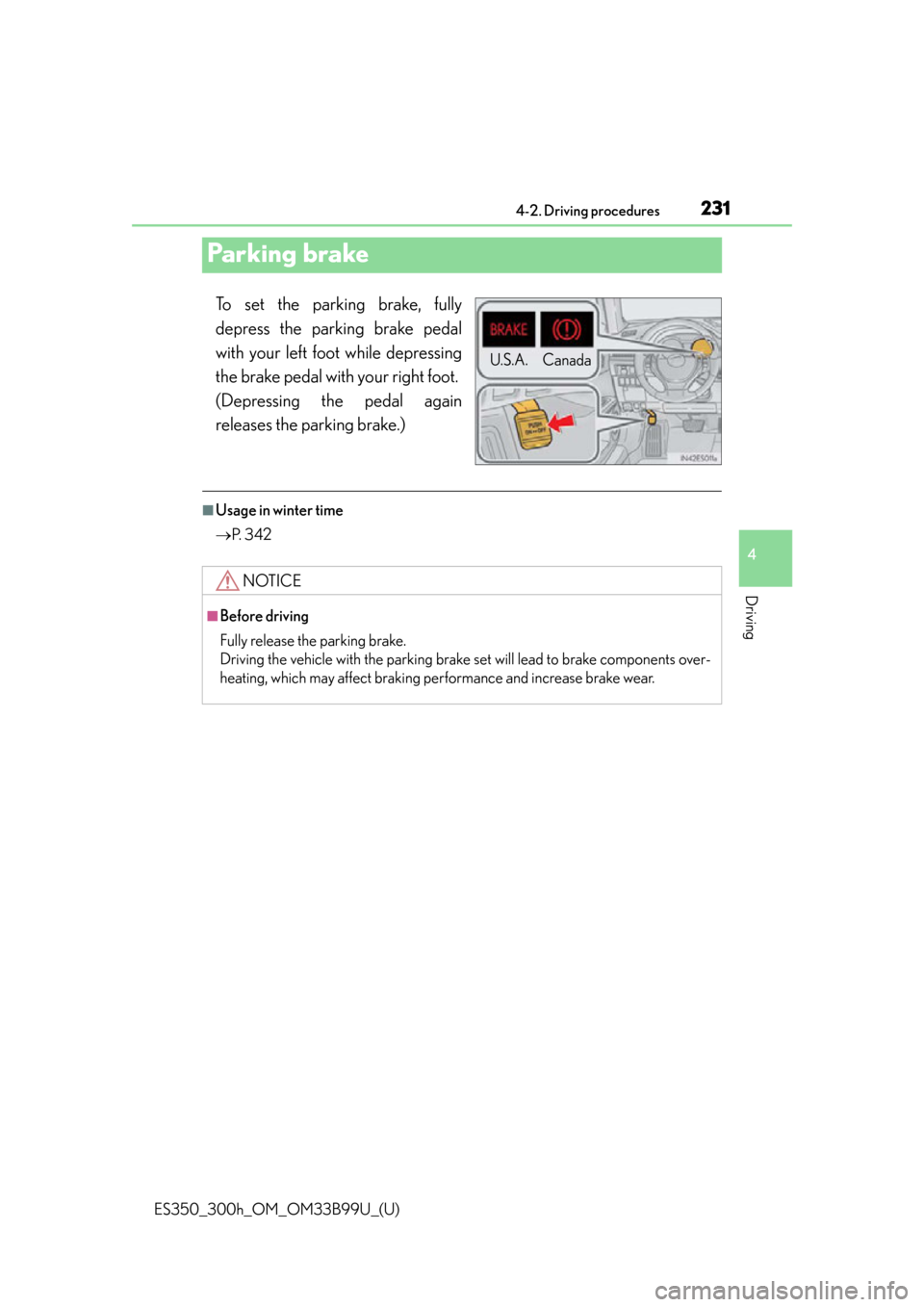
To set the parking brake, fully
depress the parking brake pedal
with your left foot while depressing
the brake pedal with your right foot.
(Depressing the pedal again
releases the parking brake.)
■Usage in winter time
P. 3 4 2
U.S.A. Canada
NOTICE
■Before driving
Fully release the parking brake.
Driving the vehicle with the parking brake set will lead to brake components over-
heating, which may affect braking performance and increase brake wear.
Page 235 of 784
ES350_300h_OM_OM33B99U_(U)
2354-3. Operating the lights and wipers
4
Driving
■Daytime running light system
●To make your vehicle more visible to other drivers, the parking lights turn on auto-
matically (at an increased intensity) whenever the engine
and the parking brake is released. Daytime running lights are not designed for use
at night.
For the U.S.A.: Daytime running lights can be turned off by operating the switch.
●Compared to turning on the headlights, the daytime running light system offers
greater durability and consumes less electricity, so it can help improve fuel econ-
omy.
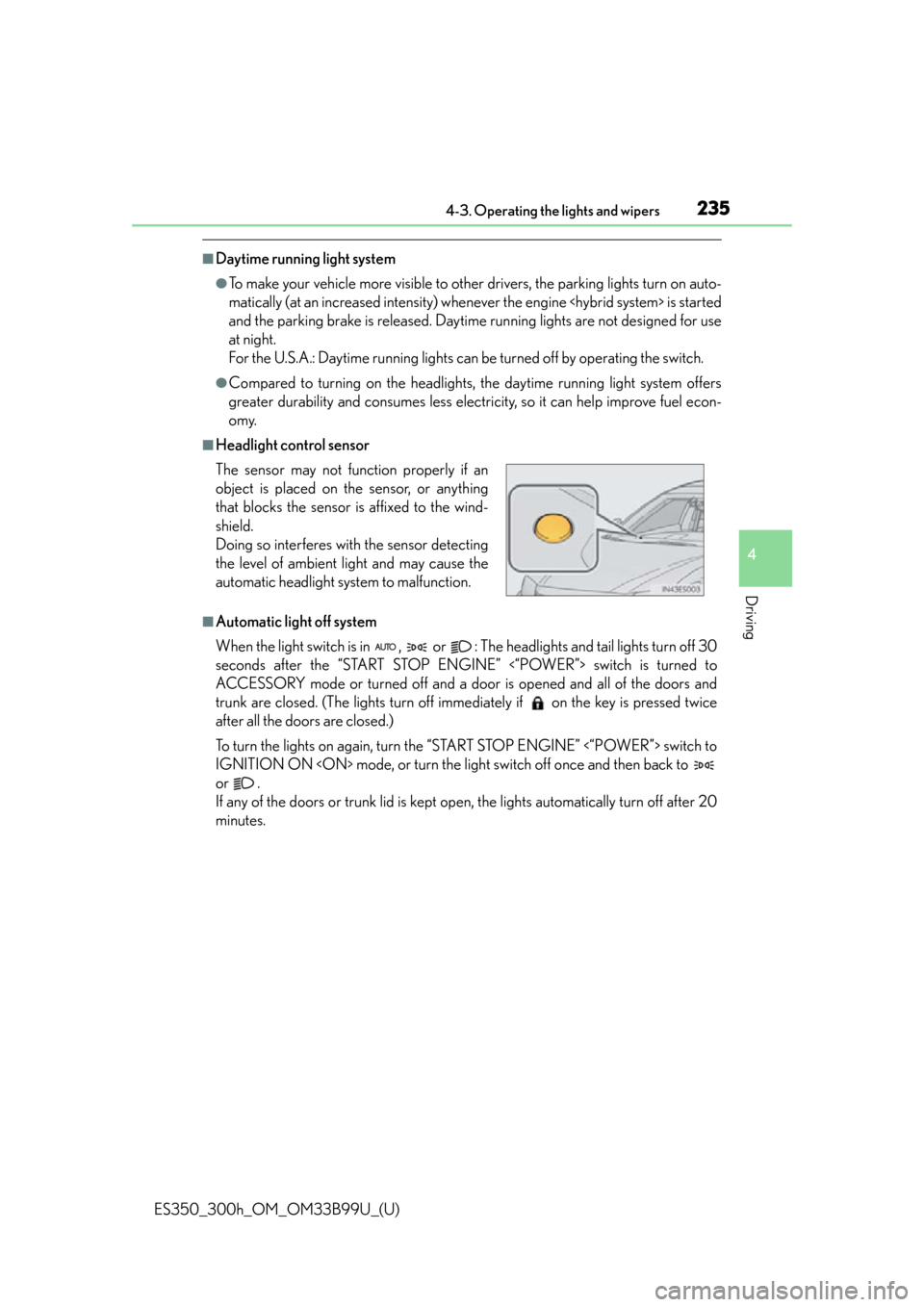
■Headlight control sensor
■Automatic light off system
When the light switch is in , or : The headlights and tail lights turn off 30
seconds after the “START STOP ENGINE” <“POWER”> switch is turned to
ACCESSORY mode or turned off and a door is opened and all of the doors and
trunk are closed. (The lights turn off imme diately if on the key is pressed twice
after all the doors are closed.)
To turn the lights on again, turn the “START STOP ENGINE” <“POWER”> switch to
IGNITION ON
or .
If any of the doors or trunk lid is kept op en, the lights automatically turn off after 20
minutes. The sensor may not func tion properly if an
object is placed on the sensor, or anything
that blocks the sensor is affixed to the wind-
shield.
Doing so interferes with the sensor detecting
the level of ambient light and may cause the
automatic headlight system to malfunction.
Page 291 of 784

ES350_300h_OM_OM33B99U_(U)
2914-5. Using the driving support systems
4
Driving
■Intuitive parking assist display
When an obstacle is detected while the rear view monitor system is in use, the warn-
ing indicator will appear in the top right of the screen even if the display setting has
been set to off.
■Sensor detection information
●The sensor’s detection areas are limited to the areas around the vehicle’s front cor-
ners and rear bumper.
●Certain vehicle conditions and the surrou nding environment may affect the ability
of the sensor to correctly detect obstacles. Particular instances where this may
occur are listed below.
• There is dirt, snow or ice on the sensor. (Wiping the sensors will resolve this problem.)
• The sensor is frozen. (Thawing the area will resolve this problem.) In especially cold weather, if a sensor is frozen the screen may show an abnor-
mal display, or obstacle s may not be detected.
• The sensor is covered in any way.
• The vehicle is leaning considerably to one side.
• On an extremely bumpy road, on an incline, on gravel, or on grass.
• The vicinity of the vehicle is noisy due to vehicle horns, motorcycle engines, air brakes of large vehicles, or other loud noises producing ultrasonic waves.
• There is another vehicle equipped with parking assist sensors in the vicinity.
• The sensor is coated with a sheet of spray or heavy rain.
• The vehicle is equipped with a fender pole or wireless antenna.
• Towing eyelets are installed.
• The bumper or sensor receives a strong impact.
• The vehicle is approaching a tall or curved curb.
• In harsh sunlight or intense cold weather.
• The area directly under th e bumpers is not detected.
• If obstacles draw too close to the sensor.
• A non-genuine Lexus suspension (low ered suspension etc.) is installed.
• People may not be detected if they are wearing certain types of clothing.
In addition to the examples above, there are instances in which, because of their
shape, signs and other objects may be judged by the se nsor to be closer than they
are.
Page 293 of 784

ES350_300h_OM_OM33B99U_(U)
2934-5. Using the driving support systems
4
Driving
CAUTION
■When using the intuitive parking assist
Observe the following precautions.
Failing to do so may result in the vehicle being unable to be driven safely and possi-
bly cause an accident.
●Do not use the sensor at speeds in excess of 6 mph (10 km/h).
●The sensors’ detection areas and reaction times are limited. When moving for-
ward or reversing, check the areas surrounding the vehicle (especially the sides
of the vehicle) for safety, and drive slowly, using the brake to control the vehicle’s
speed.
●Do not install accessories within the sensors’ detection areas.
NOTICE
■When using intuitive parking assist-sensor
In the following situations, the system may not function correctly due to a sensor
malfunction etc. Have the vehicl e checked by your Lexus dealer.
●The intuitive parking assist operation disp lay flashes, and a beep sounds when no
obstacles are detected.
●If the area around a sensor collides with something, or is subjected to strong
impact.
●If the bumper collides with something.
●If the display shows continuously without a beep.
●If a display error occurs, first check the sensor.
If the error occurs even if there is no ice, snow or mud on the sensor, it is likely that
the sensor is malfunctioning.
■Notes when washing the vehicle
Do not apply intensive bursts of wa ter or steam to the sensor area.
Doing so may result in the sensor malfunctioning.
Page 309 of 784

ES350_300h_OM_OM33B99U_(U)
3094-5. Using the driving support systems
4
Driving
CAUTION
■When using the Lexus parking assist monitor system
The parking assist monitor is a supplemental device intended to assist the driver
when backing up. When backing up, be sure to check visually behind and all
around the vehicle before proceeding.
Observe the following precautions to avoid an accident that could result in death
or serious injuries.
●Never depend on the parking assist monitor entirely when backing up. The image
and the position of the guid e lines displayed on the screen may differ from the
actual state.
Use caution, just as you would when backing up any vehicle.
●Be sure to back up slowly, depressing the brake pedal to control vehicle speed.
●If you seem likely to hit nearby vehicles , obstacles, people or mount the shoulder,
depress the brake pedal to stop the vehicle.
●The instructions given are only guidelines.
When and how much to turn the steering wheel will vary according to traffic con-
ditions, road surface conditions, vehicle condition, etc. when parking. It is neces-
sary to be fully aware of this before using the parking assist system.
●When parking, be sure to check that the parking space will accommodate your
vehicle before maneuvering into it.
●Do not use the parking assist monitor in the following cases:
• On icy or slick road surfaces, or in snow
• When using tire chains or emergency tires
• When the trunk is not closed completely
• On roads that are not flat or straight, such as curves or slopes.
●In low temperatures, the screen may darken or the image may become faint. The
image could distort when the vehicle is moving, or you may become unable to
see the image on the screen. Be sure to check direct visually and with the mirrors
all around the vehicle before proceeding.
Page 319 of 784

319
ES350_300h_OM_OM33B99U_(U)
4-5. Using the driving support systems
4
Driving
Hill-start assist control (hybrid vehicles)
To engage hill-start assist control,
further depress the brake pedal
when the vehicle is stopped com-
pletely.
A buzzer will sound once to indicate
the system is activated. The slip indica-
tor will also start flashing.
■Hill-start assist control operating conditions
●The system operates in the following situations:
• The shift lever is in a position other than P.
• The parking brake is not applied.
• The accelerator peda l is not depressed.
●Hill-start assist control cannot be operated while the slip indicator light is illumi-
nated.
■Hill-start assist control
●While hill-start assist control is operating, the brakes remain automatically applied
after the driver releases the brake pedal. The stop lights and the high mounted
stoplight turn on.
●Hill-start assist control operates for about 2 seconds after the brake pedal is
released.
●If the slip indicator does not flash and the buzzer does not sound when the brake
pedal is further depressed, slightly reduce the pressure on the brake pedal (do not
allow the vehicle to roll backward) and then firmly depress it again. If the system still
does not operate, check that the operating conditions explained above have been
met.
Assists with starting off and temporarily maintains braking power even
if the foot is removed from the brake pedal when starting off on an
incline or a slippery slope.
Page 320 of 784

320
ES350_300h_OM_OM33B99U_(U)
4-5. Using the driving support systems
■Hill-start assist control buzzer
●When hill-start assist control is activated, the buzzer will sound once.
●In the following situations, hill-start assist control will be canceled and the buzzer
will sound twice.
• No attempt is made to drive the vehicle within approximately 2 seconds ofreleasing the brake pedal.
• The shift lever is moved to P.
• The parking brake is applied.
• The brake pedal is depressed again.
• The brake pedal has been depressed fo r more than approximately 3 minutes.
■If the slip indicator comes on
It may indicate a malfunction in the system. Contact your Lexus dealer.
CAUTION
■Hill-start assist control
●Do not overly rely on hill-start assist control. Hill-start assist control may not oper-
ate effectively on steep inclines and roads covered with ice.
●Unlike the parking brake, hill-start assist control is not intended to hold the vehi-
cle stationary for an extended period of time. Do not attempt to use hill-start
assist control to hold the vehicle on an in cline, as doing so may lead to an acci-
dent.
Page 342 of 784

342
ES350_300h_OM_OM33B99U_(U)
4-6. Driving tips
Perform the following according to the driving conditions:
●Do not try to forcibly open a window or move a wiper that is frozen.
Pour warm water over the frozen area to melt the ice. Wipe away the
water immediately to prevent it from freezing.
●To ensure proper operation of the climate control system fan, remove
any snow that has accumulated on the air inlet vents in front of the wind-
shield.
●Check for and remove any excess ice or snow that may have accumu-
lated on the exterior lights, vehicle’s roof, chassis, around the tires or on
the brakes.
●Remove any snow or mud from the bo ttom of your shoes before getting
in the vehicle.
Accelerate the vehicle slowly, keep a safe distance between you and the
vehicle ahead, and drive at a reduced speed suitable to road conditions.
Park the vehicle and move the shift lever to P without setting the parking
brake. The parking brake may freeze up, preventing it from being
released. If necessary, block the wheels to prevent inadvertent sliding or
creeping.
Before driving the vehicle
When driving the vehicle
When parking the vehicle
Page 534 of 784
534
ES350_300h_OM_OM33B99U_(U)
7-2. Maintenance
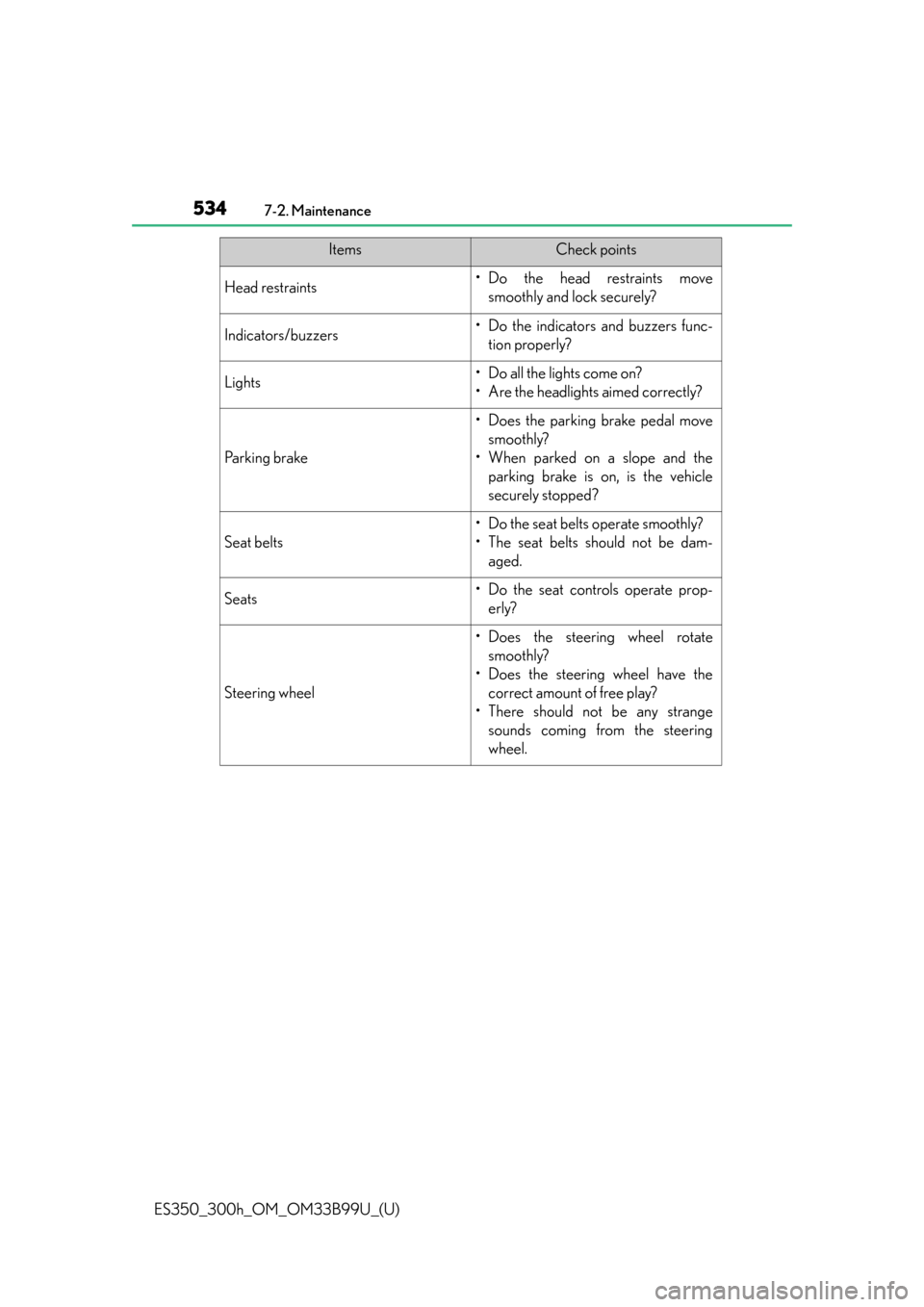
Head restraints•Do the head restraints movesmoothly and lock securely?
Indicators/buzzers• Do the indicators and buzzers func-tion properly?
Lights• Do all the lights come on?
• Are the headlights aimed correctly?
Parking brake
• Does the parking brake pedal movesmoothly?
• When parked on a slope and the parking brake is on, is the vehicle
securely stopped?
Seat belts
• Do the seat belts operate smoothly?
• The seat belts should not be dam-aged.
Seats• Do the seat controls operate prop-erly?
Steering wheel
• Does the steering wheel rotatesmoothly?
• Does the steering wheel have the correct amount of free play?
• There should not be any strange sounds coming from the steering
wheel.
ItemsCheck points
Page 544 of 784

544
ES350_300h_OM_OM33B99U_(U)
7-3. Do-it-yourself maintenance
CAUTION
■When raising your vehicle
Make sure to observe the following precautions to reduce the possibility of death
or serious injury:
●When using a floor jack, follow the instructions of the manual provided with the
jack.
●Do not use the jack that was supplied with your vehicle.
●Do not put any part of your body underneath the vehicle when it is supported
only by the floor jack.
●Always use floor jack and/or automotive jack stands on a solid, flat, level surface.
●Do not start the engine
jack.
●Stop the vehicle on level, firm ground, firmly set the parking brake and shift the
shift lever to P.
●Make sure to set the floor jack properly at the jack point.
Raising the vehicle with an improperly positioned floor jack will damage the vehi-
cle and may cause the vehicle to fall off the floor jack.
●Do not raise the vehicle while someone is in the vehicle.
●When raising the vehicle, do not place any object on top of or underneath the
floor jack.
●Lift up the vehicle using a floor jack such as
the one shown in the illustration.