USB Lexus ES300h 2015 User Guide
[x] Cancel search | Manufacturer: LEXUS, Model Year: 2015, Model line: ES300h, Model: Lexus ES300h 2015Pages: 786, PDF Size: 23.74 MB
Page 375 of 786
3745-3. Using the audio system
ES350_300h_OM_OM33B36U_(U)
To change the cover art settings, select “Cover Art Settings” on the “Audio
Settings” screen, CD or MP3/WMA/AAC disc menu screen. ( →P. 375)
Select to set the cover art display
of the DISC mode on/off.
Select to set the cover art display
of the USB mode on/off.
Change the priority of the
Gracenote database of the USB
mode.
Select to set the cover art display of the iPod mode on/off.
Change the priority of the Gracenote database of the iPod mode.
To change USB settings, select “USB Settings” on the “Audio Settings”
screen or USB menu screen. ( →P. 375)
Change the cover art settings
(→ P. 3 74 )
Changing the cover art settings
1
2
3
Changing USB settings
4
5
1
Page 377 of 786
3765-3. Using the audio system
ES350_300h_OM_OM33B36U_(U)
XCD, MP3/WMA/AAC disc, iPod, USB or Bluetooth®
Play or pause a track/file
Select a track/file
Select a folder/album (MP3/
WMA/AAC disc or USB)
Select and hold: Fast-forward or
rewind a track/file
Select a repeat mode.
(→P. 3 7 7 )
Select a random/shuffle play
mode. ( →P. 3 7 7 )
Select a full screen mode (iPod
video mode)
Change iPod settings (iPod)
(→ P. 373)
Change USB settings (USB) ( →P. 3 74 )
Connect a Bluetooth device (Bluetooth
®) (→ P. 4 1 0 )
Change the cover art settings (CD or MP3/WMA/AAC disc)
(→ P. 3 74 )
Change sound settings ( →P. 3 7 0 )
XA/V
Select full screen mode
Change A/V settings
(→ P. 373)
Change sound settings
(→ P. 3 7 0 )
1
2
3
4
5
6
7
8
9
10
11
12
1
2
3
Page 378 of 786
ES350_300h_OM_OM33B36U_(U)
3775-3. Using the audio system
5
Lexus Display Audio system
Repeat play
ModeActionTarget audio source
File/track repeat All media
Folder repeat MP3/WMA/AAC disc, USB
Album repeat USB, Bluetooth
®
Random/shuffle playback
ModeActionTarget audio source
Random/shuffle play of the disc/
folder/album All media
Random play of all folders MP3/WMA/AAC disc, USB
Random/shuffle play of all albums iPod, USB, Bluetooth
®
Page 400 of 786
399
ES350_300h_OM_OM33B36U_(U)
5-6. Using an external device
5
Lexus Display Audio system
Using USB memory device
→P. 359
Pressing the “MEDIA” button displays the USB top screen from any
screen of the selected source.
■Menu screen
→ P. 3 7 5
■Selecting a file
Press the “ ∧” or “∨ ” button or turn the “TUNE•SCROLL” knob to select
the desired file number.
To fast-forward or rewind, press and hold the “ ∧” or “ ∨” button.
■Selecting a play mode
Move the controller to the right and select “Browse”.
Select the desired play mode, then select a file to begin the selected
play mode.
■Displaying the now playing list
Move the controller to the right and select “Now Playing List”.
Connecting a USB memory device enab les you to enjoy music from the
vehicle speakers.
Select “USB1” or “USB2” on the aud io source selection screen.
Connecting a USB memory device
USB top screen
1
2
Page 401 of 786
4005-6. Using an external device
ES350_300h_OM_OM33B36U_(U)
■USB memory functions
●Depending on the USB memory device that is connected to the system, the device
itself may not be operable and certain functions may not be available. If the device
is inoperable or a function is unavailable due to a malfunction (as opposed to a sys-
tem specification), disconnecting the device and reconnecting it may resolve the
problem.
●If the USB memory device still does not begin operation after being disconnected
and reconnected, format the device.
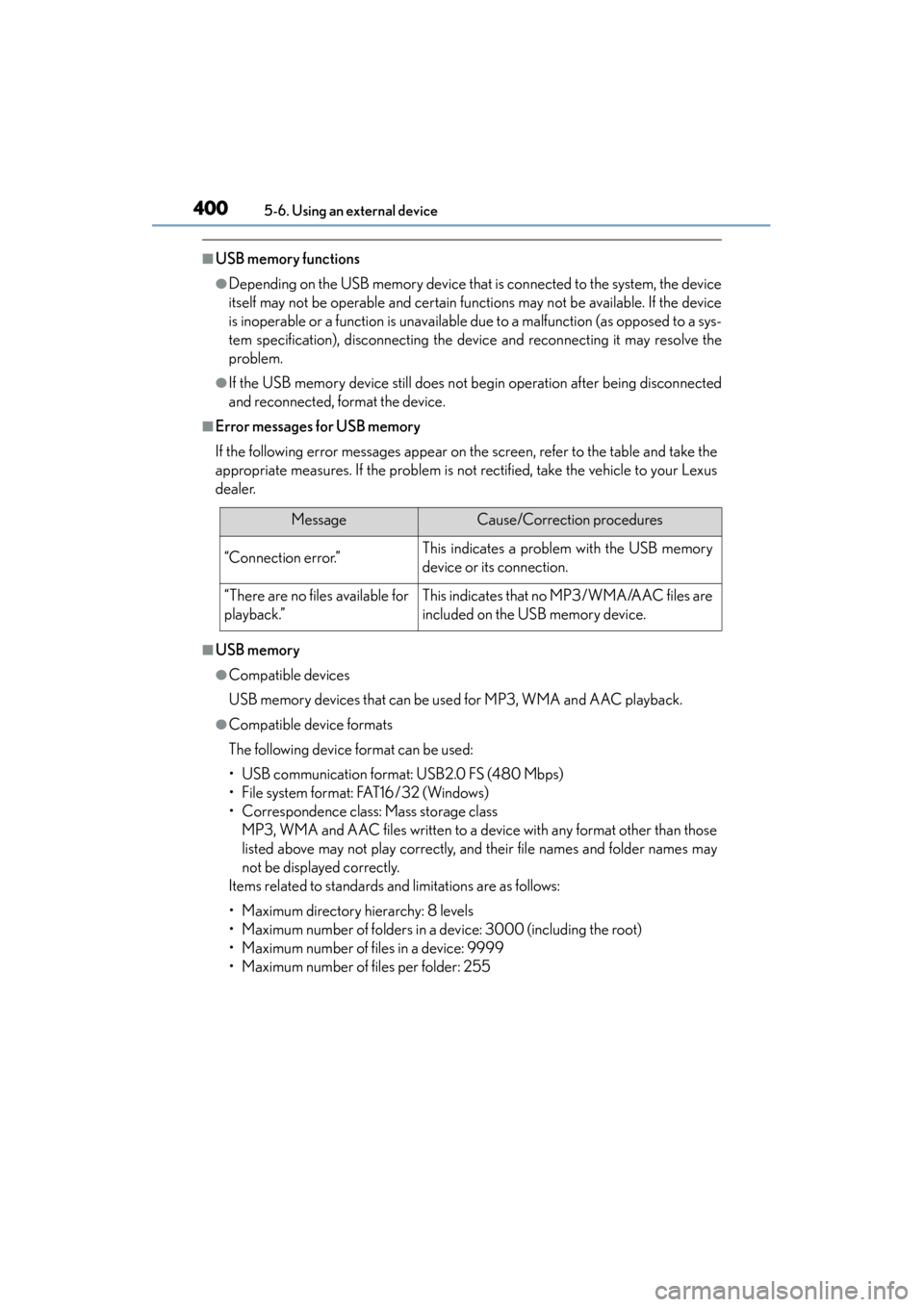
■Error messages for USB memory
If the following error messages appear on the screen, refer to the table and take the
appropriate measures. If the problem is not rectified, take the vehicle to your Lexus
dealer.
■USB memory
●Compatible devices
USB memory devices that can be used for MP3, WMA and AAC playback.
●Compatible device formats
The following device format can be used:
• USB communication format: USB2.0 FS (480 Mbps)
• File system format: FAT16 /32 (Windows)
• Correspondence class: Mass storage class MP3, WMA and AAC files written to a device with any format other than those
listed above may not play correctly, and their file names and folder names may
not be displayed correctly.
Items related to standards and limitations are as follows:
• Maximum directory hierarchy: 8 levels
• Maximum number of folders in a device: 3000 (including the root)
• Maximum number of files in a device: 9999
• Maximum number of files per folder: 255
MessageCause/Correction procedures
“Connection error.”This indicates a problem with the USB memory
device or its connection.
“There are no files available for
playback.”This indicates that no MP3/WMA/AAC files are
included on the USB memory device.
Page 403 of 786
4025-6. Using an external device
ES350_300h_OM_OM33B36U_(U)
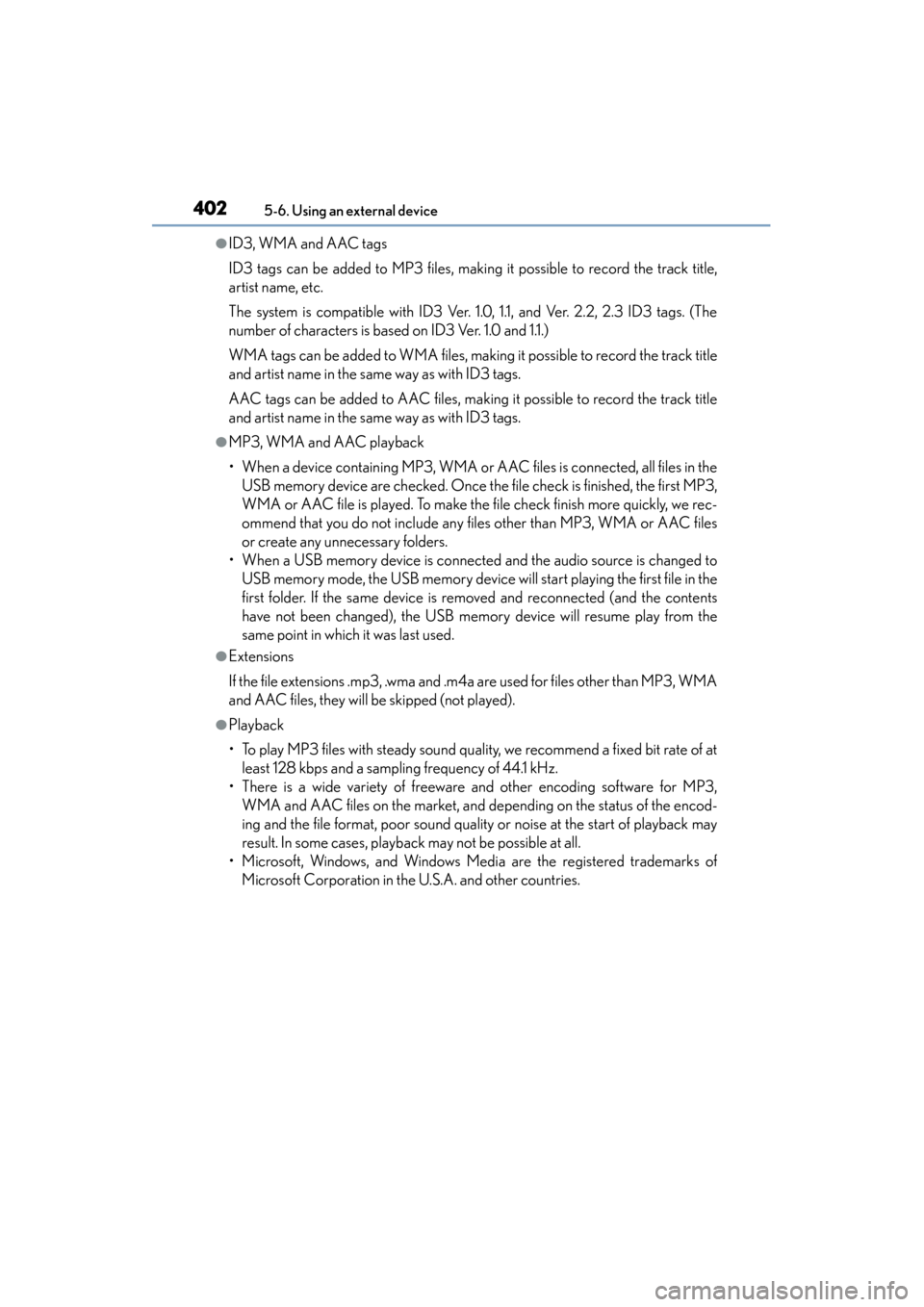
●ID3, WMA and AAC tags
ID3 tags can be added to MP3 files, making it possible to record the track title,
artist name, etc.
The system is compatible with ID3 Ver. 1.0, 1.1, and Ver. 2.2, 2.3 ID3 tags. (The
number of characters is based on ID3 Ver. 1.0 and 1.1.)
WMA tags can be added to WMA files, making it possible to record the track title
and artist name in the same way as with ID3 tags.
AAC tags can be added to AAC files, making it possible to record the track title
and artist name in the same way as with ID3 tags.
●MP3, WMA and AAC playback
• When a device containing MP3, WMA or AAC files is connected, all files in theUSB memory device are checked. Once the file check is finished, the first MP3,
WMA or AAC file is played. To make the file check finish more quickly, we rec-
ommend that you do not include any files other than MP3, WMA or AAC files
or create any unnecessary folders.
• When a USB memory device is connected and the audio source is changed to USB memory mode, the USB memory device wi ll start playing the first file in the
first folder. If the same device is removed and reconnected (and the contents
have not been changed), the USB memory device will resume play from the
same point in which it was last used.
●Extensions
If the file extensions .mp3, .wma and .m4a are used for files other than MP3, WMA
and AAC files, they will be skipped (not played).
●Playback
• To play MP3 files with steady sound quality, we recommend a fixed bit rate of at least 128 kbps and a sampling frequency of 44.1 kHz.
• There is a wide variety of freeware and other encoding software for MP3, WMA and AAC files on the market, and depending on the status of the encod-
ing and the file format, poor sound quality or noise at the start of playback may
result. In some cases, playback may not be possible at all.
• Microsoft, Windows, and Windows Media are the registered trademarks of Microsoft Corporation in the U.S.A. and other countries.
Page 404 of 786
ES350_300h_OM_OM33B36U_(U)
4035-6. Using an external device
5
Lexus Display Audio system
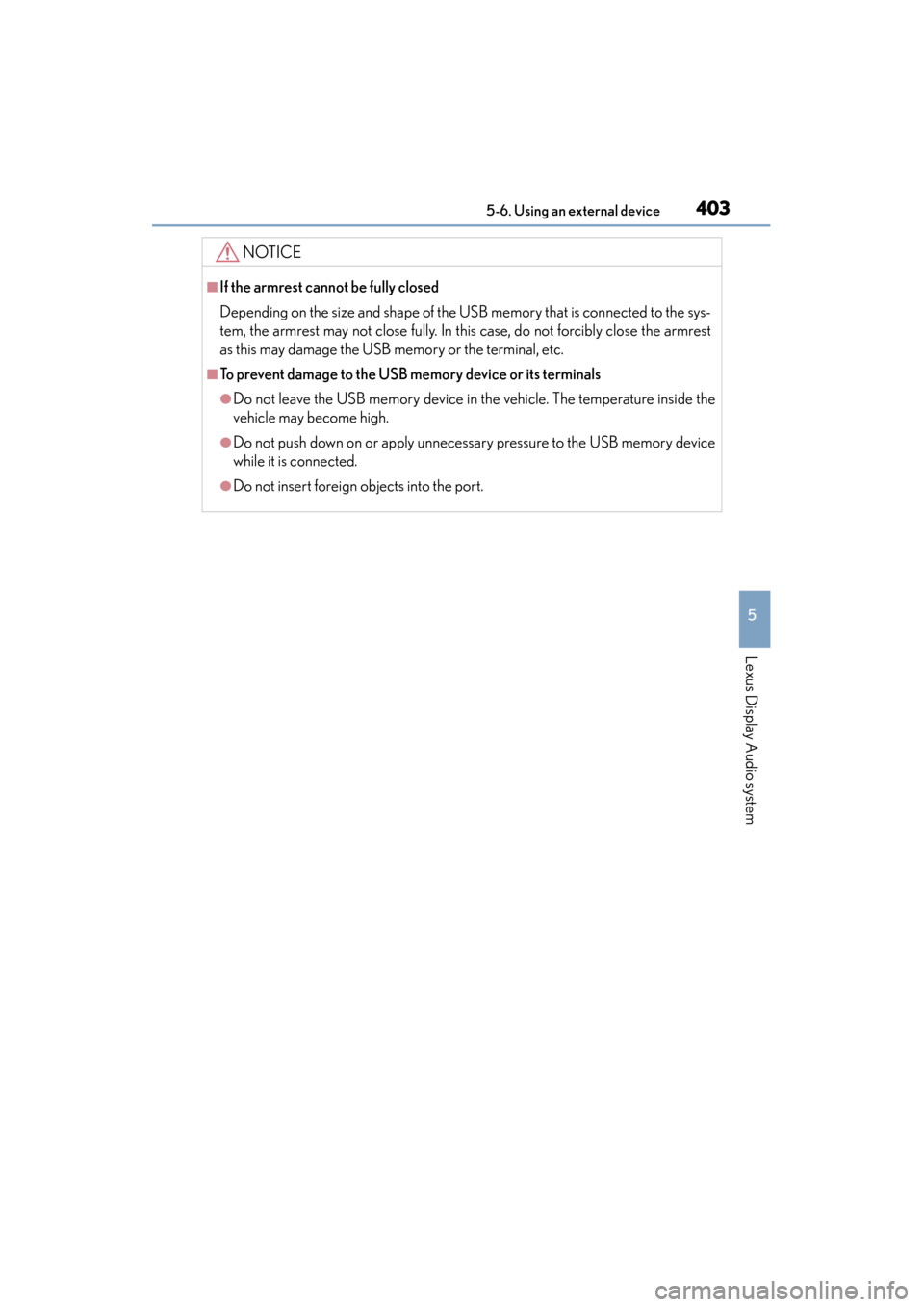
NOTICE
■If the armrest cannot be fully closed
Depending on the size and shape of the USB memory that is connected to the sys-
tem, the armrest may not close fully. In this case, do not forcibly close the armrest
as this may damage the USB memory or the terminal, etc.
■To prevent damage to the USB memory device or its terminals
●Do not leave the USB memory device in the vehicle. The temperature inside the
vehicle may become high.
●Do not push down on or apply unnecessary pressure to the USB memory device
while it is connected.
●Do not insert foreign objects into the port.
Page 450 of 786
449
ES350_300h_OM_OM33B36U_(U)
5-12. Other function
5
Lexus Display Audio system
“Information” screen
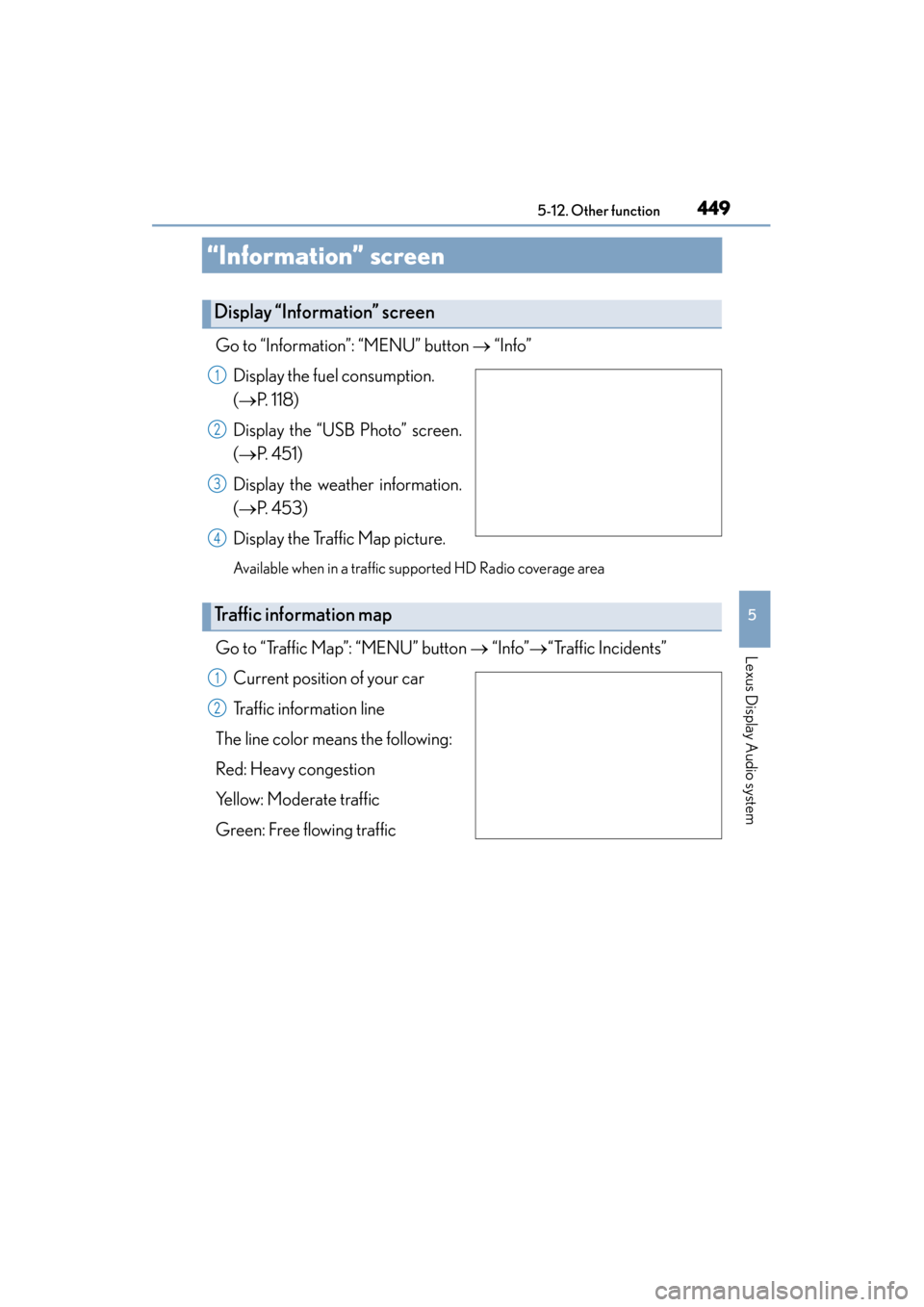
Go to “Information”: “MENU” button → “Info”
Display the fuel consumption.
(→ P. 118)
Display the “USB Photo” screen.
(→ P. 4 5 1 )
Display the weather information.
(→ P. 453)
Display the Traffic Map picture.
Available when in a traffic supported HD Radio coverage area
Go to “Traffic Map”: “MENU” button → “Info” →“Traffic Incidents”
Current position of your car
Traffic information line
The line color means the following:
Red: Heavy congestion
Yellow: Moderate traffic
Green: Free flowing traffic
Display “Information” screen
1
2
3
4
Traffic information map
1
2
Page 452 of 786
451
ES350_300h_OM_OM33B36U_(U)
5-12. Other function
5
Lexus Display Audio system
USB photo
Go to “USB Photo”: “MENU” button → “Info” → “USB1 Photo” or “USB2
Photo”
→ P. 359
Move the controller to the left to display the menu screen. Change the full screen mode.
Select to set the slide show dis-
play on/off.
Start the slide show at a selected
folder.
Change the play speed.
Change the play mode.
Move the controller to the right and select “Browse”.
Select the desired folder, and then select a desired file to begin using
the selected folder.
Connecting a USB memory device enables you to enjoy photos on the
Lexus Display Audio display.
USB photo screen
Connecting a USB memory device
Menu screen
1
2
3
4
Selecting a folder and a file
1
2
Page 453 of 786
4525-12. Other function
ES350_300h_OM_OM33B36U_(U)
■USB memory functions
→P. 4 0 0
■USB memory
●Compatible devices
USB memory device that can be used for JPEG display.
●Compatible device formats
The following device format can be used:
• USB communication format: USB2.0 FS (480 Mbps)
• File system format: FAT16 /32 (Windows)
• Correspondence class: Mass storage class
●JPEG file compatibility
• Compatible image size: Maximum 10MB
• Compatible pixel size: Maximum 10,000,000 pixels
NOTICE
■To prevent damage to the USB me mory device or its terminals
→ P. 4 0 3