change time Lexus ES300h 2015 Owner's Guide
[x] Cancel search | Manufacturer: LEXUS, Model Year: 2015, Model line: ES300h, Model: Lexus ES300h 2015Pages: 786, PDF Size: 23.74 MB
Page 482 of 786
ES350_300h_OM_OM33B36U_(U)
4816-2. Using the interior lights
6
Interior features
■Illuminated entry system
The lights automatically turn on/off according to “START STOP ENGINE”
<“POWER”> switch mode, the presence of the electronic key, whether the doors are
locked/unlocked, and whether the doors are opened/closed.
■To prevent 12-volt battery discharge
If the following lights remain on when the “START STOP ENGINE” <“POWER”>
switch is turned off the lights will go off automatically after 20 minutes:
●Outer foot lights
●Personal/interior light
●Door courtesy lights
●Ornament lights (if equipped)
●Footwell lights
■Customization
Setting (e.g. the time elapsed before lights turn off) can be changed.
(Customizable features: →P. 7 3 0 )
Page 497 of 786
496
ES350_300h_OM_OM33B36U_(U)
6-4. Other interior features
■The rear sunshade can be used when
The “START STOP ENGINE” <“POWER”> switch is in IGNITION ON
mode.
■Operating the rear sunshade after the engine
The rear sunshade can be operated for approximately 1 minute even after the
“START STOP ENGINE” <“POWER”> switch is turned to ACCESSORY mode or
turned off.
■Reverse operation feature
To ensure adequate rear visibility, the rear sunshade automatically lowers when the
shift lever is shifted to R.
However, the rear sunshade is raised again if any of the following occurs:
●The button is pressed again.*
●Shift the shift lever into P.
●The shift lever is shifted out of R, and the vehicle reaches a speed of 9 mph
(15 km/h).
If the engine
to the reverse operation feature, it will not be raised even when the engine
km/h). To raise the sunshade again, press the button.
*: Occasionally, the reverse function may not be carried out after the switch has been pressed. Repeat the above operation to operate the function.
■Customization
Time elapsed before the reverse operation feature activates can be changed.
(Customizable features: → P. 7 3 0 )
Page 680 of 786
6798-2. Steps to take in an emergency
ES350_300h_OM_OM33B36U_(U)
8
When trouble arises
■Stopping the engine
Shift the shift lever to P and press the “START STOP ENGINE” <“POWER”> switch
as you normally do when stopping the engine
■Replacing the key battery
As the above procedure is a temporary measure, it is recommended that the elec-
tronic key battery be replaced immediately when the battery is depleted. (→P. 5 8 4 )
■Changing “START STOP ENGINE” <“POWER”> switch modes
Release the brake pedal and press the “START STOP ENGINE” <“POWER”> switch
in step above.
The engine
switch is pressed. ( →P. 206, 213)
■When the electronic key does not work properly
●Make sure that the smart access system with push-button start has not been deac-
tivated in the customization setting. If it is off, turn the function on.
(Customizable features →P. 7 3 0 )
●Check if battery-saving mode is set. If it is set, cancel the function. ( →P. 1 3 3 )
CAUTION
■When using the mechanical key and operating the power windows and moon
roof
Operate the power window or moon roof after checking to make sure that there is
no possibility of any passenger having any of their body parts caught in the window
or moon roof.
Also, do not allow children to operate the mechanical key. It is possible for children
and other passengers to get caught in power window and moon roof.
3
Page 739 of 786
738
ES350_300h_OM_OM33B36U_(U)
9-2. Customization
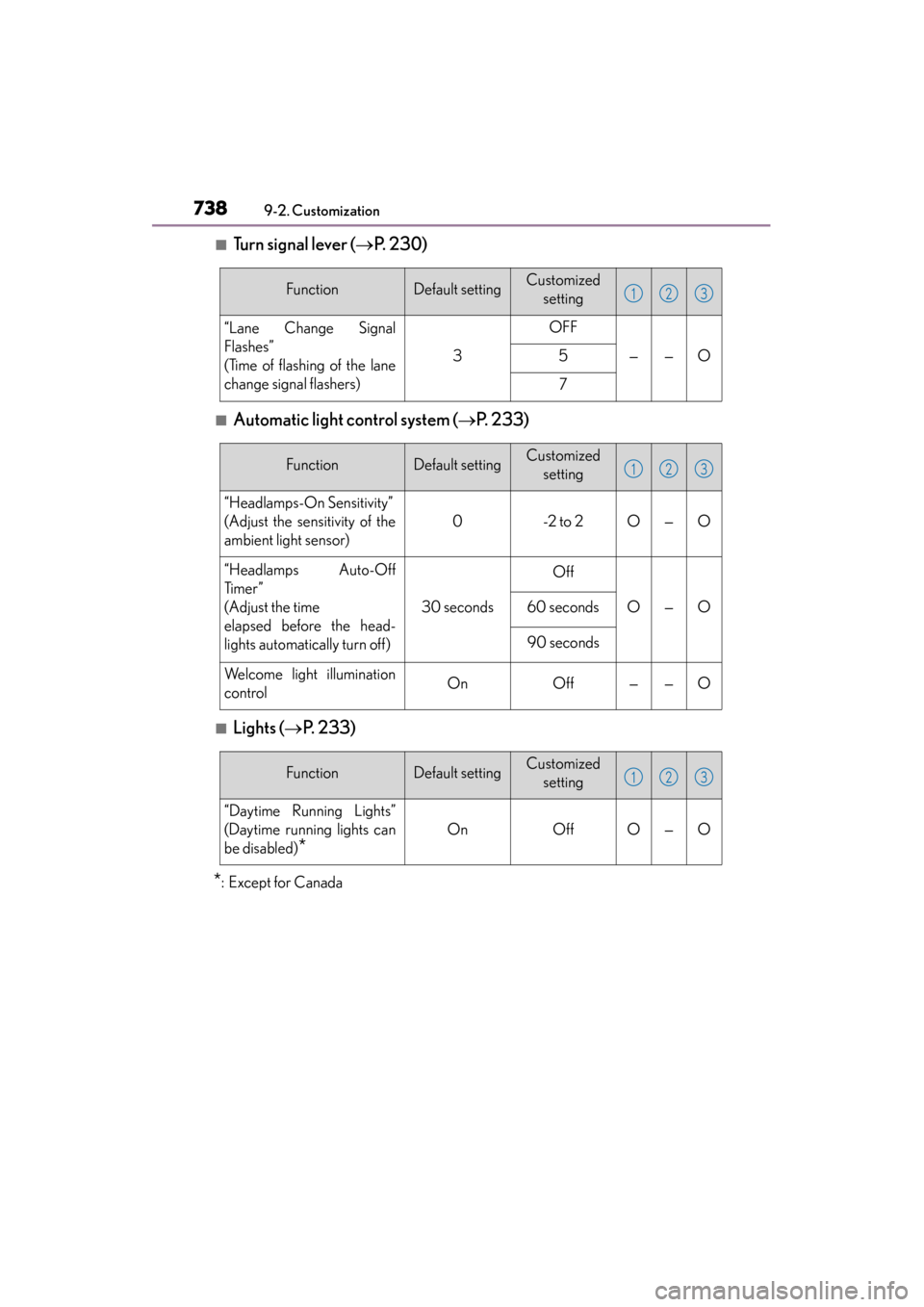
■Turn signal lever (→P. 2 3 0 )
■Automatic light control system ( →P. 2 3 3 )
■Lights ( →P. 2 3 3 )
*:Except for Canada
FunctionDefault settingCustomized
setting
“Lane Change Signal
Flashes”
(Time of flashing of the lane
change signal flashers)
3
OFF
——O5
7
123
FunctionDefault settingCustomized setting
“Headlamps-On Sensitivity”
(Adjust the sensitivity of the
ambient light sensor)
0-2 to 2O—O
“Headlamps Auto-Off
Ti m e r ”
(Adjust the time
elapsed before the head-
lights automatically turn off)
30 seconds
Off
O—O60 seconds
90 seconds
Welcome light illumination
controlOnOff——O
123
FunctionDefault settingCustomized setting
“Daytime Running Lights”
(Daytime running lights can
be disabled)
*
OnOffO—O
123