phone Lexus ES300h 2015 Specifications / (OM33B99U) Workshop Manual
[x] Cancel search | Manufacturer: LEXUS, Model Year: 2015, Model line: ES300h, Model: Lexus ES300h 2015Pages: 784, PDF Size: 9.63 MB
Page 448 of 784

4485-11. Bluetooth®
ES350_300h_OM_OM33B99U_(U)Co-Location:
This transmitter must not be co-located or
operated in conjunction with any other
antenna or transmitter.
Under Industry Canada regulations, this radio transmitter may only operate using an
antenna of a type and maximum (or lesser ) gain approved for the transmitter by
Industry Canada. To reduce potential radio interference to other users, the antenna
type and its gain should be so chosen that the equivalent isotropically radiated power
(e.i.r.p.) is not more than that necessary for successful communication.
Conformément à la réglementation d’Industrie Canada, le présent émetteur radio
peut fonctionner avec une antenne d’un type et d’un gain maximal (ou inférieur)
approuvé pour l’émetteur par Industrie Canada. Dans le but de réduire les risques
de brouillage radioélectrique à l’intention des autres utilisateurs, il faut choisir le type
d’antenne et son gain de sorte que la puissance isotrope rayonnée équivalente
(p.i.r.e.) ne dépasse pas l’intensité néce ssaire à l’établissement d’une communication
satisfaisante.
CAUTION
■While driving
Do not operate the portable audio player, cellular phone or connect a device to the
Bluetooth
® system.
■Caution regarding interference with electronic devices
●Your audio unit is fitted with Bluetooth® antennas. People with implantable car-
diac pacemakers, cardiac resynchronization therapy-pacemakers or implantable
cardioverter defibrillators should maintain a reasonable distance between them-
selves and the Bluetooth
® antennas. The radio waves may affect the operation of
such devices.
●Before using Bluetooth® devices, users of any electrical medical device other
than implantable cardiac pacemakers, cardiac resynchronization therapy-pace-
makers or implantable cardioverter defibrillators should consult the manufac-
turer of the device for information about its operation under the influence of radio
waves. Radio waves could have unexpect ed effects on the operation of such
medical devices.
NOTICE
■When leaving the vehicle
Do not leave your portable audio player or cellular phone in the vehicle. The inside
of the vehicle may become hot, causing damage to the portable audio player or
cellular phone.
Page 456 of 784

4565-12. Other function
ES350_300h_OM_OM33B99U_(U)
■Microphone
P. 4 2 0
■When using the microphone
●It is unnecessary to speak directly into the microphone when giving a command.
●Wait for the confirmation beep before speaking a command.
●Voice commands may not be recognized if:
• Spoken too quickly.
• Spoken at a low or high volume.
• The roof or windows are open.
• Passengers are talking while voice commands are spoken.
• The air conditioning speed is set high.
• The air conditioning vents are turned towards the microphone.
●In the following conditions, the system may not recognize the command properly
and using voice commands may not be possible:
• The command is incorrect or unclear. Note that certain words, accents or speech patterns may be difficul t for the system to recognize.
• There is excessive background noise, such as wind noise.
■When searching for a track
●A USB memory or iPod must be connected to enable track searching and play-
back. ( P. 3 5 9 )
●When a USB memory or iPod is connected, recognition data is created so tracks
can be searched using voice commands.
●Recognition data is updated under the following conditions:
• When the USB memory or iPod data has changed.
• When the voice recognition language is changed. ( P. 3 6 2 )
●While the recognition data is being created or being updated, a track search can-
not be performed using a voice command.
■The Gracenote® media database
P. 3 9 2
Page 458 of 784
4585-12. Other function
ES350_300h_OM_OM33B99U_(U)
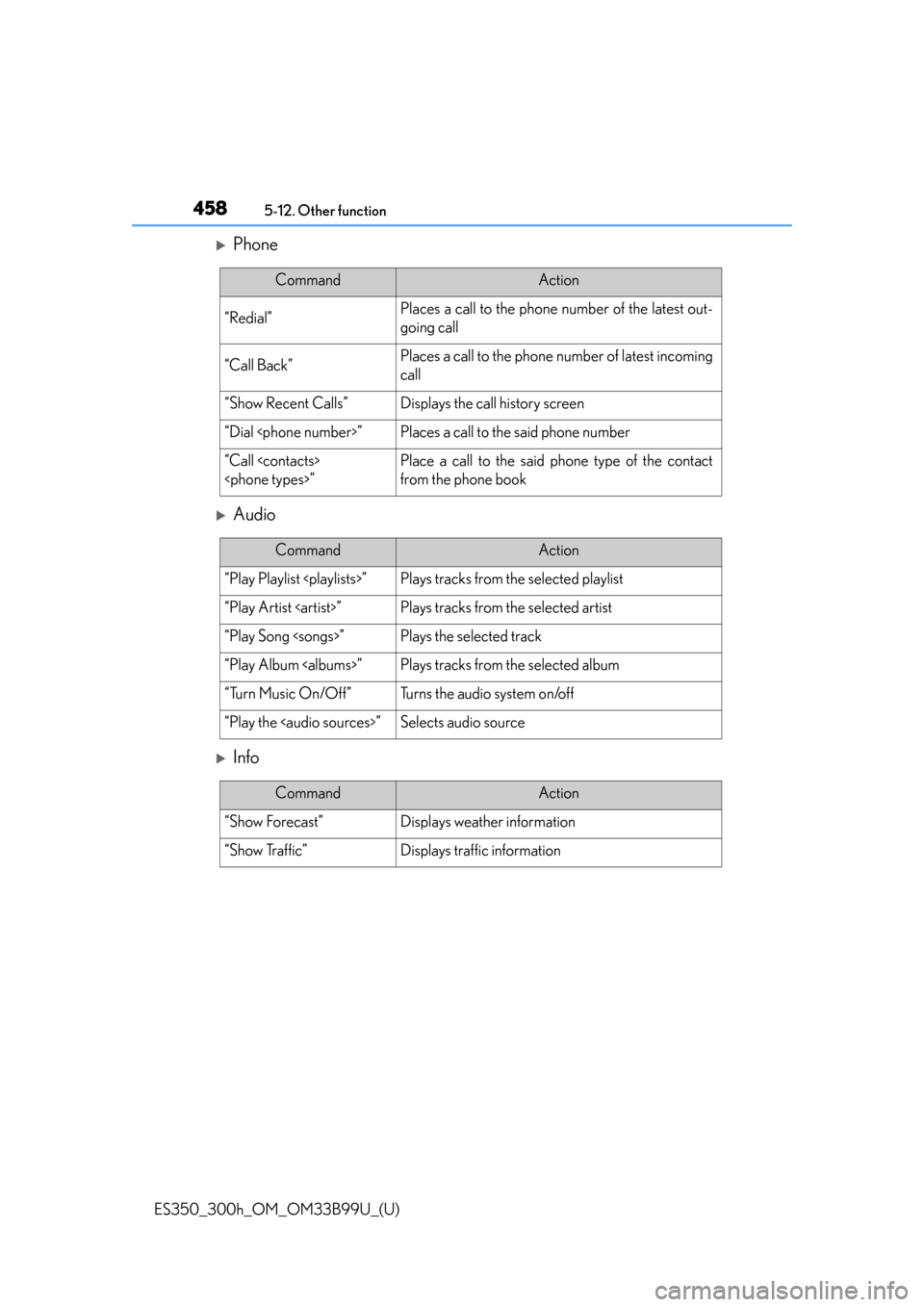
Phone
Audio
Info
CommandAction
“Redial”Places a call to the phone number of the latest out-
going call
“Call Back”Places a call to the phone number of latest incoming
call
“Show Recent Calls”Displays the call history screen
“Dial
“Call
from the phone book
CommandAction
“Play Playlist
“Play Artist
“Play Song
“Play Album
“Turn Music On/Off”Turns the audio system on/off
“Play the
Page 459 of 784
459
ES350_300h_OM_OM33B99U_(U)
5-12. Other function
5
Lexus Display Audio system
Mobile Assistant
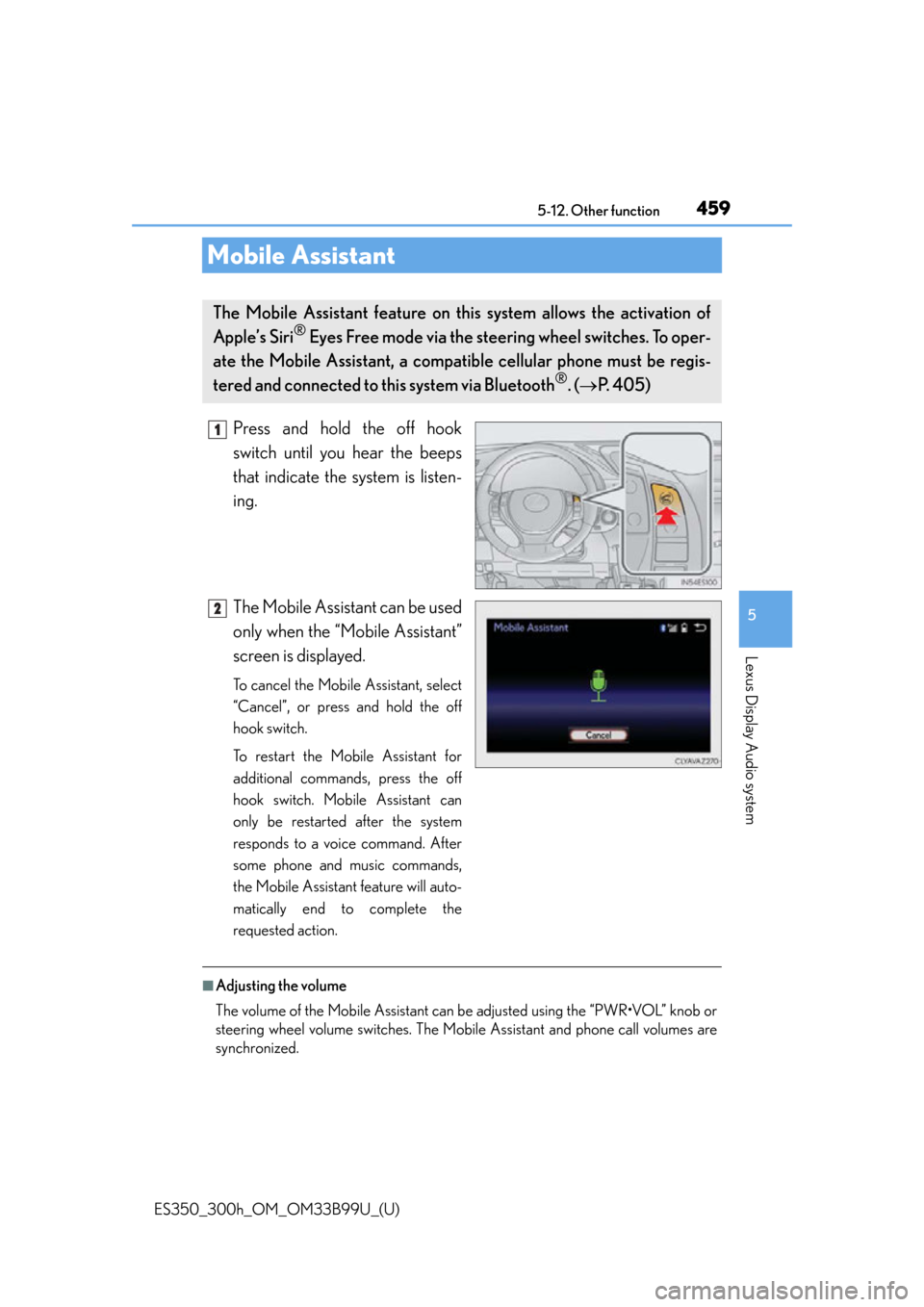
Press and hold the off hook
switch until you hear the beeps
that indicate the system is listen-
ing.
The Mobile Assistant can be used
only when the “Mobile Assistant”
screen is displayed.
To cancel the Mobile Assistant, select
“Cancel”, or press and hold the off
hook switch.
To restart the Mobile Assistant for
additional commands, press the off
hook switch. Mobile Assistant can
only be restarted after the system
responds to a voice command. After
some phone and music commands,
the Mobile Assistant feature will auto-
matically end to complete the
requested action.
■Adjusting the volume
The volume of the Mobile Assistant can be adjusted using the “PWR•VOL” knob or
steering wheel volume switches. The Mobi le Assistant and phone call volumes are
synchronized.
The Mobile Assistant feature on this system allows the activation of
Apple’s Siri
® Eyes Free mode via the steering wheel switches. To oper-
ate the Mobile Assistant, a compa tible cellular phone must be regis-
tered and connected to this system via Bluetooth
®. ( P. 405)
1
2
Page 460 of 784

4605-12. Other function
ES350_300h_OM_OM33B99U_(U)
■Microphone
●Wait for the listening beeps before using the Mobile Assistant.
●The Mobile Assistant may not recognize commands in the following situations:
• When spoken too quickly.
• When spoken at a low or high volume.
• When the roof or windows are open.
• When passengers are talking while th e Mobile Assistant is being used.
• When the air conditioning system’s fan speed is set high.
• When the air conditioning vents are turned toward the microphone.
■Mobile Assistant precautions
●The available features and functions may vary based on the iOS version installed on
the connected device.
●Some Siri features are limited in Eyes Free mode. If you attempt to use an unavail-
able function, Siri will inform you that the function is not available.
●If Siri is not enabled on the cellular phone connected via Bluetooth®, an error mes-
sage will be displayed on the screen.
●While a phone call is active, the Mobile Assistant cannot be used.
●If using the navigation feature of the cellular phone, ensure the active audio source
is Bluetooth® audio or iPod in order to hear turn by turn direction prompts.
It is not necessary to
speak directly into the
microphone when using the Mobile Assistant.
Page 461 of 784
461
ES350_300h_OM_OM33B99U_(U)
5-12. Other function
5
Lexus Display Audio system
LEXUS Enform Remote
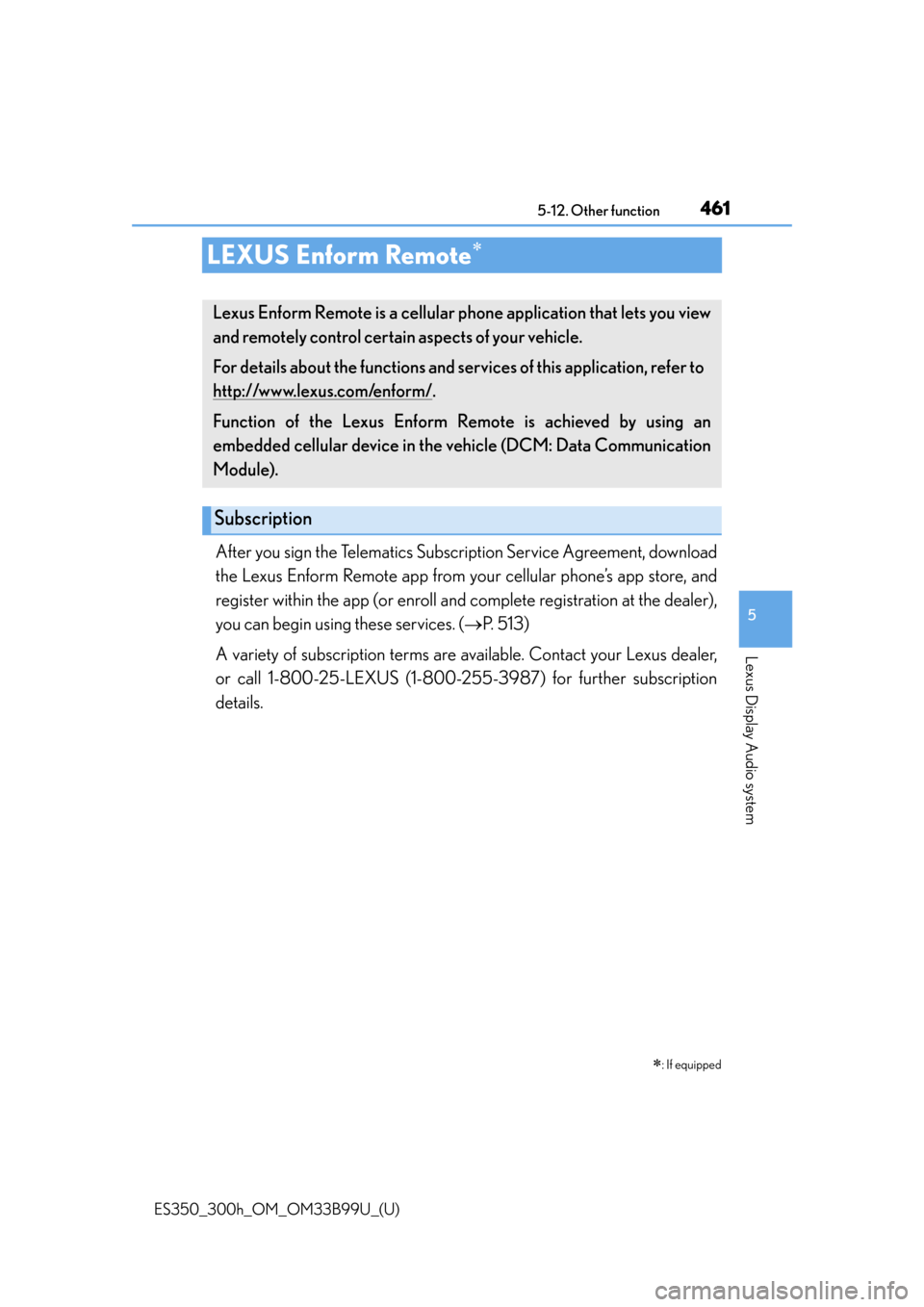
After you sign the Telematics Subscription Service Agreement, download
the Lexus Enform Remote app from your cellular phone’s app store, and
register within the app (o r enroll and complete registration at the dealer),
you can begin using these services. ( P. 513)
A variety of subscription terms are av ailable. Contact your Lexus dealer,
or call 1-800-25-LEXUS (1-800-25 5-3987) for further subscription
details.
: If equipped
Lexus Enform Remote is a cellular phone application that lets you view
and remotely control certain aspects of your vehicle.
For details about the functions and services of this application, refer to
http://www.lexus.com/enform/
.
Function of the Lexus Enform Remote is achieved by using an
embedded cellular device in the ve hicle (DCM: Data Communication
Module).
Subscription
Page 513 of 784

513
ES350_300h_OM_OM33B99U_(U)
6-4. Other interior features
6
Interior features
LEXUS Enform Safety Connect
“SOS” button
LED light indicators
Microphone
: If equipped
Safety Connect is a subscription-based telematics service that uses
Global Positioning System (GPS ) data and embedded cellular technol-
ogy to provide safety and security fe atures to subscribers. Safety Con-
nect is supported by Lexus’ designated response center, which
operates 24 hours per day, 7 days per week.
Safety Connect service is available by subscription on select, telemat-
ics hardware-equipped vehicles.
By using the Safety Connect servic e, you are agreeing to be bound by
the Telematics Subscription Service Agreement and its Terms and
Conditions, as in effect and amen ded from time to time, a current copy
of which is available at Lexus.co m. All use of the Safety Connect ser-
vice is subject to such then-applicable Terms and Conditions.
System components
1
2
3
Page 515 of 784

ES350_300h_OM_OM33B99U_(U)
5156-4. Other interior features
6
Interior features
■Safety Connect Services Information
●Phone calls using the vehicles Bluetooth® technology will not be possible during
Safety Connect.
●Safety Connect is available beginning Fall 2009 on select Lexus models. Contact
with the Safety Connect response center is dependent upon the telematics device
being in operative condition, cellular conn ection availability, and GPS satellite sig-
nal reception, which can limit the ability to reach the response center or receive
emergency service support. Enrollment and Telematics Subscription Service
Agreement required. A variety of subscription terms is available; charges vary by
subscription term selected.
●Automatic Collision Notification, Emergency Assistance and Stolen Vehicle Loca-
tion will function in the United States, including Hawaii and Alaska, and in Canada,
and Enhanced Roadside Assistance will function in the United States (except
Hawaii) and in Canada. No Safety Connect services will function outside of the
United States in countries other than Canada.
●Safety Connect services are not subject to section 255 of the Telecommunications
Act and the device is not TTY compatible.
■Languages
The Safety Connect response center will offer support in multiple languages. The
Safety Connect system will offer voice prompts in English and Spanish. Please indi-
cate your language of choice when enrolling.
■When contacting the response center
You may be unable to contact the response center if the network is busy.
Page 518 of 784

518
ES350_300h_OM_OM33B99U_(U)
6-4. Other interior features
Important! Read this information before using Safety Connect.
■Exposure to radio frequency signals
The Safety Connect system installed in your vehicle is a low-power
radio transmitter and receiver. It receives and also sends out radio fre-
quency (RF) signals.
In August 1996, the Federal Communications Commission (FCC)
adopted RF exposure guid elines with safety levels for mobile wireless
phones. Those guidelines are consistent with the safety standards previ-
ously set by the following U.S. and international standards bodies.
●ANSI (American National Standards Institute) C95.1 [1992]
●NCRP (National Council on Radi ation Protection and Measure-
ment) Report 86 [1986]
●ICNIRP (International Commission on Non-Ionizing Radiation Pro-
tection) [1996]
Those standards were based on comprehensive and periodic evalua-
tions of the relevant scientific litera ture. Over 120 scientists, engineers,
and physicians from universities, and government health agencies and
industries reviewed the available body of research to develop the ANSI
Standard (C95.1).
The design of Safety Connect co mplies with the FCC guidelines in
addition to those standards.
Safety information for Safety Connect
Page 571 of 784

ES350_300h_OM_OM33B99U_(U)
5717-3. Do-it-yourself maintenance
7
Maintenance and care
■If the tread on snow tires wears down below 0.16 in. (4 mm)
The effectiveness of the tires as snow tires is lost.
■Situations in which the tire pressure warning system may not operate properly
●In the following cases, the tire pressure warning system may not operate properly.
• If non-genuine Lexus wheels are used.
• A tire has been replaced with a tire that is not an OE (Original Equipment) tire.
• A tire has been replaced with a tire that is not of the specified size.
• Tire chains etc. are equipped.
• Lock nuts are equipped.
• An auxiliary-supported run- flat tire is equipped.
• If a window tint that affects the radio wave signals is installed.
• If there is a lot of snow or ice on the vehicle, particularly around the wheels or wheel housings.
• If the tire inflation pressure is extremely higher than the specified level.
• If the spare tire is in a location subject to poor radio wave signal reception.
*
• If a large metallic object which can interfere with signal reception is put in the trunk.
*
*
: Vehicles with a full-size spare tire only
●Performance may be affected in the following situations.
• Near a TV tower, electric power plant, gas station, radio station, large display,
airport or other facility that generates strong radio waves or electrical noise
• When carrying a portable radio, cellular phone, cordless phone or other wire- less communication device
If tire position information is not correctly displayed due to the radio wave condi-
tions, the display may be corrected by driving and changing the radio wave condi-
tions.
●When the vehicle is parked, the time taken for the warning to start or go off could
be extended.
●When tire inflation pressure declines rapi dly for example when a tire has burst, the
warning may not function.