lock Lexus ES300h 2015 Specifications / (OM33B99U) Manual Online
[x] Cancel search | Manufacturer: LEXUS, Model Year: 2015, Model line: ES300h, Model: Lexus ES300h 2015Pages: 784, PDF Size: 9.63 MB
Page 324 of 784

324
ES350_300h_OM_OM33B99U_(U)
4-5. Using the driving support systems
■Conditions that may trigger the system even if there is no possibility of a collision
●When there is an object by the roadside at the entrance to a curve
●When passing an oncoming vehicle on a curve
●When driving over a narrow iron bridge
●When there is a metal object on the road surface
●When driving on an uneven road surface
●When passing an oncoming vehicle on a left-turn
●When your vehicle rapidly closes on the vehicle in front
●When a grade separation/interchange, sign , billboard, or other structure appears
to be directly in the vehicle’s line of travel
●When the steep angle of the road causes a metal object located beneath the road
surface to be seen ahead of the vehicle
●When an extreme change in vehicle height occurs
●When the axis of the radar is out of adjustment
●When passing through certain toll gates
●When passing through an overpass
When the system is activated in the situations described above, there is also a possi-
bility that the seat belts will retract quickly and the brakes will be applied with a force
greater than normal. When the seat belt is locked in the retracted position, stop the
vehicle in a safe place, release the seat belt and refasten it.
■Obstacles not detected
The sensor cannot detect plastic obstacles such as traffic cones. There may also be
occasions when the sensor cannot detect pedestrians, animals, bicycles, motorcy-
cles, trees, or snowdrifts.
■Situations in which the pre-collision system does not function properly
The system may not function effectively in situations such as the following:
●On roads with sharp bends or uneven surfaces
●If a vehicle suddenly moves in front of your vehicle, such as at an intersection
●If a vehicle suddenly cuts in front of your vehicle, such as when overtaking
●In inclement weather such as heavy rain, fog, snow or sand storms
●When your vehicle is skidding such as the VSC system off
●When your vehicle is steeply inclined
●When the axis of the radar is out of adjustment
Page 342 of 784

342
ES350_300h_OM_OM33B99U_(U)
4-6. Driving tips
Perform the following according to the driving conditions:
●Do not try to forcibly open a window or move a wiper that is frozen.
Pour warm water over the frozen area to melt the ice. Wipe away the
water immediately to prevent it from freezing.
●To ensure proper operation of the climate control system fan, remove
any snow that has accumulated on the air inlet vents in front of the wind-
shield.
●Check for and remove any excess ice or snow that may have accumu-
lated on the exterior lights, vehicle’s roof, chassis, around the tires or on
the brakes.
●Remove any snow or mud from the bo ttom of your shoes before getting
in the vehicle.
Accelerate the vehicle slowly, keep a safe distance between you and the
vehicle ahead, and drive at a reduced speed suitable to road conditions.
Park the vehicle and move the shift lever to P without setting the parking
brake. The parking brake may freeze up, preventing it from being
released. If necessary, block the wheels to prevent inadvertent sliding or
creeping.
Before driving the vehicle
When driving the vehicle
When parking the vehicle
Page 344 of 784
344
ES350_300h_OM_OM33B99U_(U)
4-6. Driving tips
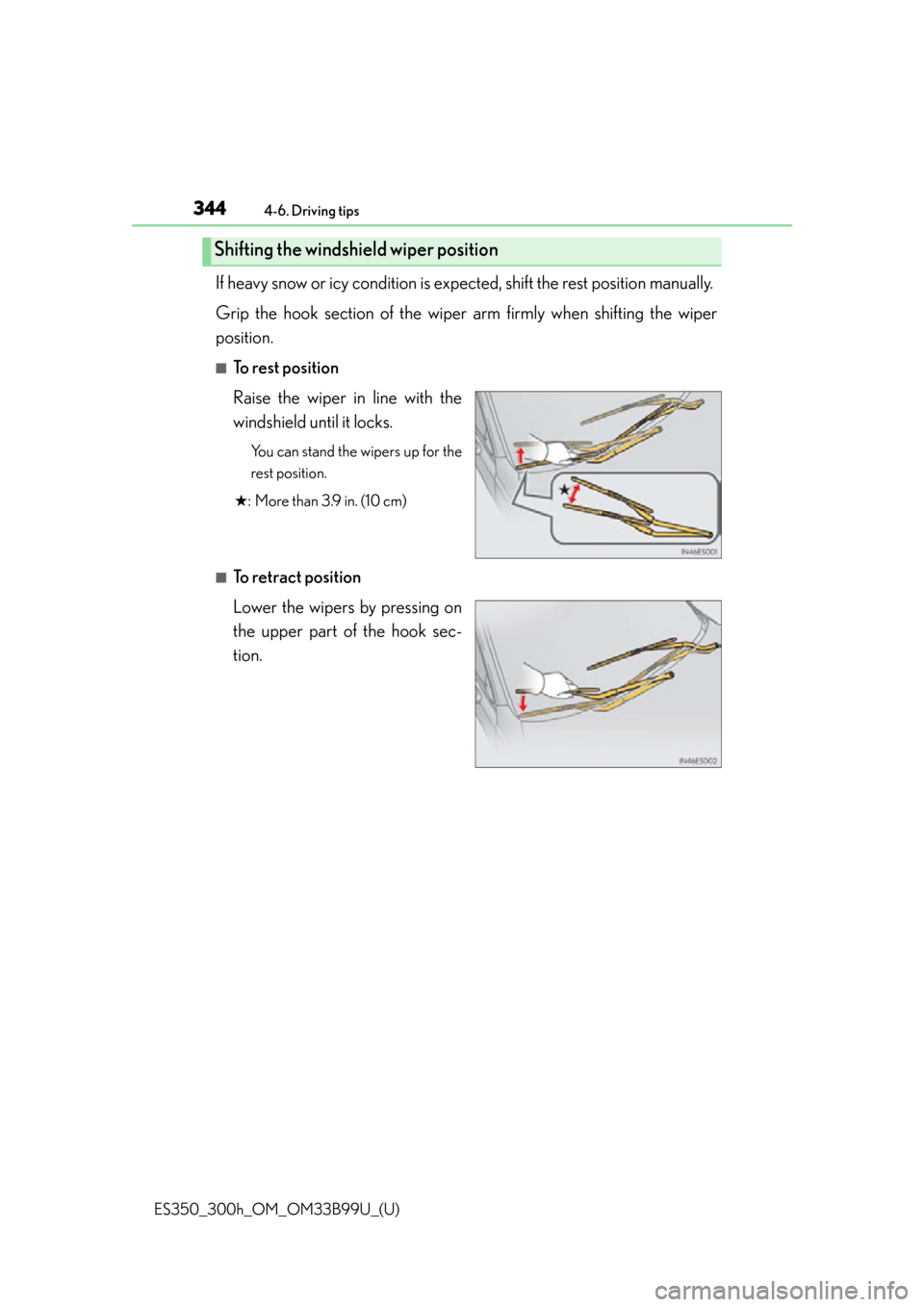
If heavy snow or icy condition is expected, shift the rest position manually.
Grip the hook section of the wiper arm firmly when shifting the wiper
position.
■To rest position
Raise the wiper in line with the
windshield until it locks.
You can stand the wipers up for the
rest position.
★ : More than 3.9 in. (10 cm)
■To retract position
Lower the wipers by pressing on
the upper part of the hook sec-
tion.
Shifting the windsh ield wiper position
Page 359 of 784
359
ES350_300h_OM_OM33B99U_(U)
5-1. Basic Operations
5
Lexus Display Audio system
USB/AUX ports
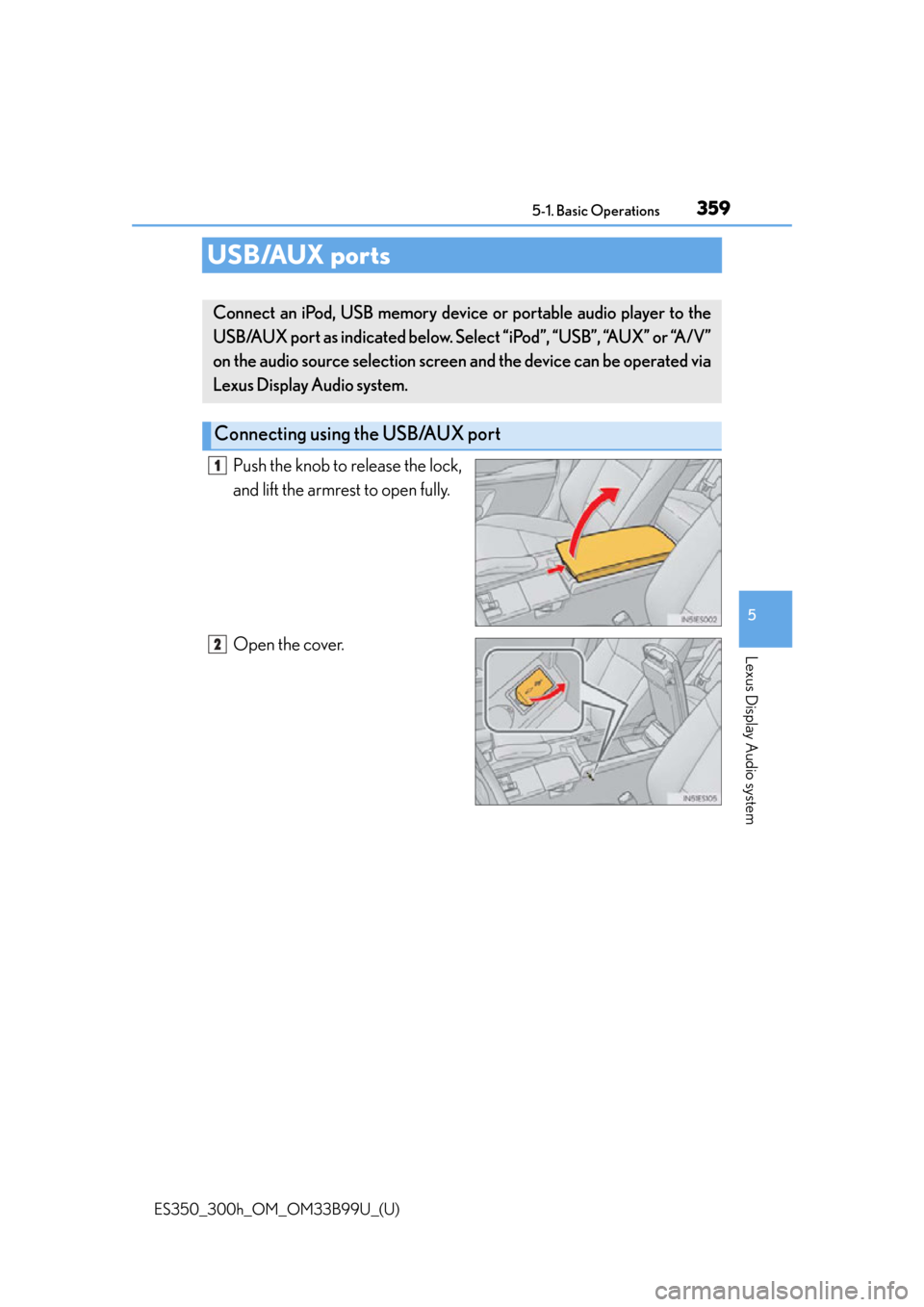
Push the knob to release the lock,
and lift the armrest to open fully.
Open the cover.
Connect an iPod, USB memory device or portable audio player to the
USB/AUX port as indicated below. Select “iPod”, “USB”, “AUX” or “A/V”
on the audio source selection screen and the device can be operated via
Lexus Display Audio system.
Connecting using the USB/AUX port
1
2
Page 368 of 784

3685-2. Setup
ES350_300h_OM_OM33B99U_(U)
Select “General” or “Camera” on the “Display” screen or select “Dis-
play” on each audio menu screen. (P. 3 7 5 )
Adjust the display as desired by tu rning the controller clockwise (+) or
counterclockwise (-).
To select “Contrast”, “Brightness”, “Color ” or “Tone”, move the controller to the
left. (“Colour” and “Tone” are available when “Display” on the audio settings
screen for each audio source is selected.)
■Changing the sample image (when “General” is selected)
Move the controller to the right an d select the desired sample image.
Adjusting the screen quality
1
2
Page 385 of 784

ES350_300h_OM_OM33B99U_(U)
3855-4. Using the radio
5
Lexus Display Audio system
■XM Radio Services — Legal Disclaimers and Warnings
●Fees and Taxes — Subscription fee, taxes, one time activation fee, and other fees
may apply. Subscription fee is consumer only. All fees and programming subject to
change. Subscriptions subject to Customer Agreement available at
www.siriusxm.com
(U.S.A.) or www.xmradio.ca (Canada) XM service only
available in the 48 contiguous United States and Canada
*.
*: Canada — some deterioration of service may occur in extreme northern lati-
tudes. This is beyond the control of XM Satellite Radio.
Explicit Language Notice — Channels with frequent explicit language are indi-
cated with an “XL” preceding the channel name. Channel blocking is available for
XM Satellite Radio receivers by notifying XM at;
U.S.A. Customers:
Visit www.siriusxm.com
or calling 1-877-515-3987
Canadian Customers:
Visit w w w.xmradio.ca
or calling 1-877-438-9677
It is prohibited to copy, decompile, disassemble, reverse engineer, hack, manipulate,
or otherwise make available any technology or software incorporated in receivers
compatible with the XM Satellite Radio Syst em or that support the XM website, the
Online Service or any of its content. Furthermore, the AMBE
® voice compression
software included in this product is protec ted by intellectual property rights includ-
ing patent rights, copyrights, and trade secrets of Digital Voice Systems, Inc.
Note: this applies to XM receivers only and not XM Ready devices.
Page 463 of 784

463
ES350_300h_OM_OM33B99U_(U)
6Interior features
6-1. Using the air conditioning system and defogger
Automatic air conditioning system ..........................................464
Heated steering wheel/ seat heaters/seat
ventilators ................................... 477
6-2. Using the interior lights Interior lights list.......................... 479• Interior light ........................... 480
• Personal lights....................... 480 6-3. Using the storage features
List of storage features ............ 482• Glove box ...............................484
• Console box...........................485
• Cup holders ...........................486
• Auxiliary box .......................... 487
Trunk features ............................. 488
6-4. Other interior features Sun visors and vanity mirrors ................... 490
Clock................................................ 491
Power outlets ............................... 492
Armrest .......................................... 494
Rear sunshade/ rear door sunshades .............. 495
Trunk storage extension .......... 498
Coat hooks ................................... 499
Assist grips................................... 500
Garage door opener................. 501
Compass ...................................... 508
LEXUS Enform Safety Connect ....................................... 513
Page 472 of 784
4726-1. Using the air conditioning system and defogger
ES350_300h_OM_OM33B99U_(U)
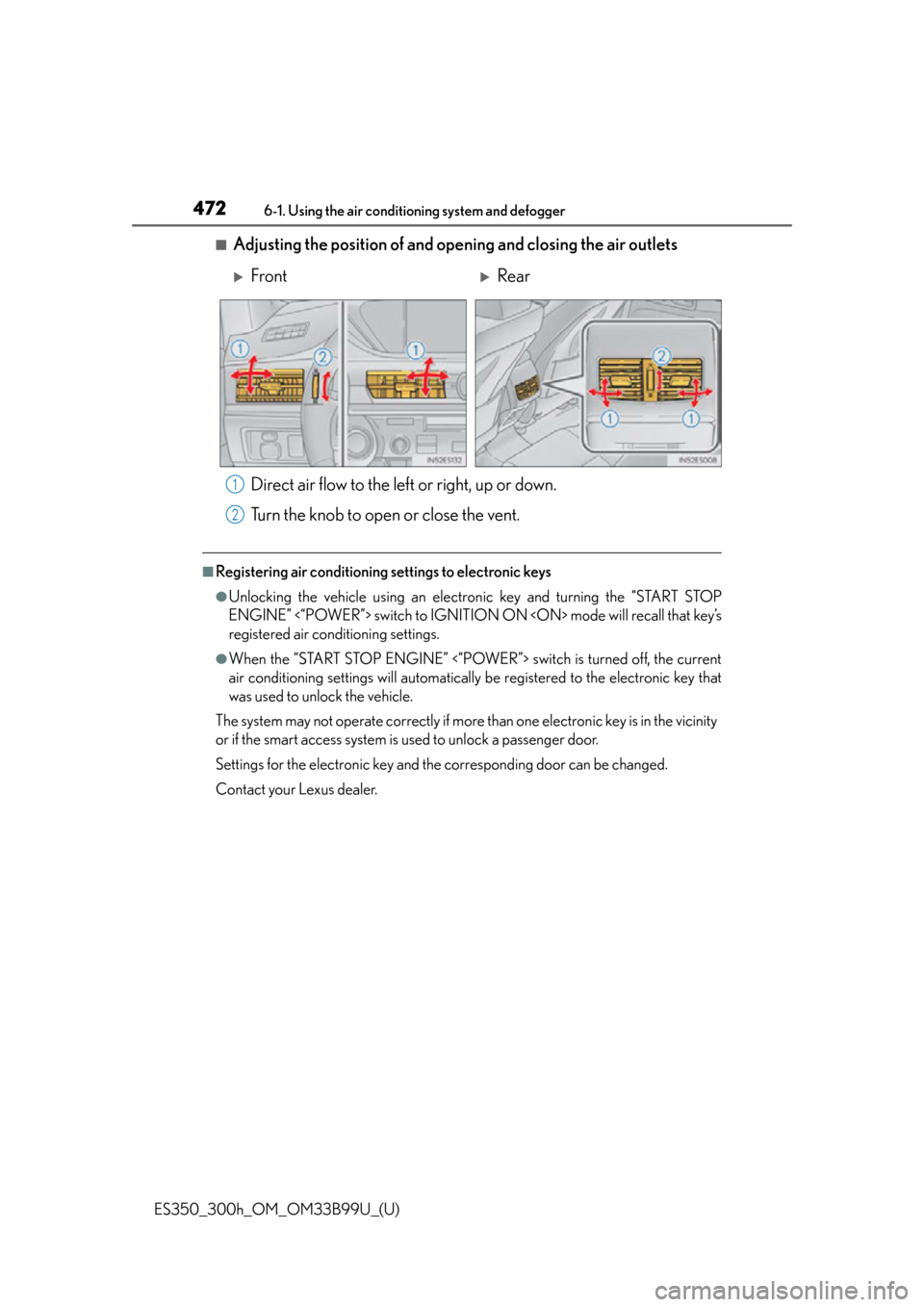
■Adjusting the position of and opening and closing the air outlets
Direct air flow to the left or right, up or down.
Turn the knob to open or close the vent.
■Registering air conditioning settings to electronic keys
●Unlocking the vehicle using an electronic key and turning the “START STOP
ENGINE” <“POWER”> switch to IGNITION ON
registered air conditioning settings.
●When the “START STOP ENGINE” <“POWER”> switch is turned off, the current
air conditioning settings will automaticall y be registered to the electronic key that
was used to unlock the vehicle.
The system may not operate correctly if more than one electronic key is in the vicinity
or if the smart access system is used to unlock a passenger door.
Settings for the electronic key and th e corresponding door can be changed.
Contact your Lexus dealer.
FrontRear
1
2
Page 475 of 784
ES350_300h_OM_OM33B99U_(U)
4756-1. Using the air conditioning system and defogger
6
Interior features
■Air conditioning filter
P. 5 8 2
■Customization
Settings (e.g. A/C automatic mode sw itch operation) can be changed.
(Customizable features: P. 7 3 9 )
CAUTION
■To prevent the windshield from fogging up
●Do not use during cool air operation in extremely humid weather. The dif-
ference between the temperature of the outside air and that of the windshield can
cause the outer surface of the windshie ld to fog up, blocking your vision.
■To prevent burns
●Do not touch the rear view mirror surfaces when the outside rear view mirror
defoggers are on.
●Do not touch the glass at lower part of th e windshield or to the side of the front
pillars when the windshield wiper de-icer is on. (vehicles with windshield wiper
de-icer)
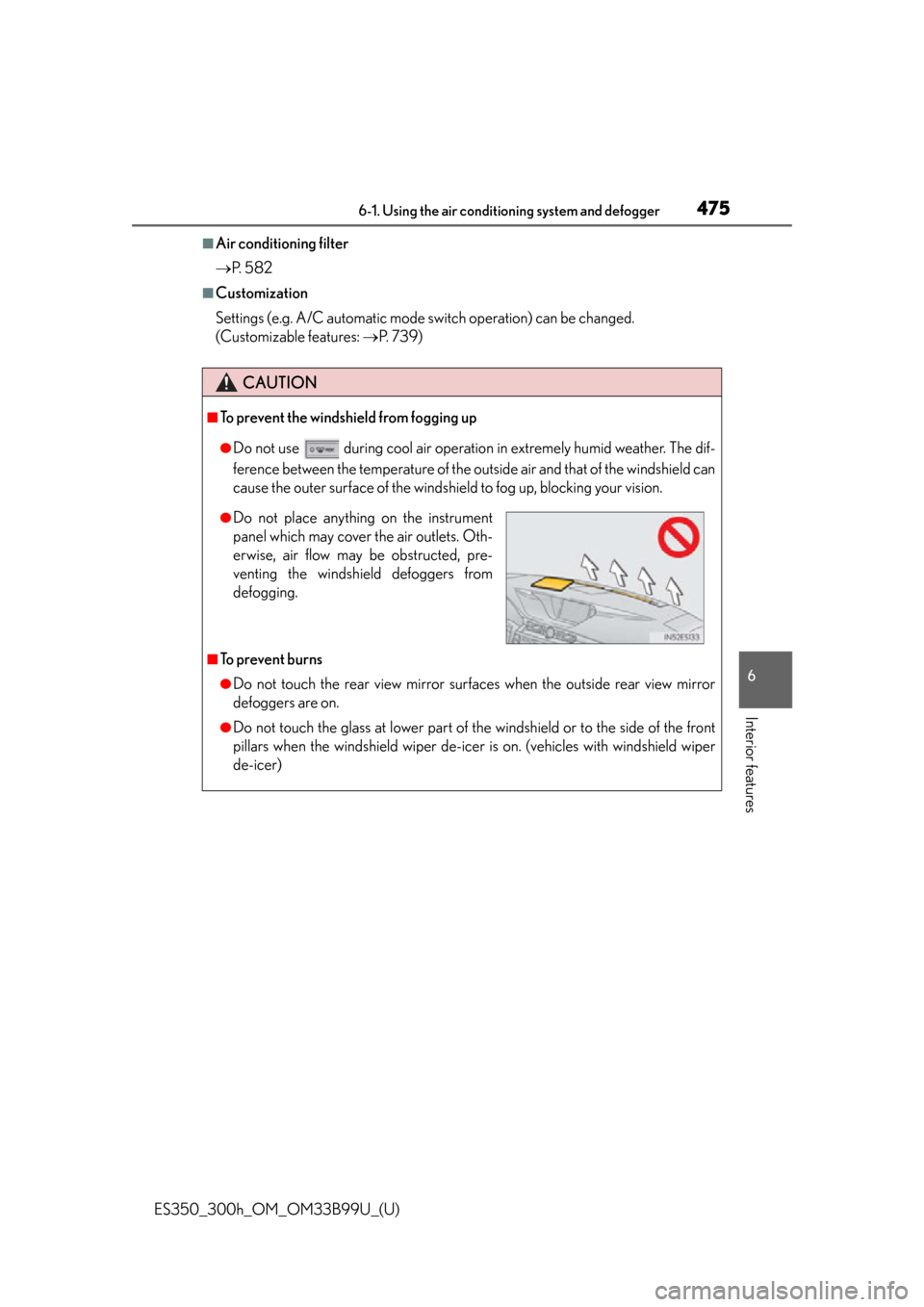
●Do not place anything on the instrument
panel which may cover the air outlets. Oth-
erwise, air flow may be obstructed, pre-
venting the windshield defoggers from
defogging.
Page 481 of 784

ES350_300h_OM_OM33B99U_(U)
4816-2. Using the interior lights
6
Interior features
■Illuminated entry system
The lights automatically turn on/off according to “START STOP ENGINE”
<“POWER”> switch mode, the presence of the electronic key, whether the doors are
locked/unlocked, and whether the doors are opened/closed.
■To prevent 12-volt battery discharge
If the following lights remain on when the “START STOP ENGINE” <“POWER”>
switch is turned off the lights will go off automatically after 20 minutes:
●Outer foot lights
●Personal/interior light
●Door courtesy lights
●Ornament lights (if equipped)
●Footwell lights
■Customization
Setting (e.g. the time elapsed before lights turn off) can be changed.
(Customizable features: P. 7 3 0 )