sensor Lexus ES300h 2016 (OM33B71U) User Guide
[x] Cancel search | Manufacturer: LEXUS, Model Year: 2016, Model line: ES300h, Model: Lexus ES300h 2016Pages: 600, PDF Size: 8.59 MB
Page 180 of 600

180
ES300h_OM_OM33B71U_(U)4-3. Operating the lights and wipers
■Automatic light off system
When the light switch is in , or :
The headlights and tail lights turn off 30
seconds after the power switch is turned to ACCESSORY mode or turned off and a
door is opened and all of the doors and trunk are closed. (The lights turn off immediately
if on the key is pressed twice after all the doors are closed.)
To turn the lights on again, turn the power switch to ON mode, or turn the light switch off
once and then back to or .
If any of the doors or trunk lid is kept open , the lights automatically turn off after 20 min-
utes.
■Light reminder buzzer
A buzzer sounds when the power switch is turned off or turned to ACCESSORY mode
and the driver’s door is opened while the lights are turned on.
■Automatic headlight leveling system (if equipped)
The level of the headlights is automatically ad justed according to the number of passen-
gers and the loading condition of the vehicle to ensure that the headlights do not inter-
fere with other road users.
■If “Headlight System Malfunction Visit Your Dealer” is displayed on the multi-informa-
tion display
The system may be malfunctioning. Have the vehicle inspected by your Lexus dealer.
■Customization
Settings (e.g. light sensor se nsitivity) can be changed.
(Customizable features: P. 5 5 5 )
NOTICE
■To prevent 12-volt battery discharge
Do not leave the lights on longer than necessary when the hybrid system is not operat-
ing.
Page 181 of 600
181
ES300h_OM_OM33B71U_(U)4-3. Operating the lights and wipers
4
Driving
Automatic High Beam
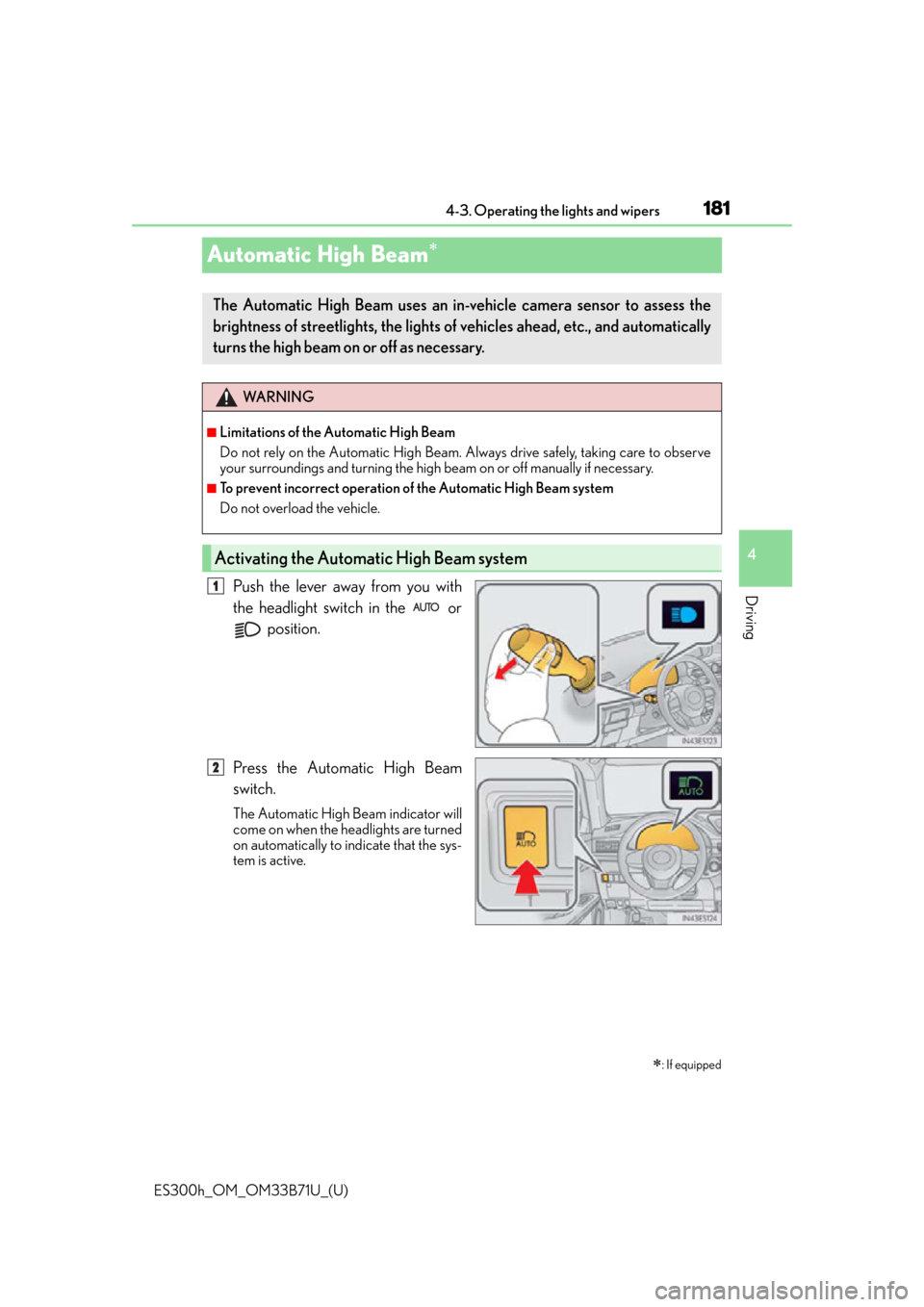
Push the lever away from you with
the headlight switch in the or
position.
Press the Automatic High Beam
switch.
The Automatic High Beam indicator will
come on when the headlights are turned
on automatically to indicate that the sys-
tem is active.
: If equipped
The Automatic High Beam uses an in-v ehicle camera sensor to assess the
brightness of streetlights, the lights of vehicles ahead, etc., and automatically
turns the high beam on or off as necessary.
WA R N I N G
■Limitations of the Automatic High Beam
Do not rely on the Automatic High Beam. Always drive safely, taking care to observe
your surroundings and turning the high beam on or off manually if necessary.
■To prevent incorrect operation of the Automatic High Beam system
Do not overload the vehicle.
Activating the Automatic High Beam system
1
2
Page 183 of 600

ES300h_OM_OM33B71U_(U)
1834-3. Operating the lights and wipers
4
Driving
■Camera sensor detection information
●The high beam may not be automatically turned off in the following situations:
• When oncoming vehicles sudd enly appear from a curve
• When the vehicle is cut in front of by another vehicle
• When vehicles ahead are hidden from sight due to repeated curves, road dividers or roadside trees
• When vehicles ahead appear from the faraway lane on wide road
• When vehicles ahead have no lights
●The high beam may be turned off if a vehicl e ahead that is using fog lights without using
the headlights is detected.
●House lights, street lights, traffic signals, and illuminated billboards or signs may cause
the high beam to switch to the low be ams, or the low beams to remain on.
●The following factors may affect the amount of time taken to turn the high beam on or
off:
• The brightness of headlights, fog lights, and tail lights of vehicles ahead
• The movement and direction of vehicles ahead
• When a vehicle ahead only has operational lights on one side
• When a vehicle ahead is a two-wheeled vehicle
• The condition of the road (gradient, curve, condition of the road surface etc.)
• The number of passengers and amount of luggage
●The high beam may be turned on or off when the driver does not expect it.
●Bicycles or similar objects may not be detected.
●In the situations shown below, the system may not be able to accurately detect sur-
rounding brightness levels. This may caus e the low beams to remain on or the high
beams to cause problems for pedestrians, ve hicles ahead or other parties. In these
cases, manually switch between the high and low beams.
• In bad weather (rain, snow, fog, sandstorms etc.)
• The windshield is obscured by fog, mist, ice, dirt etc.
• The windshield is cracked or damaged.
• The camera sensor is deformed or dirty.
• The camera sensor temperature is extremely high.
• Surrounding brightness levels are equal to those of headlights, tail lights or fog lights.
• Vehicles ahead have headlights or tail lights that are either switched off, dirty, are
changing color, or are not aimed properly.
• When driving through an area of intermit tently changing brightness and darkness.
• When frequently and repeatedly driving ascending/descending roads, or roads with rough, bumpy or uneven surfaces (such as stone-paved roads, gravel tracks etc.).
• When frequently and repeat edly taking curves or driving on a winding road.
• There is a highly reflective object ahead of the vehicle, such as a sign or a mirror.
• The back of a vehicle ahead is highly reflective, such as a container on a truck.
• The vehicle’s headlights are damaged or dirty, or are not aimed properly.
• The vehicle is listing or tilting due to a flat tire, a trailer being towed, etc.
• The high beam and low beam are repeatedly being switched between in an abnor- mal manner.
• The driver believes that the high beam may be causing problems or distress to other
drivers or pedestrians nearby.
Page 184 of 600

184
ES300h_OM_OM33B71U_(U)4-3. Operating the lights and wipers
■Temporarily lowering sensor sensitivity
The sensitivity of the sensor can be temporarily lowered.
Turn the power switch off while the following conditions are met.
• The headlight switch is in or .
• The headlight switch lever is in high beam position.
• Automatic High Beam switch is on. Turn the power switch to ON mode.
Within 30 seconds after , repeat pulling the headlight switch lever to the original
position then pushing it to the high beam position quickly 10 times, then leave the
lever in high beam position.
If the sensitivity is changed, the Automatic High Beam indicator is turn on and off
three times.
Automatic High Beam (headlights) may turn on even the vehicle is stopped.
1
2
32
4
Page 187 of 600
ES300h_OM_OM33B71U_(U)
1874-3. Operating the lights and wipers
4
Driving
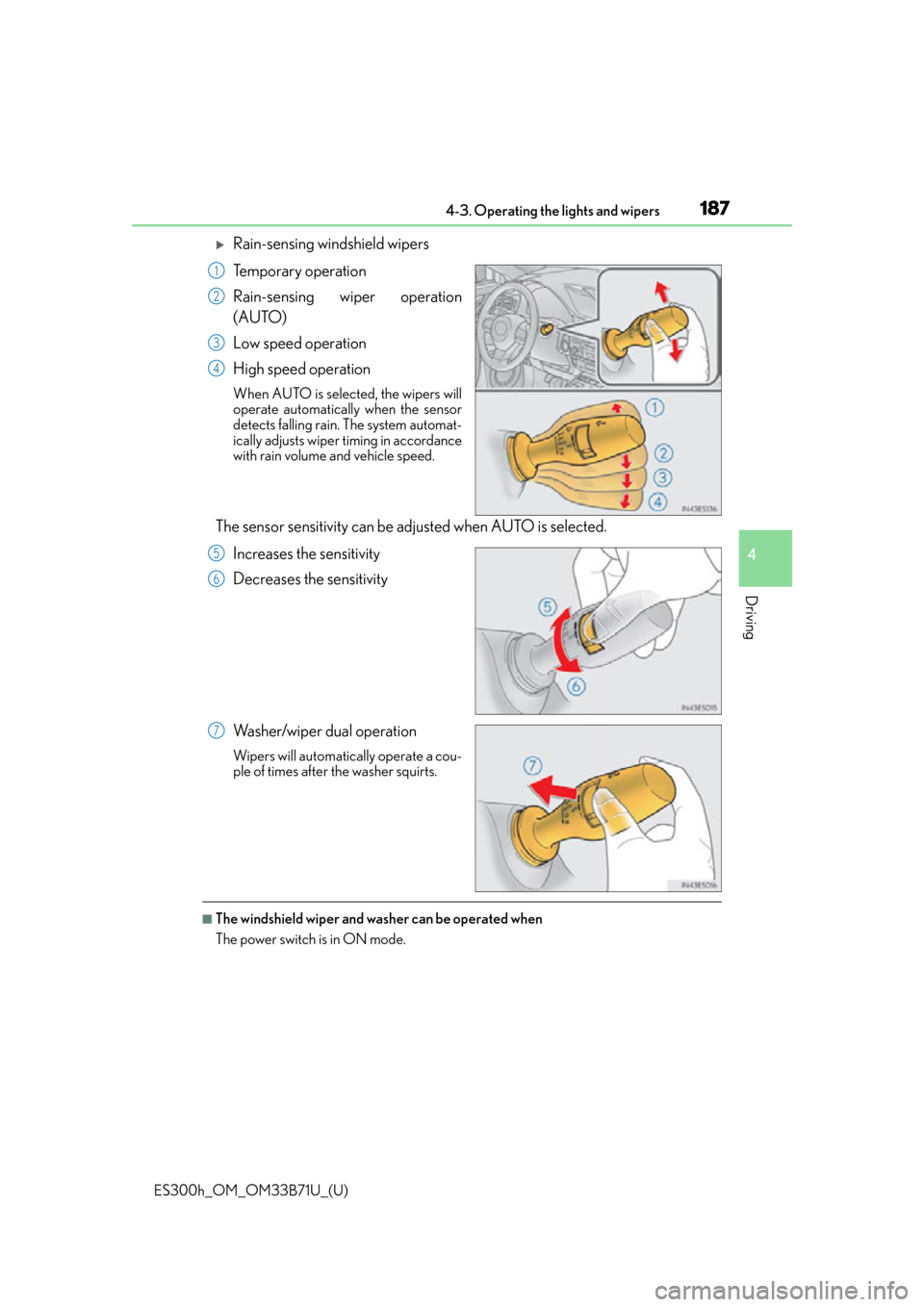
Rain-sensing windshield wipers
Temporary operation
Rain-sensing wiper operation
(AUTO)
Low speed operation
High speed operation
When AUTO is selected, the wipers will
operate automatically when the sensor
detects falling rain. The system automat-
ically adjusts wiper timing in accordance
with rain volume and vehicle speed.
The sensor sensitivity can be adjusted when AUTO is selected.
Increases the sensitivity
Decreases the sensitivity
Washer/wiper dual operation
Wipers will automatically operate a cou-
ple of times after the washer squirts.
■The windshield wiper and washer can be operated when
The power switch is in ON mode.
1
2
3
4
5
6
7
Page 188 of 600

188
ES300h_OM_OM33B71U_(U)4-3. Operating the lights and wipers
■Raindrop sensor (vehicles with rain-sensing windshield wipers)
●If the wiper switch is turned to AUTO position while the power switch is in ON mode,
the wipers will operate once to sh
ow that AUTO mode is activated.
●When the sensor sensitivity ring is turned toward high while in AUTO mode, the wipers
will operate once to indicate that the sensor sensitivity is enhanced.
●If the temperature of the raindrop sensor is 185°F (85°C) or higher, or -22°F
(-30°C) or lower, automatic operation ma y not occur. In this case, operate the
wipers in any mode other than AUTO mode.
■If no windshield washer fluid sprays
Check that the washer nozzles are not blocked if there is washer fluid in the windshield
washer fluid reservoir.
●The raindrop sensor judges the amount of
raindrops.
An optical sensor is ad opted. It may not oper-
ate properly when sunlight from the rising or
setting of the sun intermittently strikes the
windshield, or if bugs etc. are present on the
windshield.
WA R N I N G
■Caution regarding the use of windshield wi pers in AUTO mode (vehicles with rain-
sensing windshield wipers)
The windshield wipers may operate unexpectedly if the sensor is touched or the wind-
shield is subject to vibration in AUTO mode. Take care that your fingers or anything
else do not become caught in the windshield wipers.
■Caution regarding the use of washer fluid
When it is cold, do not use the washer fl uid until the windshield becomes warm. The
fluid may freeze on the windshield and cause lo w visibility. This may lead to an accident,
resulting in death or serious injury.
Page 195 of 600

ES300h_OM_OM33B71U_(U)
1954-5. Using the driving support systems
4
Driving
The pre-collision system is equipped with a sophisticated computer that will
record certain data, such as: • Accelerator status
•Brake status
• Vehicle speed
• Operation status of the pre-collision system functions
• Information (such as the distance and relative speed between your vehicle and the vehicle ahead or other objects)
Additionally, if the pre-collision braking fu nction is operating, image information
from the camera sensor will also be recorded. The pre-collisio n system does not
record conversations, sounds or pictures.
●Data usage
Lexus may use the data recorded in this computer to diagnose malfunctions,
conduct research and development, and improve quality.
Lexus will not disclose the recorded data to a third party except: • With the consent of the vehicle owner or with the consent of the lessee if the vehicle is leased
• In response to an official request by the police, a court of law or a govern- ment agency
• For use by Lexus in a lawsuit
• For research purposes where the data is not tied to a specific vehicle or vehicle owner
●Recorded image information can be erased using a specialized device.
The image information recording function can be disabled. However, if the
function is disabled, data from when the pre-collision system operates will not
be available.
Vehicle data recording
Page 196 of 600
196
ES300h_OM_OM33B71U_(U)4-5. Using the driving support systems
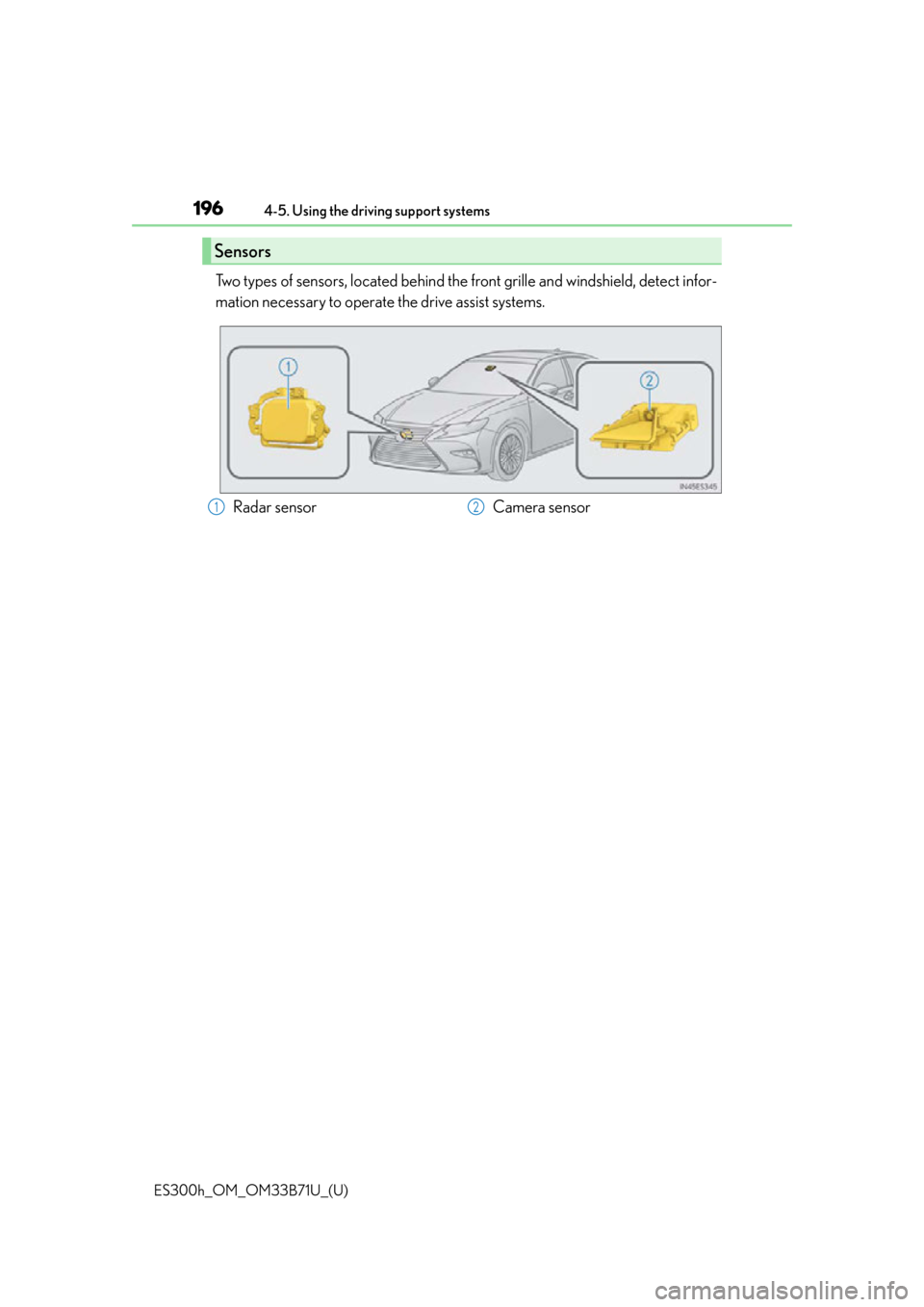
Two types of sensors, located behind the front grille and windshield, detect infor-
mation necessary to operate the drive assist systems.
Sensors
Radar sensor
Camera sensor12
Page 197 of 600
ES300h_OM_OM33B71U_(U)
1974-5. Using the driving support systems
4
Driving
WA R N I N G
■To avoid malfunction of the radar sensor
Observe the following precautions.
Otherwise, the radar sensor may not operate properly, possibly leading to an accident
resulting in death or serious injury.
●Keep the radar sensor and front gr ille emblem clean at all times.
●Do not attach accessories, stickers (inclu ding transparent stickers) or other items to
the radar sensor, front grille emblem or surrounding area.
●Do not subject the radar sensor or su rrounding area to a strong impact.
If the radar sensor, front grille, or front bumper has been subjected to a strong impact,
have the vehicle inspected by your Lexus dealer.
●Do not disassemble the radar sensor.
●Do not modify or paint the radar sensor, front grille emblem or surrounding area.
●If the radar sensor, front grille, or front bumper needs to be removed and installed, or
replaced, contact your Lexus dealer.
●The radar sensor complies with relevant radio wave regulations, as shown by the label
attached to the sensor. Do not remove the label. Additionally, disassembly or modifi-
cation of the radar sensor may be prohibited by law.
■To avoid malfunction of the camera sensor
Observe the following precautions.
Otherwise, the camera sensor may not operat e properly, possibly leading to an acci-
dent resulting in death or serious injury.
●Keep the windshield clean at all times.
If the windshield is dirty or covered with an oily film, water droplets, snow, etc., clear
the windshield.
If the inner side of the windshield where the camera sensor is installed is dirty, contact
your Lexus dealer.
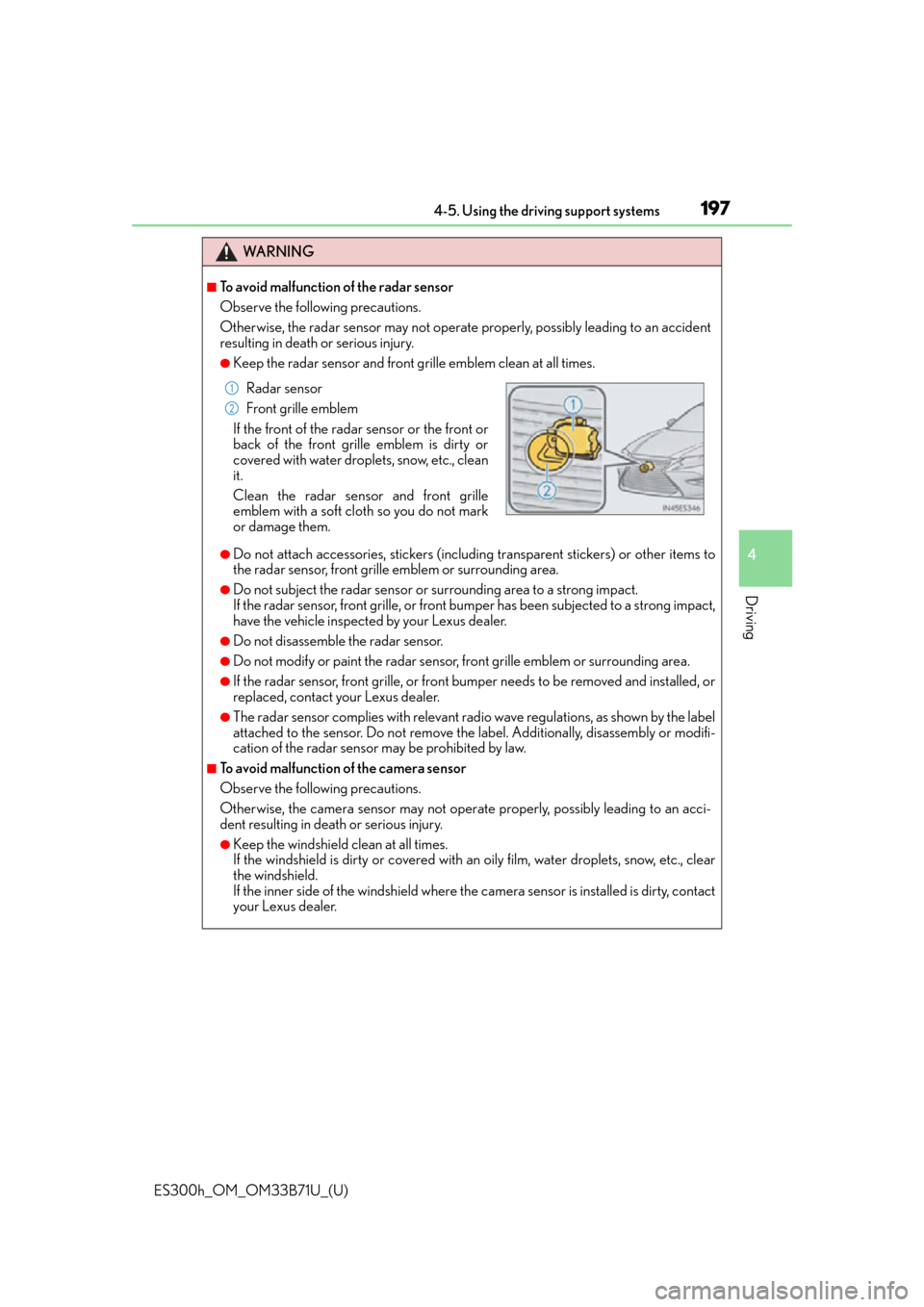
Radar sensor
Front grille emblem
If the front of the radar sensor or the front or
back of the front grille emblem is dirty or
covered with water droplets, snow, etc., clean
it.
Clean the radar sensor and front grille
emblem with a soft cloth so you do not mark
or damage them.1
2
Page 198 of 600
198
ES300h_OM_OM33B71U_(U)4-5. Using the driving support systems
WA R N I N G
●If the part of the windshield in front of th
e camera sensor is fogged up or covered with
condensation or ice, use the windshield defogger to remove the fog, condensation or
ice. ( P. 388)
●Do not apply glass coating agents to the area of the windshield in front of the camera
sensor.
Glass coating agents can be applied to the windshield in areas other than in front of
the camera sensor. However, it will still be necessary to use the wipers if the area of
the windshield in front of the camera sensor is covered with water droplets.
●If water droplets cannot be properly remove d from the area of the windshield in front
of the camera sensor by the windshield wi pers, replace the wiper rubber or wiper
blade.
If the wiper inserts or wiper blades need to be replaced, contact your Lexus dealer.
●Do not attach window tinting to the windshield.
●Replace the windshield if it is damaged or cracked.
If the windshield needs to be re placed, contact your Lexus dealer.
●Do not get the camera sensor wet.
●Do not allow bright lights to shine into the camera sensor.
●Do not dirty or damage the camera sensor.
When cleaning the inside of the windshield , do not allow glass cleaner to contact the
lens. Also, do not touch the lens.
If the lens is dirty or damag ed, contact your Lexus dealer.
●Do not subject the camera sensor to a strong impact.
●Do not change the installation position or di rection of the camera sensor or remove it.
●Do not disassemble the camera sensor.
●Do not install an electronic device or device that emits strong electric waves near the
camera sensor.
●Do not modify any components of the vehicle around the camera sensor (inside rear
view mirror, sun visors, etc.) or ceiling.
●Do not attach any accessories that may obst ruct the camera sensor to the hood, front
grille or front bumper. Contact your Lexus dealer for details.
●If a surfboard or other long object is to be mounted on the roof, make sure that it will
not obstruct the camera sensor.
●Do not modify the headlights or other lights.
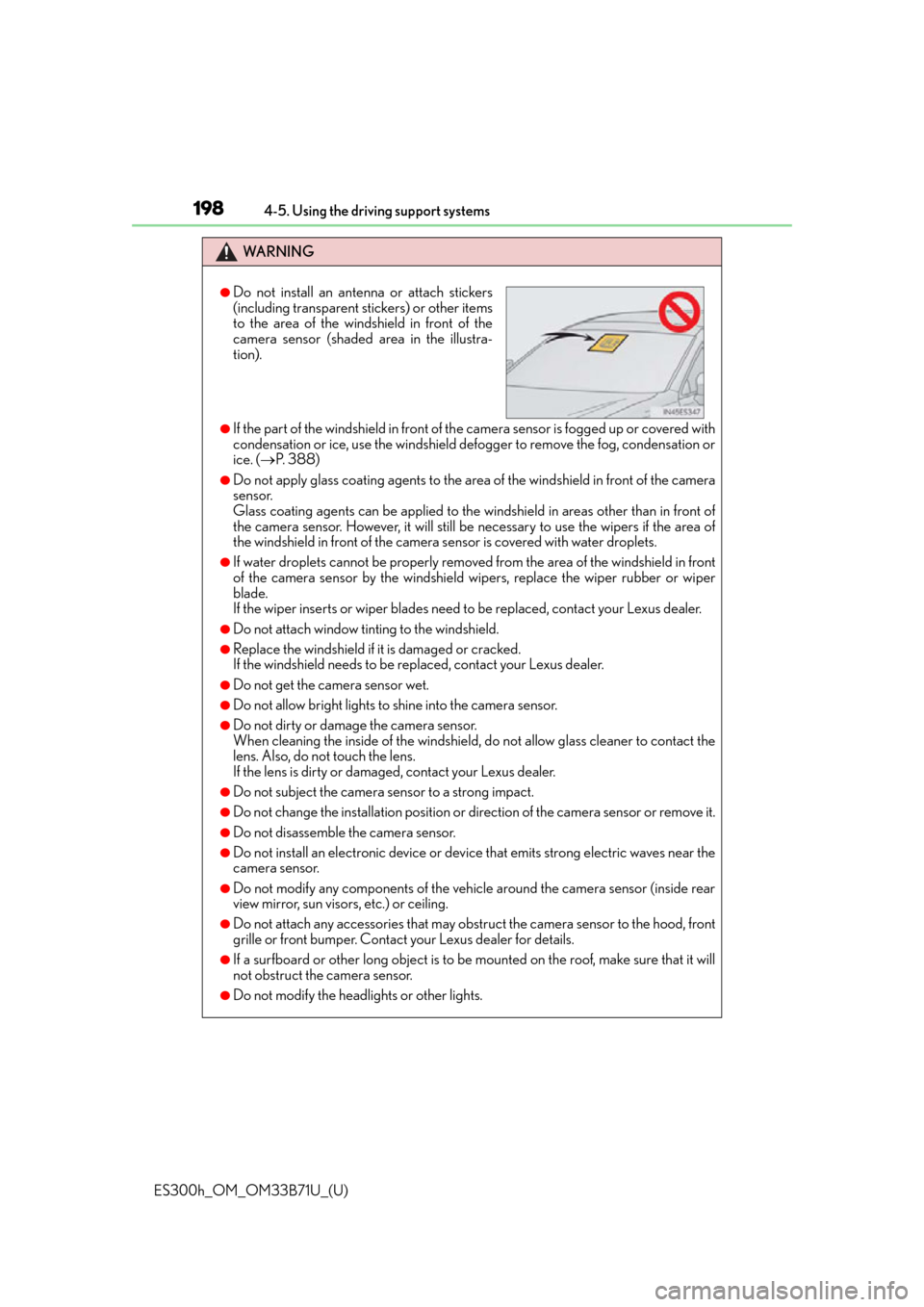
●Do not install an antenna or attach stickers
(including transparent stickers) or other items
to the area of the windshield in front of the
camera sensor (shaded area in the illustra-
tion).