phone Lexus ES300h 2017 Navigation Manual
[x] Cancel search | Manufacturer: LEXUS, Model Year: 2017, Model line: ES300h, Model: Lexus ES300h 2017Pages: 357, PDF Size: 9.68 MB
Page 327 of 357
325
2. LEXUS ENFORM OPERATION
ES350/300h_Navi_OM33C79U_(U)16.06.22 14:52
LEXUS ENFORM
9
4. LEXUS Enform Destinations
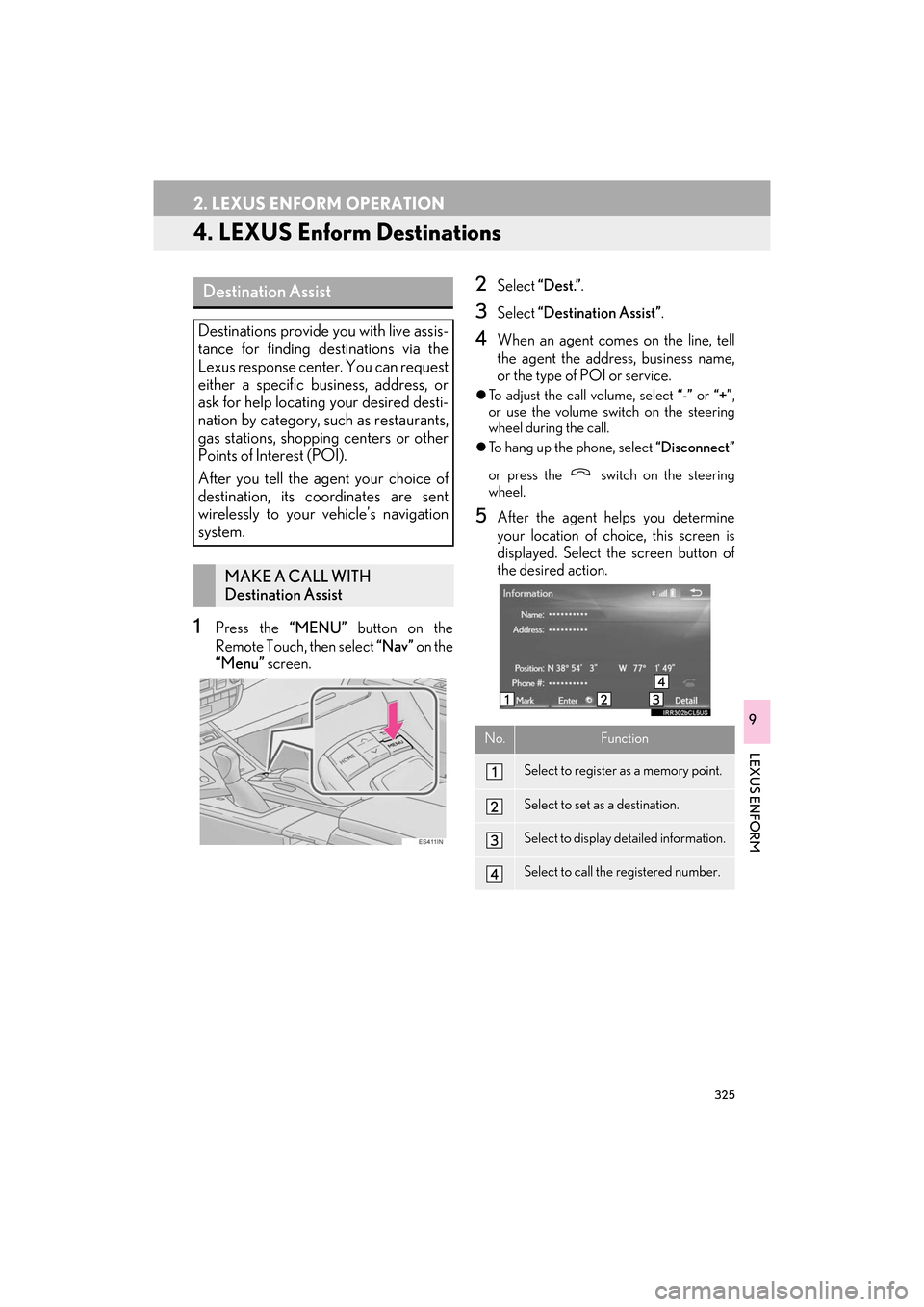
1Press the “MENU” button on the
Remote Touch, then select “Nav” on the
“Menu” screen.
2Select “Dest.” .
3Select “Destination Assist” .
4When an agent comes on the line, tell
the agent the address, business name,
or the type of POI or service.
zTo adjust the call volume, select “-” or “+”,
or use the volume switch on the steering
wheel during the call.
z To hang up the phone, select “Disconnect”
or press the switch on the steering
wheel.
5After the agent helps you determine
your location of choice, this screen is
displayed. Select the screen button of
the desired action.
Destination Assist
Destinations provide you with live assis-
tance for finding destinations via the
Lexus response center. You can request
either a specific business, address, or
ask for help locating your desired desti-
nation by category, such as restaurants,
gas stations, shopping centers or other
Points of Interest (POI).
After you tell the agent your choice of
destination, its coordinates are sent
wirelessly to your vehicle’s navigation
system.
MAKE A CALL WITH
Destination Assist
No.Function
Select to register as a memory point.
Select to set as a destination.
Select to display detailed information.
Select to call the registered number.
ES350_300h_Navi_OM33C79U_(U).book Page 325 Wednesday, June 22, 2016 2:54 PM
Page 333 of 357

331
ES350/300h_Navi_OM33C79U_(U)16.06.22 14:52
LEXUS ENFORM
9
3. SETUP
1. LEXUS App Suite SETTINGS
1Press the “MENU” button on the
Remote Touch.
2Select “Setup” .
3Select “LEXUS App Suite” .
4Select the items to be set.
The settings of App Suite can be
changed.SCREEN FOR LEXUS App Suite
SETTINGS
No.InformationPage
Select to set the voice guid-
ance volume.
Select to set the pop up re-
minder for cellular phone
data usage.332
Select to set Lexus Insider
settings.332
Select to reset all setup
items.
ES350_300h_Navi_OM33C79U_(U).book Page 331 Wednesday, June 22, 2016 2:54 PM
Page 334 of 357

332
3. SETUP
ES350/300h_Navi_OM33C79U_(U)16.06.22 14:52
1Display the “LEXUS App Suite Set-
tings” screen. (→P.331)
2Select “Mobile Data Usage Notifica-
tion” .
3Check the desired function to be oper-
ated.
1Display the “LEXUS App Suite Set-
tings” screen. ( →P.331)
2Select “LEXUS Insider” .
3Select the items to be set.
PHONE DATA PLAN POP-UP
SETTINGS
The phone data plan pop-up can be set
when a paid application is downloaded.Lexus Insider SETTINGS
Lexus Insider settings, notification, and
opt in or out of article receipt can be
changed.
No.Function
Select to set the receiving of Lexus In-
sider articles yes/no.
Select to set the new message notifi-
cation on/off.
Select to reset all setup items.
ES350_300h_Navi_OM33C79U_(U).book Page 332 Wednesday, June 22, 2016 2:54 PM
Page 336 of 357

334
ALPHABETICAL INDEX
ES350/300h_Navi_OM33C79U_(U)16.06.14 11:50
A
AM/FM radio ............................................................ 157Available HD Radio™ Technology ............. 164
Caching a radio program ................................. 161
Overview ................................................................ 157
Preset button screen..........................................160
Radio broadcast data system ......................... 163
Selecting a station from the list ....................... 161
Troubleshooting guide ...................................... 166
Using HD Radio™ Technology..................... 164
Audio settings .......................................................... 205 Audio settings screen ...................................... 205
Audio/visual Remote Controls ........................ 202
Audio/visual system ................................................ 145
AUX...............................................................................198 External options ................................................... 201
Overview ................................................................198
B
Basic function ......................................................... 12, 31
Basic information before operation....................32
Basic operation ................................................. 76, 146
Bluetooth
® audio ..................................................... 192
Connecting a Bluetooth® device ................ 197
Listening to Bluetooth® audio ....................... 197
Overview ................................................................ 192
Bluetooth
® phone message function ..............281
Calling the message sender ......................... 285
Checking messages ......................................... 283
Receiving a message ....................................... 282
Replying to a message (Quick Reply) ...... 284
Bluetooth
® settings ...................................................44
C
Calling on the Bluetooth® phone ...................... 271
By call history ....................................................... 272
By contacts list..................................................... 273
By dial Pad ............................................................ 275
By favorites list..................................................... 272
By off hook switch .............................................. 276
Casual speech recognization ............................ 234
CD .................................................................................. 175 Overview................................................................ 175
Command list ........................................................... 235
D
Data services settings............................................ 245 Setting download methods ............................ 245
Destination search ..................................................... 93
Destination search operation ............................... 93 Destination search by Destination Assist .....................................................................101
Searching by address .......................................... 96
Searching by address book ..............................101
Searching by coordinates................................ 104
Searching by emergency................................. 102
Searching by intersection and freeway ..... 102
Searching by map ............................................... 104
Searching by point of interest .......................... 97
Searching from previous destinations..........101
Selecting search area .......................................... 95
Setting home as destination.............................. 95
Setting preset destinations as destination ........................................................... 95
Detailed navigation settings ................................ 132 Screens for navigation settings ..................... 132
DVD............................................................................... 178 DVD options ...........................................................181
Overview................................................................ 178
ALPHABETICAL INDEX
ES350_300h_Navi_OM33C79U_(U).book Page 334 Wednesday, June 22, 2016 2:54 PM
Page 338 of 357
336
ALPHABETICAL INDEX
ES350/300h_Navi_OM33C79U_(U)16.06.14 11:50
Lexus parking assist monitor precautions.....257Area displayed on screen ...............................257
Differences between the screen and the actual road ............................................... 259
The camera .......................................................... 258
When approaching three-dimensional objects ............................................................... 260
Linking multi-information display and navigation system ..................................................43
M
Map database version and covered area ...... 142
About the map data ............................................ 142
Map information .................................................. 142
Map screen information ......................................... 86 Displaying information about the icon where the cursor is set .................................. 89
Displaying map information ............................. 86
Standard map icons ............................................. 90
Map screen operation ..............................................79
Adjusting location in small increments........ 85
Current position display .....................................79
Map scale................................................................. 80
Orientation of the map......................................... 81
Screen scroll operation...................................... 84
Switching the map mode ................................... 82
Media operation ....................................................... 175
Memory points .......................................................... 122
Memory points settings ......................................... 122 Deleting previous destinations ....................... 131
Setting up address book ................................... 126
Setting up areas to avoid .................................. 129
Setting up home ................................................... 123
Setting up preset destinations ........................ 124
“Menu” screen .............................................................. 14
Status display ............................................................ 16
Mobile assistant....................................................... 240
Mobile assistant operation ................................. 240
N
Navigation operation ............................................... 24
Navigation system ..................................................... 75
O
Operating information........................................... 210 DVD player and disc ........................................... 211
Error messages ................................................... 222
File information .....................................................217
iPod ........................................................................... 216
Radio ........................................................................ 210
Terms....................................................................... 220
Operation flow: Guiding the route..................... 26
Other settings................................................................61
P
Parking assist guide line display mode...........255
Parking ................................................................... 256
Screen description ............................................255
Peripheral monitoring system............................ 247
Phone ........................................................................... 265
Phone operation (Hands-free system for cellular phones) .................................................. 266
Phone settings .......................................................... 286 “Contacts/Call History” screen.................. 288
“Messaging” screen ..........................................295
“Notifications” screen ...................................... 296
“Sounds” screen.................................................. 287
Q
Quick guide..................................................................... 11
Quick reference ............................20, 76, 146, 266
Map screen.............................................................. 76
Navigation options screen ................................ 78
ES350_300h_Navi_OM33C79U_(U).book Page 336 Wednesday, June 22, 2016 2:54 PM
Page 339 of 357

337
ES350/300h_Navi_OM33C79U_(U)16.06.14 11:50
R
Radio operation......................................................... 157
Receiving doppler weather information ....... 244Displaying doppler weather information ...................................................... 244
Receiving on the Bluetooth
® phone ............... 277
Incoming calls....................................................... 277
Registering home ...................................................... 24
Registering preset destinations ........................... 25
Registering/connecting Bluetooth
®
device......................................................................... 44
Profiles....................................................................... 48
Registering a Bluetooth
® audio player
for the first time ................................................. 46
Registering a Bluetooth
® for the first
time ........................................................................ 44
Remote Touch............................................................... 12
Route guidance .......................................................... 110
Route guidance screen ........................................... 110 During freeway driving....................................... 113
Route overview...................................................... 112
Screen for route guidance ................................ 110
Turn list screen ....................................................... 115
Turn-by-Turn Arrow screen ............................ 116
When approaching intersection .................... 115
S
Screen adjustment ...................................................... 41
Setting Bluetooth® details..................................... 50
“Bluetooth* Setup” screen ............................... 50
Connecting a Bluetooth
® device ..................53
Deleting a Bluetooth® device .........................53
Editing the Bluetooth® device
information ......................................................... 55
Registering a Bluetooth
® device .................... 51
“System Settings” screen ...................................57
Setting home as the destination ........................... 27
Setup .............................................132, 205, 286, 331
“Setup” screen .............................................................20
Some basics .....................................................148, 267 About the contacts in the contact list.........270
Audio screen adjustment ................................. 154
Disc slot ...................................................................150
Registering/connecting a Bluetooth
®
phone................................................................. 268
Selecting an audio source ............................... 149
“Sound Settings” screen ................................... 152
Turning the system on and off ........................ 148
USB/AUX port..................................................... 151
Using the phone switch/microphone ....... 268
Voice command system ........................156, 269
When selling or disposing of the vehicle ................................................................270
Starting route guidance .........................................105 Confirm destination screen ............................106
Entire route map screen................................... 106
Steering switches.................................................... 202
*: The Bluetooth
® word mark and logos are registered trademarks owned by Bluetooth SIG, Inc.
ES350_300h_Navi_OM33C79U_(U).book Page 337 Wednesday, June 22, 2016 2:54 PM
Page 340 of 357

338
ALPHABETICAL INDEX
ES350/300h_Navi_OM33C79U_(U)16.06.14 11:50
T
Talking on the Bluetooth® phone ....................278
Incoming call waiting ....................................... 280
Things you should know........................................262
If you notice any symptoms ............................262
Tips for operating the audio/visual system.......................................................................210
Tips for the navigation system ............................. 139
Traffic information ....................................................... 91
Displaying traffic information on the map.........................................................................92
Traffic settings ............................................................ 137 Screen for traffic settings ................................. 137
Troubleshooting ...................................................... 298
Type A: Function achieved by using a cellular phone........................................................310
Before using the function ................................. 312
Preparation before using LEXUS App Suite .......................................... 313
Type B: Function achieved by using DCM and the navigation system .................. 314
Before using the function .................................315
Type C: Function achieved by using DCM......................................................................... 317
Typical voice guidance prompts ..........................117
U
USB memory..............................................................183 Overview ................................................................183
V
Vehicle settings........................................................... 69Maintenance ........................................................... 70
Voice command system............................225, 226
Using the voice command system .............. 226
Voice command system operation ............ 227
Voice command system operation ................. 226
Voice settings .............................................................. 67 Voice settings screen .......................................... 67
W
What to do if... ...........................................................298
X
XM Satellite Radio ...................................................167Displaying the radio ID ....................................... 171
How to subscribe to an XM Satellite Radio ........................................ 169
If the satellite radio tuner malfunctions .......172
Overview.................................................................167
Selecting a channel from the list ..................... 171
ES350_300h_Navi_OM33C79U_(U).book Page 338 Wednesday, June 22, 2016 2:54 PM