audio Lexus ES300h 2017 Owner's Manual
[x] Cancel search | Manufacturer: LEXUS, Model Year: 2017, Model line: ES300h, Model: Lexus ES300h 2017Pages: 612, PDF Size: 14.05 MB
Page 380 of 612
378
ES300h_OM_OM33C75U_(U)5-12. Other function
USB photo
Go to “USB Photo”: “MENU” button
→ “Info” → “USB1 Photo” or “USB2
Photo”
→ P. 2 9 9
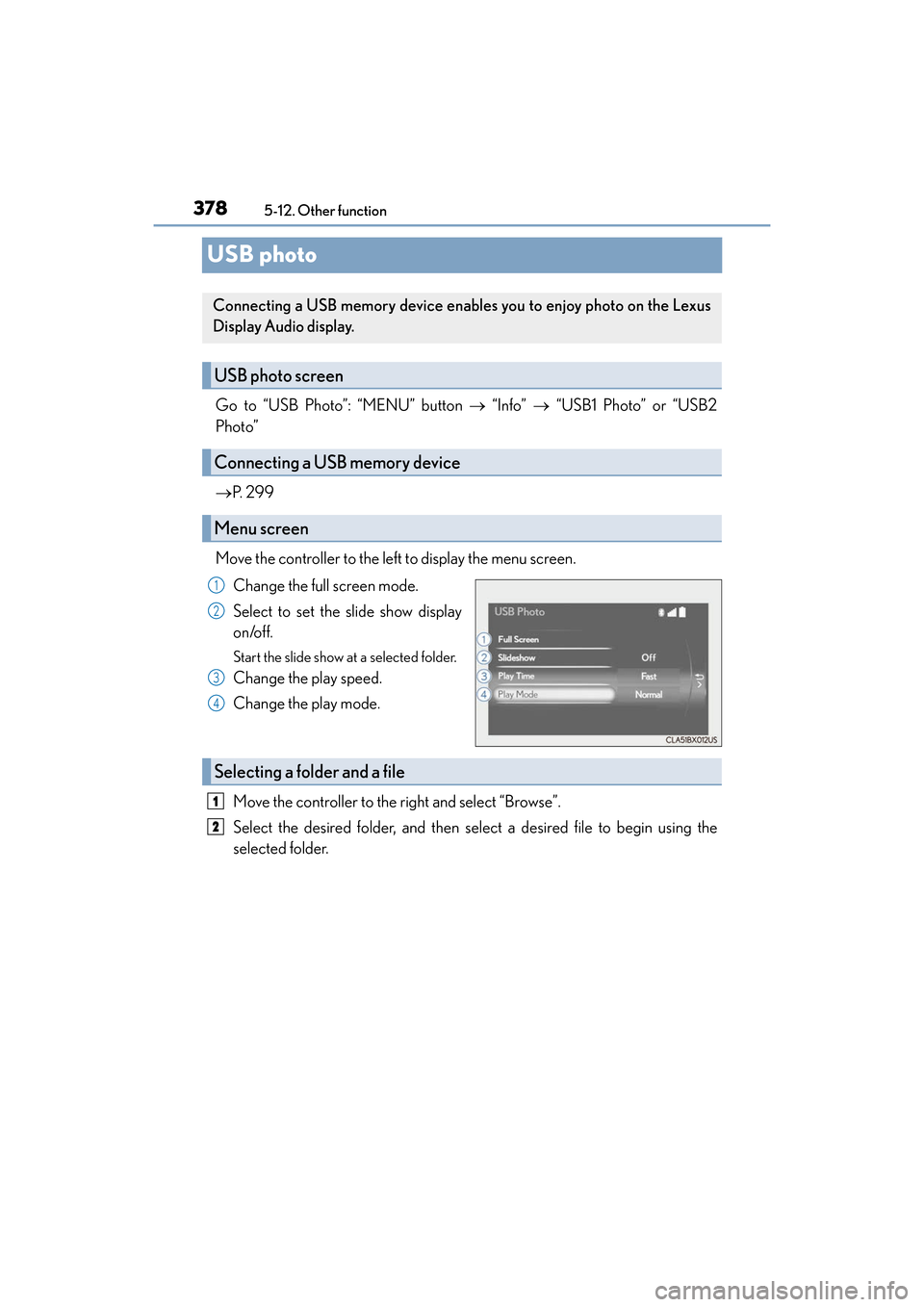
Move the controller to the left to display the menu screen. Change the full screen mode.
Select to set the slide show display
on/off.
Start the slide show at a selected folder.
Change the play speed.
Change the play mode.
Move the controller to the right and select “Browse”.
Select the desired folder, and then select a desired file to begin using the
selected folder.
Connecting a USB memory device enables you to enjoy photo on the Lexus
Display Audio display.
USB photo screen
Connecting a USB memory device
Menu screen
1
2
3
4
Selecting a fold er and a file
1
2
Page 381 of 612
ES300h_OM_OM33C75U_(U)
3795-12. Other function
5
Lexus Display Audio system
■USB memory functions
→P. 3 3 4
■USB memory
●Compatible devices
USB memory device that can be used for JPEG display.
●Compatible device formats
The following device format can be used:
• USB communication format: USB2.0 FS (480 Mbps)
• File system format: FAT16/32 (Windows)
• Correspondence class: Mass storage class
●JPEG file compatibility
• Compatible image size: Maximum 10MB
• Compatible pixel size: Maximum 10,000,000 pixels
NOTICE
■To prevent damage to the USB memory device or its terminals
→P. 3 3 6
Page 383 of 612
381
ES300h_OM_OM33C75U_(U)5-12. Other function
5
Lexus Display Audio system
Voice command system
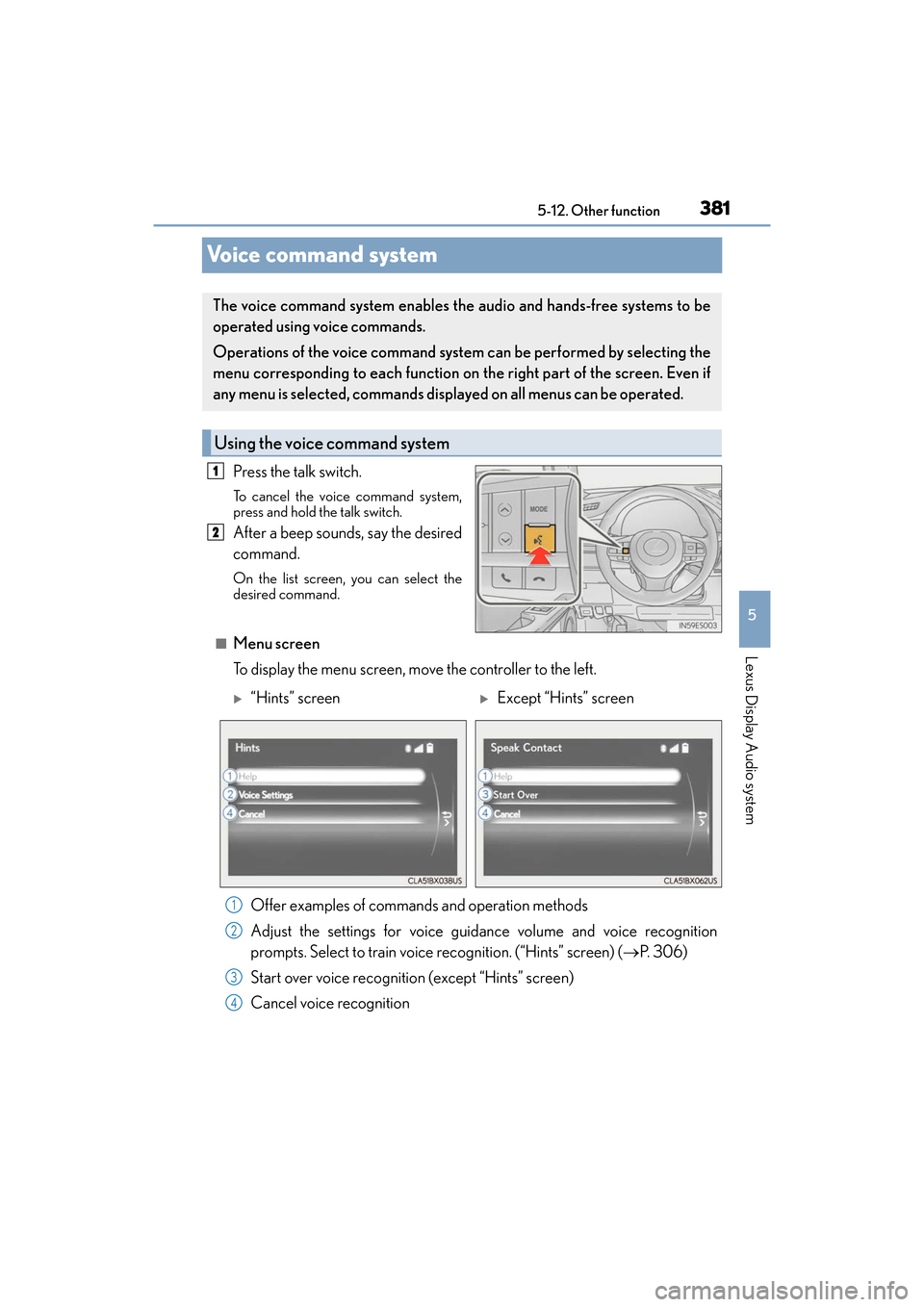
Press the talk switch.
To cancel the voice command system,
press and hold the talk switch.
After a beep sounds, say the desired
command.
On the list screen, you can select the
desired command.
■Menu screen
To display the menu screen, move the controller to the left.
The voice command system enables the audio and hands-free systems to be
operated using voice commands.
Operations of the voice command system
can be performed by selecting the
menu corresponding to each function on the right part of the screen. Even if
any menu is selected, commands displayed on all menus can be operated.
Using the voice command system
1
2
X“Hints” screenXExcept “Hints” screen
Offer examples of commands and operation methods
Adjust the settings for voice guidance volume and voice recognition
prompts. Select to train voice recognition. (“Hints” screen) ( →P. 306)
Start over voice recognition (except “Hints” screen)
Cancel voice recognition
1
2
3
4
Page 385 of 612
ES300h_OM_OM33C75U_(U)
3835-12. Other function
5
Lexus Display Audio system
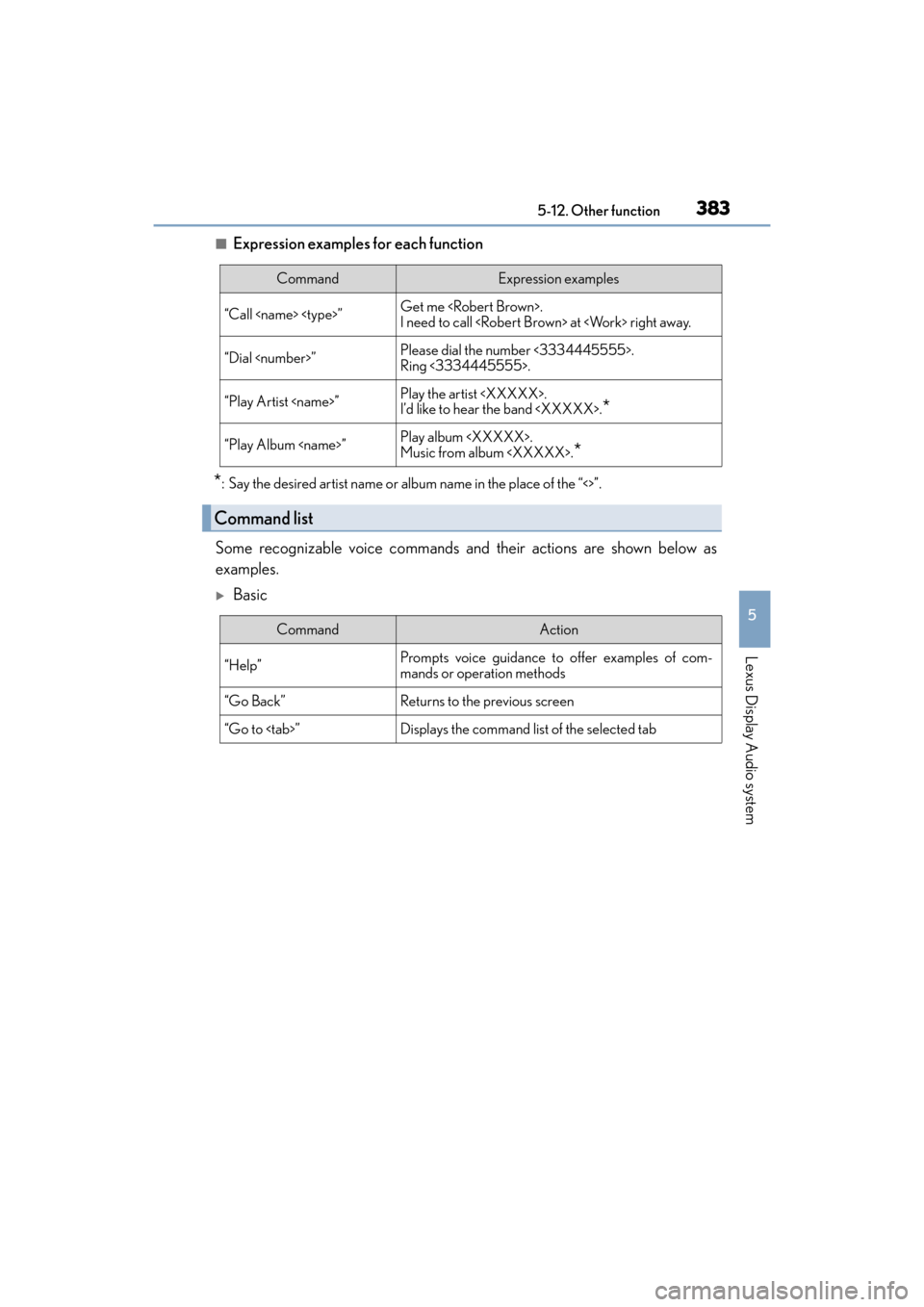
■Expression examples for each function
*: Say the desired artist name or album name in the place of the “<>”.
Some recognizable voice commands and their actions are shown below as
examples.
XBasic
CommandExpression examples
“Call
I need to call
“Dial
Ring <3334445555>.
“Play Artist
I’d like to hear the band
“Play Album
Music from album
*
Command list
CommandAction
“Help”Prompts voice guidance to offer examples of com-
mands or operation methods
“Go Back”Returns to the previous screen
“Go to
Page 387 of 612
ES300h_OM_OM33C75U_(U)
3855-12. Other function
5
Lexus Display Audio system
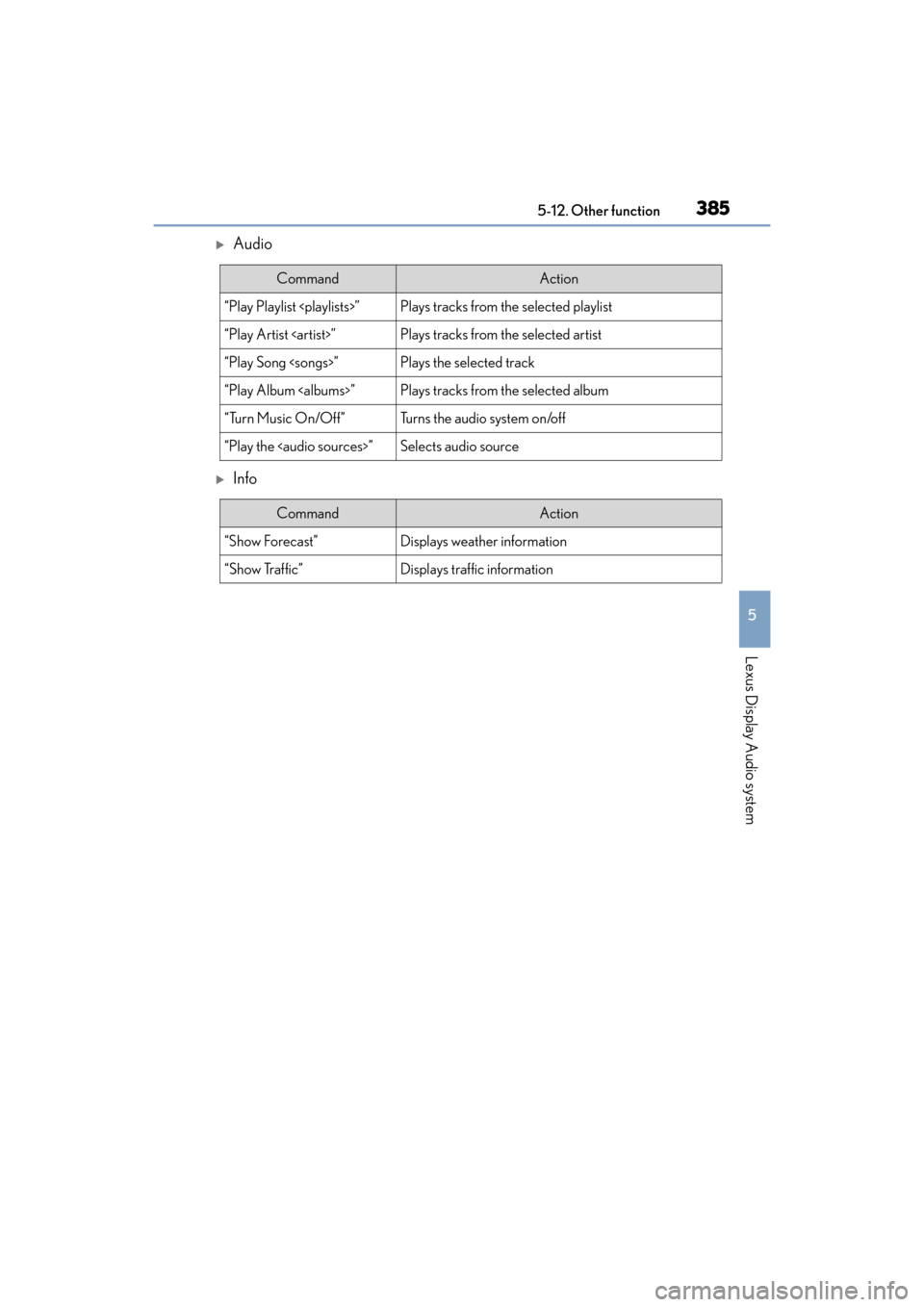
XAudio
XInfo
CommandAction
“Play Playlist
“Play Artist
“Play Song
“Play Album
“Turn Music On/Off”Turns the audio system on/off
“Play the
Page 390 of 612
388
ES300h_OM_OM33C75U_(U)6-1. Using the air conditio
ning system and defogger
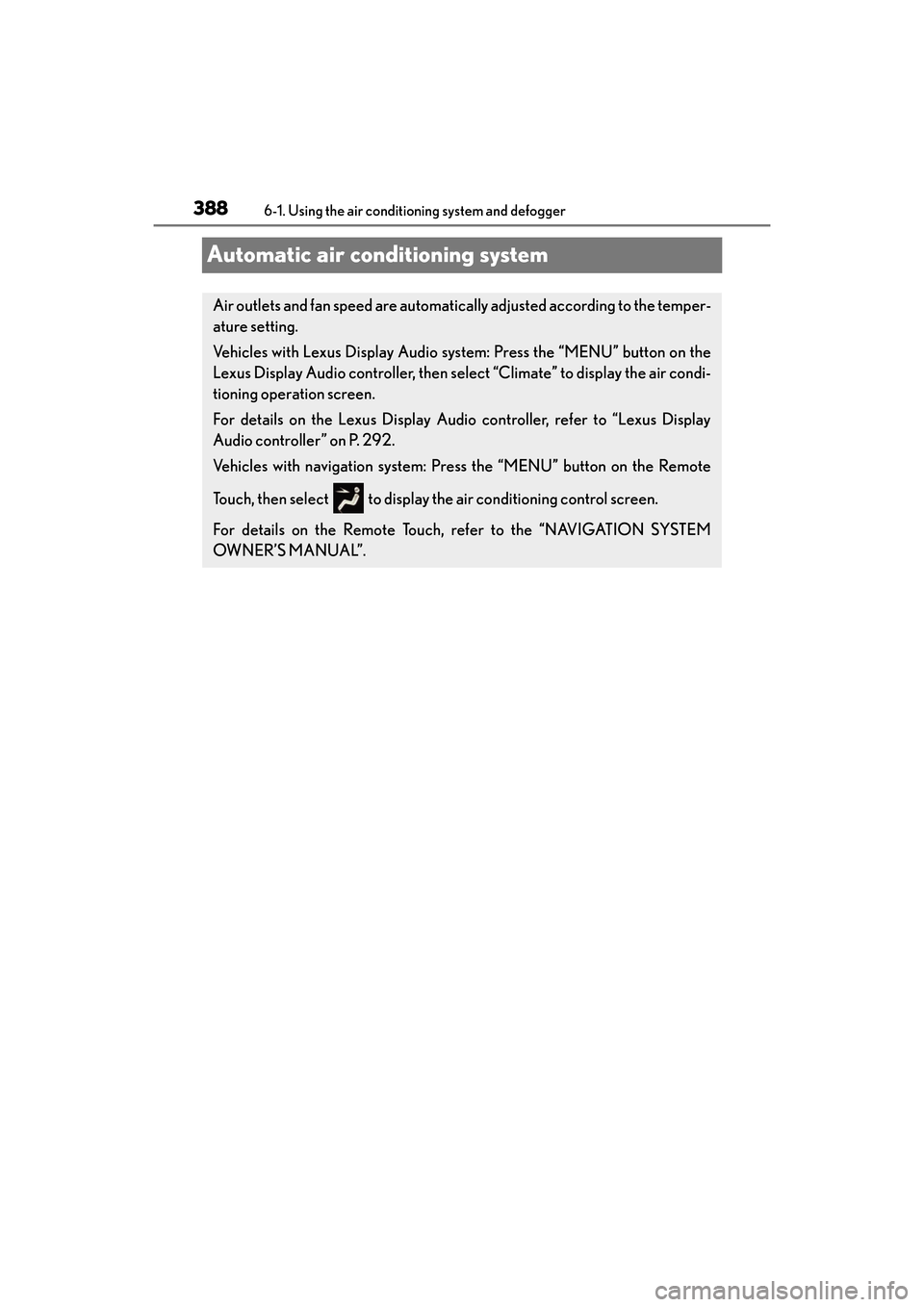
Automatic air conditioning system
Air outlets and fan speed are automatically adjusted according to the temper-
ature setting.
Vehicles with Lexus Display Audio system: Press the “MENU” button on the
Lexus Display Audio controller, then select “Climate” to display the air condi-
tioning operation screen.
For details on the Lexus Display Audio controller, refer to “Lexus Display
Audio controller” on P. 292.
Vehicles with navigation system: Press the “MENU” button on the Remote
Touch, then select to display the air conditioning control screen.
For details on the Remote Touch, refer to the “NAVIGATION SYSTEM
OW N ER’S M A NUA L”.
Page 391 of 612
ES300h_OM_OM33C75U_(U)
3896-1. Using the air conditioning system and defogger
6
Interior features
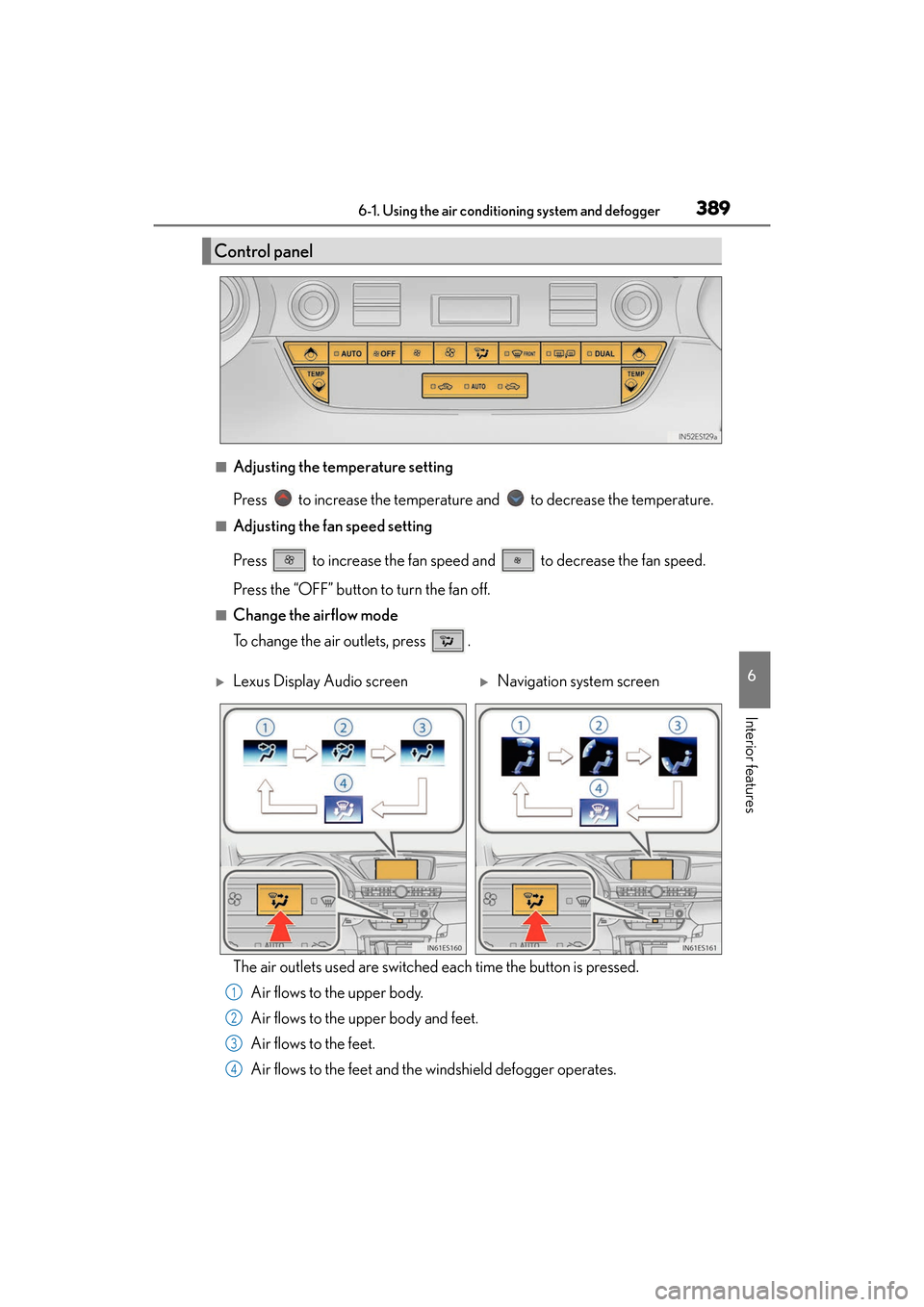
■Adjusting the temperature setting
Press to increase the temperature and to decrease the temperature.
■Adjusting the fan speed setting
Press to increase the fan speed and to decrease the fan speed.
Press the “OFF” button to turn the fan off.
■Change the airflow mode
To change the air outlets, press .
The air outlets used are switched each time the button is pressed.
Air flows to the upper body.
Air flows to the upper body and feet.
Air flows to the feet.
Air flows to the feet and the windshield defogger operates.
Control panel
XLexus Display Audio screenXNavigation system screen
1
2
3
4
Page 392 of 612
3906-1. Using the air conditioning system and defogger
ES300h_OM_OM33C75U_(U)
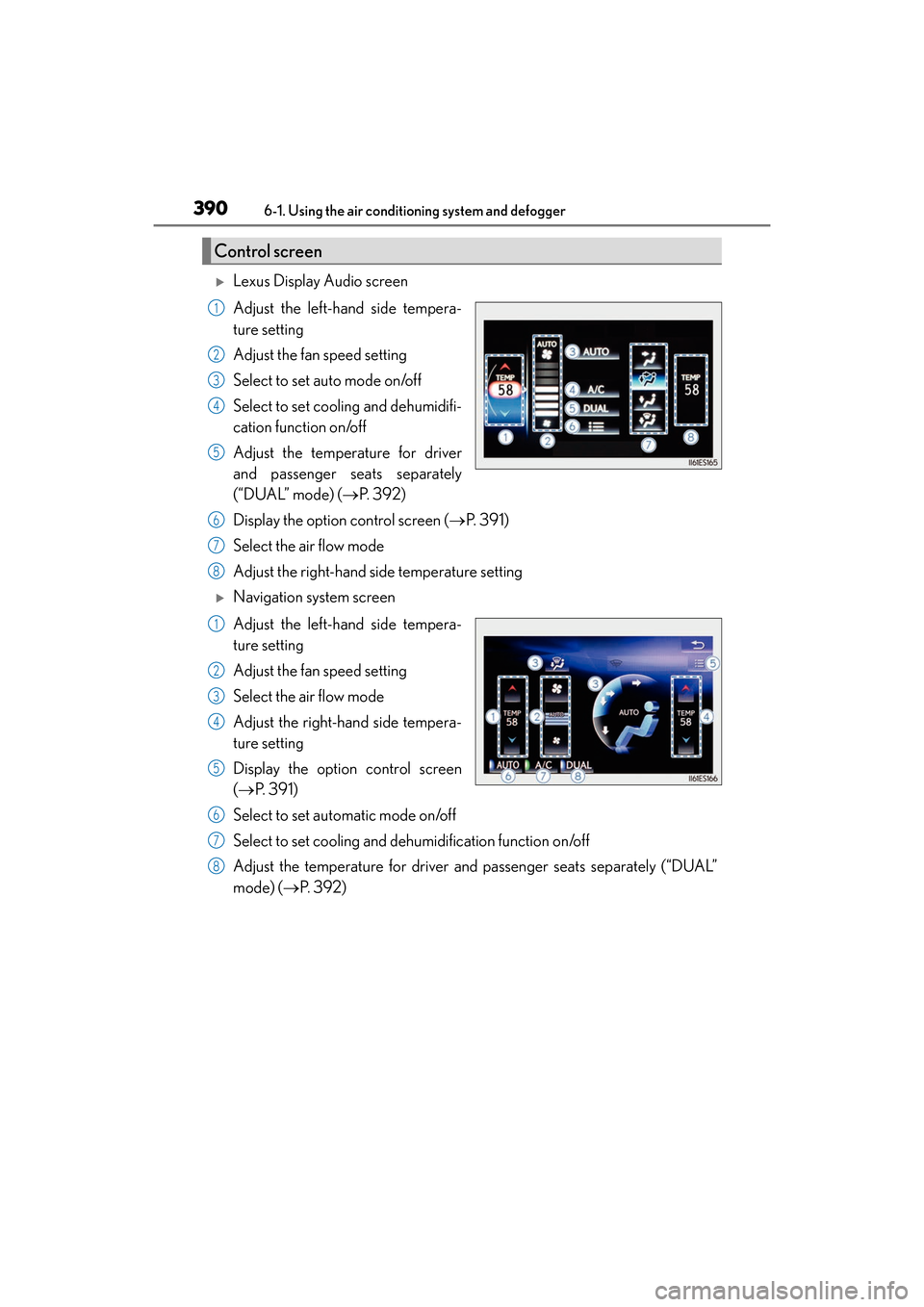
XLexus Display Audio screen
Adjust the left-hand side tempera-
ture setting
Adjust the fan speed setting
Select to set auto mode on/off
Select to set cooling and dehumidifi-
cation function on/off
Adjust the temperature for driver
and passenger seats separately
(“DUAL” mode) ( →P. 3 9 2 )
Display the option control screen ( →P. 3 9 1 )
Select the air flow mode
Adjust the right-hand side temperature setting
XNavigation system screen
Adjust the left-hand side tempera-
ture setting
Adjust the fan speed setting
Select the air flow mode
Adjust the right-hand side tempera-
ture setting
Display the option control screen
( → P. 3 9 1 )
Select to set automatic mode on/off
Select to set cooling and dehu midification function on/off
Adjust the temperature for driver and passenger seats separately (“DUAL”
mode) (→ P. 3 9 2 )
Control screen
1
2
3
4
5
6
7
8
1
2
3
4
5
6
7
8
Page 393 of 612
ES300h_OM_OM33C75U_(U)
3916-1. Using the air conditioning system and defogger
6
Interior features
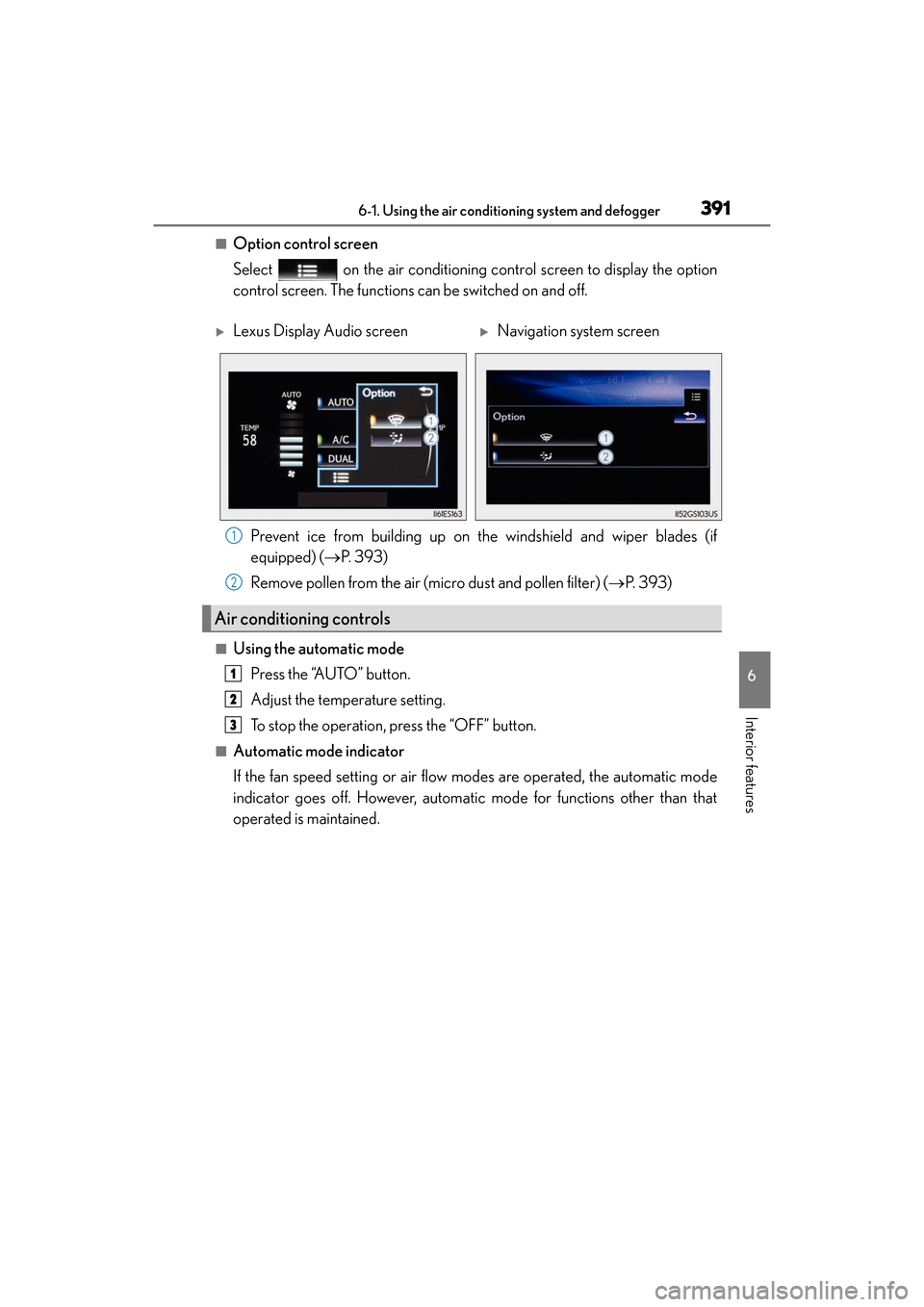
■Option control screen
Select on the air conditioning control screen to display the option
control screen. The functions can be switched on and off.
Prevent ice from building up on the windshield and wiper blades (if
equipped) ( →P. 393)
Remove pollen from the air (micro dust and pollen filter) ( →P. 393)
■Using the automatic mode
Press the “AUTO” button.
Adjust the temperature setting.
To stop the operation, press the “OFF” button.
■Automatic mode indicator
If the fan speed setting or air flow modes are operated, the automatic mode
indicator goes off. However, automatic mode for functions other than that
operated is maintained.
XLexus Display Audio screenXNavigation system screen
Air conditioning controls
1
2
1
2
3
Page 441 of 612
ES300h_OM_OM33C75U_(U)
4397-1. Maintenance and care
7
Maintenance and care
NOTICE
■Cleaning detergents
●Do not use the following types of detergent, as they may discolor the vehicle interior
or cause streaks or damage to painted surfaces:
• Non-seat portions: Organic substances such as benzene or gasoline, alkaline or
acidic solutions, dye, and bleach
• Seats: Alkaline or acidic solutions, such as thinner, benzene, and alcohol
●Do not use polish wax or polish cleaner. The instrument panel’s or other interior part’s
painted surface may be damaged.
■Preventing damage to leather surfaces
Observe the following precautions to avoid damage to and deterioration of leather
surfaces:
●Remove any dust or dirt from leather surfaces immediately.
●Do not expose the vehicle to direct sunlight for extended periods of time. Park the
vehicle in the shade, especially during summer.
●Do not place items made of vinyl, plastic, or containing wax on the upholstery, as they
may stick to the leather surface if the vehicle interior heats up significantly.
■Water on the floor
Do not wash the vehicle floor with water.
Vehicle systems such as the audio system may be damaged if water comes into contact
with electrical components such as the audio system above or under the floor of the
vehicle. Water may also cause the body to rust.
■When cleaning the inside of the windshield (vehicles with Lexus Safety System+)
Do not allow glass cleaner to contact the lens. Also, do not touch the lens. ( →P. 2 0 0 )
■Cleaning the inside of the rear window
●Do not use glass cleaner to clean the rear window, as this may cause damage to the
rear window defogger heater wires or antenna. Use a cloth dampened with luke-
warm water to gently wipe the window clean. Wipe the window in strokes running
parallel to the heater wires or antenna.
●Be careful not to scratch or damage the heater wires or antenna.