light Lexus ES300h 2017 Owner's Manual
[x] Cancel search | Manufacturer: LEXUS, Model Year: 2017, Model line: ES300h, Model: Lexus ES300h 2017Pages: 612, PDF Size: 14.05 MB
Page 403 of 612
ES300h_OM_OM33C75U_(U)
4016-2. Using the interior lights
6
Interior features
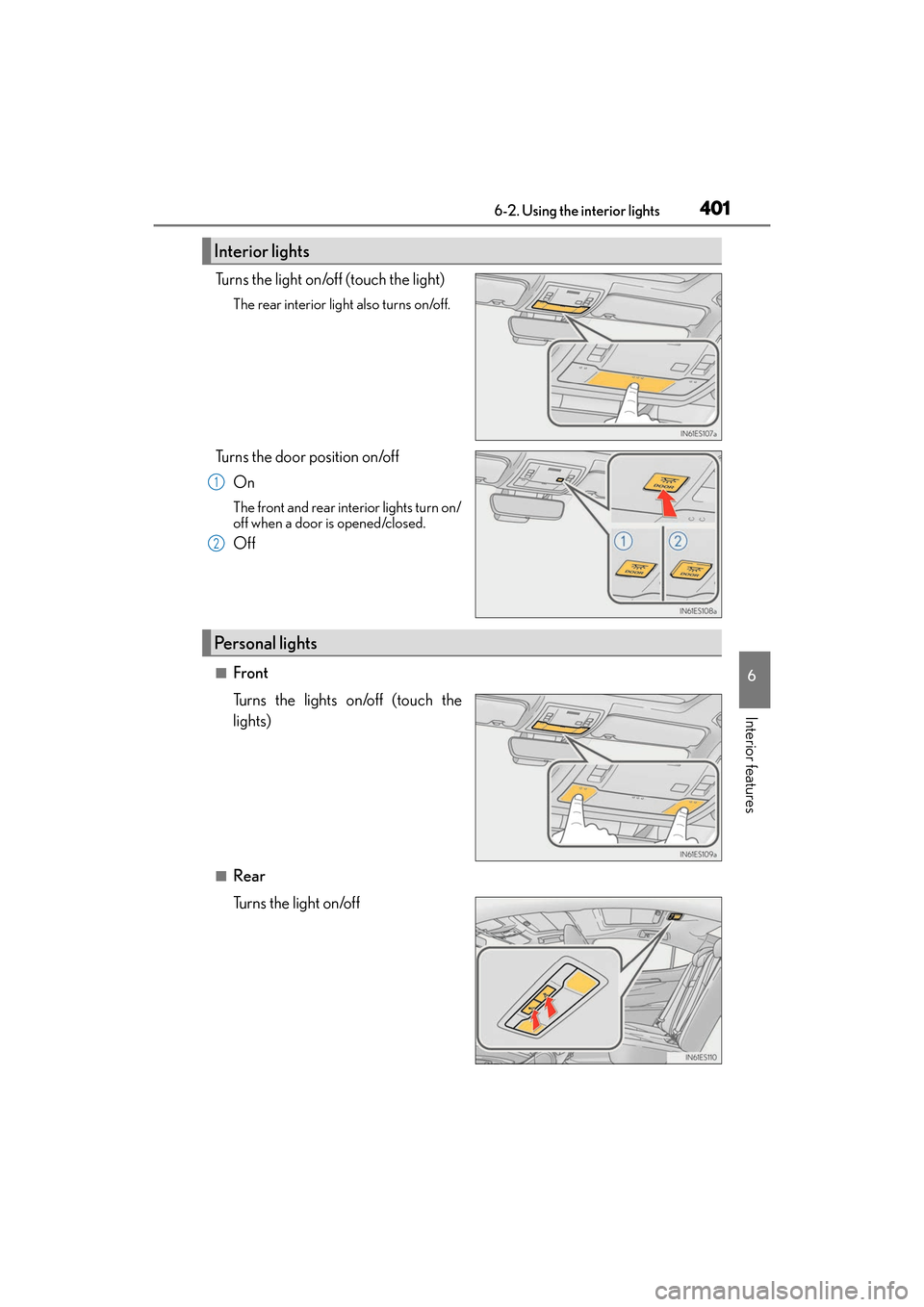
Turns the light on/off (touch the light)
The rear interior light also turns on/off.
Turns the door position on/offOn
The front and rear interior lights turn on/
off when a door is opened/closed.
Off
■Front
Turns the lights on/off (touch the
lights)
■Rear
Turns the light on/off
Interior lights
1
2
Personal lights
Page 404 of 612
402
ES300h_OM_OM33C75U_(U)6-2. Using the interior lights
●Illuminated entry system: The lights automati
cally turn on/off according to power switch
mode, the presence of the electronic key, whether the doors are locked/unlocked, and
whether the doors are opened/closed.
●If the following lights remain on when the powe r switch is turned off the lights will go off
automatically after 20 minutes:
• Outer foot lights
• Personal/interior lights
• Door courtesy lights
• Ornament lights (if equipped)
• Footwell lights
●Setting (e.g. the time elapsed before lights turn off) can be changed.
(Customizable features: →P. 5 6 2 )
Page 405 of 612
403
ES300h_OM_OM33C75U_(U)6-3. Using the storage features
6
Interior features
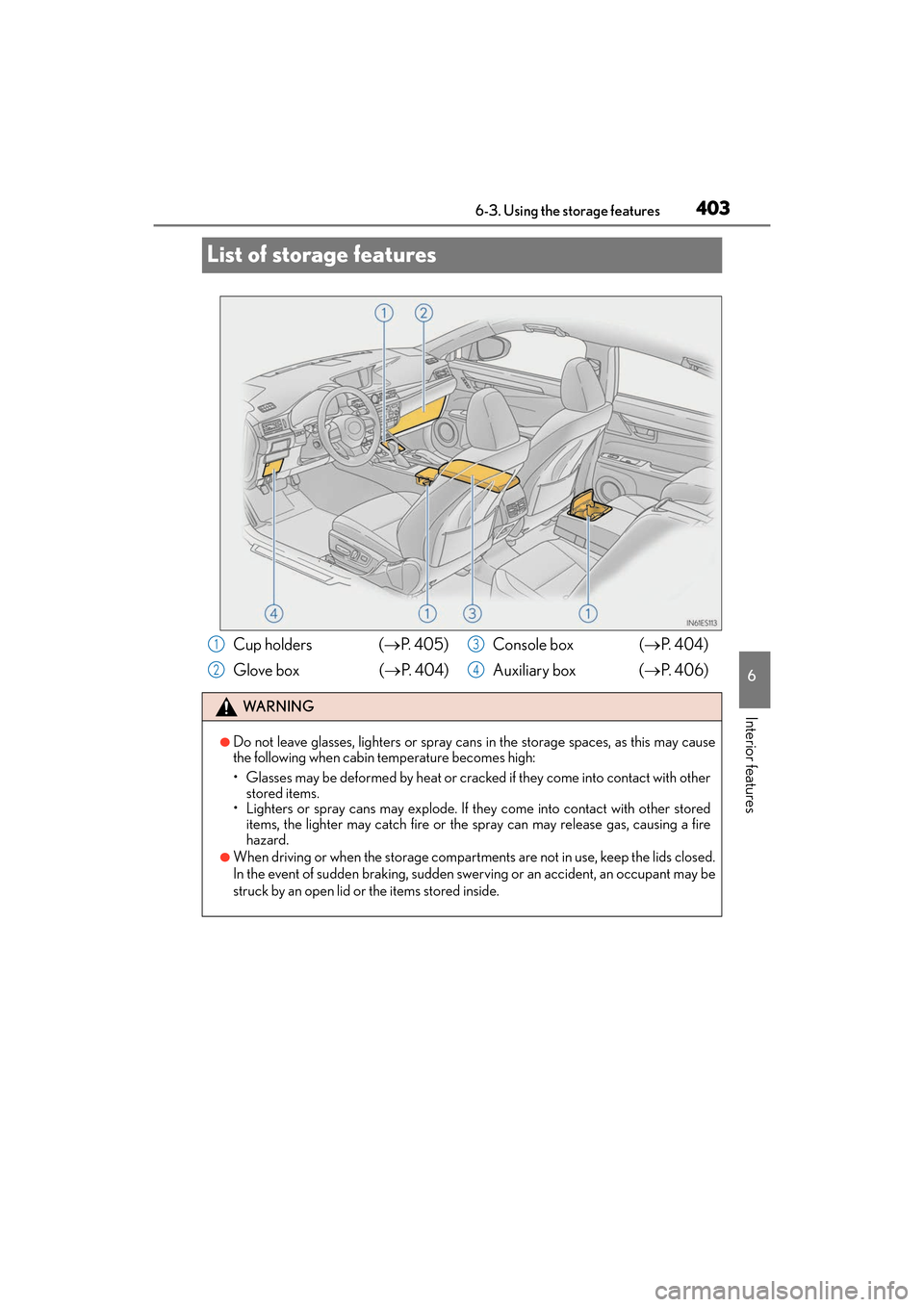
List of storage features
Cup holders (
→P. 4 0 5 )
Glove box ( →P. 404) Console box (
→P. 404)
Auxiliary box ( →P. 4 0 6 )
WA R N I N G
●Do not leave glasses, lighters or spray cans in the storage spaces, as this may cause
the following when cabin temperature becomes high:
• Glasses may be deformed by heat or cracked if they come into contact with other stored items.
• Lighters or spray cans may explode. If they come into contact with other stored
items, the lighter may catch fire or the spray can may release gas, causing a fire
hazard.
●When driving or when the storage compartments are not in use, keep the lids closed.
In the event of sudden braking, sudden swerving or an accident, an occupant may be
struck by an open lid or the items stored inside.
1
2
3
4
Page 406 of 612
404
ES300h_OM_OM33C75U_(U)6-3. Using the storage features
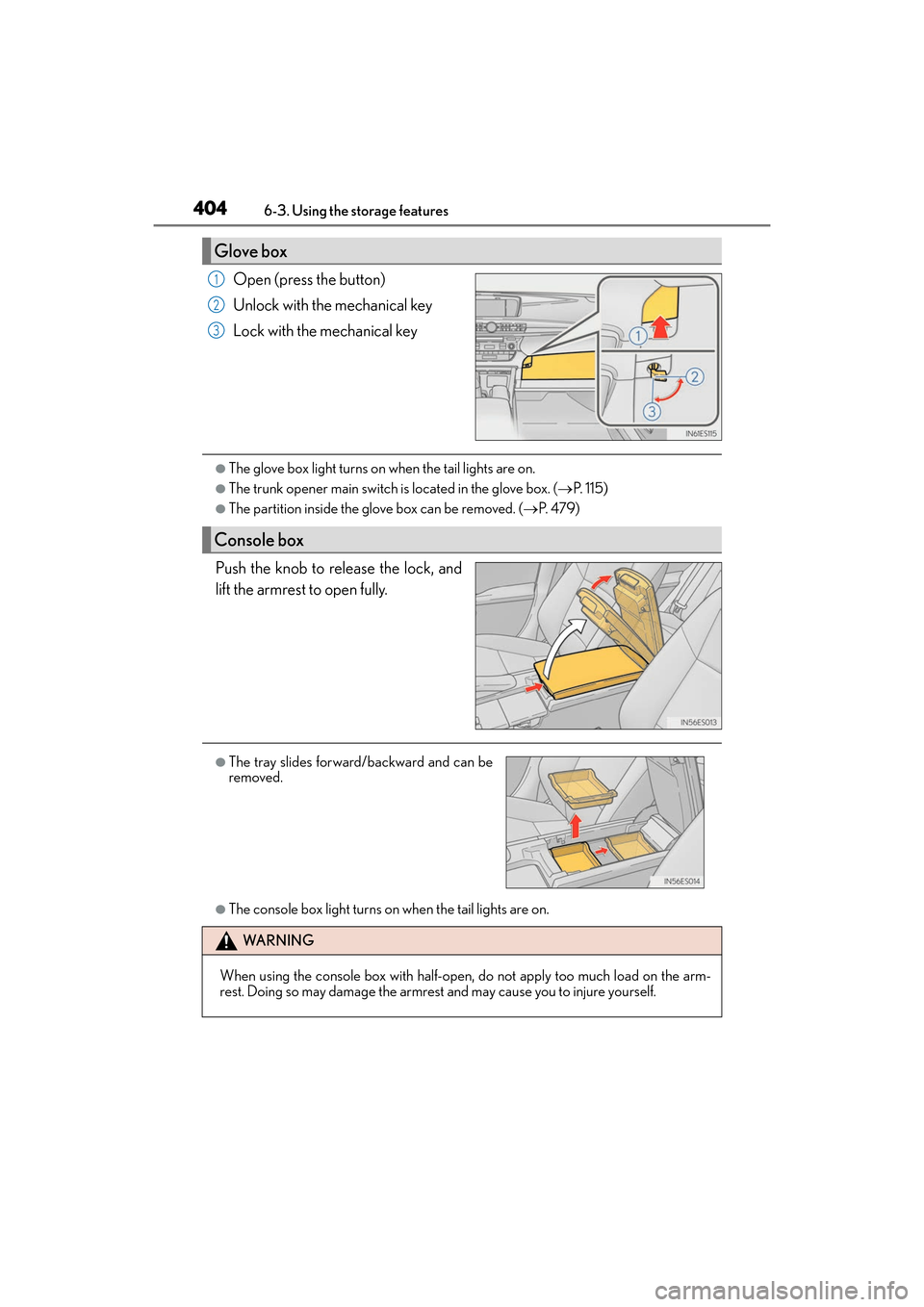
Open (press the button)
Unlock with the mechanical key
Lock with the mechanical key
●The glove box light turns on
when the tail lights are on.
●The trunk opener main switch is located in the glove box. (→P. 1 1 5 )
●The partition inside the glove box can be removed. ( →P. 4 7 9 )
Push the knob to release the lock, and
lift the armrest to open fully.
●The console box light turns on when the tail lights are on.
Glove box
1
2
3
Console box
●The tray slides forward/backward and can be
removed.
WA R N I N G
When using the console box with half-open, do not apply too much load on the arm-
rest. Doing so may damage the armrest and may cause you to injure yourself.
Page 411 of 612
409
ES300h_OM_OM33C75U_(U)6-4. Using the other interior features
6
Interior features
Other interior features
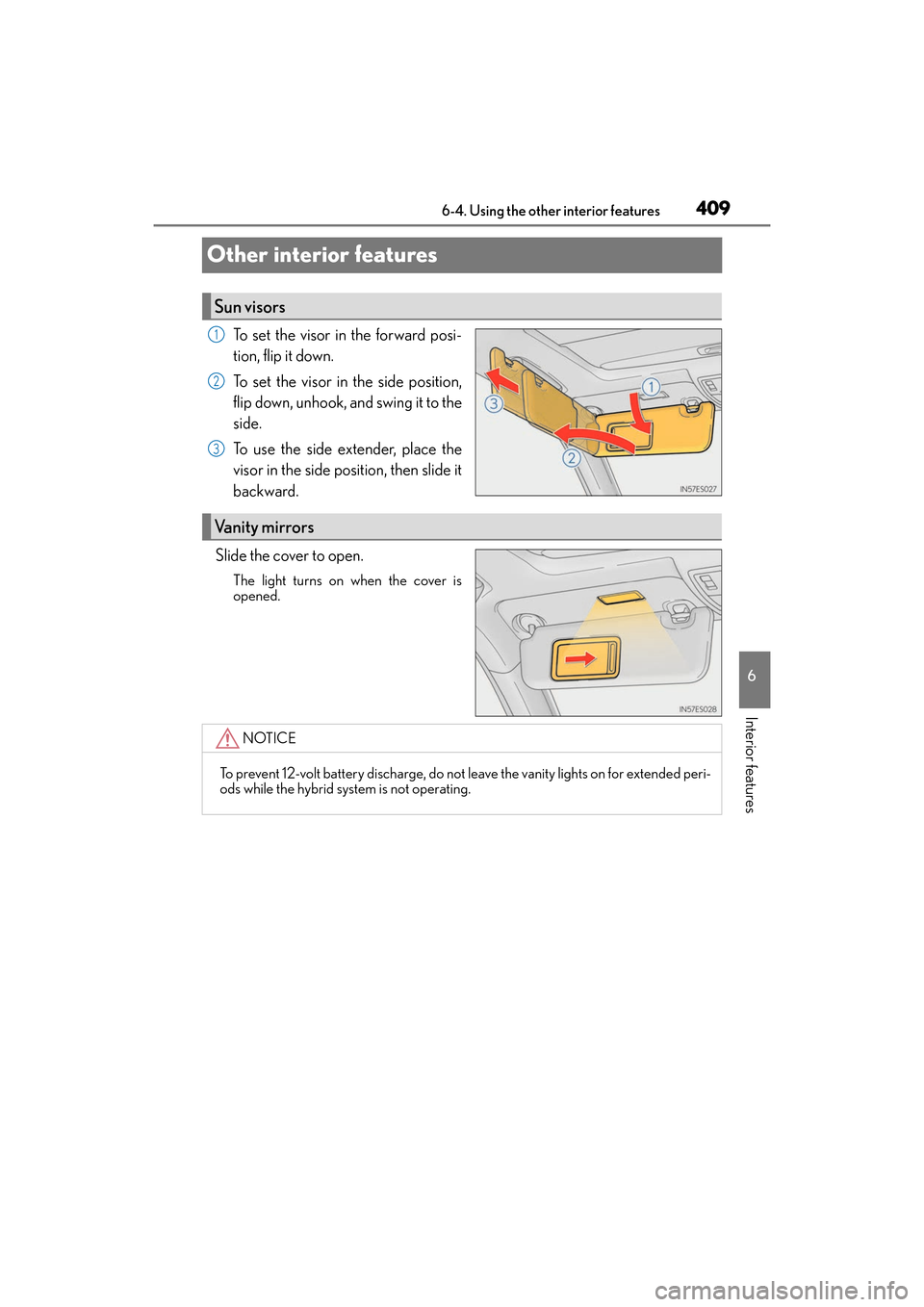
To set the visor in the forward posi-
tion, flip it down.
To set the visor in the side position,
flip down, unhook, and swing it to the
side.
To use the side extender, place the
visor in the side position, then slide it
backward.
Slide the cover to open.
The light turns on when the cover is
opened.
Sun visors
1
2
3
Vanity mirrors
NOTICE
To prevent 12-volt battery discharge, do not leave the vanity lights on for extended peri-
ods while the hybrid system is not operating.
Page 417 of 612
415
ES300h_OM_OM33C75U_(U)6-4. Using the other interior features
6
Interior features
Garage door opener
The HomeLink® wireless control system in your vehicle has 3 buttons which can
be programmed to operate 3 different devices. Refer to the programming meth-
ods on the following pages to determine the method which is appropriate for the
device.
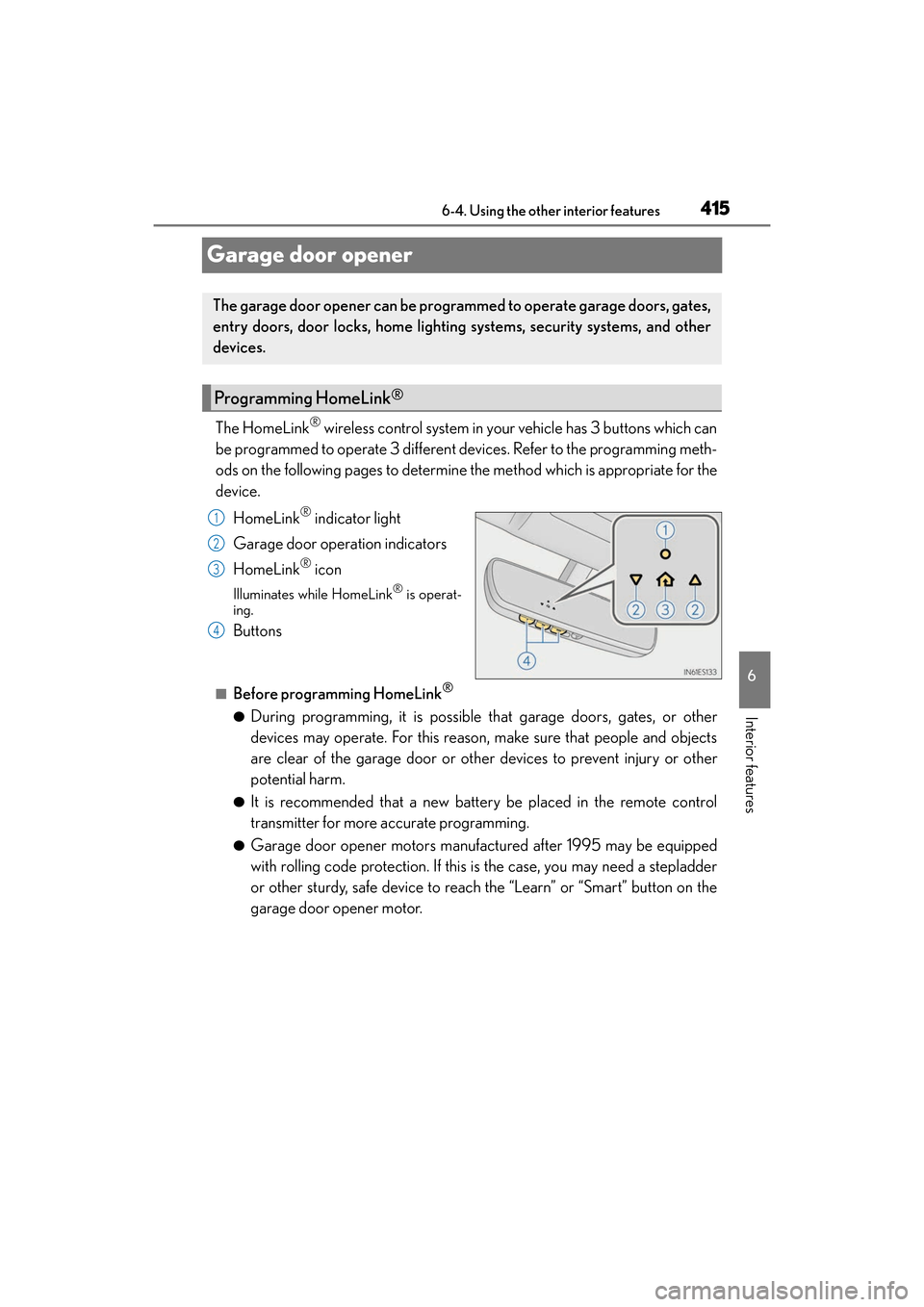
HomeLink
® indicator light
Garage door operation indicators
HomeLink
® icon
Illuminates while HomeLink® is operat-
ing.
Buttons
■Before programming HomeLink®
●During programming, it is possible that garage doors, gates, or other
devices may operate. For this reason, make sure that people and objects
are clear of the garage door or other devices to prevent injury or other
potential harm.
●It is recommended that a new battery be placed in the remote control
transmitter for more accurate programming.
●Garage door opener motors manufactured after 1995 may be equipped
with rolling code protection. If this is the case, you may need a stepladder
or other sturdy, safe device to reach the “Learn” or “Smart” button on the
garage door opener motor.
The garage door opener can be progra mmed to operate garage doors, gates,
entry doors, door locks, home lighting systems, security systems, and other
devices.
Programming HomeLink®
1
2
3
4
Page 418 of 612
416
ES300h_OM_OM33C75U_(U)6-4. Using the other interior features
■Programming HomeLink®
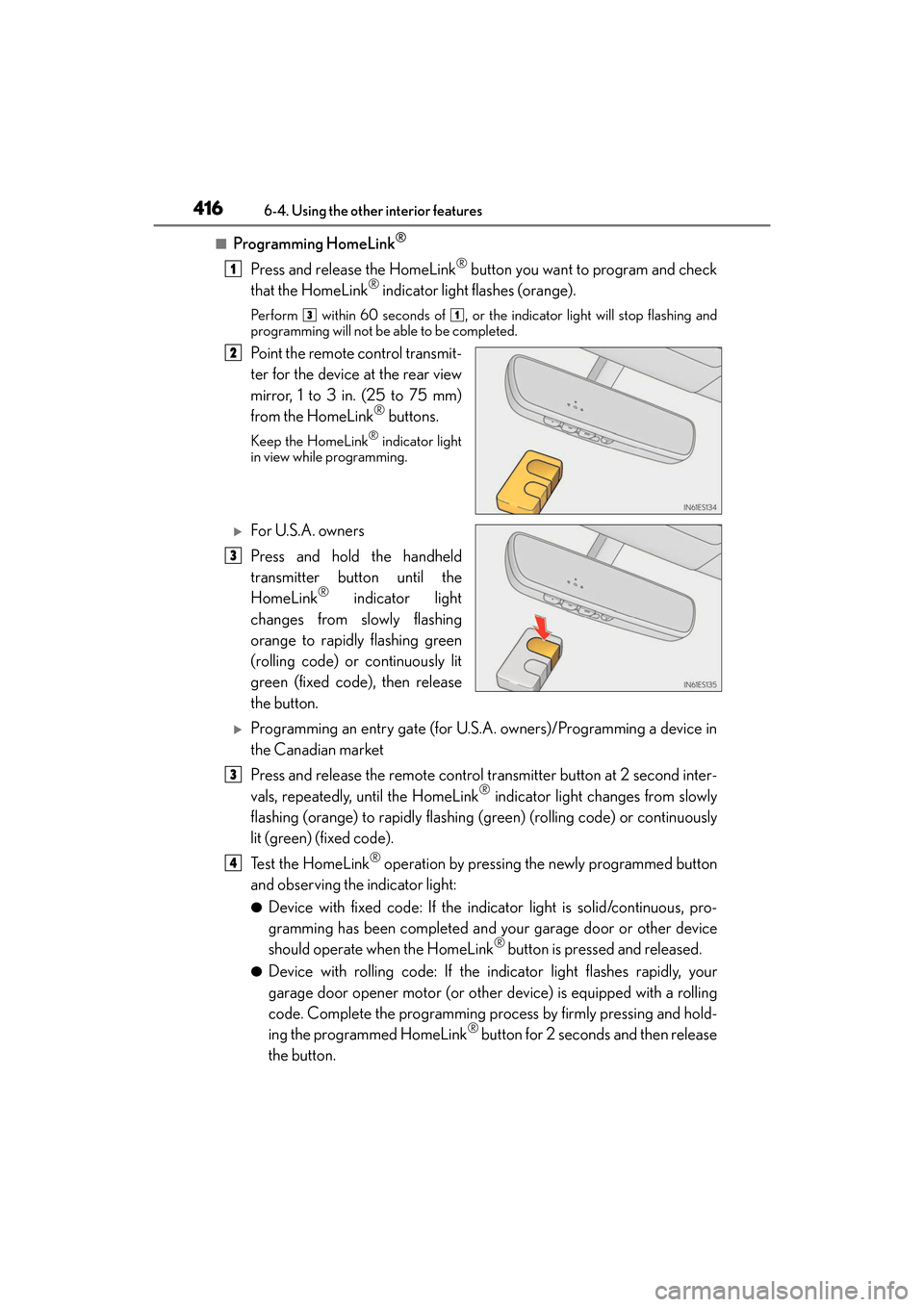
Press and release the HomeLink® button you want to program and check
that the HomeLink® indicator light flashes (orange).
Perform within 60 seconds of , or the indicator light will stop flashing and
programming will not be able to be completed.
Point the remote control transmit-
ter for the device at the rear view
mirror, 1 to 3 in. (25 to 75 mm)
from the HomeLink
® buttons.
Keep the HomeLink® indicator light
in view while programming.
XFor U.S.A. owners
Press and hold the handheld
transmitter button until the
HomeLink
® indicator light
changes from slowly flashing
orange to rapidly flashing green
(rolling code) or continuously lit
green (fixed code), then release
the button.
XProgramming an entry gate (for U.S.A. owners)/Programming a device in
the Canadian market
Press and release the remote control transmitter button at 2 second inter-
vals, repeatedly, until the HomeLink
® indicator light changes from slowly
flashing (orange) to rapidly flashing (green) (rolling code) or continuously
lit (green) (fixed code).
Te s t t h e H o m e L i n k
® operation by pressing the newly programmed button
and observing the indicator light:
●Device with fixed code: If the indicator light is solid/continuous, pro-
gramming has been completed and your garage door or other device
should operate when the HomeLink
® button is pressed and released.
●Device with rolling code: If the indicator light flashes rapidly, your
garage door opener motor (or other device) is equipped with a rolling
code. Complete the programming process by firmly pressing and hold-
ing the programmed HomeLink
® button for 2 seconds and then release
the button.
1
31
2
3
3
4
Page 420 of 612
418
ES300h_OM_OM33C75U_(U)6-4. Using the other interior features
■Enabling 2-way communication with a ga
rage door (only available for com-
patible devices)
When enabled, 2-way communication allows you to check the status of the
opening and closing of a garage door through indicators in your vehicle.
2-way communication is only available if the garage door opener motor used
is a compatible device. (To check device compatibility, refer to
www.HomeLink.com.)
Within 5 seconds after programming the garage door opener has been
completed, if the garage door opener motor is trained to HomeLink
®,
both garage door operation indicators will flash rapidly (green) and the
light on the garage door opener motor will blink twice, indicating that 2-
way communication is enabled.
If the indicators do not flash, perform and within the first 10 presses of
the HomeLink
® button after programming has been completed.
Press a programmed HomeLink
® button to operate a garage door.
Within 1 minute of pressing the HomeLink
® button, after the garage door
operation has stopped, press the “Learn” or “Smart” button on the garage
door opener motor. Within 5 seconds of the establishment of 2-way com-
munication with the garage door opener, both garage door operation indi-
cators in the vehicle will flash rapidly (green) and the light on the garage
door opener motor will blink twice, indicating that 2-way communication is
enabled.
■Reprogramming a single HomeLink® button
When the following procedure is performed, buttons which already have
devices registered to them can be overwritten: With one hand, press and hold the desired HomeLink
® button.
When the HomeLink
® indicator starts flashing (orange), continue to hold
the HomeLink® button and perform “Programming HomeLink®” (it
takes 20 seconds for the HomeLink® indicator to start flashing).
Press the appropriate HomeLink
® button. The HomeLink® indicator light
should turn on.
Operating HomeLink®
1
23
2
3
1
2
1
Page 421 of 612
ES300h_OM_OM33C75U_(U)
4196-4. Using the other interior features
6
Interior features
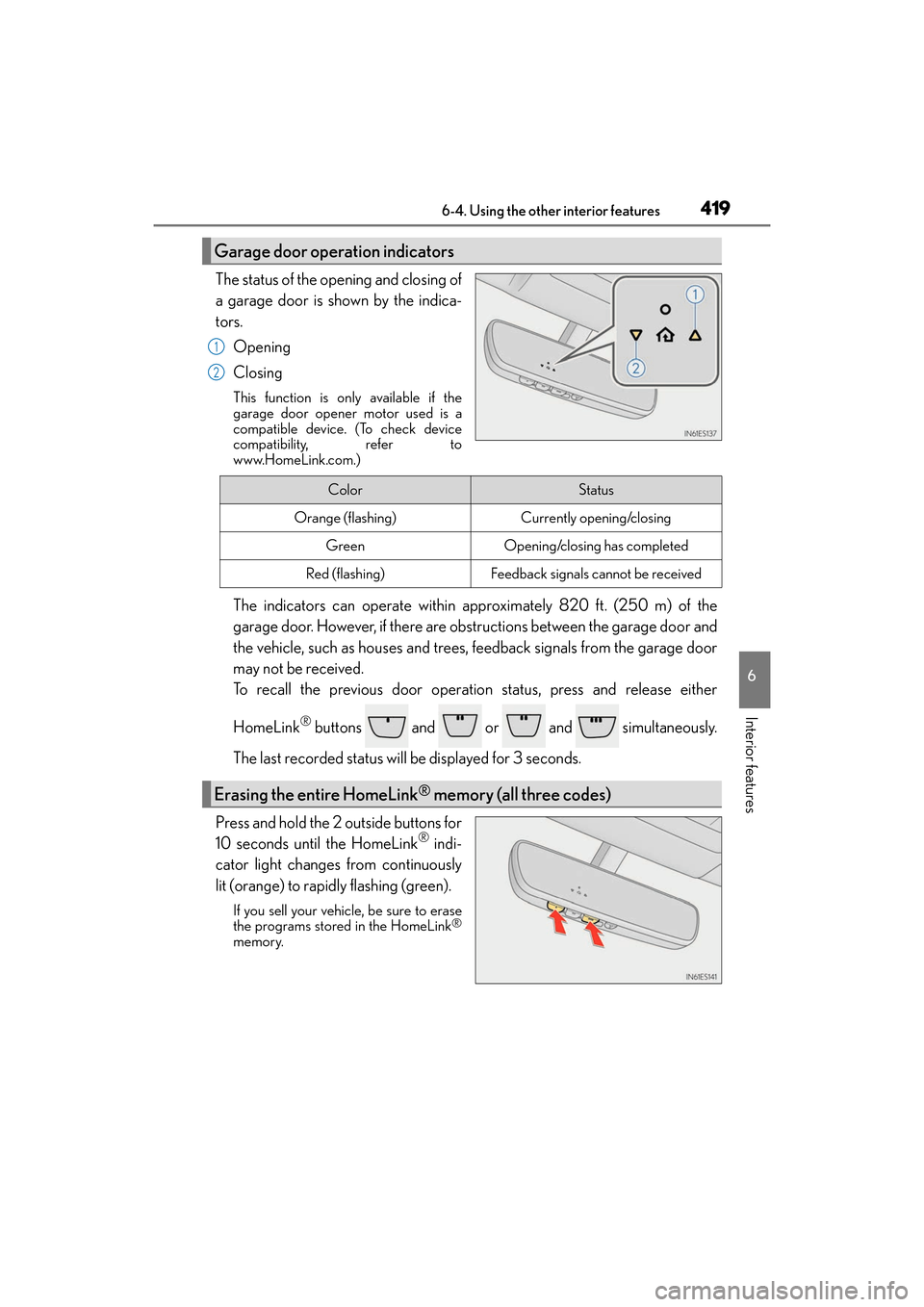
The status of the opening and closing of
a garage door is shown by the indica-
tors.Opening
Closing
This function is only available if the
garage door opener motor used is a
compatible device. (To check device
compatibility, refer to
www.HomeLink.com.)
The indicators can operate within approximately 820 ft. (250 m) of the
garage door. However, if there are obstructions between the garage door and
the vehicle, such as houses and trees, feedback signals from the garage door
may not be received.
To recall the previous door operation status, press and release either
HomeLink
® buttons and or and simultaneously.
The last recorded status will be displayed for 3 seconds.
Press and hold the 2 outside buttons for
10 seconds until the HomeLink
® indi-
cator light changes from continuously
lit (orange) to rapidly flashing (green).
If you sell your vehicle, be sure to erase
the programs stored in the HomeLink®
memory.
Garage door operation indicators
1
2
ColorStatus
Orange (flashing)Currently opening/closing
GreenOpening/closing has completed
Red (flashing)Feedback signals cannot be received
Erasing the entire HomeLink® memory (all three codes)
Page 428 of 612
426
ES300h_OM_OM33C75U_(U)6-4. Using the other interior features
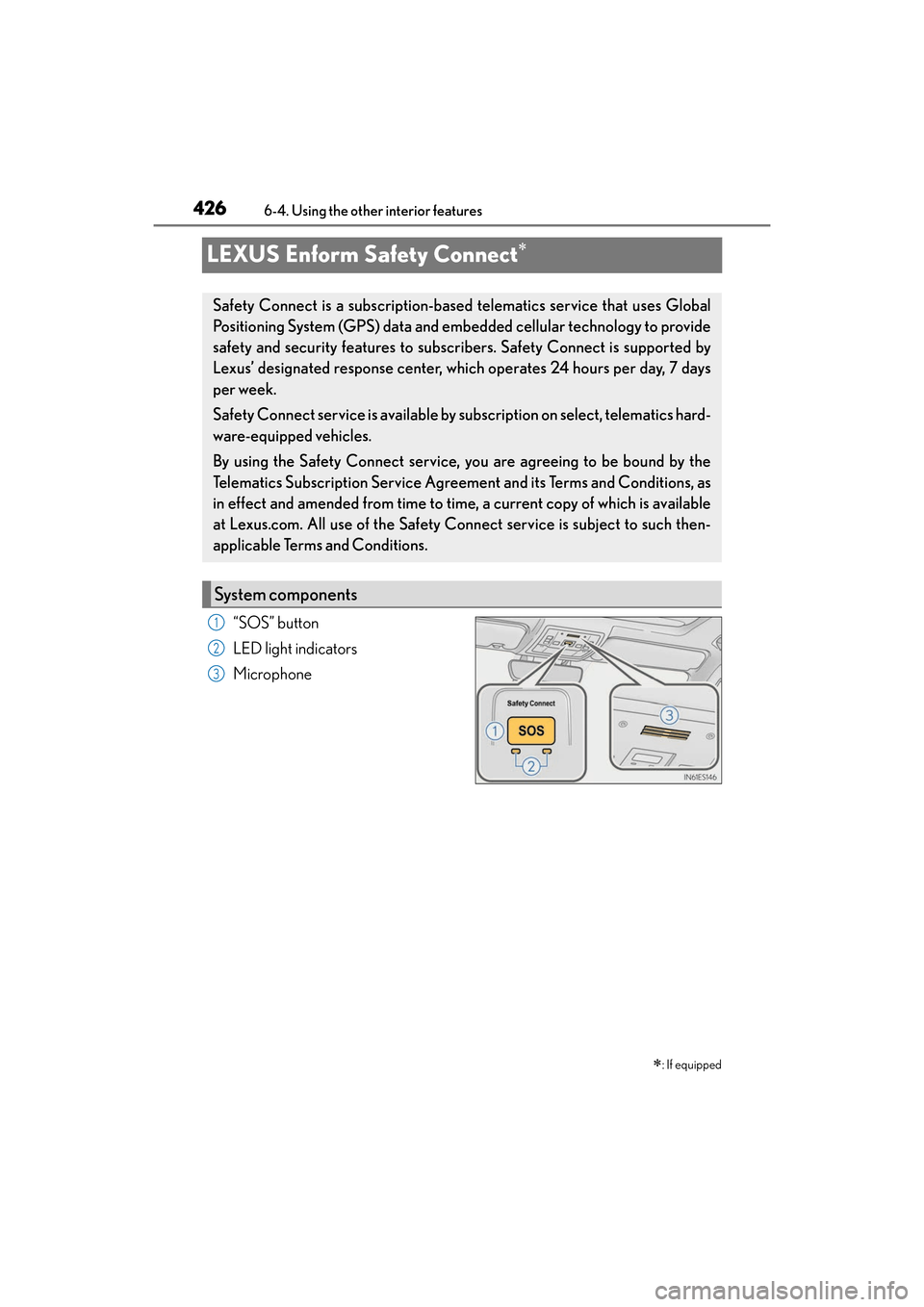
LEXUS Enform Safety Connect∗
“SOS” button
LED light indicators
Microphone
∗: If equipped
Safety Connect is a subscription-based telematics service that uses Global
Positioning System (GPS) data and embedded cellular technology to provide
safety and security features to subscr
ibers. Safety Connect is supported by
Lexus’ designated response center, which operates 24 hours per day, 7 days
per week.
Safety Connect service is available by subscription on select, telematics hard-
ware-equipped vehicles.
By using the Safety Connect service, you are agreeing to be bound by the
Telematics Subscription Service Agreement and its Terms and Conditions, as
in effect and amended from time to time , a current copy of which is available
at Lexus.com. All use of the Safety Connect service is subject to such then-
applicable Terms and Conditions.
System components
1
2
3