Radar Lexus ES300h 2017 User Guide
[x] Cancel search | Manufacturer: LEXUS, Model Year: 2017, Model line: ES300h, Model: Lexus ES300h 2017Pages: 612, PDF Size: 14.05 MB
Page 207 of 612
205
ES300h_OM_OM33C75U_(U)4-5. Using the driving support systems
4
Driving
PCS (Pre-Collision System)∗
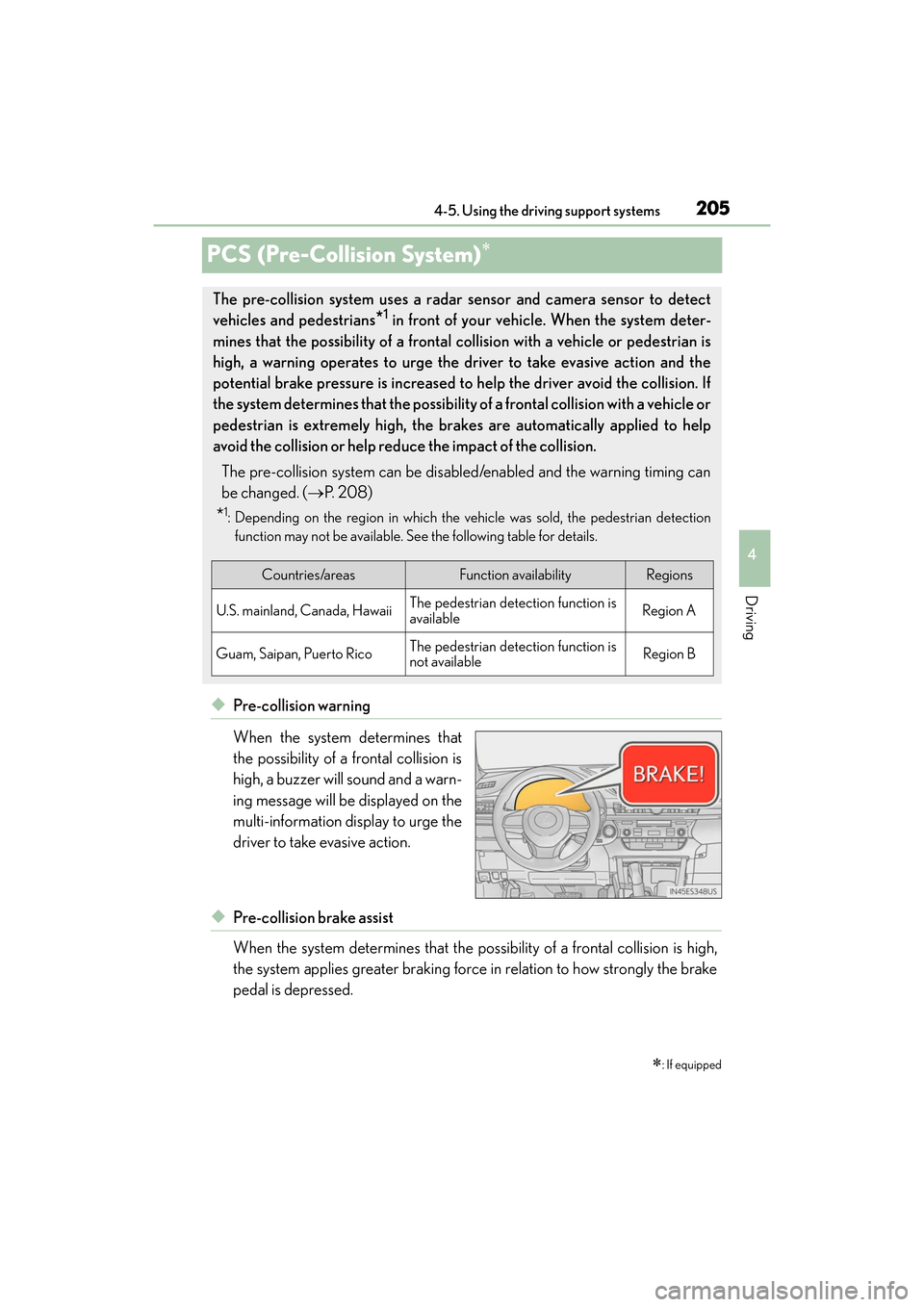
◆Pre-collision warning
When the system determines that
the possibility of a frontal collision is
high, a buzzer will sound and a warn-
ing message will be displayed on the
multi-information display to urge the
driver to take evasive action.
◆Pre-collision brake assist
When the system determines that the possi
bility of a frontal collision is high,
the system applies greater braking force in relation to how strongly the brake
pedal is depressed.
∗: If equipped
The pre-collision system uses a radar sensor and camera sensor to detect
vehicles and pedestrians
*1 in front of your vehicle. When the system deter-
mines that the possibility of a frontal collision with a vehicle or pedestrian is
high, a warning operates to urge the driver to take evasive action and the
potential brake pressure is increased to help the driver avoid the collision. If
the system determines that the possibility of a frontal collision with a vehicle or
pedestrian is extremely high, the brakes are automatically applied to help
avoid the collision or help reduce the impact of the collision.
The pre-collision system can be disabled/enabled and the warning timing can
be changed. ( →P. 2 0 8 )
*1: Depending on the region in which the vehicle was sold, the pedestrian detection
function may not be available. See the following table for details.
Countries/areasFunction availabilityRegions
U.S. mainland, Canada, HawaiiThe pedestrian detection function is
availableRegion A
Guam, Saipan, Puerto RicoThe pedestrian detection function is
not availableRegion B
Page 209 of 612
ES300h_OM_OM33C75U_(U)
2074-5. Using the driving support systems
4
Driving
WA R N I N G
■When to disable the pre-collision system
In the following situations, disable the system, as it may not operate properly, possibly
leading to an accident resulting in death or serious injury:
●When the vehicle is being towed
●When your vehicle is towing another vehicle
●When transporting the vehicle via truck, boat, train or similar means of transportation
●When the vehicle is raised on a lift with the hybrid system on and the tires are allowed
to rotate freely
●When inspecting the vehicle using a drum tester such as a chassis dynamometer or
speedometer tester, or when using an on vehicle wheel balancer
●When a strong impact is applied to the front bumper or front grille, due to an accident
or other reasons
●If the vehicle cannot be driven in a stable manner, such as when the vehicle has been
in an accident or is malfunctioning
●When the vehicle is driven in a sporty manner or off-road
●When the tires are not properly inflated
●When the tires are very worn
●When tires of a size other than specified are installed
●When tire chains are installed
●When a compact spare tire is used
●If equipment (snow plow, etc.) that may obstruct the radar sensor or camera sensor is
temporarily installed to the vehicle
Page 216 of 612
214
ES300h_OM_OM33C75U_(U)4-5. Using the driving support systems
■Situations in which the system may not operate properly
●In some situations such as the following, a vehicle may not be detected by the radar
sensor and camera sensor, preventing the system from operating properly:
• If an oncoming vehicle is approaching your vehicle
• If a vehicle ahead is a motorcycle or bicycle
• When approaching the side or front of a vehicle
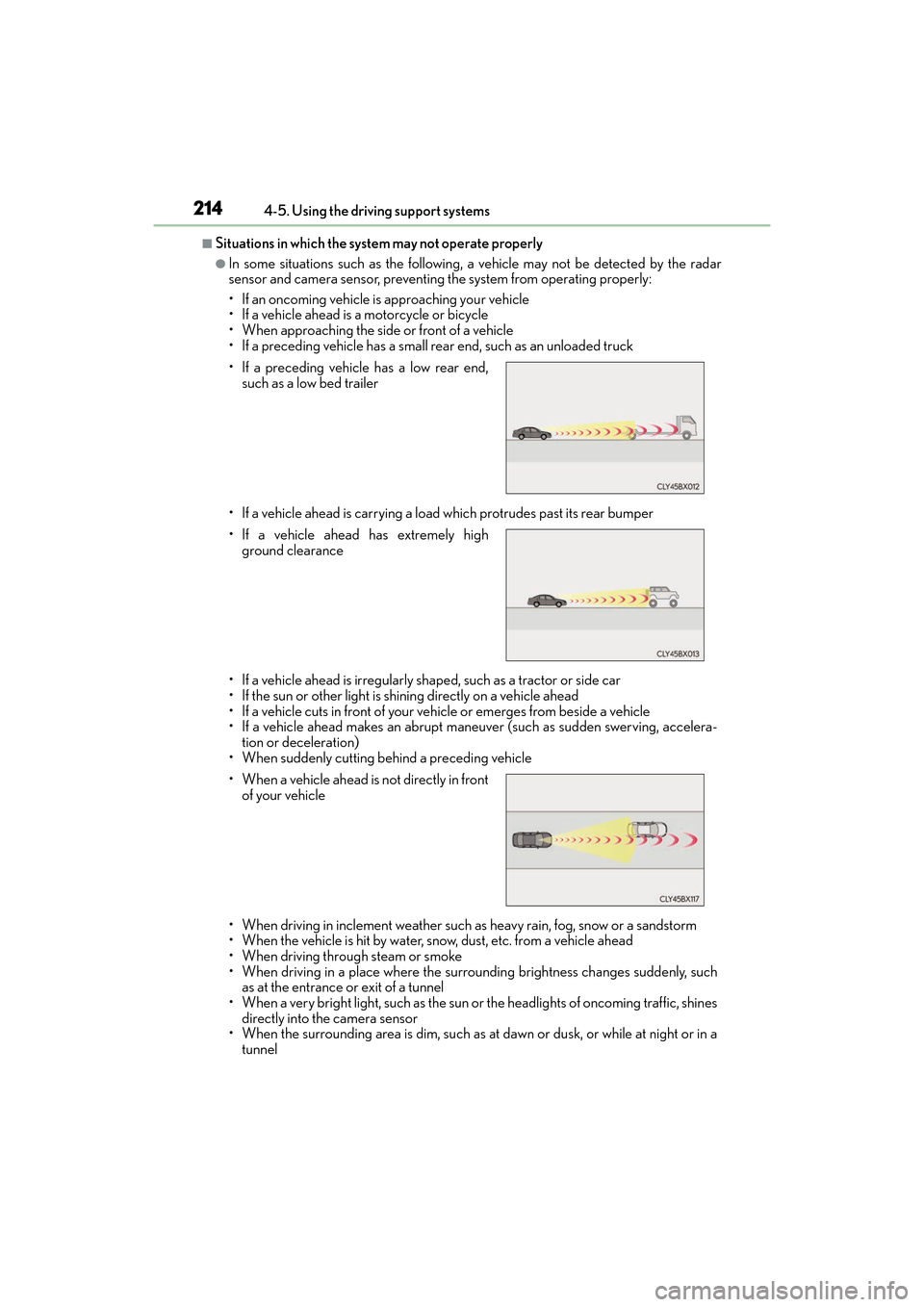
• If a preceding vehicle has a small rear end, such as an unloaded truck
• If a vehicle ahead is carrying a load which protrudes past its rear bumper
• If a vehicle ahead is irregularly shaped, such as a tractor or side car
• If the sun or other light is shining directly on a vehicle ahead
• If a vehicle cuts in front of your vehicle or emerges from beside a vehicle
• If a vehicle ahead makes an abrupt maneuver (such as sudden swerving, accelera-
tion or deceleration)
• When suddenly cutting behind a preceding vehicle
• When driving in inclement weather such as heavy rain, fog, snow or a sandstorm
• When the vehicle is hit by water, snow, dust, etc. from a vehicle ahead
• When driving through steam or smoke
• When driving in a place where the surrou nding brightness changes suddenly, such
as at the entrance or exit of a tunnel
• When a very bright light, such as the sun or the headlights of oncoming traffic, shines directly into the camera sensor
• When the surrounding area is dim, such as at dawn or dusk, or while at night or in a
tunnel
• If a preceding vehicle has a low rear end,
such as a low bed trailer
• If a vehicle ahead has extremely high ground clearance
• When a vehicle ahead is not directly in front of your vehicle
Page 217 of 612
ES300h_OM_OM33C75U_(U)
2154-5. Using the driving support systems
4
Driving
• After the hybrid system has started the vehicle has not been driven for a certainamount of time
• While making a left/right turn and for a few seconds after making a left/right turn
• While driving on a curve and for a few seconds after driving on a curve
• If your vehicle is skidding
• If the wheels are misaligned
• If a wiper blade is blocking the camera sensor
• The vehicle is wobbling.
• The vehicle is being driven at extremely high speeds.
• When driving on a hill
• If the radar sensor or ca mera sensor is misaligned
●In some situations such as the following, sufficient braking force may not be obtained,
preventing the system from performing properly:
• If the braking functions cannot operate to their full extent, such as when the brake
parts are extremely cold, extremely hot, or wet
• If the vehicle is not properly maintained (brakes or tires are excessively worn, improper tire inflation pressure, etc.)
• When the vehicle is being driven on a gravel road or other slippery surface
●Some pedestrians such as the following may not be detected by the radar sensor and
camera sensor, preventing the system from operating properly
*2:
• Pedestrians shorter than approximately 3.2 ft. (1 m) or taller than approximately 6.5 ft. (2 m)
• Pedestrians wearing oversized clothing (a rain coat, long skirt, etc.), making their sil-
houette obscure
• Pedestrians who are carrying large baggage, holding an umbrella, etc., hiding part of their body
• Pedestrians who are bending forward or squatting
• Pedestrians who are pushing a stroller, wheelchair, bicycle or other vehicle
• Groups of pedestrians which are close together
• Pedestrians who are wearing white and look extremely bright
• Pedestrians in the dark, such as at night or while in a tunnel
• Pedestrians whose clothing appears to be nearly the same color or brightness as their surroundings
• Pedestrians near walls, fences, guardrails, or large objects
• Pedestrians who are on a metal object (manhole cover, steel plate, etc.) on the road
• Pedestrians who are walking fast
• Pedestrians who are changing speed abruptly
• Pedestrians running out from behind a vehicle or a large object
• Pedestrians who are extremely close to the side of the vehicle (outside rear view mirror, etc.)
*2: For countries/areas specified as Region B ( →P. 205), the pedestrian detection
function may not be available.
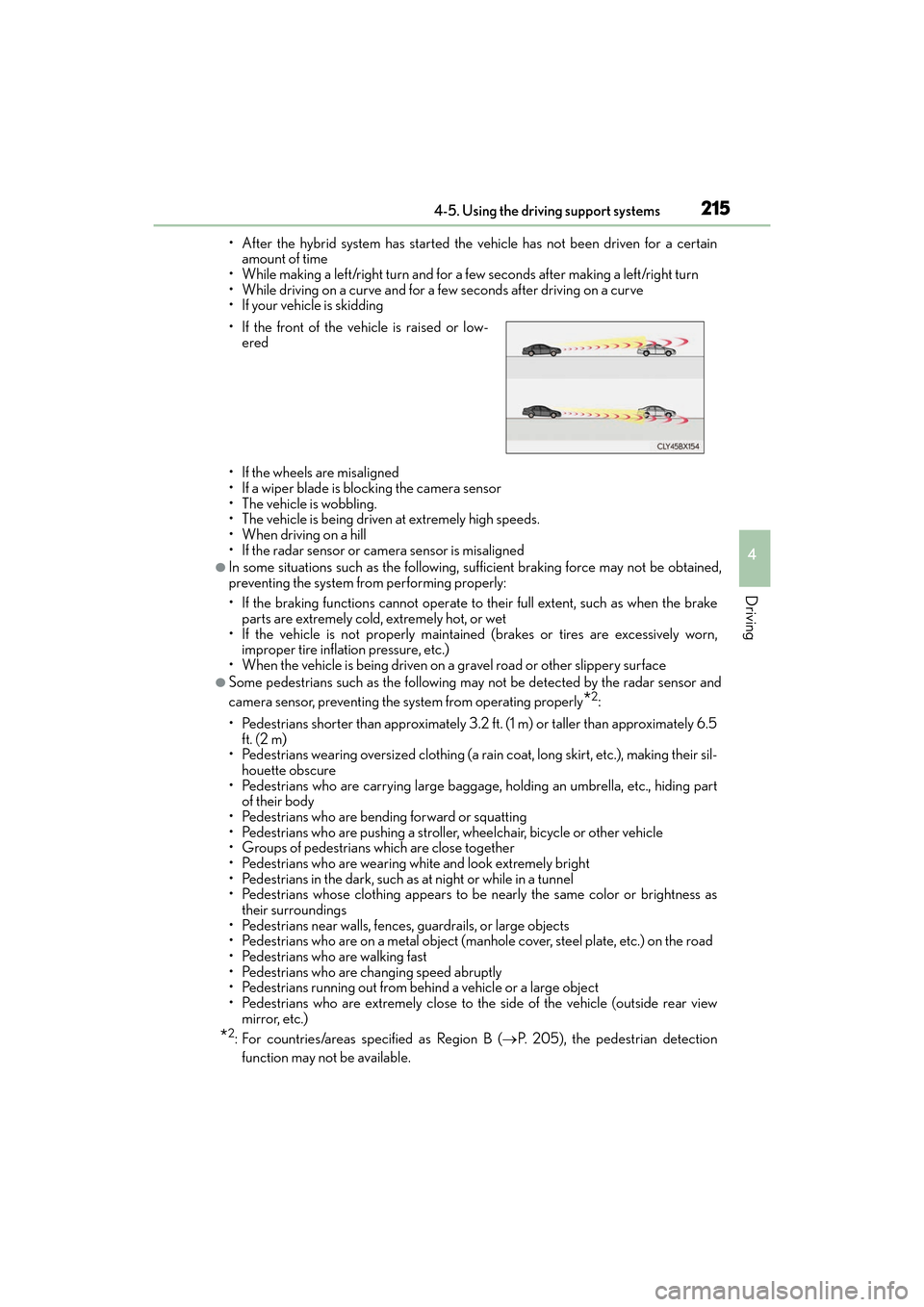
• If the front of the vehicle is raised or low-
ered
Page 218 of 612
216
ES300h_OM_OM33C75U_(U)4-5. Using the driving support systems
■If the PCS warning light flashes and a warnin
g message is displayed on the multi-infor-
mation display
The pre-collision system may be temporarily unavailable or there may be a malfunction
in the system.
●In the following situations, th e warning light will turn off, the message will disappear and
the system will become operational when normal operating conditions return:
• When the radar sensor or camera sensor or the area around either sensor is hot, such as in the sun
• When the radar sensor or camera sensor or the area around either sensor is cold,
such as in an extremely cold environment
• When the radar sensor or front grille emblem is dirty or covered with snow, etc.
• When the part of the windshield in front of the camera sensor is fogged up or cov-
ered with condensation or ice (Defogging the windshield: →P. 3 9 2 )
• If the camera sensor is obstructed, such as when the hood is open or a sticker is
attached to the windshield near the camera sensor
●If the PCS warning light continues to flash or the warning message does not disappear,
the system may be malfunctioning. Have the vehicle inspected by your Lexus dealer
immediately.
■If VSC is disabled
●If VSC is disabled ( →P. 278), the pre-collision brake as sist and pre-collision braking
functions are also disabled.
●The PCS warning light will turn on and “V SC Turned Off Pre-Collision Brake System
Unavailable” will be displayed on the multi-information display.
Page 228 of 612
226
ES300h_OM_OM33C75U_(U)4-5. Using the driving support systems
Dynamic radar cruise control∗
In vehicle-to-vehicle distance control mode, the vehicle automatically acceler-
ates and decelerates to match the speed changes of the preceding vehicle even
if the accelerator pedal is not depresse
d. In constant speed control mode, the
vehicle runs at a fixed speed.
Use the dynamic radar cruise control on freeways and highways.
●Vehicle-to-vehicle distance control mode ( →P. 2 2 9 )
●Constant speed control mode ( →P. 2 3 4 )
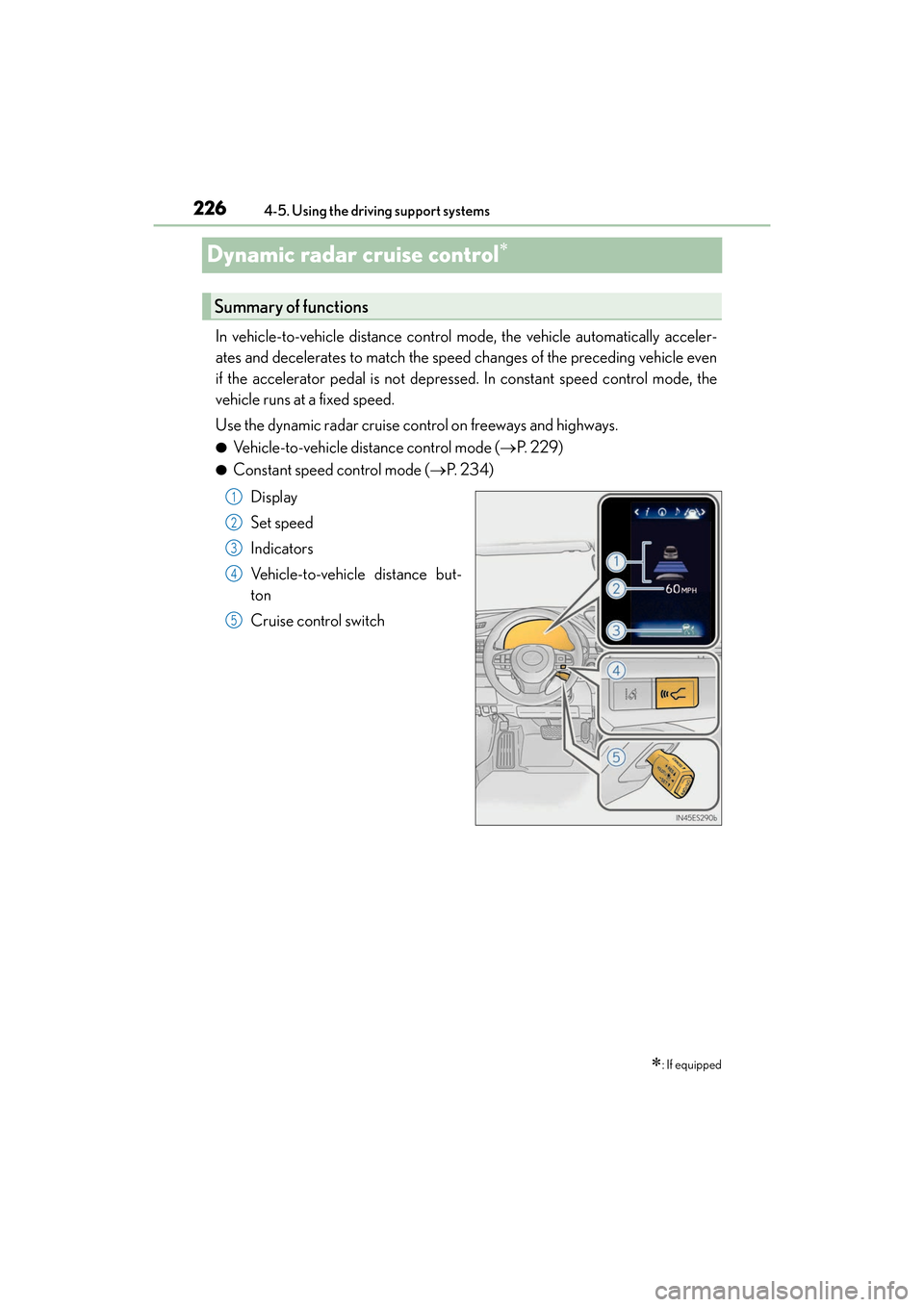
Display
Set speed
Indicators
Vehicle-to-vehicle distance but-
ton
Cruise control switch
∗: If equipped
Summary of functions
1
2
3
4
5
Page 229 of 612
ES300h_OM_OM33C75U_(U)
2274-5. Using the driving support systems
4
Driving
WA R N I N G
■Before using dynamic radar cruise control
Driving safely is the sole responsibility of the driver. Do not rely solely on the system,
and drive safely by always paying careful attention to your surroundings.
The dynamic radar cruise control provides driving assistance to reduce the driver’s
burden. However, there are limitations to the assistance provided.
Even when the system is functioning normally, the condition of the preceding vehicle as
detected by the system may differ from the condition observed by the driver. There-
fore, the driver must always remain alert, assess the danger of each situation and drive
safely. Relying on this system or assuming the system ensures safety while driving can
lead to an accident, resulting in death or serious injury.
■Cautions regarding the driving assist systems
Observe the following precautions, as there are limitations to the assistance provided
by the system.
Failure to do so may cause an accident resulting in death or serious injury.
●Assisting the driver to measure following distance
The dynamic radar cruise control is only intended to help the driver in determining
the following distance between the driver’s own vehicle and a designated vehicle
traveling ahead. It is not a mechanism that a llows careless or inattentive driving, and it
is not a system that can assist the driver in low-visibility conditions. It is still necessary
for driver to pay close attention to the vehicle’s surroundings.
●Assisting the driver to judg e proper following distance
The dynamic radar cruise control determines whether the following distance
between the driver’s own vehicle and a design ated vehicle traveling ahead is within a
set range. It is not capable of making any other type of judgement. Therefore, it is
absolutely necessary for the driver to remain vigilant and to determine whether or not
there is a possibility of dang er in any given situation.
●Assisting the driver to operate the vehicle
The dynamic radar cruise control has limited capability to prevent or avoid a collision
with a vehicle traveling ahead. Therefore, if there is ever any danger, the driver must
take immediate and direct control of the vehicle and act appropriately in order to
ensure the safety of all involved.
■To avoid inadvertent dynamic radar cruise control activation
Switch the dynamic radar cruise control off using the “ON/OFF” button when not in
use.
Page 230 of 612
228
ES300h_OM_OM33C75U_(U)4-5. Using the driving support systems
WA R N I N G
■Situations unsuitable for dynamic radar cruise control
Do not use dynamic radar cruise control in any of the following situations.
Doing so may result in inappropriate speed control and could cause an accident result-
ing in death or serious injury.
●Roads where there are pedestrians, cyclists, etc.
●In heavy traffic
●On roads with sharp bends
●On winding roads
●On slippery roads, such as those covered with rain, ice or snow
●On steep downhills, or where there are su
dden changes between sharp up and down
gradients
Vehicle speed may exceed the set speed when driving down a steep hill.
●At entrances to freeways and highways
●When weather conditions are bad enough that they may prevent the sensors from
detecting correctly (fog, snow, sandstorm, heavy rain, etc.)
●When there is rain, snow, etc. on the front surface of the radar sensor or camera sen-
sor
●In traffic conditions that require frequent repeated acceleration and deceleration
●During emergency towing
●When an approach warning buzzer is heard often
Page 231 of 612
ES300h_OM_OM33C75U_(U)
2294-5. Using the driving support systems
4
Driving
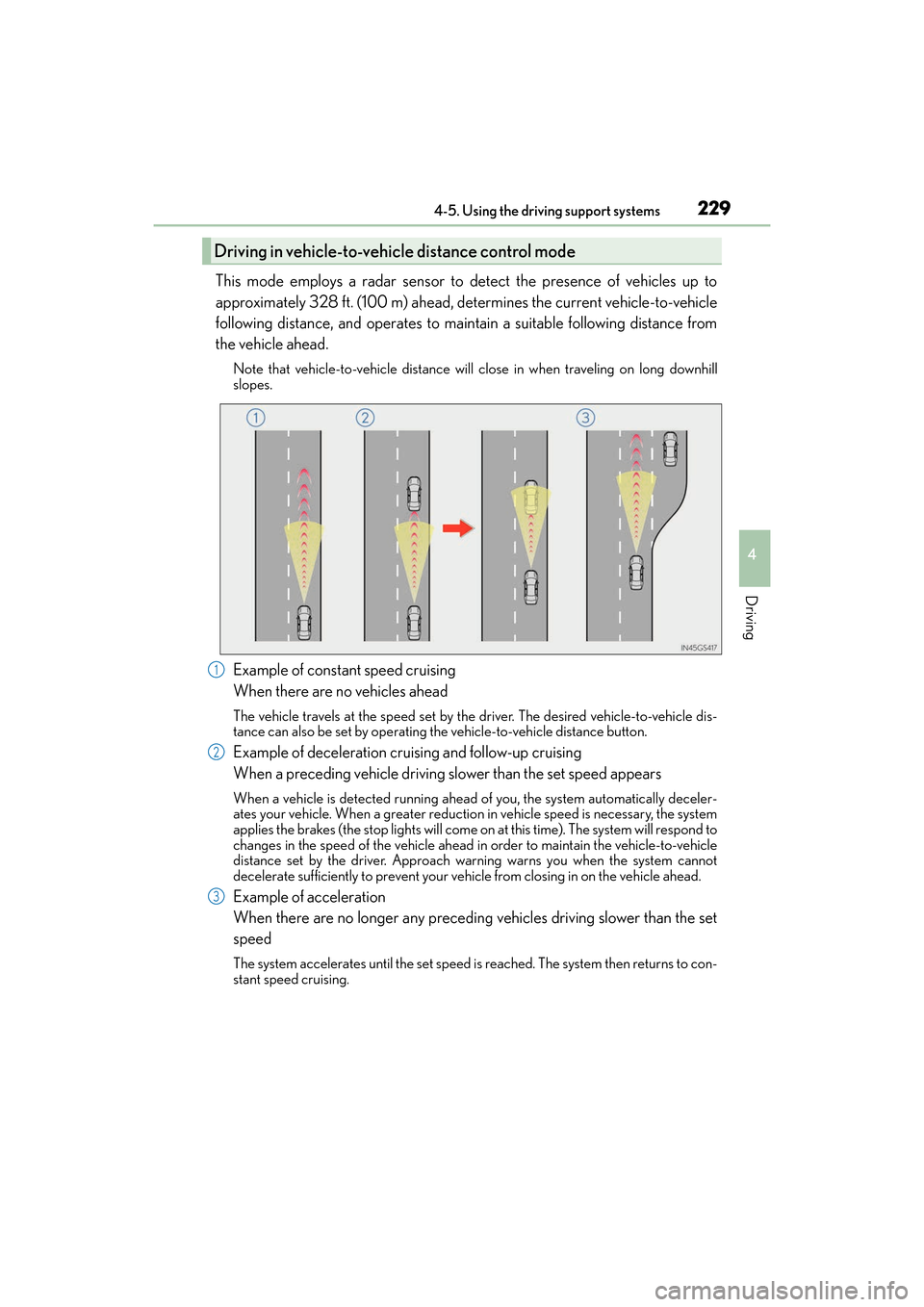
This mode employs a radar sensor to detect the presence of vehicles up to
approximately 328 ft. (100 m) ahead, determines the current vehicle-to-vehicle
following distance, and operates to maintain a suitable following distance from
the vehicle ahead.
Note that vehicle-to-vehicle distance will close in when traveling on long downhill
slopes.
Example of constant speed cruising
When there are no vehicles ahead
The vehicle travels at the speed set by the driver. The desired vehicle-to-vehicle dis-
tance can also be set by operating the vehicle-to-vehicle distance button.
Example of deceleration cruising and follow-up cruising
When a preceding vehicle driving slower than the set speed appears
When a vehicle is detected running ahead of you, the system automatically deceler-
ates your vehicle. When a greater reduction in vehicle speed is necessary, the system
applies the brakes (the stop lights will come on at this time). The system will respond to
changes in the speed of the vehicle ahead in order to maintain the vehicle-to-vehicle
distance set by the driver. Approach warning warns you when the system cannot
decelerate sufficiently to prevent your vehicle from closing in on the vehicle ahead.
Example of acceleration
When there are no longer any preceding vehicles driving slower than the set
speed
The system accelerates until the set speed is reached. The system then returns to con-
stant speed cruising.
Driving in vehicle-to-vehicle distance control mode
1
2
3
Page 232 of 612
230
ES300h_OM_OM33C75U_(U)4-5. Using the driving support systems
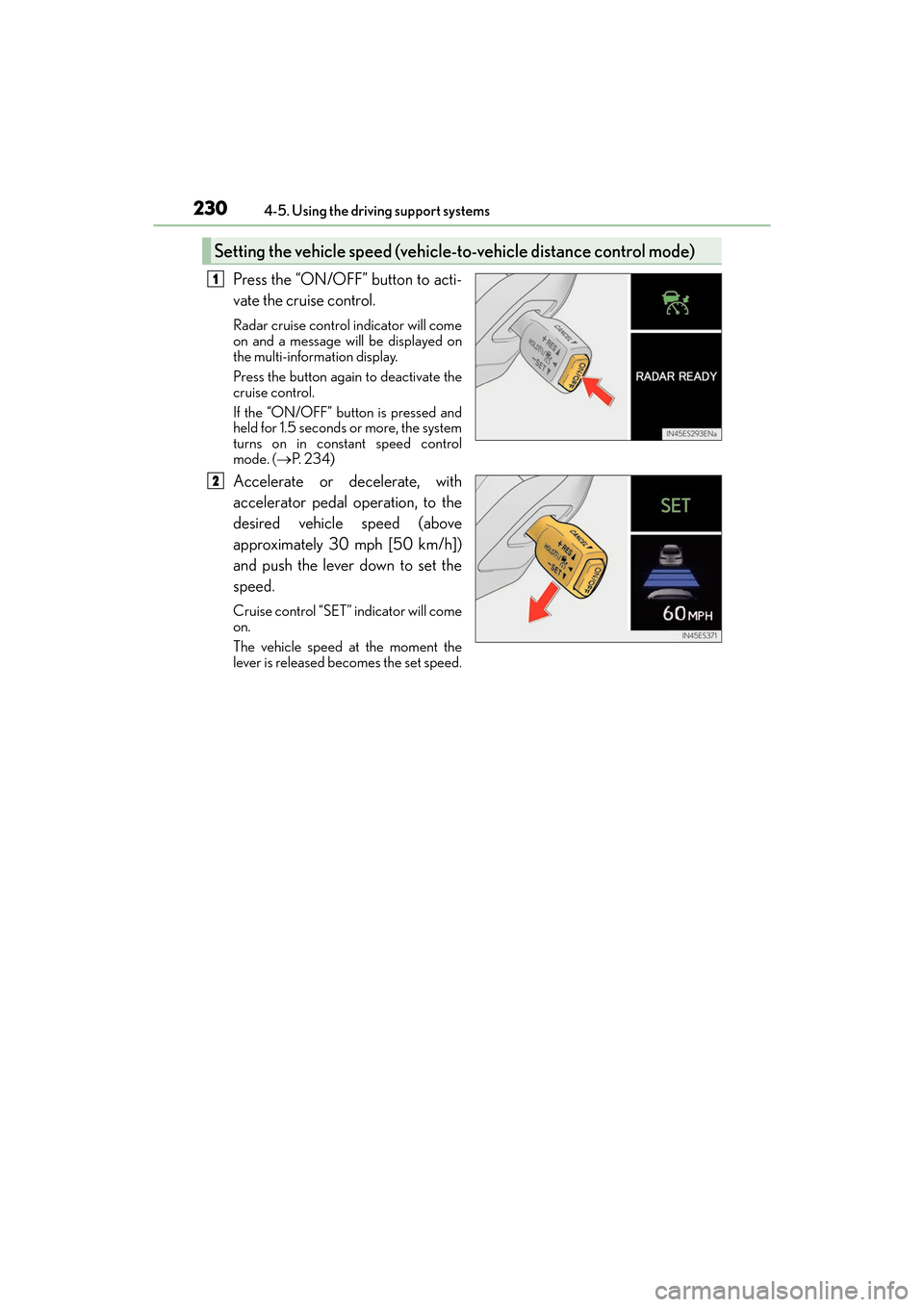
Press the “ON/OFF” button to acti-
vate the cruise control.
Radar cruise control indicator will come
on and a message will be displayed on
the multi-information display.
Press the button again to deactivate the
cruise control.
If the “ON/OFF” button is pressed and
held for 1.5 seconds or more, the system
turns on in constant speed control
mode. (
→P. 2 3 4 )
Accelerate or decelerate, with
accelerator pedal operation, to the
desired vehicle speed (above
approximately 30 mph [50 km/h])
and push the lever down to set the
speed.
Cruise control “SET” indicator will come
on.
The vehicle speed at the moment the
lever is released becomes the set speed.
Setting the vehicle speed (vehicle -to-vehicle distance control mode)
1
2