battery Lexus ES300h 2017 User Guide
[x] Cancel search | Manufacturer: LEXUS, Model Year: 2017, Model line: ES300h, Model: Lexus ES300h 2017Pages: 612, PDF Size: 14.05 MB
Page 81 of 612
791-3. Theft deterrent system
ES300h_OM_OM33C75U_(U)
1
For safety and security
■System maintenance
The vehicle has a maintenance-free type alarm system.
■Items to check before locking the vehicle
To prevent unexpected triggering of the alarm and vehicle theft, make sure of the follow-
ing:
●Nobody is in the vehicle.
●The windows and moon roof are closed before the alarm is set.
●No valuables or other personal items are left in the vehicle.
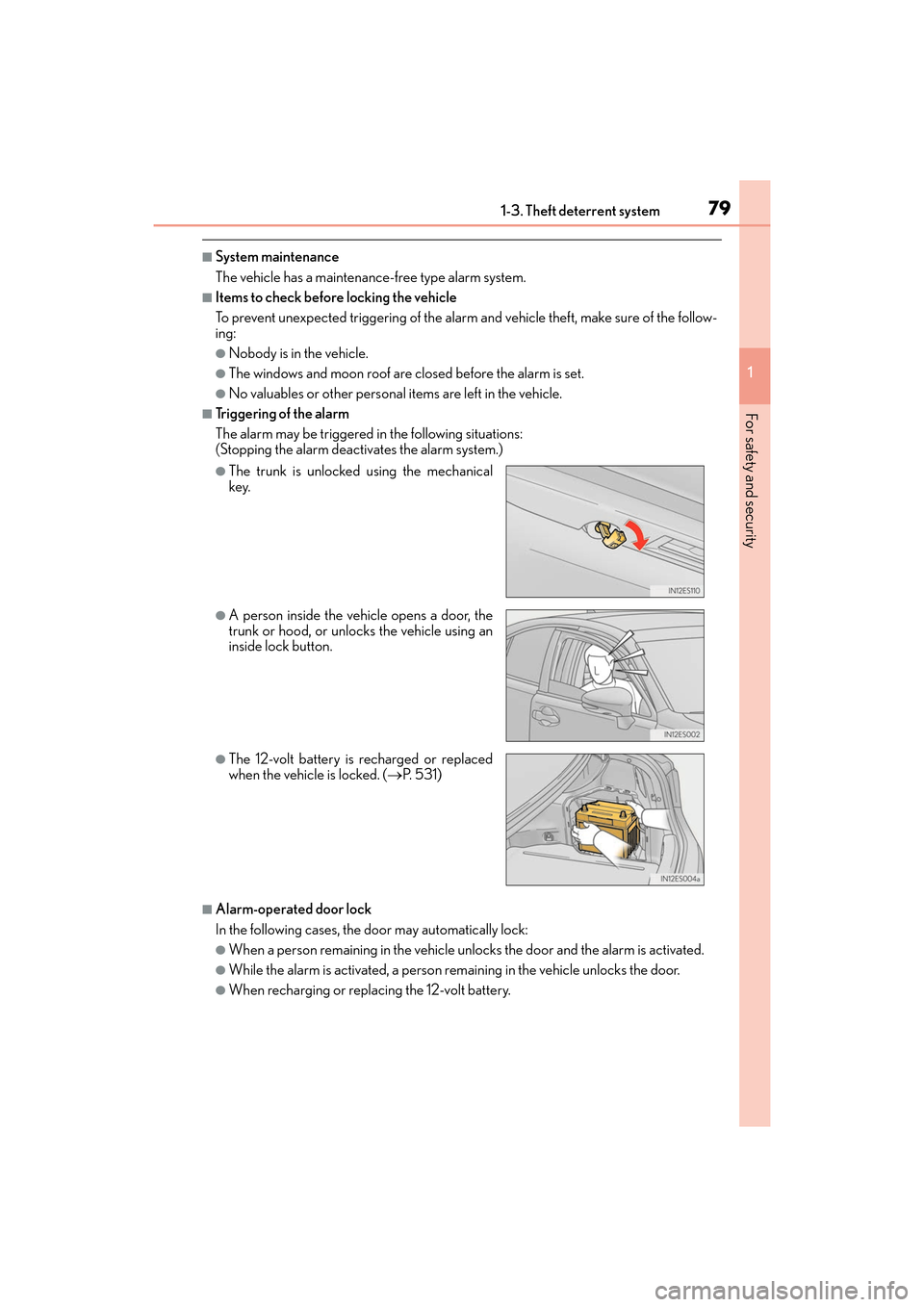
■Triggering of the alarm
The alarm may be triggered in the following situations:
(Stopping the alarm deactivates the alarm system.)
■Alarm-operated door lock
In the following cases, the door may automatically lock:
●When a person remaining in the vehicle unlocks the door and the alarm is activated.
●While the alarm is activated, a person remaining in the vehicle unlocks the door.
●When recharging or replacing the 12-volt battery.
●The trunk is unlocked using the mechanical
key.
●A person inside the vehicle opens a door, the
trunk or hood, or unlocks the vehicle using an
inside lock button.
●The 12-volt battery is recharged or replaced
when the vehicle is locked. (→P. 5 3 1 )
Page 90 of 612
88
ES300h_OM_OM33C75U_(U)2. Instrument cluster
■The meters and display illuminate when
The power switch is in ON mode.
■Instrument panel brightness adjustment
The instrument panel brightness levels when
the tail lights are on and off can be adjusted
individually. However, when the surroundings ar e bright (daytime, etc.), turning on the tail
lights will not change the instrument panel brightness. At this time, any adjustments made
to the instrument panel brightness levels w ill be applied to both settings at once.
■Limitation of brightness adjustment
The brightness of the instrument panel lights is automatically adjusted based on the light
sensor detecting how bright the surroundings are. However, if the instrument panel
brightness has been manually set to either the brightest or darkest setting, the automatic
adjustment will not be performed.
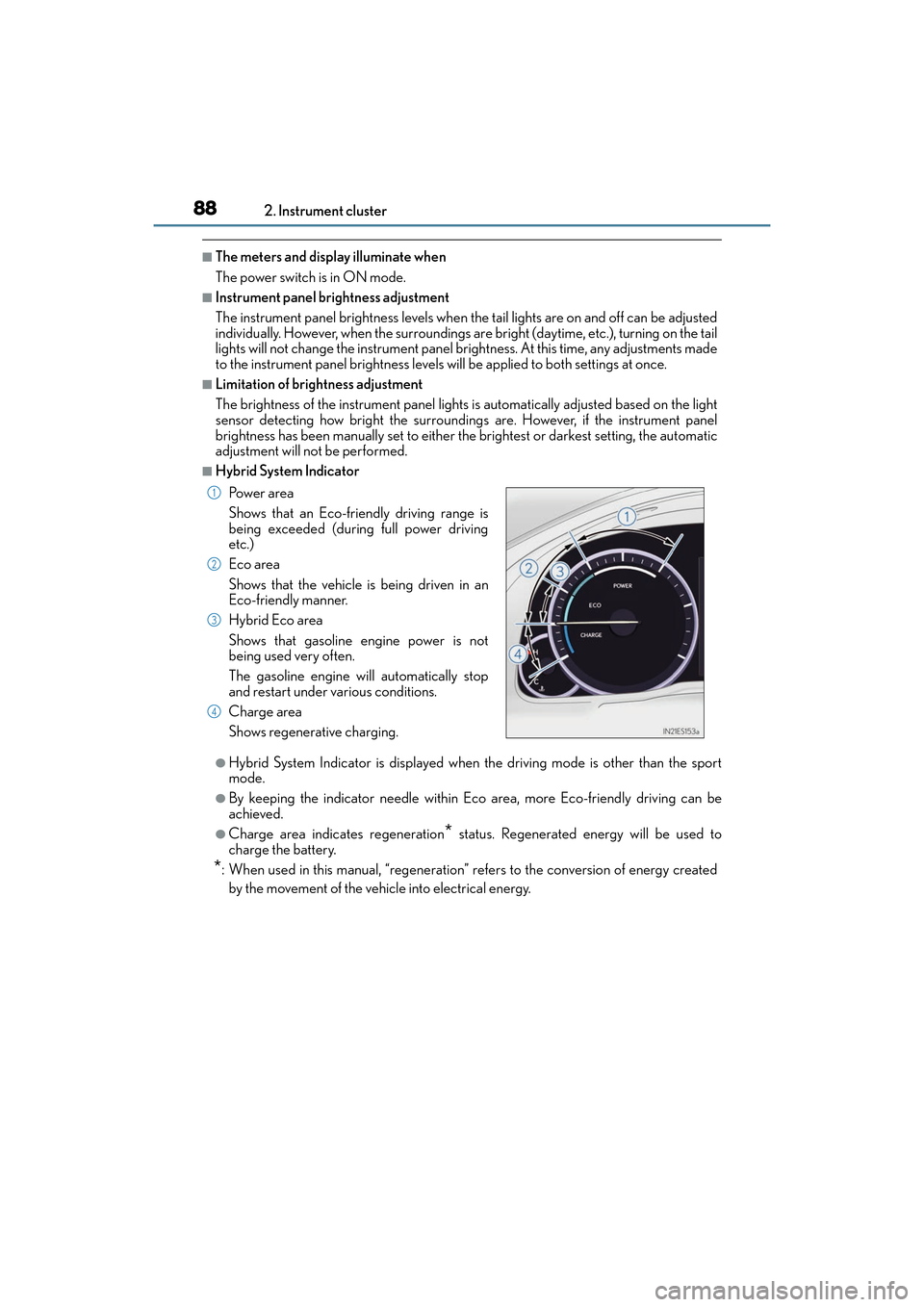
■Hybrid System Indicator
●Hybrid System Indicator is displayed when the driving mode is other than the sport
mode.
●By keeping the indicator need le within Eco area, more Eco-friendly driving can be
achieved.
●Charge area indicates regeneration* status. Regenerated energy will be used to
charge the battery.
*: When used in this manual, “regeneration” re fers to the conversion of energy created
by the movement of the vehicle into electrical energy. Po w e r a r e a
Shows that an Eco-friendly driving range is
being exceeded (during full power driving
etc.)
Eco area
Shows that the vehicle is being driven in an
Eco-friendly manner.
Hybrid Eco area
Shows that gasoline engine power is not
being used very often.
The gasoline engine will automatically stop
and restart under various conditions.
Charge area
Shows regenerative charging.
1
2
3
4
Page 97 of 612
ES300h_OM_OM33C75U_(U)
952. Instrument cluster
2
Instrument cluster
■System check display
After turning the power switch to ON mode, opening image is displayed while system
operation is checked. When the system check is complete, the normal screen will return.
■Suspension of the settings display
In the following situations, the settings display using the meter control switches will be
suspended.
●When a warning message appears on the multi-information display
●When the vehicle begins to move
■Tire inflation pressure
●It may take a few minutes to display the tire inflation pressure after the power switch is
turned to ON mode. It may also take a few minutes to display the tire inflation pressure
after inflation pressure has been adjusted.
●“---” may be displayed if the tire information cannot be determined due to unfavorable
radio wave conditions.
●Tire inflation pressure changes with temperature. The displayed values may also be dif-
ferent from the values measured using a tire pressure gauge.
■When disconnecting and reconnecting 12-volt battery terminals
The drive information will be reset.
■Liquid crystal display
→P. 8 9
WA R N I N G
■Caution for use while driving
For safety, avoid operating the meter control switch while driving as much as possible,
and do not look continuously at the multi- information display while driving. Stop the
vehicle and operate the meter control switch. Failure to do so may cause a steering
wheel operation error, resulting in an unexpected accident.
■Cautions during setting up the display
As the hybrid system needs to be operating during setting up the display, ensure that
the vehicle is parked in a place with adequate ventilation. In a closed area such as a
garage, exhaust gases including harmful carbon monoxide (CO) may collect and enter
the vehicle. This may lead to death or a serious health hazard.
NOTICE
■During setting up the display
To prevent 12-volt battery discharge, ensure that the hybrid system is operating while
setting up the display features.
Page 100 of 612
98
ES300h_OM_OM33C75U_(U)2. Instrument cluster
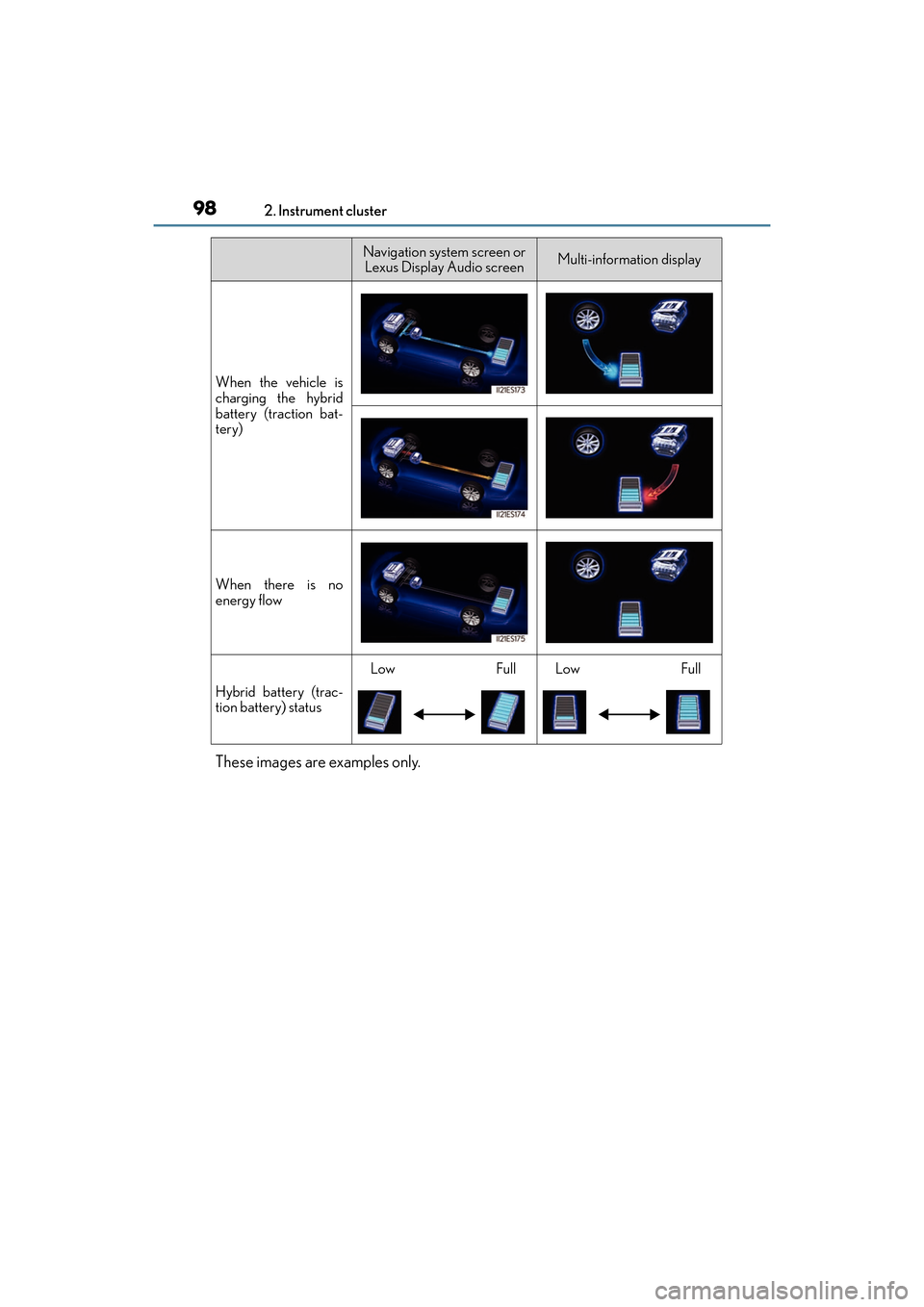
These images are examples only.
When the vehicle is
charging the hybrid
battery (traction bat-
tery)
When there is no
energy flow
Hybrid battery (trac-
tion battery) status
LowFullLowFull
Navigation system screen or
Lexus Display Audio screenMulti-information display
Page 107 of 612
ES300h_OM_OM33C75U_(U)
1053-1. Key information
3
Operation of each component
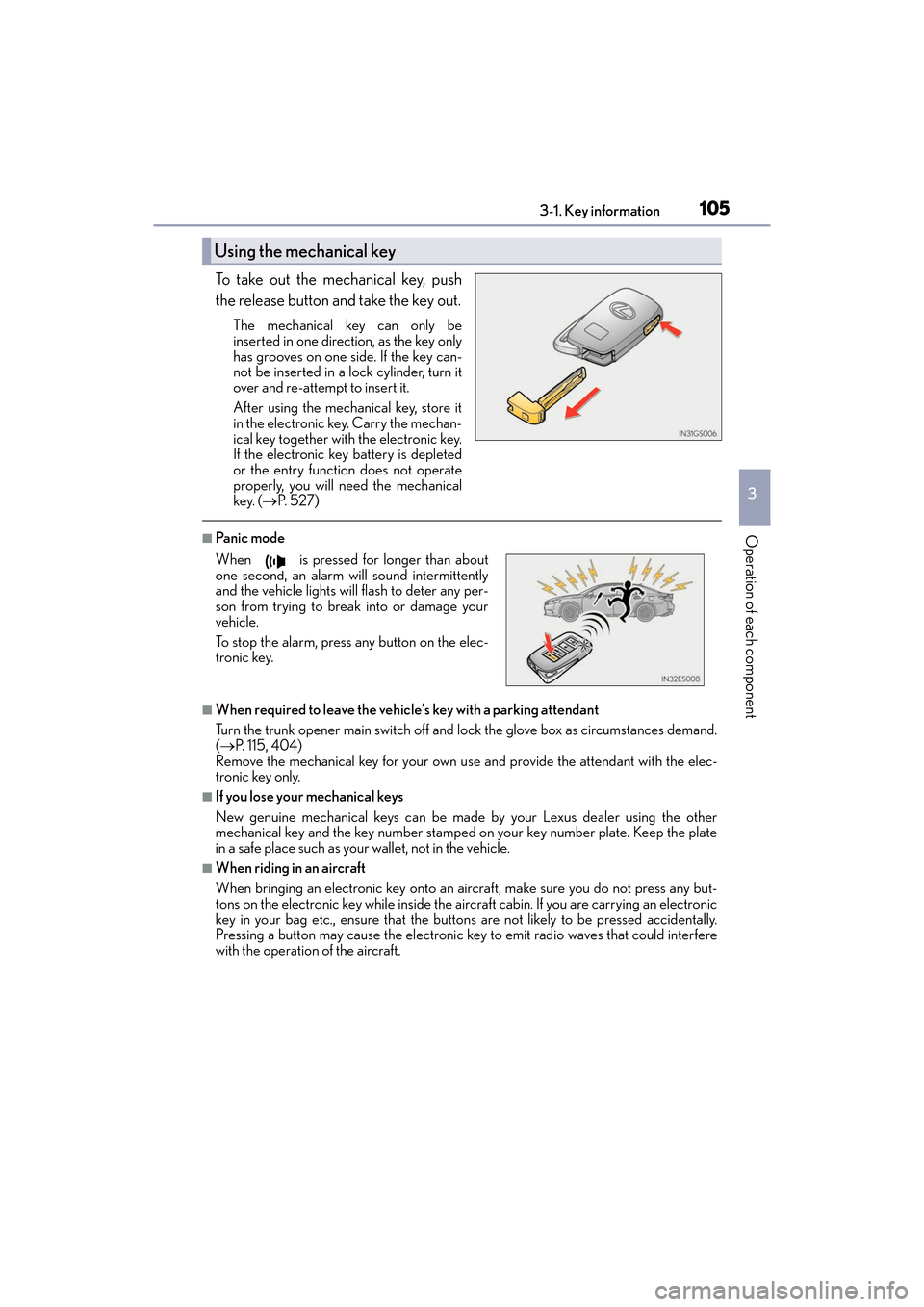
To take out the mechanical key, push
the release button and take the key out.
The mechanical key can only be
inserted in one direction, as the key only
has grooves on one side. If the key can-
not be inserted in a lock cylinder, turn it
over and re-attempt to insert it.
After using the mechanical key, store it
in the electronic key. Carry the mechan-
ical key together with the electronic key.
If the electronic key battery is depleted
or the entry function does not operate
properly, you will need the mechanical
key. ( →P. 5 2 7 )
■Pa ni c m o d e
■When required to leave the vehicle’s key with a parking attendant
Turn the trunk opener main switch off and lock the glove box as circumstances demand.
(→ P. 115, 404)
Remove the mechanical key for your own use and provide the attendant with the elec-
tronic key only.
■If you lose your mechanical keys
New genuine mechanical keys can be made by your Lexus dealer using the other
mechanical key and the key number stamped on your key number plate. Keep the plate
in a safe place such as your wallet, not in the vehicle.
■When riding in an aircraft
When bringing an electronic key onto an aircraft, make sure you do not press any but-
tons on the electronic key while inside the aircraft cabin. If you are carrying an electronic
key in your bag etc., ensure that the buttons are not likely to be pressed accidentally.
Pressing a button may cause the electronic key to emit radio waves that could interfere
with the operation of the aircraft.
Using the mechanical key
When is pressed for longer than about
one second, an alarm will sound intermittently
and the vehicle lights will flash to deter any per-
son from trying to break into or damage your
vehicle.
To stop the alarm, press any button on the elec-
tronic key.
Page 108 of 612
106
ES300h_OM_OM33C75U_(U)3-1. Key information
■Electronic key battery depletion
●The standard battery life is 1 to 2 years.
●If the battery becomes low, an alarm will
sound in the cabin when the hybrid system
stops. ( →P. 4 8 1 )
●As the electronic key always receives radio waves, the battery will become depleted
even if the electronic key is not used. The following symptoms indicate that the elec-
tronic key battery may be depleted. Replace the battery when necessary. ( →P. 4 8 1 )
• The smart access system with push-button start or the wireless remote control does not operate.
• The detection area becomes smaller.
• The LED indicator on the key surface does not turn on.
●To avoid serious deterioration, do not leave the electronic key within 3 ft. (1 m) of the
following electrical appliances that produce a magnetic field:
•TVs
• Personal computers
• Cellular phones, cordless phones and battery chargers
• Recharging cellular phones or cordless phones
• Table lamps
• Induction cookers
■If “Key Battery Low” is displayed on the multi-information display
The electronic key has a low battery. Replace the electronic key battery. ( →P. 4 8 1 )
■Replacing the battery
→P. 4 8 1
■Confirmation of the registered key number
The number of keys already registered to the vehicle can be confirmed. Ask your Lexus
dealer for details.
■If a wrong key is used
The key cylinder rotates freely to isolate inside mechanism.
Page 111 of 612
ES300h_OM_OM33C75U_(U)
1093-2. Opening, closing and locking the doors and trunk
3
Operation of each component
■Operation signals
A buzzer sounds and the emergency flashers flash to indicate that the doors have been
locked/unlocked. (Locked: Once; Unlocked: Twice)
Windows and moon roof:
A buzzer sounds to indicate that the windows and moon roof are opening.
■Security feature
If a door is not opened within approximately 60 seconds after the vehicle is unlocked, the
security feature automatically locks the vehicle again.
■Welcome light illumination control
The side marker, parking, tail and license plate lights automatically turn on at night when
the doors are unlocked using the entry function or wireless remote control if the light
switch is in the “AUTO” position.
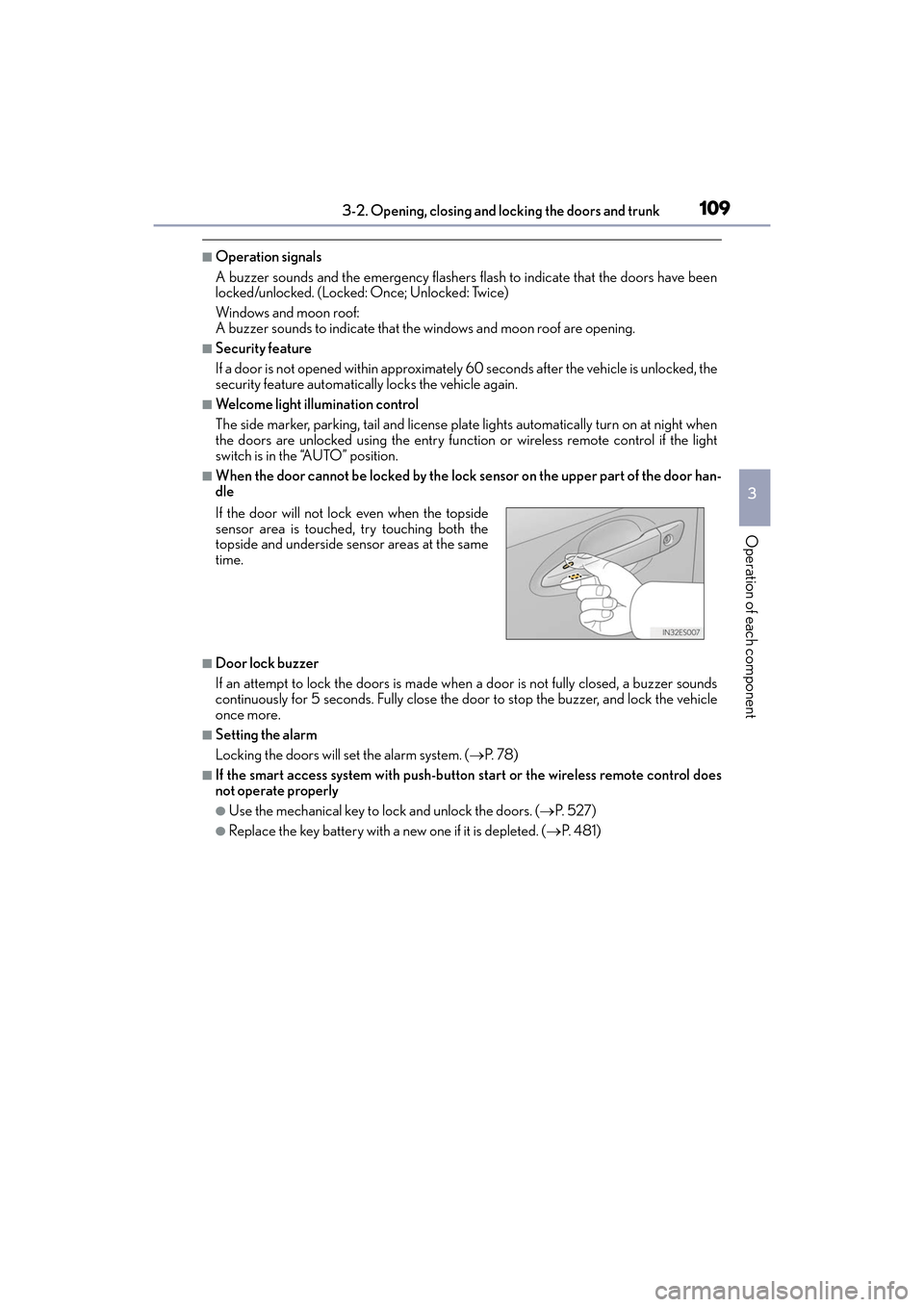
■When the door cannot be locked by the lock sensor on the upper part of the door han-
dle
■Door lock buzzer
If an attempt to lock the doors is made when a door is not fully closed, a buzzer sounds
continuously for 5 seconds. Fully close the door to stop the buzzer, and lock the vehicle
once more.
■Setting the alarm
Locking the doors will set the alarm system. ( →P. 7 8 )
■If the smart access system with push-button start or the wireless remote control does
not operate properly
●Use the mechanical key to lock and unlock the doors. ( →P. 5 2 7 )
●Replace the key battery with a new one if it is depleted. ( →P. 4 8 1 )
If the door will not lock even when the topside
sensor area is touched, try touching both the
topside and underside sensor areas at the same
time.
Page 119 of 612
ES300h_OM_OM33C75U_(U)
1173-2. Opening, closing and locking the doors and trunk
3
Operation of each component
■Using the mechanical key
The trunk can be also opened using the mechanical key. (→P. 5 2 7 )
■When leaving a key to the vehicle with a parking attendant
→P. 1 0 5
■If the smart access system with push-button start or the wireless remote control does
not operate properly
●Use the mechanical key to unlock the trunk. ( →P. 5 2 7 )
●Replace the key battery with a new one if it is depleted. ( →P. 4 8 1 )
■Customization
The trunk unlocking operation can be changed. (Customizable features: →P. 5 6 6 )
WA R N I N G
Observe the following precautions.
Failure to do so may result in death or serious injury.
■Before driving
●Make sure that the trunk lid is fully closed. If the trunk lid is not fully closed, it may
open unexpectedly while driving and hit ne ar-by objects or luggage in the trunk may
be thrown out, causing an accident.
●Do not allow children to play in the trunk.
If a child is accidentally locked in the trunk, they could suffer from heat exhaustion,
suffocation or other injuries.
●Do not allow a child to open or close the trunk lid.
Doing so may cause the trunk lid to open unexpectedly, or cause the child’s hands,
head, or neck to be caught by the closing trunk lid.
■Important points while driving
Never let anyone sit in the trunk. In the even t of sudden braking or a collision, they are
susceptible to death or serious injury.
Page 121 of 612
ES300h_OM_OM33C75U_(U)
1193-2. Opening, closing and locking the doors and trunk
3
Operation of each component
WA R N I N G
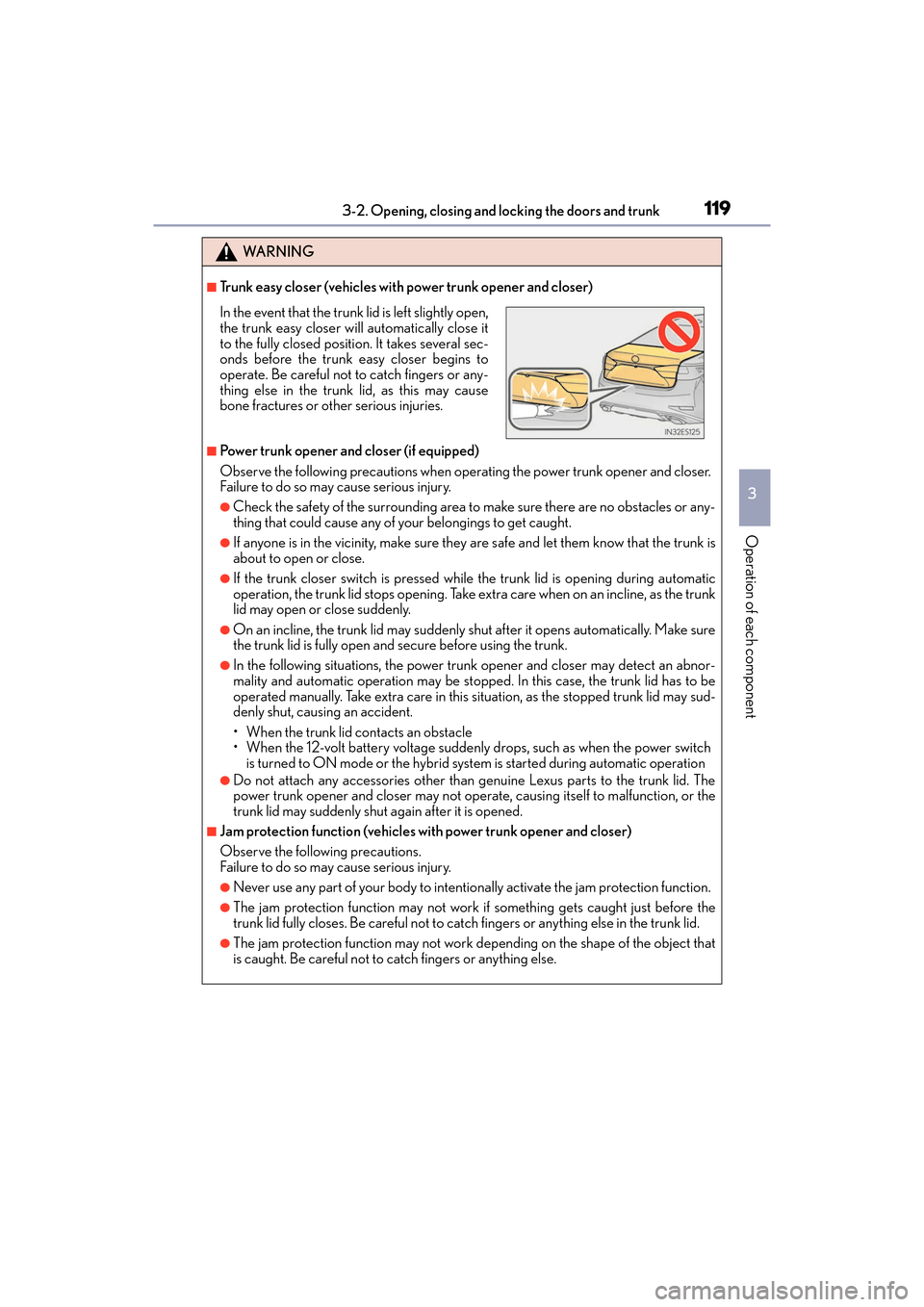
■Trunk easy closer (vehicles with power trunk opener and closer)
■Power trunk opener and closer (if equipped)
Observe the following precautions when operating the power trunk opener and closer.
Failure to do so may cause serious injury.
●Check the safety of the surrounding area to make sure there are no obstacles or any-
thing that could cause any of your belongings to get caught.
●If anyone is in the vicinity, make sure they are safe and let them know that the trunk is
about to open or close.
●If the trunk closer switch is pressed whil e the trunk lid is opening during automatic
operation, the trunk lid stops opening. Take ex tra care when on an incline, as the trunk
lid may open or close suddenly.
●On an incline, the trunk lid may suddenly shut after it opens automatically. Make sure
the trunk lid is fully open and secure before using the trunk.
●In the following situations, the power trunk opener and closer may detect an abnor-
mality and automatic operation may be stoppe d. In this case, the trunk lid has to be
operated manually. Take extra care in this situation, as the stopped trunk lid may sud-
denly shut, causing an accident.
• When the trunk lid contacts an obstacle
• When the 12-volt battery voltage suddenly drops, such as when the power switch is turned to ON mode or the hybrid system is started during automatic operation
●Do not attach any accessories other than genuine Lexus parts to the trunk lid. The
power trunk opener and closer may not operate, causing itself to malfunction, or the
trunk lid may suddenly shut again after it is opened.
■Jam protection function (vehicles with power trunk opener and closer)
Observe the following precautions.
Failure to do so may cause serious injury.
●Never use any part of your body to intent ionally activate the jam protection function.
●The jam protection function may not work if something gets caught just before the
trunk lid fully closes. Be careful not to catch fingers or anything else in the trunk lid.
●The jam protection function may not work depending on the shape of the object that
is caught. Be careful not to catch fingers or anything else.
In the event that the trunk lid is left slightly open,
the trunk easy closer will automatically close it
to the fully closed position. It takes several sec-
onds before the trunk easy closer begins to
operate. Be careful not to catch fingers or any-
thing else in the trunk lid, as this may cause
bone fractures or other serious injuries.
Page 124 of 612
122
ES300h_OM_OM33C75U_(U)3-2. Opening, closing and locking the doors and trunk
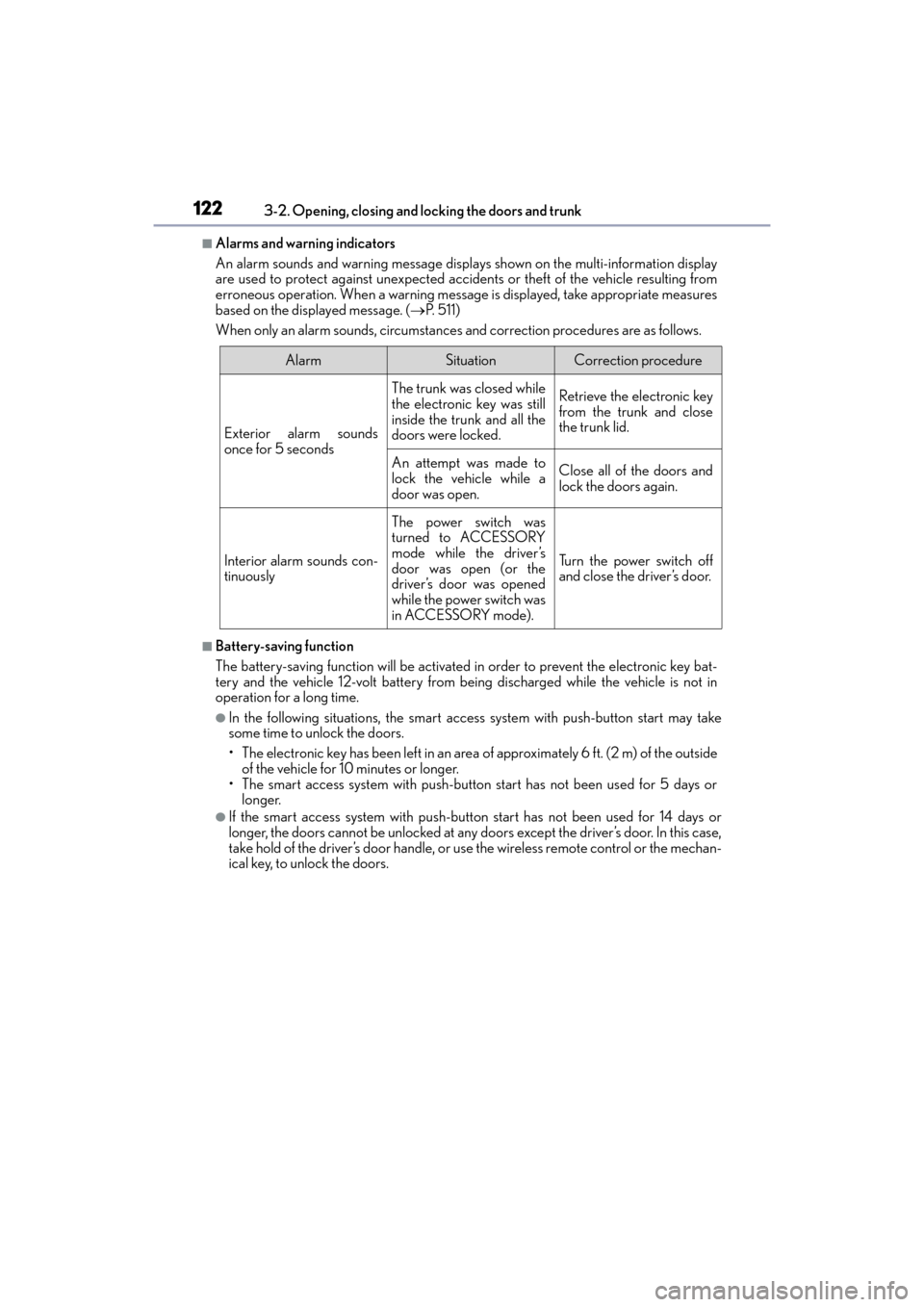
■Alarms and warning indicators
An alarm sounds and warning message displa
ys shown on the multi-information display
are used to protect against unexpected accidents or theft of the vehicle resulting from
erroneous operation. When a warning message is displayed, take appropriate measures
based on the displayed message. ( →P. 511)
When only an alarm sounds, circumstances and correction procedures are as follows.
■Battery-saving function
The battery-saving function will be activated in order to prevent the electronic key bat-
tery and the vehicle 12-volt battery from being discharged while the vehicle is not in
operation for a long time.
●In the following situations, the smart access system with push-button start may take
some time to unlock the doors.
• The electronic key has been left in an area of approximately 6 ft. (2 m) of the outside
of the vehicle for 10 minutes or longer.
• The smart access system with push-button start has not been used for 5 days or longer.
●If the smart access system with push-button start has not been used for 14 days or
longer, the doors cannot be unlocked at any doors except the driver’s door. In this case,
take hold of the driver’s door handle, or use the wireless remote control or the mechan-
ical key, to unlock the doors.
AlarmSituationCorrection procedure
Exterior alarm sounds
once for 5 seconds
The trunk was closed while
the electronic key was still
inside the trunk and all the
doors were locked.Retrieve the electronic key
from the trunk and close
the trunk lid.
An attempt was made to
lock the vehicle while a
door was open.Close all of the doors and
lock the doors again.
Interior alarm sounds con-
tinuously
The power switch was
turned to ACCESSORY
mode while the driver’s
door was open (or the
driver’s door was opened
while the power switch was
in ACCESSORY mode).
Turn the power switch off
and close the driver’s door.