fuel consumption Lexus ES300h 2017 User Guide
[x] Cancel search | Manufacturer: LEXUS, Model Year: 2017, Model line: ES300h, Model: Lexus ES300h 2017Pages: 612, PDF Size: 14.05 MB
Page 378 of 612
376
ES300h_OM_OM33C75U_(U)5-12. Other function
“Information” screen
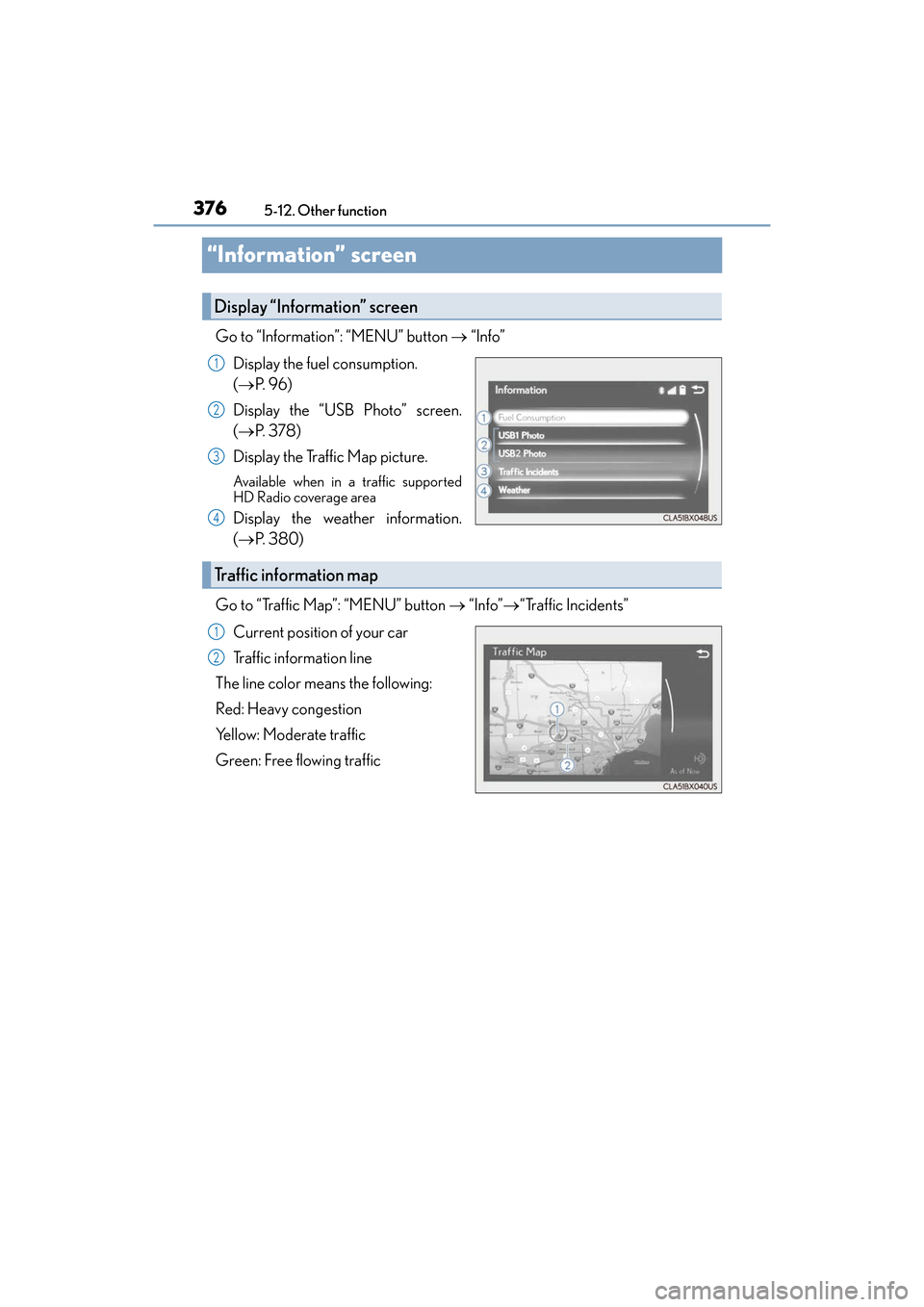
Go to “Information”: “MENU” button
→ “Info”
Display the fuel consumption.
( → P. 9 6 )
Display the “USB Photo” screen.
( → P. 3 7 8 )
Display the Traffic Map picture.
Available when in a traffic supported
HD Radio coverage area
Display the weather information.
( → P. 3 8 0 )
Go to “Traffic Map”: “MENU” button → “Info”→ “Traffic Incidents”
Current position of your car
Traffic information line
The line color means the following:
Red: Heavy congestion
Yellow: Moderate traffic
Green: Free flowing traffic
Display “Information” screen
1
2
3
4
Traffic information map
1
2
Page 396 of 612
3946-1. Using the air conditioning system and defogger
ES300h_OM_OM33C75U_(U)
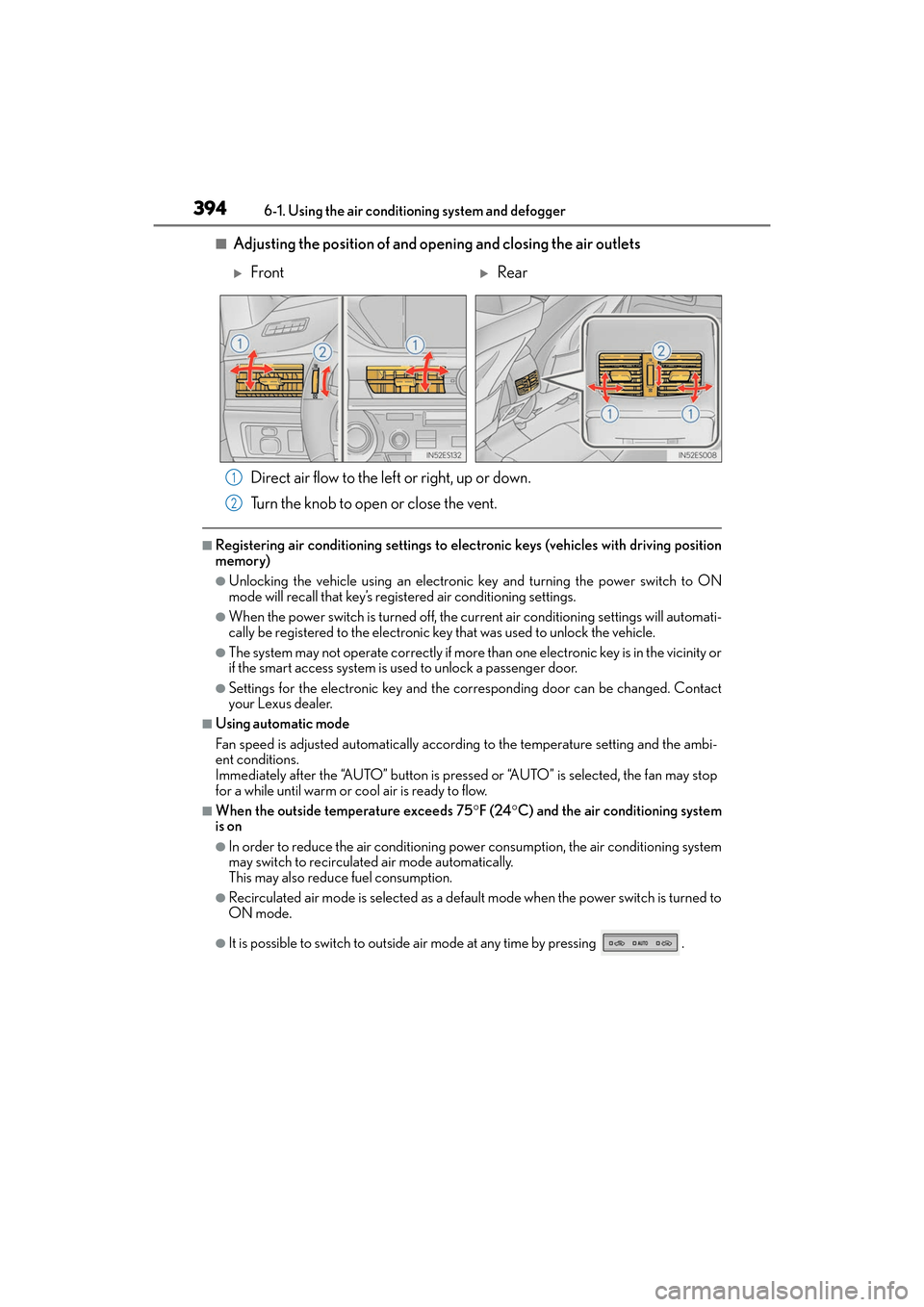
■Adjusting the position of and opening and closing the air outlets Direct air flow to the left or right, up or down.
Turn the knob to open or close the vent.
■Registering air conditioning settings to elec tronic keys (vehicles with driving position
memory)
●Unlocking the vehicle using an electronic key and turning the power switch to ON
mode will recall that key’s registered air conditioning settings.
●When the power switch is turned off, the cu rrent air conditioning settings will automati-
cally be registered to the electronic key that was used to unlock the vehicle.
●The system may not operate correctly if more than one electronic key is in the vicinity or
if the smart access system is used to unlock a passenger door.
●Settings for the electronic key and the corresponding door can be changed. Contact
your Lexus dealer.
■Using automatic mode
Fan speed is adjusted automatically according to the temperature setting and the ambi-
ent conditions.
Immediately after the “AUTO” button is pressed or “AUTO” is selected, the fan may stop
for a while until warm or cool air is ready to flow.
■When the outside temperature exceeds 75 °F (24 °C) and the air conditioning system
is on
●In order to reduce the air conditioning power consumption, the air conditioning system
may switch to recirculated air mode automatically.
This may also reduce fuel consumption.
●Recirculated air mode is selected as a default mode when the power switch is turned to
ON mode.
●It is possible to switch to outside air mode at any time by pressing .
XFrontXRear
1
2
Page 566 of 612

564
ES300h_OM_OM33C75U_(U)9-2. Customization
■Multi-information display (
→P. 9 1 )
FunctionDefault
settingCustomized setting
Language EnglishFrench
–O–
Spanish
Units*1miles (MPG US)
miles
(MPG Imperial)
OO–km (L/100 km)
km (km/L)
EV indicator On Off
–O–
switch settingsDrive
information 1Desired status screen
*2–O–
Drive information screen dis-
played on the first screen of
(Drive information 1)Current fuel
consumption
*3–O–Average fuel economy
(after reset)
Drive information screen dis-
played on the second screen
of
(Drive information 2)Distance (range)
*3–O–Average speed
(after reset)
Drive information screen dis-
played on the third screen of
(Drive information 3)Average fuel economy
(after refuel)
*3–O–
Elapsed time
(after start)
Pop-up displayOnOff–O–
Accent colorColor 1Color 2OO–
Changeover to tachometer
when sport mode is selected AutoHybrid system
indicator (always) –O–
Tachometer (always)
123
Page 567 of 612
ES300h_OM_OM33C75U_(U)
5659-2. Customization
9
Vehicle specifications
*1: The default setting varies according to countries.
*2: Some status screens cannot be registered (indicated on the multi-information display)
*3: 2 of the following items: current fuel consumption, average fuel economy (after reset),
average fuel economy (after refuel), average fuel economy (after start), average vehi-
cle speed (after reset), average vehicle speed (after start), distance (driving range),
distance (after start), elapsed time (after reset), elapsed time (after start), blank
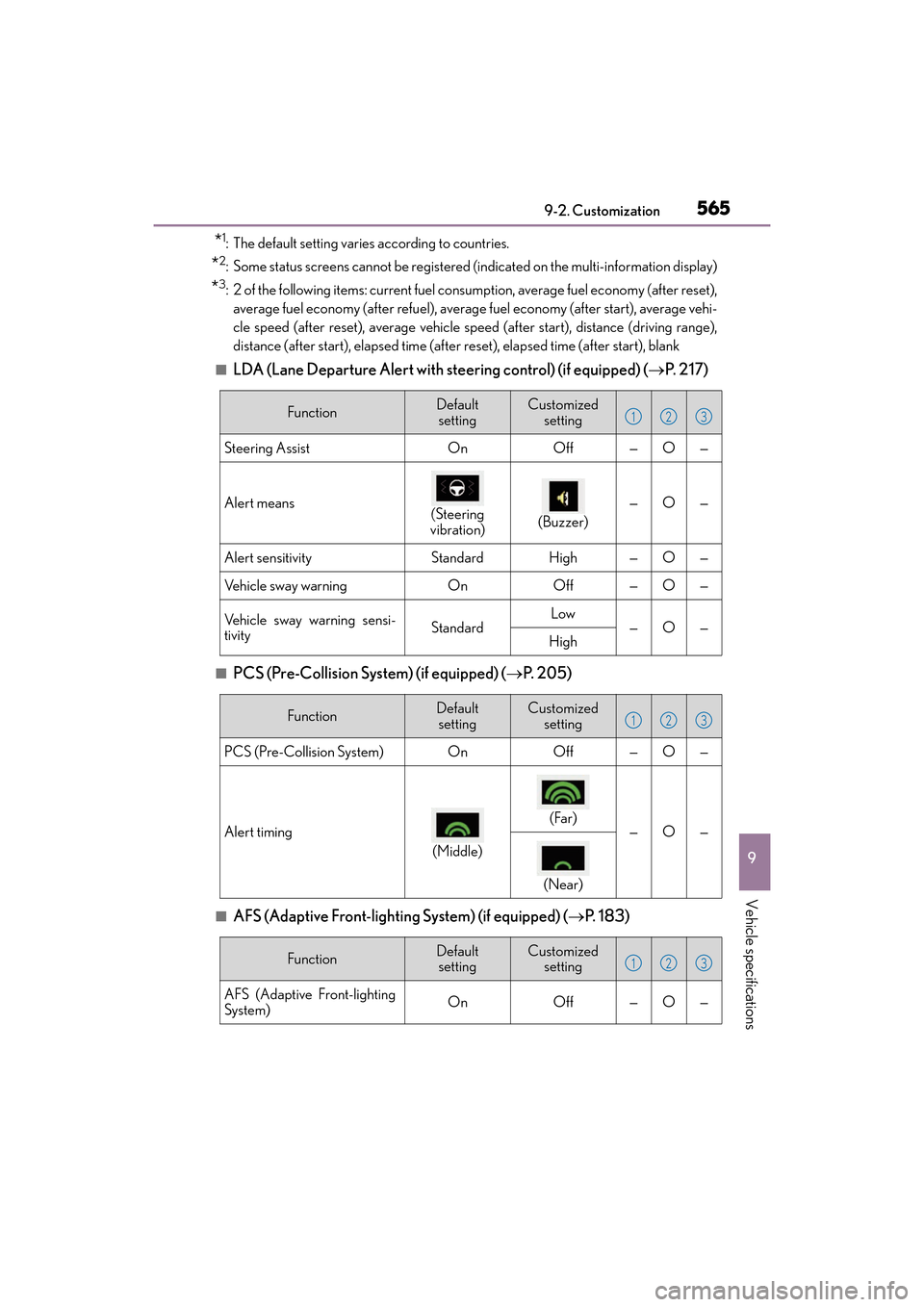
■LDA (Lane Departure Alert with steering control) (if equipped) ( →P. 2 1 7 )
■PCS (Pre-Collision System) (if equipped) ( →P. 205)
■AFS (Adaptive Front-lighting System) (if equipped) ( →P. 1 8 3 )
FunctionDefault
settingCustomized setting
Steering AssistOnOff—O—
Alert means
(Steering
vibration)
(Buzzer)—O—
Alert sensitivityStandardHigh—O—
Vehicle sway warningOnOff—O—
Vehicle sway warning sensi-
tivityStandardLow—O—High
123
FunctionDefault settingCustomized setting
PCS (Pre-Collision System)OnOff—O—
Alert timing
(Middle)
(Far)
—O—
(Near)
123
FunctionDefault settingCustomized setting
AFS (Adaptive Front-lighting
System)OnOff—O—
123