navigation Lexus ES300h 2017 User Guide
[x] Cancel search | Manufacturer: LEXUS, Model Year: 2017, Model line: ES300h, Model: Lexus ES300h 2017Pages: 612, PDF Size: 14.05 MB
Page 166 of 612
164
ES300h_OM_OM33C75U_(U)4-1. Before driving
WA R N I N G
■Things that must not be carried in the trunk
The following things may cause a fire if loaded in the trunk:
●Receptacles containing gasoline
●Aerosol cans
■Storage precautions
Observe the following precautions.
Failure to do so may prevent the pedals from being depressed properly, may block the
driver’s vision, or may result in items hitting
the driver or passengers, possibly causing
an accident.
●Stow cargo and luggage in the trunk whenever possible.
●Do not place cargo or luggage in or on the following locations.
• At the feet of the driver
• On the front passenger or rear seats (when stacking items)
• On the package tray
• On the instrument panel
• On the dashboard
• In front of the navigation system screen or Lexus Display Audio system screen
●Secure all items in the occupant compartment.
■Capacity and distribution
●Do not exceed the maximum axle weight rating or the total vehicle weight rating.
●Even if the total load of occupant’s weight and the cargo load is less than the total load
capacity, do not apply the load unevenly. Improper loading may cause deterioration
of steering or braking control which may cause death or serious injury.
Page 243 of 612
241
ES300h_OM_OM33C75U_(U)4-5. Using the driving support systems
4
Driving
Intuitive parking assist∗
∗: If equipped
The distance from your vehicle to nearby obstacles when parallel parking or
maneuvering into a garage is measured
by the sensors and communicated via
the multi-information display, navigation system screen or Lexus Display
Audio system screen and a buzzer. Always check the surrounding area when
using this system.
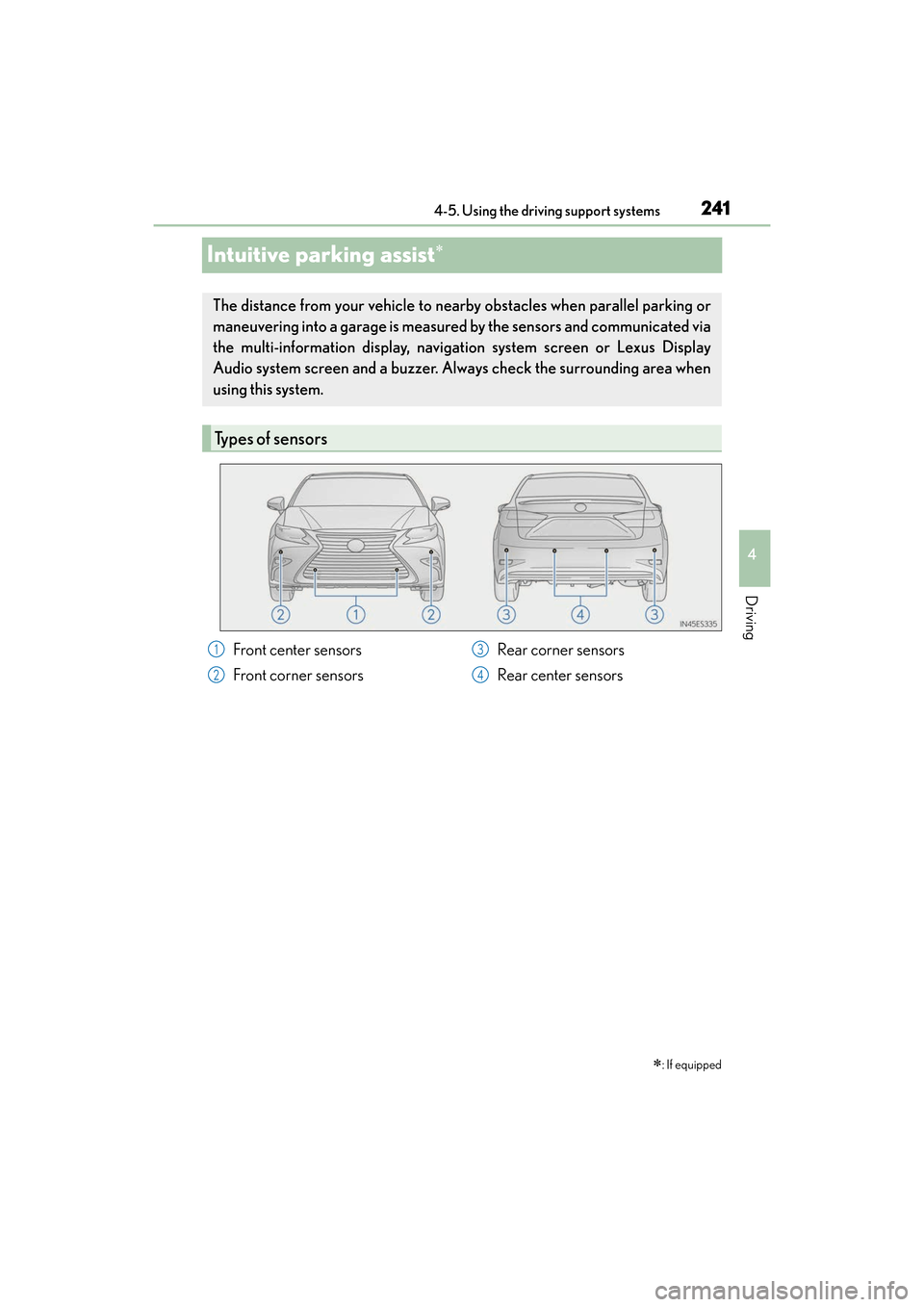
Types of sensors
Front center sensors
Front corner sensors Rear corner sensors
Rear center sensors1
2
3
4
Page 244 of 612
242
ES300h_OM_OM33C75U_(U)4-5. Using the driving support systems
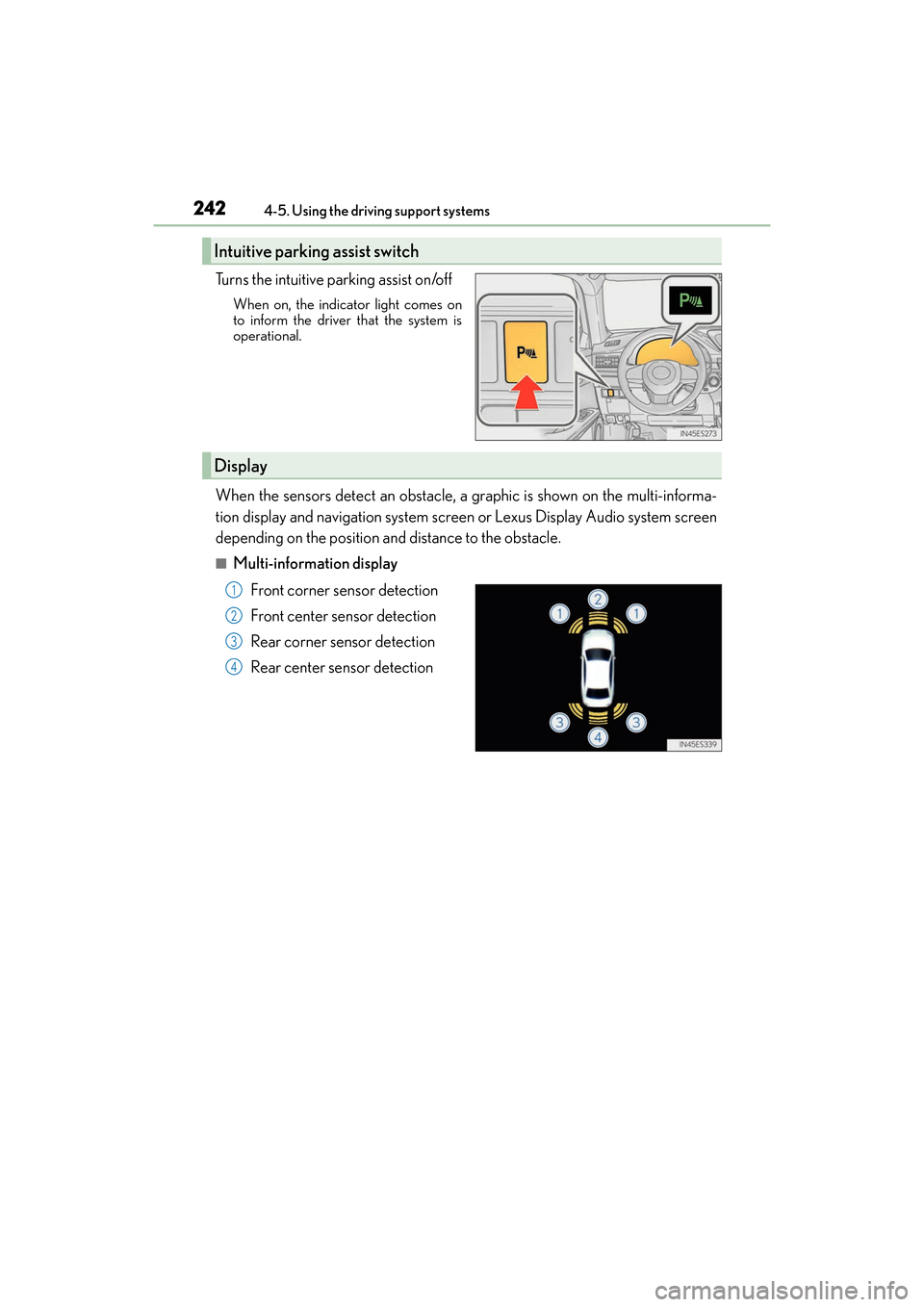
Turns the intuitive parking assist on/off
When on, the indicat
or light comes on
to inform the driver that the system is
operational.
When the sensors detect an obstacle, a graphic is shown on the multi-informa-
tion display and navigation system screen or Lexus Display Audio system screen
depending on the position and distance to the obstacle.
■Multi-information display
Front corner sensor detection
Front center sensor detection
Rear corner sensor detection
Rear center sensor detection
Intuitive parking assist switch
Display
1
2
3
4
Page 245 of 612
ES300h_OM_OM33C75U_(U)
2434-5. Using the driving support systems
4
Driving
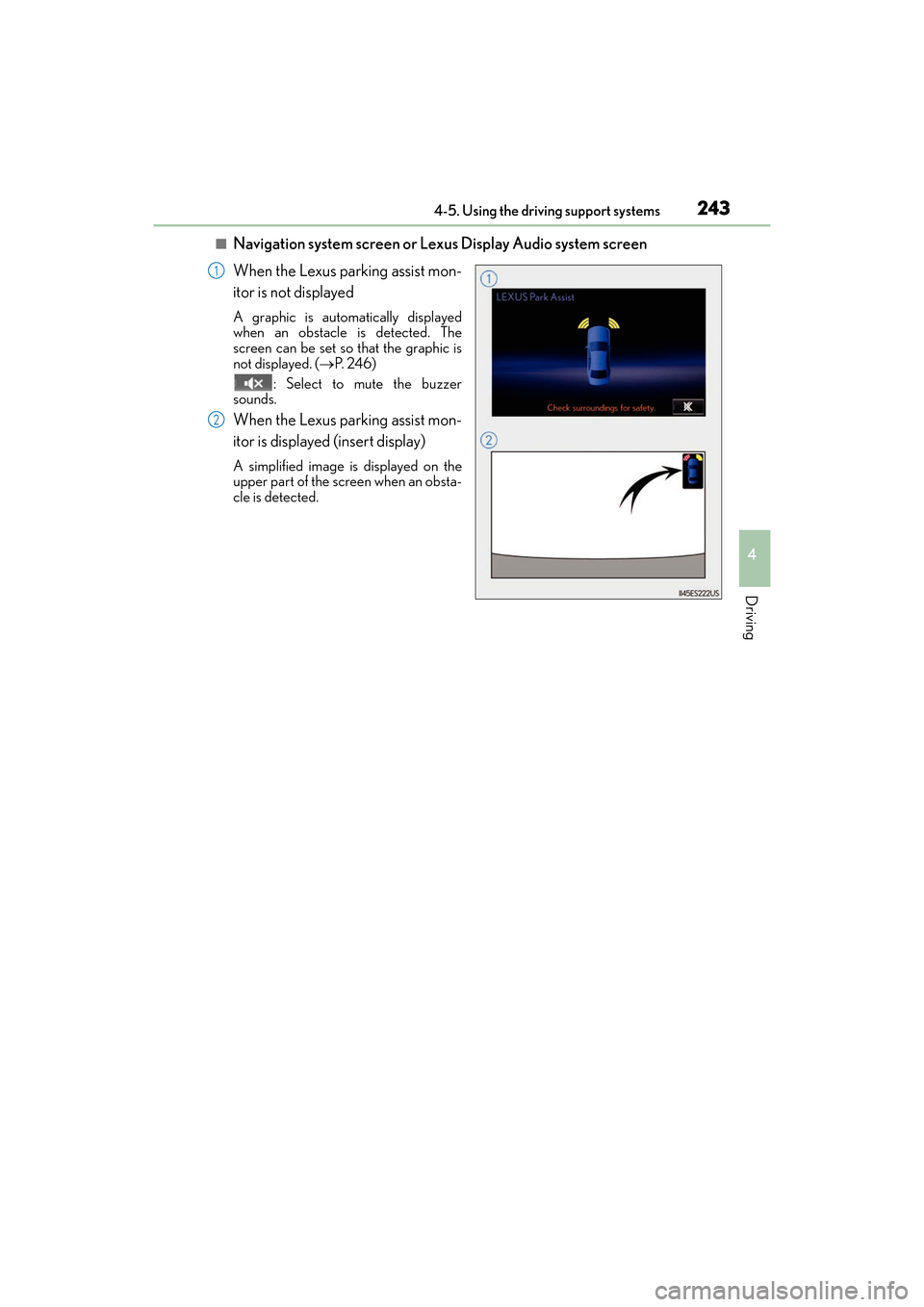
■Navigation system screen or Lexus Display Audio system screen
When the Lexus parking assist mon-
itor is not displayed
A graphic is automatically displayed
when an obstacle is detected. The
screen can be set so that the graphic is
not displayed. (→P. 2 4 6 )
: Select to mute the buzzer
sounds.
When the Lexus parking assist mon-
itor is displayed (insert display)
A simplified image is displayed on the
upper part of the screen when an obsta-
cle is detected.
1
2
Page 246 of 612
244
ES300h_OM_OM33C75U_(U)4-5. Using the driving support systems
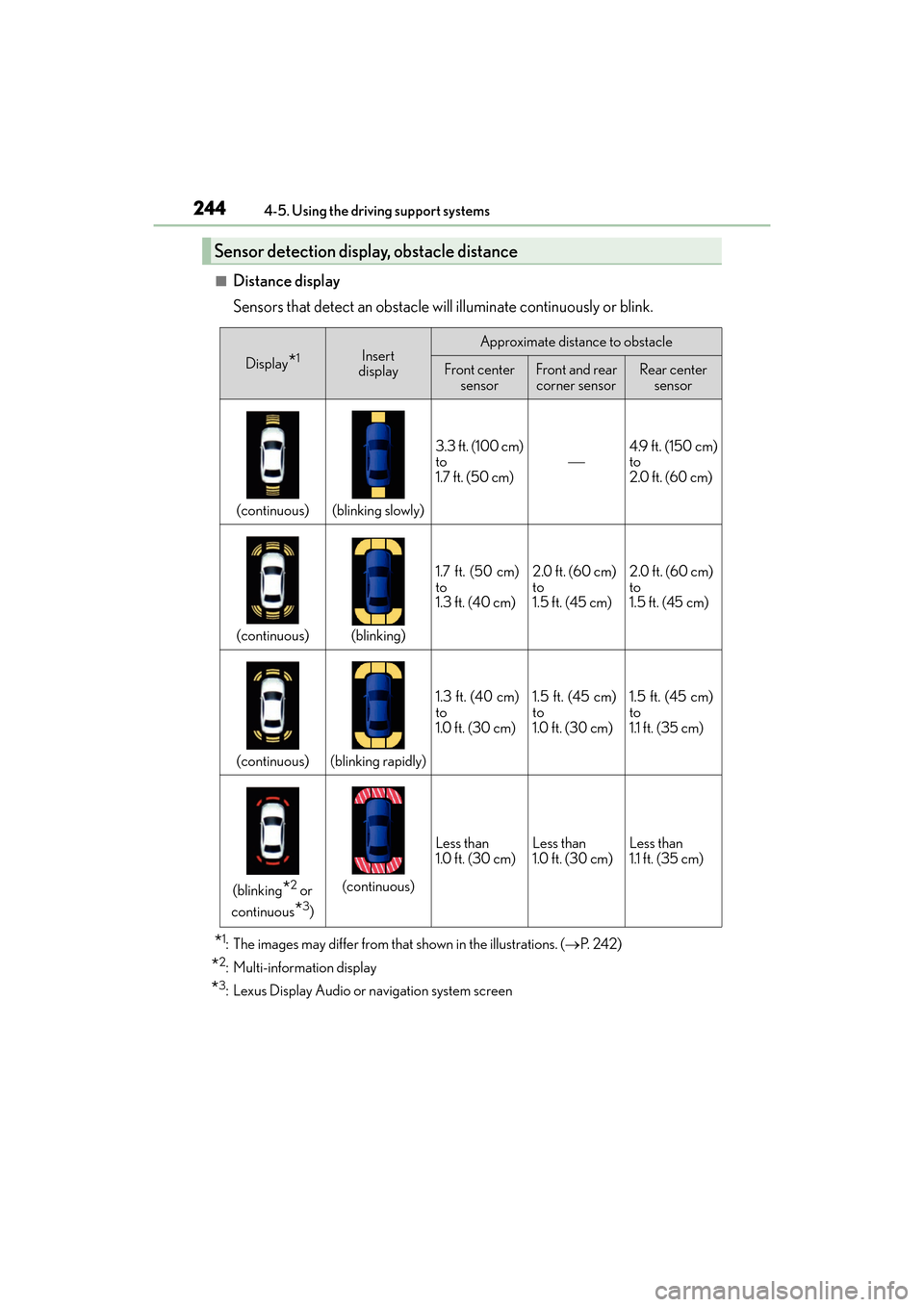
■Distance display
Sensors that detect an obstacle will illuminate continuously or blink.
*1: The images may differ from that shown in the illustrations. (→
P. 2 4 2 )
*2: Multi-information display
*3: Lexus Display Audio or navigation system screen
Sensor detection display, obstacle distance
Display*1Insert
displayApproximate distance to obstacle
Front center sensorFront and rear corner sensorRear center sensor
(continuous)(blinking slowly)
3.3 ft. (100 cm)
to
1.7 ft. (50 cm)4.9 ft. (150 cm)
to
2.0 ft. (60 cm)
(continuous)(blinking)
1.7 ft. (50 cm)
to
1.3 ft. (40 cm)2.0 ft. (60 cm)
to
1.5 ft. (45 cm)2.0 ft. (60 cm)
to
1.5 ft. (45 cm)
(continuous)(blinking rapidly)
1.3 ft. (40 cm)
to
1.0 ft. (30 cm)1.5 ft. (45 cm)
to
1.0 ft. (30 cm)1.5 ft. (45 cm)
to
1.1 ft. (35 cm)
(blinking*2 or
continuous
*3)
(continuous)
Less than
1.0 ft. (30 cm)Less than
1.0 ft. (30 cm)Less than
1.1 ft. (35 cm)
Page 248 of 612
246
ES300h_OM_OM33C75U_(U)4-5. Using the driving support systems
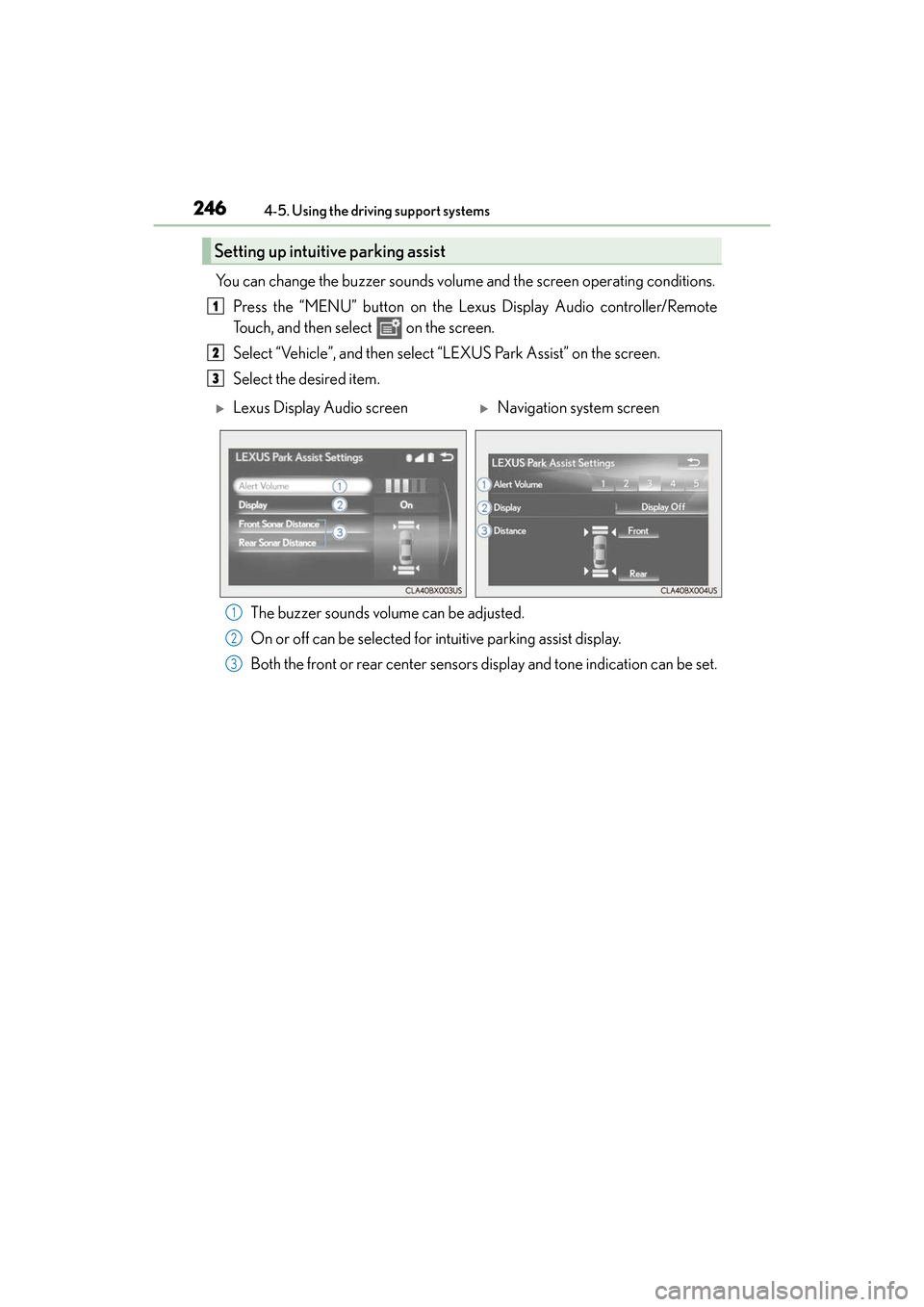
You can change the buzzer sounds volume
and the screen operating conditions.
Press the “MENU” button on the Lexus Display Audio controller/Remote
Touch, and then select on the screen.
Select “Vehicle”, and then select “LEXUS Park Assist” on the screen.
Select the desired item.
The buzzer sounds volume can be adjusted.
On or off can be selected for intuitive parking assist display.
Both the front or rear center sensors display and tone indication can be set.
Setting up intuitive parking assist
1
2
3
XLexus Display Audio screenXNavigation system screen
1
2
3
Page 252 of 612
250
ES300h_OM_OM33C75U_(U)4-5. Using the driving support systems
Lexus parking assist monitor
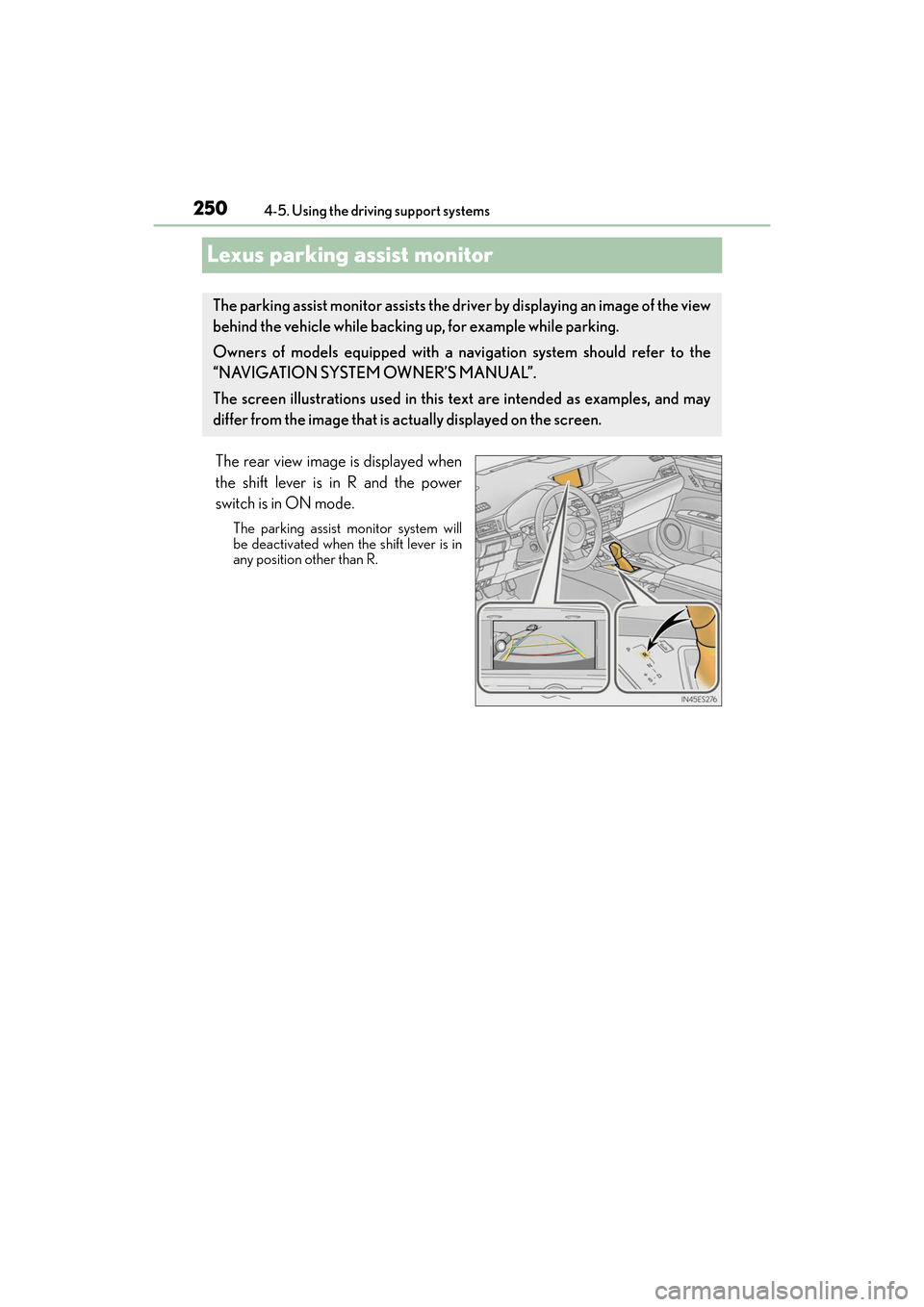
The rear view image is displayed when
the shift lever is in R and the power
switch is in ON mode.
The parking assist monitor system will
be deactivated when the shift lever is in
any position other than R.
The parking assist monitor assists the driver by displaying an image of the view
behind the vehicle while backing up, for example while parking.
Owners of models equipped with a navi
gation system should refer to the
“NAVIGATION SYSTEM OWNER’S MANUAL”.
The screen illustrations used in this text are intended as examples, and may
differ from the image that is actually displayed on the screen.
Page 293 of 612
ES300h_OM_OM33C75U_(U)
2915-1. Basic Operations
5
Lexus Display Audio system
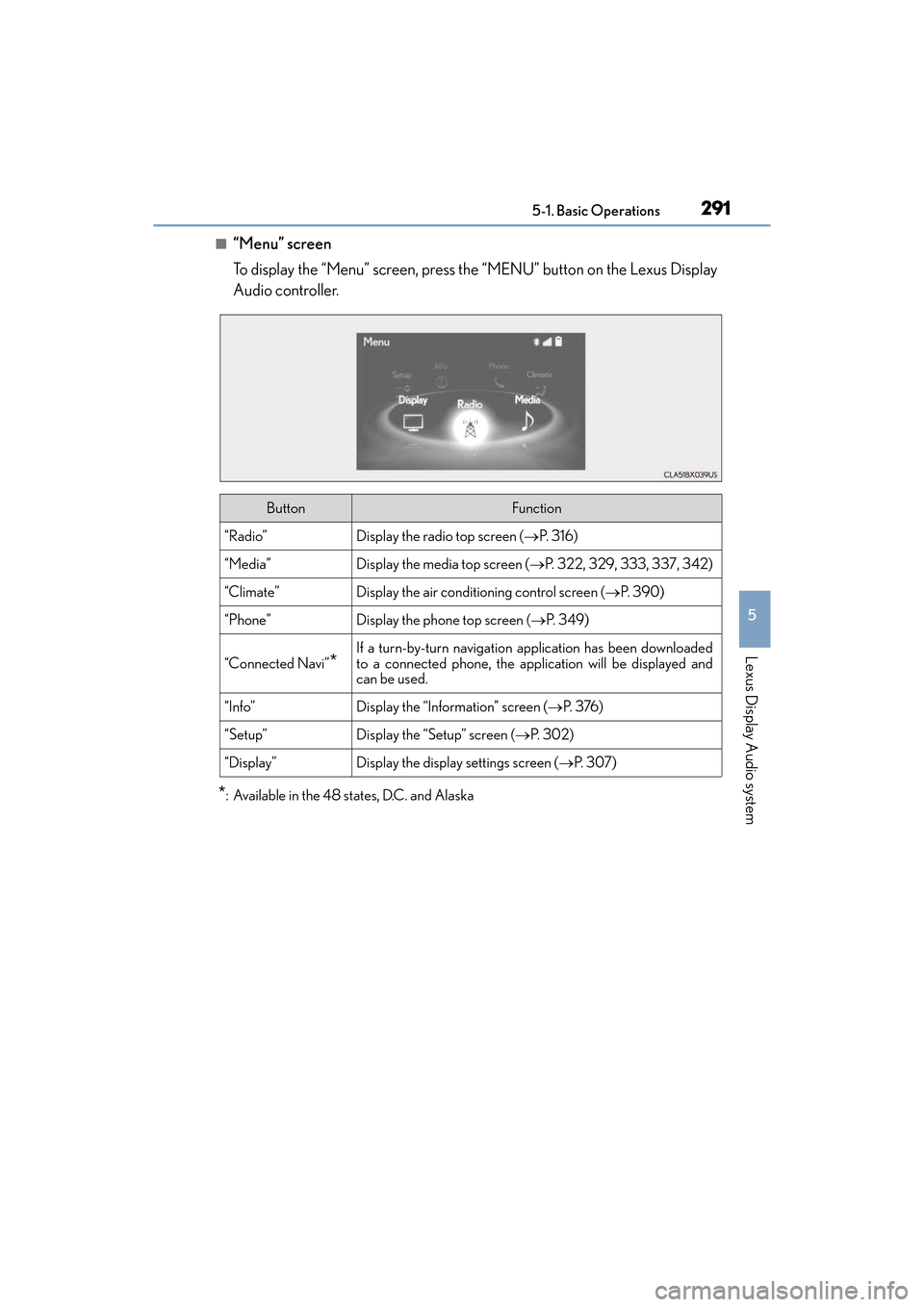
■“Menu” screen
To display the “Menu” screen, press the “MENU” button on the Lexus Display
Audio controller.
*: Available in the 48 states, D.C. and Alaska
ButtonFunction
“Radio”Display the radio top screen (→P. 3 1 6 )
“Media”Display the media top screen (→P. 322, 329, 333, 337, 342)
“Climate”Display the air conditioning control screen ( →P. 3 9 0 )
“Phone”Display the phone top screen ( →P. 3 4 9 )
“Connected Navi”*
If a turn-by-turn navigation application has been downloaded
to a connected phone, the application will be displayed and
can be used.
“Info”Display the “Information” screen ( →P. 3 76 )
“Setup”Display the “Setup” screen ( →P. 3 0 2 )
“Display”Display the display settings screen ( →P. 3 0 7 )
Page 298 of 612
296
ES300h_OM_OM33C75U_(U)5-1. Basic Operations
Steering wheel audio switches
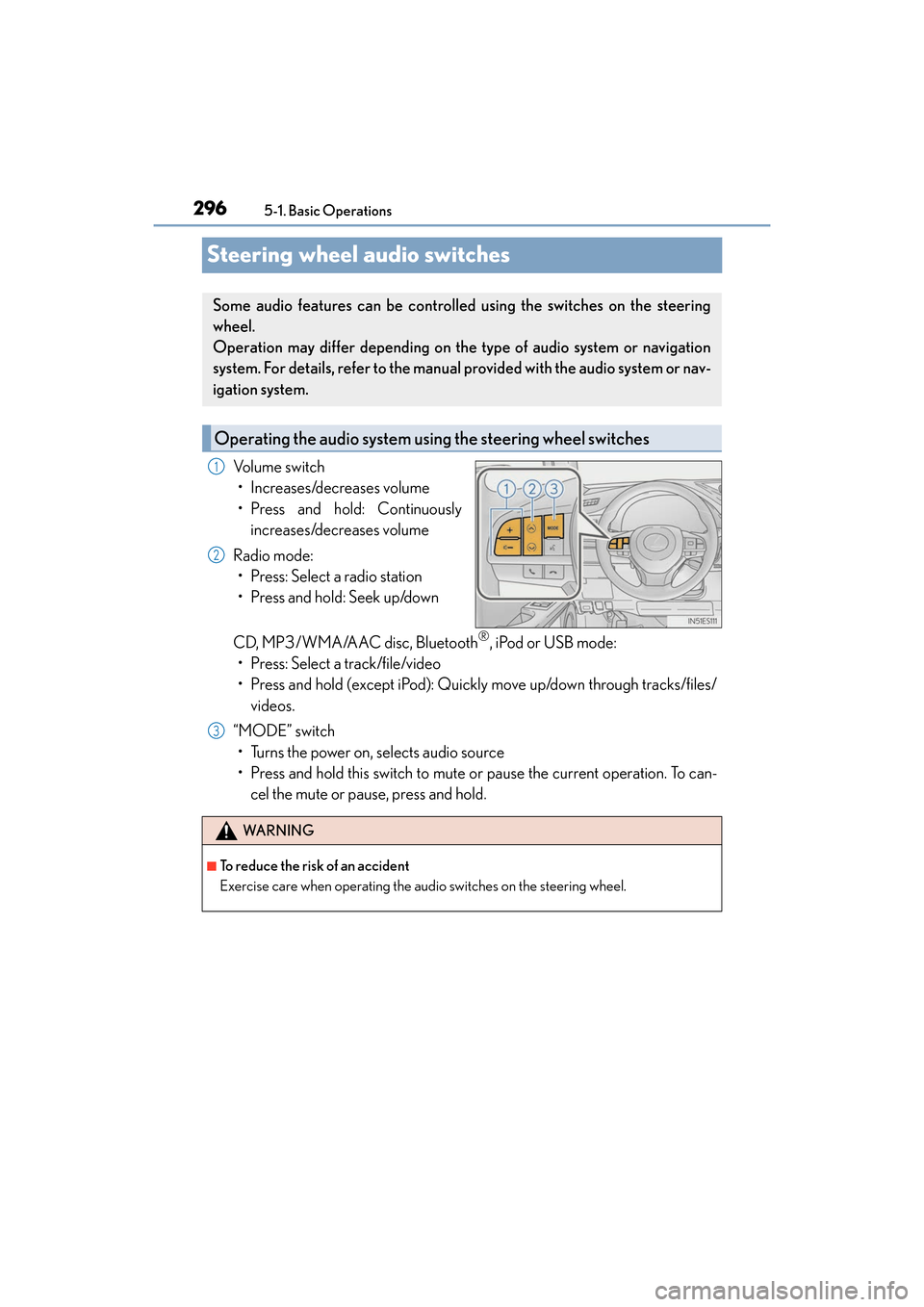
Volume switch
• Increases/decreases volume
• Press and hold: Continuously increases/decreases volume
Radio mode: • Press: Select a radio station
• Press and hold: Seek up/down
CD, MP3/WMA/AAC disc, Bluetooth
®, iPod or USB mode:
• Press: Select a track/file/video
• Press and hold (except iPod): Quickly move up/down through tracks/files/ videos.
“MODE” switch • Turns the power on, selects audio source
• Press and hold this switch to mute or pause the current operation. To can- cel the mute or pause, press and hold.
Some audio features can be controlle d using the switches on the steering
wheel.
Operation may differ depending on the type of audio system or navigation
system. For details, refer to the manual provided with the audio system or nav-
igation system.
Operating the audio system us ing the steering wheel switches
1
2
WA R N I N G
■To reduce the risk of an accident
Exercise care when operating the audio switches on the steering wheel.
3
Page 300 of 612
2985-1. Basic Operations
ES300h_OM_OM33C75U_(U)
■Adjusting the volume
The volume of the Mobile Assistant can be adjusted using the
“PWR·VOL” knob or
steering wheel volume switches. The Mobile Assistant and phone call volumes are syn-
chronized.
■Microphone
It is not necessary to speak directly into the microphone when using the Mobile Assis-
tant.
●Wait for the listening beeps before using the Mobile Assistant.
●The Mobile Assistant may not recognize commands in the following situations:
• When spoken too quickly.
• When spoken at a low or high volume.
• When the roof or windows are open.
• When passengers are talking while th e Mobile Assistant is being used.
• When the air conditioning system’s fan speed is set high.
• When the air conditioning vents are turned toward the microphone.
■Mobile Assistant precautions
●The available features and functions may vary based on the iOS version installed on the
connected device.
●Some Siri features are limited in Eyes Free mode. If you attempt to use an unavailable
function, Siri will inform you that the function is not available.
●If Siri is not enabled on the ce llular phone connected via Bluetooth, an error message
will be displayed on the screen.
●While a phone call is active, the Mobile Assistant cannot be used.
●If using the navigation feature of the cellular phone, ensure the active audio source is
Bluetooth audio or iPod in order to hear turn by turn direction prompts.