steering Lexus ES300h 2017 User Guide
[x] Cancel search | Manufacturer: LEXUS, Model Year: 2017, Model line: ES300h, Model: Lexus ES300h 2017Pages: 612, PDF Size: 14.05 MB
Page 44 of 612
421-1. For safe use
ES300h_OM_OM33C75U_(U)
■If the SRS airbags deploy (inflate)
●Slight abrasions, burns, bruising etc., may be sustained from SRS airbags, due to the
extremely high speed deployment (inflation) by hot gases.
●A loud noise and white powder will be emitted.
●Parts of the airbag module (steering wheel hub, airbag cover and inflator) as well as the
seats, parts of the front and rear pillars, and roof side rails may be hot for several min-
utes. The airbag itself may also be hot.
●The windshield may crack.
●For Lexus Enform Safety Connect subscribers, if the SRS airbags deploy or in the event
of a severe rear-end collision, the system is designed to send an emergency call to the
response center, notifying them of the vehicle’s location (without needing to push the
“SOS” button) and an agent will attempt to speak with the occupants to ascertain the
level of emergency and assistance required. If the occupants are unable to communi-
cate, the agent automatically treats the call as an emergency and helps to dispatch the
necessary emergency services. (→ P. 4 2 6 )
WA R N I N G
■SRS airbag precautions
●Do not strike or apply significant levels of force to the area of the SRS airbag compo-
nents.
Doing so can cause the SRS airbags to malfunction.
●Do not touch any of the component parts immediately after the SRS airbags have
deployed (inflated) as they may be hot.
●If breathing becomes difficult after the SRS airbags have deployed, open a door or
window to allow fresh air in, or leave the vehicle if it is safe to do so. Wash off any resi-
due as soon as possible to prevent skin irritation.
●If the areas where the SRS airbags are stored, such as the steering wheel pad and
front and rear pillar garnishes are damaged or cracked, have them replaced by your
Lexus dealer.
■Modification and disposal of SRS airbag system components
Do not dispose of your vehicle or perform any of the following modifications without
consulting your Lexus dealer. The SRS airbags may malfunction or deploy (inflate)
accidentally, causing death or serious injury.
●Installation, removal, disassembl y and repair of the SRS airbags
●Repairs, modifications, removal or replacement of the steering wheel, instrument
panel, dashboard, glove box, seats or seat upholstery, front, side and rear pillars or
roof side rails
●Repairs or modifications of the front fend er, front bumper, or side of the occupant
compartment
●Installation of a grille guard (bull bars, ka ngaroo bar, etc.), snow plows, winches or
roof luggage carrier
●Modifications to the vehicle’s suspension system
●Installation of electronic devices such as mobile two-way radios and CD players
●Modifications to your vehicle for a person with a physical disability
Page 47 of 612
451-1. For safe use
ES300h_OM_OM33C75U_(U)
1
For safety and security
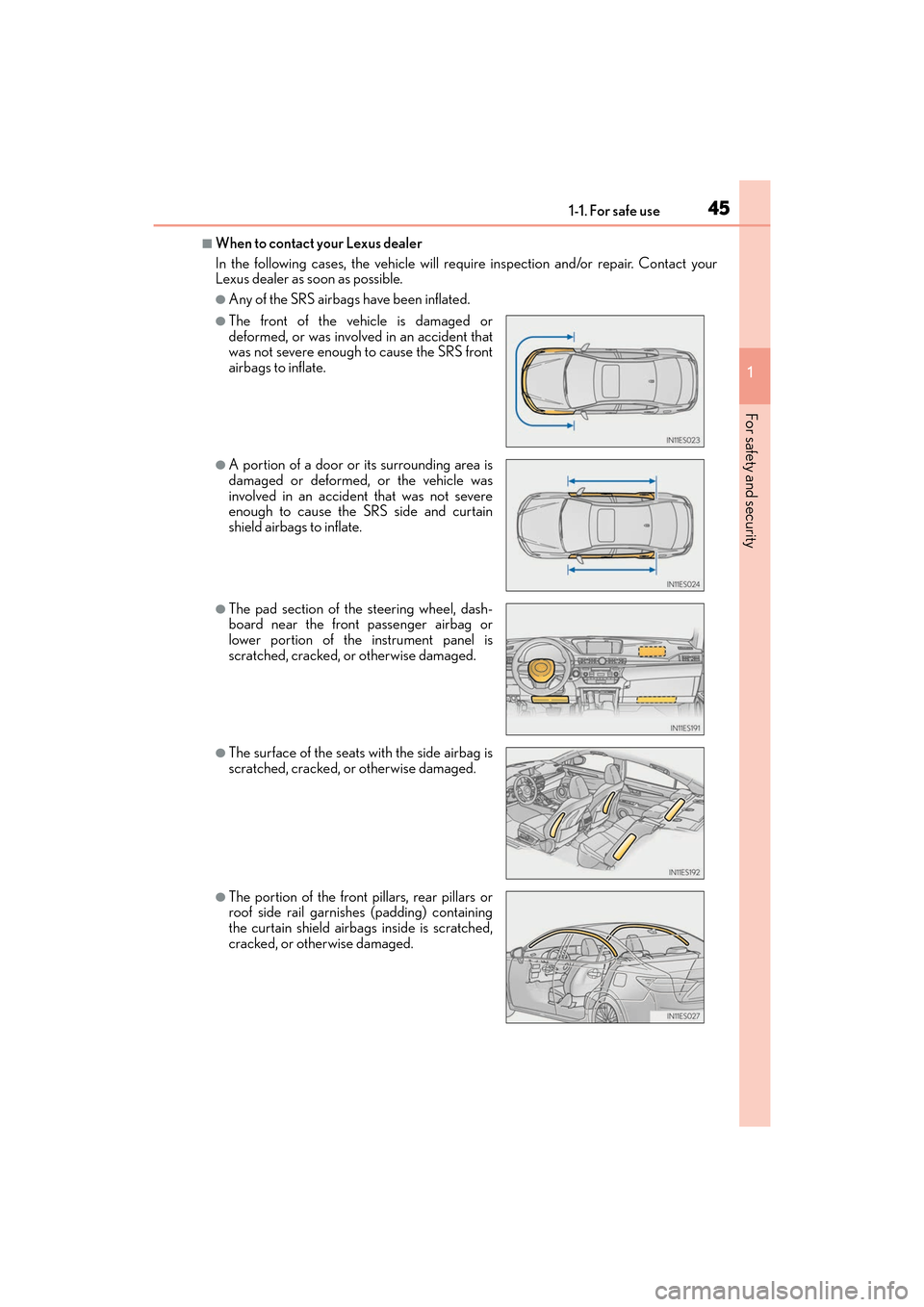
■When to contact your Lexus dealer
In the following cases, the vehicle will requ ire inspection and/or repair. Contact your
Lexus dealer as soon as possible.
●Any of the SRS airbags have been inflated.
●The front of the vehicle is damaged or
deformed, or was involved in an accident that
was not severe enough to cause the SRS front
airbags to inflate.
●A portion of a door or its surrounding area is
damaged or deformed, or the vehicle was
involved in an accident that was not severe
enough to cause the SRS side and curtain
shield airbags to inflate.
●The pad section of the steering wheel, dash-
board near the front passenger airbag or
lower portion of the instrument panel is
scratched, cracked, or otherwise damaged.
●The surface of the seats with the side airbag is
scratched, cracked, or otherwise damaged.
●The portion of the front pillars, rear pillars or
roof side rail garnishes (padding) containing
the curtain shield airbags inside is scratched,
cracked, or otherwise damaged.
Page 85 of 612
ES300h_OM_OM33C75U_(U)
832. Instrument cluster
2
Instrument cluster
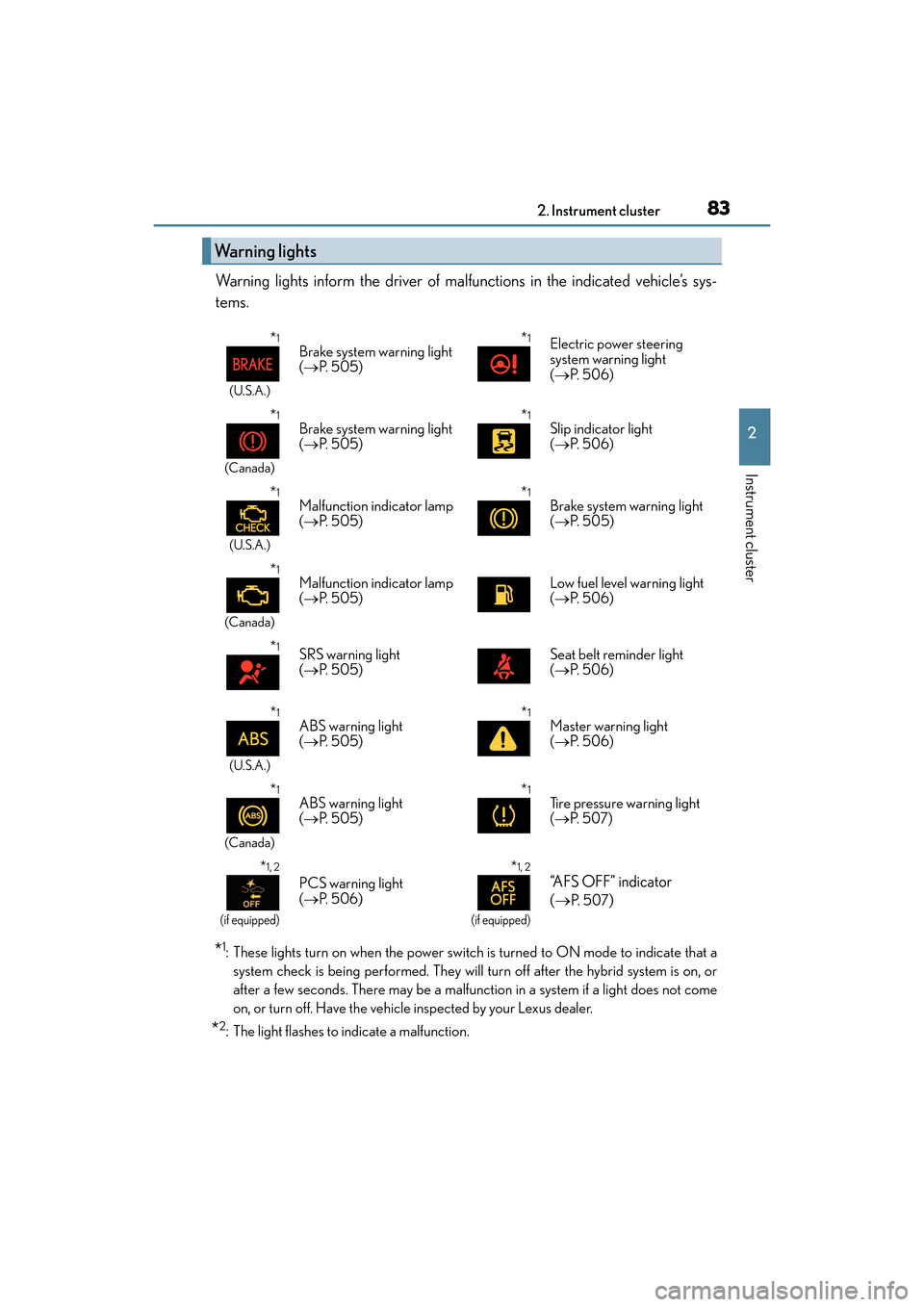
Warning lights inform the driver of malfunctions in the indicated vehicle’s sys-
tems.
*1: These lights turn on when the power switch is turned to ON mode to indicate that asystem check is being performe d. They will turn off after the hybrid system is on, or
after a few seconds. There may be a malfunction in a system if a light does not come
on, or turn off. Have the vehicle inspected by your Lexus dealer.
*2: The light flashes to indicate a malfunction.
Warning lights
*1
(U.S.A.)
Brake system warning light
( → P. 5 0 5 )*1Electric power steering
system warning light
(→ P. 5 0 6 )
*1
(Canada)
Brake system warning light
(→ P. 5 0 5 )*1Slip indicator light
(→ P. 5 0 6 )
*1
(U.S.A.)
Malfunction indicator lamp
(→ P. 5 0 5 )*1Brake system warning light
(→ P. 505)
*1
(Canada)
Malfunction indicator lamp
(→ P. 5 0 5 )Low fuel level warning light
(→ P. 5 0 6 )
*1SRS warning light
(→ P. 5 0 5 )Seat belt reminder light
(→ P. 5 0 6 )
*1
(U.S.A.)
ABS warning light
(→ P. 5 0 5 )*1Master warning light
(→ P. 5 0 6 )
*1
(Canada)
ABS warning light
(→ P. 5 0 5 )*1Tire pressure warning light
(→ P. 5 0 7 )
*1, 2
(if equipped)
PCS warning light
(→ P. 5 0 6 )
*1, 2
(if equipped)
“AFS OFF” indicator
(→
P. 5 0 7)
Page 93 of 612
91
ES300h_OM_OM33C75U_(U)2. Instrument cluster
2
Instrument cluster
Multi-information display
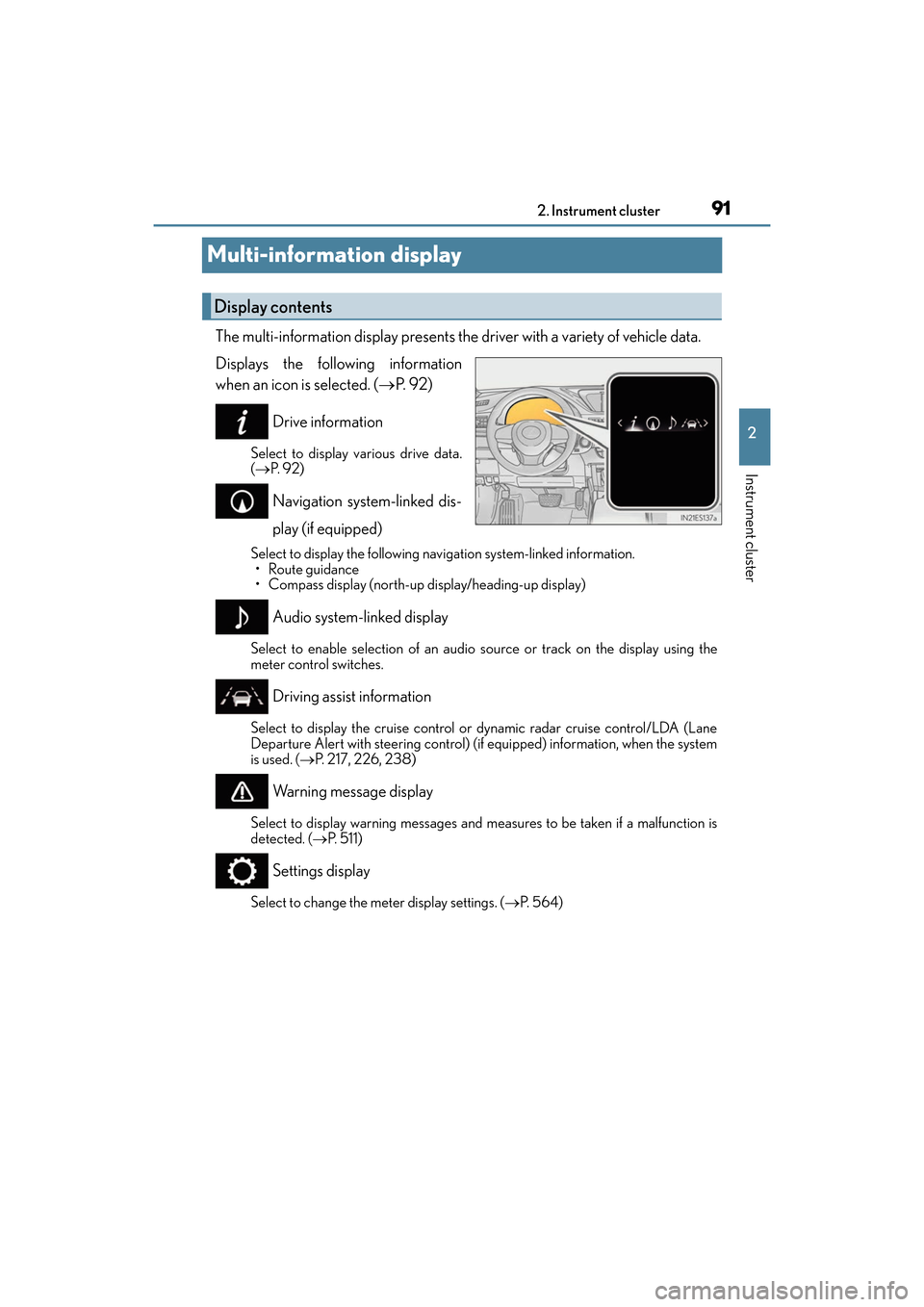
The multi-information display presents the driver with a variety of vehicle data.
Displays the following information
when an icon is selected. (
→P. 9 2 )
Drive information
Select to display various drive data.
( → P. 9 2 )
Navigation system-linked dis-
play (if equipped)
Select to display the following navigation system-linked information.
•Route guidance
• Compass display (north-up display/heading-up display)
Audio system-linked display
Select to enable selection of an audio source or track on the display using the
meter control switches.
Driving assist information
Select to display the cruise control or dynamic radar cruise control/LDA (Lane
Departure Alert with steering control) (if equipped) information, when the system
is used. ( →P. 217, 226, 238)
Warning message display
Select to display warning messages and me asures to be taken if a malfunction is
detected. ( →P. 511)
Settings display
Select to change the meter display settings. ( →P. 5 6 4 )
Display contents
Page 95 of 612
ES300h_OM_OM33C75U_(U)
932. Instrument cluster
2
Instrument cluster
■Average speed (after reset*2/a f t e r s t a r t )*1
Displays the average vehicle speed since the function was reset and the
hybrid system was started, respectively
■Elapsed time (after reset*2/a f t e r s t a r t )*1
Displays the elapsed time since the function was reset and the hybrid system
was started, respectively
■Distance (range/after start)*1
Displays the estimated maximum distance that can be driven with the quantity
of fuel remaining and the distance driven after the hybrid system was started
respectively.
• This distance is computed based on your average fuel consumption. As a result,the actual distance that can be driven may differ from that displayed.
• When only a small amount of fuel is added to the tank, the display may not be
updated.
When refueling, turn the power switch off. If the vehicle is refueled without turning
the power switch off, the display may not be updated.
■Energy monitor
→ P. 9 6
■Tire inflation pressure
Displays inflation pressure of each tire.
The inflation pressure of the spare tire will not be displayed.
■LDA (Lane Departure Alert with steering control) vehicle sway warning (if
equipped)
→P. 2 1 7
■Display off
A blank screen is displayed
*1: Displayed when the item is set in “Drive Info 1”, “Drive Info 2” or “Drive Info 3”.
(→ P. 5 6 4 )
*2: The function can be reset by pressing the of the meter control switches for
longer than 1 second when the item to reset is displayed.
If there is more than one item that can be reset, the item selection screen will appear.
Page 96 of 612
94
ES300h_OM_OM33C75U_(U)2. Instrument cluster
The settings of the following items can be changed, refer to P. 562
For functions that can be enabled or disabled, the function switches between on and
off each time is pressed.
●(Lane Departure Alert with steering control) (if
equipped) (
→P. 2 1 7 )
●(Pre-Collision System) (if equipped) ( →P. 2 0 5 )
●AFS (Adaptive Front-lighting System) (if equipped) ( →P. 1 8 3 )
●Clock
Adjusts the hour and minute of the clock on the multi-information display.
●Ambient illumin.
Select to turn the ornament lights on and off.
●Ve h i c l e S e t t i n g s
• Scheduled Maintenance ( →P. 441)
• Oil Maintenance ( →P. 4 5 5 )
●Meter Settings
•Language
Select to change the language on the display.
•Units
Select to change the unit of measure.
• EV indicator
Select to activate/deactivate the EV indicator.
• switch
Displays a procedure to register a desired screen to .
You can register 1 screen as a shortcut , which can be displayed by pressing .
• Drive information 1 /2 /3
Select to select up to 2 items that will be displayed on a Drive information
screen, up to 3 Drive information screens can be set.
•Pop-up display
Select to set the pop-up displays, which may appear in some situations, on/off.
• Accent color
Select to change the accent colors on the screen, such as the cursor color.
• Tachometer
Select to set the tachometer display.
• Default settings
Registered or changed meter settings will be deleted or returned to their
default setting.
Settings display
Page 97 of 612
ES300h_OM_OM33C75U_(U)
952. Instrument cluster
2
Instrument cluster
■System check display
After turning the power switch to ON mode, opening image is displayed while system
operation is checked. When the system check is complete, the normal screen will return.
■Suspension of the settings display
In the following situations, the settings display using the meter control switches will be
suspended.
●When a warning message appears on the multi-information display
●When the vehicle begins to move
■Tire inflation pressure
●It may take a few minutes to display the tire inflation pressure after the power switch is
turned to ON mode. It may also take a few minutes to display the tire inflation pressure
after inflation pressure has been adjusted.
●“---” may be displayed if the tire information cannot be determined due to unfavorable
radio wave conditions.
●Tire inflation pressure changes with temperature. The displayed values may also be dif-
ferent from the values measured using a tire pressure gauge.
■When disconnecting and reconnecting 12-volt battery terminals
The drive information will be reset.
■Liquid crystal display
→P. 8 9
WA R N I N G
■Caution for use while driving
For safety, avoid operating the meter control switch while driving as much as possible,
and do not look continuously at the multi- information display while driving. Stop the
vehicle and operate the meter control switch. Failure to do so may cause a steering
wheel operation error, resulting in an unexpected accident.
■Cautions during setting up the display
As the hybrid system needs to be operating during setting up the display, ensure that
the vehicle is parked in a place with adequate ventilation. In a closed area such as a
garage, exhaust gases including harmful carbon monoxide (CO) may collect and enter
the vehicle. This may lead to death or a serious health hazard.
NOTICE
■During setting up the display
To prevent 12-volt battery discharge, ensure that the hybrid system is operating while
setting up the display features.
Page 105 of 612
103
ES300h_OM_OM33C75U_(U)
3
Operation of
each component
3-1. Key information
Keys .................................................. 104
3-2. Opening, closing and locking the doors and trunk
Doors ............................................... 108
Trunk ................................................... 114
Smart access system with push-button start .............. 121
3-3. Adjusting the seats Front seats.......................................129
Driving position memory ......... 130
Head restraints ............................ 135
3-4. Adjusting the steering wheel and mirrors
Steering wheel ............................. 138
Inside rear view mirror.............. 140
Outside rear view mirrors ........142
3-5. Opening, closing the windows and moon roof
Power windows .............................145
Moon roof ...................................... 148
Page 131 of 612
129
ES300h_OM_OM33C75U_(U)3-3. Adjusting the seats
3
Operation of each component
Front seats
■Power easy access system
The driver’s seat and steering wheel (power adjustment type) move in accordance with
power switch mode and the driv
er’s seat belt condition. (→P. 1 3 0 )
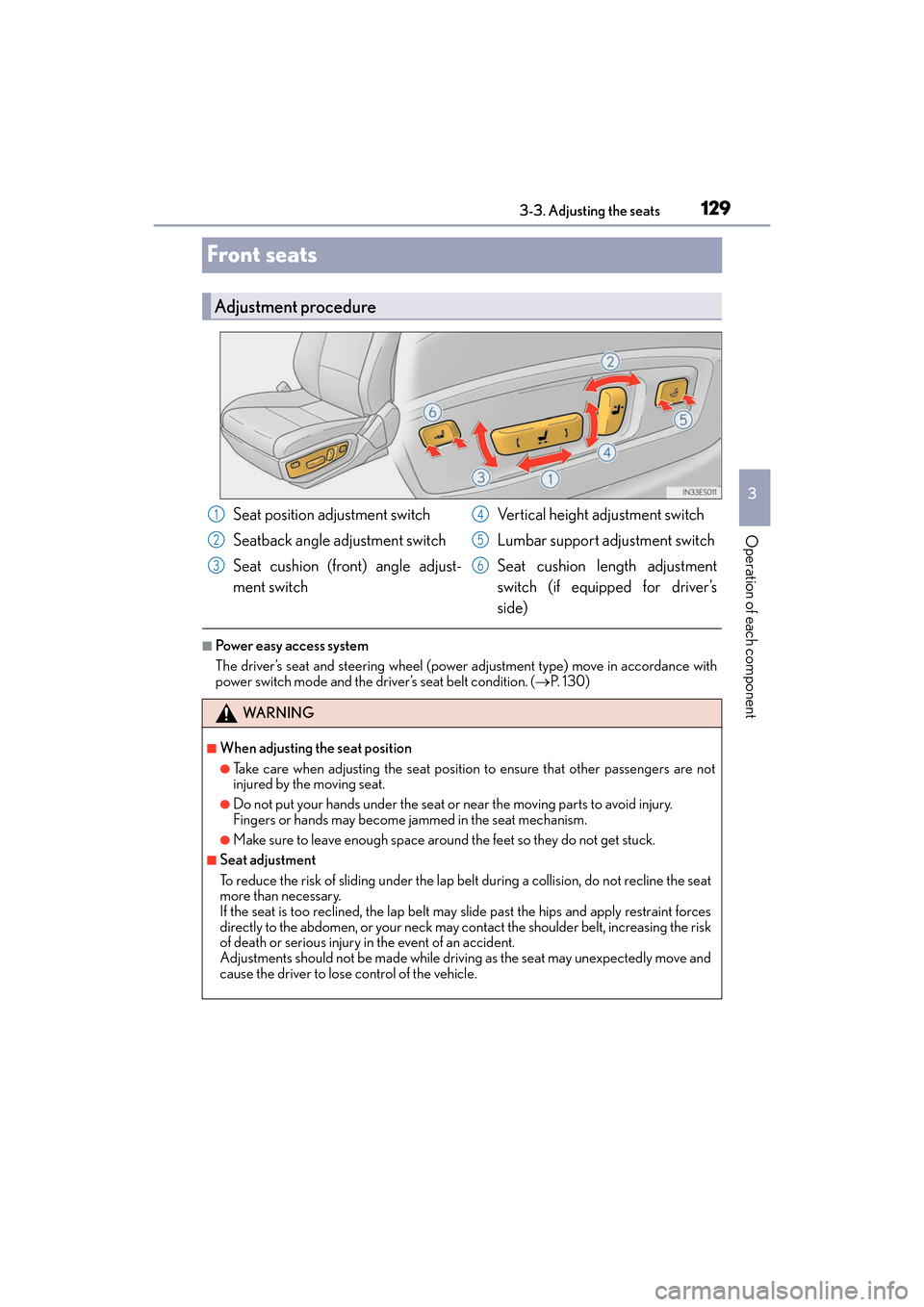
Adjustment procedure
Seat position adjustment switch
Seatback angle adjustment switch
Seat cushion (front) angle adjust-
ment switch Vertical height adjustment switch
Lumbar support adjustment switch
Seat cushion length adjustment
switch (if equipped for driver’s
side)
WA R N I N G
■When adjusting the seat position
●Take care when adjusting the seat position to ensure that other passengers are not
injured by the moving seat.
●Do not put your hands under the seat or near the moving parts to avoid injury.
Fingers or hands may become jammed in the seat mechanism.
●Make sure to leave enough space around the feet so they do not get stuck.
■Seat adjustment
To reduce the risk of sliding under the lap be
lt during a collision, do not recline the seat
more than necessary.
If the seat is too reclined, th e lap belt may slide past the hips and apply restraint forces
directly to the abdomen, or your neck may contact the shoulder belt, increasing the risk
of death or serious injury in the event of an accident.
Adjustments should not be made while drivin g as the seat may unexpectedly move and
cause the driver to lose control of the vehicle.
1
2
3
4
5
6
Page 132 of 612
130
ES300h_OM_OM33C75U_(U)3-3. Adjusting the seats
Driving position memory∗
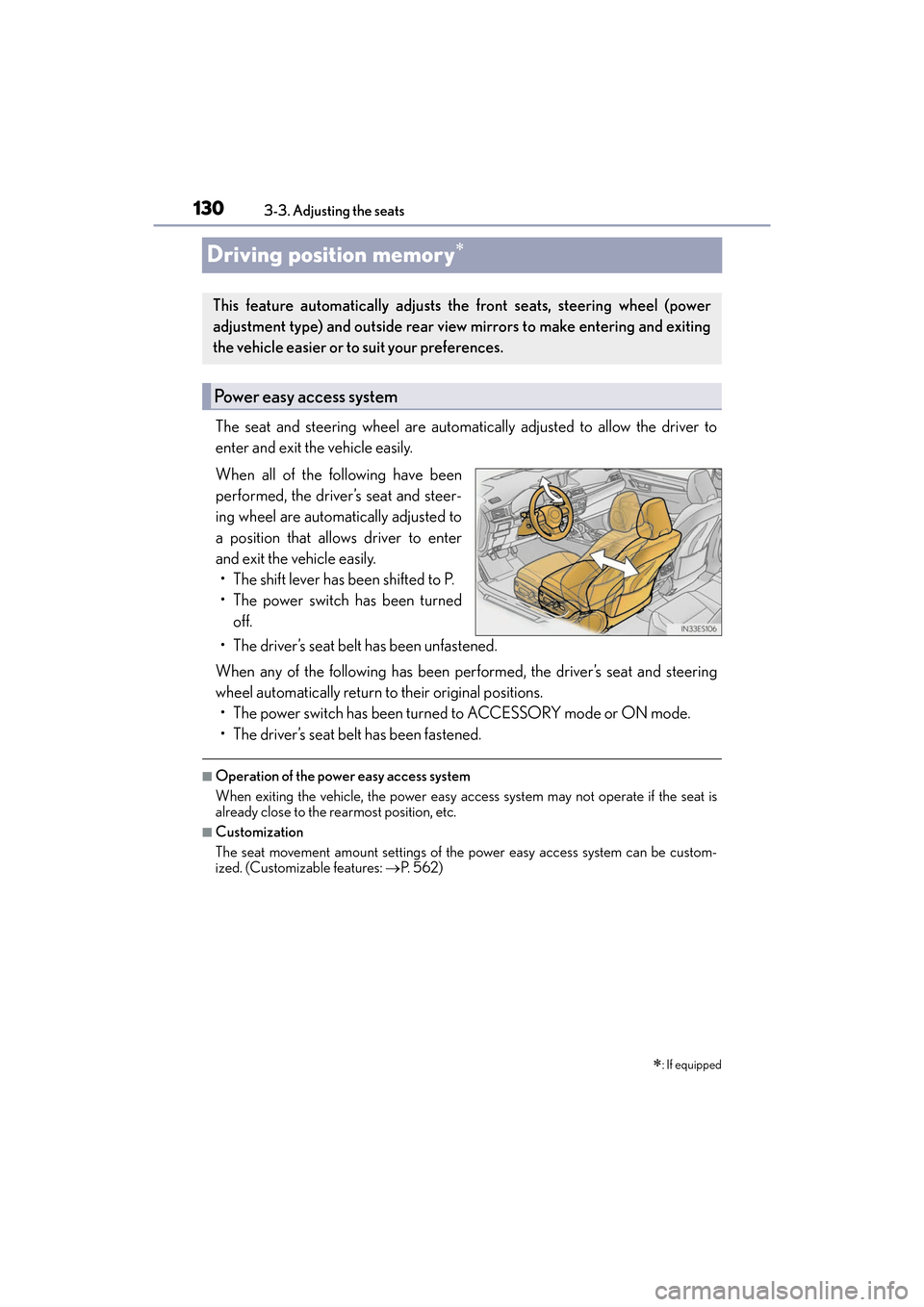
The seat and steering wheel are automatically adjusted to allow the driver to
enter and exit the vehicle easily.
When all of the following have been
performed, the driver’s seat and steer-
ing wheel are automatically adjusted to
a position that allows driver to enter
and exit the vehicle easily.
• The shift lever has been shifted to P.
• The power switch has been turned off.
• The driver’s seat belt has been unfastened.
When any of the following has been performed, the driver’s seat and steering
wheel automatically return to their original positions. • The power switch has been turned to ACCESSORY mode or ON mode.
• The driver’s seat belt has been fastened.
■Operation of the power easy access system
When exiting the vehicle, the power easy access system may not operate if the seat is
already close to the rearmost position, etc.
■Customization
The seat movement amount settings of the power easy access system can be custom-
ized. (Customizable features: →P. 5 6 2 )
∗: If equipped
This feature automatically adjusts the front seats, steering wheel (power
adjustment type) and outside rear view mirrors to make entering and exiting
the vehicle easier or to suit your preferences.
Power easy access system