lock Lexus ES300h 2017 Owner's Guide
[x] Cancel search | Manufacturer: LEXUS, Model Year: 2017, Model line: ES300h, Model: Lexus ES300h 2017Pages: 612, PDF Size: 14.05 MB
Page 88 of 612

86
ES300h_OM_OM33C75U_(U)2. Instrument cluster
Gauges and meters
The units used on the speedometer may differ depending on the target region.
Engine coolant temperature gauge
Displays the engine coolant temperature
Tachometer/Hybrid System Indicator
Tachometer:
Displays the engine speed in revolutions per minute.
Hybrid System Indicator:
Displays hybrid system output or regeneration level. (→
P. 8 8 )
Outside temperature
Displays the outside temperature within the range of -40 °F (-40 °C) to 122 °F
(50 °C). Low outside temperature indicator comes on when the ambient temperature
is 37 °F (3 °C) or lower.
Clock
Time can be adjusted or a clock format can be set from (settings display) of
the multi-information display. ( →P. 9 1 )
Multi-information display
Presents the driver with a variety of vehicle data ( →P. 9 1 )
Displays warning messages in case of a malfunction ( →P. 5 1 1 )
Speedometer
Displays the vehicle speed
Fuel gauge
Displays the quantity of fuel remaining in the tank
Shift position and shift range
Displays the selected shift position or selected shift range ( →P. 1 7 5 )
1
2
3
4
5
6
7
8
Page 96 of 612
94
ES300h_OM_OM33C75U_(U)2. Instrument cluster
The settings of the following items can be changed, refer to P. 562
For functions that can be enabled or disabled, the function switches between on and
off each time is pressed.
●(Lane Departure Alert with steering control) (if
equipped) (
→P. 2 1 7 )
●(Pre-Collision System) (if equipped) ( →P. 2 0 5 )
●AFS (Adaptive Front-lighting System) (if equipped) ( →P. 1 8 3 )
●Clock
Adjusts the hour and minute of the clock on the multi-information display.
●Ambient illumin.
Select to turn the ornament lights on and off.
●Ve h i c l e S e t t i n g s
• Scheduled Maintenance ( →P. 441)
• Oil Maintenance ( →P. 4 5 5 )
●Meter Settings
•Language
Select to change the language on the display.
•Units
Select to change the unit of measure.
• EV indicator
Select to activate/deactivate the EV indicator.
• switch
Displays a procedure to register a desired screen to .
You can register 1 screen as a shortcut , which can be displayed by pressing .
• Drive information 1 /2 /3
Select to select up to 2 items that will be displayed on a Drive information
screen, up to 3 Drive information screens can be set.
•Pop-up display
Select to set the pop-up displays, which may appear in some situations, on/off.
• Accent color
Select to change the accent colors on the screen, such as the cursor color.
• Tachometer
Select to set the tachometer display.
• Default settings
Registered or changed meter settings will be deleted or returned to their
default setting.
Settings display
Page 105 of 612
103
ES300h_OM_OM33C75U_(U)
3
Operation of
each component
3-1. Key information
Keys .................................................. 104
3-2. Opening, closing and locking the doors and trunk
Doors ............................................... 108
Trunk ................................................... 114
Smart access system with push-button start .............. 121
3-3. Adjusting the seats Front seats.......................................129
Driving position memory ......... 130
Head restraints ............................ 135
3-4. Adjusting the steering wheel and mirrors
Steering wheel ............................. 138
Inside rear view mirror.............. 140
Outside rear view mirrors ........142
3-5. Opening, closing the windows and moon roof
Power windows .............................145
Moon roof ...................................... 148
Page 106 of 612
104
ES300h_OM_OM33C75U_(U)3-1. Key information
Keys
The following keys are provided with the vehicle.
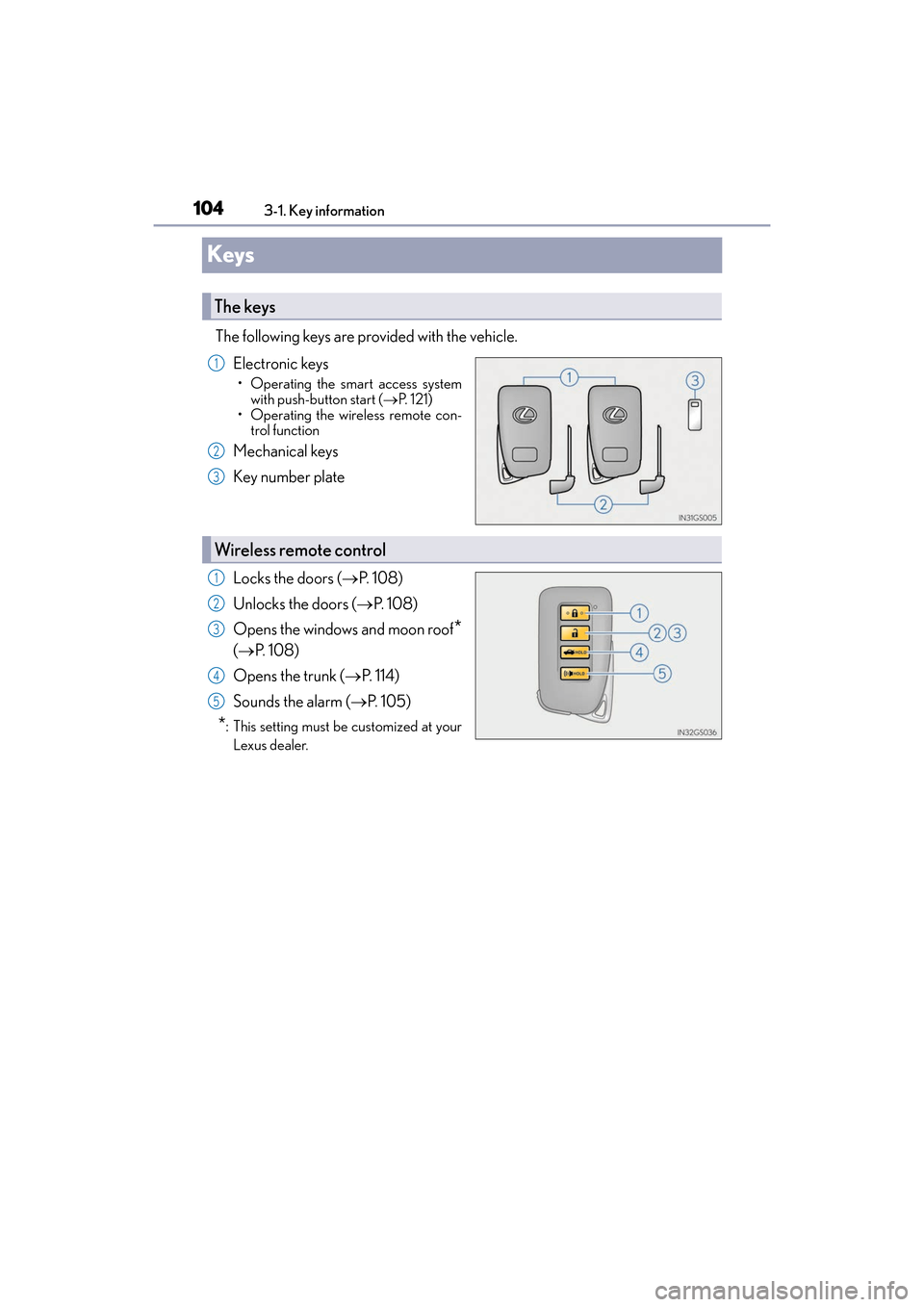
Electronic keys
• Operating the smart access systemwith push-button start ( →P. 121)
• Operating the wireless remote con- trol function
Mechanical keys
Key number plate
Locks the doors ( →P. 1 0 8 )
Unlocks the doors ( →P. 1 0 8 )
Opens the windows and moon roof
*
( → P. 1 0 8 )
Opens the trunk ( →P. 114)
Sounds the alarm ( →P. 1 0 5 )
*: This setting must be customized at your
Lexus dealer.
The keys
1
2
3
Wireless remote control
1
2
3
4
5
Page 107 of 612
ES300h_OM_OM33C75U_(U)
1053-1. Key information
3
Operation of each component
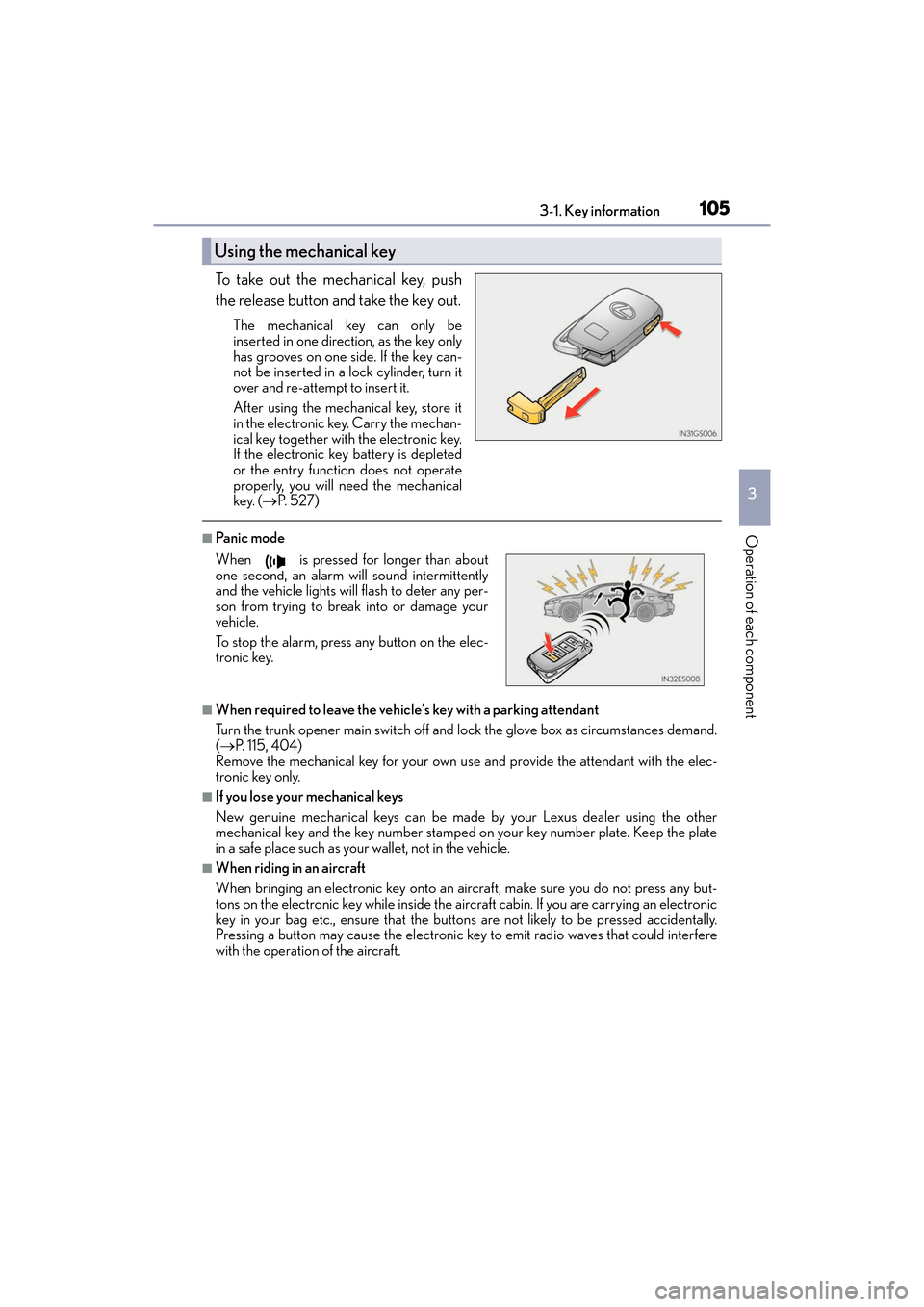
To take out the mechanical key, push
the release button and take the key out.
The mechanical key can only be
inserted in one direction, as the key only
has grooves on one side. If the key can-
not be inserted in a lock cylinder, turn it
over and re-attempt to insert it.
After using the mechanical key, store it
in the electronic key. Carry the mechan-
ical key together with the electronic key.
If the electronic key battery is depleted
or the entry function does not operate
properly, you will need the mechanical
key. ( →P. 5 2 7 )
■Pa ni c m o d e
■When required to leave the vehicle’s key with a parking attendant
Turn the trunk opener main switch off and lock the glove box as circumstances demand.
(→ P. 115, 404)
Remove the mechanical key for your own use and provide the attendant with the elec-
tronic key only.
■If you lose your mechanical keys
New genuine mechanical keys can be made by your Lexus dealer using the other
mechanical key and the key number stamped on your key number plate. Keep the plate
in a safe place such as your wallet, not in the vehicle.
■When riding in an aircraft
When bringing an electronic key onto an aircraft, make sure you do not press any but-
tons on the electronic key while inside the aircraft cabin. If you are carrying an electronic
key in your bag etc., ensure that the buttons are not likely to be pressed accidentally.
Pressing a button may cause the electronic key to emit radio waves that could interfere
with the operation of the aircraft.
Using the mechanical key
When is pressed for longer than about
one second, an alarm will sound intermittently
and the vehicle lights will flash to deter any per-
son from trying to break into or damage your
vehicle.
To stop the alarm, press any button on the elec-
tronic key.
Page 110 of 612
108
ES300h_OM_OM33C75U_(U)3-2. Opening, closing and locking the doors and trunk
Doors
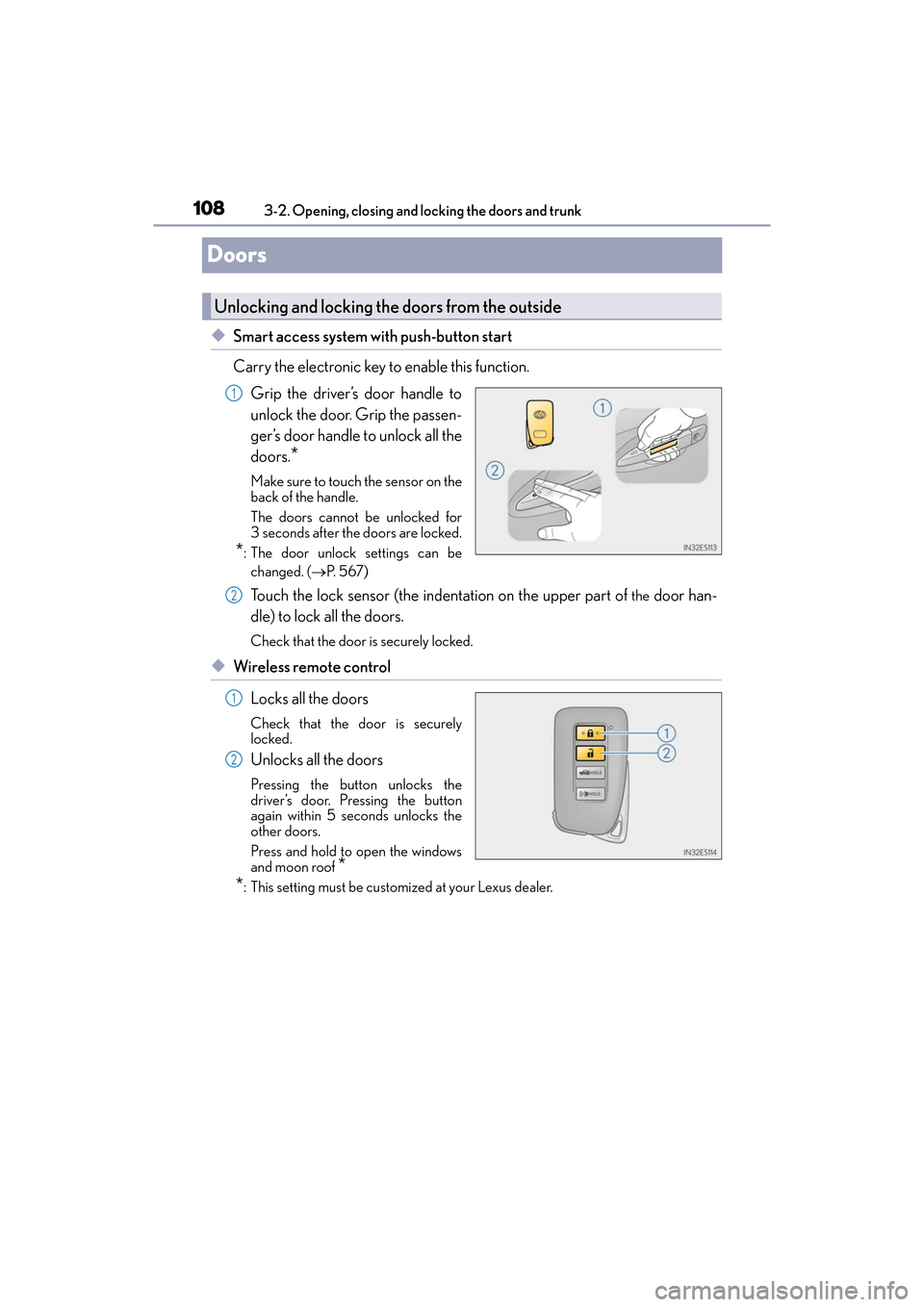
◆Smart access system with push-button start
Carry the electronic key to enable this function.
Grip the driver’s door handle to
unlock the door. Grip the passen-
ger’s door handle to unlock all the
doors.
*
Make sure to touch the sensor on the
back of the handle.
The doors cannot be unlocked for
3 seconds after the doors are locked.
*: The door unlock settings can bechanged. ( →P. 5 6 7 )
Touch the lock sensor (the indentation on the upper part of the door han-
dle) to lock all the doors.
Check that the door is securely locked.
◆Wireless remote control
Locks all the doors
Check that the door is securely
locked.
Unlocks all the doors
Pressing the button unlocks the
driver’s door. Pressing the button
again within 5 seconds unlocks the
other doors.
Press and hold to open the windows
and moon roof
*
*
: This setting must be customized at your Lexus dealer.
Unlocking and locking the doors from the outside
1
2
1
2
Page 111 of 612
ES300h_OM_OM33C75U_(U)
1093-2. Opening, closing and locking the doors and trunk
3
Operation of each component
■Operation signals
A buzzer sounds and the emergency flashers flash to indicate that the doors have been
locked/unlocked. (Locked: Once; Unlocked: Twice)
Windows and moon roof:
A buzzer sounds to indicate that the windows and moon roof are opening.
■Security feature
If a door is not opened within approximately 60 seconds after the vehicle is unlocked, the
security feature automatically locks the vehicle again.
■Welcome light illumination control
The side marker, parking, tail and license plate lights automatically turn on at night when
the doors are unlocked using the entry function or wireless remote control if the light
switch is in the “AUTO” position.
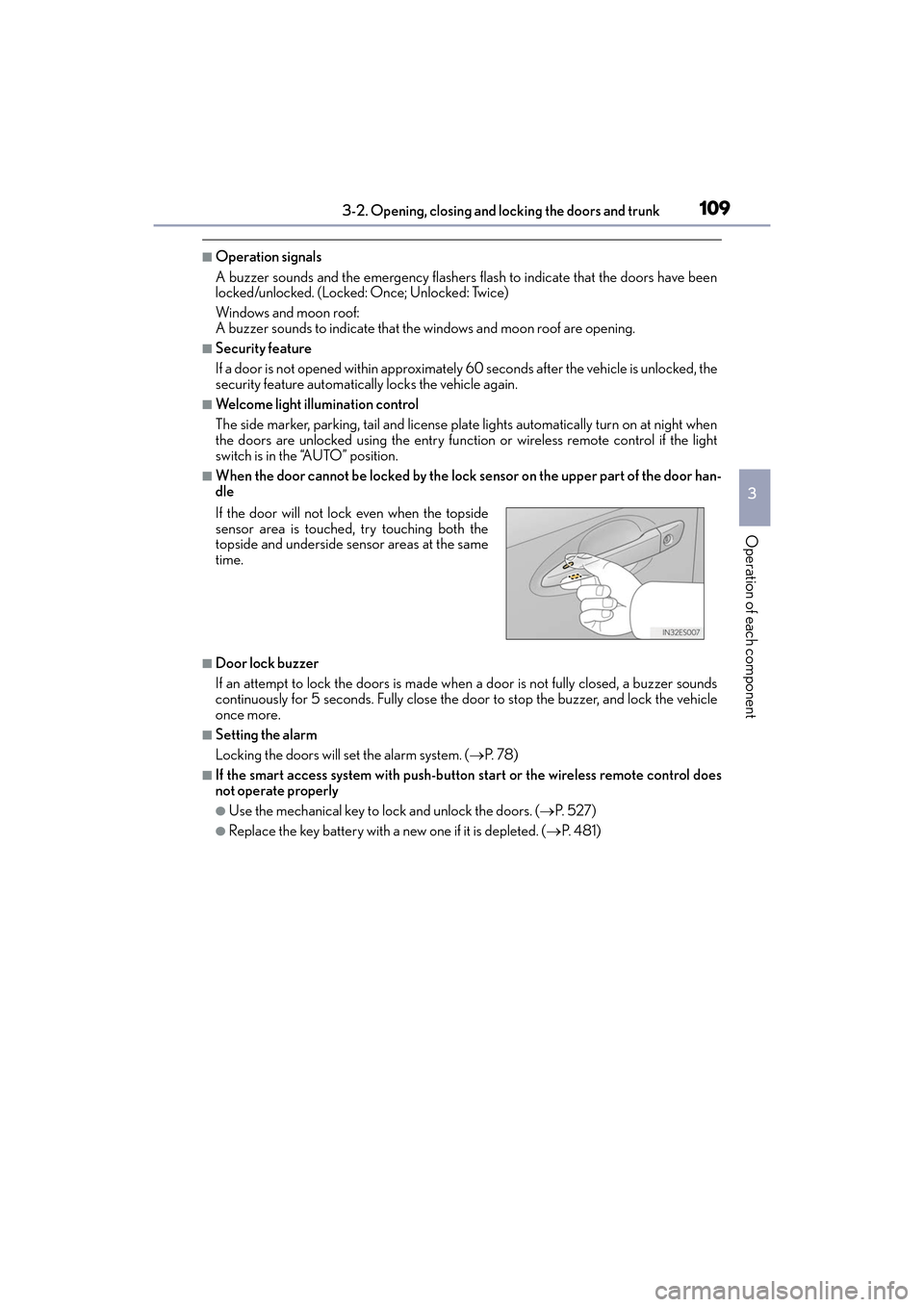
■When the door cannot be locked by the lock sensor on the upper part of the door han-
dle
■Door lock buzzer
If an attempt to lock the doors is made when a door is not fully closed, a buzzer sounds
continuously for 5 seconds. Fully close the door to stop the buzzer, and lock the vehicle
once more.
■Setting the alarm
Locking the doors will set the alarm system. ( →P. 7 8 )
■If the smart access system with push-button start or the wireless remote control does
not operate properly
●Use the mechanical key to lock and unlock the doors. ( →P. 5 2 7 )
●Replace the key battery with a new one if it is depleted. ( →P. 4 8 1 )
If the door will not lock even when the topside
sensor area is touched, try touching both the
topside and underside sensor areas at the same
time.
Page 112 of 612
110
ES300h_OM_OM33C75U_(U)3-2. Opening, closing and locking the doors and trunk
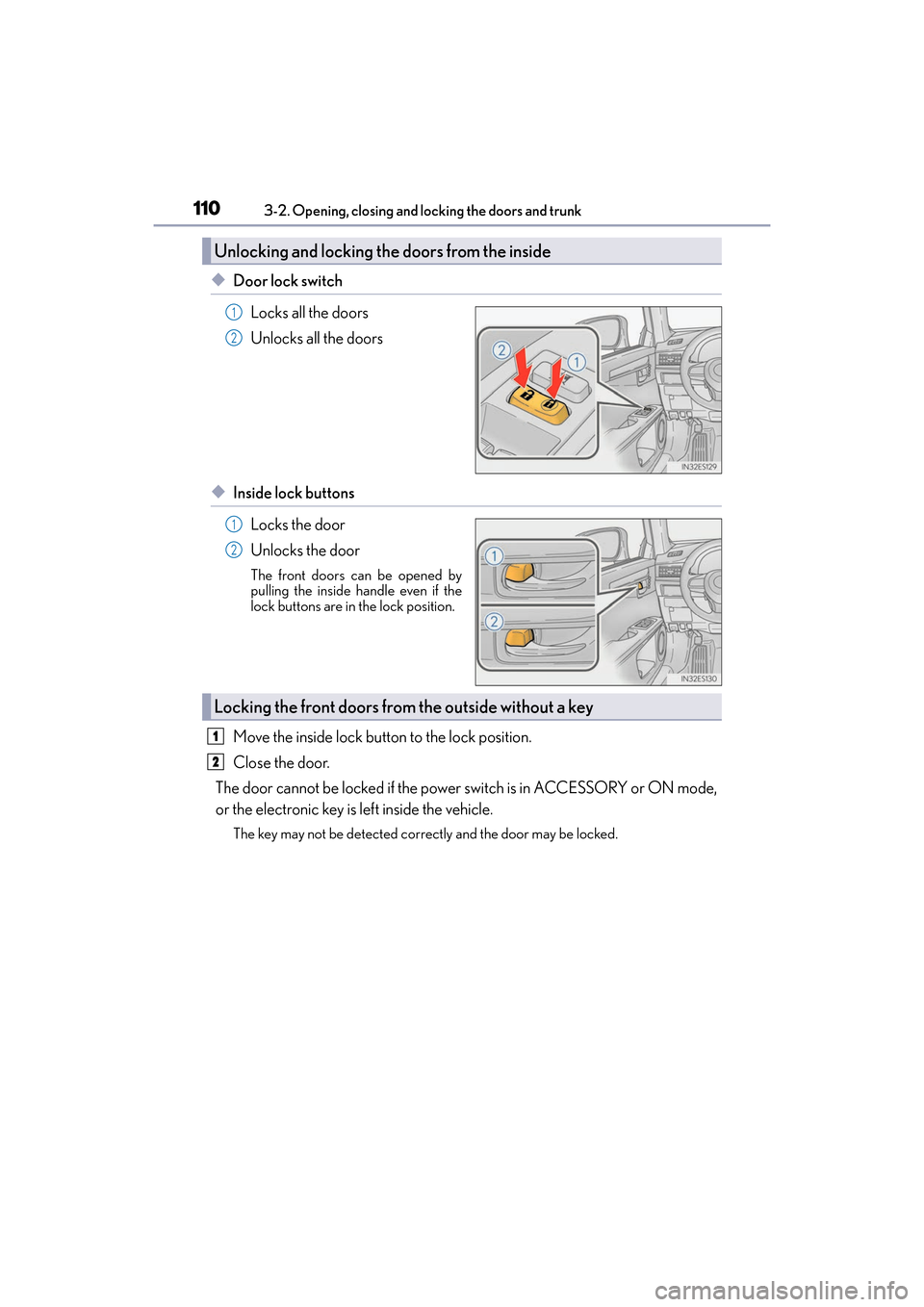
◆Door lock switch
Locks all the doors
Unlocks all the doors
◆Inside lock buttonsLocks the door
Unlocks the door
The front doors can be opened by
pulling the inside handle even if the
lock buttons are in the lock position.
Move the inside lock button to the lock position.
Close the door.
The door cannot be locked if the power switch is in ACCESSORY or ON mode,
or the electronic key is left inside the vehicle.
The key may not be detected correctly and the door may be locked.
Unlocking and locking th e doors from the inside
1
2
1
2
Locking the front doors from the outside without a key
1
2
Page 113 of 612
ES300h_OM_OM33C75U_(U)
1113-2. Opening, closing and locking the doors and trunk
3
Operation of each component
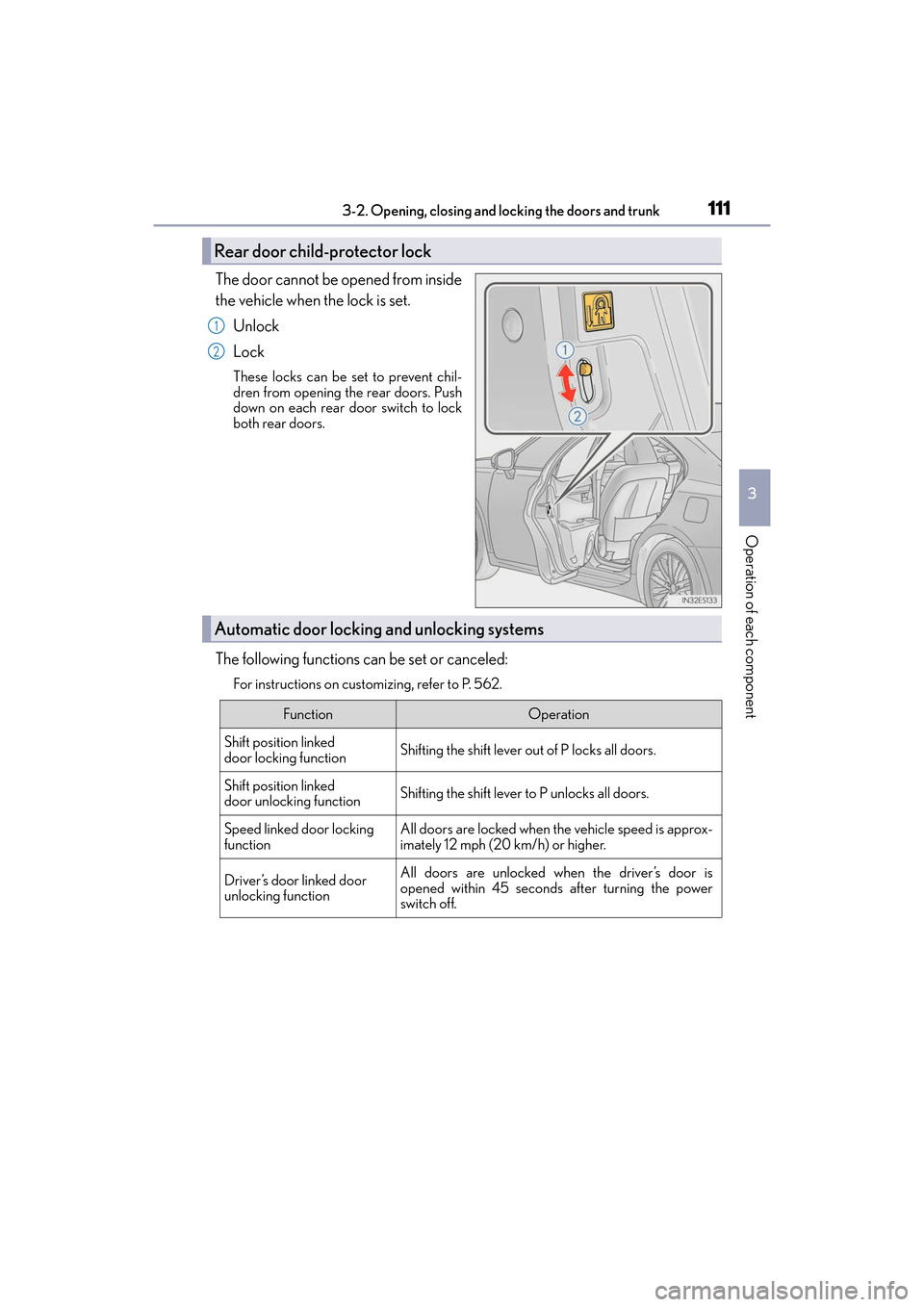
The door cannot be opened from inside
the vehicle when the lock is set.Unlock
Lock
These locks can be set to prevent chil-
dren from opening the rear doors. Push
down on each rear door switch to lock
both rear doors.
The following functions can be set or canceled:
For instructions on customizing, refer to P. 562.
Rear door child-protector lock
1
2
Automatic door locking and unlocking systems
FunctionOperation
Shift position linked
door locking functionShifting the shift lever out of P locks all doors.
Shift position linked
door unlocking functionShifting the shift lever to P unlocks all doors.
Speed linked door locking
functionAll doors are locked when the vehicle speed is approx-
imately 12 mph (20 km/h) or higher.
Driver’s door linked door
unlocking functionAll doors are unlocked when the driver’s door is
opened within 45 seconds after turning the power
switch off.
Page 114 of 612
112
ES300h_OM_OM33C75U_(U)3-2. Opening, closing and locking the doors and trunk
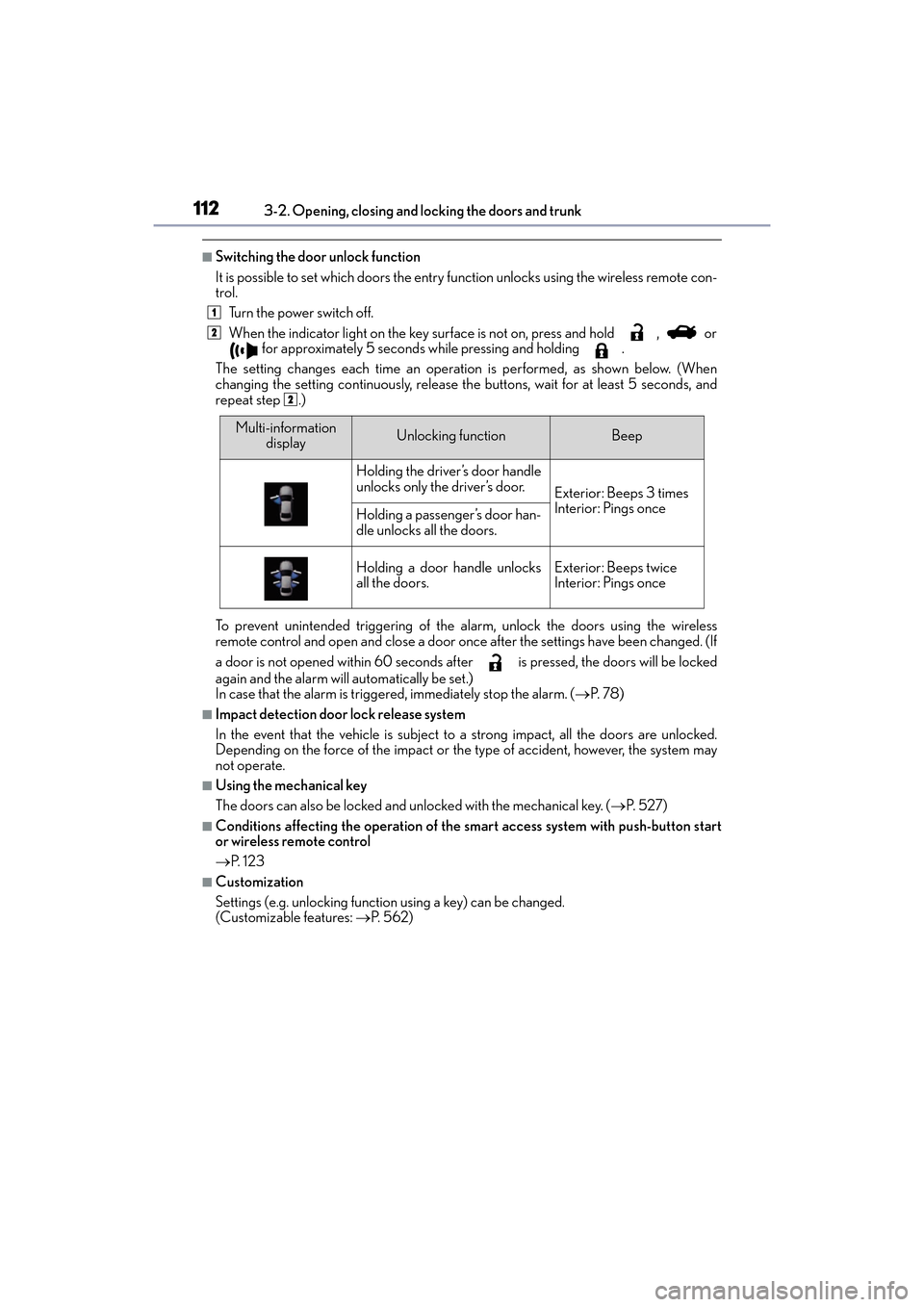
■Switching the door unlock function
It is possible to set which doors the entry function unlocks using the wireless remote con-
trol.
Turn the power switch off.
When the indicator light on the key surface is not on, press and hold , or for approximately 5 seconds while pressing and holding .
The setting changes each time an operation is performed, as shown below. (When
changing the setting continuously, release th e buttons, wait for at least 5 seconds, and
repeat step .)
To prevent unintended triggering of the alarm, unlock the doors using the wireless
remote control and open and close a door once after the settings have been changed. (If
a door is not opened within 60 seconds af ter is pressed, the doors will be locked
again and the alarm will automatically be set.)
In case that the alarm is triggered, immediately stop the alarm. ( →P. 7 8 )
■Impact detection door lock release system
In the event that the vehicle is subject to a strong impact, all the doors are unlocked.
Depending on the force of the impact or the type of accident, however, the system may
not operate.
■Using the mechanical key
The doors can also be locked and unlocked with the mechanical key. ( →P. 5 2 7 )
■Conditions affecting the operation of the smart access system with push-button start
or wireless remote control
→P. 1 2 3
■Customization
Settings (e.g. unlocking function using a key) can be changed.
(Customizable features: →P. 5 6 2 )
1
2
2
Multi-information
displayUnlocking functionBeep
Holding the driver’s door handle
unlocks only the driver’s door.
Exterior: Beeps 3 times
Interior: Pings once
Holding a passenger’s door han-
dle unlocks all the doors.
Holding a door handle unlocks
all the doors.Exterior: Beeps twice
Interior: Pings once