display Lexus ES300h 2017 Repair Manual
[x] Cancel search | Manufacturer: LEXUS, Model Year: 2017, Model line: ES300h, Model: Lexus ES300h 2017Pages: 612, PDF Size: 14.05 MB
Page 234 of 612
232
ES300h_OM_OM33C75U_(U)4-5. Using the driving support systems
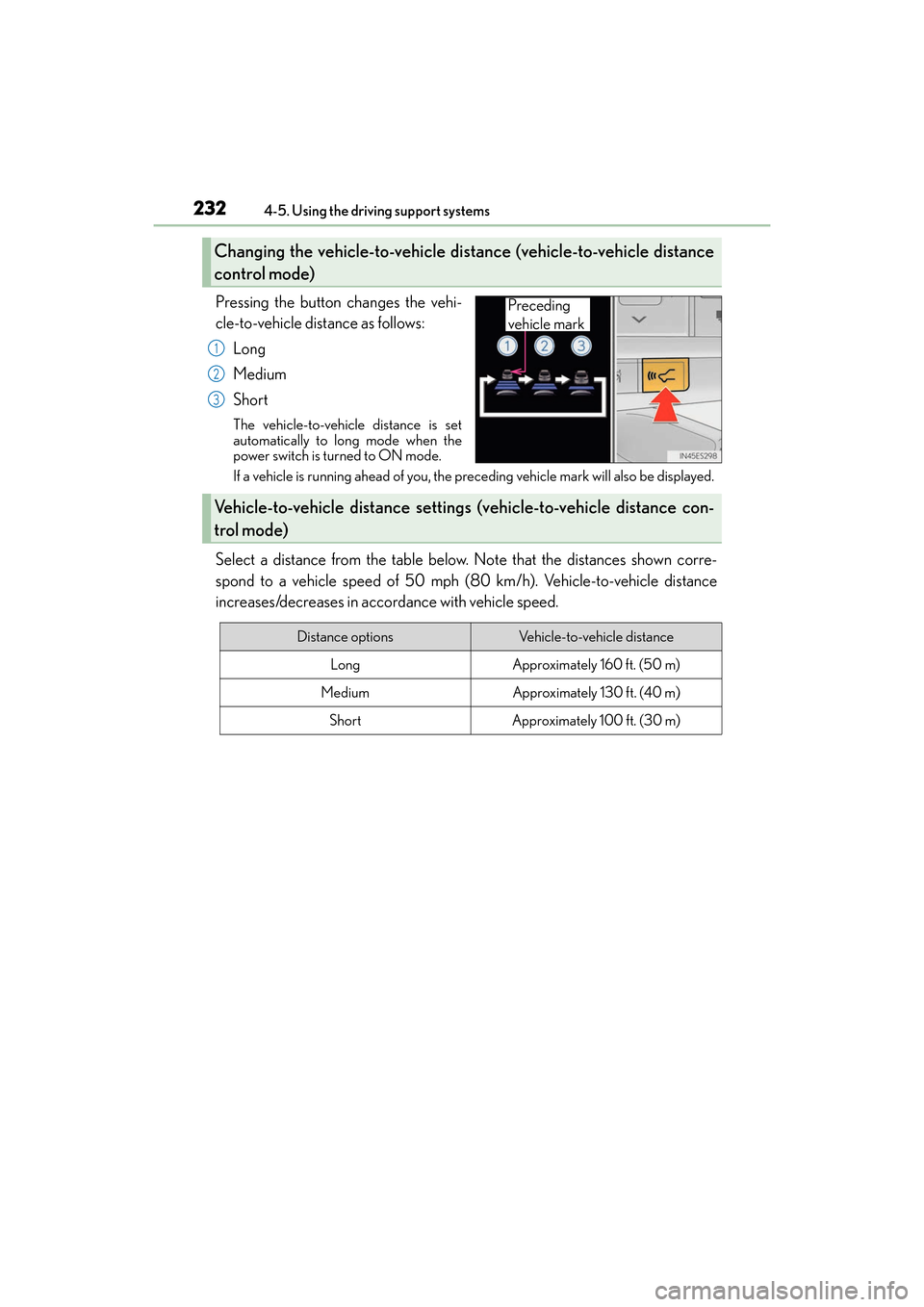
Pressing the button changes the vehi-
cle-to-vehicle distance as follows:
Long
Medium
Short
The vehicle-to-vehicle distance is set
automatically to long mode when the
power switch is turned to ON mode.
If a vehicle is running ahead of you, the preceding vehicle mark will also be displayed.
Select a distance from the table below. Note that the distances shown corre-
spond to a vehicle speed of 50 mph (80 km/h). Vehicle-to-vehicle distance
increases/decreases in accordance with vehicle speed.
Changing the vehicle-to-vehicle di stance (vehicle-to-vehicle distance
control mode)
Preceding
vehicle mark
1
2
3
Vehicle-to-vehicle distance setting s (vehicle-to-vehicle distance con-
trol mode)
Distance optionsVehicle-to-vehicle distance
LongApproximately 160 ft. (50 m)
MediumApproximately 130 ft. (40 m)
ShortApproximately 100 ft. (30 m)
Page 235 of 612
ES300h_OM_OM33C75U_(U)
2334-5. Using the driving support systems
4
Driving
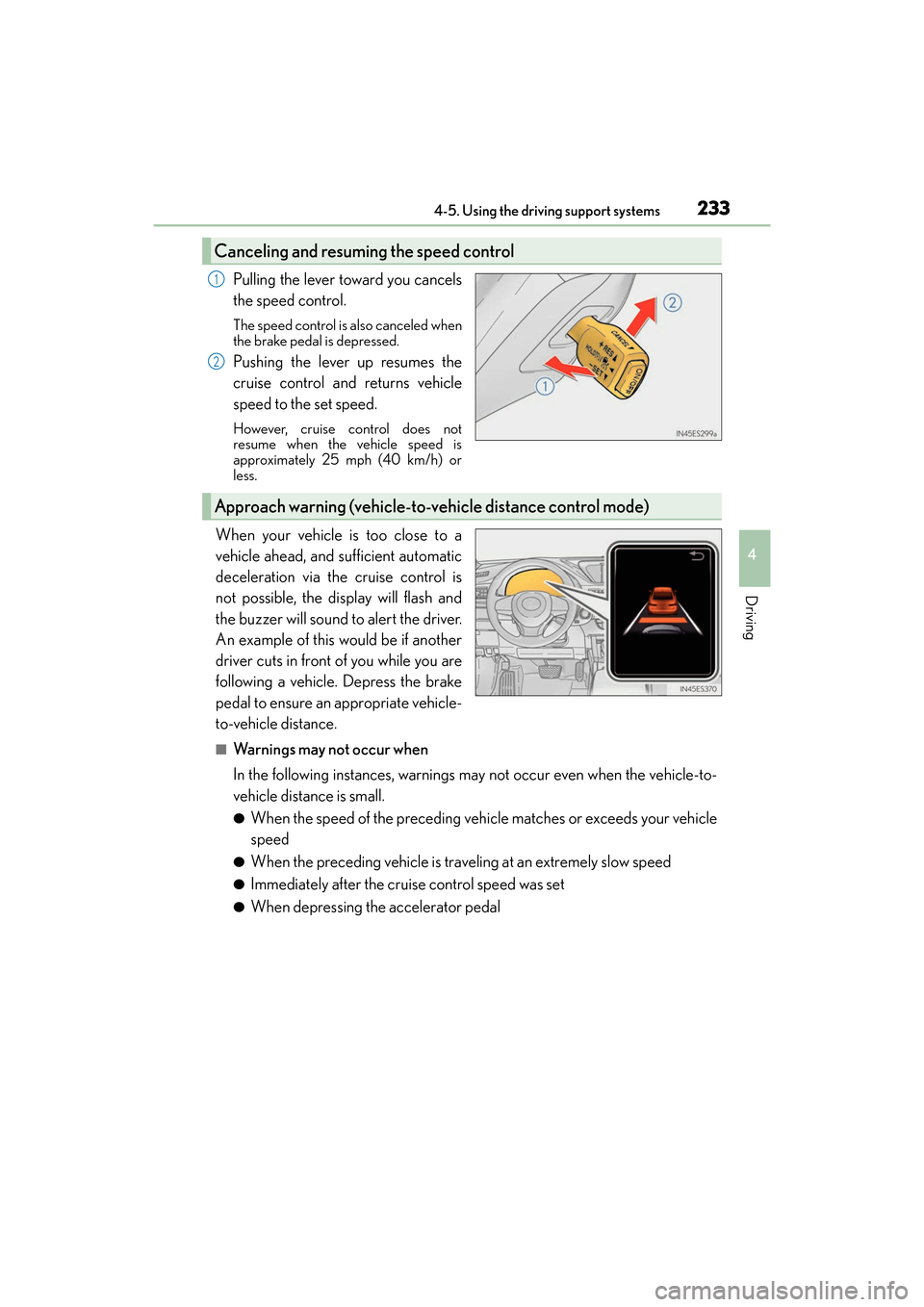
Pulling the lever toward you cancels
the speed control.
The speed control is also canceled when
the brake pedal is depressed.
Pushing the lever up resumes the
cruise control and returns vehicle
speed to the set speed.
However, cruise control does not
resume when the vehicle speed is
approximately 25 mph (40 km/h) or
less.
When your vehicle is too close to a
vehicle ahead, and sufficient automatic
deceleration via the cruise control is
not possible, the display will flash and
the buzzer will sound to alert the driver.
An example of this would be if another
driver cuts in front of you while you are
following a vehicle. Depress the brake
pedal to ensure an appropriate vehicle-
to-vehicle distance.
■Warnings may not occur when
In the following instances, warnings may not occur even when the vehicle-to-
vehicle distance is small.
●When the speed of the preceding vehicle matches or exceeds your vehicle
speed
●When the preceding vehicle is traveling at an extremely slow speed
●Immediately after the cruise control speed was set
●When depressing the accelerator pedal
Canceling and resuming the speed control
1
2
Approach warning (vehicle-to-vehicle distance control mode)
Page 237 of 612
ES300h_OM_OM33C75U_(U)
2354-5. Using the driving support systems
4
Driving
■Dynamic radar cruise control can be set when
●The shift lever is in D or range 4 or higher of S has been selected.
●Vehicle speed is above approximately 30 mph (50 km/h).
■Accelerating after setting the vehicle speed
The vehicle can accelerate by operating the accelerator pedal. After accelerating, the
set speed resumes. However, during vehicle-to-vehicle distance control mode, the vehi-
cle speed may decrease below the set speed in order to maintain the distance to the pre-
ceding vehicle.
■Automatic cancelation of vehicle-to-vehicle distance control mode
Vehicle-to-vehicle distance control mode is automatically canceled in the following situ-
ations.
●Actual vehicle speed falls below approximately 25 mph (40 km/h).
●VSC is activated.
●TRAC is activated for a period of time.
●When the VSC or TRAC system is turned off by pressing the VSC OFF switch.
●The sensor cannot detect correctly because it is covered in some way.
●Pre-collision braking is activated.
If vehicle-to-vehicle distance control mode is automatically canceled for any other rea-
son, there may be a malfunction in the system. Contact your Lexus dealer.
■Automatic cancelation of constant speed control mode
Constant speed control mode is automatically canceled in the following situations:
●Actual vehicle speed is more than approximately 10 mph (16 km/h) below the set vehi-
cle speed.
●Actual vehicle speed falls below approximately 25 mph (40 km/h).
●VSC is activated.
●TRAC is activated for a period of time.
●When the VSC or TRAC system is turned off by pressing the VSC OFF switch.
●Pre-collision braking is activated.
If constant speed control mode is automatically canceled for any other reason, there may
be a malfunction in the system. Contact your Lexus dealer.
■Warning messages and buzzers for dynamic radar cruise control
Warning messages and buzzers are used to indicate a system malfunction or to inform
the driver of the need for caution while driv ing. If a warning message is shown on the
multi-information display, read the message and follow the instructions.
Page 242 of 612
240
ES300h_OM_OM33C75U_(U)4-5. Using the driving support systems
■Automatic cruise control cancelation
Cruise control will stop maintaining the vehicle speed in any of the following situations.
●Actual vehicle speed falls more than approximately 10 mph (16 km/h) below the preset
vehicle speed.
At this time, the memorized set speed is not retained.
●Actual vehicle speed is below approximately 25 mph (40 km/h).
●VSC is activated.
●TRAC is activated for a period of time.
●When the VSC or TRAC system is turned off by pressing the VSC OFF switch.
■If the warning message for the cruise contro
l is shown on the multi-information display
Press the “ON/OFF” button once to deactivate the system, and then press the button
again to reactivate the system.
If the cruise control speed cannot be set or if the cruise control cancels immediately after
being activated, there may be a malfunction in the cruise control system. Have the vehi-
cle inspected by your Lexus dealer.
WA R N I N G
■To avoid operating the cruise control by mistake
Switch the cruise control off using the “ON/OFF” button when not in use.
■Situations unsuitable for cruise control
Do not use cruise control in any of the following situations.
Doing so may result in loss of control and could cause an accident resulting in death or
serious injury.
●Roads where there are pedestrians, cyclists, etc.
●In heavy traffic
●On roads with sharp bends
●On winding roads
●On slippery roads, such as those covered with rain, ice or snow
●On steep hills
Vehicle speed may exceed the set speed when driving down a steep hill.
●During emergency towing
Page 243 of 612
241
ES300h_OM_OM33C75U_(U)4-5. Using the driving support systems
4
Driving
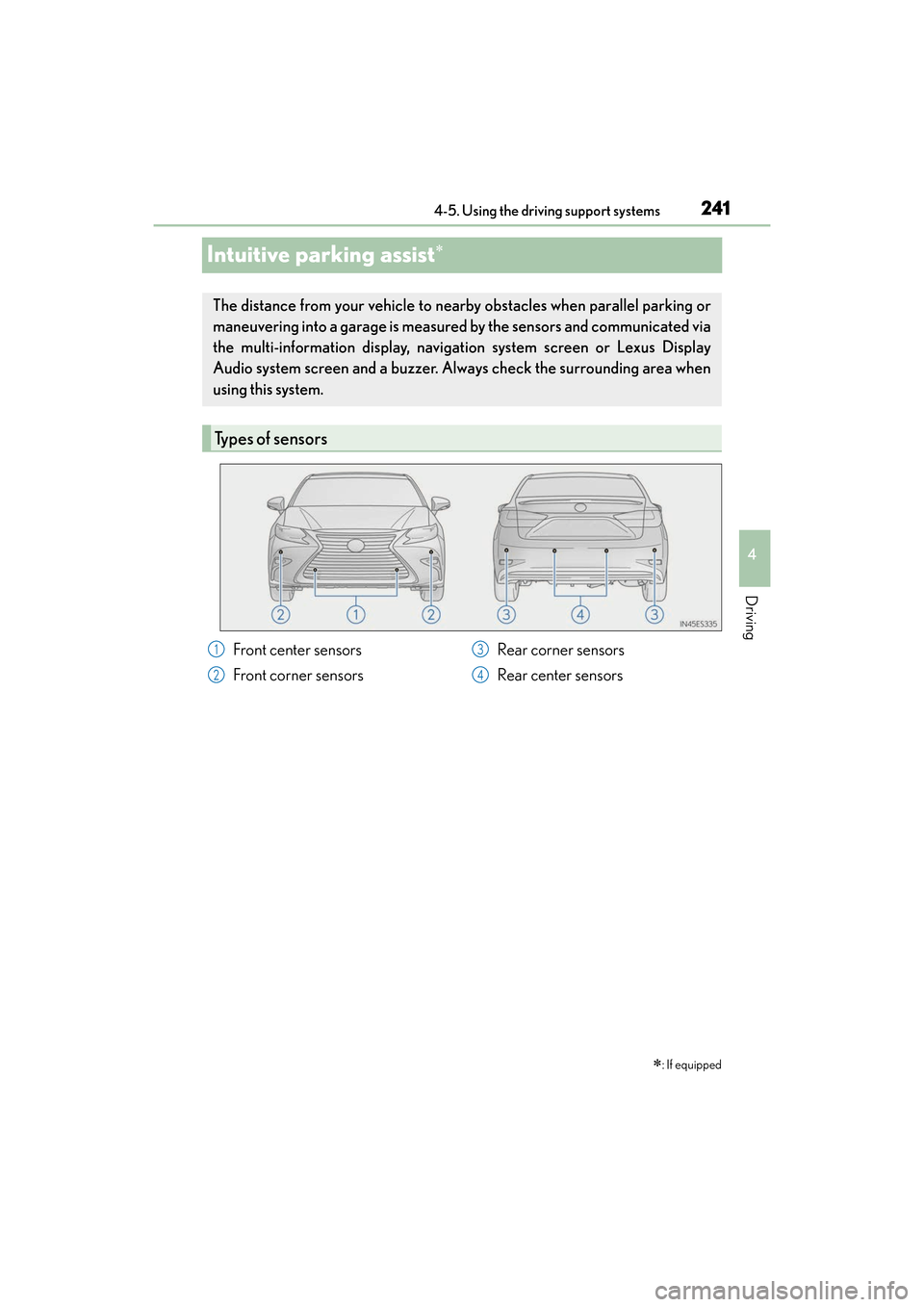
Intuitive parking assist∗
∗: If equipped
The distance from your vehicle to nearby obstacles when parallel parking or
maneuvering into a garage is measured
by the sensors and communicated via
the multi-information display, navigation system screen or Lexus Display
Audio system screen and a buzzer. Always check the surrounding area when
using this system.
Types of sensors
Front center sensors
Front corner sensors Rear corner sensors
Rear center sensors1
2
3
4
Page 244 of 612
242
ES300h_OM_OM33C75U_(U)4-5. Using the driving support systems
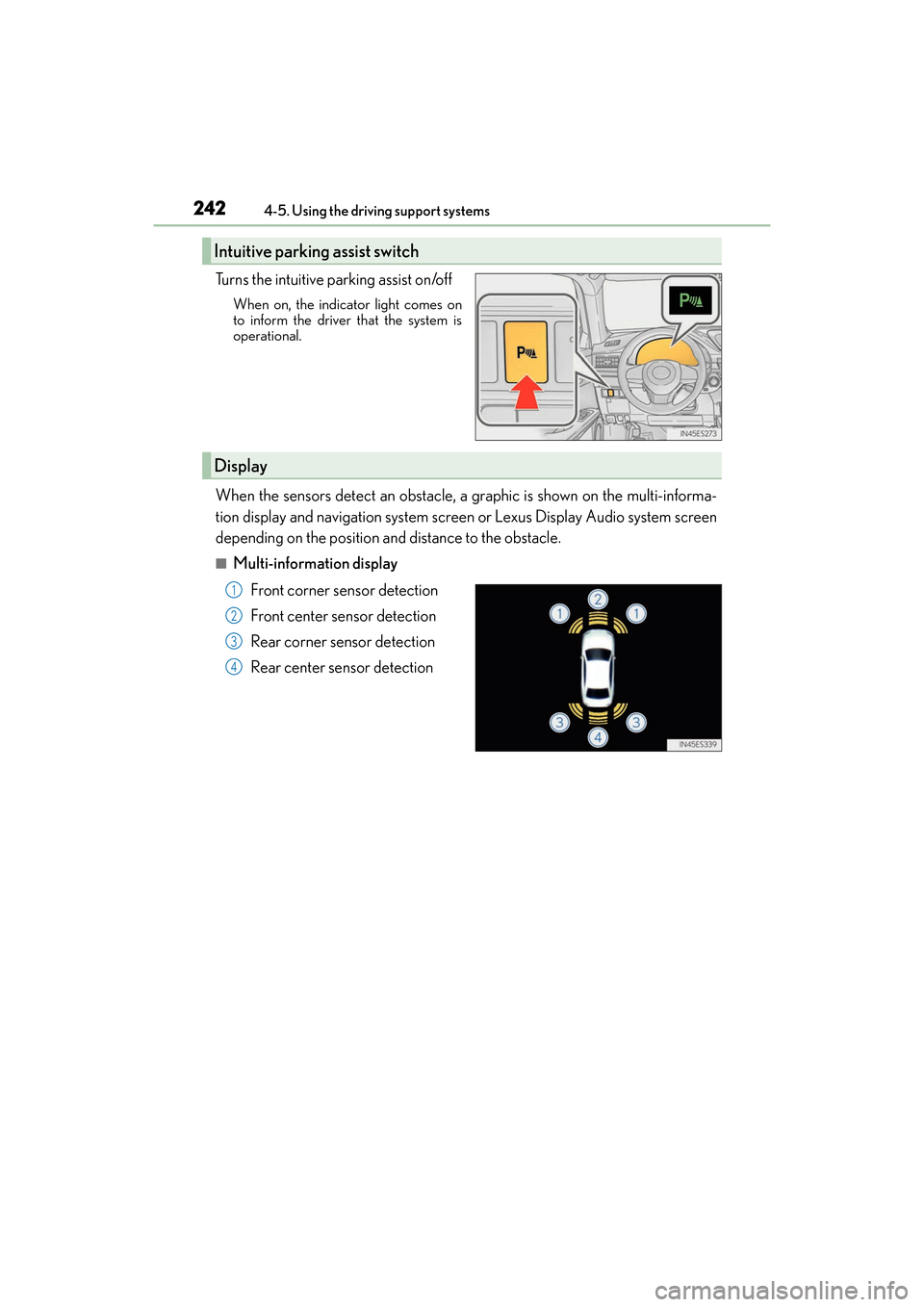
Turns the intuitive parking assist on/off
When on, the indicat
or light comes on
to inform the driver that the system is
operational.
When the sensors detect an obstacle, a graphic is shown on the multi-informa-
tion display and navigation system screen or Lexus Display Audio system screen
depending on the position and distance to the obstacle.
■Multi-information display
Front corner sensor detection
Front center sensor detection
Rear corner sensor detection
Rear center sensor detection
Intuitive parking assist switch
Display
1
2
3
4
Page 245 of 612
ES300h_OM_OM33C75U_(U)
2434-5. Using the driving support systems
4
Driving
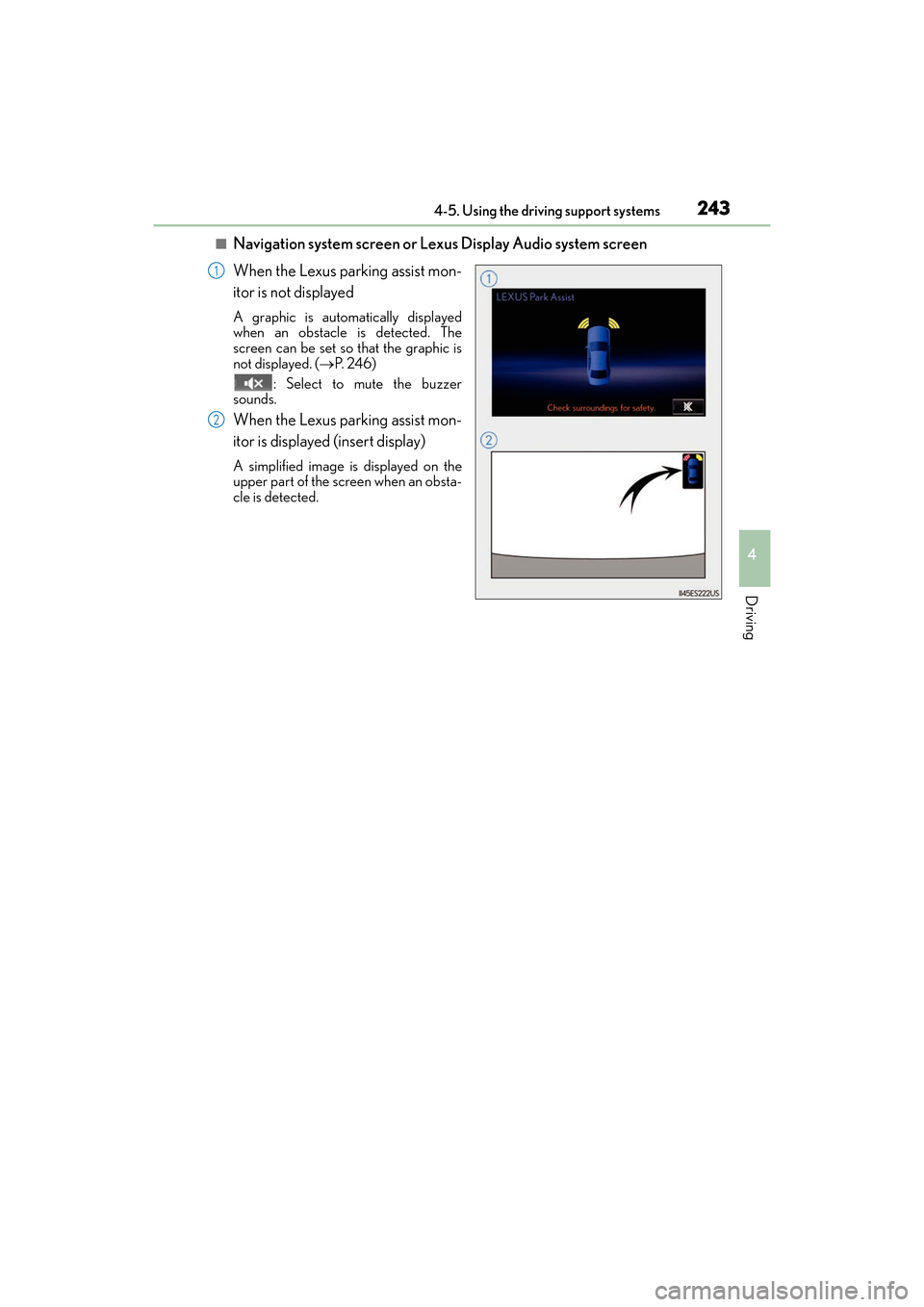
■Navigation system screen or Lexus Display Audio system screen
When the Lexus parking assist mon-
itor is not displayed
A graphic is automatically displayed
when an obstacle is detected. The
screen can be set so that the graphic is
not displayed. (→P. 2 4 6 )
: Select to mute the buzzer
sounds.
When the Lexus parking assist mon-
itor is displayed (insert display)
A simplified image is displayed on the
upper part of the screen when an obsta-
cle is detected.
1
2
Page 246 of 612
244
ES300h_OM_OM33C75U_(U)4-5. Using the driving support systems
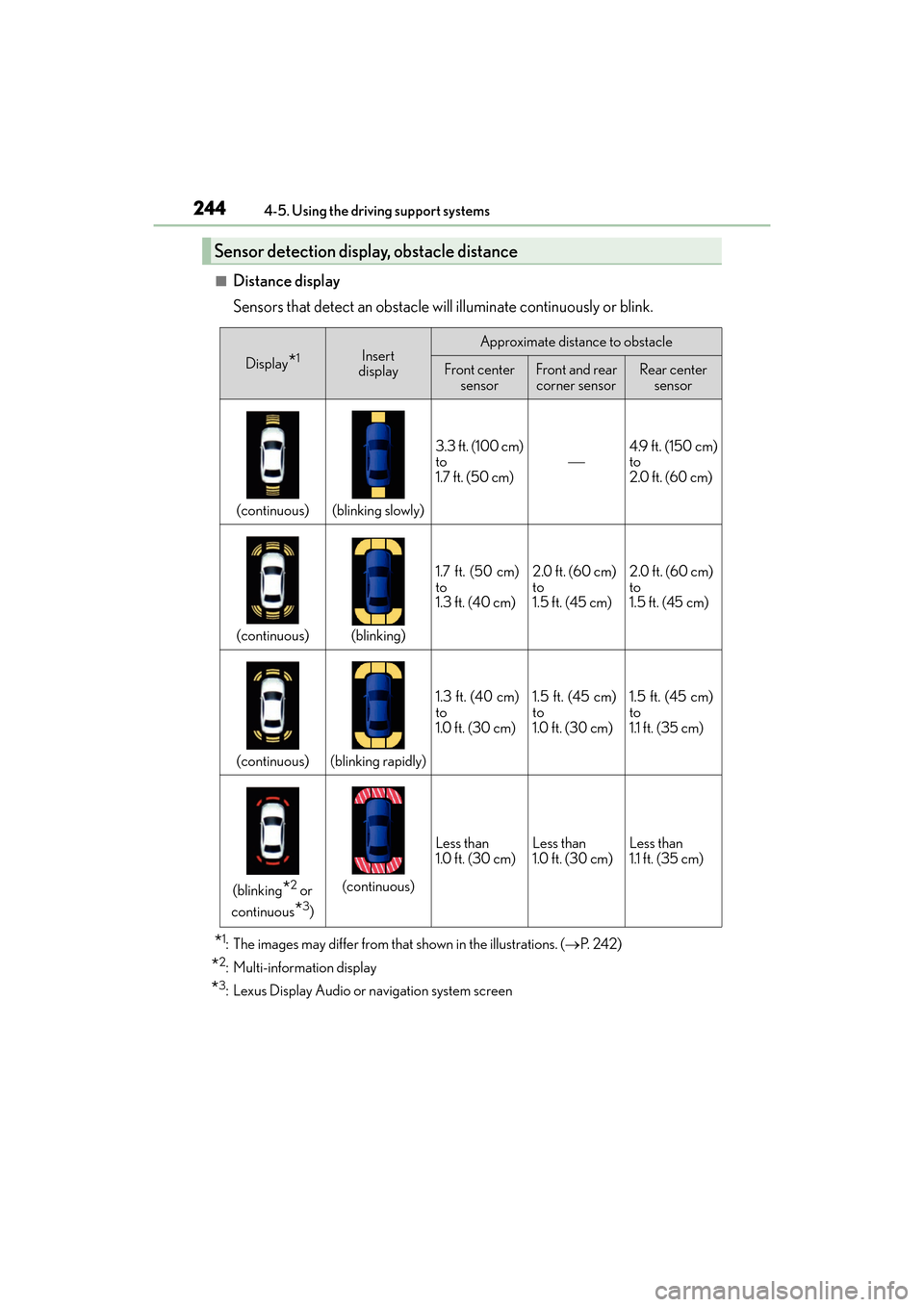
■Distance display
Sensors that detect an obstacle will illuminate continuously or blink.
*1: The images may differ from that shown in the illustrations. (→
P. 2 4 2 )
*2: Multi-information display
*3: Lexus Display Audio or navigation system screen
Sensor detection display, obstacle distance
Display*1Insert
displayApproximate distance to obstacle
Front center sensorFront and rear corner sensorRear center sensor
(continuous)(blinking slowly)
3.3 ft. (100 cm)
to
1.7 ft. (50 cm)4.9 ft. (150 cm)
to
2.0 ft. (60 cm)
(continuous)(blinking)
1.7 ft. (50 cm)
to
1.3 ft. (40 cm)2.0 ft. (60 cm)
to
1.5 ft. (45 cm)2.0 ft. (60 cm)
to
1.5 ft. (45 cm)
(continuous)(blinking rapidly)
1.3 ft. (40 cm)
to
1.0 ft. (30 cm)1.5 ft. (45 cm)
to
1.0 ft. (30 cm)1.5 ft. (45 cm)
to
1.1 ft. (35 cm)
(blinking*2 or
continuous
*3)
(continuous)
Less than
1.0 ft. (30 cm)Less than
1.0 ft. (30 cm)Less than
1.1 ft. (35 cm)
Page 248 of 612
246
ES300h_OM_OM33C75U_(U)4-5. Using the driving support systems
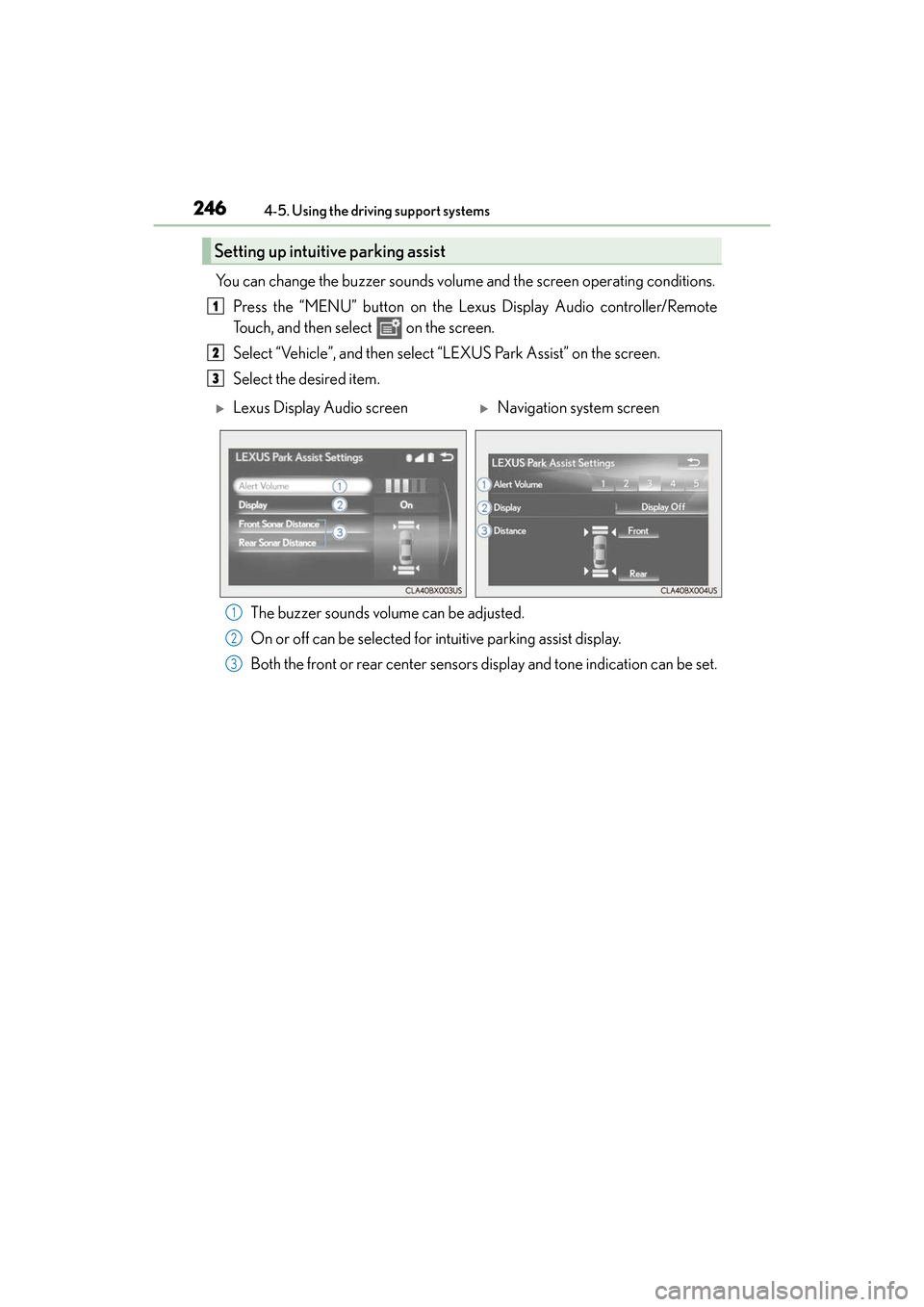
You can change the buzzer sounds volume
and the screen operating conditions.
Press the “MENU” button on the Lexus Display Audio controller/Remote
Touch, and then select on the screen.
Select “Vehicle”, and then select “LEXUS Park Assist” on the screen.
Select the desired item.
The buzzer sounds volume can be adjusted.
On or off can be selected for intuitive parking assist display.
Both the front or rear center sensors display and tone indication can be set.
Setting up intuitive parking assist
1
2
3
XLexus Display Audio screenXNavigation system screen
1
2
3
Page 249 of 612
ES300h_OM_OM33C75U_(U)
2474-5. Using the driving support systems
4
Driving
■The intuitive parking assist can be operated when
●Front center sensors:
• The power switch is in ON mode.
• The shift lever is in a position other than P or R.
• The vehicle speed is less than about 6 mph (10 km/h).
●Front corner sensors:
• The power switch is in ON mode.
• The shift lever is in a position other than P.
• The vehicle speed is less than about 6 mph (10 km/h).(At any speed when the shift lever is in R)
●Rear corner and rear center sensors:
• The power switch is in ON mode.
• The shift lever is in R.
■Intuitive parking assist display
When an obstacle is detected while the Lexus parking assist monitor is in use, the warn-
ing indicator will appear in the upper part of the screen even if the display setting has
been set to off.
■Sensor detection information
●The sensor’s detection areas are limited to the areas around the vehicle’s front corners
and rear bumper.
●Certain vehicle conditions and the surrou nding environment may affect the ability of
the sensor to correctly detect obstacles. Particular instances where this may occur are
listed below.
• There is dirt, snow or ice on the sensor . (Wiping the sensors will resolve this prob-
lem.)
• The sensor is frozen. (Thawing th e area will resolve this problem.)
In especially cold weather, if a sensor is frozen the screen may show an abnormal
display, or obstacles may not be detected.
• The sensor is covered in any way.
• The vehicle is leaning co nsiderably to one side.
• On an extremely bumpy road, on an incline, on gravel, or on grass.
• The vicinity of the vehicle is noisy due to vehicle horns, motorcycle engines, air
brakes of large vehicles, or other loud noises producing ultrasonic waves.
• There is another vehicle equipped with parking assist sensors in the vicinity.
• The sensor is coated with a sheet of spray or heavy rain.
• The vehicle is equipped with a fender pole or wireless antenna.
• Towing eyelets are installed.
• The bumper or sensor receives a strong impact.
• The vehicle is approaching a tall or curved curb.
• In harsh sunlight or intense cold weather.
• The area directly under the bumpers is not detected.
• If obstacles draw too close to the sensor.
• A non-genuine Lexus suspension (lowered suspension etc.) is installed.
• People may not be detected if they are wearing certain types of clothing.
In addition to the examples above, there are instances in which, because of their shape,
signs and other objects may be judged by the sensor to be closer than they are.