low beam Lexus ES300h 2017 Owner's Manual
[x] Cancel search | Manufacturer: LEXUS, Model Year: 2017, Model line: ES300h, Model: Lexus ES300h 2017Pages: 612, PDF Size: 14.05 MB
Page 86 of 612
84
ES300h_OM_OM33C75U_(U)2. Instrument cluster
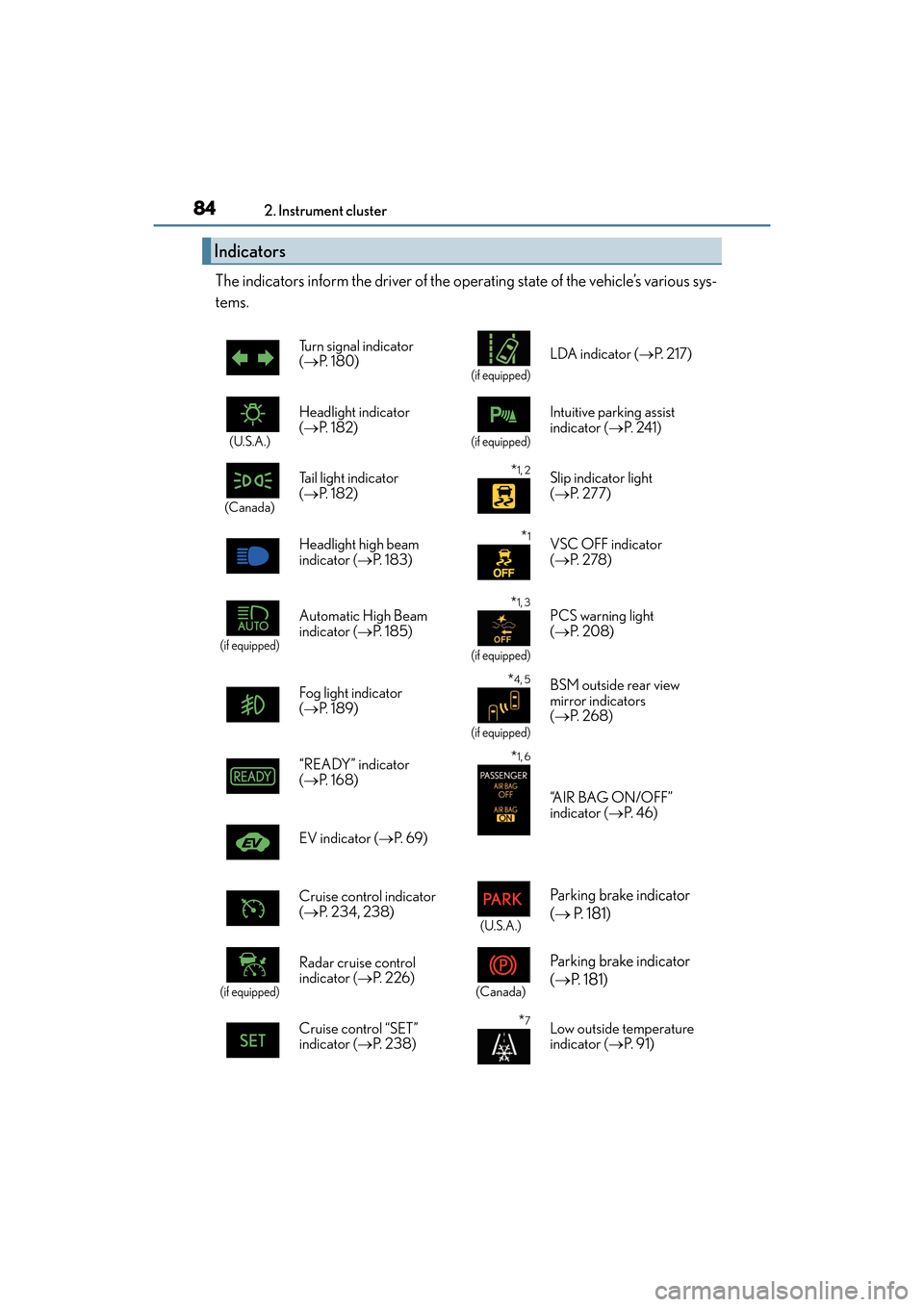
The indicators inform the driver of the operating state of the vehicle’s various sys-
tems.
Indicators
Turn signal indicator
(
→ P. 1 8 0 )
(if equipped)
LDA indicator ( →P. 2 1 7 )
(U.S.A.)
Headlight indicator
(→ P. 1 8 2 )
(if equipped)
Intuitive parking assist
indicator ( →P. 2 4 1 )
(Canada)
Tail light indicator
(→ P. 1 8 2 ) *1, 2Slip indicator light
(→ P. 277)
Headlight high beam
indicator ( →P. 1 8 3 )
*1VSC OFF indicator
(→ P. 2 7 8 )
(if equipped)
Automatic High Beam
indicator ( →P. 1 8 5 ) *1, 3
(if equipped)
PCS warning light
(→ P. 2 0 8 )
Fog light indicator
( → P. 1 8 9 )
*4, 5
(if equipped)
BSM outside rear view
mirror indicators
(→ P. 2 6 8 )
“READY” indicator
(→ P. 1 6 8 )*1, 6
“A I R B A G O N / O F F ”
indicator ( →P. 4 6 )
EV indicator ( →P. 6 9 )
Cruise control indicator
( → P. 2 3 4 , 2 3 8 )
(U.S.A.)
Parking brake indicator
(→ P. 181)
(if equipped)
Radar cruise control
indicator ( →P. 2 2 6 )
(Canada)
Parking brake indicator
(→ P. 1 8 1 )
Cruise control “SET”
indicator ( →P. 2 3 8 )*7Low outside temperature
indicator ( →P. 9 1 )
Page 188 of 612
186
ES300h_OM_OM33C75U_(U)4-3. Operating the lights and wipers
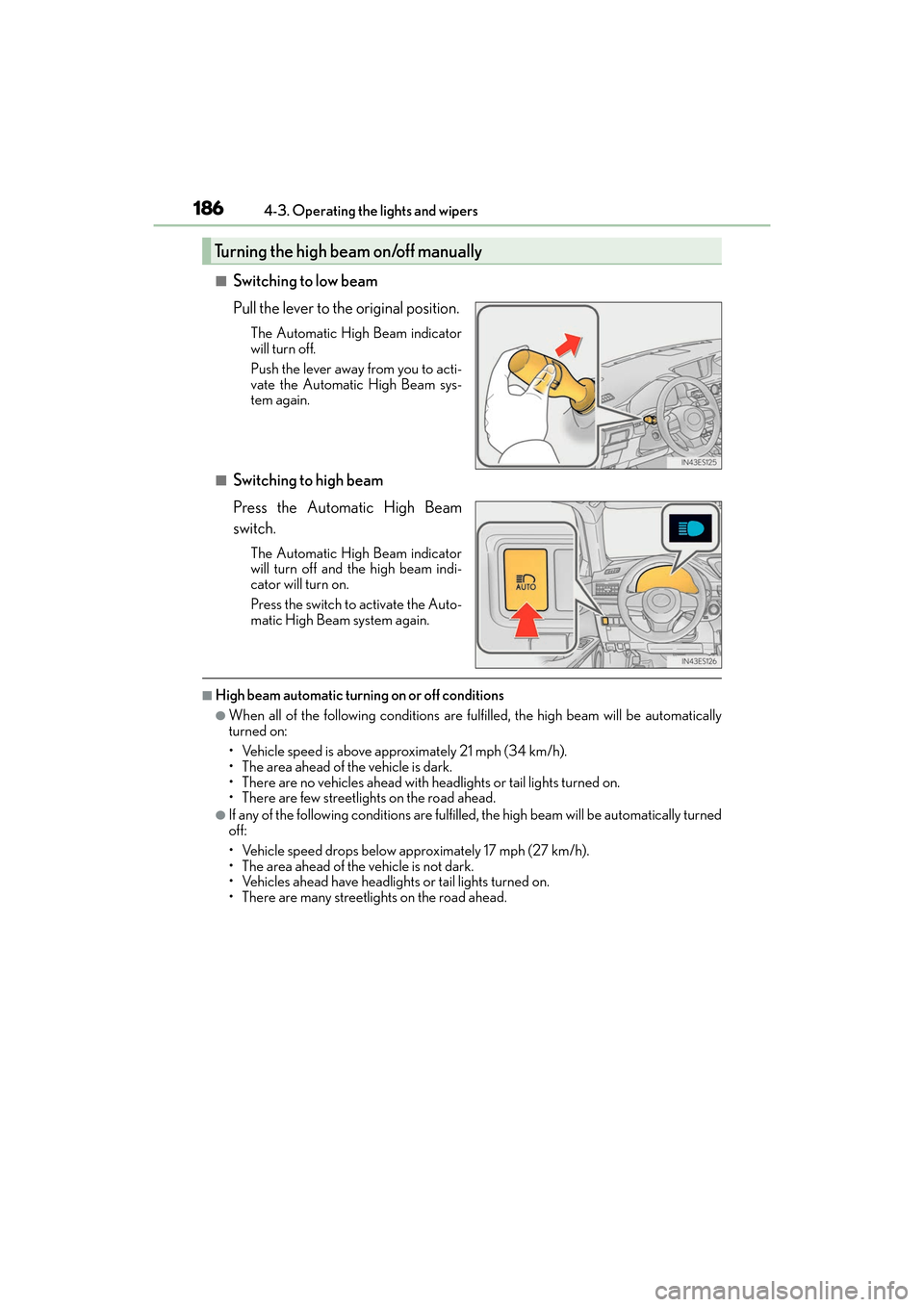
■Switching to low beam
Pull the lever to the original position.
The Automatic High Beam indicator
will turn off.
Push the lever away from you to acti-
vate the Automatic High Beam sys-
tem again.
■Switching to high beam
Press the Automatic High Beam
switch.
The Automatic High Beam indicator
will turn off and the high beam indi-
cator will turn on.
Press the switch to activate the Auto-
matic High Beam system again.
■High beam automatic turning on or off conditions
●When all of the following conditions are fu
lfilled, the high beam will be automatically
turned on:
• Vehicle speed is above approximately 21 mph (34 km/h).
• The area ahead of the vehicle is dark.
• There are no vehicles ahead with headlights or tail lights turned on.
• There are few streetlights on the road ahead.
●If any of the following conditions are fulfille d, the high beam will be automatically turned
off:
• Vehicle speed drops below approximately 17 mph (27 km/h).
• The area ahead of the vehicle is not dark.
• Vehicles ahead have headlights or tail lights turned on.
• There are many streetlights on the road ahead.
Turning the high beam on/off manually
Page 189 of 612
ES300h_OM_OM33C75U_(U)
1874-3. Operating the lights and wipers
4
Driving
■Camera sensor detection information
●The high beam may not be automatically turned off in the following situations:
• When oncoming vehicles suddenly appear from a curve
• When the vehicle is cut in front of by another vehicle
• When vehicles ahead are hidden from sight due to repeated curves, road dividers or roadside trees
• When vehicles ahead appear from the faraway lane on wide road
• When vehicles ahead have no lights
●The high beam may be turned off if a vehicle ahead that is using fog lights without using
the headlights is detected.
●House lights, street lights, traffic signals, and illuminated billboards or signs may cause
the high beam to switch to the low beams, or the low beams to remain on.
●The following factors may affect the amount of time taken to turn the high beam on or
off:
• The brightness of headlights, fog lights, and tail lights of vehicles ahead
• The movement and direction of vehicles ahead
• When a vehicle ahead only has operational lights on one side
• When a vehicle ahead is a two-wheeled vehicle
• The condition of the road (gradient, curve, condition of the road surface etc.)
• The number of passengers and amount of luggage
●The high beam may be turned on or off when the driver does not expect it.
●Bicycles or similar objects may not be detected.
●In the situations shown below, the system may not be able to accurately detect sur-
rounding brightness levels. This may cause the low beams to remain on or the high
beams to cause problems for pedestrians, ve hicles ahead or other parties. In these
cases, manually switch between the high and low beams.
• In bad weather (rain, snow, fog, sandstorms etc.)
• The windshield is obscured by fog, mist, ice, dirt etc.
• The windshield is cracked or damaged.
• The camera sensor is deformed or dirty.
• The camera sensor temperature is extremely high.
• Surrounding brightness levels are equal to those of headlights, tail lights or fog lights.
• Vehicles ahead have headlights or tail lights that are either switched off, dirty, are changing color, or are not aimed properly.
• When driving through an area of intermit tently changing brightness and darkness.
• When frequently and repeated ly driving ascending/descending roads, or roads with
rough, bumpy or uneven surfaces (such as stone-paved roads, gravel tracks etc.).
• When frequently and repeatedly taking curves or driving on a winding road.
• There is a highly reflective object ahead of the vehicle, such as a sign or a mirror.
• The back of a vehicle ahead is highly reflective, such as a container on a truck.
• The vehicle’s headlights are damaged or dirty, or are not aimed properly.
• The vehicle is listing or tilting due to a flat tire, a trailer being towed, etc.
• The high beam and low beam are repeatedly being switched between in an abnor-
mal manner.
• The driver believes that the high beam may be causing problems or distress to other
drivers or pedestrians nearby.
Page 190 of 612
188
ES300h_OM_OM33C75U_(U)4-3. Operating the lights and wipers
■Temporarily lowering sensor sensitivity
The sensitivity of the sensor can be temporarily lowered.
Turn the power switch off while the following conditions are met.
• The headlight switch is in or .
• The headlight switch lever is in high beam position.
• Automatic High Beam switch is on. Turn the power switch to ON mode.
Within 30 seconds after , repeat pulling the headlight switch lever to the original
position then pushing it to the high beam position quickly 10 times, then leave the
lever in high beam position.
If the sensitivity is changed, the Automati c High Beam indicator is turn on and off
three times.
Automatic High Beam (headlights) may turn on even the vehicle is stopped.
1
2
32
4
Page 191 of 612
189
ES300h_OM_OM33C75U_(U)4-3. Operating the lights and wipers
4
Driving
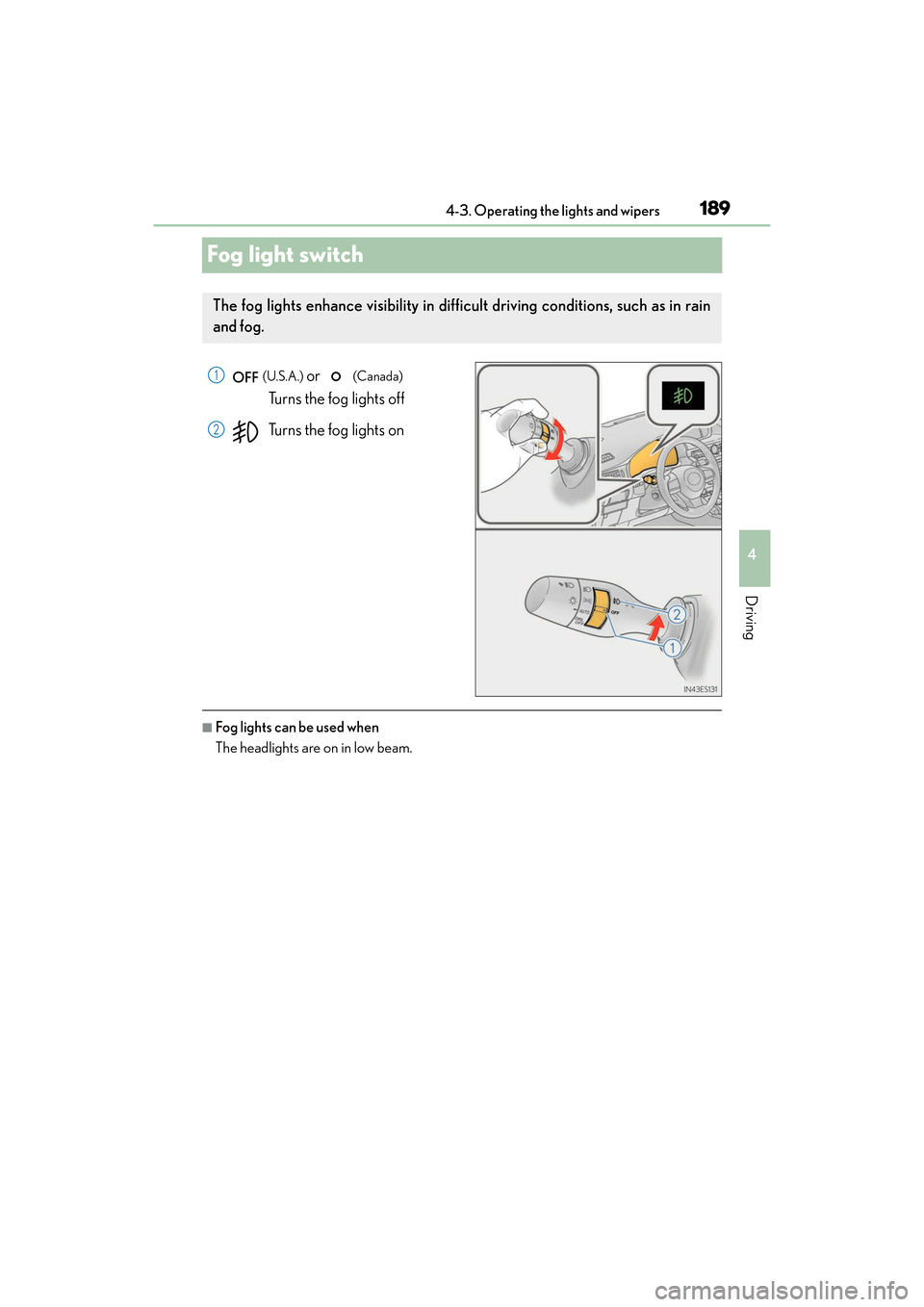
Fog light switch
(U.S.A.) or (Canada)
Turns the fog lights off
Turns the fog lights on
■Fog lights can be used when
The headlights are on in low beam.
The fog lights enhance visibility in difficult driving conditions, such as in rain
and fog.
1
2
Page 200 of 612
198
ES300h_OM_OM33C75U_(U)4-5. Using the driving support systems
Lexus Safety System+∗
◆PCS (Pre-Collision System)
→
P. 2 0 5
◆LDA (Lane Departure Alert with steering control)
→P. 2 1 7
◆Dynamic radar cruise control
→P. 2 2 6
◆Automatic High Beam
→P. 1 8 5
∗: If equipped
The Lexus Safety System+ consists of the following drive assist systems and
contributes to a safe and co mfortable driving experience:
WA R N I N G
■Lexus Safety System+
The Lexus Safety System+ is designed to operate under the assumption that the driver
will drive safely, and is designed to help reduce the impact to the occupants and the
vehicle in the case of a collision or assist the driver in normal driving conditions.
As there is a limit to the degree of reco gnition accuracy and control performance that
this system can provide, do not overly rely on this system. The driver is always responsi-
ble for paying attention to the vehicle’s surroundings and driving safely.
Page 225 of 612
ES300h_OM_OM33C75U_(U)
2234-5. Using the driving support systems
4
Driving
■Hands off steering wheel alert
When the system determines that the driver has removed the hands from the steering
wheel while the steering control function is operating, a warning message is displayed on
the multi-information display.
If the driver continues to keep their hands off of the steering wheel, the buzzer sounds, a
warning message is displayed and the function is temporarily canceled. This alert also
operates in the same way when the vehicle is driven with the steering wheel lightly
gripped. However, depending on the road conditions, etc., the function may not cancel.
■White (yellow) lines are only on one side of road
The LDA system will not operate for the side on which white (yellow) lines could not be
recognized.
■Conditions in whic h functions may not operate properly
In the following situations, the camera sensor may not detect white (yellow) lines and var-
ious functions may not operate normally.
●There are shadows on the road that run parallel with, or cover, the white (yellow) lines.
●The vehicle is driven in an area without white (yellow) lines, such as in front of a tollgate
or checkpoint, or at an intersection, etc.
●The white (yellow) lines are cracked, “Raised pavement marker” or stones are present.
●The white (yellow) lines cannot be seen or are difficult to see due to sand, etc.
●The vehicle is driven on a road surface that is wet due to rain, puddles, etc.
●The traffic lines are yellow (which may be more difficult to recognize than lines that are
white).
●The white (yellow) lines cross over a curb, etc.
●The vehicle is driven on a bright surface, such as concrete.
●The vehicle is driven on a surface that is bright due to reflected light, etc.
●The vehicle is driven in an area where the brightness changes suddenly, such as at the
entrances and exits of tunnels, etc.
●Light from the headlights of an oncoming vehicle, the sun, etc. enters the camera.
●The vehicle is driven where the road diverges, merges, etc.
●The vehicle is driven on a slope.
●The vehicle is driven on a road which t ilts left or right, or a winding road.
●The vehicle is driven on an unpaved or rough road.
●The vehicle is driven around a sharp curve.
●The traffic lane is excessively narrow or wide.
●The vehicle is extremely tilted due to carrying heavy luggage or having improper tire
pressure.
●The distance to the preceding vehicle is extremely short.
●The vehicle is moving up and down a large amount due to road conditions during driv-
ing (poor roads or road seams).
●The headlight lenses are dirty and emit a faint amount of light at night, or the beam axis
has deviated.
●The vehicle is struck by a crosswind.
●The vehicle has just changed lanes or crossed an intersection.
●Snow tires, etc. are equipped.
Page 488 of 612
486
ES300h_OM_OM33C75U_(U)7-3. Do-it-yourself maintenance
Light bulbs
Check the wattage of the light bulb to be replaced. (
→P. 5 4 8 )
→ P. 4 5 2
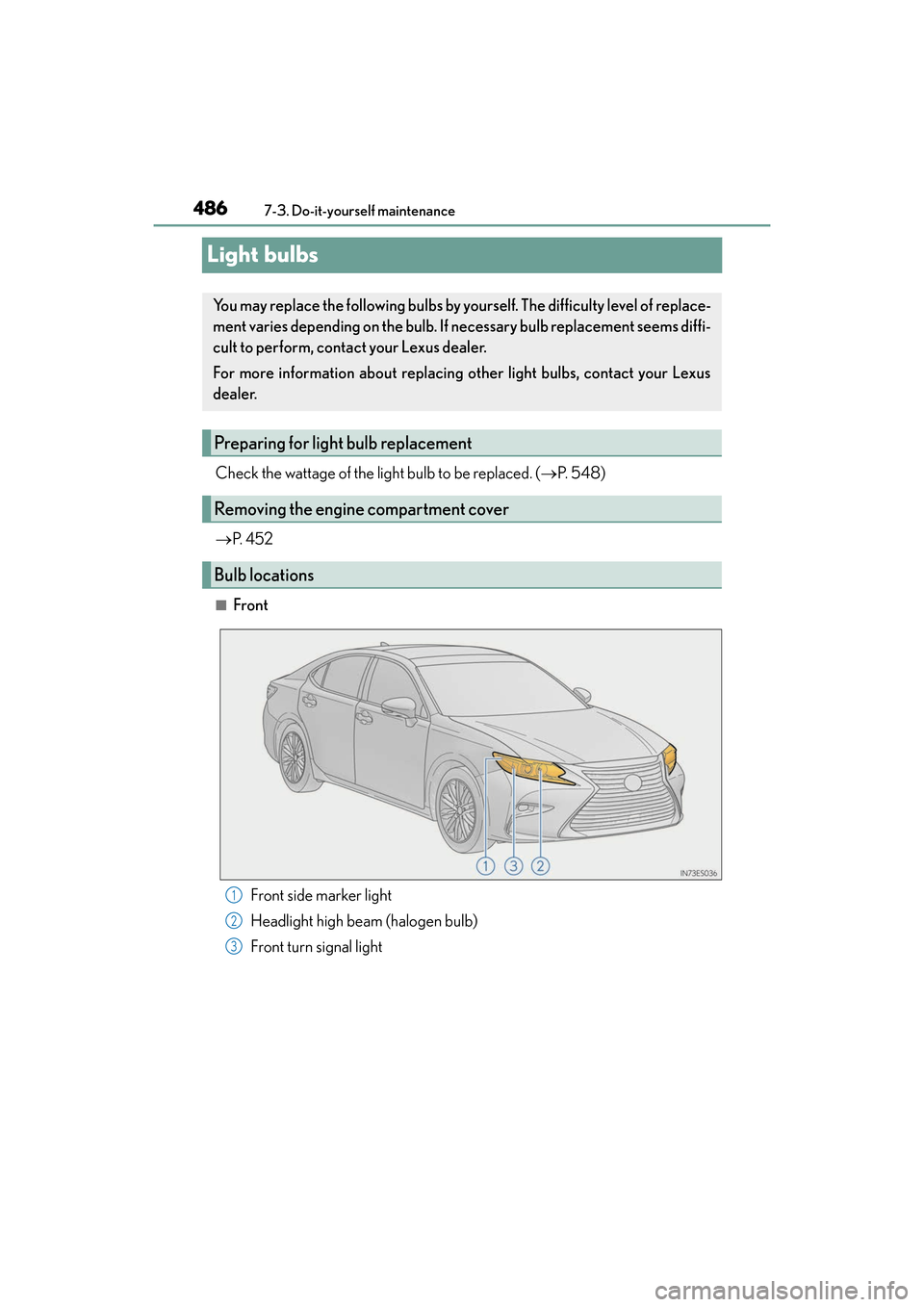
■Front
Front side marker light
Headlight high beam (halogen bulb)
Front turn signal light
You may replace the following bulbs by yourself. The difficulty level of replace-
ment varies depending on the bulb. If necessary bulb replacement seems diffi-
cult to perform, contact your Lexus dealer.
For more information about replacing other light bulbs, contact your Lexus
dealer.
Preparing for light bulb replacement
Removing the engine compartment cover
Bulb locations
1
2
3
Page 497 of 612
ES300h_OM_OM33C75U_(U)
4957-3. Do-it-yourself maintenance
7
Maintenance and care
■Replacing the following bulbs
If any of the lights listed below has burnt out, have it replaced by your Lexus
dealer.
●Headlight low beams
●Headlight high beams (LED type)
●Parking lights/daytime running lights
●Side turn signal lights
●Fog lights
●Stop/tail lights
●High mounted stoplight
●License plate lights
●Outer foot lights
●Rear side marker lights
■LED lights
The headlight low beams, headlight high beams (LED type), parking lights/daytime run-
ning lights, fog lights, side turn signal lights, stop/tail lights, rear side marker lights, high
mounted stoplight and license plate lights consis t of a number of LEDs. If any of the LEDs
burn out, take your vehicle to your Lexus dealer to have the light replaced.
■Condensation build-up on the inside of the lens
Temporary condensation build-up on the inside of the headlight lens does not indicate a
malfunction. Contact your Lexus dealer for more information in the following situations:
●Large drops of water have built up on the inside of the lens.
●Water has built up inside the headlight.
■When replacing light bulbs
→ P. 4 8 5
Page 515 of 612
5138-2. Steps to take in an emergency
ES300h_OM_OM33C75U_(U)
8
When trouble arises
■If “Maintenance Required Visit Your Dealer” is shown (U.S.A. only)
Indicates that all maintenance is required to correspond to the driven distance on the
maintenance schedule
*.
Comes on approximately 5000 miles (80 00 km) after the message has been reset.
(The indicator will not work properly unless the message has been reset.)
Perform the necessary maintenance. Please reset the message after the maintenance is
performed ( →P. 4 4 1 )
*: Refer to the separate “Scheduled Maintenance” or “Owner’s Manual Supplement” for
the maintenance interval applicable to your vehicle.
■If “Oil Maintenance Required Soon” is shown
Indicates that the engine oil is scheduled to be changed. (The indicator will not work
properly unless the oil maintenance data has been reset.)
Check the engine oil, and change if necessary. After changing the engine oil, the oil
change system should be reset. ( →P. 4 5 5 )
■If “Oil Maintenance Required Your Dealer” is shown
Indicates that the engine oil should be change d. (After the engine oil is changed and the
oil maintenance data has been reset.)
Check and change the engine oil, and oil filter by your Lexus dealer. After changing the
engine oil, the oil change system should be reset. ( →P. 4 5 5 )
■If “Power Turned Off to Save Battery” is shown
Power was turned off due to the automatic power off function.
Next time when starting the hybrid system, operate the hybrid system for approximately
5 minutes to recharge the 12-volt battery.
■If “Forward Camera System Unavailable” or “Forward Camera System Unavailable
Clean Windshield” is displayed. (if equipped)
The following systems may be suspended un til the problem shown in the message is
resolved.
●PCS (Pre-Collision System)
●LDA (Lane Departure Alert with steering control)
●Dynamic radar cruise control
●Automatic High Beam
■When a message that indicates the need for the shift lever operation is shown
To prevent the shift lever from being operated incorrectly or the vehicle from moving
unexpectedly, a message that requires shifting the shift lever may be shown on the multi-
information display. In that case, follow the instruction of the message and shift the shift
lever.
■If “Visit Your Dealer” is shown
The system or part shown on the multi-info rmation display is malfunctioning. Have the
vehicle inspected by your Lexus dealer immediately.