audio Lexus ES300h 2017 Quick Guide
[x] Cancel search | Manufacturer: LEXUS, Model Year: 2017, Model line: ES300h, Model: Lexus ES300h 2017Pages: 108, PDF Size: 3.81 MB
Page 49 of 108
48
ES300h_QG_OM33C90U_(U)
Intuitive Parking Assist (if equipped)
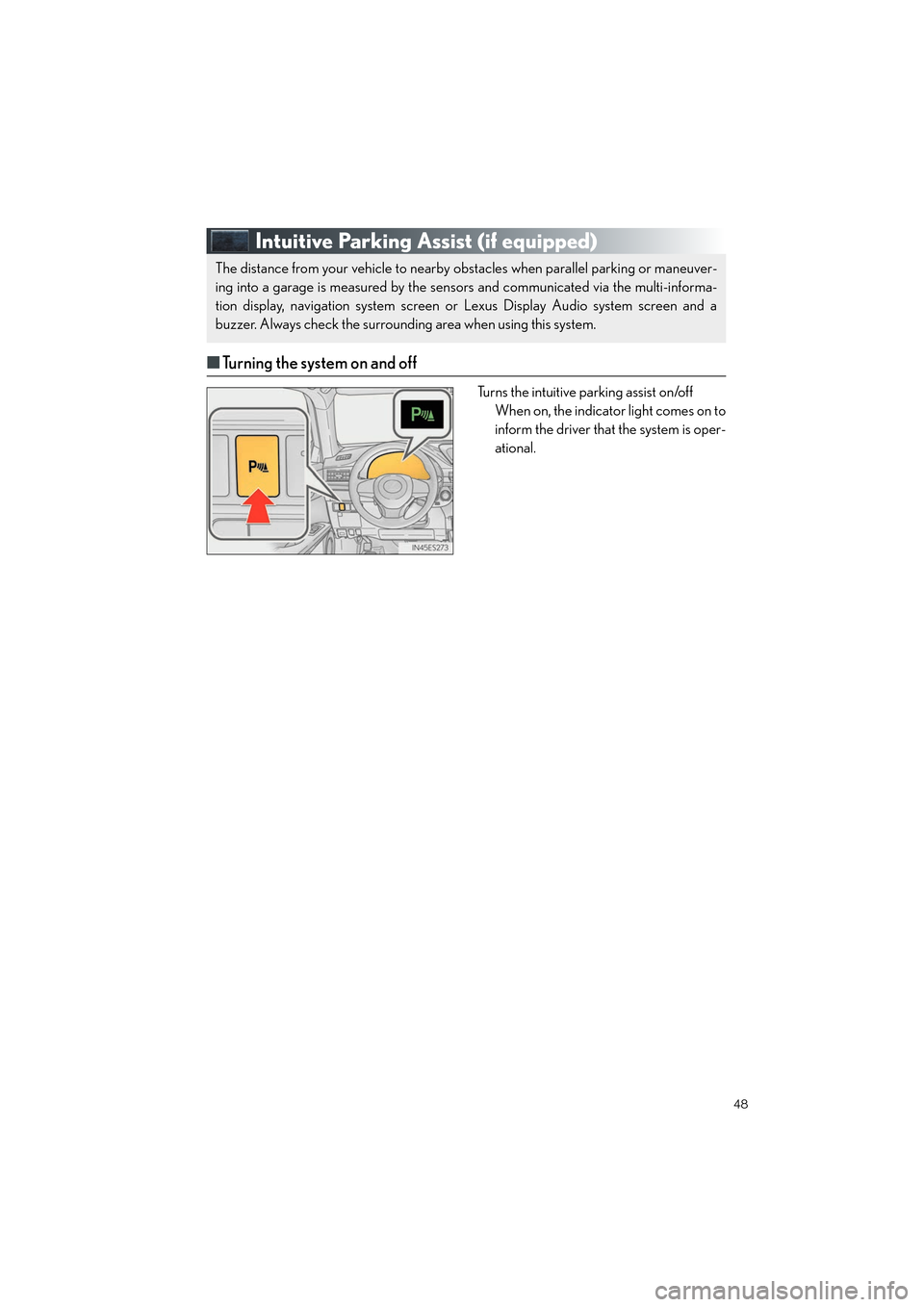
■Turning the system on and off
Turns the intuitive parking assist on/off
When on, the indicator light comes on to
inform the driver that the system is oper-
ational.
The distance from your vehicle to nearby obstacles when parallel parking or maneuver-
ing into a garage is measured by the sensors and communicated via the multi-informa-
tion display, navigation system screen or Lexus Display Audio system screen and a
buzzer. Always check the surrounding area when using this system.
Page 62 of 108
61
ES300h_QG_OM33C90U_(U)
Audio System (with navigation system)
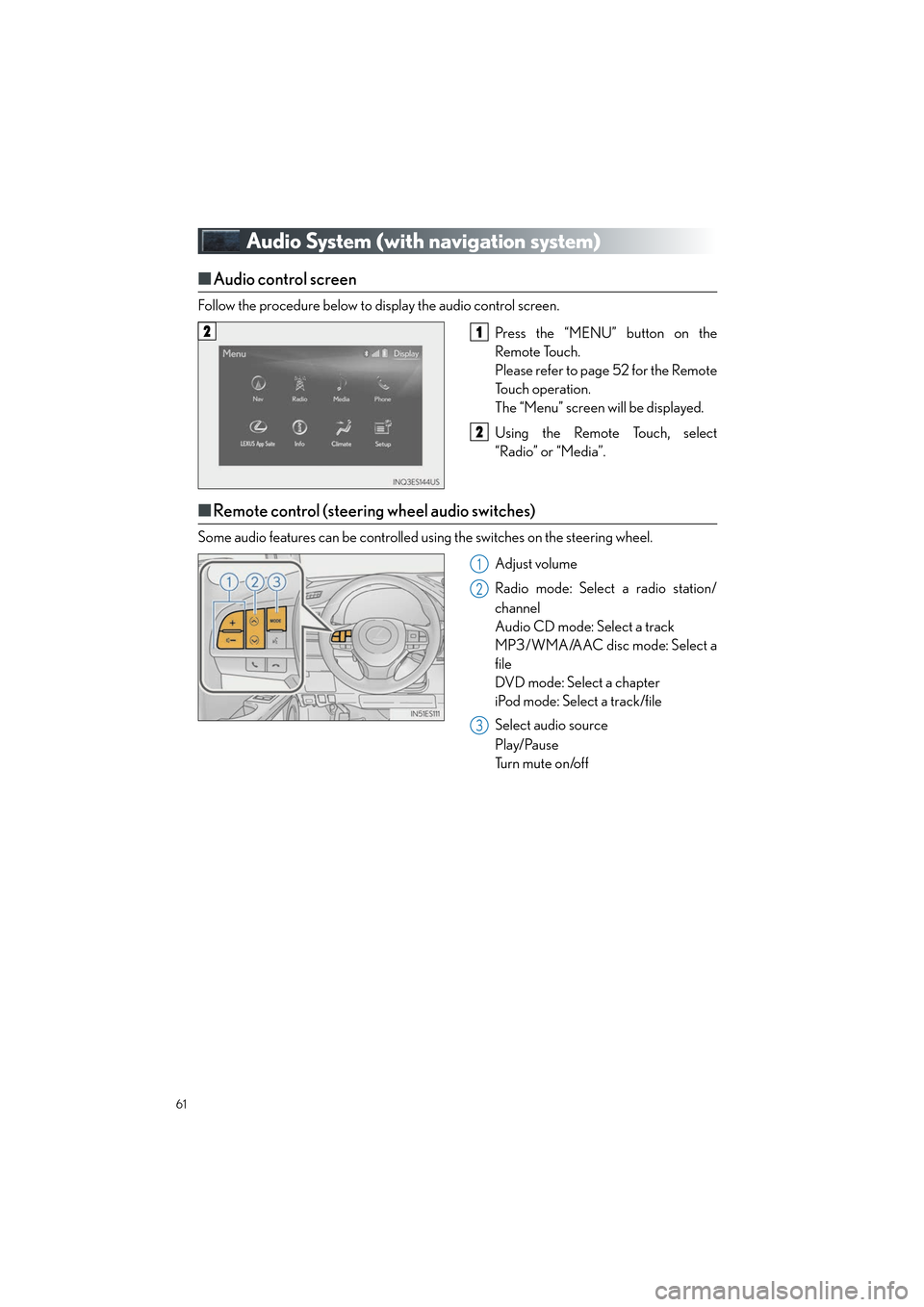
■Audio control screen
Follow the procedure below to display the audio control screen.
Press the “MENU” button on the
Remote Touch.
Please refer to page 52 for the Remote
To u c h o p e r a t i o n .
The “Menu” screen will be displayed.
Using the Remote Touch, select
“Radio” or “Media”.
■Remote control (steering wheel audio switches)
Some audio features can be controlled using the switches on the steering wheel.
Adjust volume
Radio mode: Select a radio station/
channel
Audio CD mode: Select a track
MP3/WMA/AAC disc mode: Select a
file
DVD mode: Select a chapter
iPod mode: Select a track/file
Select audio source
Play/Pause
Tu r n m u t e o n /o f f
21
2
1
2
3
Page 63 of 108
62
ES300h_QG_OM33C90U_(U)
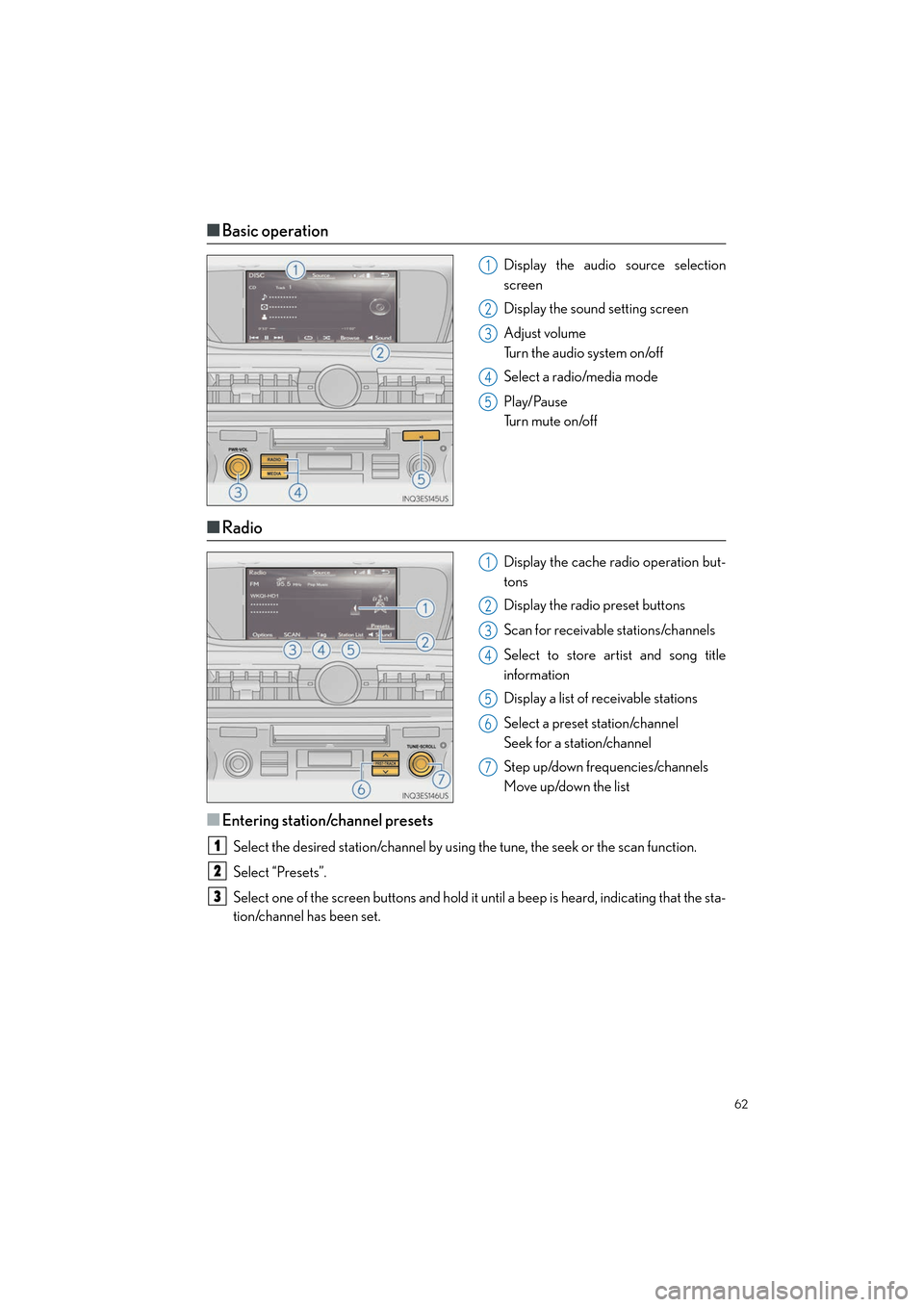
■Basic operation
Display the audio source selection
screen
Display the sound setting screen
Adjust volume
Turn the audio system on/off
Select a radio/media mode
Play/Pause
Tu r n m u t e o n /o f f
■Radio
Display the cache radio operation but-
tons
Display the radio preset buttons
Scan for receivable stations/channels
Select to store artist and song title
information
Display a list of receivable stations
Select a preset station/channel
Seek for a station/channel
Step up/down frequencies/channels
Move up/down the list
■Entering station/channel presets
Select the desired station/channel by using the tune, the seek or the scan function.
Select “Presets”.
Select one of the screen buttons and hold it until a beep is heard, indicating that the sta-
tion/channel has been set.
1
2
3
4
5
1
2
3
4
5
6
7
1
2
3
Page 64 of 108
63
ES300h_QG_OM33C90U_(U)
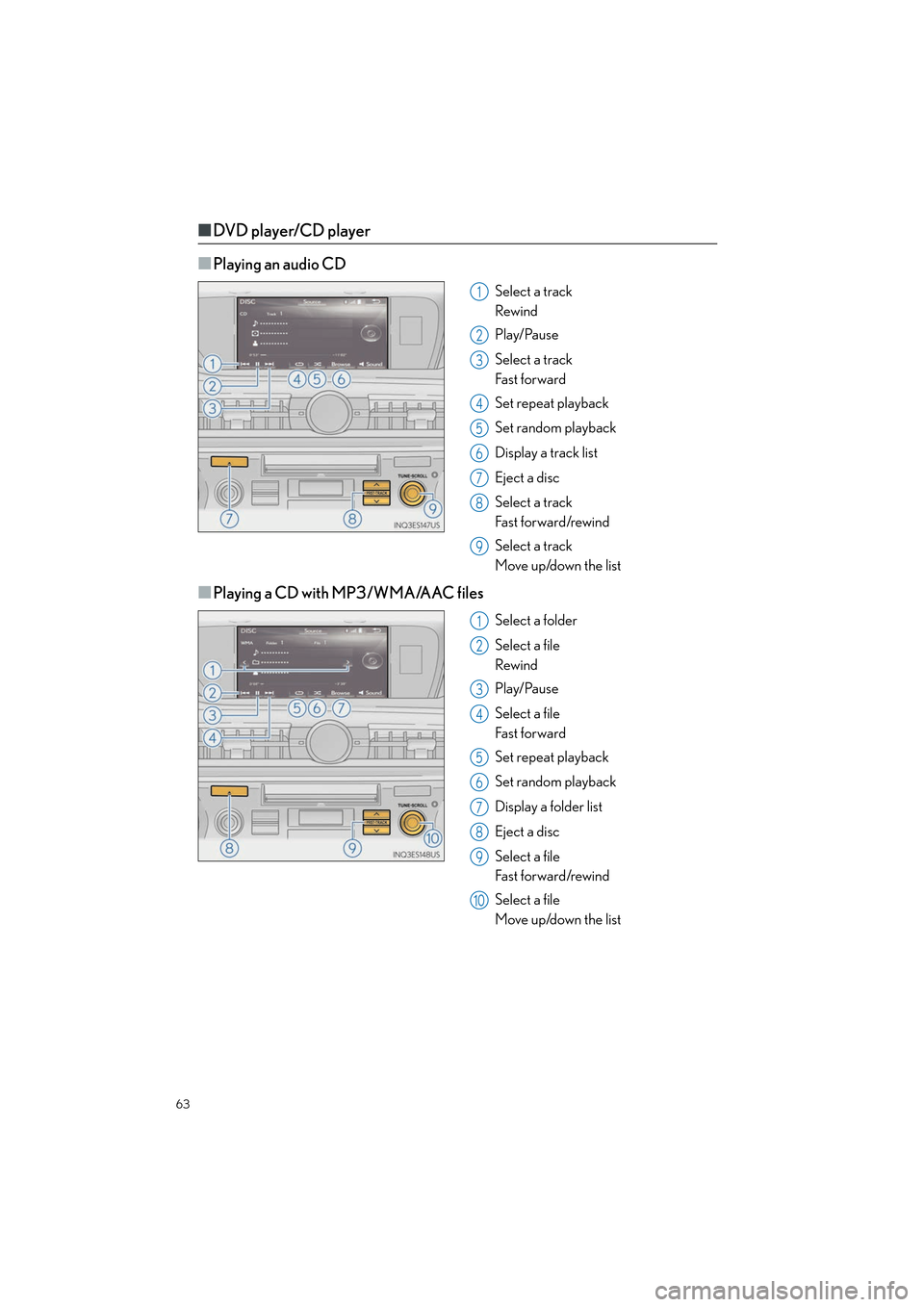
■DVD player/CD player
■
Playing an audio CD
Select a track
Rewind
Play/Pause
Select a track
Fa s t f o r wa rd
Set repeat playback
Set random playback
Display a track list
Eject a disc
Select a track
Fa s t f o r wa rd /rewi n d
Select a track
Move up/down the list
■Playing a CD with MP3/WMA/AAC files
Select a folder
Select a file
Rewind
Play/Pause
Select a file
Fa s t f o r wa rd
Set repeat playback
Set random playback
Display a folder list
Eject a disc
Select a file
Fa s t f o r wa rd /rewi n d
Select a file
Move up/down the list
1
2
3
4
5
6
7
8
9
1
2
3
4
5
6
7
8
9
10
Page 66 of 108
65
ES300h_QG_OM33C90U_(U)
Lexus Display Audio Controller
(with Lexus Display Audio System)
■Basic operation
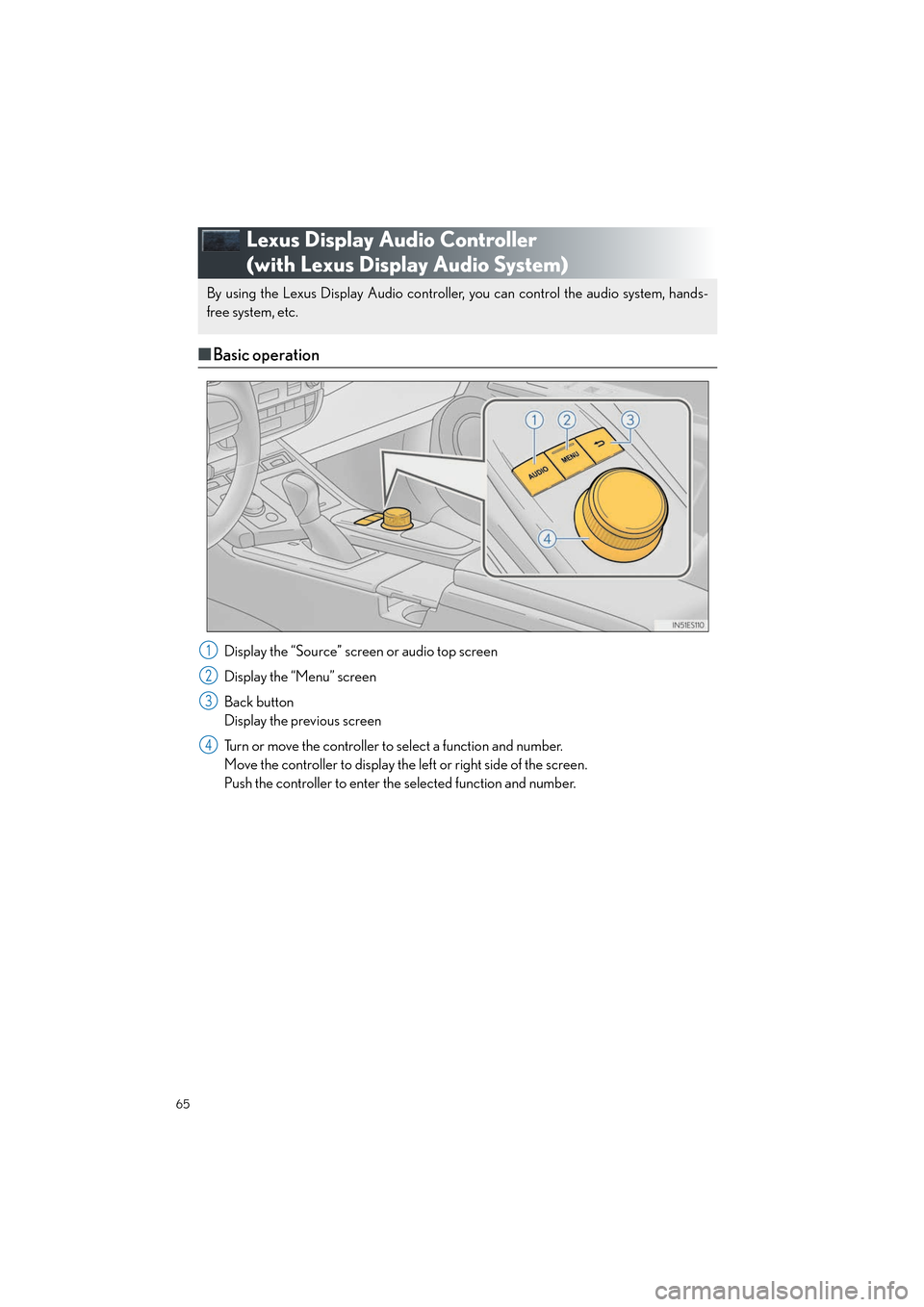
Display the “Source” screen or audio top screen
Display the “Menu” screen
Back button
Display the previous screen
Turn or move the controller to select a function and number.
Move the controller to display the left or right side of the screen.
Push the controller to enter the selected function and number.
By using the Lexus Display Audio controller, you can control the audio system, hands-
free system, etc.
1
2
3
4
Page 67 of 108
66
ES300h_QG_OM33C90U_(U)
■“Menu” screen
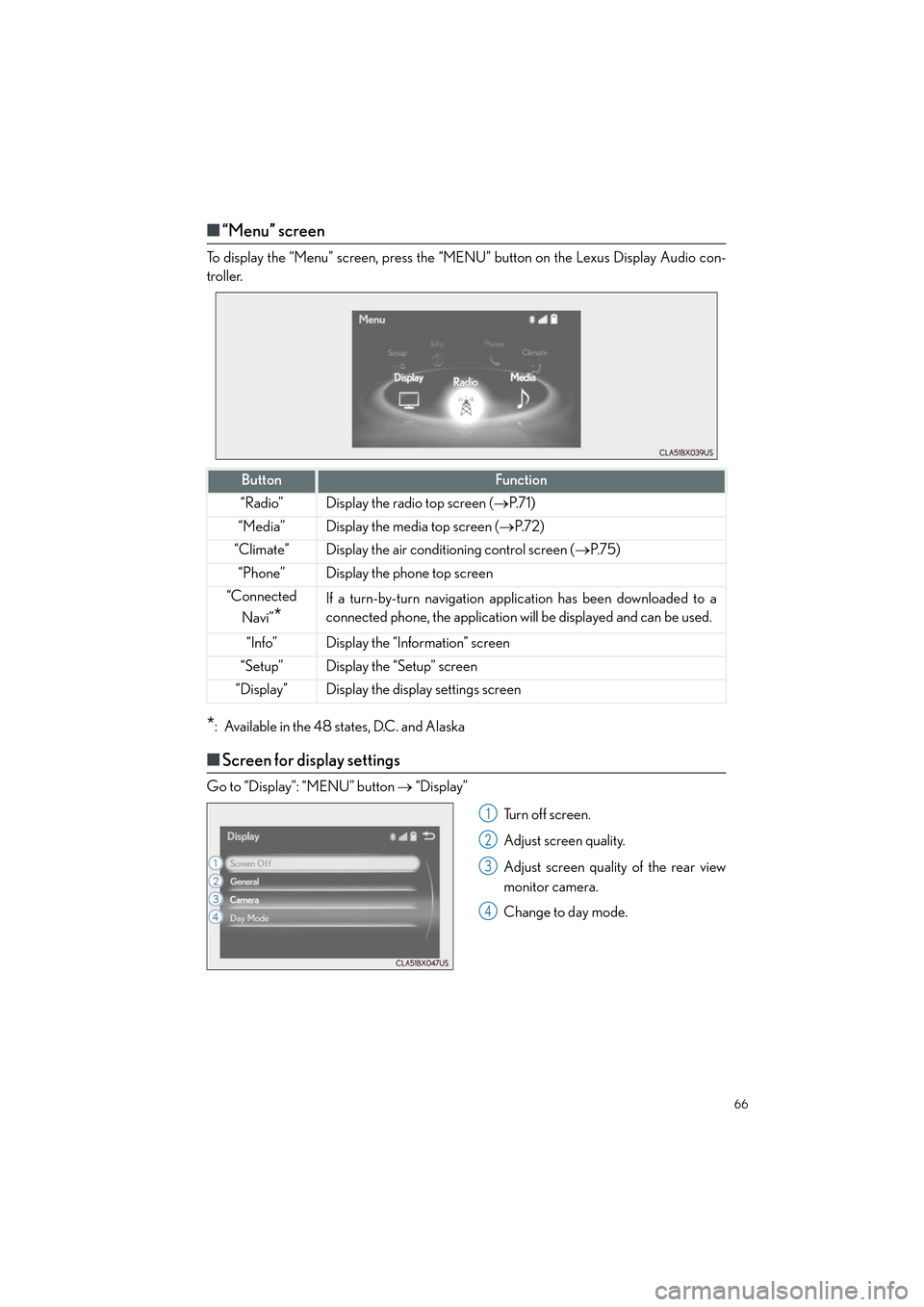
To display the “Menu” screen, press the “MENU” button on the Lexus Display Audio con-
troller.
*: Available in the 48 states, D.C. and Alaska
■Screen for display settings
Go to “Display”: “MENU” button → “Display”
Tu r n o f f s c r e e n .
Adjust screen quality.
Adjust screen quality of the rear view
monitor camera.
Change to day mode.
ButtonFunction
“Radio”Display the radio top screen ( →P. 7 1 )
“Media”Display the media top screen ( →P. 7 2 )
“Climate”Display the air conditioning control screen ( →P. 7 5 )
“Phone”Display the phone top screen
“Connected
Navi”
*
If a turn-by-turn navigation app lication has been downloaded to a
connected phone, the application will be displayed and can be used.
“Info”Display the “Information” screen
“Setup”Display the “Setup” screen
“Display”Display the display settings screen
1
2
3
4
Page 68 of 108
67
ES300h_QG_OM33C90U_(U)
Hands-free System For Cellular Phone
(with Lexus Display Audio System)
■How to register a Bluetooth® phone
Compatible Bluetooth®-equipped phones can be connected to the vehicle, enabling
hands-free operation. Please refer to the cellu lar phone manufacture’s user guide for pairing
procedures, or go to “www.lexus.com/MobileLink
” (for U.S.A.) for phone information.
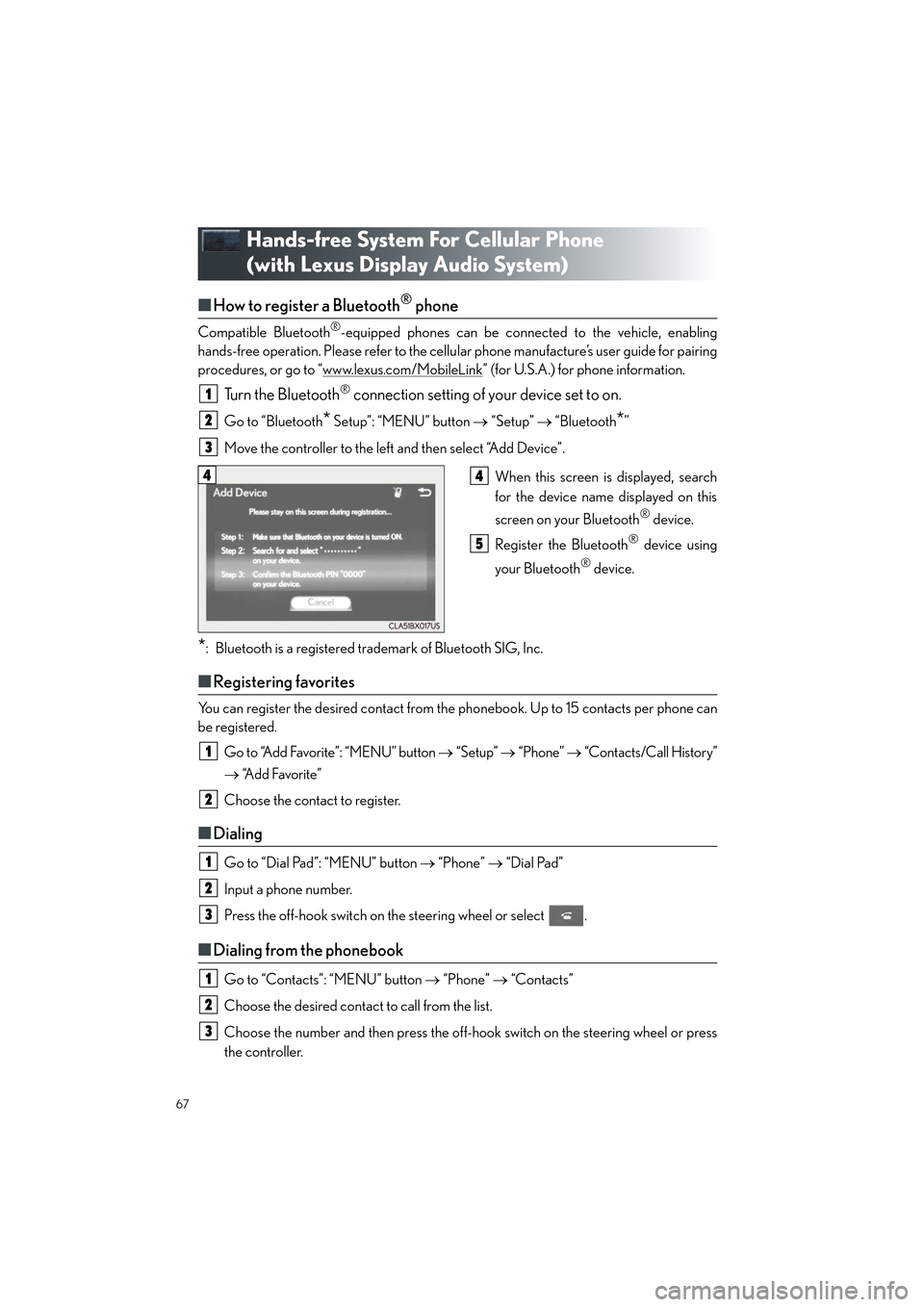
Turn the Bluetooth® connection setting of your device set to on.
Go to “Bluetooth* Setup”: “MENU” button → “Setup” → “Bluetooth*”
Move the controller to the left and then select “Add Device”.
When this screen is displayed, search
for the device name displayed on this
screen on your Bluetooth
® device.
Register the Bluetooth
® device using
your Bluetooth
® device.
*: Bluetooth is a registered trademark of Bluetooth SIG, Inc.
■ Registering favorites
You can register the desired contact from the phonebook. Up to 15 contacts per phone can
be registered.
Go to “Add Favorite”: “MENU” button → “Setup” → “Phone” → “Contacts/Call History”
→ “Add Favorite”
Choose the contact to register.
■ Dialing
Go to “Dial Pad”: “MENU” button → “Phone” → “Dial Pad”
Input a phone number.
Press the off-hook switch on the steering wheel or select .
■ Dialing from the phonebook
Go to “Contacts”: “MENU” button → “Phone” → “Contacts”
Choose the desired contact to call from the list.
Choose the number and then press the off-hook switch on the steering wheel or press
the controller.
1
2
3
44
5
1
2
1
2
3
1
2
3
Page 71 of 108

70
ES300h_QG_OM33C90U_(U)
Audio System
(with Lexus Display Audio System)
■Lexus Display Audio operation buttons
Eject a disc.
Disc slot
Except radio and A/V mode: Pause or resume playing a track or file.
Radio and A/V mode: Turn mute on/off.
“TUNE•SCROLL” knob
Select a radio station band, track or file.
Select preset radio stations, or access a desired track or file.
Display the radio top screen.
Display the media top screen.
“PWR•VOL” knob
Press to turn the audio system on/off, and turn to adjust the volume.
■Using the steering wheel switches to change audio sources
Press the “MODE” switch when the audio system is turned on. The audio source changes
each time the “MODE” switch is pressed.
1
2
3
4
5
6
7
8
Page 72 of 108

71
ES300h_QG_OM33C90U_(U)
■Audio menu screen
Go to audio menu screen: Move the controller to the left on the audio top screen
Radio mode
ButtonFunctionTarget radio mode
“SCAN”Scans for receivable stationsAM, FM
“SEEK”Seeks a station of the nearest frequency (stops
when a station is found)AM, FM
“Tag”
Captures the song title and artist name informa-
tion for potential purchase (when the “HD)” indi-
cator on the selected station is appears)
FM
“Multicast”Changes the channel of HD Radio (HD2, HD3,
HD4 where applicable)FM
“Traffic”Seeks a station of the traffic announcementFM
“HD Radio”Selects to set the station list shows of HD radio
on/offAM, FM
“Radio Settings”Changes radio settingsAll mode
“Sound Settings”Changes sound settingsAll mode
Page 74 of 108

73
ES300h_QG_OM33C90U_(U)
■Operating the audio system using the steering wheel switches
Volume switch
• Press: Increases/decreases volume
• Press and hold: Continuously
increases/decreases volume
Radio mode:
• Press: Selects a radio station
•Press and hold: Seeks up/down
CD, MP3/WMA/AAC disc,
Bluetooth
®, iPod or USB mode:
• Press: Selects a track/file/video
• Press and hold (except iPod): Quickly move up/down through
tracks/files/videos.
“MODE” switch
• Turns the power on, selects audio source
• Press and hold this switch to mute or pause the current operation. To can-
cel the mute or pause, press and
hold.
1
2
3