steering wheel Lexus ES300h 2017 Quick Guide
[x] Cancel search | Manufacturer: LEXUS, Model Year: 2017, Model line: ES300h, Model: Lexus ES300h 2017Pages: 108, PDF Size: 3.81 MB
Page 2 of 108
1
ES300h_QG_OM33C90U_(U)
The Quick Guide is not intended as a substitute for your Owner’s
Manual. We strongly encourage you to review the Owner’s
Manual and supplementary manuals so you will have a better
understanding of your vehicle’ s capabilities and limitations.
Air Conditioning System..................................................................................................................74
Audio System (with Lexus Display Audio System) Lexus Display Audio operation buttons ............................................................................... 70
Using the steering switches to change audio sources ................................................... 70
Audio menu screen.............................................................................................................. ...........71
Operating the audio system using the steering wheel switches ................................ 73
Audio System (with navigation system)
*
Audio control screen........................................................................................................... ...........61
Remote control (steering wheel switches)............................................................................61
Basic operation ................................................................................................................ ............... 62
Radio ................................................................................................................................................... 62
DVD player/CD player ........................................................................................................... ....63
Operating an iPod .............................................................................................................. ........... 64
Automatic High Beam ......................................................................................................................36
BSM (Blind Spot Monitor) .............................................................................................................. 49
Cruise Control ...................................................................................................................................... 41
Door Locks ............................................................................................................................................. 92
Driving Mode Select Switch ......................................................................................................... 50
Driving Position Memory ................................................................................................................ 23
Dynamic Radar Cruise Control ...................................................................................................43
Energy Monitor/Consumption Screen ..................................................................................... 14
EV Drive Mode .................................................................................................................................... 29
Floor mat installation ............................................................................................................................11
Front Seats .............................................................................................................................................. 21
Fuel Tank Cap .......................................................................................................................................95
Garage Door Opener ......................................................................................................................84
Contents
*: These features may be operated by Voice Command (See P.77)
Page 3 of 108
2
ES300h_QG_OM33C90U_(U)
Hands-free System For Cellular Phone (with Lexus Display Audio System)How to register a Bluetooth
® phone .................................................................................... 67
Registering favorites .......................................................................................................... ........... 67
Dialing................................................................................................................................................. 67
Dialing from the phonebook ..................................................................................................... 67
When the phonebook is empty............................................................................................... 68
Dialing from favorites ......................................................................................................... ......... 68
To answer the phone............................................................................................................ .........69
To refuse a call ............................................................................................................... .................. 69
Operating a telephone using the steering wheel switches .......................................... 69
Hands-free System For Cellular Phone (with navigation system)
*
Bluetooth® phone pairing ........................................................................................................ 58
Contacts transfer .............................................................................................................. .............59
Calling by name................................................................................................................ ..............60
Receiving a call ............................................................................................................... ................60
Steering switches .............................................................................................................. .............60
Headlights ..............................................................................................................................................35
Head Restraints ................................................................................................................................... 22
Hybrid System ............................................................................................................................... ....... 12
Hybrid Transmission ......................................................................................................................... 30
Intuitive Parking Assist .....................................................................................................................48
Keys ............................................................................................................................................................ 18
LDA (Lane Departure Alert with steering control) ............................................................ 47
Lexus Display Audio Controller (with Lexus Display Audio System) ........................65
LEXUS Enform ................................................................................................................................... 88
LEXUS Enform Safety Connect ................................................................................................. 86
*: These features may be operated by Voice Command (See P.77)
Page 10 of 108
9
ES300h_QG_OM33C90U_(U)
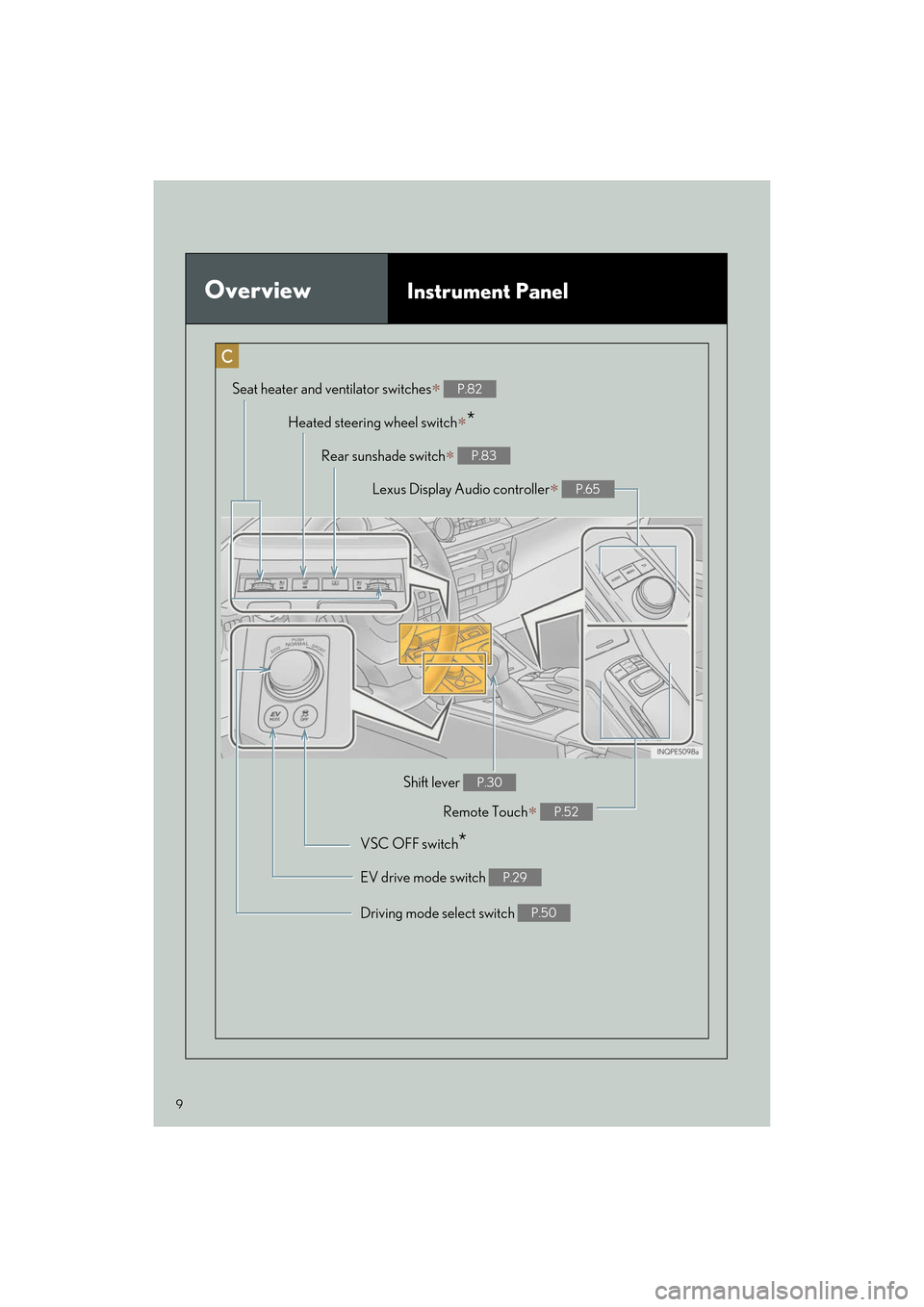
OverviewInstrument Panel
Remote Touch∗ P.52
Heated steering wheel switch∗*
VSC OFF switch*
Seat heater and ventilator switches∗ P.82
Driving mode select switch P.50
Shift lever P.30
Rear sunshade switch∗ P.83
Lexus Display Audio controller∗ P.65
EV drive mode switch P.29
Page 24 of 108
23
ES300h_QG_OM33C90U_(U)
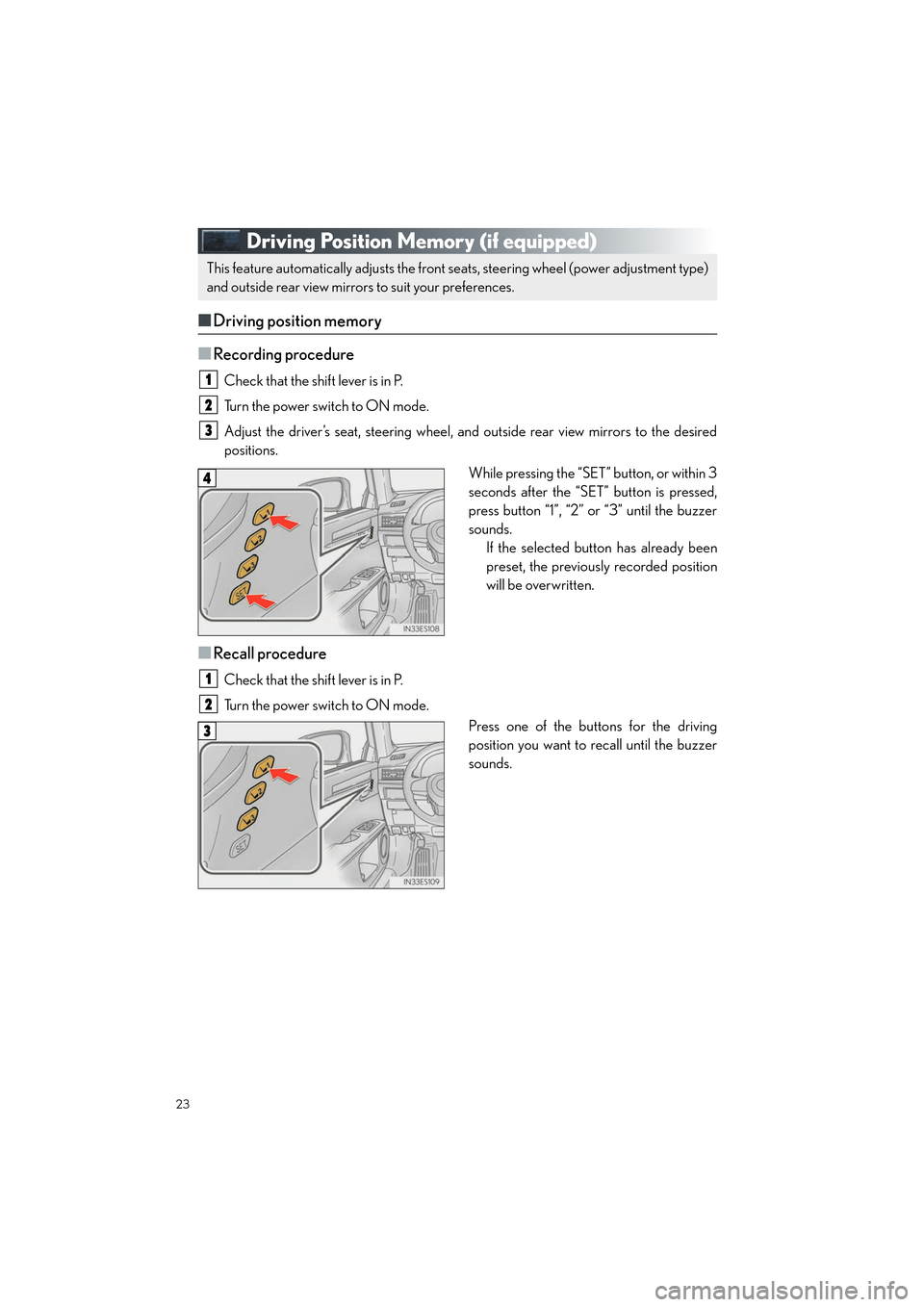
Driving Position Memory (if equipped)
■Driving position memory
■
Recording procedure
Check that the shift lever is in P.
Turn the power switch to ON mode.
Adjust the driver’s seat, steering wheel, and outside rear view mirrors to the desired
positions. While pressing the “SET” button, or within 3
seconds after the “SET” button is pressed,
press button “1”, “2” or “3” until the buzzer
sounds.If the selected button has already been
preset, the previously recorded position
will be overwritten.
■Recall procedure
Check that the shift lever is in P.
Turn the power switch to ON mode.
Press one of the buttons for the driving
position you want to recall until the buzzer
sounds.
This feature automatically adjusts the front se ats, steering wheel (power adjustment type)
and outside rear view mirrors to suit your preferences.
1
2
3
4
1
2
3
Page 48 of 108

47
ES300h_QG_OM33C90U_(U)
LDA (Lane Departure Alert with
steering control) (if equipped)
■Turning LDA system on
Press the LDA switch to turn the LDA sys-
tem on.
The LDA indicator illuminates and a
message is displayed on the multi-infor-
mation display.
Press the LDA switch again to turn the
LDA system off.
When the LDA system is turned on or
off, operation of the LDA system contin-
ues in the same condition the next time
the hybrid system is started.
When driving on highways and freeways with wh ite (yellow) lines, this function alerts the
driver when the vehicle might depart from its lane and provides assistance by operating
the steering wheel to keep the vehicle in its lane.
The LDA system recognizes visible white (yellow) lines with the camera sensor on the
upper portion of the front windshield.
Page 61 of 108
60
ES300h_QG_OM33C90U_(U)
■Calling by name
You can call by giving a name registered in the contact list. For details, refer to the
“NAVIGATION SYSTEM OWNER’S MANUAL”.
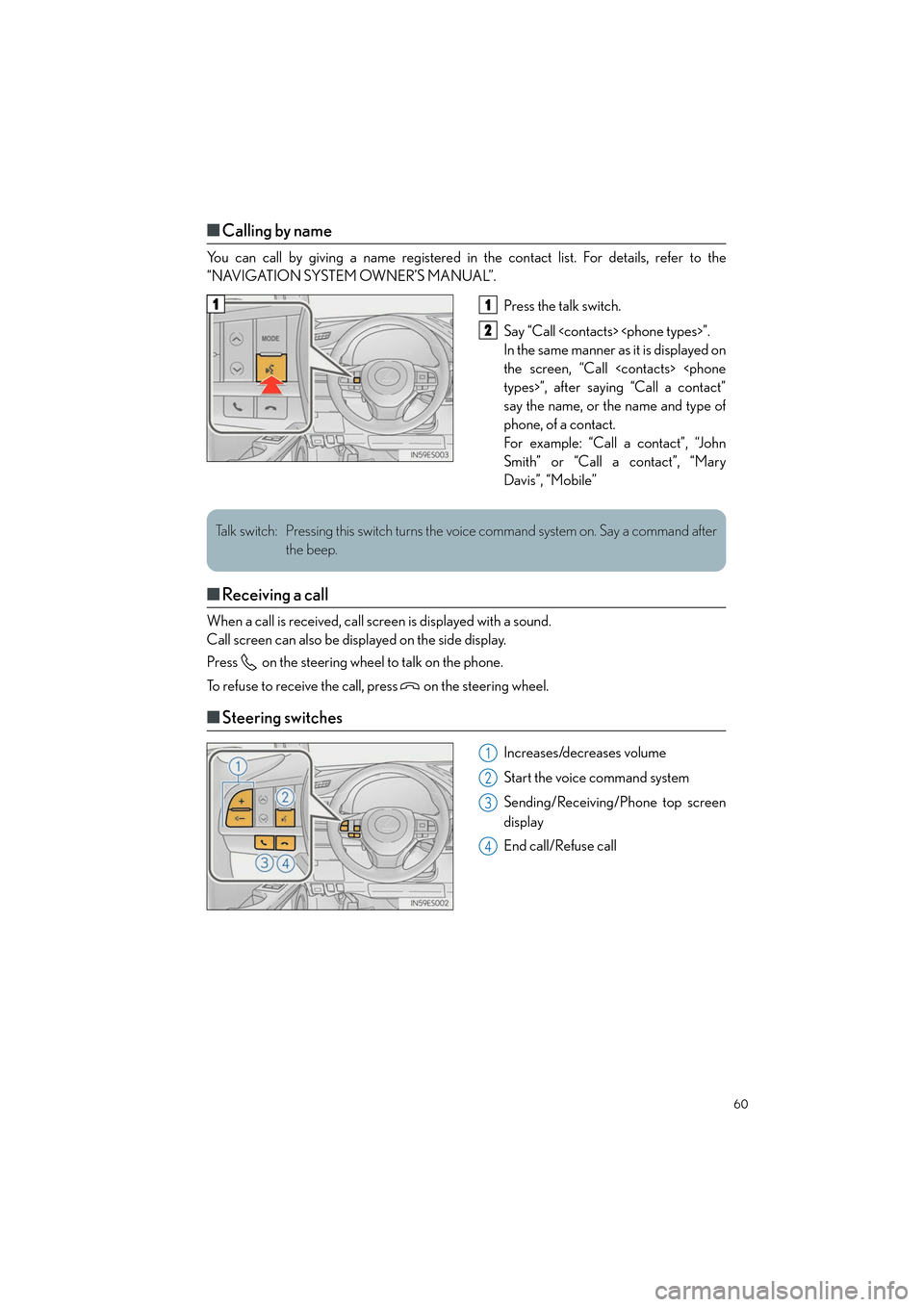
Press the talk switch.
Say “Call
In the same manner as it is displayed on
the screen, “Call
say the name, or the name and type of
phone, of a contact.
For example: “Call a contact”, “John
Smith” or “Call a contact”, “Mary
Davis”, “Mobile”
■Receiving a call
When a call is received, call screen is displayed with a sound.
Call screen can also be displayed on the side display.
Press on the steering wheel to talk on the phone.
To refuse to receive the call, press on the steering wheel.
■Steering switches
Increases/decreases volume
Start the voice command system
Sending/Receiving/Phone top screen
display
End call/Refuse call
11
2
Talk switch: Pressing this switch turns the voice command system on. Say a command after
the beep.
1
2
3
4
Page 62 of 108
61
ES300h_QG_OM33C90U_(U)
Audio System (with navigation system)
■Audio control screen
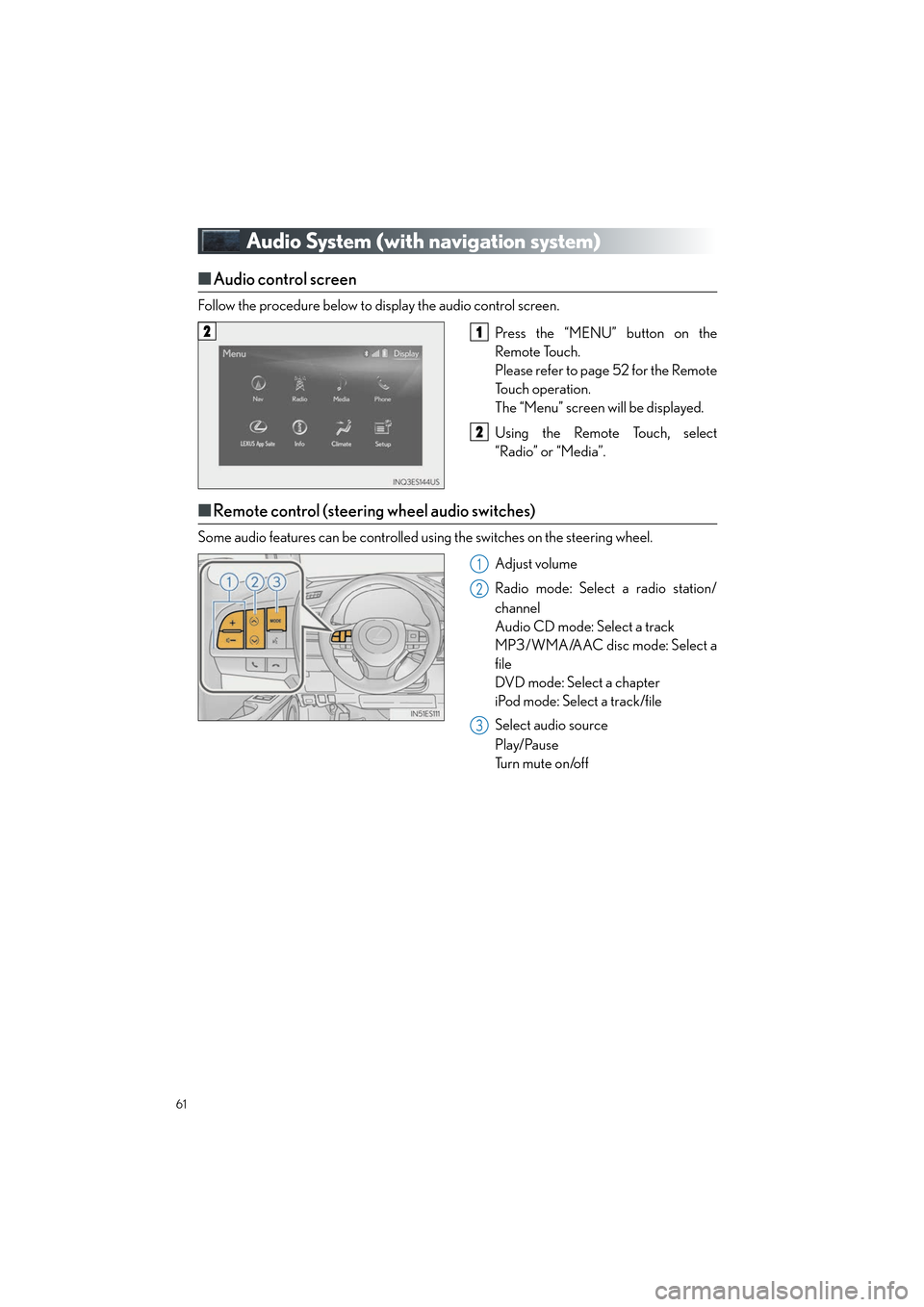
Follow the procedure below to display the audio control screen.
Press the “MENU” button on the
Remote Touch.
Please refer to page 52 for the Remote
To u c h o p e r a t i o n .
The “Menu” screen will be displayed.
Using the Remote Touch, select
“Radio” or “Media”.
■Remote control (steering wheel audio switches)
Some audio features can be controlled using the switches on the steering wheel.
Adjust volume
Radio mode: Select a radio station/
channel
Audio CD mode: Select a track
MP3/WMA/AAC disc mode: Select a
file
DVD mode: Select a chapter
iPod mode: Select a track/file
Select audio source
Play/Pause
Tu r n m u t e o n /o f f
21
2
1
2
3
Page 68 of 108
67
ES300h_QG_OM33C90U_(U)
Hands-free System For Cellular Phone
(with Lexus Display Audio System)
■How to register a Bluetooth® phone
Compatible Bluetooth®-equipped phones can be connected to the vehicle, enabling
hands-free operation. Please refer to the cellu lar phone manufacture’s user guide for pairing
procedures, or go to “www.lexus.com/MobileLink
” (for U.S.A.) for phone information.
Turn the Bluetooth® connection setting of your device set to on.
Go to “Bluetooth* Setup”: “MENU” button → “Setup” → “Bluetooth*”
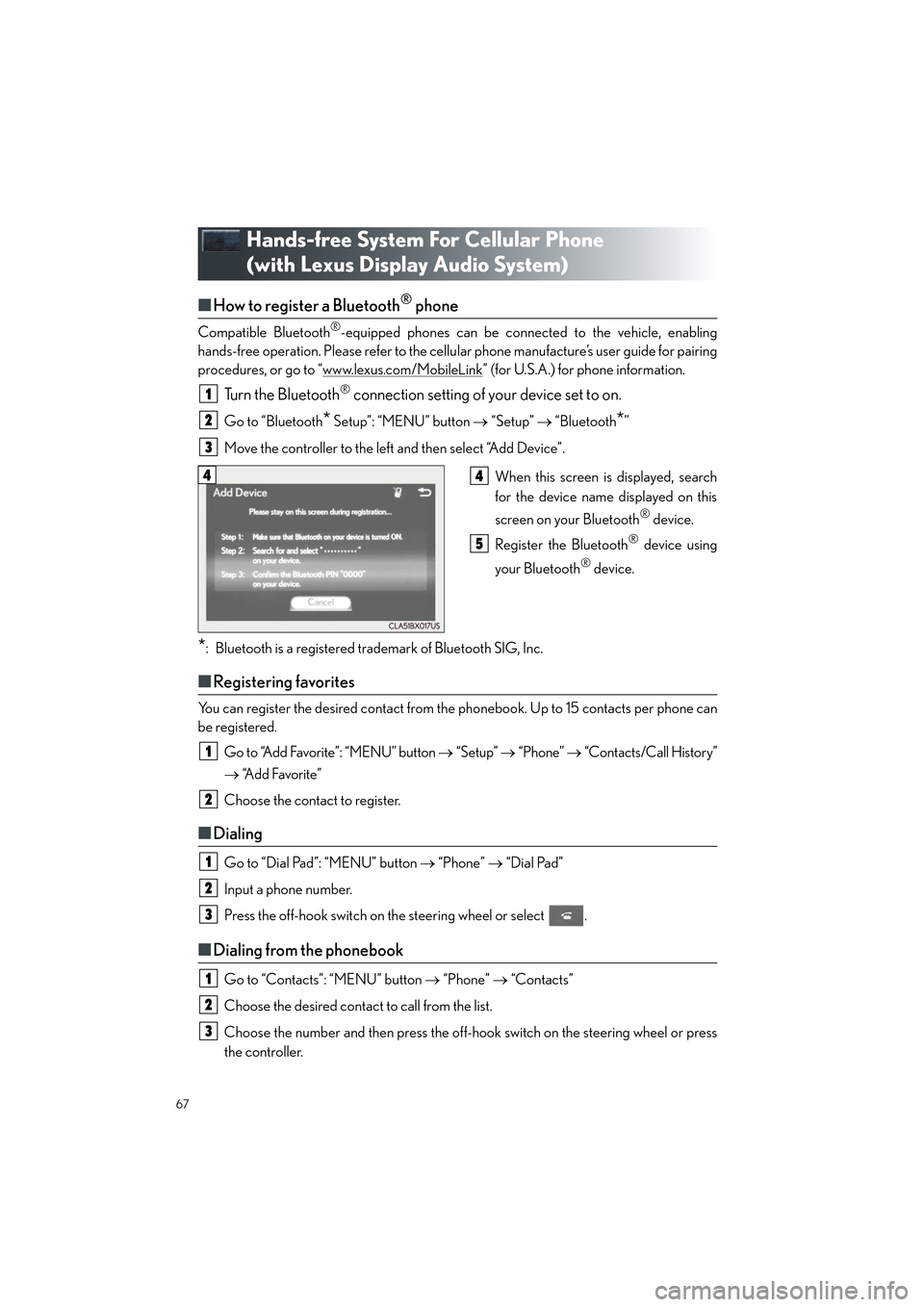
Move the controller to the left and then select “Add Device”.
When this screen is displayed, search
for the device name displayed on this
screen on your Bluetooth
® device.
Register the Bluetooth
® device using
your Bluetooth
® device.
*: Bluetooth is a registered trademark of Bluetooth SIG, Inc.
■ Registering favorites
You can register the desired contact from the phonebook. Up to 15 contacts per phone can
be registered.
Go to “Add Favorite”: “MENU” button → “Setup” → “Phone” → “Contacts/Call History”
→ “Add Favorite”
Choose the contact to register.
■ Dialing
Go to “Dial Pad”: “MENU” button → “Phone” → “Dial Pad”
Input a phone number.
Press the off-hook switch on the steering wheel or select .
■ Dialing from the phonebook
Go to “Contacts”: “MENU” button → “Phone” → “Contacts”
Choose the desired contact to call from the list.
Choose the number and then press the off-hook switch on the steering wheel or press
the controller.
1
2
3
44
5
1
2
1
2
3
1
2
3
Page 69 of 108
68
ES300h_QG_OM33C90U_(U)
■When the phonebook is empty
You can transfer the phone numbers in a Bluetooth® phone to the system.
Operation methods differ between PBAP (Phone Book Access Profile) compatible and
PBAP incompatible Bluetooth
® phones. If the cellular phone does not support either PBAP
or OPP (Object Push Profile) service, you cannot transfer contacts.
Press the off-hook switch on the steering wheel.
If the phonebook is empty, a message will be displayed.
For a PBAP compatible Bluetooth
® phone and “Automatic Transfer” is off
To enable automatic transfer of new contacts from a cellular phone every time it is con-
nected, select “Always”.
Select “Once” if you want to transfer new contacts from a cellular phone.
For a PBAP incompatible and OPP compatible Bluetooth
® phone
Select “Transfer” and operate your cellular phone to transfer new contacts from a cellu-
lar phone.
Select “Add” if you want to add a new contact manually.
■ Dialing from favorites
You can make a call using numbers registered in the favorites.
Go to “Favorites”: “MENU” button → “Phone” → “Favorites”
Choose the desired contact to call from the list.
Choose the number and then press the off-hook switch on the steering wheel or press
the controller.
1
2
2
1
2
3
Page 70 of 108
69
ES300h_QG_OM33C90U_(U)
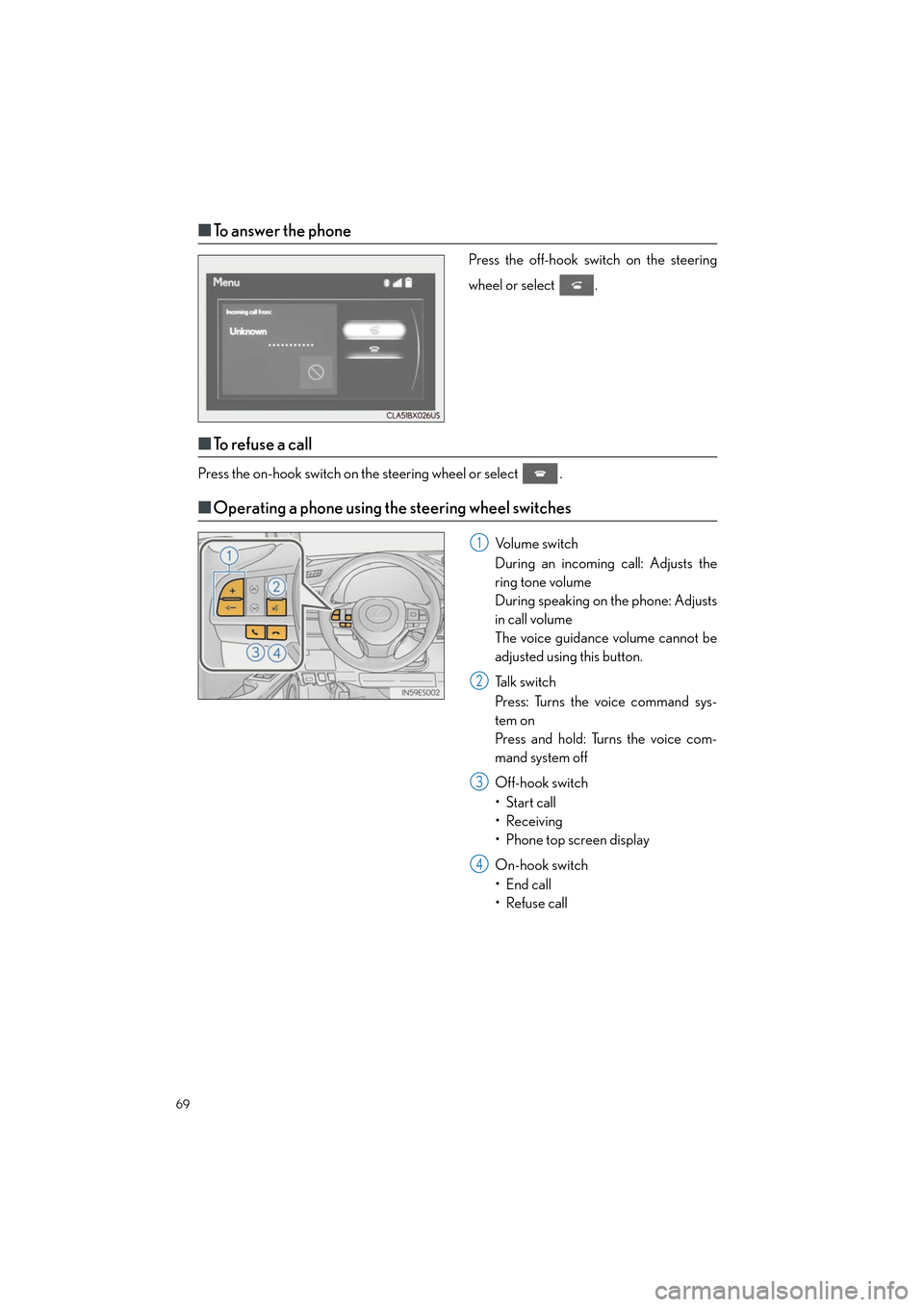
■To answer the phone
Press the off-hook switch on the steering
wheel or select .
■To r e f u s e a c a l l
Press the on-hook switch on the steering wheel or select .
■Operating a phone using the steering wheel switches
Volume switch
During an incoming call: Adjusts the
ring tone volume
During speaking on the phone: Adjusts
in call volume
The voice guidance volume cannot be
adjusted using this button.
Talk switch
Press: Turns the voice command sys-
tem on
Press and hold: Turns the voice com-
mand system off
Off-hook switch
•Start call
• Receiving
• Phone top screen display
On-hook switch
• End call
• Refuse call1
2
3
4