display Lexus ES300h 2018 (OM33D45U) User Guide
[x] Cancel search | Manufacturer: LEXUS, Model Year: 2018, Model line: ES300h, Model: Lexus ES300h 2018Pages: 608, PDF Size: 10.67 MB
Page 81 of 608

81
ES300h_OM_OM33D45U_(U)
Instrument cluster2
2. Instrument clusterWarning lights and indicators .............................. 82
Gauges and meters ..................... 86
Multi-information display ............91
Energy monitor/ consumption screen ................. 96
Page 82 of 608
82
ES300h_OM_OM33D45U_(U)2. Instrument cluster
Warning lights and indicators
The units used on the speedometer and some indicators may differ depending on the
target region or grade/type.
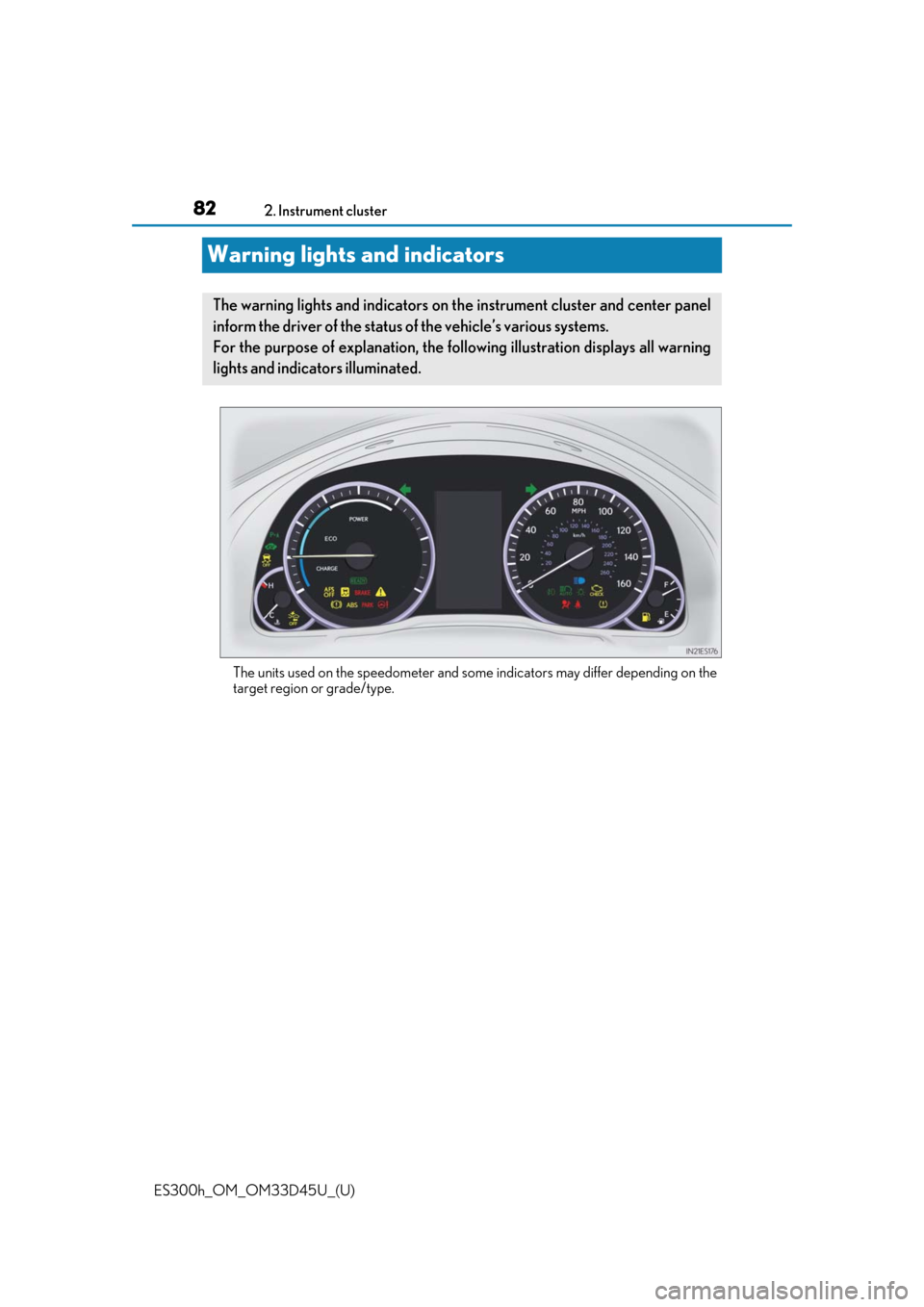
The warning lights and indicators on th
e instrument cluster and center panel
inform the driver of the status of the vehicle’s various systems.
For the purpose of explanation, the following illustration displays all warning
lights and indicators illuminated.
Page 86 of 608
86
ES300h_OM_OM33D45U_(U)2. Instrument cluster
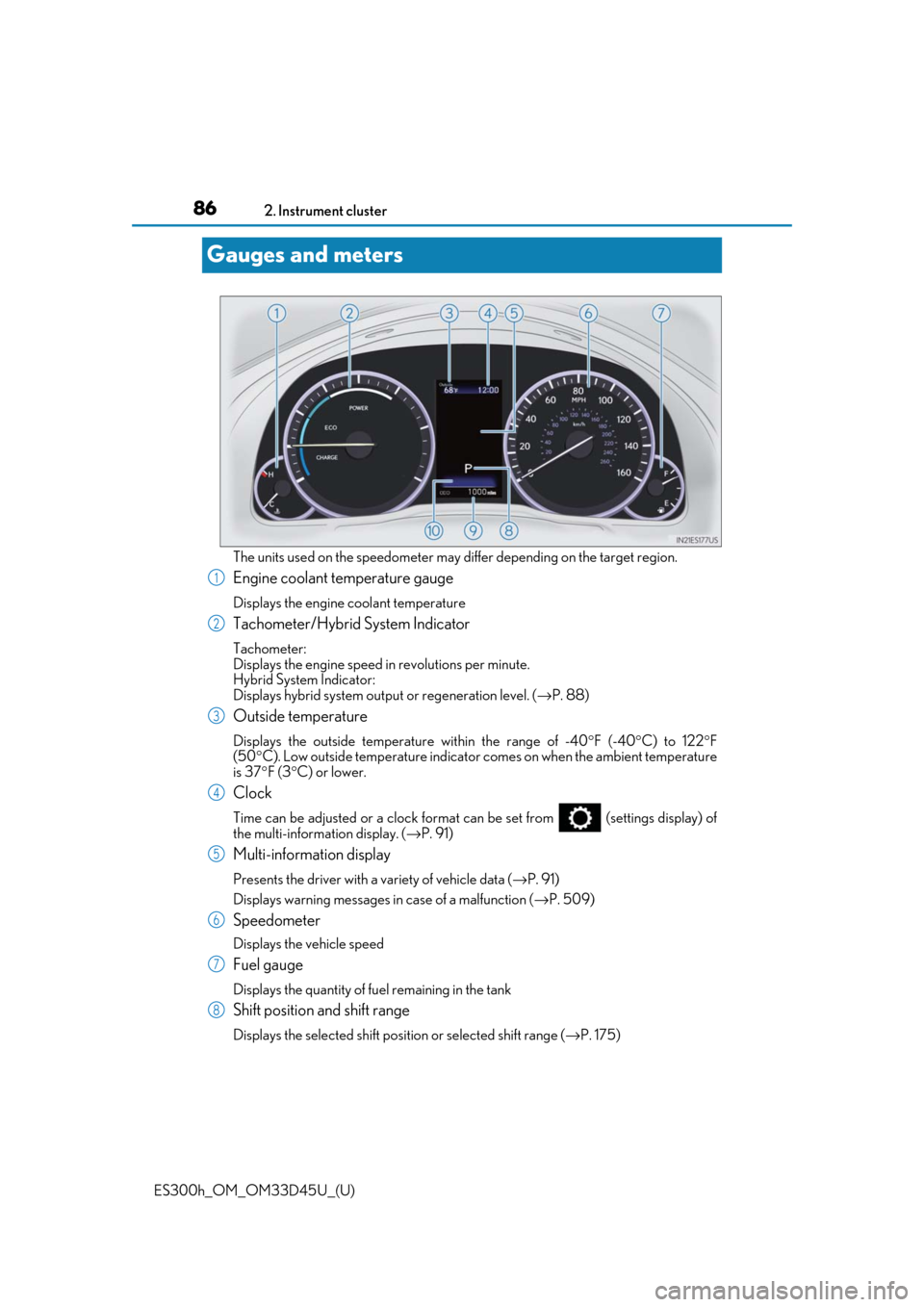
Gauges and meters
The units used on the speedometer may differ depending on the target region.
Engine coolant temperature gauge
Displays the engine coolant temperature
Tachometer/Hybrid System Indicator
Tachometer:
Displays the engine speed
in revolutions per minute.
Hybrid System Indicator:
Displays hybrid system output or regeneration level. (→P. 88)
Outside temperature
Displays the outside temperature within the range of -40 °F (-40 °C) to 122 °F
(50 °C). Low outside temperature indicator comes on when the ambient temperature
is 37 °F (3 °C) or lower.
Clock
Time can be adjusted or a clock format can be set from (settings display) of
the multi-information display. ( →P. 91)
Multi-information display
Presents the driver with a variety of vehicle data ( →P. 91)
Displays warning me ssages in case of a malfunction ( →P. 509)
Speedometer
Displays the vehicle speed
Fuel gauge
Displays the quantity of fuel remaining in the tank
Shift position and shift range
Displays the selected shift posi tion or selected shift range (→P. 175)
1
2
3
4
5
6
7
8
Page 87 of 608
ES300h_OM_OM33D45U_(U)
872. Instrument cluster
2
Instrument cluster
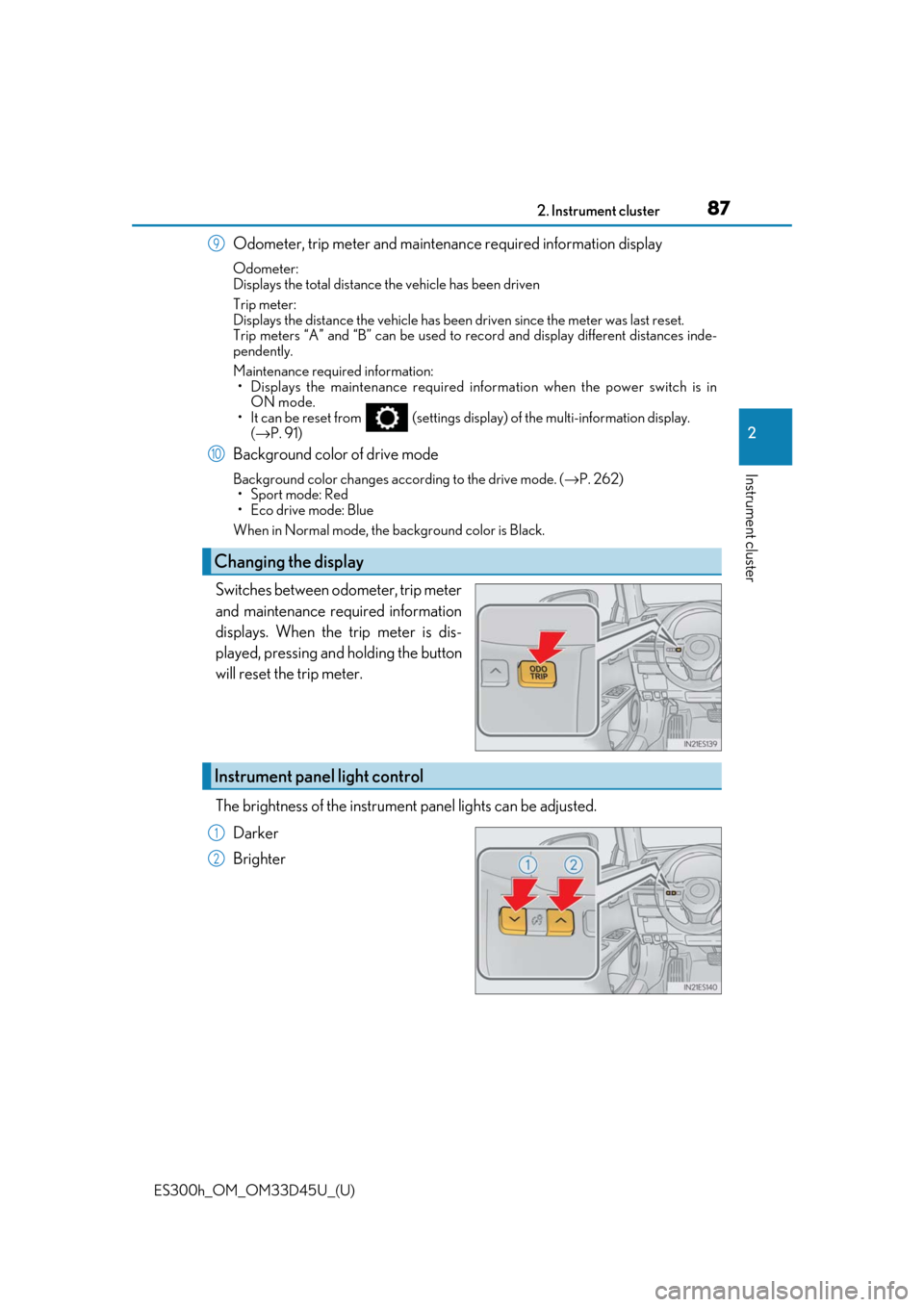
Odometer, trip meter and maintenance required information display
Odometer:
Displays the total distance the vehicle has been driven
Trip meter:
Displays the distance the vehicle has been driven since the meter was last reset.
Trip meters “A” and “B” can be used to record and display different distances inde-
pendently.
Maintenance required information: • Displays the maintenance required info rmation when the power switch is in
ON mode.
• It can be reset from (settings display) of the multi-information display. (→ P. 91)
Background color of drive mode
Background color changes according to the drive mode. ( →P. 262)
•Sport mode: Red
• Eco drive mode: Blue
When in Normal mode, the background color is Black.
Switches between odometer, trip meter
and maintenance required information
displays. When the trip meter is dis-
played, pressing and holding the button
will reset the trip meter.
The brightness of the instrument panel lights can be adjusted.
Darker
Brighter
Changing the display
9
10
Instrument panel light control
1
2
Page 88 of 608
88
ES300h_OM_OM33D45U_(U)2. Instrument cluster
■The meters and display illuminate when
The power switch is in ON mode.
■Instrument panel brightness adjustment
The instrument panel brightness levels when the tail lights are on and off can be adjusted
individually. However, when the
surroundings are bright (daytime, etc.), turning on the tail
lights will not change the inst rument panel brightness. At th is time, any adjustments made
to the instrument panel brightness levels will be applied to both settings at once.
■Limitation of brightness adjustment
The brightness of the instrument panel lights is automatically adjusted based on the light
sensor detecting how bright the surroundings are. However, if the instrument panel
brightness has been manually set to either the brightest or darkest setting, the automatic
adjustment will not be performed.
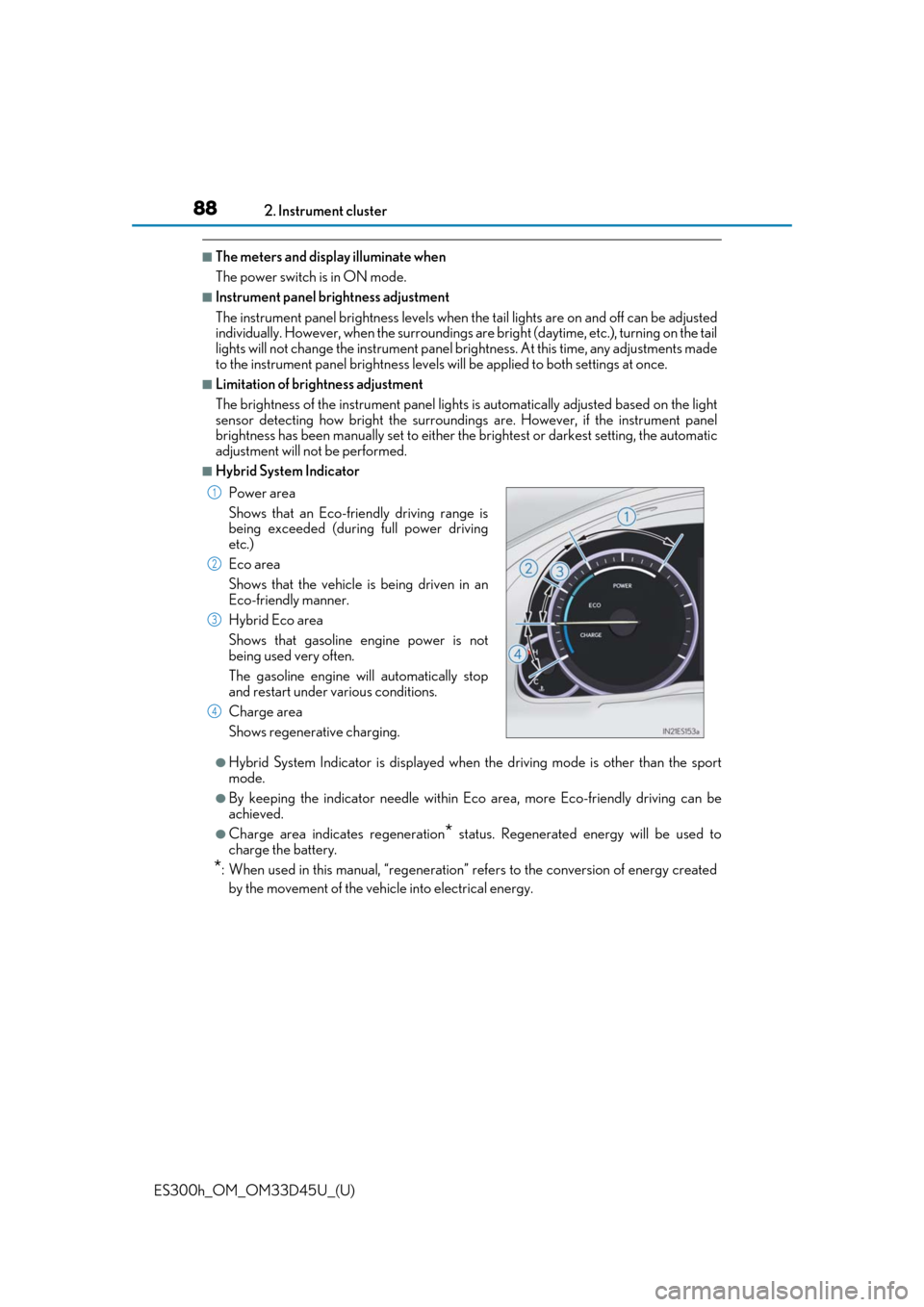
■Hybrid System Indicator
●Hybrid System Indicator is displayed when the driving mode is other than the sport
mode.
●By keeping the indicator needle within Ec o area, more Eco-friendly driving can be
achieved.
●Charge area indicates regeneration* status. Regenerated energy will be used to
charge the battery.
*: When used in this manual, “regeneration” refers to the conversion of energy created
by the movement of the vehicle into electrical energy. Power area
Shows that an Eco-friendly driving range is
being exceeded (durin g full power driving
etc.)
Eco area
Shows that the vehicle is being driven in an
Eco-friendly manner.
Hybrid Eco area
Shows that gasoline engine power is not
being used very often.
The gasoline engine will automatically stop
and restart under various conditions.
Charge area
Shows regenerative charging.
1
2
3
4
Page 89 of 608
ES300h_OM_OM33D45U_(U)
892. Instrument cluster
2
Instrument cluster
■Tachometer
Hybrid System Indicator switches to the tachometer when driving mode is in sport mode.
The settings of the tachometer display can be changed on the multi-information display.
( → P. 91)
■Engine speed
Engine speed is precisely cont rolled in order to help improve fuel efficiency and reduce
exhaust emissions etc.
There are times when the engine speed that is displayed may differ even when vehicle
operation and driving conditions are the same.
■Outside temperature display
●In the following situations, the correct outside temperature may not be displayed, or the
display may take longer than normal to change.
• When stopped, or driving at low speeds (less than 12 mph [20 km/h])
• When the outside temperature has changed suddenly (at the entrance/exit of a garage, tunnel, etc.)
• When the vehicle is parked in direct sunlight
●When “--” or “E” is displayed, the system may be malfunctioning.
Take your vehicle to your Lexus dealer.
■Pop-up display
In some situations, a pop-up display will be temporarily displayed on the multi-informa-
tion display or the odometer/trip meter/maintenance required information screen.
The pop-up display function can be set on/off. ( →P. 562)
■Liquid crystal display
Small spots or light spots may appear on the display. This phenomenon is characteristic
of liquid crystal displays, and there is no problem continuing to use the display.
■Customization
The meter display can be customized on the multi-information display.
(Customizable features →P. 560)
WARNING
■The information display at low temperatures
Allow the interior of the vehicle to warm up before using the liquid crystal information
display. At extremely low temperatures, th e information display monitor may respond
slowly, and display changes may be delayed.
For example, there is a lag between the dr iver’s shifting and the new gear number
appearing on the display. This lag could ca use the driver to downshift again, causing
rapid and excessive engine braking and possibly an accident resulting in personal
death or injury.
Page 90 of 608

90
ES300h_OM_OM33D45U_(U)2. Instrument cluster
NOTICE
■To prevent damage to the
engine and its components
●Do not let the indicator needle of the tachometer enter the red zone, which indicates
the maximum engine speed.
●The engine may be overheating if the engine coolant temperature gauge is in the red
zone (H); or “Engine Coolant Temp High” is shown on the multi-information display.
In this case, immediately stop the vehicle in a safe place, and check the engine after it
has cooled completely. ( →P. 531)
Page 91 of 608
91
ES300h_OM_OM33D45U_(U)2. Instrument cluster
2
Instrument cluster
Multi-information display
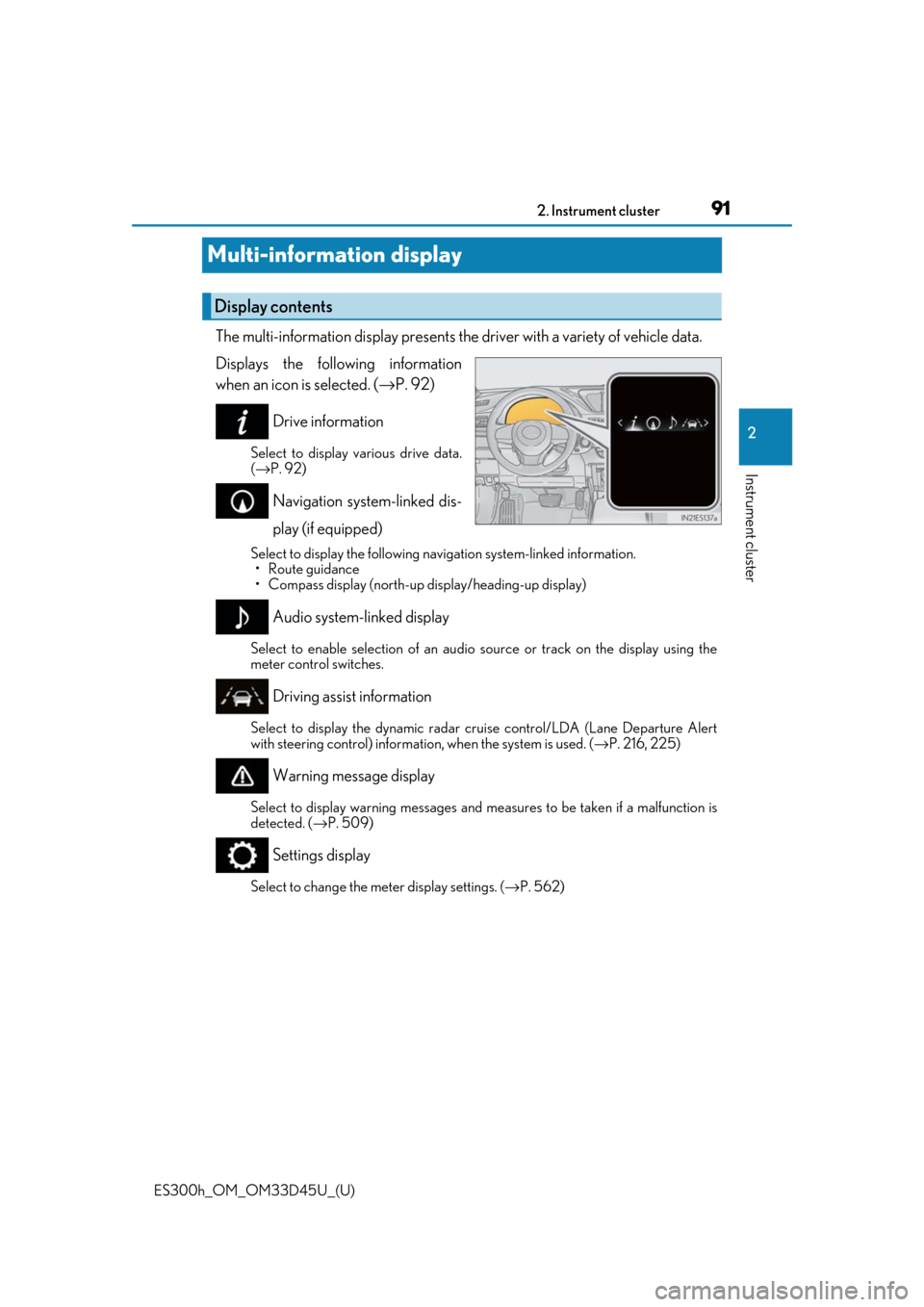
The multi-information display presents the
driver with a variety of vehicle data.
Displays the following information
when an icon is selected. ( →P. 92)
Drive information
Select to display various drive data.
( → P. 92)
Navigation system-linked dis-
play (if equipped)
Select to display the following na vigation system-linked information.
•Route guidance
• Compass display (north-up display/heading-up display)
Audio system-linked display
Select to enable selection of an audio source or track on the display using the
meter control switches.
Driving assist information
Select to display the dyna mic radar cruise control/LDA (Lane Departure Alert
with steering control) informatio n, when the system is used. (→P. 216, 225)
Warning message display
Select to display warning messages and me asures to be taken if a malfunction is
detected. ( →P. 509)
Settings display
Select to change the meter display settings. ( →P. 562)
Display contents
Page 92 of 608
92
ES300h_OM_OM33D45U_(U)2. Instrument cluster
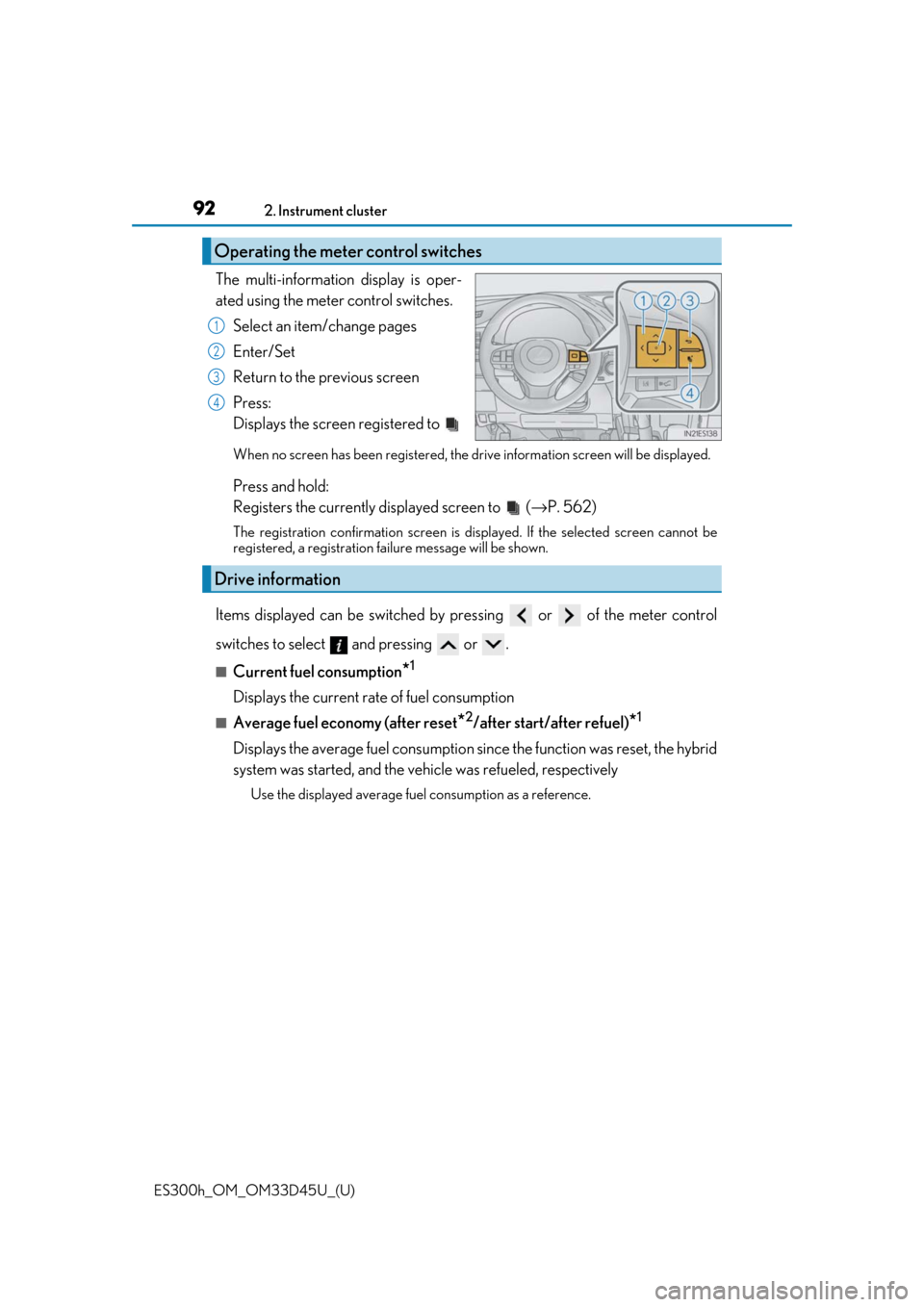
The multi-information display is oper-
ated using the meter control switches.
Select an item/change pages
Enter/Set
Return to the previous screen
Press:
Displays the screen registered to
When no screen has been registered, the dr ive information screen will be displayed.
Press and hold:
Registers the currently displayed screen to ( →P. 562)
The registration confirmation screen is displayed. If the selected screen cannot be
registered, a registration fa ilure message will be shown.
Items displayed can be switched by pr essing or of the meter control
switches to select and pressing or .
■Current fuel consumption*1
Displays the current rate of fuel consumption
■Average fuel economy (after reset*2/after start/after refuel)*1
Displays the average fuel consumption since the function was reset, the hybrid
system was started, and the vehicle was refueled, respectively
Use the displayed average fuel consumption as a reference.
Operating the meter control switches
1
2
3
4
Drive information
Page 93 of 608

ES300h_OM_OM33D45U_(U)
932. Instrument cluster
2
Instrument cluster
■Average speed (after reset*2/after start)*1
Displays the average vehicle speed since the function was reset and the
hybrid system was started, respectively
■Elapsed time (after reset*2/after start)*1
Displays the elapsed time since the function was reset and the hybrid system
was started, respectively
■Distance (range/after start)*1
Displays the estimated maximum distance that can be driven with the quantity
of fuel remaining and the distance driv en after the hybrid system was started
respectively.
• This distance is computed based on your average fuel consumption. As a result, the actual distance that can be driv en may differ from that displayed.
• When only a small amount of fuel is added to the tank, the display may not be
updated.
When refueling, turn the power switch off. If the vehicle is refueled without turning
the power switch off, the display may not be updated.
■Energy monitor
→ P. 96
■Tire inflation pressure
Displays inflation pressure of each tire.
The inflation pressure of the spare tire will not be displayed.
■LDA (Lane Departure Alert with steeri ng control) vehicle sway warning
→ P. 216
■Display off
A blank screen is displayed
*1: Displayed when the item is se t in “Drive Info 1”, “Drive Info 2” or “Drive Info 3”.
( → P. 562)
*2: The function can be reset by pressing th e of the meter control switches for lon-
ger than 1 second when the item to reset is displayed.
If there is more than one item that can be reset, the item selection screen will appear.