parking brake Lexus ES300h 2019 (OM06178U) Owner's Guide
[x] Cancel search | Manufacturer: LEXUS, Model Year: 2019, Model line: ES300h, Model: Lexus ES300h 2019Pages: 456, PDF Size: 9.59 MB
Page 150 of 456
1504-3. Operating the lights and wipers
4-3.Operating the lights and wipers
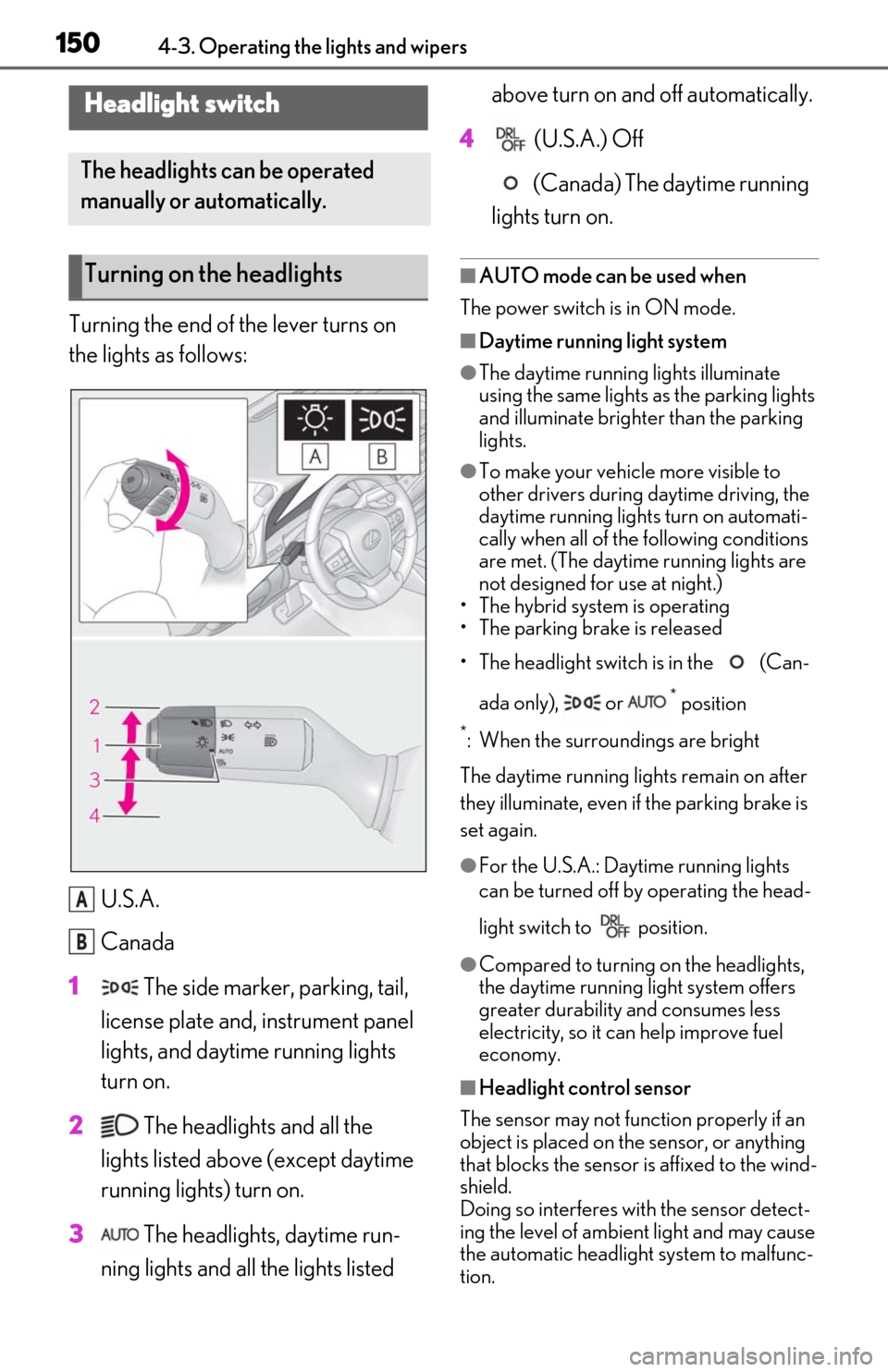
Turning the end of the lever turns on
the lights as follows:U.S.A.
Canada
1 The side marker, parking, tail,
license plate and, instrument panel
lights, and daytime running lights
turn on.
2 The headlights and all the
lights listed above (except daytime
running lights) turn on.
3 The headlights, daytime run-
ning lights and all the lights listed above turn on and off automatically.
4 (U.S.A.) Off
(Canada) The daytime running
lights turn on.
■AUTO mode can be used when
The power switch is in ON mode.
■Daytime running light system
●The daytime running lights illuminate
using the same lights as the parking lights
and illuminate brighter than the parking
lights.
●To make your vehicle more visible to
other drivers during daytime driving, the
daytime running lights turn on automati-
cally when all of the following conditions
are met. (The daytime running lights are
not designed for use at night.)
• The hybrid system is operating
• The parking brake is released
• The headlight switch is in the (Can-
ada only), or
* position
*: When the surroundings are bright
The daytime running lights remain on after
they illuminate, even if the parking brake is
set again.
●For the U.S.A.: Daytime running lights
can be turned off by operating the head-
light switch to position.
●Compared to turning on the headlights,
the daytime running light system offers
greater durability and consumes less
electricity, so it can help improve fuel
economy.
■Headlight control sensor
The sensor may not function properly if an
object is placed on the sensor, or anything
that blocks the sensor is affixed to the wind-
shield.
Doing so interferes with the sensor detect-
ing the level of ambien t light and may cause
the automatic headlight system to malfunc-
tion.
Headlight switch
The headlights can be operated
manually or automatically.
Turning on the headlights
A
B
Page 195 of 456

1954-5. Using the driving support systems
4
Driving
the vehicle speed is approximately 20
mph (30 km/h) or more. (However, when
the vehicle speed is set while driving at
below approximately 20 mph [30 km/h],
the set speed will be set to approximately
20 mph [30 km/h].)
■Accelerating after setting the vehicle
speed
The vehicle can accelerate by operating the
accelerator pedal. After accelerating, the
set speed resumes. However, during vehi-
cle-to-vehicle distance control mode, the
vehicle speed may decrease below the set
speed in order to maintain the distance to
the preceding vehicle.
■When the vehicle stops while follow-up
cruising
●Pressing the +RES sw itch while the vehi-
cle ahead stops will resume follow-up
cruising if the vehicle ahead starts off
within approximately 3 seconds after the
switch is pressed.
●If the vehicle ahead starts off within 3 sec-
onds after your vehicle stops, follow-up
cruising will be resumed.
■Automatic cancelation of vehicle-to-
vehicle distance control mode
Vehicle-to-vehicle dist ance control mode is
automatically canceled in the following situ-
ations.
●VSC is activated.
●TRAC is activated for a period of time.
●When the VSC or TRAC system is
turned off.
●The sensor cannot detect correctly
because it is covered in some way.
●Pre-collision braking is activated.
●The parking brake is operated.
●The vehicle is stopped by system control
on a steep incline.
●The following are detected when the
vehicle has been stopped by system con-
trol:
• The driver is not wearing a seat belt.
• The driver’s door is opened.
• The vehicle has been stopped for about 3 minutes If vehicle-to-vehicle
distance control mode
is automatically canceled for any reasons
other than the above, there may be a mal-
function in the system. Contact your Lexus
dealer.
■Automatic cancelation of constant
speed control mode
Constant speed control mode is automati-
cally canceled in the following situations:
●Actual vehicle speed is more than
approximately 10 mph (16 km/h) below
the set vehicle speed.
●Actual vehicle speed falls below approxi-
mately 20 mph (30 km/h).
●VSC is activated.
●TRAC is activated for a period of time.
●When the VSC or TRAC system is
turned off.
●Pre-collision braking is activated.
If constant speed control mode is automati-
cally canceled for any reasons other than
the above, there may be a malfunction in the
system. Contact your Lexus dealer.
■Brake operation
A brake operation sound may be heard and
the brake pedal response may change, but
these are not malfunctions.
■Warning messages and buzzers for
dynamic radar cruise control with full-
speed range
Warning messages and buzzers are used to
indicate a system malfunction or to inform
the driver of the need for caution while driv-
ing. If a warning me ssage is shown on the
multi-information displa y, read the message
and follow the instructions. ( P.167, 368)
■When the sensor may not be correctly
detecting the vehicle ahead
In the case of the fo llowing and depending
on the conditions, operate the brake pedal
when deceleration of the system is insuffi-
cient or operate the accelerator pedal
when acceleration is required.
As the sensor may not be able to correctly
detect these types of vehicles, the approach
warning ( P.193) may not be activated.
●Vehicles that cut in suddenly
Page 203 of 456
2034-5. Using the driving support systems
4
Driving
When not in SPORT mode, if the Driving
Mode Select switch is turned away from
you, the “Sport” indicator comes on.
■Operation of the air conditioning sys-
tem in Eco drive mode
Eco drive mode contro ls the heating/cool-
ing operations and fan speed of the air con-
ditioning system to enhance fuel efficiency.
To improve air condit ioning performance,
perform the following operations:
●Turn off eco air conditioning mode
( P.257)
●Adjust the fan speed ( P.256)
●Turn off Eco drive mode ( P.202)
■Auto Glide Control
●While driving in Eco drive mode with D
position, selected, releasing the accelera-
tor pedal will activate Auto Glide Control
under certain conditions. (Auto Glide
Control may activate before the acceler-
ator pedal is fully released.)
When Auto Glide Control operates, the
electric motor (traction motor) will be
controlled, reducing the deceleration
force and allowing the vehicle to coast,
enhancing fuel economy.
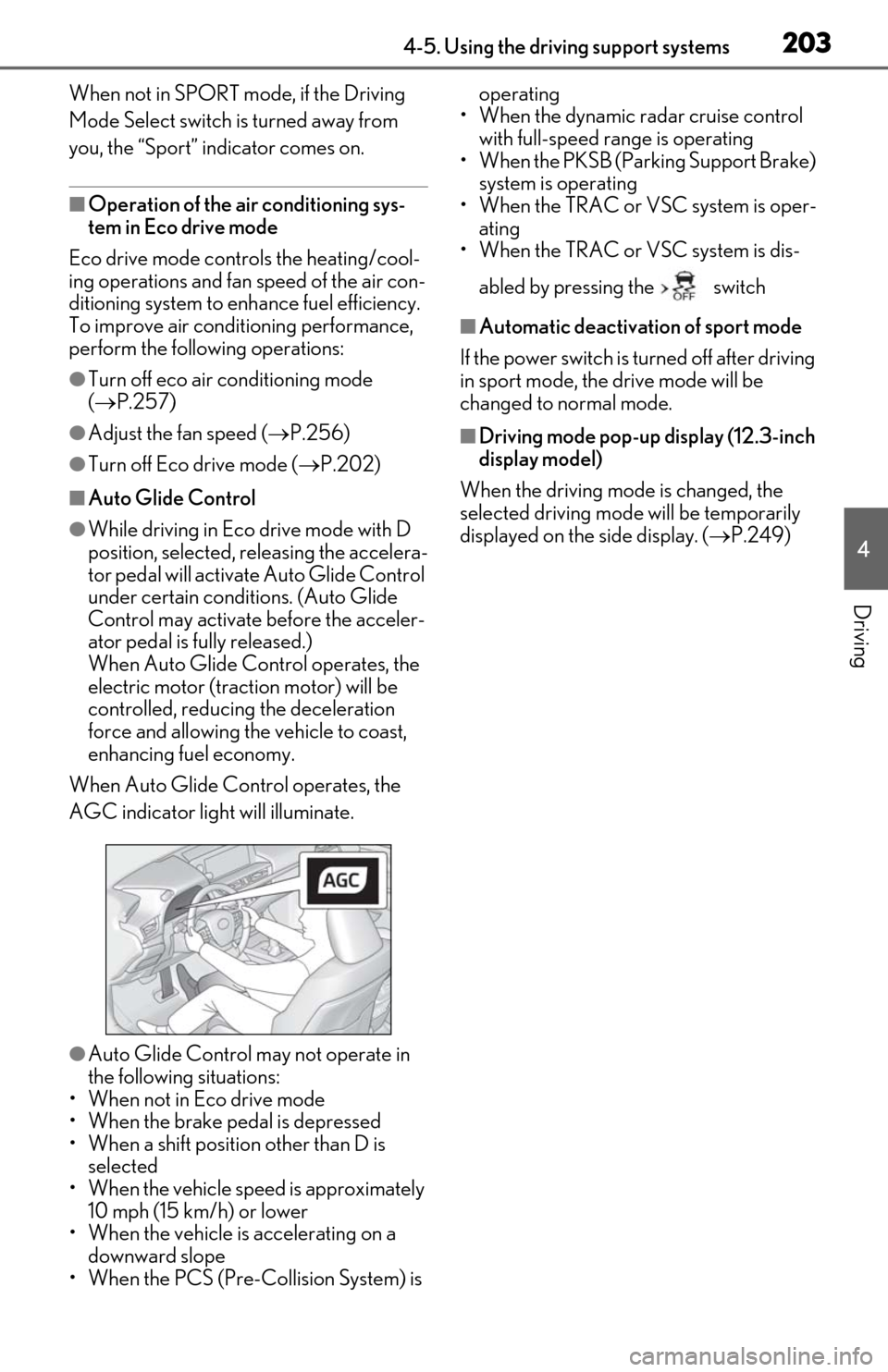
When Auto Glide Control operates, the
AGC indicator light will illuminate.
●Auto Glide Control may not operate in
the following situations:
• When not in Eco drive mode
• When the brake pedal is depressed
• When a shift position other than D is selected
• When the vehicle speed is approximately 10 mph (15 km/h) or lower
• When the vehicle is accelerating on a
downward slope
• When the PCS (Pre-Collision System) is operating
• When the dynamic radar cruise control with full-speed range is operating
• When the PKSB (Parking Support Brake)
system is operating
• When the TRAC or VSC system is oper- ating
• When the TRAC or VSC system is dis-
abled by pressing the switch
■Automatic deactivation of sport mode
If the power switch is turned off after driving
in sport mode, the drive mode will be
changed to normal mode.
■Driving mode pop-up display (12.3-inch
display model)
When the driving mode is changed, the
selected driving mode will be temporarily
displayed on the side display. ( P.249)
Page 206 of 456
2064-5. Using the driving support systems
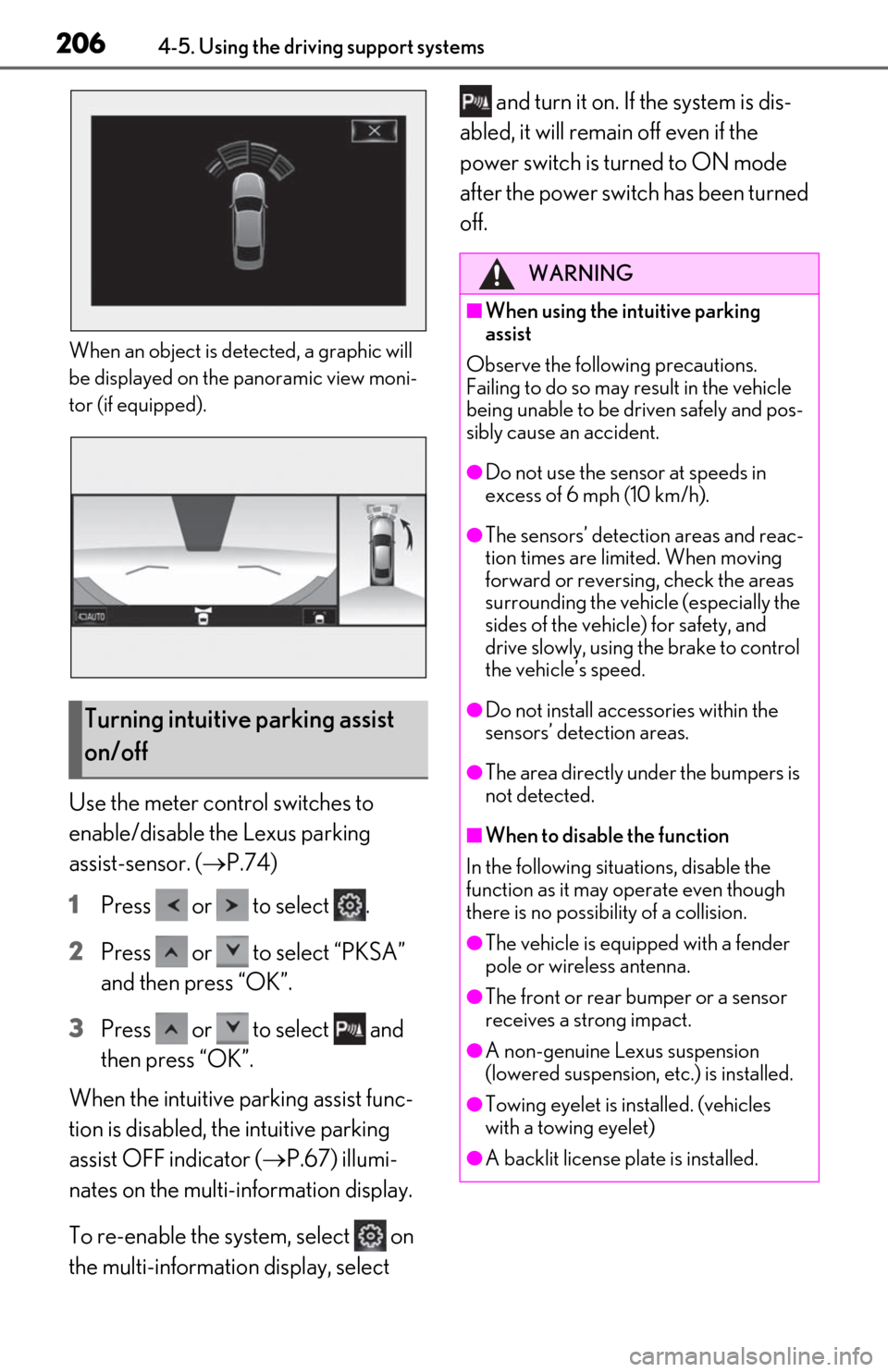
When an object is detected, a graphic will
be displayed on the panoramic view moni-
tor (if equipped).
Use the meter control switches to
enable/disable the Lexus parking
assist-sensor. (P.74)
1
Press or to select .
2
Press or to select “PKSA”
and then press “OK”.
3
Press or to select and
then press “OK”.
When the intuitive parking assist func-
tion is disabled, the intuitive parking
assist OFF indicator ( P.67) illumi-
nates on the multi-information display.
To re-enable the system, select on
the multi-information display, select and turn it on. If the system is dis-
abled, it will remain off even if the
power switch is turned to ON mode
after the power switch has been turned
off.
Turning intuitive parking assist
on/off
WARNING
■When using the intuitive parking
assist
Observe the following precautions.
Failing to do so may result in the vehicle
being unable to be driven safely and pos-
sibly cause an accident.
●Do not use the sensor at speeds in
excess of 6 mph (10 km/h).
●The sensors’ detection areas and reac-
tion times are limited. When moving
forward or reversin g, check the areas
surrounding the vehicle (especially the
sides of the vehicle) for safety, and
drive slowly, using the brake to control
the vehicle’s speed.
●Do not install accessories within the
sensors’ detection areas.
●The area directly under the bumpers is
not detected.
■When to disable the function
In the following situations, disable the
function as it may operate even though
there is no possibility of a collision.
●The vehicle is equipped with a fender
pole or wireless antenna.
●The front or rear bumper or a sensor
receives a strong impact.
●A non-genuine Lexus suspension
(lowered suspension, etc.) is installed.
●Towing eyelet is installed. (vehicles
with a towing eyelet)
●A backlit license plate is installed.
Page 208 of 456
2084-5. Using the driving support systems
frozen the sensor display may be dis-
played abnormally, or objects, such as a
wall, may not be detected.
●A sensor is covered in any way.
●When a sensor or the area around a sen-
sor is extremely hot or cold.
●On an extremely bumpy road, on an
incline, on gravel, or on grass.
●The vicinity of the vehicle is noisy due to
vehicle horns, motorcycle engines, air
brakes of large vehicles, or other loud
noises producing ultrasonic waves.
●There is another vehicle equipped with
parking assist sensors in the vicinity.
●A sensor is coated with a sheet of spray
or heavy rain.
●If a sensor is hit by a large amount of
water, such as when driving on a flooded
road.
●If the vehicle is significantly tilted.
●The vehicle is approaching a tall or
curved curb.
●If objects draw too close to the sensor.
■Objects which may not be properly
detected
The shape of the object may prevent the
sensor from detecting it. Pay particular
attention to the following objects:
●Wires, fences, ropes, etc.
●Cotton, snow and other materials that
absorb sound waves
●Sharply-angled objects
●Low objects
●Tall objects with upper sections project-
ing outwards in the direction of your vehi- cle
People may not be de tected if they are
wearing certain types of clothing.
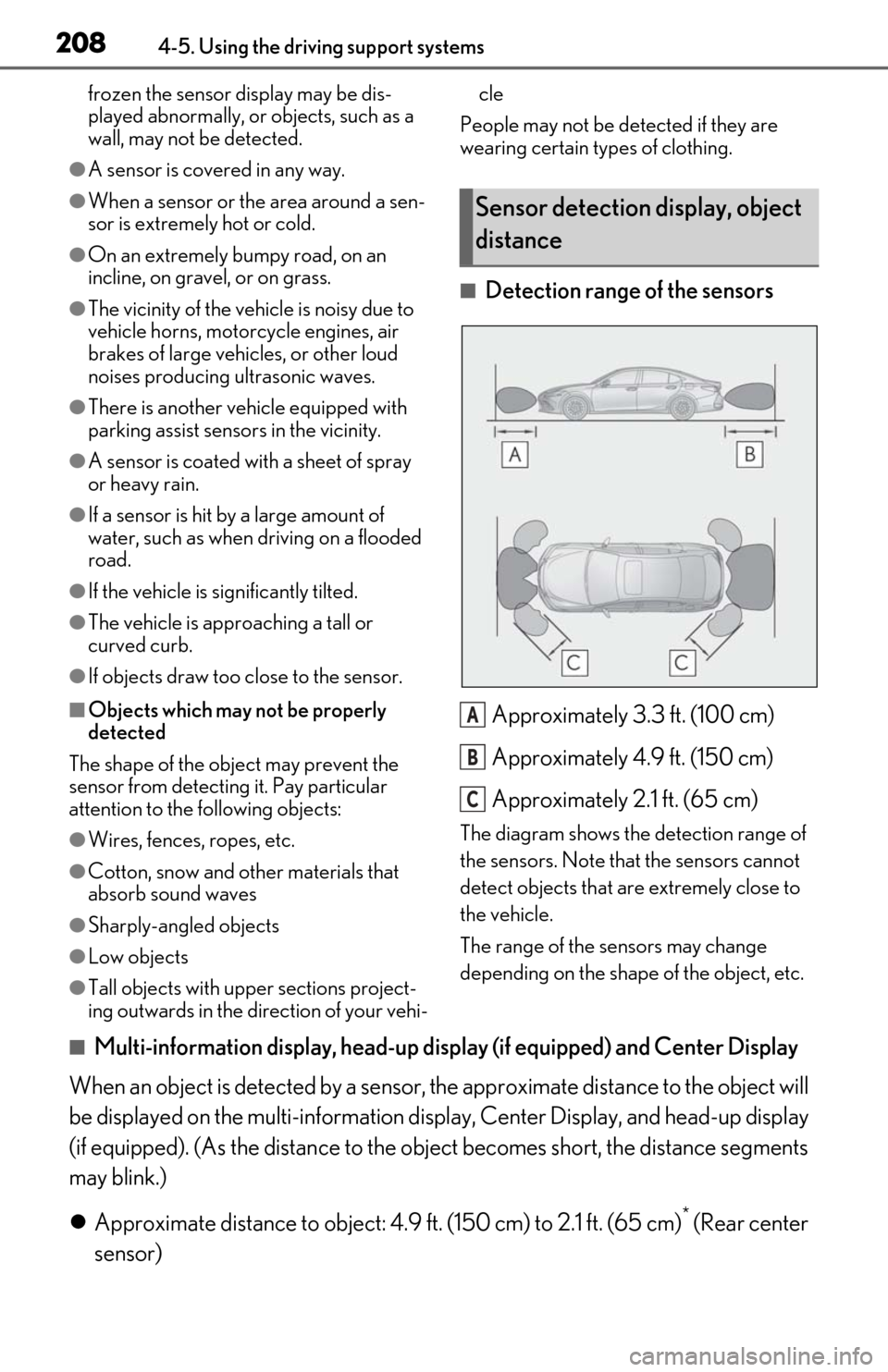
■Detection range of the sensors
Approximately 3.3 ft. (100 cm)
Approximately 4.9 ft. (150 cm)
Approximately 2.1 ft. (65 cm)
The diagram shows the detection range of
the sensors. Note that the sensors cannot
detect objects that are extremely close to
the vehicle.
The range of the sensors may change
depending on the shape of the object, etc.
■Multi-information display, head-up display (if equipped) and Center Display
When an object is detected by a sensor, the approximate distance to the object will
be displayed on the multi-information display, Center Di splay, and head-up display
(if equipped). (As the distan ce to the object becomes sh ort, the distance segments
may blink.)
Approximate distance to object: 4.9 ft. (150 cm) to 2.1 ft. (65 cm)
* (Rear center
sensor)
Sensor detection display, object
distance
A
B
C
Page 218 of 456
2184-5. Using the driving support systems
*: If equipped
■Parking Support Brake function
(static objects)
Ultrasonic sensors are used to detect
static objects, such as a wall, in the
detection area when driving at a low
speed or backing up. ( P.224)
■Parking Support Brake function
(rear-crossing vehicles) (if
equipped)
Rear radar sensors are used to detect
approaching vehicles in the detection
area behind the vehicle when backing
up. ( P.229)
■Parking Support Brake function
(rear pedestrians) (if equipped)
A rear camera sensor is used to detect
pedestrians in the detection area
behind the vehicle when backing up.
( P.233)PKSB (Parking Support
B
rake)*
The Parking Support Brake system
consists of the following functions
that operate when driving at a low
speed or backing up, such as when
parking. When the system deter-
mines that the possibility of a colli-
sion with a detected object or
pedestrian is high, a warning oper-
ates to urge the driver to take eva-
sive action. If the system
determines that the possibility of a
collision with a detected object or
pedestrian is extremely high, the
brakes are automatically applied to
help avoid the collision or help
reduce the impact of the collision.
PKSB (Parking Support Brake)
system
WARNING
■Limitations of the Parking Support
Brake system
Do not overly rely on the system, as
doing so may lead to an accident.
●The driver is solely responsible for safe
driving. Always drive carefully, taking
care to observe your surroundings.
The Parking Support Brake system is
designed to provide support to lessen
the severity of collisions. However, it
may not operate in some situations.
●The Parking Support Brake system is
not designed to stop the vehicle com-
pletely. Additionally, even if the system
has stopped the vehicle, it is necessary
to depress the brake pedal immedi-
ately as brake control will be canceled
after approximately 2 seconds.
NOTICE
■If “Parking Support Brake Unavail-
able” is displayed on the multi-infor-
mation display and the PKSB OFF
indicator is flashing
If this message is displayed immediately
after the power switch is changed to ON
mode, operate the vehicle carefully, pay-
ing attention to your surroundings. It may
be necessary to drive the vehicle for a
certain amount of time before the system
returns to normal. (If the system is not
return to normal afte r driving for a while,
clean the rear camera lens.)
Page 219 of 456
2194-5. Using the driving support systems
4
Driving
The Parking Support Brake can be
enabled/disabled on the multi-informa-
tion display. All of the Parking Support
Brake functions (static objects, rear-
crossing vehicles, and rear pedestri-
ans) are enabled/disabled simultane-
ously.
Use the meter control switches to
enable/disable the parking support
brake. (P.74)
1 Press or to select .
2 Press or to select and
then press “OK”.
When the Parking Support Brake is dis-
abled, the PKSB OFF indicator ( P.67)
illuminates on the multi-information dis-
play.
To re-enable the system, select on the
multi-information disp lay, select and
turn it on. If the system is disabled, it will
remain off even if the power switch is
turned to ON mode after the power switch
has been turned off.
If the hybrid system output restriction con-
trol or brake control operates, a buzzer will
sound and a message will be displayed on
the Center Display and multi-information
display, to alert the driver. On vehicles with
a head-up display, the head-up display will
display the same message as the multi-
information display. Depending on the situat
ion, hybrid system
output restriction control will operate to
either limit acceleration or restrict output
as much as possible.
Hybrid system output restriction
control is operating (acceleration
restriction)
Acceleration greater than a certain
amount is restricted by the system.
Center Display (Panoramic view monitor):
No warning displayed
Multi-information display: “Object
Detected Acceleration Reduced”
PKSB OFF indicator: Not illuminated
Buzzer: Does not sound
Hybrid system output restriction
control is operating (output
restricted as much as possible)
The system has determined that stronger-
than-normal brake operation is necessary.
Center Display (Panoramic view monitor):
“BRAKE!”
Multi-information display: “BRAKE!”
PKSB OFF indicator: Not illuminated
Buzzer: Short beep
Brake control is operating
The system determined that emergency
braking is necessary.
Center Display (Panoramic view monitor):
“BRAKE!”
Multi-information display: “BRAKE!”
PKSB OFF indicator: Not illuminated
Buzzer: Short beep
Vehicle stopped by system opera-
tion
The vehicle has been stopped by brake
control operation.
Enabling/Disabling the Parking
Support Brake
Displays and buzzers for hybrid
system output restriction con-
trol and brake control
Page 220 of 456
2204-5. Using the driving support systems
Center Display (Panoramic view monitor):
“Press Brake Pedal”
Multi-information display: “Switch to
Brake” (If the accelerator pedal is not
depressed, “Press Brake Pedal” will be dis-played.)
PKSB OFF indicator: Illuminated
Buzzer: Short beep
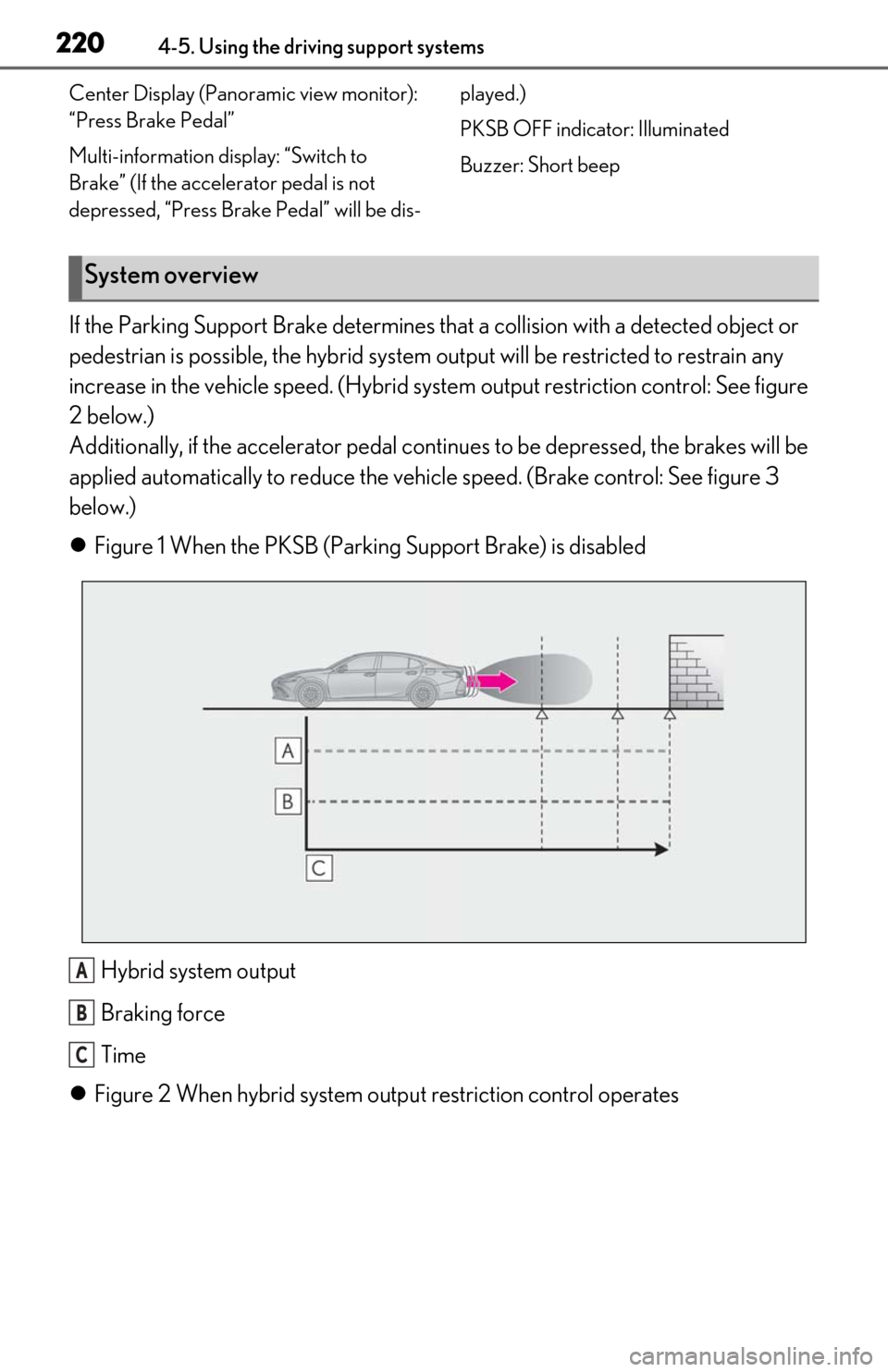
If the Parking Support Brake
determines that a collision with a detected object or
pedestrian is possible, the hybrid system output will be restricted to restrain any
increase in the vehicle speed. (Hybrid system output restriction control: See figure
2 below.)
Additionally, if the accelerator pedal contin ues to be depressed, the brakes will be
applied automatically to re duce the vehicle speed. (Brake control: See figure 3
below.)
Figure 1 When the PKSB (Parki ng Support Brake) is disabled
Hybrid system output
Braking force
Time
Figure 2 When hybrid system ou tput restriction control operates
System overview
A
B
C
Page 222 of 456

2224-5. Using the driving support systems
Time
Hybrid system output restriction control begins operating
System determines that po ssibility of collision with detected object is high
Hybrid system output reduced
System determines that possibility of col lision with detected object is extremely
high
Brake control begins operating
Brake control strength increased
Example: Multi-informat ion display: “BRAKE!”
Example: Multi-information display: “Switch to Brake”
■If the Parking Support Brake has oper-
ated
If the vehicle is stopped due to operation of
the Parking Support Brake, the Parking
Support Brake will be disabled and the
PKSB OFF indicator will illuminate. If the
Parking Support Brake operates unneces-
sarily, brake control can be canceled by
depressing the brake pedal or waiting for
approximately 2 seconds for it to automati-
cally be canceled. Then, the vehicle can be
operated by depressing the accelerator
pedal.
■Re-enabling the Park ing Support Brake
To re-enable the Parking Support Brake
when it has been disabled due to system
operation, perform any of the following
operations. At this time, the PKSB OFF indi-
cator will turn off. ( P.67)
●Turn the PKSB system on ( P.219)
●Turn the power switch off, and then back
to ON mode
●Shift the shift lever to P
●Drive with no operation targets in the
traveling direction of the vehicle
●Change the traveling direction of the
vehicle*
*
: Except the Parking Support Brake func- tion (rear pedestrian)
■If “Parking Support Brake Unavailable”
is displayed on th e multi-information
display and the PKSB OFF indicator is
flashing
If the vehicle is stopped due to operation of
the Parking Support Brake, the Parking
Support Brake will be disabled and the
PKSB OFF indicator will illuminate.
●A sensor may be cove red with ice, snow,
dirt, etc. Remove the ice, snow, dirt, etc.,
from the sensor to return the system to
normal.
Also, due to ice forming on a sensor at
low temperatures, a warning message
may be displayed or the sensor may not
be able to detect an object. Once the ice
melts, the system wi ll return to normal.
●If this message is displayed only when the
shift lever is in R, the rear camera lens
may be dirty. Clean the camera lens. If
this message is disp layed when the shift
lever is in any position other than R, a sen-
sor on the front or rear bumper may be
dirty. Clean the sensors and their sur-
rounding area on the bumpers.
●If this message continues to be displayed
even after cleaning the sensor, or is dis-
played even though the sensor is clean,
have the vehicle inspected by your Lexus
dealer.
●Initialization may not have been per-
formed after a 12-volt battery terminal
was disconnected and reconnected. Ini-
C
D
E
F
G
H
I
J
K
Page 223 of 456

2234-5. Using the driving support systems
4
Driving
tialize the system. (P.223)
If this message continues to be displayed
even after init ialization, have the vehicle
inspected by your Lexus dealer.
■If a 12-volt battery terminal has been
disconnected and reconnected
The system needs to be initialized. To initial-
ize the system, drive the vehicle straight
ahead for 5 seconds or more at a speed of
approximately 22 mph (35 km/h) or more.
Additionally, for vehicles with the Parking
Support Brake function, turn the steering
wheel fully to the left and right with the vehi-
cle stopped.