fuel Lexus ES300h 2019 (OM33D00U) User Guide
[x] Cancel search | Manufacturer: LEXUS, Model Year: 2019, Model line: ES300h, Model: Lexus ES300h 2019Pages: 456, PDF Size: 8.65 MB
Page 67 of 456
672-1. Instrument cluster
2
Vehicle status information and indicators
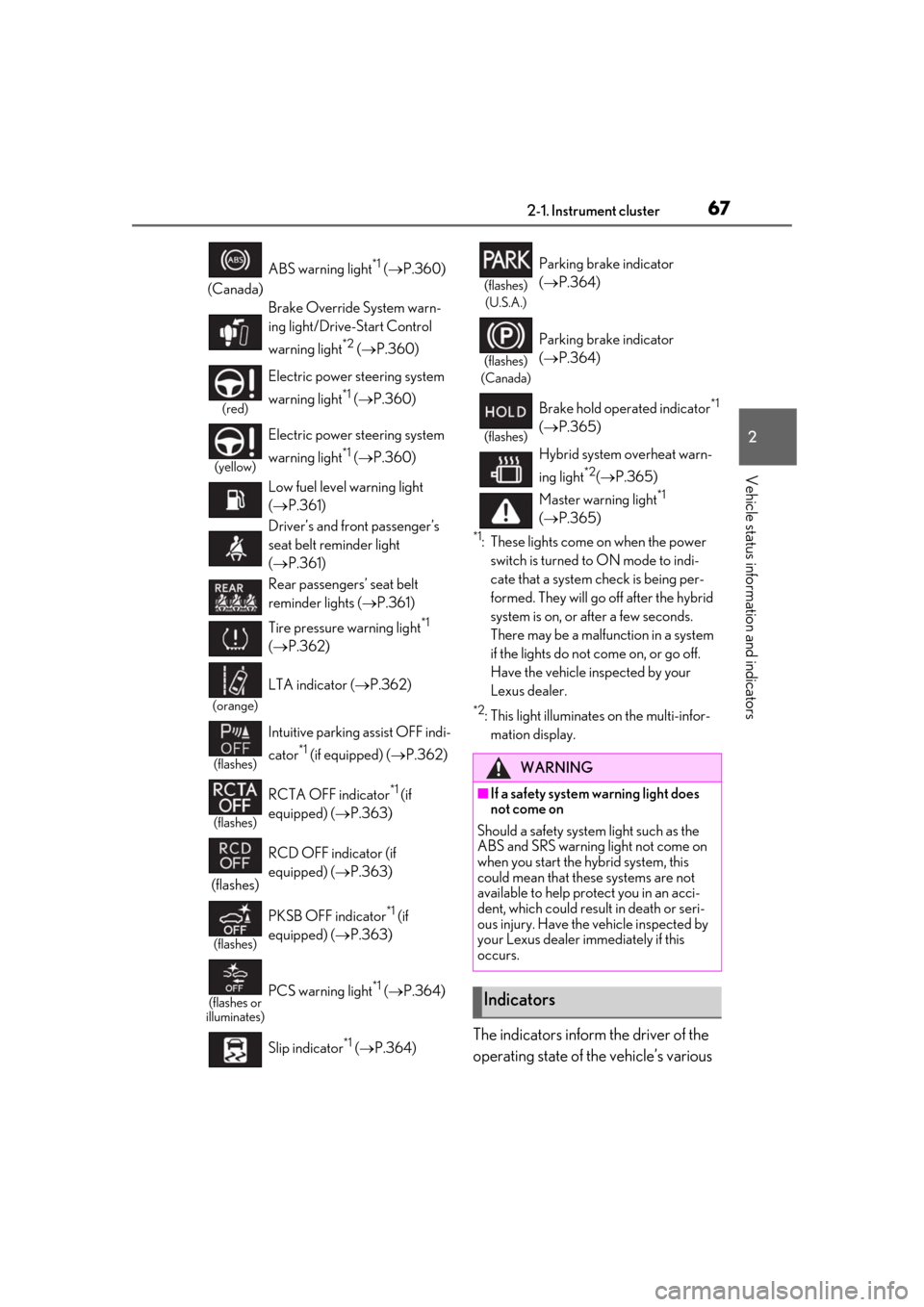
*1: These lights come on when the power switch is turned to ON mode to indi-
cate that a system check is being per-
formed. They will go off after the hybrid
system is on, or after a few seconds.
There may be a malfunction in a system
if the lights do not come on, or go off.
Have the vehicle inspected by your
Lexus dealer.
*2: This light illuminates on the multi-infor-mation display.
The indicators inform the driver of the
operating state of the vehicle’s various
(Canada) ABS warning light
*1 (
P.360)
Brake Override System warn-
ing light/Drive-Start Control
warning light
*2 ( P.360)
(red)
Electric power st eering system
warning light
*1 ( P.360)
(yellow)
Electric power st eering system
warning light
*1 ( P.360)
Low fuel level warning light
( P.361)
Driver’s and front passenger’s
seat belt reminder light
( P.361)
Rear passengers’ seat belt
reminder lights ( P.361)
Tire pressure warning light
*1
( P.362)
(orange)
LTA indicator ( P.362)
(flashes)
Intuitive parking assist OFF indi-
cator
*1 (if equipped) ( P.362)
(flashes)
RCTA OFF indicator*1 (if
equipped) ( P.363)
(flashes) RCD OFF indicator (if
equipped) (
P.363)
(flashes)
PKSB OFF indicator*1 (if
equipped) ( P.363)
(flashes or
illuminates)PCS warning light*1 ( P.364)
Slip indicator
*1 ( P.364)
(flashes)
(U.S.A.)
Parking brake indicator
( P.364)
(flashes)
(Canada)
Parking brake indicator
( P.364)
(flashes)
Brake hold operated indicator*1
( P.365)
Hybrid system overheat warn-
ing light
*2( P.365)
Master warning light
*1
( P.365)
WARNING
■If a safety system warning light does
not come on
Should a safety system light such as the
ABS and SRS warning light not come on
when you start the hybrid system, this
could mean that these systems are not
available to help protect you in an acci-
dent, which could result in death or seri-
ous injury. Have the vehicle inspected by
your Lexus dealer immediately if this
occurs.
Indicators
Page 70 of 456
702-1. Instrument cluster
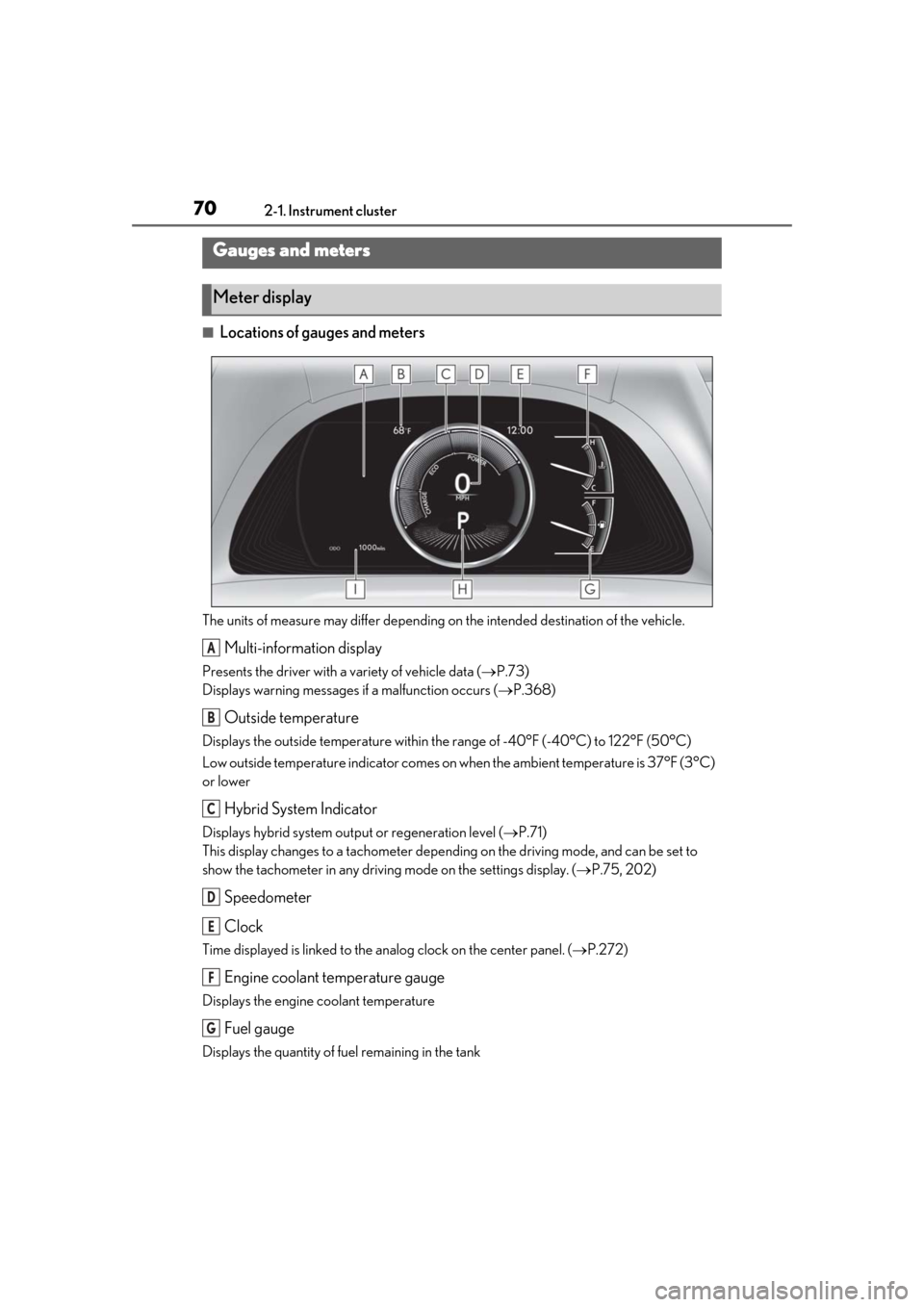
■Locations of gauges and meters
The units of measure may differ depending on the intended destination of the vehicle.
Multi-information display
Presents the driver with a variety of vehicle data ( P.73)
Displays warning messages if a malfunction occurs (P.368)
Outside temperature
Displays the outside temperature within the range of -40°F (-40°C) to 122°F (50°C)
Low outside temperature indicator comes on wh en the ambient temperature is 37°F (3°C)
or lower
Hybrid System Indicator
Displays hybrid system outp ut or regeneration level (P.71)
This display changes to a tachometer depending on the driving mode, and can be set to
show the tachometer in any driving mode on the settings display. (P.75, 202)
Speedometer
Clock
Time displayed is linked to the analog clock on the center panel. (P.272)
Engine coolant temperature gauge
Displays the engine coolant temperature
Fuel gauge
Displays the quantity of fuel remaining in the tank
Gauges and meters
Meter display
A
B
C
D
E
F
G
Page 71 of 456
712-1. Instrument cluster
2
Vehicle status information and indicators
Shift position and shift range (P.141)
Odometer and trip meter display ( P.72)
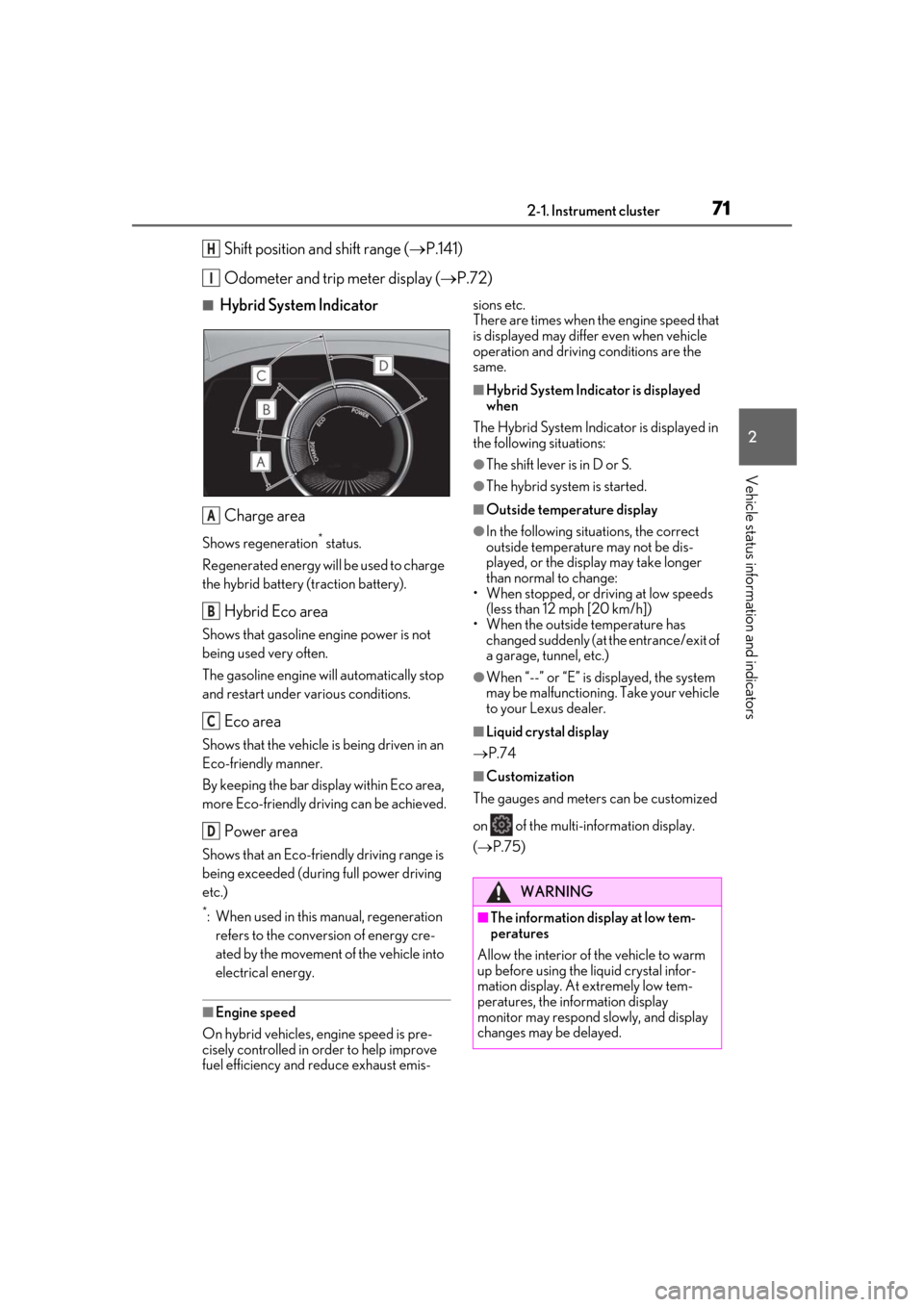
■Hybrid System Indicator
Charge area
Shows regeneration* status.
Regenerated energy will be used to charge
the hybrid battery (traction battery).
Hybrid Eco area
Shows that gasoline engine power is not
being used very often.
The gasoline engine will automatically stop
and restart under various conditions.
Eco area
Shows that the vehicle is being driven in an
Eco-friendly manner.
By keeping the bar display within Eco area,
more Eco-friendly driv ing can be achieved.
Power area
Shows that an Eco-friendly driving range is
being exceeded (durin g full power driving
etc.)
*: When used in this manual, regeneration refers to the conversion of energy cre-
ated by the movement of the vehicle into
electrical energy.
■Engine speed
On hybrid vehicles, engine speed is pre-
cisely controlled in order to help improve
fuel efficiency and reduce exhaust emis- sions etc.
There are times when the engine speed that
is displayed may differ even when vehicle
operation and driving
conditions are the
same.
■Hybrid System Indicator is displayed
when
The Hybrid System Indicator is displayed in
the following situations:
●The shift lever is in D or S.
●The hybrid system is started.
■Outside temperature display
●In the following situations, the correct
outside temperature may not be dis-
played, or the display may take longer
than normal to change:
• When stopped, or driving at low speeds
(less than 12 mph [20 km/h])
• When the outside temperature has changed suddenly (at the entrance/exit of
a garage, tunnel, etc.)
●When “--” or “E” is displayed, the system
may be malfunctioning. Take your vehicle
to your Lexus dealer.
■Liquid crystal display
P.74
■Customization
The gauges and meters can be customized
on of the multi-information display.
( P.75)
H
I
A
B
C
D
WARNING
■The information display at low tem-
peratures
Allow the interior of the vehicle to warm
up before using the liquid crystal infor-
mation display. At extremely low tem-
peratures, the information display
monitor may respond slowly, and display
changes may be delayed.
Page 74 of 456
742-1. Instrument cluster
■Liquid crystal display
Small spots or light spots may appear on the
display. This phenomenon is characteristic
of liquid crystal displays, and there is no
problem continuing to use the display.
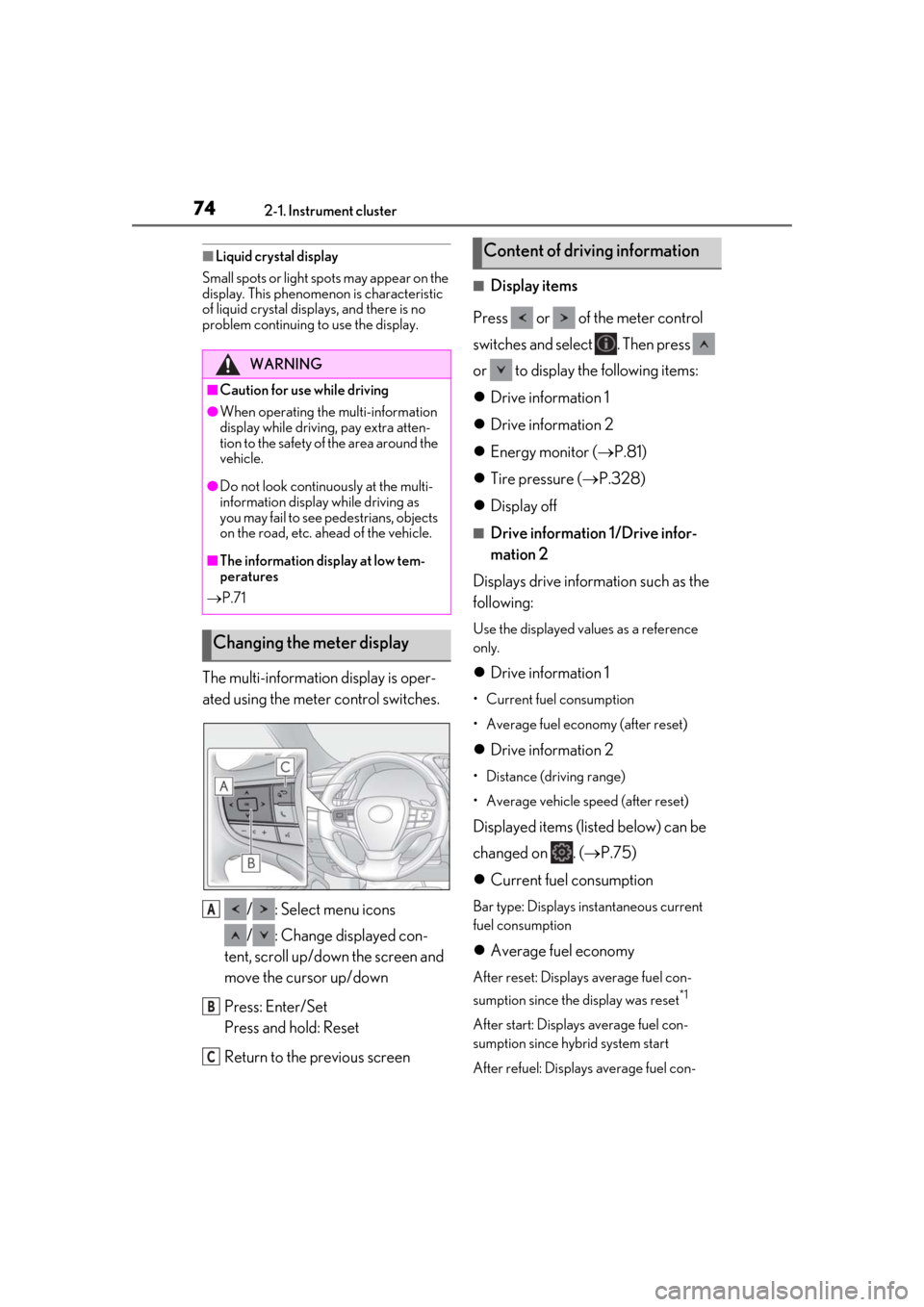
The multi-information display is oper-
ated using the meter control switches.
/ : Select menu icons
/ : Change displayed con-
tent, scroll up/down the screen and
move the cursor up/down
Press: Enter/Set
Press and hold: Reset
Return to the previous screen
■Display items
Press or of the meter control
switches and select . Then press
or to display the following items:
Drive information 1
Drive information 2
Energy monitor ( P.81)
Tire pressure ( P.328)
Display off
■Drive information 1/Drive infor-
mation 2
Displays drive information such as the
following:
Use the displayed values as a reference
only.
Drive information 1
• Current fuel consumption
• Average fuel economy (after reset)
Drive information 2
• Distance (driving range)
• Average vehicle speed (after reset)
Displayed items (listed below) can be
changed on . ( P.75)
Current fuel consumption
Bar type: Displays instantaneous current
fuel consumption
Average fuel economy
After reset: Displays average fuel con-
sumption since the display was reset
*1
After start: Displays average fuel con-
sumption since hybrid system start
After refuel: Displays average fuel con-
WARNING
■Caution for use while driving
●When operating the multi-information
display while driving, pay extra atten-
tion to the safety of the area around the
vehicle.
●Do not look continuously at the multi-
information display while driving as
you may fail to see pedestrians, objects
on the road, etc. ahead of the vehicle.
■The information display at low tem-
peratures
P.71
Changing the meter display
A
B
C
Content of driving information
Page 75 of 456
752-1. Instrument cluster
2
Vehicle status information and indicators
sumption since refuel
Average vehicle speed
After reset: Displays average vehicle
speed since the display was reset
*1
After start: Displays average vehicle speed
since hybrid system start
Elapsed time
After reset: Displays elapsed time since the
display was reset
*1
After start: Displays elapsed time since
hybrid system start
Distance
Driving range: Displays driving range with
remaining fuel
*2, 3
After start: Displays the distance driven
since hybrid system start
Other
Blank: No item
*1: To reset, display the desired item and
press and hold “OK” of the meter con-
trol switches.
*2: This distance is computed based on your average fuel consumption. As a
result, the actual distance that can be
driven may differ from that displayed.
*3: When only a small amount of fuel is added to the tank, the display may not
be updated.
When refueling, turn the power switch
off. If the vehicle is refueled without
turning the power switch off, the display
may not be updated.
Select to display the following naviga-
tion system-linked information.
Route guidance to destination
Compass display (heading-up dis-
play)
■Route guidance to destination display
When the route guidance to destination
display is enabled on th e head-up display, it
will not be displayed on the multi-informa-
tion display. ( P.78)
Select to enable se lection of an audio
source or track on the meter using the
meter control switches.
Select to display the operational status
of the following systems:
LTA (Lane Tracing Assist) ( P.176)
Dynamic radar cruise control with
full-speed range ( P.187)
RSA (Road Sign Assist) (if
equipped) ( P.185)
■Meter display settings that can be
changed
Language
Select to change the language displayed.
Units
Select to change the units of measure dis-
played.
Speedometer display
Select to set the display of the speedome-
ter to digital/analog/both digital and ana-
Navigation system-linked dis-
play (if equipped)
Audio system-linked display
Driving support system informa-
tion display
Settings display
Page 81 of 456
812-1. Instrument cluster
2
Vehicle status information and indicators
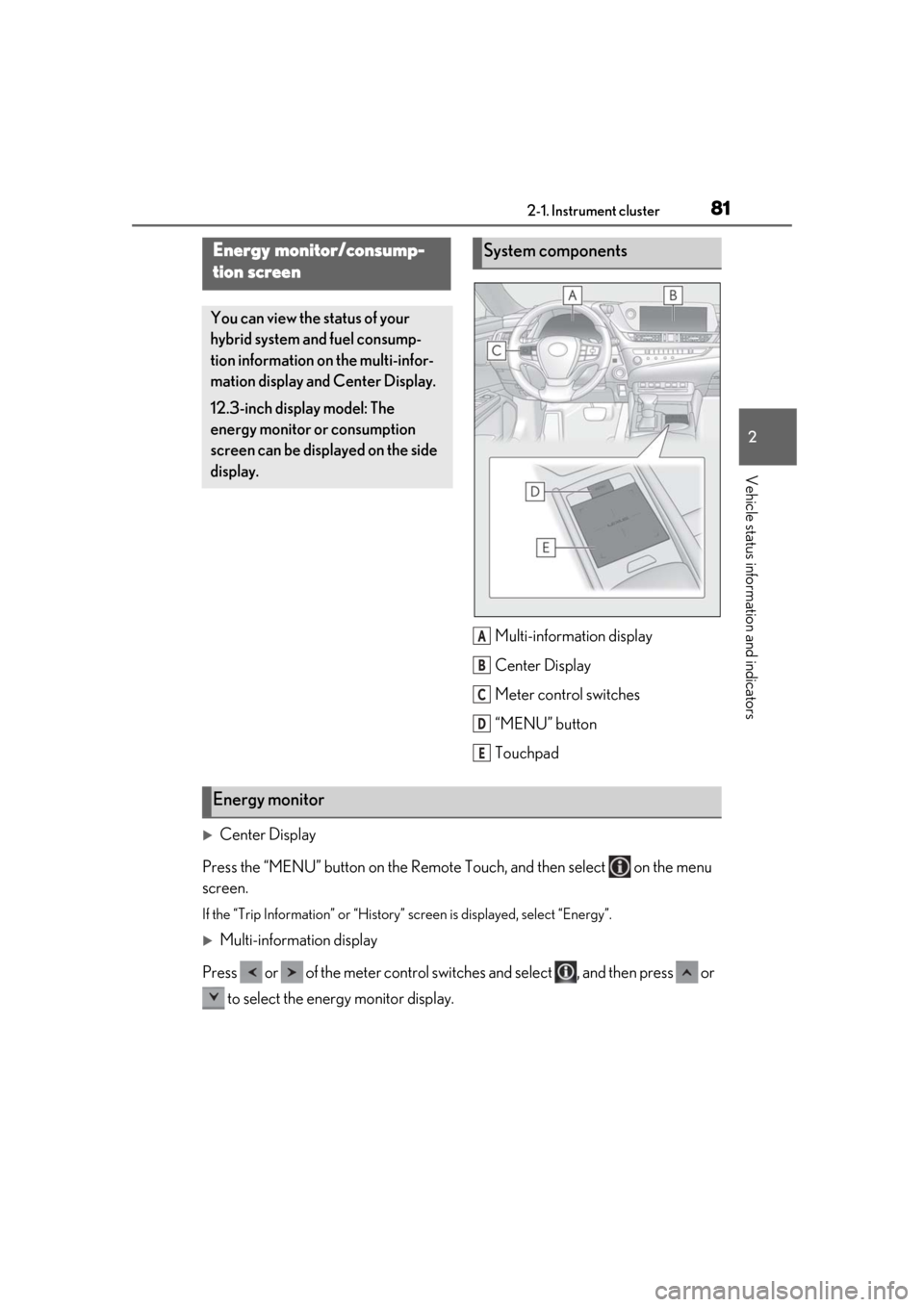
Multi-information display
Center Display
Meter control switches
“MENU” button
Touchpad
Center Display
Press the “MENU” button on the Remote Touch, and then select on the menu
screen.
If the “Trip Information” or “History” screen is displayed, select “Energy”.
Multi-information display
Press or of the meter control switch es and select , and then press or
to select the energy monitor display.
Energy monitor/consump-
tion screen
You can view the status of your
hybrid system and fuel consump-
tion information on the multi-infor-
mation display and Center Display.
12.3-inch display model: The
energy monitor or consumption
screen can be displayed on the side
display.
System components
A
B
C
D
E
Energy monitor
Page 84 of 456
842-1. Instrument cluster
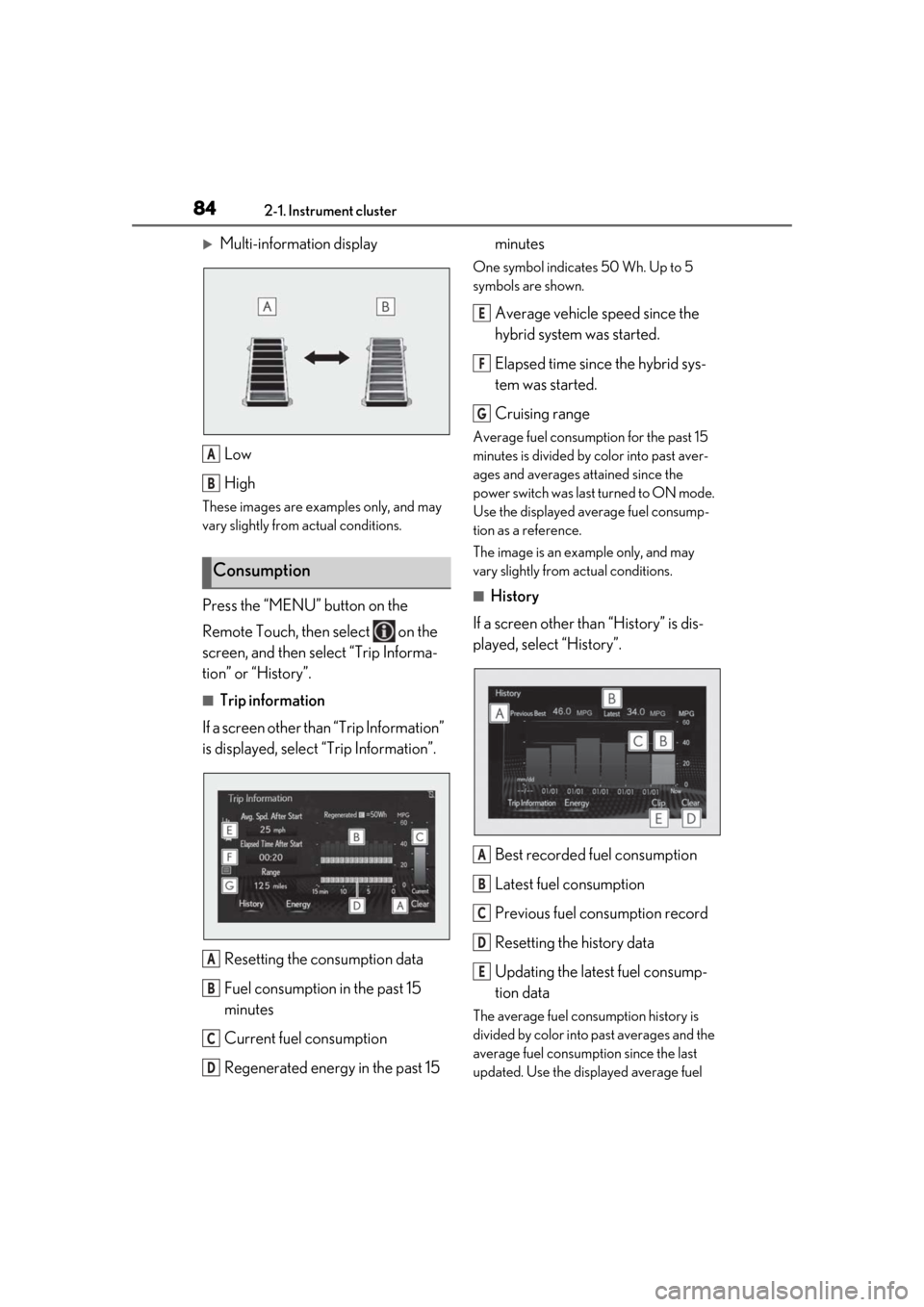
Multi-information displayLow
High
These images are examples only, and may
vary slightly from actual conditions.
Press the “MENU” button on the
Remote Touch, then select on the
screen, and then select “Trip Informa-
tion” or “History”.
■Trip information
If a screen other than “Trip Information”
is displayed, select “Trip Information”.
Resetting the consumption data
Fuel consumption in the past 15
minutes
Current fuel consumption
Regenerated energy in the past 15 minutes
One symbol indicates 50 Wh. Up to 5
symbols are shown.
Average vehicle speed since the
hybrid system was started.
Elapsed time since the hybrid sys-
tem was started.
Cruising range
Average fuel consumption for the past 15
minutes is divided by color into past aver-
ages and averages attained since the
power switch was last turned to ON mode.
Use the displayed average fuel consump-
tion as a reference.
The image is an example only, and may
vary slightly from actual conditions.
■History
If a screen other than “History” is dis-
played, select “History”.
Best recorded fuel consumption
Latest fuel consumption
Previous fuel consumption record
Resetting the history data
Updating the latest fuel consump-
tion data
The average fuel consumption history is
divided by color into past averages and the
average fuel consumption since the last
updated. Use the displayed average fuel
Consumption
A
B
A
B
C
D
E
F
G
A
B
C
D
E
Page 85 of 456
852-1. Instrument cluster
2
Vehicle status information and indicators
consumption as a reference.
The image is an example only, and may
vary slightly from actual conditions.
■Updating the history data
Update the latest fuel consumption by
selecting “Clip” to measure the current fuel
consumption again.
■Resetting the data
The fuel consumption data can be deleted
by selecting “Clear”.
■Cruising range
Displays the estimated maximum distance
that can be driven with the quantity of fuel
remaining.
This distance is comp uted based on your
average fuel consumption.
As a result, the actual distance that can be
driven may differ from that displayed.
Display the vehicle information on the
side display ( P.249), and then select
or to display the desired
screen.
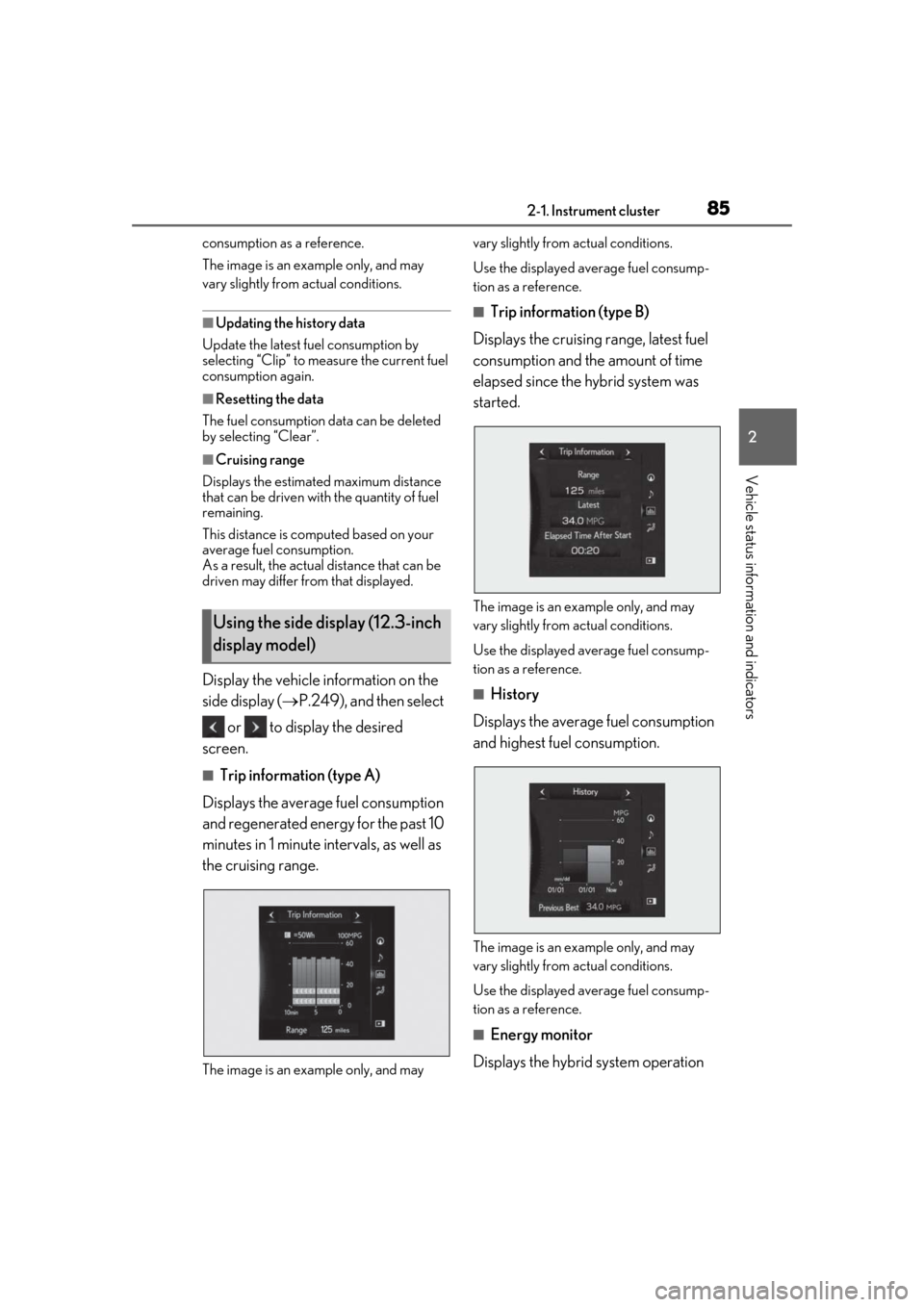
■Trip information (type A)
Displays the average fuel consumption
and regenerated energy for the past 10
minutes in 1 minute intervals, as well as
the cruising range.
The image is an example only, and may vary slightly from actual conditions.
Use the displayed average fuel consump-
tion as a reference.
■Trip information (type B)
Displays the cruising range, latest fuel
consumption and the amount of time
elapsed since the hybrid system was
started.
The image is an example only, and may
vary slightly from actual conditions.
Use the displayed average fuel consump-
tion as a reference.
■History
Displays the average fuel consumption
and highest fuel consumption.
The image is an example only, and may
vary slightly from actual conditions.
Use the displayed average fuel consump-
tion as a reference.
■Energy monitor
Displays the hybrid system operation
Using the side display (12.3-inch
display model)
Page 125 of 456
125
4
4
Driving
Driving
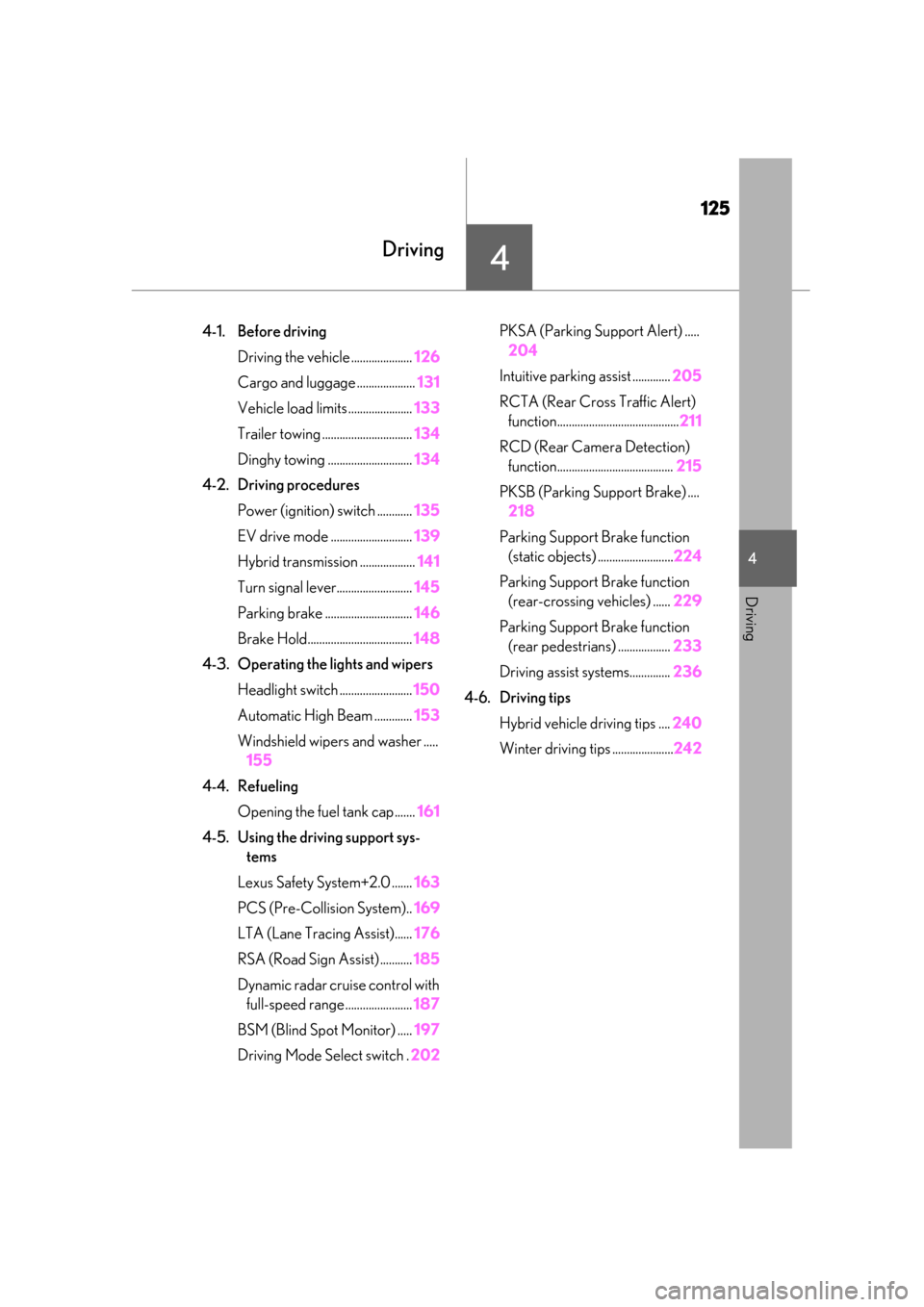
4-1. Before drivingDriving the vehicle ..................... 126
Cargo and luggage .................... 131
Vehicle load limits ...................... 133
Trailer towing ............................... 134
Dinghy towing ............................. 134
4-2. Driving procedures Power (ignition) switch ............ 135
EV drive mode ............................ 139
Hybrid transmission ................... 141
Turn signal lever.......................... 145
Parking brake .............................. 146
Brake Hold.................................... 148
4-3. Operating the lights and wipers
Headlight switch ......................... 150
Automatic High Beam ............. 153
Windshield wipers and washer ..... 155
4-4. Refueling Opening the fuel tank cap....... 161
4-5. Using the driving support sys- tems
Lexus Safety System+2.0 ....... 163
PCS (Pre-Collision System).. 169
LTA (Lane Tracing Assist)...... 176
RSA (Road Sign Assist) ........... 185
Dynamic radar cruise control with full-speed range....................... 187
BSM (Blind Spot Monitor) ..... 197
Driving Mode Select switch . 202PKSA (Parking Support Alert) .....
204
Intuitive parking assist ............. 205
RCTA (Rear Cross Traffic Alert) function.......................................... 211
RCD (Rear Camera Detection) function........................................ 215
PKSB (Parking Support Brake) .... 218
Parking Support Brake function (static objects) .......................... 224
Parking Support Brake function (rear-crossing vehicles) ...... 229
Parking Support Brake function (rear pedestrians) .................. 233
Driving assist systems.............. 236
4-6. Driving tips Hybrid vehicle driving tips .... 240
Winter driving tips ..................... 242
Page 126 of 456
1264-1. Before driving
4-1.Before driving
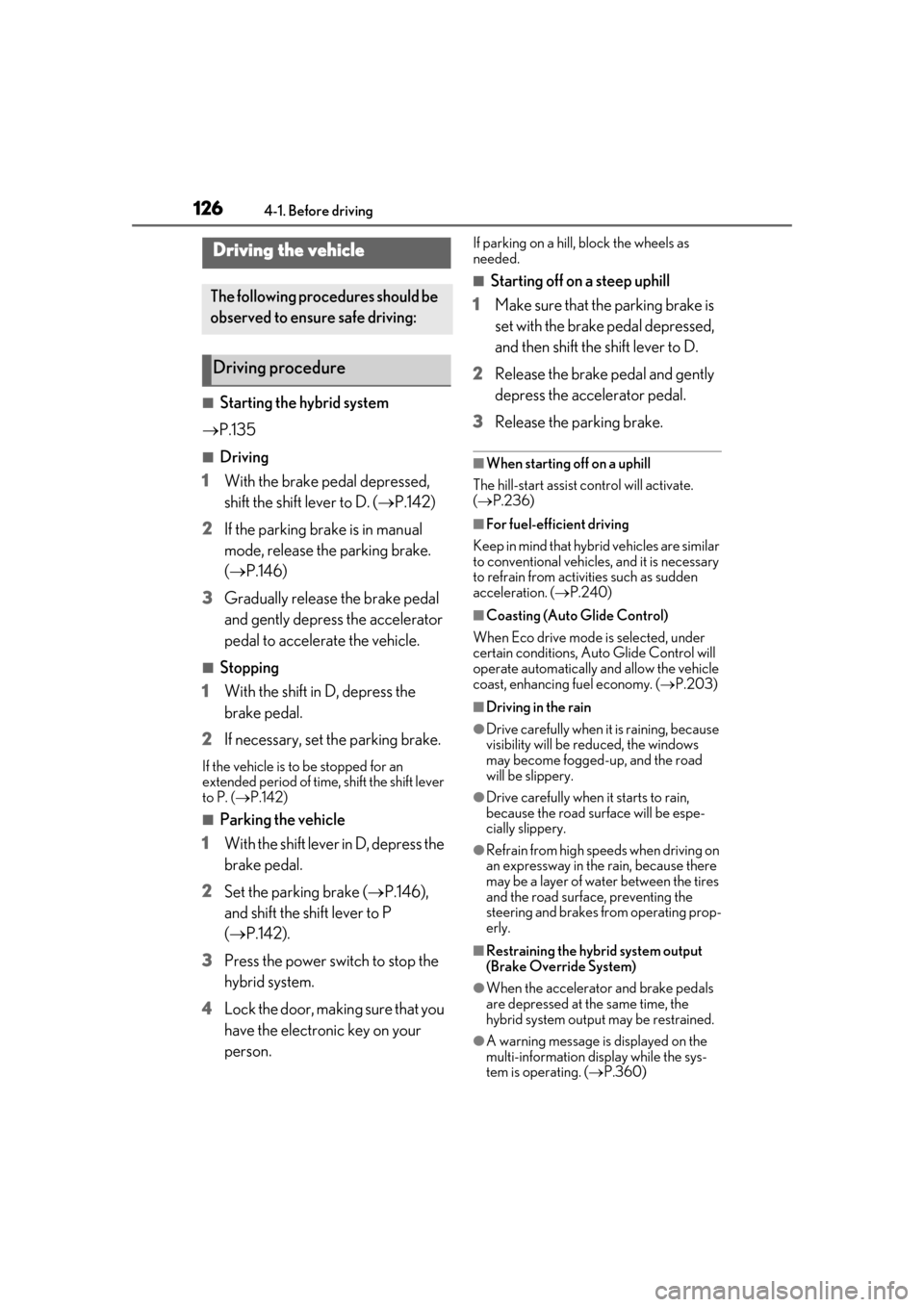
■Starting the hybrid system
P.135
■Driving
1 With the brake pedal depressed,
shift the shift lever to D. ( P.142)
2 If the parking brake is in manual
mode, release the parking brake.
(P.146)
3 Gradually release the brake pedal
and gently depress the accelerator
pedal to accelerate the vehicle.
■Stopping
1 With the shift in D, depress the
brake pedal.
2 If necessary, set the parking brake.
If the vehicle is to be stopped for an
extended period of time, shift the shift lever
to P. ( P.142)
■Parking the vehicle
1 With the shift lever in D, depress the
brake pedal.
2 Set the parking brake ( P.146),
and shift the shift lever to P
( P.142).
3 Press the power switch to stop the
hybrid system.
4 Lock the door, making sure that you
have the electronic key on your
person.
If parking on a hill, block the wheels as
needed.
■Starting off on a steep uphill
1 Make sure that the parking brake is
set with the brake pedal depressed,
and then shift the shift lever to D.
2 Release the brake pedal and gently
depress the accelerator pedal.
3 Release the parking brake.
■When starting off on a uphill
The hill-start assist control will activate.
( P.236)
■For fuel-efficient driving
Keep in mind that hybr id vehicles are similar
to conventional vehicles, and it is necessary
to refrain from activi ties such as sudden
acceleration. ( P.240)
■Coasting (Auto Glide Control)
When Eco drive mode is selected, under
certain conditions, Auto Glide Control will
operate automatically and allow the vehicle
coast, enhancing fuel economy. ( P.203)
■Driving in the rain
●Drive carefully when it is raining, because
visibility will be reduced, the windows
may become fogged-up, and the road
will be slippery.
●Drive carefully when it starts to rain,
because the road surface will be espe-
cially slippery.
●Refrain from high speeds when driving on
an expressway in the rain, because there
may be a layer of wa ter between the tires
and the road surface, preventing the
steering and brakes from operating prop-
erly.
■Restraining the hybrid system output
(Brake Override System)
●When the accelerato r and brake pedals
are depressed at the same time, the
hybrid system output may be restrained.
●A warning message is displayed on the
multi-information display while the sys-
tem is operating. ( P.360)
Driving the vehicle
The following procedures should be
observed to ensure safe driving:
Driving procedure