phone Lexus ES300h 2019 Owner's Manual Quick Guide (OM06179U)
[x] Cancel search | Manufacturer: LEXUS, Model Year: 2019, Model line: ES300h, Model: Lexus ES300h 2019Pages: 98, PDF Size: 7.2 MB
Page 1 of 98
1
ES300h_QG_OM06179U_(U)
Air Conditioning System*
Control panel ..................................................................................................................................66
Main control screen...................................................................................................................... 67
Option control screen .................................................................................................................68
Side display.......................................................................................................................................69
Using automatic mode ................................................................................................................69
Audio System
*
Audio control screen .................................................................................................................. 58
Selecting an audio source ......................................................................................................... 58
Steering switch operation ..........................................................................................................59
Radio .................................................................................................................................................... 61
CD........................................................................................................................................................ 62
DVD ....................................................................................................................................................63
iPod/iPhone ..................................................................................................................................... 64
Automatic High Beam............................................................................................................36
Brake Hold .................................................................................................................................29
Door Locks ............................................................................................................................... 88
Energy Monitor/Consumption Screen ............................................................................ 47
EV Drive Mode.........................................................................................................................22
Floor Mat Installation ............................................................................................................... 11
Front Seats ..................................................................................................................................18
Garage Door Opener............................................................................................................ 79
Hands-free System For Cellular Phone
*
Registering/connecting Bluetooth® device ......................................................................54
Contacts transfer ...........................................................................................................................55
Registering the contacts in the favorites list .......................................................................56
Calling by favorites list .................................................................................................................56
Calling the message sender......................................................................................................56
Receiving a call ............................................................................................................................... 57
Steering switches ........................................................................................................................... 57
Contents
The Quick Guide is not intended as a substitute for yourOWNER’S MANUAL. We strongly encourage you to review
the OWNER’S MANUAL and supplementary manuals so you
will have a better understanding of your vehicle’s capabilities
and limitations.
Page 2 of 98
2
ES300h_QG_OM06179U_(U)
Headlights..................................................................................................................................35
Head-up Display ......................................................................................................................32
Hybrid System ........................................................................................................................... 12
Hybrid Transmission ...............................................................................................................23
Keys .............................................................................................................................................. 15
Lexus Climate Concierge .................................................................................................... 65
Lexus Enform Remote ...........................................................................................................85
Lexus Enform Safety Connect ........................................................................................... 83
Lexus Enform Service Connect ..........................................................................................86
Multi-information Display.................................................................................................... 30
Navigation System
*
Registering home .......................................................................................................................... 50
Destination search - Search by address .............................................................................. 50
Destination search - Search points of interest by name ............................................... 52
Destination search - Search points of interest by category ........................................ 53
Destination search - Search points of interest by phone number ............................ 53
Voice Command System .......................................................................................................... 70
Opening the fuel tank cap ....................................................................................................89
Parking Brake ........................................................................................................................... 27
Pictorial Index..............................................................................................................................3
Power (Ignition) Switch .......................................................................................................... 19
Remote Touch ..........................................................................................................................40
SiriusXM Satellite Radio.......................................................................................................87
Smart Access System with Push-button Start ................................................................. 16
Turn Signal Lever ..................................................................................................................... 26
USB/AUX Ports ...................................................................................................................... 78
Voice Command System
*
Basic operation .............................................................................................................................. 70
Command list.................................................................................................................................... 71
Windshield Wipers and Washer ........................................................................................ 38
*: These features may be operated by Voice Command (See P.70)
Page 44 of 98

44
ES300h_QG_OM06179U_(U)
8-inch display model (Type B)
Select to display the audio control screen. (P.58)
Select to display the hands-free control screen. When an Apple CarPlay connection is
established, select to display the Phone app screen.
*1 (P.54)
Select to display the “Apps” screen.
*1, 2, 3
When an Apple CarPlay connection is established and this button displays
“Apple CarPlay”, select to display the home screen of Apple CarPlay.
*1, 2
Select to display the energy monitor or fuel consumption screen. (P.47)
Select to display the general settings screen.
*1, 4
Select to display the air conditioning control screen. (P.67)
Select to adjust the contrast and brightness of the screens, turn the screen off, etc.
*1
*1: Refer to the “NAVIGATION AND MULTIMEDIA SYSTEM OWNER’S MANUAL”.
*2: This function is not made available in some countries or areas.
*3: The Lexus Enform App Suite 2.0 screen may not be displayed when an Apple CarPlay
connection is established.
*4: Refer to the “OWNER’S MANUAL”
A
B
C
D
E
F
G
H
Page 52 of 98
52
ES300h_QG_OM06179U_(U)
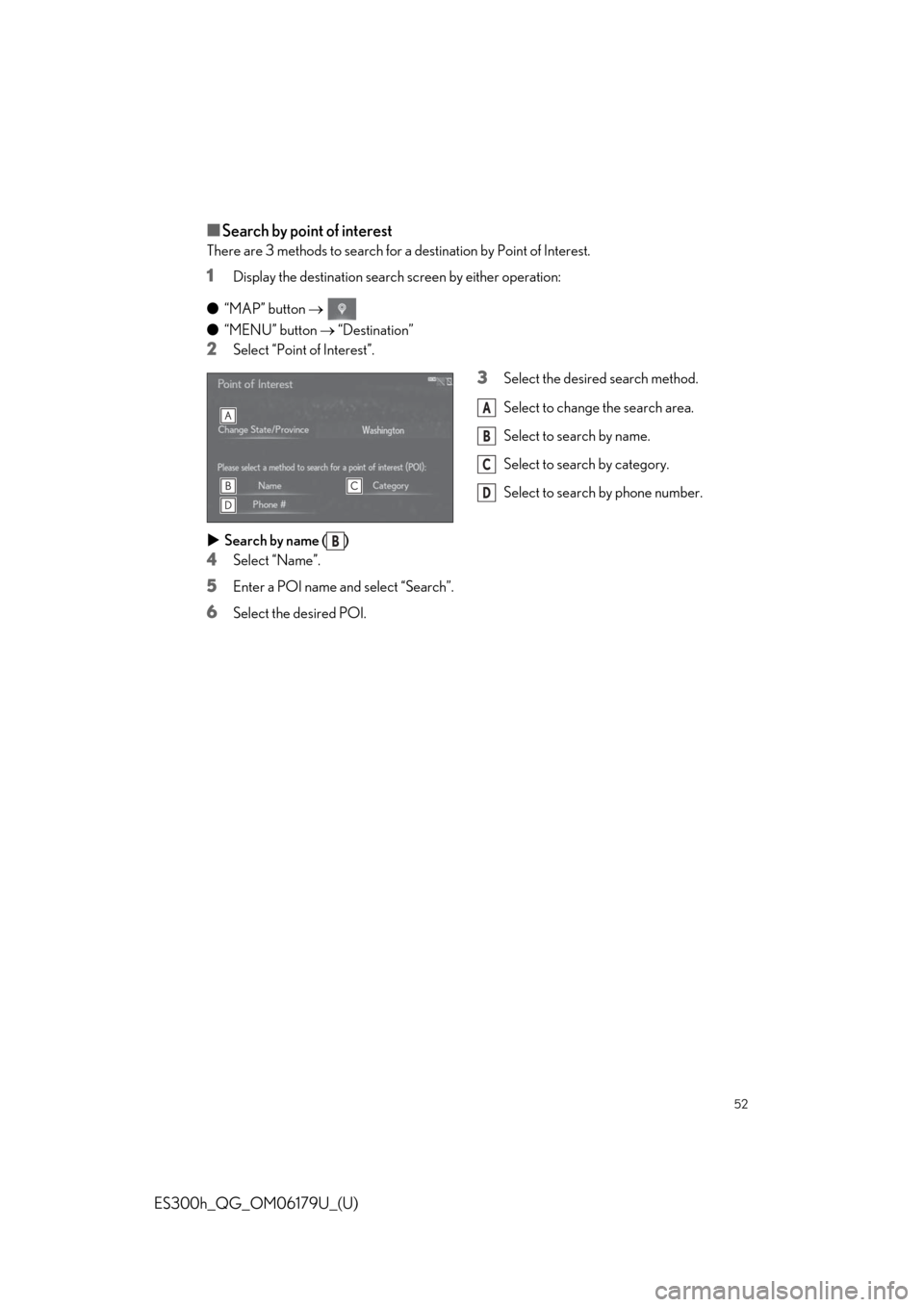
■Search by point of interest
There are 3 methods to search for a destination by Point of Interest.
1Display the destination search screen by either operation:
●“MAP” button
●“MENU” button “Destination”
2Select “Point of Interest”.
3Select the desired search method.
Select to change the search area.
Select to search by name.
Select to search by category.
Select to search by phone number.
Search by name ( )
4Select “Name”.
5Enter a POI name and select “Search”.
6Select the desired POI.
A
B
C
D
B
Page 53 of 98
53
ES300h_QG_OM06179U_(U)
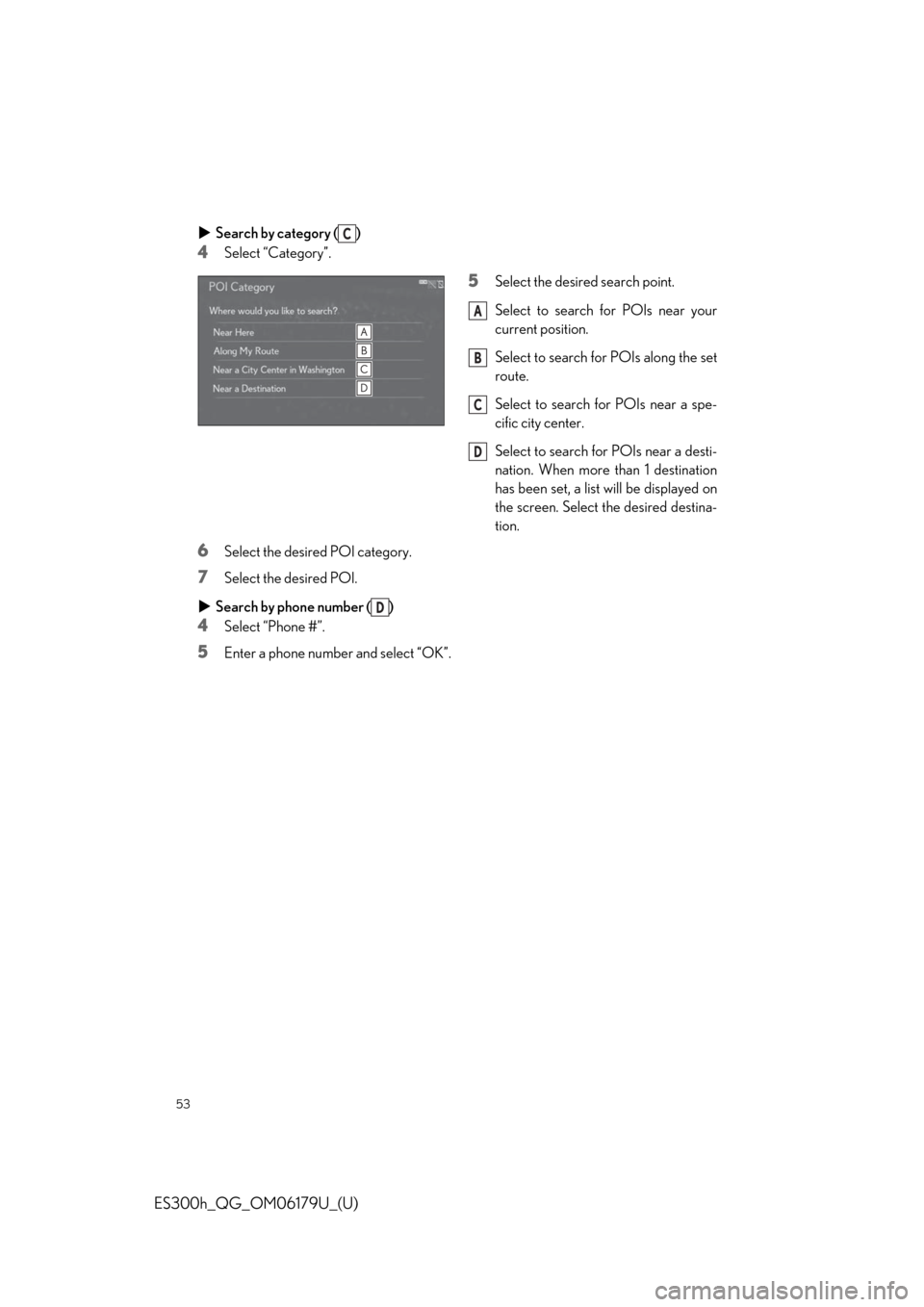
Search by category ( )
4Select “Category”.
5Select the desired search point.
Select to search for POIs near your
current position.
Select to search for POIs along the set
route.
Select to search for POIs near a spe-
cific city center.
Select to search for POIs near a desti-
nation. When more than 1 destination
has been set, a list will be displayed on
the screen. Select the desired destina-
tion.
6Select the desired POI category.
7Select the desired POI.
Search by phone number ( )
4Select “Phone #”.
5Enter a phone number and select “OK”.
C
A
B
C
D
D
Page 54 of 98
54
ES300h_QG_OM06179U_(U)
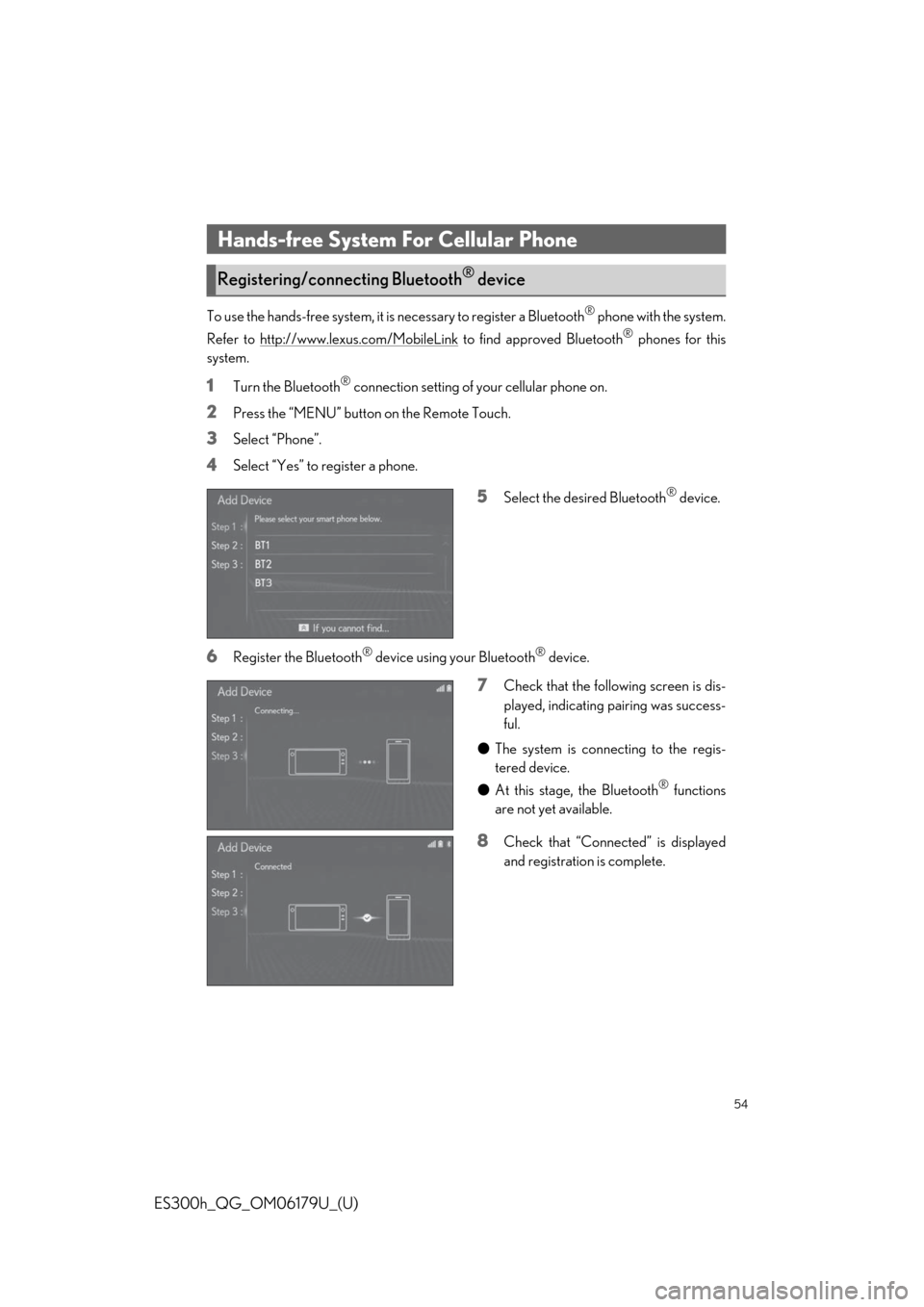
To use the hands-free system, it is necessary to register a Bluetooth® phone with the system.
Refer to http://www.lexus.com/MobileLink
to find approved Bluetooth® phones for this
system.
1Turn the Bluetooth® connection setting of your cellular phone on.
2Press the “MENU” button on the Remote Touch.
3Select “Phone”.
4Select “Yes” to register a phone.
5Select the desired Bluetooth® device.
6Register the Bluetooth® device using your Bluetooth® device.
7Check that the following screen is dis-
played, indicating pairing was success-
ful.
●The system is connecting to the regis-
tered device.
●At this stage, the Bluetooth
® functions
are not yet available.
8Check that “Connected” is displayed
and registration is complete.
Hands-free System For Cellular Phone
Registering/connecting Bluetooth® device
Page 55 of 98
55
ES300h_QG_OM06179U_(U)
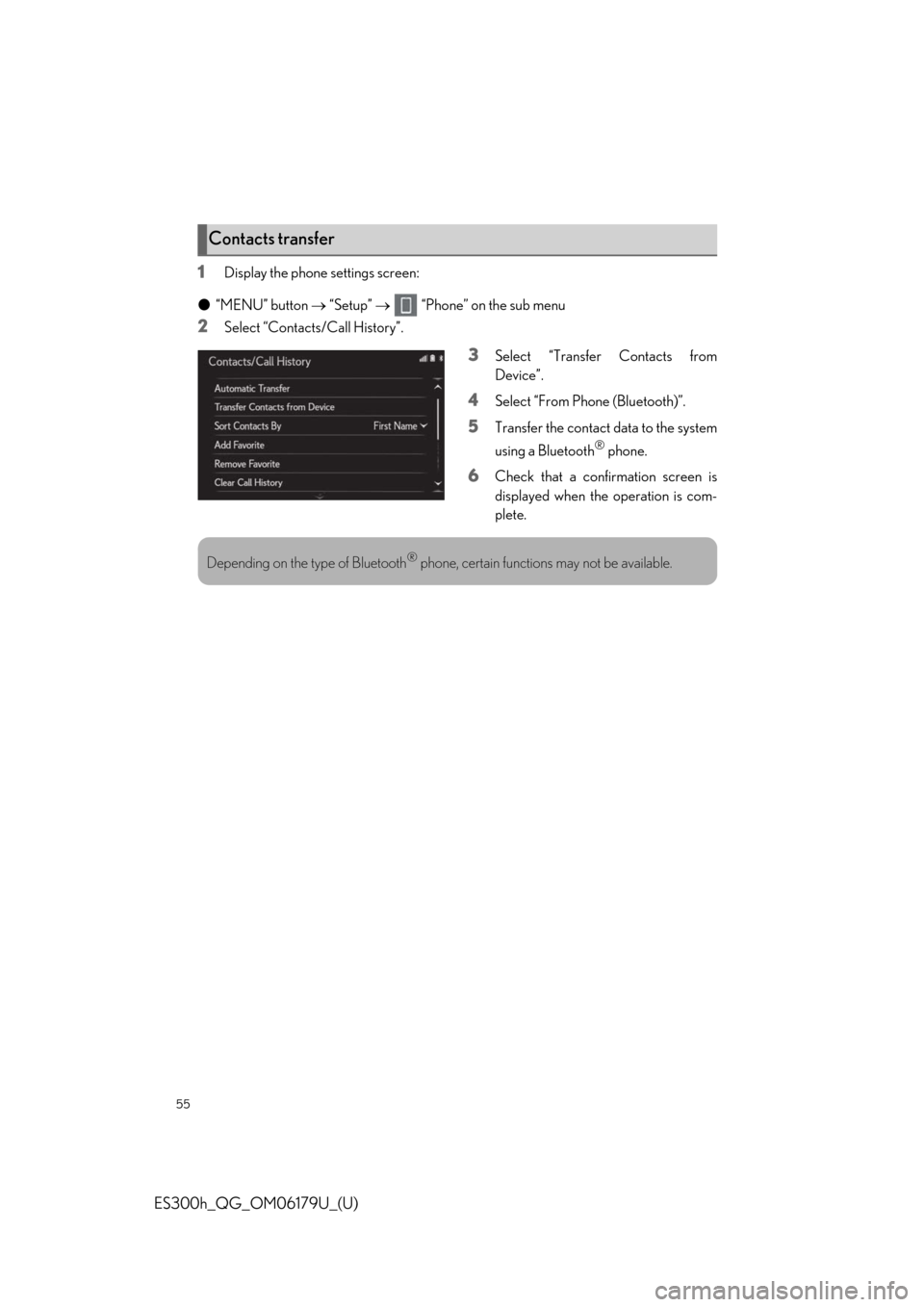
1Display the phone settings screen:
●“MENU” button “Setup” “Phone” on the sub menu
2Select “Contacts/Call History”.
3Select “Transfer Contacts from
Device”.
4Select “From Phone (Bluetooth)”.
5Transfer the contact data to the system
using a Bluetooth
® phone.
6Check that a confirmation screen is
displayed when the operation is com-
plete.
Contacts transfer
Depending on the type of Bluetooth® phone, certain functions may not be available.
Page 56 of 98
56
ES300h_QG_OM06179U_(U)
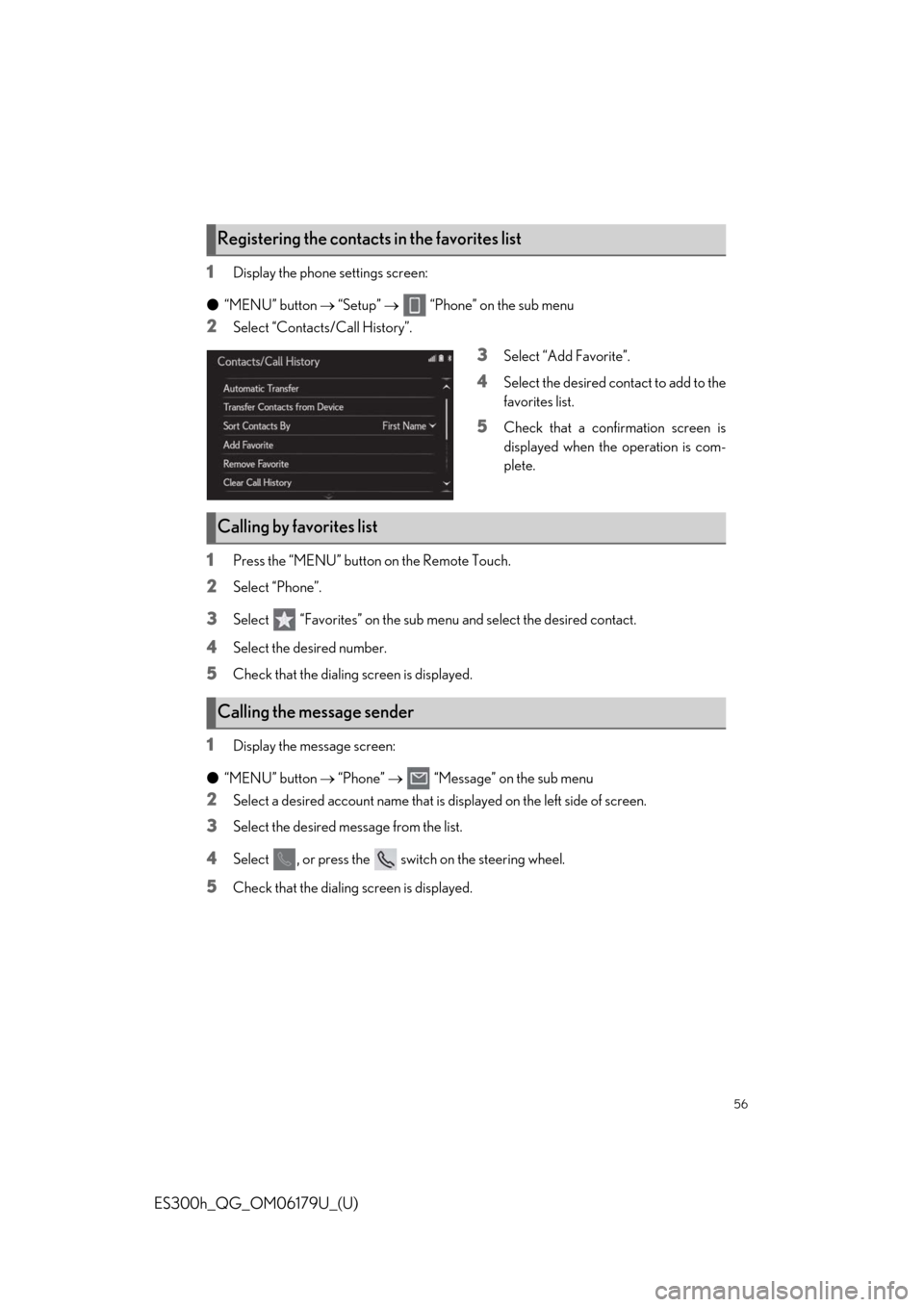
1Display the phone settings screen:
●“MENU” button “Setup” “Phone” on the sub menu
2Select “Contacts/Call History”.
3Select “Add Favorite”.
4Select the desired contact to add to the
favorites list.
5Check that a confirmation screen is
displayed when the operation is com-
plete.
1Press the “MENU” button on the Remote Touch.
2Select “Phone”.
3Select “Favorites” on the sub menu and select the desired contact.
4Select the desired number.
5Check that the dialing screen is displayed.
1Display the message screen:
●“MENU” button “Phone” “Message” on the sub menu
2Select a desired account name that is displayed on the left side of screen.
3Select the desired message from the list.
4Select , or press the switch on the steering wheel.
5Check that the dialing screen is displayed.
Registering the contacts in the favorites list
Calling by favorites list
Calling the message sender
Page 57 of 98
57
ES300h_QG_OM06179U_(U)
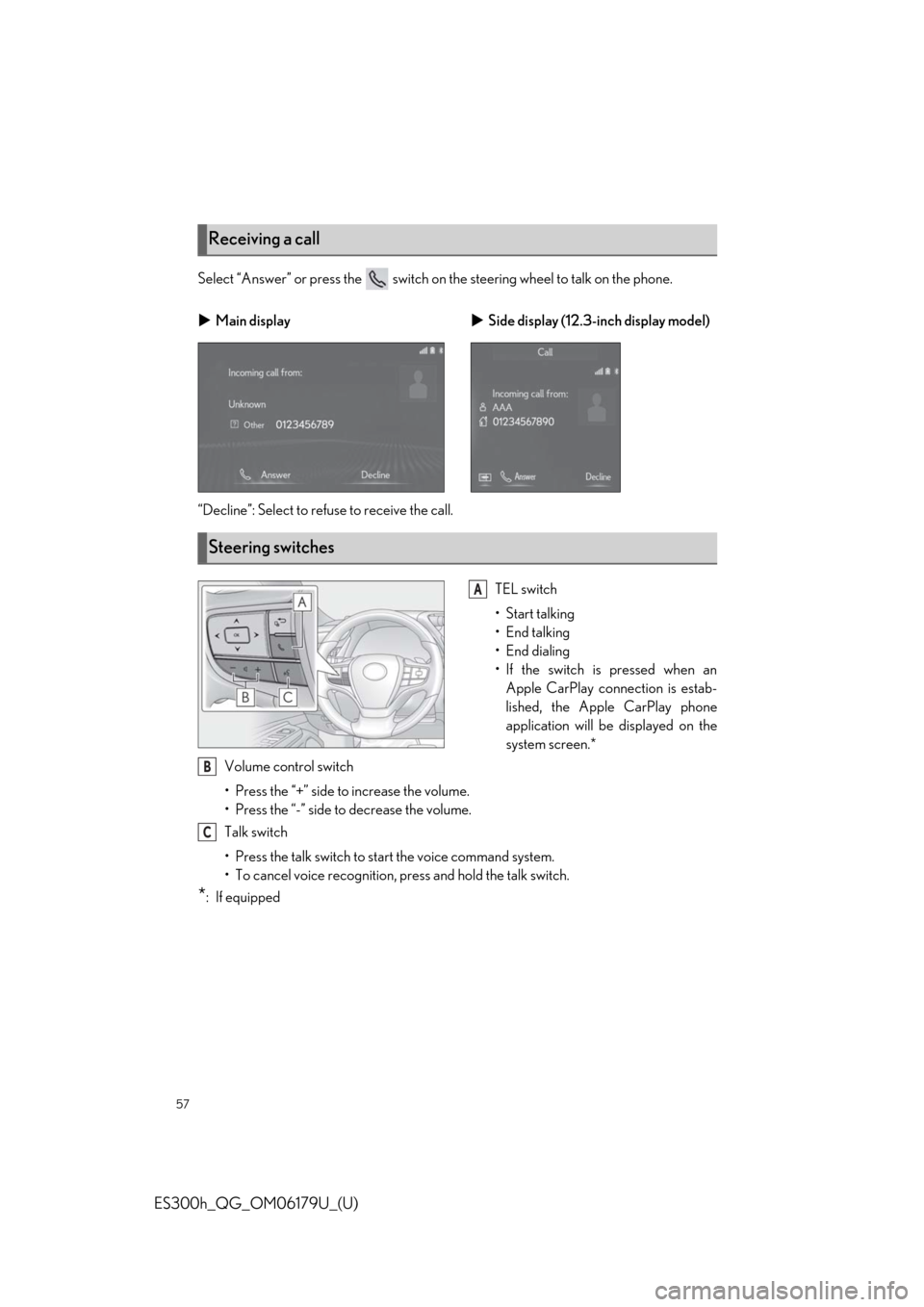
Select “Answer” or press the switch on the steering wheel to talk on the phone.
“Decline”: Select to refuse to receive the call.
TEL switch
• Start talking
• End talking
•End dialing
• If the switch is pressed when an
Apple CarPlay connection is estab-
lished, the Apple CarPlay phone
application will be displayed on the
system screen.*
Volume control switch
• Press the “+” side to increase the volume.
• Press the “-” side to decrease the volume.
Talk switch
• Press the talk switch to start the voice command system.
• To cancel voice recognition, press and hold the talk switch.
*:If equipped
Receiving a call
Main displaySide display (12.3-inch display model)
Steering switches
A
B
C
Page 64 of 98
64
ES300h_QG_OM06179U_(U)
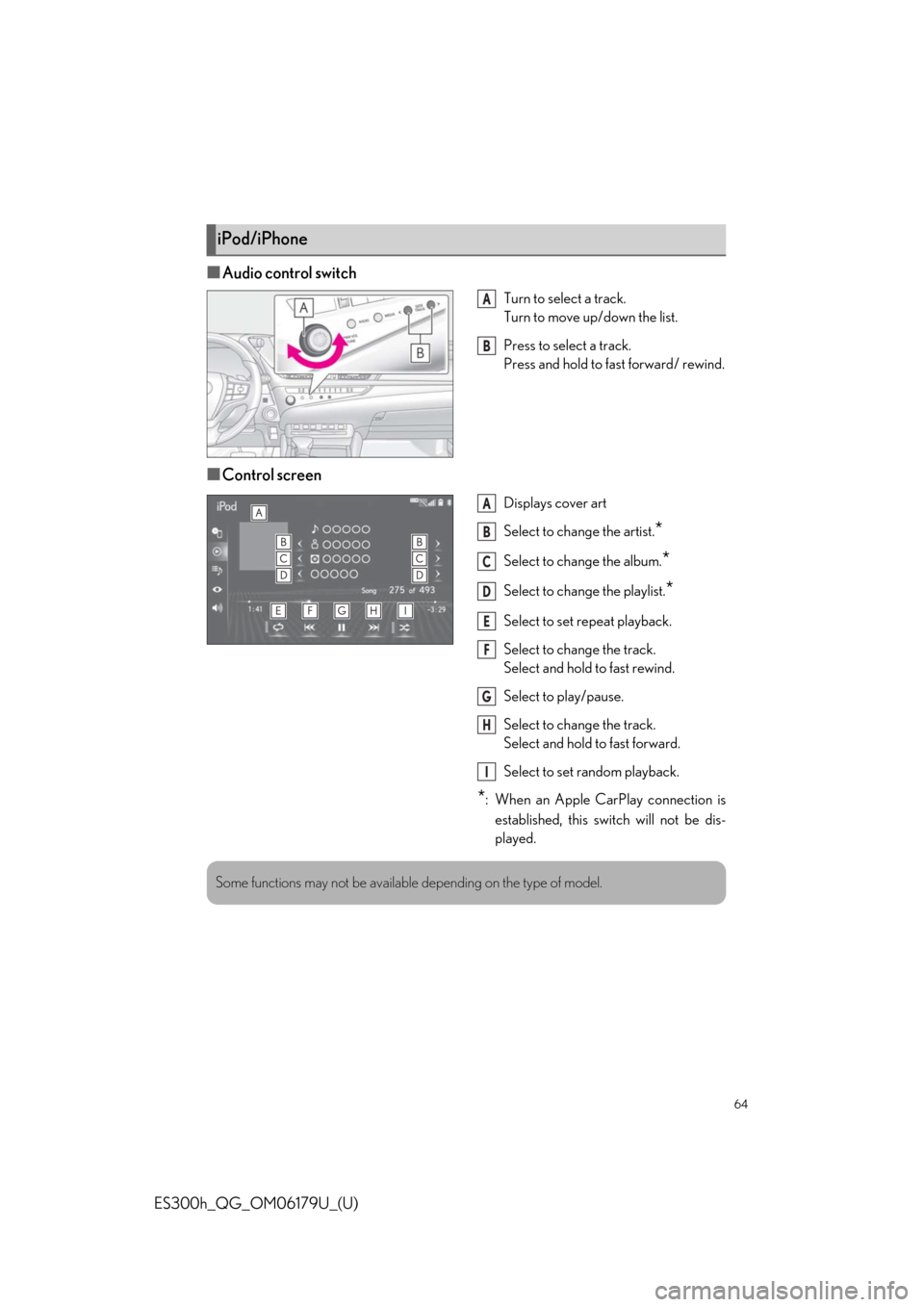
■Audio control switch
Turn to select a track.
Turn to move up/down the list.
Press to select a track.
Press and hold to fast forward/ rewind.
■Control screen
Displays cover art
Select to change the artist.
*
Select to change the album.*
Select to change the playlist.*
Select to set repeat playback.
Select to change the track.
Select and hold to fast rewind.
Select to play/pause.
Select to change the track.
Select and hold to fast forward.
Select to set random playback.
*: When an Apple CarPlay connection is
established, this switch will not be dis-
played.
iPod/iPhone
A
B
A
B
C
D
E
F
G
H
I
Some functions may not be available depending on the type of model.