audio Lexus ES300h 2020 Quick Guide (OM06199U) User Guide
[x] Cancel search | Manufacturer: LEXUS, Model Year: 2020, Model line: ES300h, Model: Lexus ES300h 2020Pages: 98, PDF Size: 1.99 MB
Page 58 of 98

58
ES300h_QG_OM06199U_(U)
■ switch
AM, FM, HD
● Press: Preset station up/down
● Press and hold (0.8 sec. or more): Seek up/down
● Press and hold (1.5 sec. or more): Seek up /down continuously while the switch is being
pressed
SXM
● Press: Preset channel up/down
● Press and hold (0.8 sec. or more): Seek for stations in the releva nt program type/channel
category
● Press and hold (1.5 sec. or more): Seek for the channel while the switch is being pressed
CD
● Press: Track up/down
● Press and hold (0.8 sec. or more): Fast forward/rewind
MP3/WMA/AAC disc
● Press: File up/down
● Press and hold (0.8 sec. or more): Fast forward/rewind
DVD
*1
●Press: Chapter up/down
● Press and hold (0.8 sec. or more): Fast forward/rewind
USB
*2, 3
●Press: File/Track up/down
● Press and hold (0.8 sec. or more): Fast forward/rewind
iPod/iPhone
*3
●Press: Track up/down
● Press and hold (0.8 sec. or more): Fast forward/rewind
Android Auto
*2
●Press: Track up/down
Bluetooth
® audio*2, 3
●Press: Track up/down
● Press and hold (0.8 sec. or more): Fast forward/rewind
*1: 12.3-inch display model
*2: When an Apple CarPlay connection is establ ished, this function will be unavailable.
*3: When an Android Auto connection is established, this function will be unavailable.
Page 59 of 98

59
ES300h_QG_OM06199U_(U)
■Audio control switch
Turn to step up/down frequencies/
channels.
Press to seek up/down.
Press and hold for continuous seek.
■Control screen
Displays cover art
Select to display HD) multicast chan-
nels available
Displays the artist info and song title or
album and genre. Select to change the
displayed information. Displays mes-
sages when available from RBDS.
Select to tune to preset stations/chan-
nels
Display items on the channels regis-
tered to smart favorites
■Presetting a station
Radio mode has a mix preset function, which can store up to 36 stations (6 stations per
page x 6 pages) from any of the AM, FM or SXM bands.
1Tune in the desired station.
2Select and hold “(Hold Edit)”.
To change the preset station to a differ-
ent one, select and hold the preset sta-
tion.
Radio
A
B
A
B
C
D
E
Page 60 of 98

60
ES300h_QG_OM06199U_(U)
■Audio control switch
Turn to select a track/file.
Press to select a track/file.
Press and hold to fast forward/rewind.
■Control screen
Audio CD
Displays cover art
Select to set repeat playback
Select to change the track.
Select and hold to fast rewind.
Select to play/pause
Select to change the track.
Select and hold to fast forward.
Select to set random playback
MP3/WMA/AAC disc
Displays cover art
Select to change the folder.
Select to set repeat playback
Select to change the file.
Select and hold to fast rewind.
Select to play/pause
Select to change the file.
Select and hold to fast forward.
Select to set random playback
CD
A
B
A
B
C
D
E
F
A
B
C
D
E
F
G
Page 61 of 98

61
ES300h_QG_OM06199U_(U)
■Audio control switch
Turn to select a chapter.
Press to select a chapter.
Press and hold to fast forward/rewind.
■Control screen
Select to display the menu control key
Select to display the menu screen
Select to change the chapter.
Select and hold to rewind.
Select to stop the video screen
Select to play/pause
Select to change the chapter.
During playback: Select and hold to
fast forward.
During a pause: Select and hold to
slow forward.
Select to display expanded screen
video.
DVD (12.3-inch display model)
A
B
A
B
C
D
E
F
G
Page 62 of 98

62
ES300h_QG_OM06199U_(U)
*: This function is not made available in some countries or areas.
■Audio control switch
Turn to select a track.
Turn to move up/down the list.
Press to select a track.
Press and hold to fast forward/ rewind.
■Control screen
Displays cover art
Select to change the artist.
*
Select to change the album.*
Select to change the playlist.*
Select to set repeat playback.
Select to change the track.
Select and hold to fast rewind.
Select to play/pause.
Select to change the track.
Select and hold to fast forward.
Select to set random playback.
*: When an Apple CarPlay connection isestablished, this switch will not be dis-
played.
iPod/iPhone (Apple CarPlay*)
A
B
A
B
C
D
E
F
G
H
I
Some functions may not be available depending on the type of model.
Page 68 of 98

68
ES300h_QG_OM06199U_(U)
1Press the talk switch.
Voice guidance for the voice com-
mand system can be skipped by press-
ing the talk switch.
2If “Getting Started with Voice” screen
is displayed, select “OK” or press the
talk switch.
3After hearing a beep, say a supported command.
●To display sample commands of the desired function, say the desired function or
select the desired function button. To display more commands, select “More Com-
mands”.
● Selecting “Help” or saying “Help” prom pts the voice command system to offer
examples of commands and operation methods.
● Registered POIs, registered names in the co ntacts list etc., can be said in the place
of the “<>” next to the commands.
Continue on to pages 69-75 for a detailed lis t of Voice Commands for the following cate-
gories:
Common . . . . . . . . . . . . . . . . . . . . . . . . . . . . . . . . . . . . . . . . . . . . . . . . P.69
Top menu . . . . . . . . . . . . . . . . . . . . . . . . . . . . . . . . . . . . . . . . . . . . . . . . P.69
Navigation . . . . . . . . . . . . . . . . . . . . . . . . . . . . . . . . . . . . . . . . . . . . . . . P.70
Phone . . . . . . . . . . . . . . . . . . . . . . . . . . . . . . . . . . . . . . . . . . . . . . . . . . . P.71
Radio . . . . . . . . . . . . . . . . . . . . . . . . . . . . . . . . . . . . . . . . . . . . . . . . . . . . P.72
Audio . . . . . . . . . . . . . . . . . . . . . . . . . . . . . . . . . . . . . . . . . . . . . . . . . . . . P.73
Info . . . . . . . . . . . . . . . . . . . . . . . . . . . . . . . . . . . . . . . . . . . . . . . . . . . . . . P.74
Apps . . . . . . . . . . . . . . . . . . . . . . . . . . . . . . . . . . . . . . . . . . . . . . . . . . . . . P.74
Climate . . . . . . . . . . . . . . . . . . . . . . . . . . . . . . . . . . . . . . . . . . . . . . . . . . P.75
Voice Command System
Basic operation
The voice command system enables the radio, phone dialing, etc. to be operated using
voice commands. Refer to the command list for samples of voice commands.
Page 73 of 98
73
ES300h_QG_OM06199U_(U)
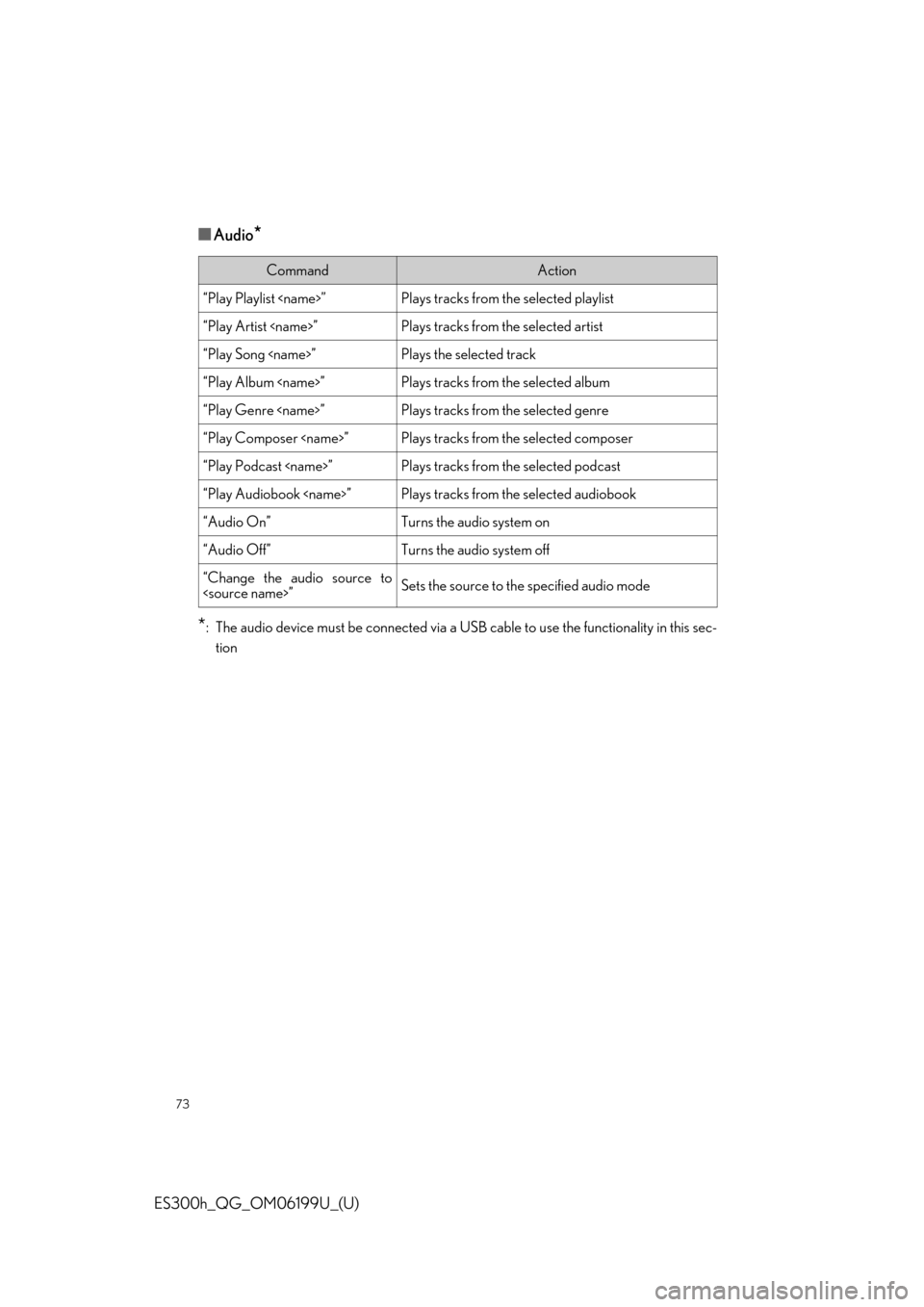
■Audio*
*
: The audio device must be connected via a US B cable to use the functionality in this sec-
tion
CommandAction
“Play Playlist
“Play Artist
“Play Song
“Play Album
“Play Genre
“Play Composer
“Play Podcast
“Play Audiobook
“Audio On”Turns the audio system on
“Audio Off”Turns the audio system off
“Change the audio source to