seats Lexus ES300h 2020 Owner's Guide
[x] Cancel search | Manufacturer: LEXUS, Model Year: 2020, Model line: ES300h, Model: Lexus ES300h 2020Pages: 462, PDF Size: 9.98 MB
Page 97 of 462

95
3
3
Before driving
Before driving
3-1. Key informationKeys ................................................... 96
3-2. Opening, closing and locking the doors and trunk
Doors................................................. 99
Trunk................................................ 103
Smart access system with push- button start .................................. 110
3-3. Adjusting the seats Front seats ...................................... 117
Driving position memory ......... 118
Head restraints............................. 121
3-4. Adjusting the steering wheel and mirrors
Steering wheel............................. 123
Inside rear view mirror............. 124
Outside rear view mirrors ...... 125
3-5. Opening and closing the win- dows and moon roof
Power windows........................... 128
Moon roof ..................................... 130
Page 103 of 462
1013-2. Opening, closing and locking the doors and trunk
3
Before driving
button start or wireless remote control.
Lock or unlock the doors using the
mechanical key. (P.388)
■Customization
Settings (e.g. unlocking function using a
key) can be changed.
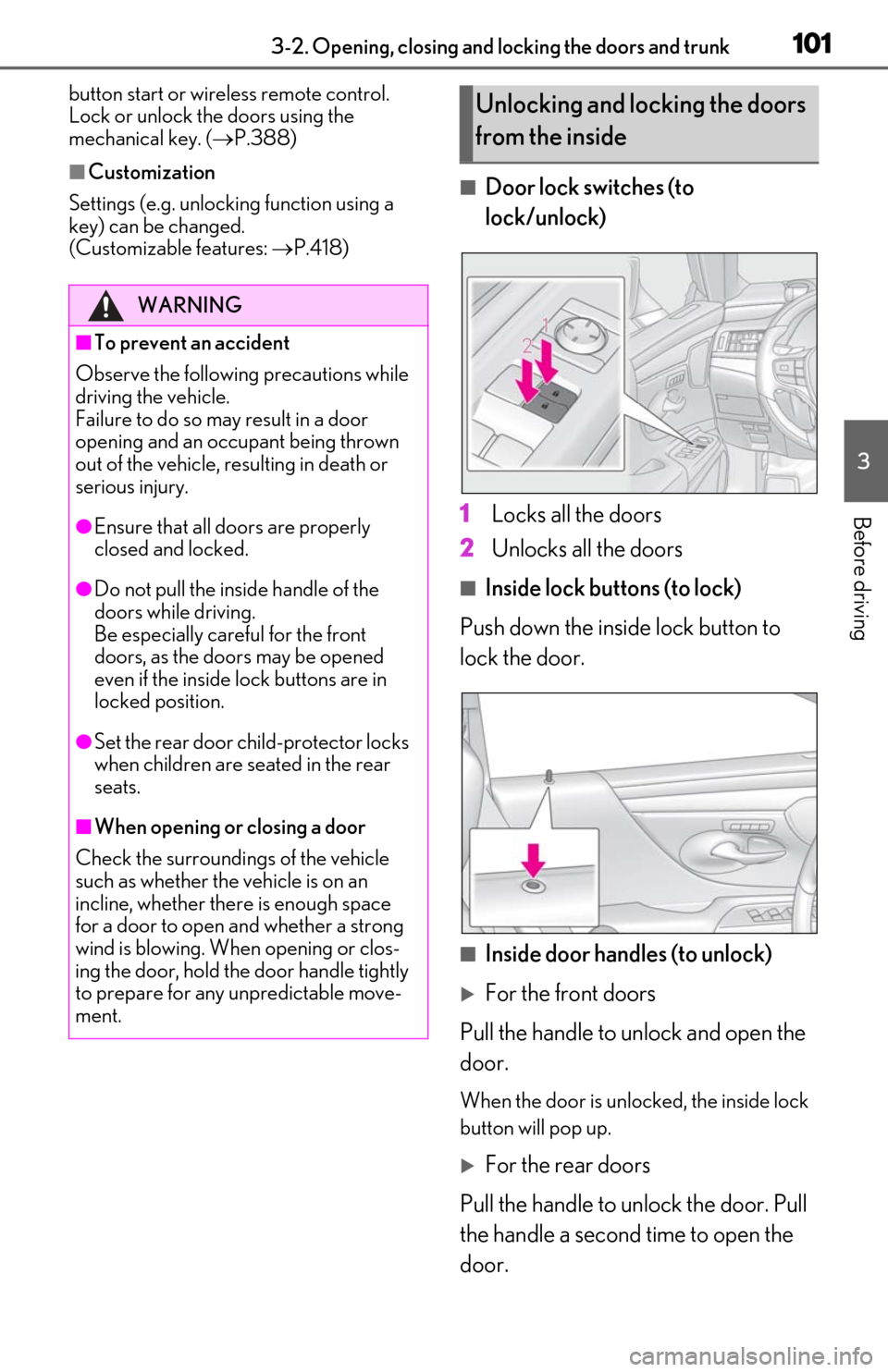
(Customizable features: P.418)■Door lock switches (to
lock/unlock)
1
Locks all the doors
2
Unlocks all the doors
■Inside lock buttons (to lock)
Push down the inside lock button to
lock the door.
■Inside door handles (to unlock)
For the front doors
Pull the handle to unlock and open the
door.
When the door is unlo cked, the inside lock
button will pop up.
For the rear doors
Pull the handle to unlock the door. Pull
the handle a second time to open the
door.
WARNING
■To prevent an accident
Observe the following precautions while
driving the vehicle.
Failure to do so may result in a door
opening and an occupant being thrown
out of the vehicle, re sulting in death or
serious injury.
●Ensure that all doors are properly
closed and locked.
●Do not pull the inside handle of the
doors while driving.
Be especially careful for the front
doors, as the doors may be opened
even if the inside lock buttons are in
locked position.
●Set the rear door ch ild-protector locks
when children are seated in the rear
seats.
■When opening or closing a door
Check the surroundings of the vehicle
such as whether the vehicle is on an
incline, whether ther e is enough space
for a door to open and whether a strong
wind is blowing. When opening or clos-
ing the door, hold the door handle tightly
to prepare for any unpredictable move-
ment.
Unlocking and locking the doors
from the inside
Page 119 of 462
1173-3. Adjusting the seats
3
Before driving
3-3.Adjusting the seats
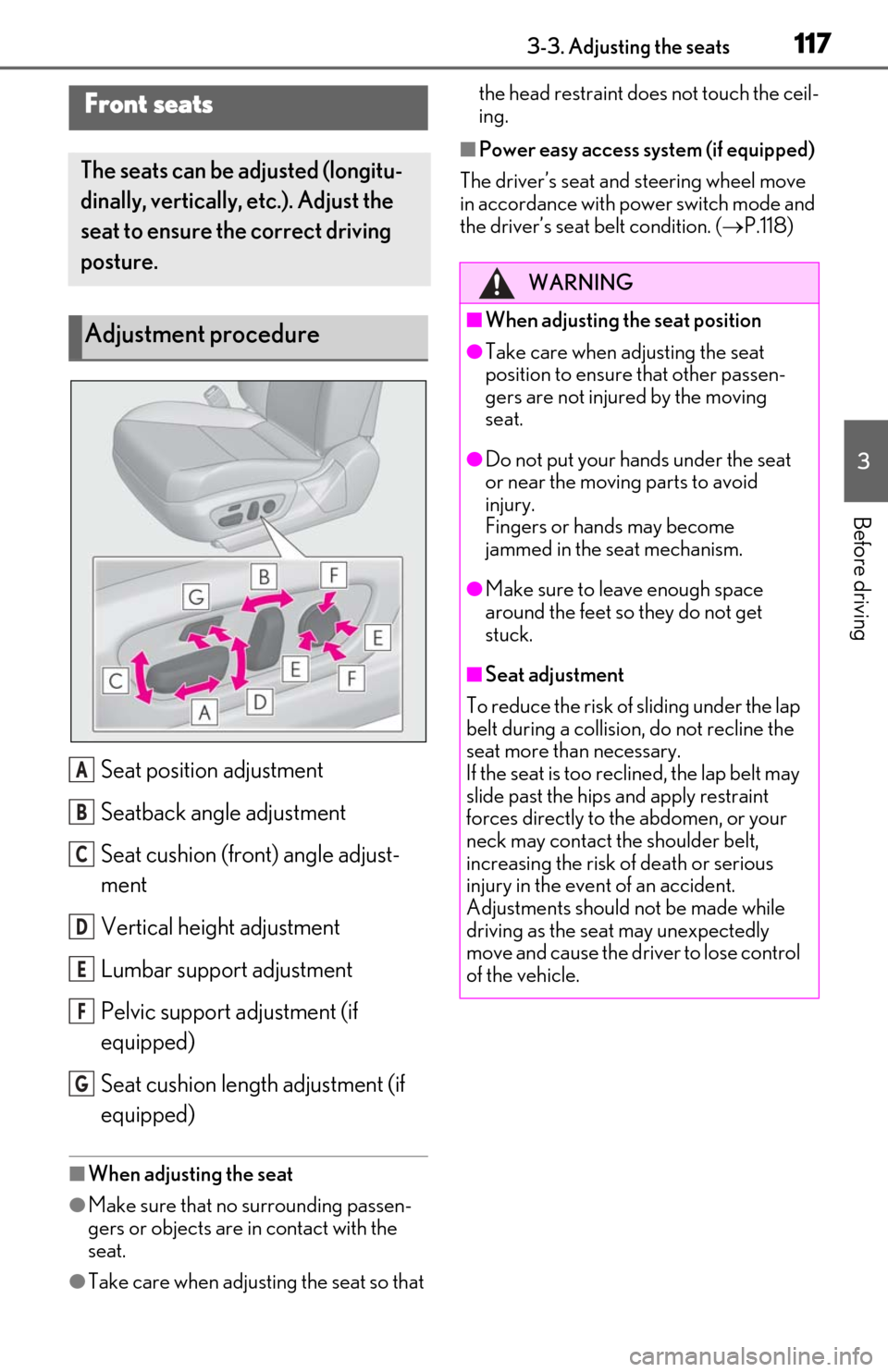
Seat position adjustment
Seatback angle adjustment
Seat cushion (front) angle adjust-
ment
Vertical height adjustment
Lumbar support adjustment
Pelvic support adjustment (if
equipped)
Seat cushion length adjustment (if
equipped)
■When adjusting the seat
●Make sure that no surrounding passen-
gers or objects are in contact with the
seat.
●Take care when adjusting the seat so that the head restraint does not touch the ceil-
ing.
■Power easy access system (if equipped)
The driver’s seat and steering wheel move
in accordance with power switch mode and
the driver’s seat belt condition. ( P.118)
Front seats
The seats can be adjusted (longitu-
dinally, vertically, etc.). Adjust the
seat to ensure the correct driving
posture.
Adjustment procedure
A
B
C
D
E
F
G
WARNING
■When adjusting the seat position
●Take care when adjusting the seat
position to ensure that other passen-
gers are not injured by the moving
seat.
●Do not put your hands under the seat
or near the moving parts to avoid
injury.
Fingers or hands may become
jammed in the seat mechanism.
●Make sure to leave enough space
around the feet so they do not get
stuck.
■Seat adjustment
To reduce the risk of sliding under the lap
belt during a collision, do not recline the
seat more than necessary.
If the seat is too rec lined, the lap belt may
slide past the hips and apply restraint
forces directly to the abdomen, or your
neck may contact the shoulder belt,
increasing the risk of death or serious
injury in the event of an accident.
Adjustments should not be made while
driving as the seat may unexpectedly
move and cause the driver to lose control
of the vehicle.
Page 120 of 462
1183-3. Adjusting the seats
*:If equipped
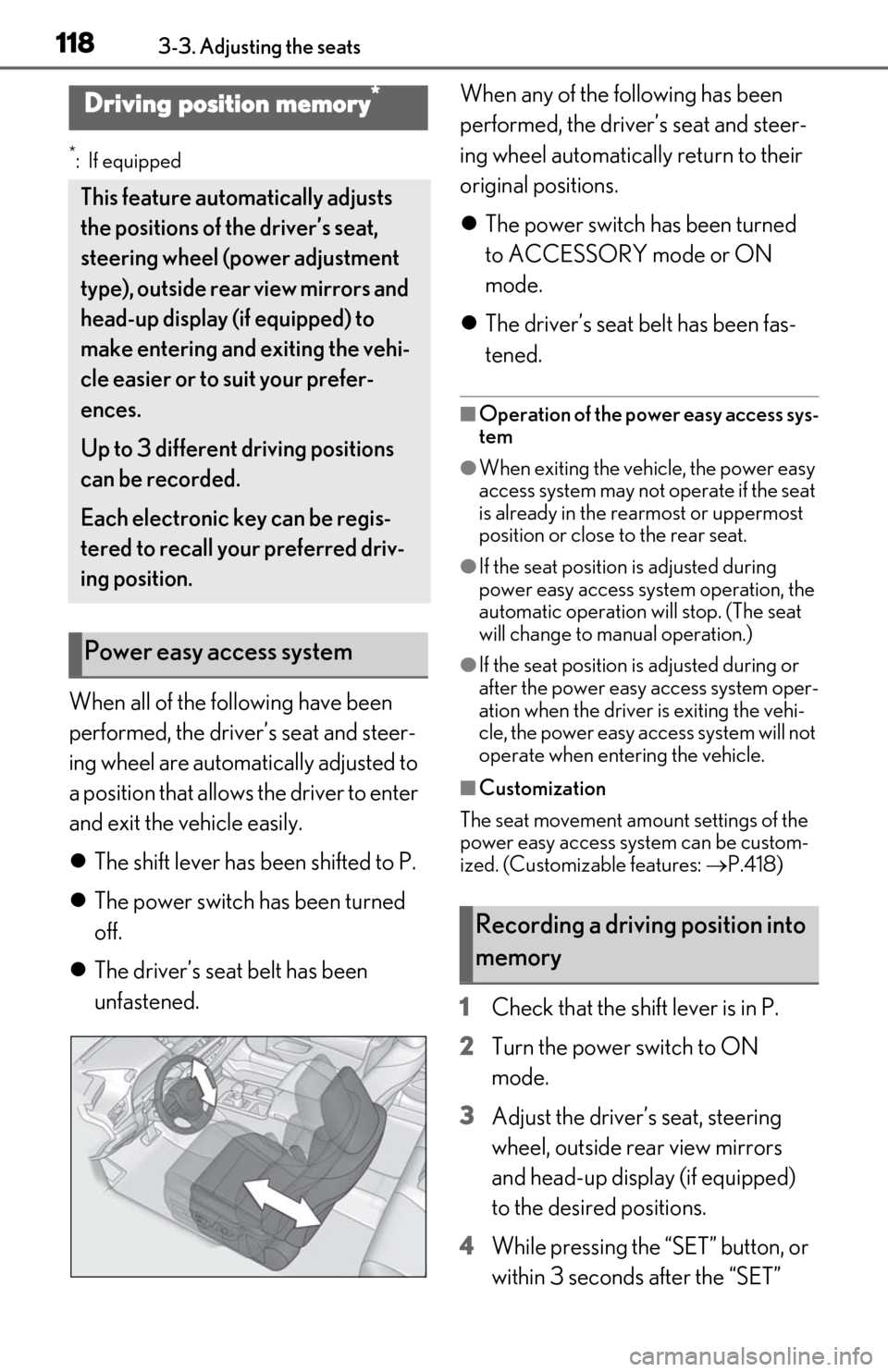
When all of the following have been
performed, the driver’s seat and steer-
ing wheel are automatically adjusted to
a position that allows the driver to enter
and exit the vehicle easily.
The shift lever has been shifted to P.
The power switch has been turned
off.
The driver’s seat belt has been
unfastened. When any of the following has been
performed, the driver’s seat and steer-
ing wheel automatically return to their
original positions.
The power switch has been turned
to ACCESSORY mode or ON
mode.
The driver’s seat belt has been fas-
tened.
■Operation of the power easy access sys-
tem
●When exiting the vehicle, the power easy
access system may not operate if the seat
is already in the rearmost or uppermost
position or close to the rear seat.
●If the seat position is adjusted during
power easy access syst em operation, the
automatic operation will stop. (The seat
will change to manual operation.)
●If the seat position is adjusted during or
after the power easy access system oper-
ation when the driver is exiting the vehi-
cle, the power easy access system will not
operate when entering the vehicle.
■Customization
The seat movement amou nt settings of the
power easy access system can be custom-
ized. (Customizable features: P.418)
1 Check that the shift lever is in P.
2 Turn the power switch to ON
mode.
3 Adjust the driver’s seat, steering
wheel, outside rear view mirrors
and head-up display (if equipped)
to the desired positions.
4 While pressing the “SET” button, or
within 3 seconds after the “SET”
Driving position memory*
This feature auto matically adjusts
the positions of the driver’s seat,
steering wheel (power adjustment
type), outside rear view mirrors and
head-up display (if equipped) to
make entering and exiting the vehi-
cle easier or to suit your prefer-
ences.
Up to 3 different driving positions
can be recorded.
Each electronic key can be regis-
tered to recall your preferred driv-
ing position.
Power easy access system
Recording a driving position into
memory
Page 121 of 462
1193-3. Adjusting the seats
3
Before driving
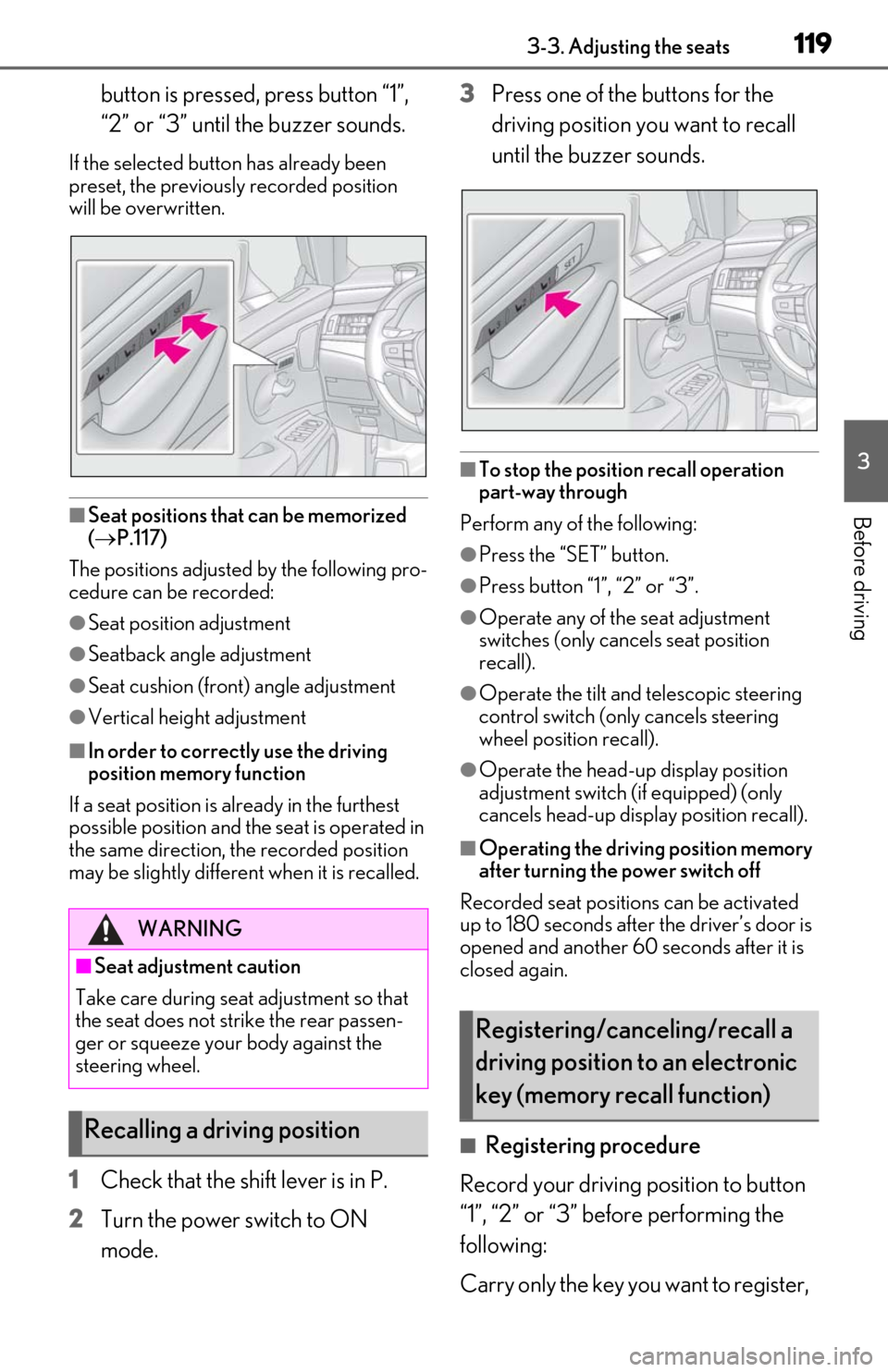
button is pressed, press button “1”,
“2” or “3” until the buzzer sounds.
If the selected button has already been
preset, the previously recorded position
will be overwritten.
■Seat positions that can be memorized
( P.117)
The positions adjusted by the following pro-
cedure can be recorded:
●Seat position adjustment
●Seatback angle adjustment
●Seat cushion (front) angle adjustment
●Vertical height adjustment
■In order to correctly use the driving
position memory function
If a seat position is already in the furthest
possible position and the seat is operated in
the same direction, the recorded position
may be slightly different when it is recalled.
1Check that the shift lever is in P.
2
Turn the power switch to ON
mode. 3
Press one of the buttons for the
driving position you want to recall
until the buzzer sounds.
■To stop the position recall operation
part-way through
Perform any of the following:
●Press the “SET” button.
●Press button “1”, “2” or “3”.
●Operate any of the seat adjustment
switches (only cancels seat position
recall).
●Operate the tilt and telescopic steering
control switch (onl y cancels steering
wheel position recall).
●Operate the head-up display position
adjustment switch (if equipped) (only
cancels head-up display position recall).
■Operating the driving position memory
after turning the power switch off
Recorded seat positions can be activated
up to 180 seconds after the driver’s door is
opened and another 60 seconds after it is
closed again.
■Registering procedure
Record your driving position to button
“1”, “2” or “3” before performing the
following:
Carry only the key yo u want to register,
WARNING
■Seat adjustment caution
Take care during seat adjustment so that
the seat does not strike the rear passen-
ger or squeeze your body against the
steering wheel.
Recalling a driving position
Registering/canceling/recall a
driving position to an electronic
key (memory recall function)
Page 122 of 462
1203-3. Adjusting the seats
and then close the driver’s door.
If 2 or more keys are in the vehicle, the
driving position cannot be recorded
properly.
1Check that the shift lever is in P.
2 Turn the power switch to ON
mode.
3 Recall the driving position that you
want to record.
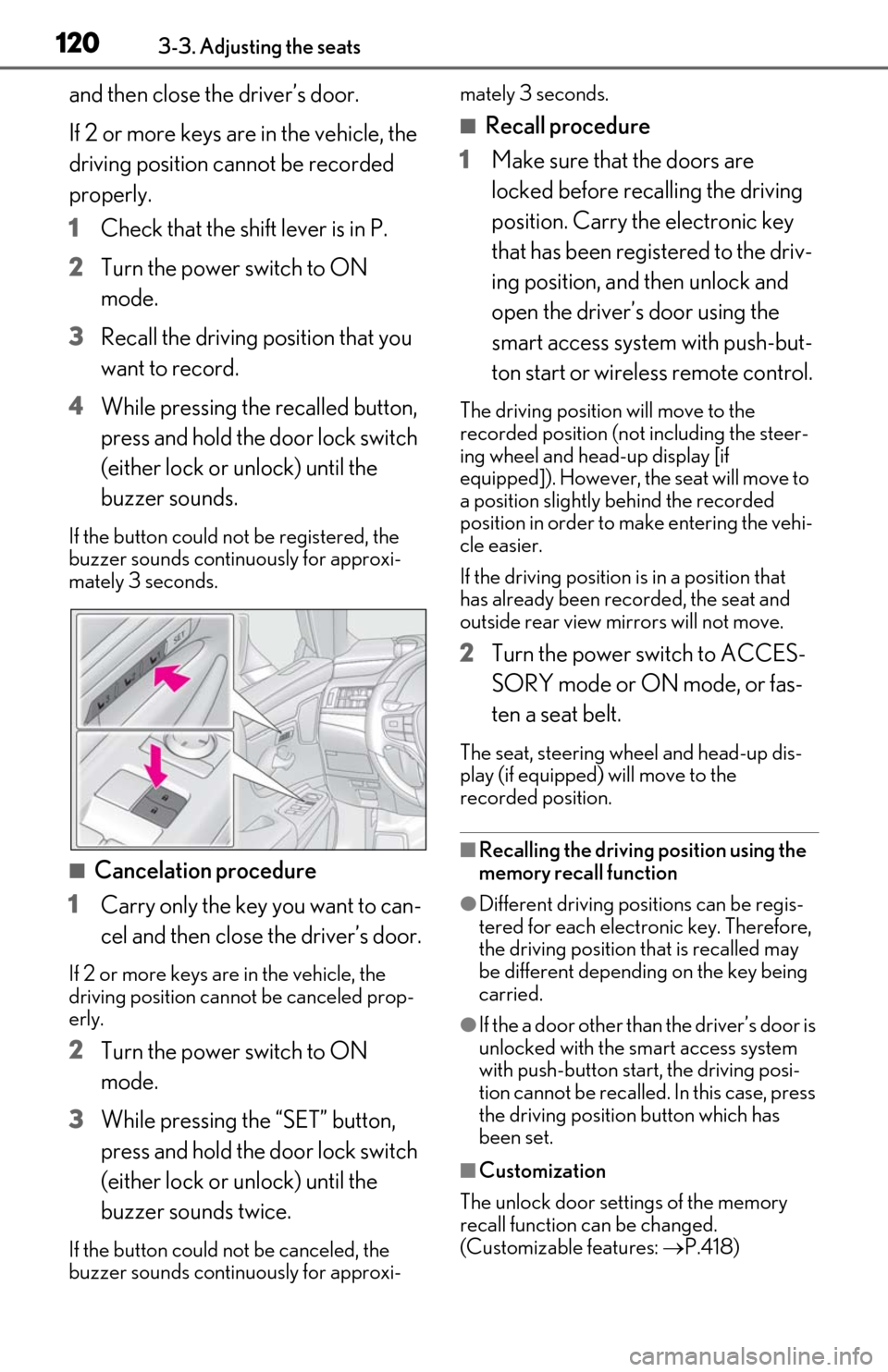
4 While pressing the recalled button,
press and hold the door lock switch
(either lock or unlock) until the
buzzer sounds.
If the button could not be registered, the
buzzer sounds continuously for approxi-
mately 3 seconds.
■Cancelation procedure
1 Carry only the key you want to can-
cel and then close the driver’s door.
If 2 or more keys are in the vehicle, the
driving position cannot be canceled prop-
erly.
2Turn the power switch to ON
mode.
3 While pressing the “SET” button,
press and hold the door lock switch
(either lock or unlock) until the
buzzer sounds twice.
If the button could not be canceled, the
buzzer sounds continuously for approxi- mately 3 seconds.
■Recall procedure
1 Make sure that the doors are
locked before recalling the driving
position. Carry the electronic key
that has been registered to the driv-
ing position, and then unlock and
open the driver’s door using the
smart access system with push-but-
ton start or wireless remote control.
The driving position will move to the
recorded position (not including the steer-
ing wheel and head-up display [if
equipped]). However, the seat will move to
a position slightly behind the recorded
position in order to make entering the vehi-
cle easier.
If the driving position is in a position that
has already been recorded, the seat and
outside rear view mirrors will not move.
2Turn the power switch to ACCES-
SORY mode or ON mode, or fas-
ten a seat belt.
The seat, steering wheel and head-up dis-
play (if equipped) will move to the
recorded position.
■Recalling the driving position using the
memory recall function
●Different driving positions can be regis-
tered for each electronic key. Therefore,
the driving position that is recalled may
be different depending on the key being
carried.
●If the a door other than the driver’s door is
unlocked with the smart access system
with push-button start, the driving posi-
tion cannot be recalled. In this case, press
the driving position button which has
been set.
■Customization
The unlock door sett ings of the memory
recall function can be changed.
(Customizable features: P.418)
Page 123 of 462
1213-3. Adjusting the seats
3
Before driving
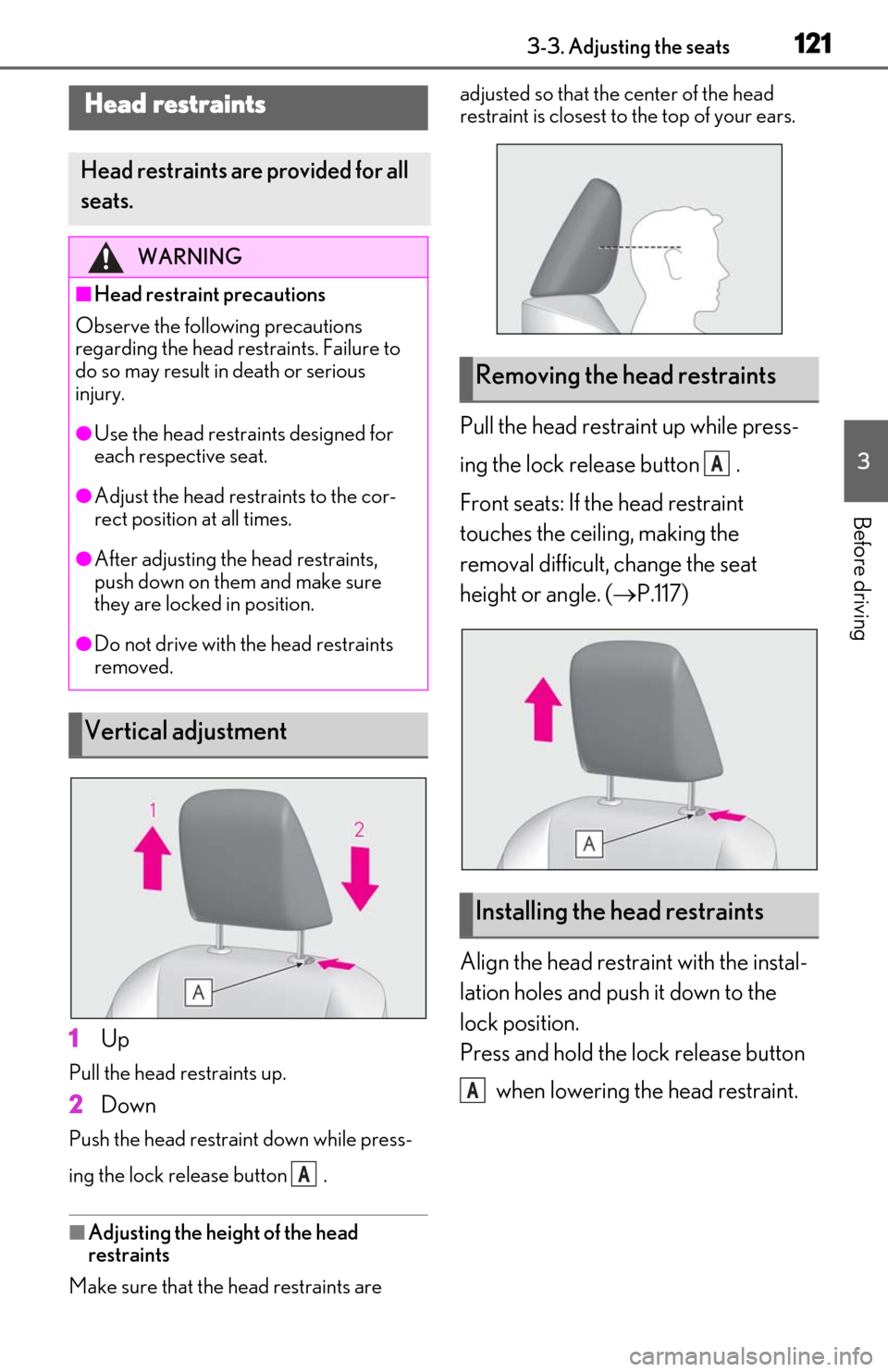
1Up
Pull the head restraints up.
2Down
Push the head restraint down while press-
ing the lock release button .
■Adjusting the height of the head
restraints
Make sure that the head restraints are adjusted so that the center of the head
restraint is closest to the top of your ears.
Pull the head restraint up while press-
ing the lock release button .
Front seats: If the head restraint
touches the ceiling, making the
removal difficult, change the seat
height or angle. (
P.117)
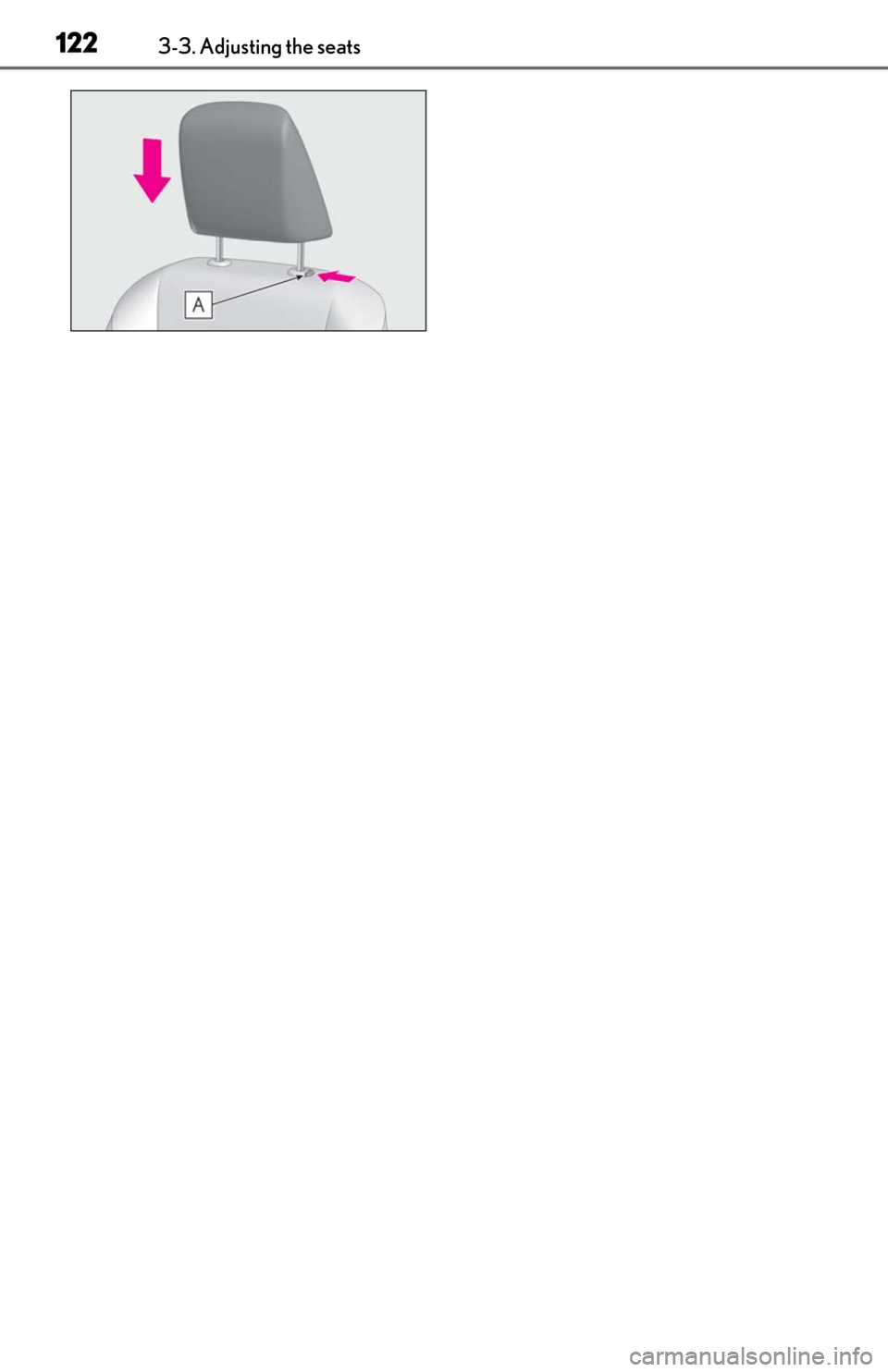
Align the head restraint with the instal-
lation holes and push it down to the
lock position.
Press and hold the lock release button when lowering the head restraint.
Head restraints
Head restraints are provided for all
seats.
WARNING
■Head restraint precautions
Observe the following precautions
regarding the head re straints. Failure to
do so may result in death or serious
injury.
●Use the head restraints designed for
each respective seat.
●Adjust the head restraints to the cor-
rect position at all times.
●After adjusting the head restraints,
push down on them and make sure
they are locked in position.
●Do not drive with the head restraints
removed.
Vertical adjustment
A
Removing the head restraints
Installing the head restraints
A
A
Page 124 of 462
1223-3. Adjusting the seats
Page 141 of 462
1394-1. Before driving
4
Driving
Cargo capacity depends on the total
weight of the occupants.
(Cargo capacity) = (Total load capac-
ity) (Total weight of occupants)
NOTICE
●Changes in quantity and quality of oil
and fluid used for the engine, hybrid
transmission, etc.
●Lubricant condition for the bearings
and suspension joints (where possi-
ble), and the function of all joints, bear-
ings, etc.
■When parking the vehicle
Always set the parking brake, and shift
the shift lever to P. Failure to do so may
cause the vehicle to move or the vehicle
may accelerate sudden ly if the accelera-
tor pedal is accidentally depressed.
Cargo and luggage
Take notice of the following infor-
mation about storage precautions,
cargo capacity and load:
WARNING
■Things that must not be carried in the
trunk
The following things may cause a fire if
loaded in the trunk:
●Receptacles containing gasoline
●Aerosol cans
■Storage precautions
Observe the following precautions.
Failure to do so may prevent the pedals
from being depressed properly, may
block the driver’s vision, or may result in
items hitting the driver or passengers,
possibly causing an accident.
●Stow cargo and luggage in the trunk
whenever possible.
●Do not place cargo or luggage in or on
the following locations.
• At the feet of the driver
• On the front passenger or rear seats (when stacking items)
• On the package tray
• On the instrument panel
• On the dashboard
• In front of the Center Display
●Secure all items in the occupant com-
partment.
Capacity and distribution
Page 271 of 462
2695-3. Using the air conditioning system
5
Interior features
( P.269)
“Off”: Turn the fan off
“A/C”: Set cooling and dehumidification
function
“DUAL”: Adjust the temperature for driver
and front passenger seats separately
(“DUAL” mode) ( P.271)
: Set eco air conditioning mode
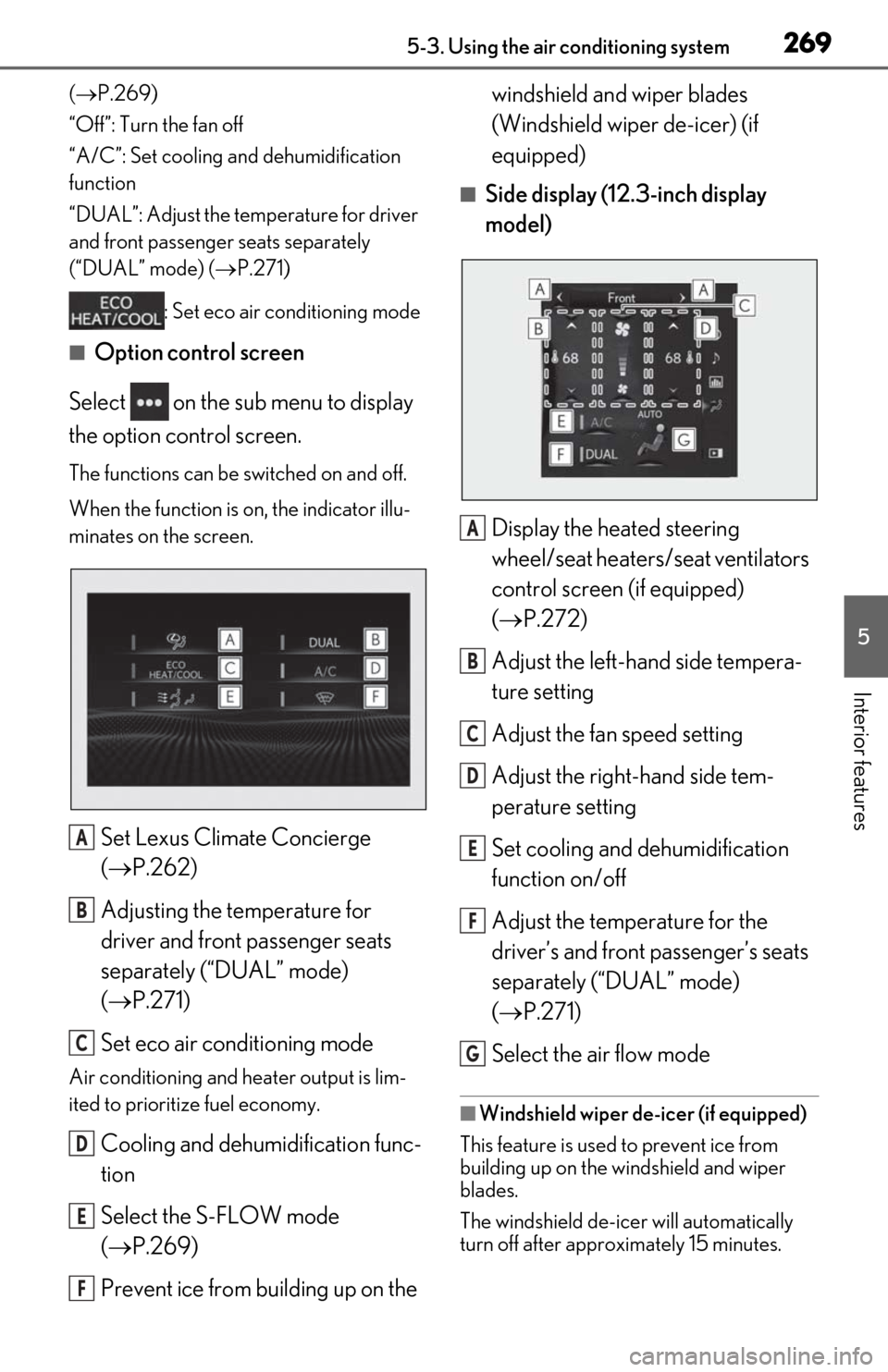
■Option control screen
Select on the sub menu to display
the option control screen.
The functions can be switched on and off.
When the function is on, the indicator illu-
minates on the screen.
Set Lexus Climate Concierge
( P.262)
Adjusting the temperature for
driver and front passenger seats
separately (“DUAL” mode)
( P.271)
Set eco air conditioning mode
Air conditioning and heater output is lim-
ited to prioritize fuel economy.
Cooling and dehumidification func-
tion
Select the S-FLOW mode
( P.269)
Prevent ice from building up on the windshield and wiper blades
(Windshield wiper de-icer) (if
equipped)
■Side display (12.3-inch display
model)
Display the heated steering
wheel/seat heaters/seat ventilators
control screen (if equipped)
( P.272)
Adjust the left-hand side tempera-
ture setting
Adjust the fan speed setting
Adjust the right-hand side tem-
perature setting
Set cooling and dehumidification
function on/off
Adjust the temperature for the
driver’s and front passenger’s seats
separately (“DUAL” mode)
( P.271)
Select the air flow mode
■Windshield wiper de-icer (if equipped)
This feature is used to prevent ice from
building up on the windshield and wiper
blades.
The windshield de-icer will automatically
turn off after approximately 15 minutes.
A
B
C
D
E
F
A
B
C
D
E
F
G