Park Lexus ES300h 2020 Manual PDF
[x] Cancel search | Manufacturer: LEXUS, Model Year: 2020, Model line: ES300h, Model: Lexus ES300h 2020Pages: 462, PDF Size: 9.98 MB
Page 252 of 462

2504-5. Using the driving support systems
WARNING
■Stopping distance when the ABS is
operating may exceed that of normal
conditions
The ABS is not designed to shorten the
vehicle’s stopping di stance. Always main-
tain a safe distance from the vehicle in
front of you, especially in the following
situations:
●When driving on dirt, gravel or snow-
covered roads
●When driving with tire chains
●When driving over bumps in the road
●When driving over roads with potholes
or uneven surfaces
■TRAC/VSC may not operate effec-
tively when
Directional control and power may not
be achievable while driving on slippery
road surfaces, even if the TRAC/VSC
system is operating.
Drive the vehicle carefully in conditions
where stability and power may be lost.
■Active Cornering Assist does not
operate effectively when
●Do not overly rely on Active Corner-
ing Assist. Active Cornering Assist
may not operate effectively when
accelerating down slopes or driving on
slippery road surfaces.
●When Active Cornering Assist fre-
quently operates, Active Cornering
Assist may temporarily stop operating
to ensure proper operation of the
brakes, TRAC and VSC.
■Hill- start assist control does not
operate effectively when
●Do not overly rely on hill-start assist
control. Hill-start assist control may
not operate effectively on steep
inclines and roads covered with ice.
●Unlike the parking brake, hill-start
assist control is not intended to hold
the vehicle stationary for an extended
period of time. Do not attempt to use
hill-start assist control to hold the vehi-
cle on an incline, as doing so may lead
to an accident.
■When the TRAC/ABS/VSC is acti-
vated
The slip indicator light flashes. Always
drive carefully. Reckless driving may
cause an accident. Exercise particular
care when the indicator light flashes.
■When the TRAC/VSC systems are
turned off
Be especially careful and drive at a speed
appropriate to the road conditions. As
these are the systems to help ensure
vehicle stability and driving force, do not
turn the TRAC/VSC systems off unless
necessary.
■Secondary Collision Brake
Do not rely solely upon the Secondary
Collision Brake. This system is designed
to help reduce the possibility of further
damage due to a secondary collision,
however, that effect changes according
to various conditions. Overly relying on
the system may result in death or serious
injury.
■Replacing tires
Make sure that all ti res are of the speci-
fied size, brand, tread pattern and total
load capacity. In addition, make sure that
the tires are inflated to the recom-
mended tire inflation pressure level.
The ABS, TRAC and VSC systems will
not function correctly if different tires are
installed on the vehicle.
Contact your Lexus dealer for further
information when replacing tires or
wheels.
■Handling of tires and the suspension
Using tires with any kind of problem or
modifying the suspensi on will affect the
driving assist systems, and may cause a
system to malfunction.
Page 253 of 462
2514-6. Driving tips
4
Driving
4-6.Driving tips
When using Eco drive mode, the
torque corresponding to the accelera-
tor pedal depression amount can be
generated more smoothly than it is in
normal conditions. In addition, the
operation of the air conditioning sys-
tem (heating/cooling) will be mini-
mized, improving the fuel economy.
( P.212)
The Eco-friendly driving is possible by
keeping the indicate of Hybrid System
Indicator within Eco area. ( P.77)
Shift the shift lever to D when stopped
at a traffic light, or driving in heavy traf-
fic etc. Shift the shift lever to P when
parking. When using the N, there is no
positive effect on fuel consumption. In
the N, the gasoline engine operates
but electricity cannot be generated.
Also, when using the air conditioning
system, etc., the hybrid battery (trac-
tion battery) power is consumed.
Drive your vehicle smoothly. Avoid
abrupt acceleration and decelera-
tion. Gradual acceleration and
deceleration will make more effec-
tive use of the electric motor (trac-
tion motor) without having to use
gasoline engine power.
Avoid repeated acceleration.
Repeated acceleration consumes
hybrid battery (traction battery)
power, resulting in poor fuel con-
sumption. Battery power can be
restored by driving with the acceler-
ator pedal slightly released.
Make sure to operate the brakes gently
and in a timely manner. A greater
amount of electrical energy can be
regenerated when slowing down.
Repeated acceleration and decelera-
tion, as well as long waits at traffic
lights, will lead to bad fuel economy.
Check traffic reports before leaving
and avoid delays as much as possible.
When driving in a traffic jam, gently
release the brake pedal to allow the
vehicle to move forward slightly while
avoiding overuse of the accelerator
pedal. Doing so can help control
excessive gasoline consumption.
Hybrid vehicle driving tips
For economical and ecological
driving, pay attention to the follow-
ing points:
Using Eco drive mode
Use of Hybrid System Indicator
Shift lever operation
Accelerator pedal/brake pedal
operation
When braking
Delays
Page 256 of 462
2544-6. Driving tips
or move a wiper that is frozen. Pour
warm water over the frozen area to
melt the ice. Wipe away the water
immediately to prevent it from
freezing.
To ensure proper operation of the
climate control system fan, remove
any snow that has accumulated on
the air inlet vents in front of the
windshield.
Check for and remove any excess
ice or snow that may have accumu-
lated on the exterior lights, vehicle’s
roof, chassis, around the tires or on
the brakes.
Remove any snow or mud from the
bottom of your shoes before getting
in the vehicle.
■To protect the windshield wipers
P.167
Accelerate the vehicle slowly, keep a
safe distance between you and the
vehicle ahead, and drive at a reduced
speed suitable to road conditions.
Park the vehicle and move the shift
lever to P without setting the park-
ing brake. The parking brake may
freeze up, preventing it from being
released. If the vehicle is parked
without setting the parking brake,
make sure to block the wheels.
Failure to do so may be dangerous
because it may cause the vehicle to move unexpectedly, possibly lead-
ing to an accident.
If the vehicle is parked without set-
ting the parking brake, confirm that
the shift lever cannot be moved out
of P
*.
*: The shift lever will be locked if it is
attempted to be shifted from P to any
other position with out depressing the
brake pedal. If the shift lever can be
shifted from P, there may be a problem
with the shift lock system. Have the vehi-
cle inspected by your Lexus dealer
immediately.
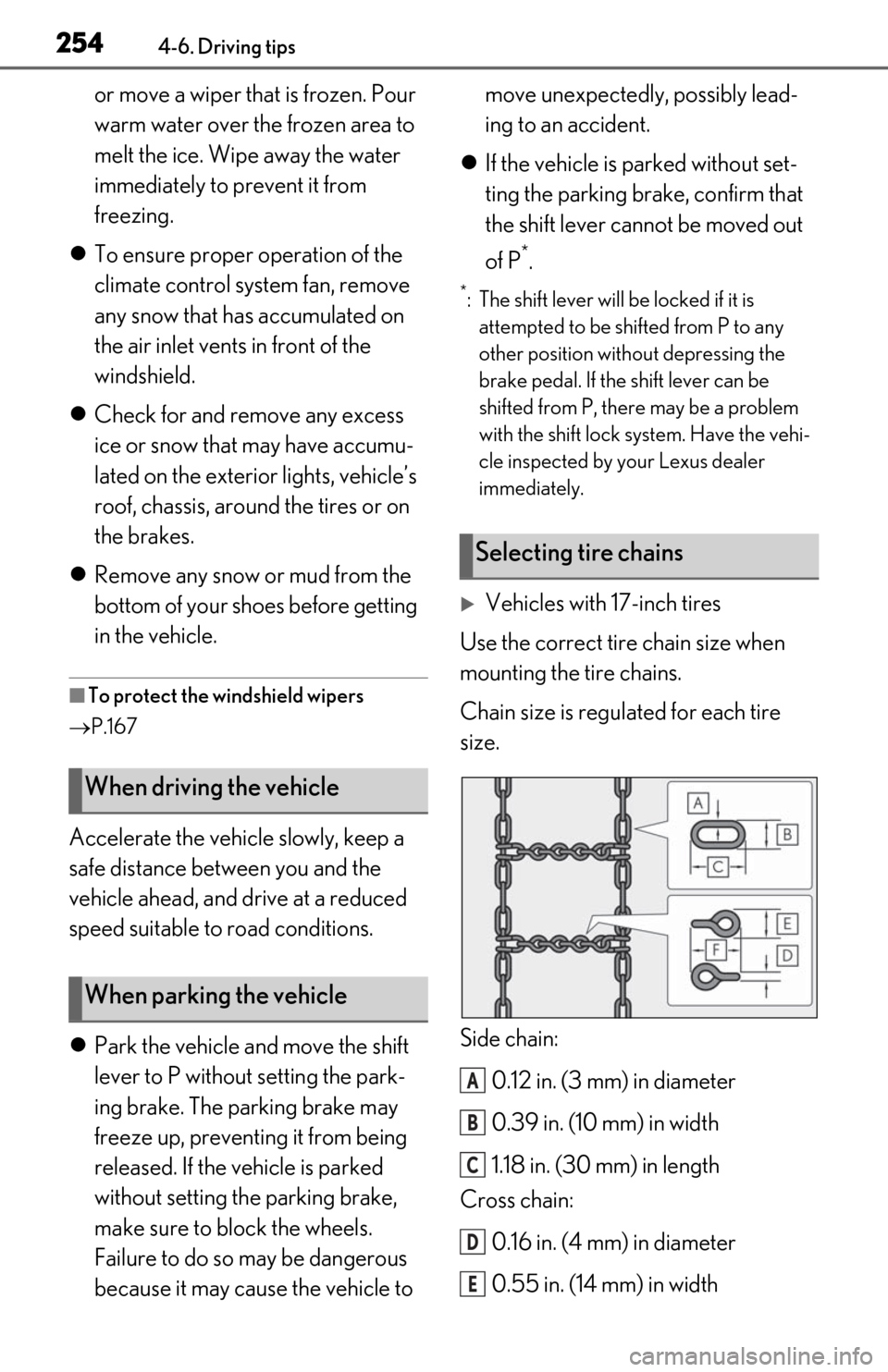
Vehicles with 17-inch tires
Use the correct tire chain size when
mounting the tire chains.
Chain size is regulated for each tire
size.
Side chain:
0.12 in. (3 mm) in diameter
0.39 in. (10 mm) in width
1.18 in. (30 mm) in length
Cross chain:
0.16 in. (4 mm) in diameter
0.55 in. (14 mm) in width
When driving the vehicle
When parking the vehicle
Selecting tire chains
A
B
C
D
E
Page 269 of 462

2675-3. Using the air conditioning system
5
Interior features
dirty air from entering the vehicle interior
and helping to cool the vehicle when the
outside air temperature is high.
●Outside/recirculated air mode may auto-
matically switch regardless of the air con-
ditioning setting depending on the
temperature setting or inside tempera-
ture.
■Registering air conditioning settings to
electronic keys
●Unlocking the vehicle using an electronic
key and turning the power switch to ON
mode will recall that key’s registered air
conditioning settings.
●When the power switch is turned off, the
current air conditioning settings will auto-
matically be registered to the electronic
key that was used to unlock the vehicle.
●The system may not operate correctly if
more than one electronic key is in the
vicinity or if the smart access system with
push-button start is used to unlock the
passenger door.
●Vehicles with the driving position mem-
ory: The doors that can recall the air con-
ditioning setting
* when unlocked using
the smart access system with push-but-
ton start can be changed. For details,
contact your Lexus dealer.
*: The doors that can recall the driving posi-
tion memory are changed at the same
time.
■Operation of the air conditioning sys-
tem in Eco drive mode
In Eco drive mode, the air conditioning sys-
tem is controlled as follows to prioritize fuel
efficiency:
●Engine speed and compressor operation
controlled to restri ct heating/cooling
capacity
●Fan speed restricted when automatic
mode is selected
To improve air conditioning performance,
perform the following operations:
●Turn off eco air conditioning mode
( P.267)
●Adjust the fan speed
●Turn off Eco drive mode ( P.212)
■When the outside temperature falls to
nearly 32°F (0°C)
The dehumidification function may not
operate even when “A/C” is selected.
■Ventilation and air conditioning odors
●To let fresh air in, set the air conditioning
system to the outside air mode.
●During use, various odors from inside and
outside the vehicle may enter into and
accumulate in the air conditioning sys-
tem. This may then cause odor to be
emitted from the vents.
●When parking, the system automatically
switches to fresh air intake mode to
encourage better air circulation through-
out the vehicle, helping to reduce odors
that occur when starting the vehicle.
■Using the voice command system
Air conditioning system can be operated
using voice commands. For details, refer to
the “NAVIGATION AND MULTIMEDIA
SYSTEM OWNER’S MANUAL”.
■Air conditioning filter
P.341
■Customization
Settings (e.g. A/C Auto switch operation)
can be changed.
(Customizable features P.418)
WARNING
■To prevent the windshield from fog-
ging up
Do not use the windshield defogger
switch during cool air operation in
extremely humid weather. The difference
between the temperature of the outside
air and that of the windshield can cause
the outer surface of the windshield to fog
up, blocking your vision.
Page 287 of 462
2855-6. Using the other interior features
5
Interior features
■The power outlet can be used when
The power switch is in ACCESSORY or
ON mode.
■When stopping the hybrid system
Disconnect electrical devices with charging
functions, such as mobile battery backs.
If such devices are left connected, the
hybrid system may not stop normally.
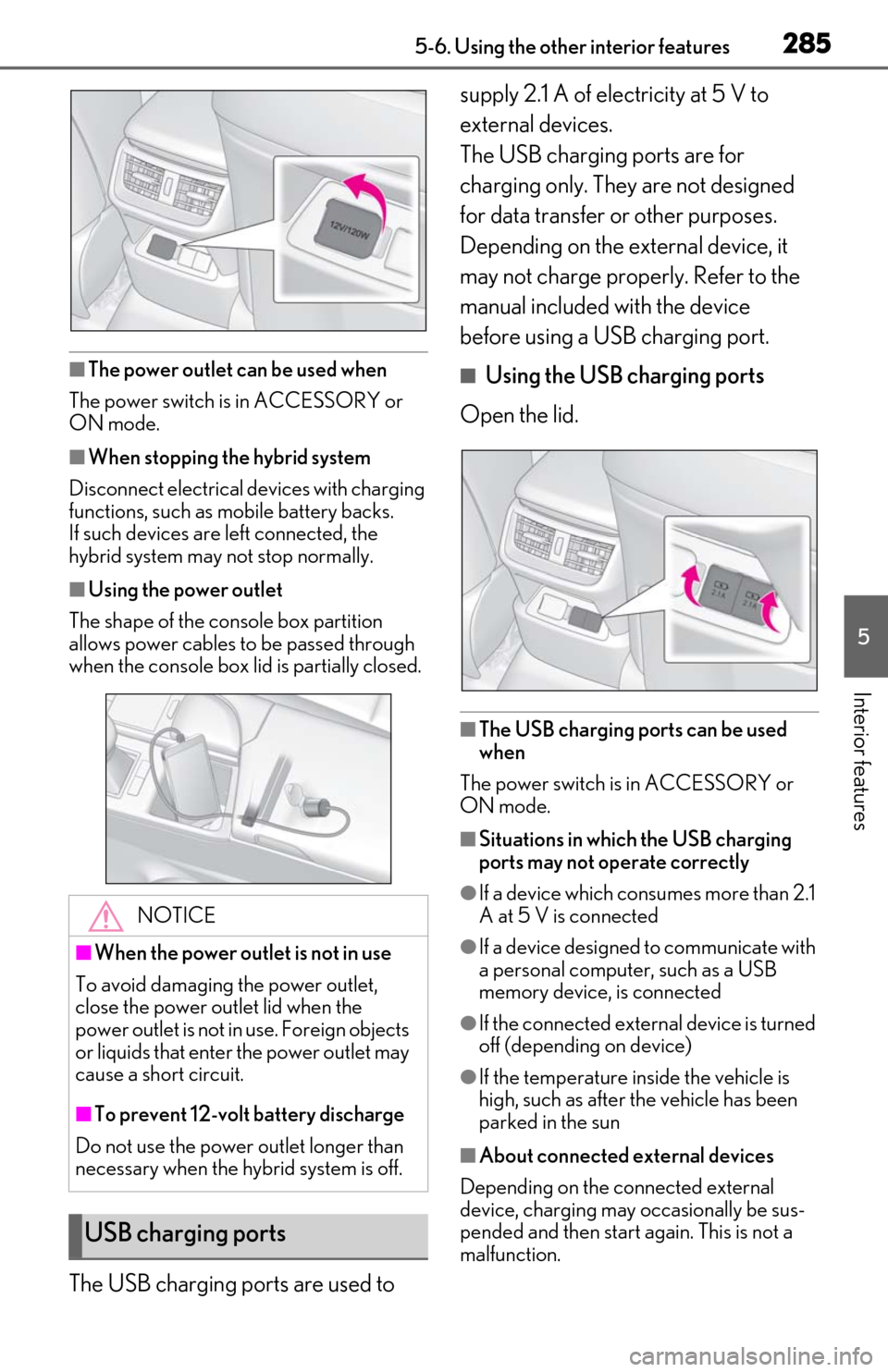
■Using the power outlet
The shape of the console box partition
allows power cables to be passed through
when the console box lid is partially closed.
The USB charging ports are used to supply 2.1 A of electricity at 5 V to
external devices.
The USB charging ports are for
charging only. They are not designed
for data transfer or other purposes.
Depending on the external device, it
may not charge properly. Refer to the
manual included with the device
before using a USB charging port.
■Using the USB charging ports
Open the lid.
■The USB charging ports can be used
when
The power switch is in ACCESSORY or
ON mode.
■Situations in whic h the USB charging
ports may not operate correctly
●If a device which consumes more than 2.1
A at 5 V is connected
●If a device designed to communicate with
a personal computer, such as a USB
memory device, is connected
●If the connected external device is turned
off (depending on device)
●If the temperature inside the vehicle is
high, such as after the vehicle has been
parked in the sun
■About connected external devices
Depending on the connected external
device, charging may occasionally be sus-
pended and then start again. This is not a
malfunction.
NOTICE
■When the power outlet is not in use
To avoid damaging the power outlet,
close the power outlet lid when the
power outlet is not in use. Foreign objects
or liquids that enter the power outlet may
cause a short circuit.
■To prevent 12-volt battery discharge
Do not use the power outlet longer than
necessary when the hy brid system is off.
USB charging ports
Page 304 of 462

3025-6. Using the other interior features
*: If equipped
To turn the compass on or off, press
and hold the button for more than 3
seconds.
Directions are displayed as follows:
■Conditions unfavorable to correct
operation
The compass may not show the correct
direction in the following conditions:
●The vehicle is stopped immediately after turning.
●The vehicle is on an inclined surface.
●The vehicle is in a place where the earth’s
magnetic field is subject to interference
by artificial magnetic fields (under-
ground car park/parking lot, under a
steel tower, between buildings, roof car
park/parking lot, near an intersection,
near a large vehicle, etc.).
●The vehicle has become magnetized.
(There is a magnet or
metal object near
the inside rear view mirror.)
●The battery has been disconnected.
●A door is open.
Compass*
The compass on the inside rear
view mirror indicates the direction
in which the vehicle is heading.
Operation and displays
DisplayDirection
“N”North
“NE”Northeast
“E”East
“SE”Southeast
“S”South
“SW”Southwest
“W”West
“NW”Northwest
WARNING
■While driving the vehicle
Do not adjust the display. Adjust the dis-
play only when the vehicle is stopped.
NOTICE
■To avoid the compass malfunctions
Do not place magnets or any metal
objects near the inside rear view mirror.
Doing this may cause the compass sen-
sor to malfunction.
■To ensure normal operation of the
compass
●Do not perform a circling calibration of
the compass in a place where the
earth’s magnetic field is subject to
interference by artificial magnetic
fields.
●During calibration, do not operate
electric systems (moon roof, power
windows, etc.) as they may interfere
with the calibration.
Page 308 of 462

3066-1. Maintenance and care
6-1.Maintenance and care
Working from top to bottom, liber-
ally apply water to the vehicle body,
wheel wells and underside of the
vehicle to remove any dirt and dust.
Wash the vehicle body using a
sponge or soft cloth, such as a
chamois.
For hard-to-remove marks, use car
wash soap and rinse thoroughly with
water.
Wipe away any water.
Wax the vehicle when the water-
proof coating deteriorates.
If water does not bead on a clean surface,
apply wax when the vehicle body is cool.
■Self-restoring coat
The vehicle body has a self-restoring coat-
ing that is resistant to small surface
scratches caused in a car wash etc.
●The coating lasts for 5 to 8 years from
when the vehicle is delivered from the
plant.
●The restoration time differs depending on
the depth of the scratch and outside tem-
perature.
The restoration time may become
shorter when the coating is warmed by
applying warm water.
●Deep scratches caused by keys, coins,
etc. cannot be restored.
●Do not use wax that contain abrasives.
■Automatic car washes
●Fold the mirrors befo re washing the vehi-
cle. Start washing from the front of the
vehicle. Make sure to extend the mirrors
before driving.
●Brushes used in automatic car washes
may scratch the vehicle body and dam-
age the paint.
●Rear spoiler may not be washable in
some automatic car washes. There may
also be an increased risk of damage to
vehicle.
■High pressure car washes
As water may enter the cabin, do not bring
the nozzle tip near the gaps around the
doors or perimeter of windows, or spray
these areas continuously.
■Notes for the smart access system with
push-button start
If the door handle becomes wet while the
electronic key is within the effective range,
the door may lock and unlock repeatedly. In
that case, follow the following correction
procedures to wash the vehicle:
●Place the key in a position 6 ft. (2 m) or
more separate from the vehicle while the
vehicle is being wash ed. (Take care to
ensure that the key is not stolen.)
●Set the electronic key to battery-saving
mode to disable the smart access system
with push-button start. ( P.111)
■Aluminum wheels
●Remove any dirt immediately by using a
neutral detergent.
●Wash detergent off with water immedi-
ately after use.
●To protect the paint from damage, make
sure to observe the following precau-
tions.
• Do not use acidic, alkaline or abrasive
detergent
• Do not use hard brushes
• Do not use detergent on the wheels when they are hot, such as after driving or park-
ing in hot weather
■Bumpers
Do not scrub with abrasive cleaners.
Cleaning and protecting the
vehicle exterior
Perform cleaning in a manner
appropriate to each component
and its material.
Cleaning instructions
Page 312 of 462
3106-1. Maintenance and care
Remove dirt using a water-damp-
ened soft cloth or synthetic chamois.
Wipe the surface with a dry soft
cloth to remove any remaining
moisture.
■Cleaning the areas with satin-finish
metal accents
The metal areas use a layer of real metal for
the surface. It is necessary to clean them
regularly. If dirty area s are left uncleaned for
long periods of time, they may be difficult to
clean.
Remove dirt and dust using a vac-
uum cleaner.
Wipe off any excess dirt and dust
with a soft cloth dampened with
diluted detergent.
Use a diluted water solution of approxi-
mately 5% neutral wool detergent.
Wring out any excess water from
the cloth and thoroughly wipe off all
remaining traces of detergent.
Wipe the surface with a dry soft
cloth to remove any remaining
moisture. Allow the leather to dry in
a shaded and ventilated area.
■Caring for leather areas
Lexus recommends cleani ng the interior of
the vehicle at least twice a year to maintain
the quality of the vehicle’s interior.
NOTICE
■Preventing damage to leather sur-
faces
Observe the following precautions to
avoid damage to and deterioration of
leather surfaces:
●Remove any dust or dirt from leather
surfaces immediately.
●Do not expose the vehicle to direct
sunlight for extended periods of time.
Park the vehicle in the shade, espe-
cially during summer.
●Do not place items made of vinyl, plas-
tic, or containing wax on the uphol-
stery, as they may stick to the leather
surface if the vehicle interior heats up
significantly.
■Water on the floor
Do not wash the vehicle floor with water.
Vehicle systems such as the audio system
may be damaged if water comes into
contact with electrical components such
as the audio system above or under the
floor of the vehicle. Water may also
cause the body to rust.
■When cleaning the inside of the wind-
shield
Do not allow glass cleaner to contact the
lens. Also, do not touch the lens.
( P.172)
■Cleaning the inside of the rear win-
dow
●Do not use glass cleaner to clean the
rear window, as this may cause dam-
age to the rear window defogger
heater wires or antenna. Use a cloth
dampened with lukewarm water to
gently wipe the window clean. Wipe
the window in strokes running parallel
to the heater wires or antenna.
●Be careful not to scratch or damage
the heater wires or antenna.
Cleaning the areas with satin-fin-
ish metal accents
Cleaning the leather areas
Page 316 of 462
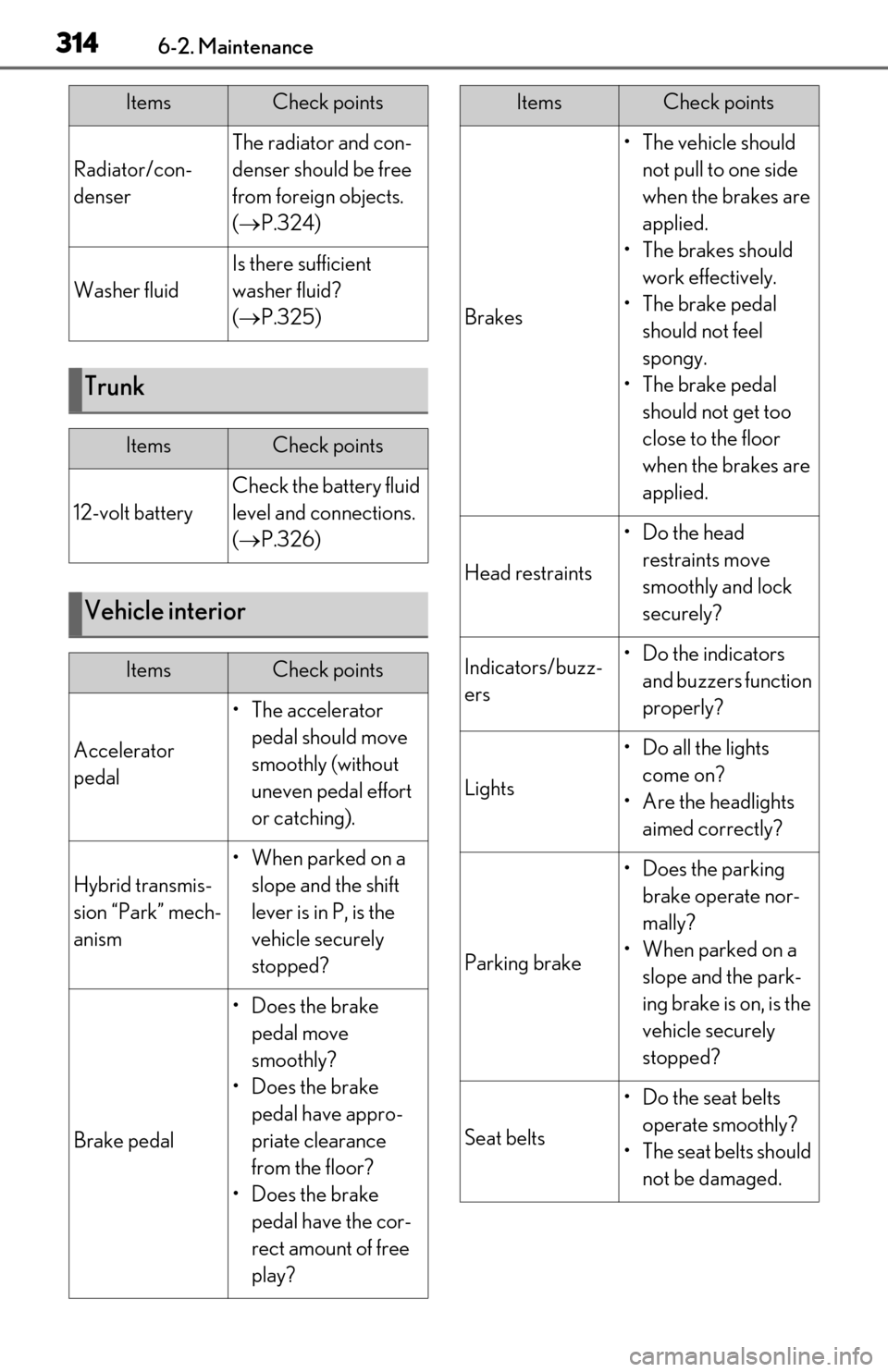
3146-2. Maintenance
Radiator/con-
denser
The radiator and con-
denser should be free
from foreign objects.
( P.324)
Washer fluid
Is there sufficient
washer fluid?
( P.325)
Trunk
ItemsCheck points
12-volt battery
Check the battery fluid
level and connections.
( P.326)
Vehicle interior
ItemsCheck points
Accelerator
pedal
• The accelerator
pedal should move
smoothly (without
uneven pedal effort
or catching).
Hybrid transmis-
sion “Park” mech-
anism
•When parked on a slope and the shift
lever is in P, is the
vehicle securely
stopped?
Brake pedal
•Does the brake pedal move
smoothly?
•Does the brake pedal have appro-
priate clearance
from the floor?
•Does the brake pedal have the cor-
rect amount of free
play?
ItemsCheck points
Brakes
•The vehicle should not pull to one side
when the brakes are
applied.
• The brakes should work effectively.
• The brake pedal should not feel
spongy.
• The brake pedal should not get too
close to the floor
when the brakes are
applied.
Head restraints
•Do the head restraints move
smoothly and lock
securely?
Indicators/buzz-
ers•Do the indicators and buzzers function
properly?
Lights
• Do all the lights come on?
• Are the headlights aimed correctly?
Parking brake
• Does the parking brake operate nor-
mally?
• When parked on a slope and the park-
ing brake is on, is the
vehicle securely
stopped?
Seat belts
• Do the seat belts operate smoothly?
• The seat belts should not be damaged.
ItemsCheck points
Page 317 of 462

3156-2. Maintenance
6
Maintenance and care
Seats• Do the seat controls operate properly?
Steering wheel
• Does the steering wheel rotate
smoothly?
• Does the steering wheel have the cor-
rect amount of free
play?
•There should not be any strange sounds
coming from the
steering wheel.
Vehicle exterior
ItemsCheck points
Doors/trunk• Do the doors/trunk operate smoothly?
Engine hood
•Does the engine hood lock system
work properly?
Fluid leaks
•There should not be any signs of fluid
leakage after the
vehicle has been
parked.
ItemsCheck points
Tires
• Is the tire inflation pressure correct?
• The tires should not be damaged or
excessively worn.
• Have the tires been rotated according to
the maintenance
schedule?
• The wheel nuts should not be loose.
Windshield wip-
ers
• The wiper blades should not show any
signs of cracking,
splitting, wear, con-
tamination or defor-
mation.
• The wiper blades should clear the
windshield without
streaking or skip-
ping.
ItemsCheck points