lock LEXUS ES300h 2021 Owners Manual
[x] Cancel search | Manufacturer: LEXUS, Model Year: 2021, Model line: ES300h, Model: LEXUS ES300h 2021Pages: 464, PDF Size: 9.55 MB
Page 393 of 464

3937-2. Steps to take in an emergency
7
When trouble arises
6Open and close any of the doors of
your vehicle with the power switch
off.
7 Maintain the engine speed of the
second vehicle and start the hybrid
system of your vehicle by turning
the power switch to ON mode.
8 Make sure the “READY” indicator
comes on. If the indicator does not
come on, contact your Lexus
dealer.
9 Once the vehicle’s hybrid system
has started, remove the jumper
cables in the exact reverse order
from which they were connected.
10 Close the exclusive jump starting
terminal cover, and reinstall the
fuse box cover to its original posi-
tion.
Once the hybrid system starts, have the
vehicle inspected at your Lexus dealer as
soon as possible.
■Starting the hybrid system when the 12-
volt battery is discharged
The hybrid system cannot be started by
push-starting.
■To prevent 12-volt battery discharge
●Turn off the headlights and the audio sys-
tem while the hybrid system is stopped.
●Turn off any unnecessary electrical com-
ponents when the vehicle is running at a
low speed for an extended period, such
as in heavy traffic.
■When the 12-volt battery is removed or
discharged
●Information stored in the ECU is cleared.
When the 12-volt battery is depleted,
have the vehicle inspected at your Lexus
dealer.
●Some systems may require initialization.
( P.431)
■When removing the 12-volt battery ter-
minals
When the 12-volt battery terminals are
removed, the information stored in the
ECU is cleared. Before removing the 12-
volt battery terminals, contact your Lexus
dealer.
■Charging the 12-volt battery
The electricity stored in the 12-volt battery
will discharge gradually even when the
vehicle is not in use, due to natural dis-
charge and the draining effects of certain
electrical appliances. If the vehicle is left for
a long time, the 12-volt battery may dis-
charge, and the hybrid system may be
unable to start. (The 12-volt battery
recharges automatically while the hybrid
system is operating.)
■When recharging or replacing the 12-
volt battery
●In some cases, it may not be possible to
unlock the doors using the smart access
system with push-button start when the
12-volt battery is discharged. Use the
wireless remote control or the mechani-
cal key to lock or unlock the doors.
●The hybrid system may not start on the
first attempt after the 12-volt battery has
recharged but will start normally after the
second attempt. This is not a malfunction.
●The power switch mode is memorized by
the vehicle. When the 12-volt battery is
reconnected, the system will return to the
mode it was in before the 12-volt battery
was discharged. Before disconnecting
the 12-volt battery, turn the power switch
off.
If you are unsure what mode the power
switch was in before the 12-volt battery
discharged, be especially careful when
reconnecting the 12-volt battery.
■When replacing the 12-volt battery
●Use a 12-volt battery that conforms to
European regulations.
●Use a 12-volt battery that the case size is
same as the previous one (LN2), 20 hour
rate capacity (20HR) is equivalent
(60Ah) or greater, and performance rat-
ing (CCA) is equivalent (345A) or
greater.
Page 421 of 464
4218-2. Customization
8
Vehicle specifications
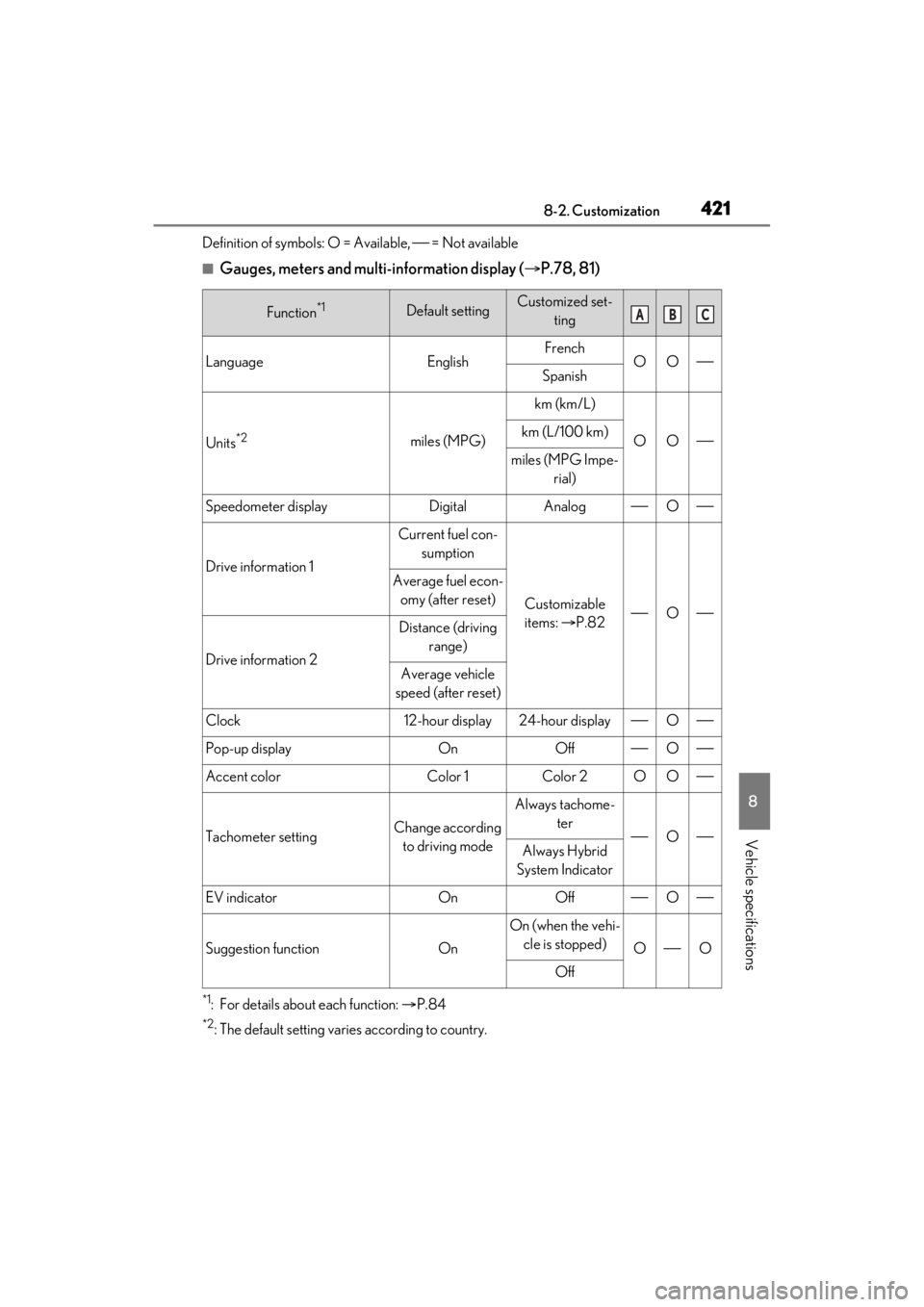
Definition of symbols: O = Available, = Not available
■Gauges, meters and multi-information display (P.78, 81)
*1: For details about each function: P.84
*2: The default setting varies according to country.
Function*1Default settingCustomized set-
ting
LanguageEnglishFrenchOOSpanish
Units*2miles (MPG)
km (km/L)
OOkm (L/100 km)
miles (MPG Impe- rial)
Speedometer displayDigitalAnalogO
Drive information 1
Current fuel con-sumption
Customizable
items: P.82O
Average fuel econ-omy (after reset)
Drive information 2
Distance (driving range)
Average vehicle
speed (after reset)
Clock12-hour display24-hour displayO
Pop-up displayOnOffO
Accent colorColor 1Color 2OO
Tachometer settingChange according to driving mode
Always tachome- ter
OAlways Hybrid
System Indicator
EV indicatorOnOffO
Suggestion functionOn
On (when the vehi- cle is stopped)
OO
Off
ABC
Page 422 of 464
4228-2. Customization
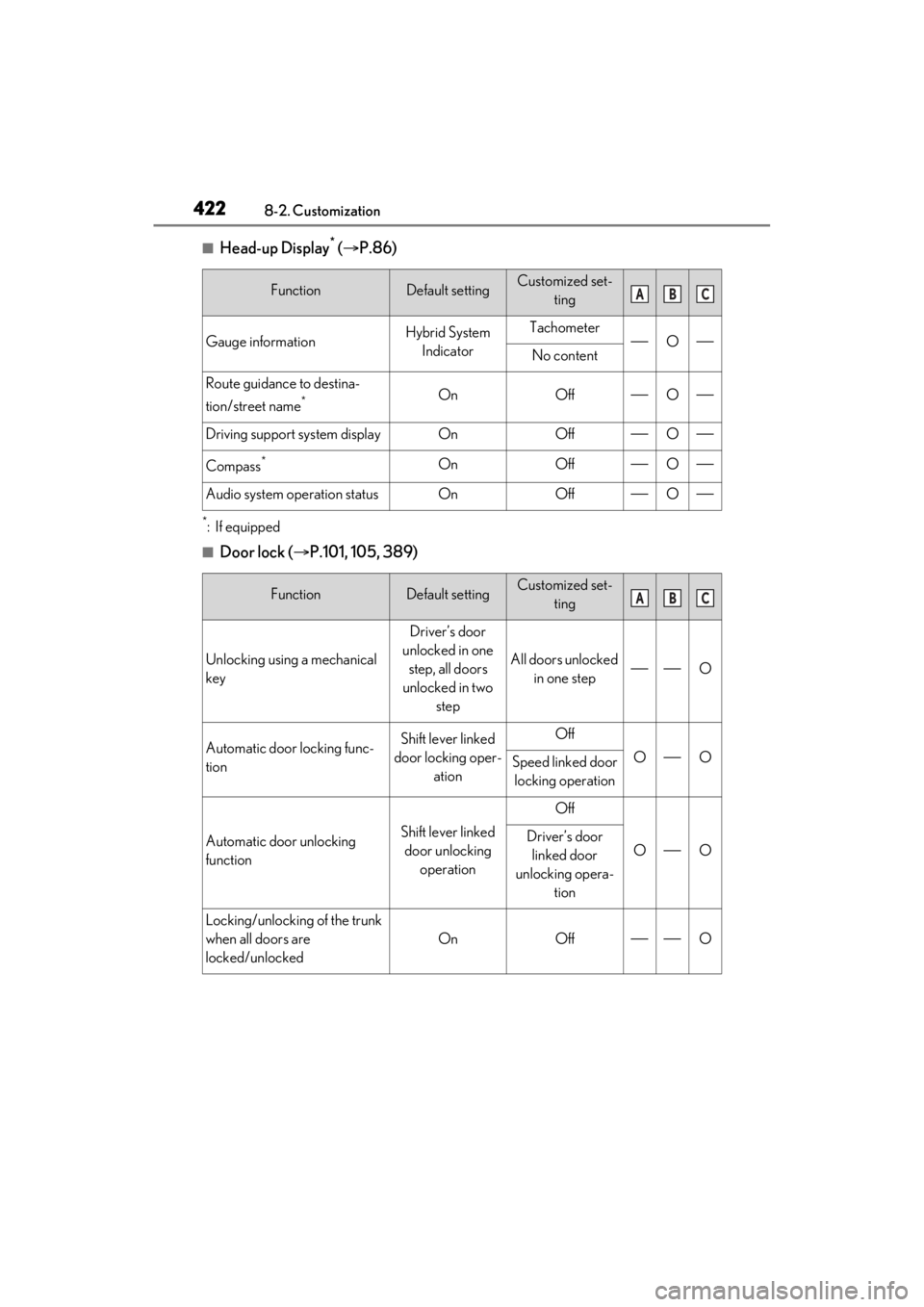
■Head-up Display* ( P.86)
*:If equipped
■Door lock ( P.101, 105, 389)
FunctionDefault settingCustomized set-
ting
Gauge informationHybrid System IndicatorTachometerONo content
Route guidance to destina-
tion/street name
*OnOffO
Driving support system displayOnOffO
Compass*OnOffO
Audio system operation statusOnOffO
FunctionDefault settingCustomized set- ting
Unlocking using a mechanical
key
Driver’s door
unlocked in one step, all doors
unlocked in two step
All doors unlocked in one stepO
Automatic door locking func-
tionShift lever linked
door locking oper- ationOff
OOSpeed linked door locking operation
Automatic door unlocking
functionShift lever linked door unlocking operation
Off
OODriver’s door linked door
unlocking opera- tion
Locking/unlocking of the trunk
when all doors are
locked/unlocked
OnOffO
ABC
ABC
Page 423 of 464
4238-2. Customization
8
Vehicle specifications
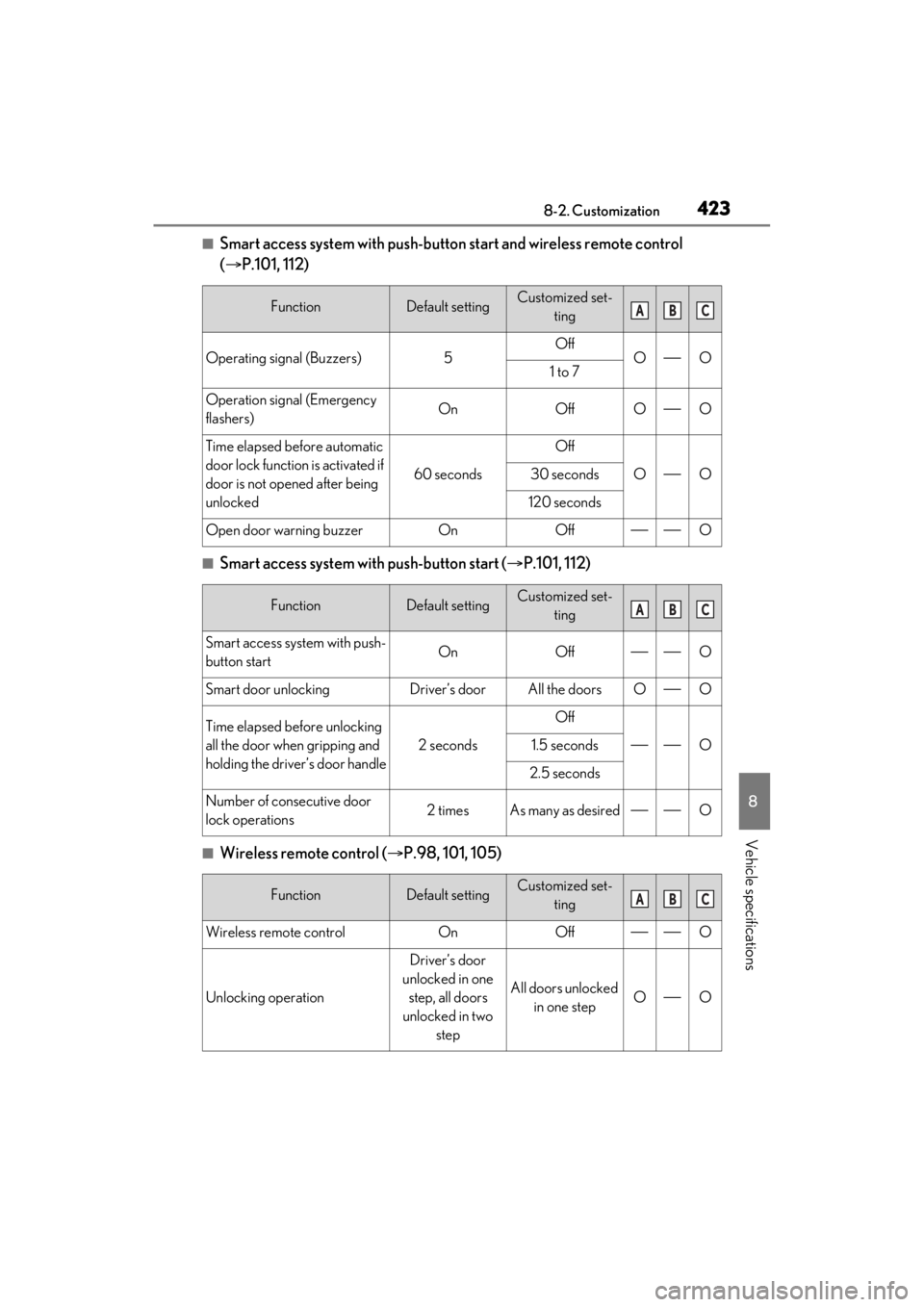
■Smart access system with push-button start and wireless remote control
( P.101, 112)
■Smart access system with push-button start ( P.101, 112)
■Wireless remote control ( P.98, 101, 105)
FunctionDefault settingCustomized set-
ting
Operating signal (Buzzers)5OffOO1 to 7
Operation signal (Emergency
flashers)OnOffOO
Time elapsed before automatic
door lock function is activated if
door is not opened after being
unlocked
60 seconds
Off
OO30 seconds
120 seconds
Open door warning buzzerOnOffO
FunctionDefault settingCustomized set-ting
Smart access system with push-
button startOnOffO
Smart door unlockingDriver’s doorAll the doorsOO
Time elapsed before unlocking
all the door when gripping and
holding the driver’s door handle
2 seconds
Off
O1.5 seconds
2.5 seconds
Number of consecutive door
lock operations2 timesAs many as desiredO
FunctionDefault settingCustomized set-ting
Wireless remote controlOnOffO
Unlocking operation
Driver’s door
unlocked in one step, all doors
unlocked in two step
All doors unlocked in one stepOO
ABC
ABC
ABC
Page 424 of 464
4248-2. Customization
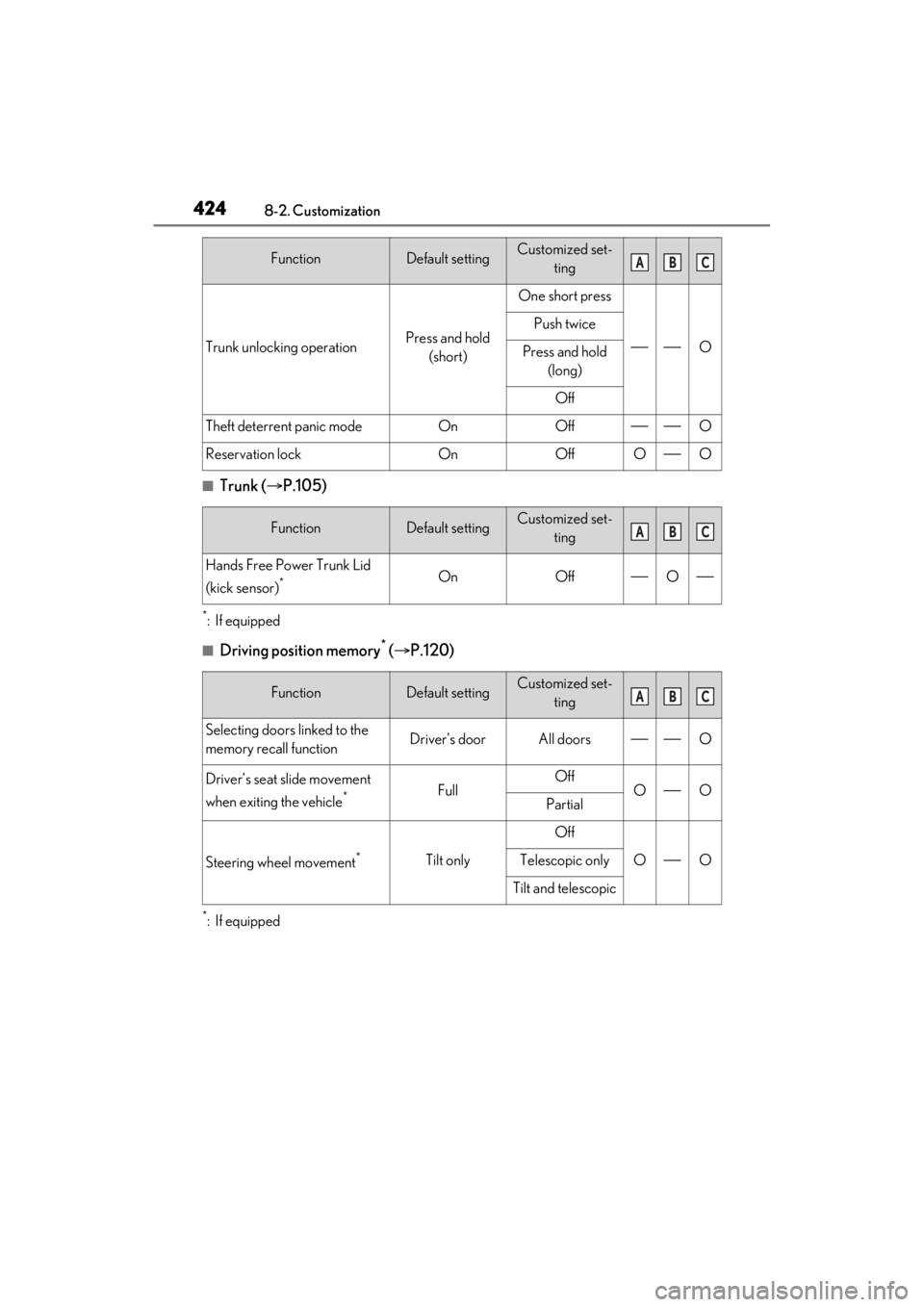
■Trunk (P.105)
*:If equipped
■Driving position memory* ( P.120)
*:If equipped
Trunk unlocking operationPress and hold
(short)
One short press
O
Push twice
Press and hold (long)
Off
Theft deterrent panic modeOnOffO
Reservation lockOnOffOO
FunctionDefault settingCustomized set- ting
Hands Free Power Trunk Lid
(kick sensor)
*OnOffO
FunctionDefault settingCustomized set-ting
Selecting doors linked to the
memory recall functionDriver’s doorAll doorsO
Driver’s seat slide movement
when exiting the vehicle
*FullOffOOPartial
Steering wheel movement*Tilt only
Off
OOTelescopic only
Tilt and telescopic
FunctionDefault settingCustomized set-tingABC
ABC
ABC
Page 425 of 464
4258-2. Customization
8
Vehicle specifications
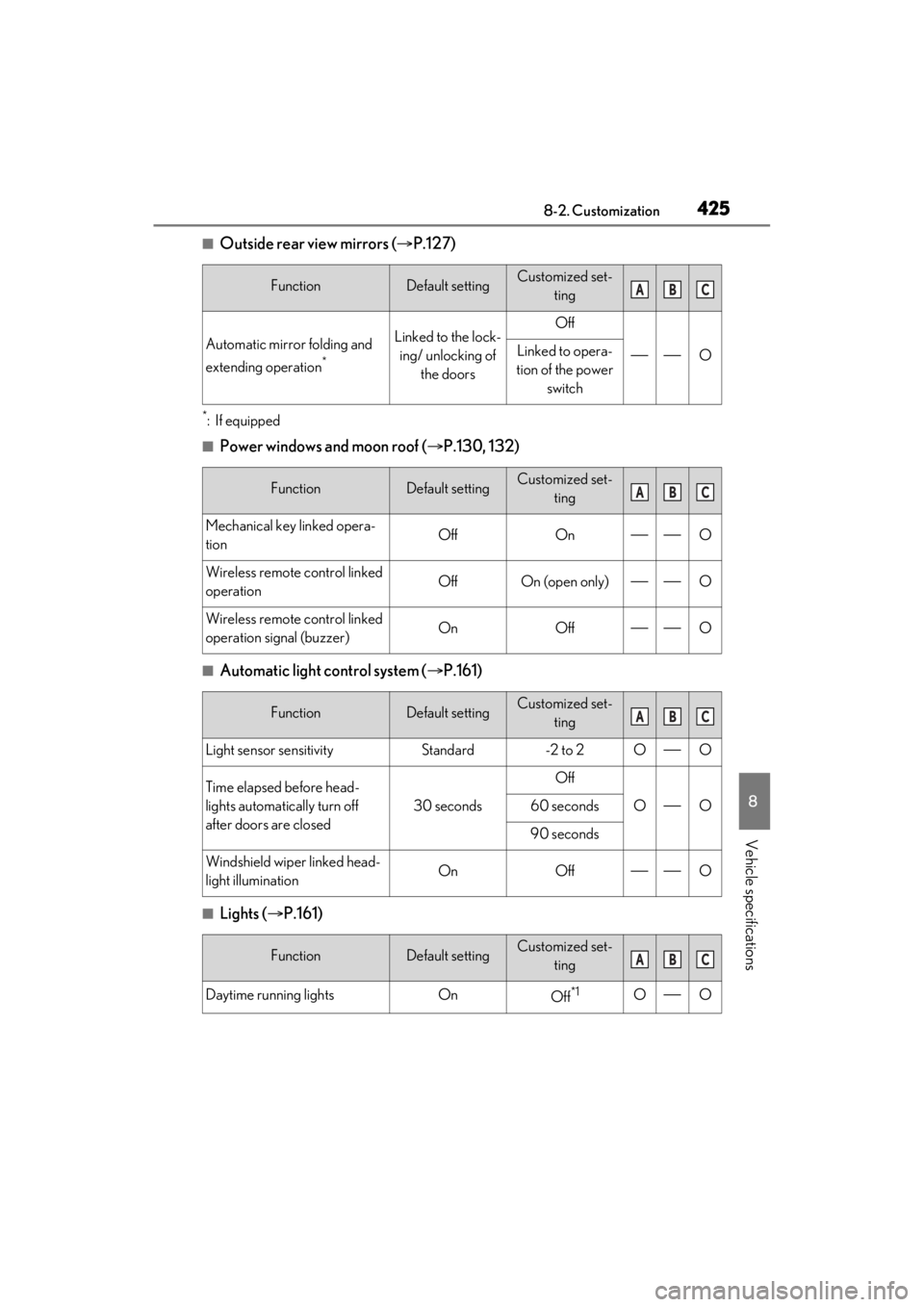
■Outside rear view mirrors (P.127)
*:If equipped
■Power windows and moon roof ( P.130, 132)
■Automatic light control system ( P.161)
■Lights ( P.161)
FunctionDefault settingCustomized set-
ting
Automatic mirror folding and
extending operation
*
Linked to the lock-ing/ unlocking of the doorsOff
OLinked to opera-
tion of the power switch
FunctionDefault settingCustomized set- ting
Mechanical key linked opera-
tionOffOnO
Wireless remote control linked
operationOffOn (open only)O
Wireless remote control linked
operation signal (buzzer)OnOffO
FunctionDefault settingCustomized set-ting
Light sensor sensitivityStandard-2 to 2OO
Time elapsed before head-
lights automatically turn off
after doors are closed
30 seconds
Off
OO60 seconds
90 seconds
Windshield wiper linked head-
light illuminationOnOffO
FunctionDefault settingCustomized set-ting
Daytime running lightsOnOff*1OO
ABC
ABC
ABC
ABC
Page 429 of 464
4298-2. Customization
8
Vehicle specifications
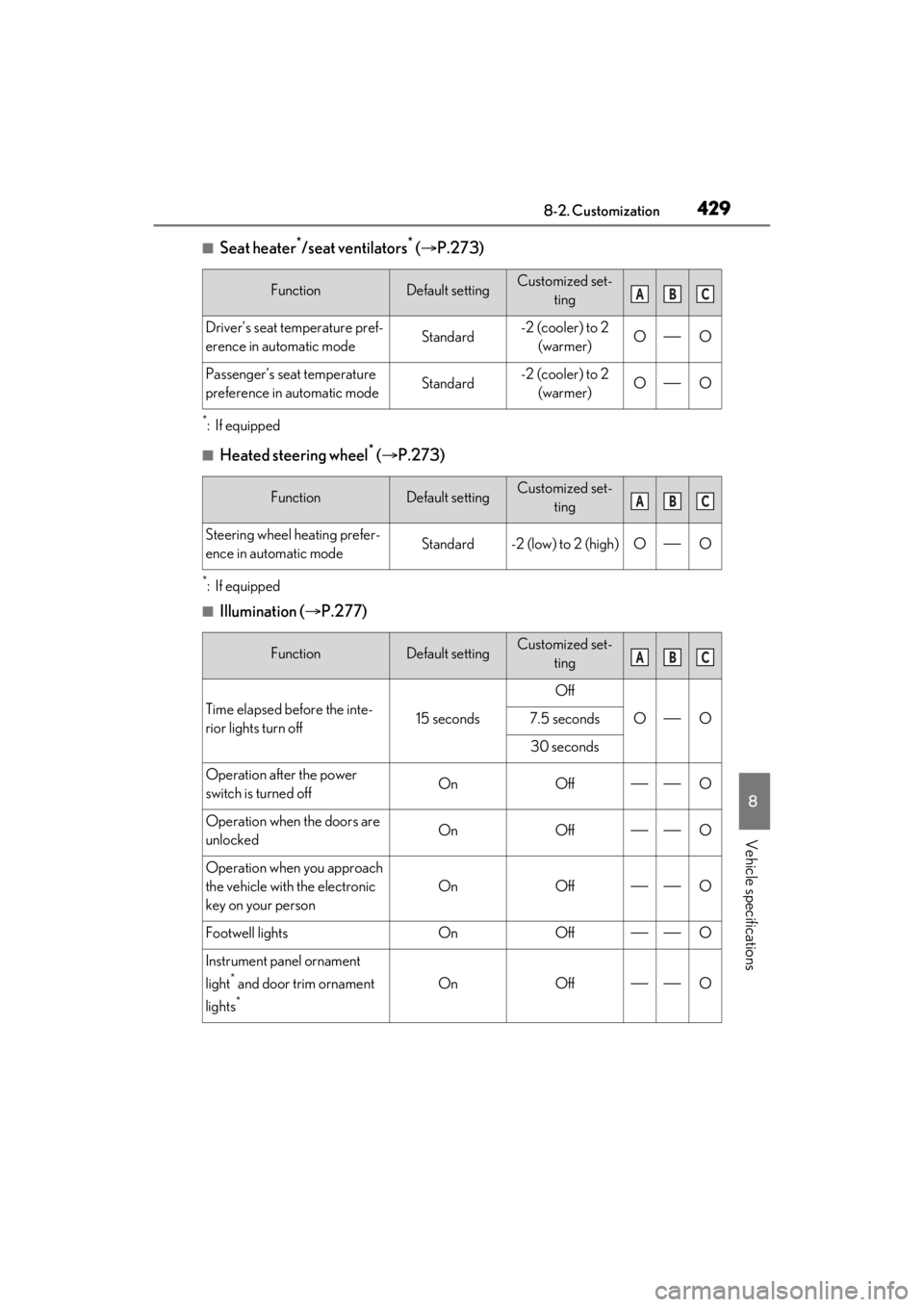
■Seat heater*/seat ventilators* ( P.273)
*:If equipped
■Heated steering wheel* ( P.273)
*:If equipped
■Illumination ( P.277)
FunctionDefault settingCustomized set-
ting
Driver’s seat temperature pref-
erence in automatic modeStandard-2 (cooler) to 2 (warmer)OO
Passenger’s seat temperature
preference in automatic modeStandard-2 (cooler) to 2 (warmer)OO
FunctionDefault settingCustomized set- ting
Steering wheel heating prefer-
ence in automatic modeStandard-2 (low) to 2 (high)OO
FunctionDefault settingCustomized set-ting
Time elapsed before the inte-
rior lights turn off15 seconds
Off
OO7.5 seconds
30 seconds
Operation after the power
switch is turned offOnOffO
Operation when the doors are
unlockedOnOffO
Operation when you approach
the vehicle with the electronic
key on your person
OnOffO
Footwell lightsOnOffO
Instrument panel ornament
light
* and door trim ornament
lights
*
OnOffO
ABC
ABC
ABC
Page 430 of 464
4308-2. Customization
*:If equipped
■Vehicle customization
●When the smart access system with
push-button start is off, the entry unlock
function cannot be customized.
●When the doors remain closed after
unlocking the doors and the timer acti-
vated automatic door lock function acti-
vates, signals will be generated in
accordance with the operation buzzer
volume and operational signal (Emer-
gency flashers) function settings.
●Some settings can be changed using a
switch or the Center Display. If a setting
is changed using a switch, the changed
setting will not be refl ected on the Center
Display until the power switch is turned
off and then to ON mode.
■Clock settings screen
If the clock adjustment screen is displayed
continuously when attempting to change
the clock settings, the system may be mal-
functioning. Have the vehicle inspected by
your Lexus dealer.
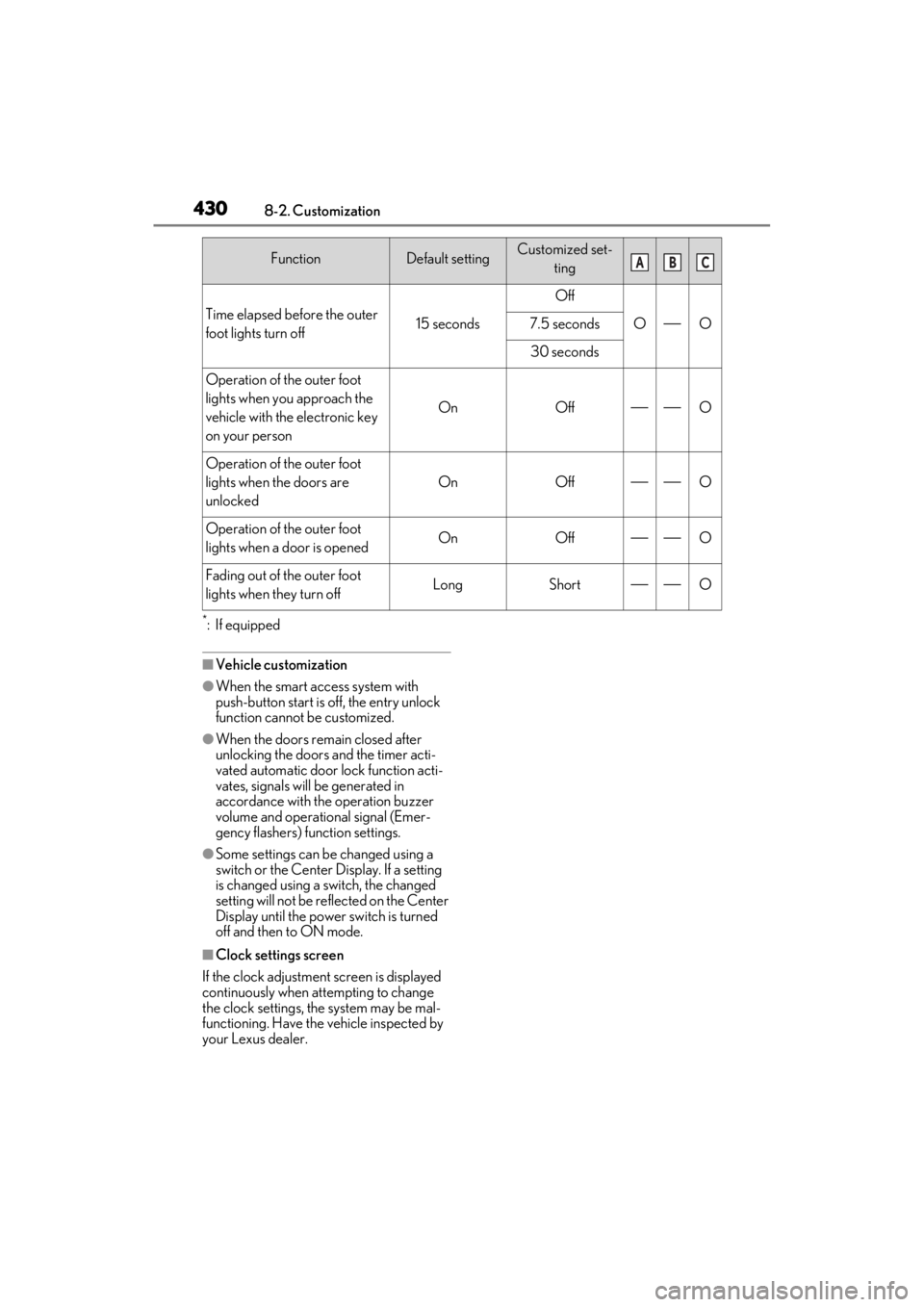
Time elapsed before the outer
foot lights turn off15 seconds
Off
OO7.5 seconds
30 seconds
Operation of the outer foot
lights when you approach the
vehicle with the electronic key
on your person
OnOffO
Operation of the outer foot
lights when the doors are
unlocked
OnOffO
Operation of the outer foot
lights when a door is openedOnOffO
Fading out of the outer foot
lights when they turn offLongShortO
FunctionDefault settingCustomized set-
tingABC
Page 446 of 464
446What to do if... (Troubleshooting)
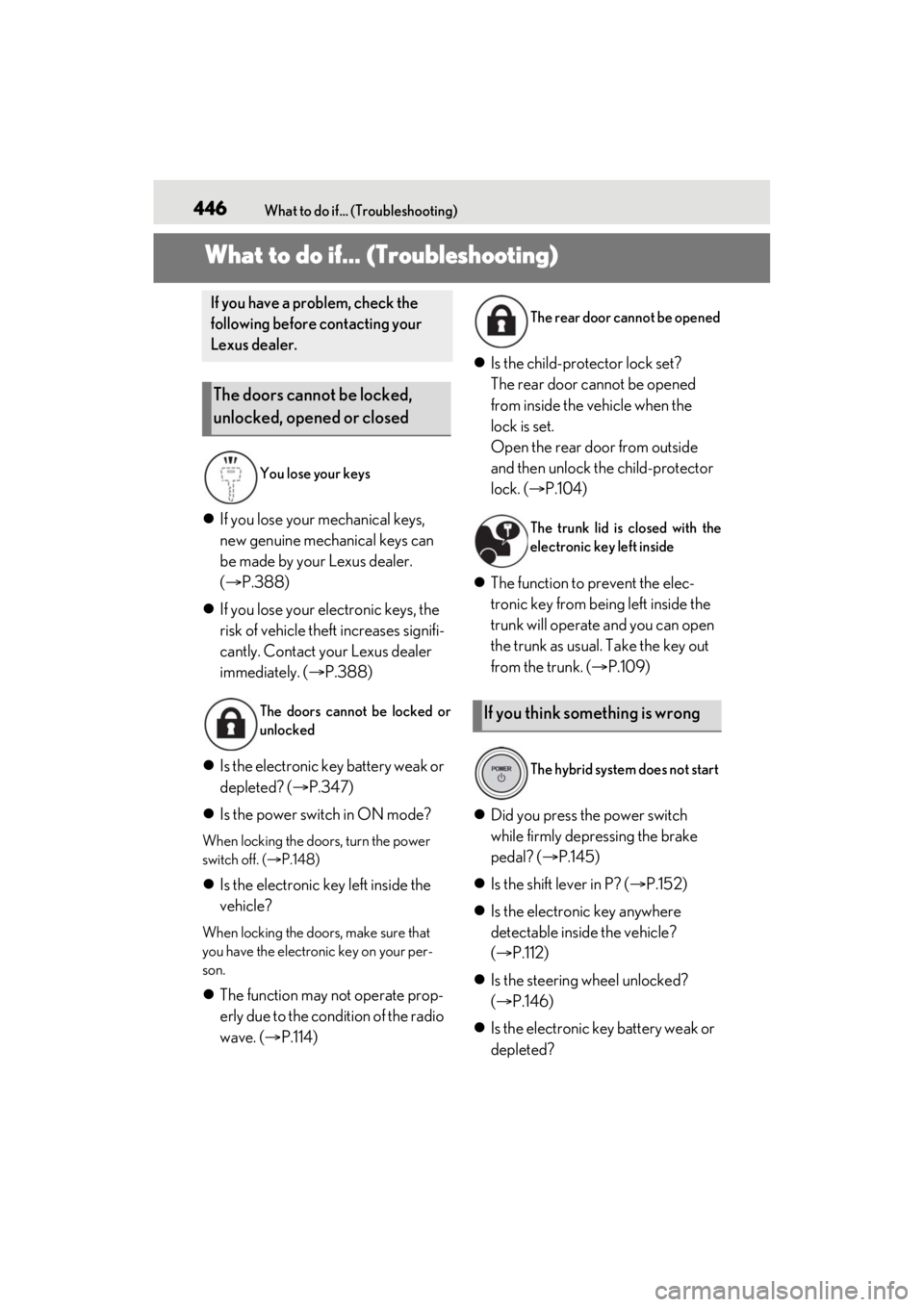
1-1.What to do if... (Troubleshooting)What to do if... (Troubleshooting)
If you lose your mechanical keys,
new genuine mechanical keys can
be made by your Lexus dealer.
( P.388)
If you lose your electronic keys, the
risk of vehicle theft increases signifi-
cantly. Contact your Lexus dealer
immediately. ( P.388)
Is the electronic key battery weak or
depleted? ( P.347)
Is the power switch in ON mode?
When locking the doors, turn the power
switch off. ( P.148)
Is the electronic key left inside the
vehicle?
When locking the doors, make sure that
you have the electronic key on your per-
son.
The function may not operate prop-
erly due to the condition of the radio
wave. ( P.114)
Is the child-protector lock set?
The rear door cannot be opened
from inside the vehicle when the
lock is set.
Open the rear door from outside
and then unlock the child-protector
lock. ( P.104)
The function to prevent the elec-
tronic key from being left inside the
trunk will operate and you can open
the trunk as usual. Take the key out
from the trunk. ( P.109)
Did you press the power switch
while firmly depressing the brake
pedal? ( P.145)
Is the shift lever in P? ( P.152)
Is the electronic key anywhere
detectable inside the vehicle?
( P.112)
Is the steering wheel unlocked?
( P.146)
Is the electronic key battery weak or
depleted?
If you have a problem, check the
following before contacting your
Lexus dealer.
The doors cannot be locked,
unlocked, opened or closed
You lose your keys
The doors cannot be locked or
unlocked
The rear door cannot be opened
The trunk lid is closed with the
electronic key left inside
If you think something is wrong
The hybrid system does not start
Page 447 of 464

447What to do if... (Troubleshooting)
In this case, the hybrid system can be
started in a temporary way. ( P.390)
Is the 12-volt battery discharged?
( P.391)
Is the power switch in ON mode?
If you cannot release the shift lever
by depressing the brake pedal with
the power switch in ON mode
( P.153)
It is locked automatically to prevent
theft of the vehicle. ( P.146)
Is the window lock switch pressed?
The power window except for the one at
the driver’s seat cannot be operated if the
window lock switch is pressed. ( P.131)
The auto power off function will be
operated if the vehicle is left in
ACCESSORY or ON mode
(hybrid system is not operating) for
a period of time. ( P.149)
The seat belt reminder light is flash-
ing
Are the driver and the passengers wearing
the seat belts? ( P.368)
The parking brake indicator is on
Is the parking brake released? ( P.157)
Depending on the situation, other
types of warning buzzer may also
sound. ( P.365, 375)
Did anyone inside the vehicle open
a door during setting the alarm?
The sensor detects it and the alarm sounds.
( P.71)
To stop the alarm, turn the power
switch to ON mode, or start the hybrid
system.
Is the message displayed on the
multi-information display?
Check the message on the multi-informa-
tion display. ( P.375)
When a warning light turns on or a
warning message is displayed, refer
to P.365, 375.
The shift lever cannot be shifted
from P even if you depress the
brake pedal
The steering wheel cannot be
turned after the hybrid system is
stopped
The windows do not open or
close by operating the power
window switches
The power switch is turned off
automatically
A warning buzzer sounds during
driving
An alarm is activated and the
horn sounds
A warning buzzer sounds when
leaving the vehicle
A warning light turns on or a
warning message is displayed