horn LEXUS ES300h 2021 Owners Manual
[x] Cancel search | Manufacturer: LEXUS, Model Year: 2021, Model line: ES300h, Model: LEXUS ES300h 2021Pages: 464, PDF Size: 9.55 MB
Page 125 of 464
1253-4. Adjusting the steering wheel and mirrors
3
Before driving
3-4.Adjusting the steering wheel and mirrors
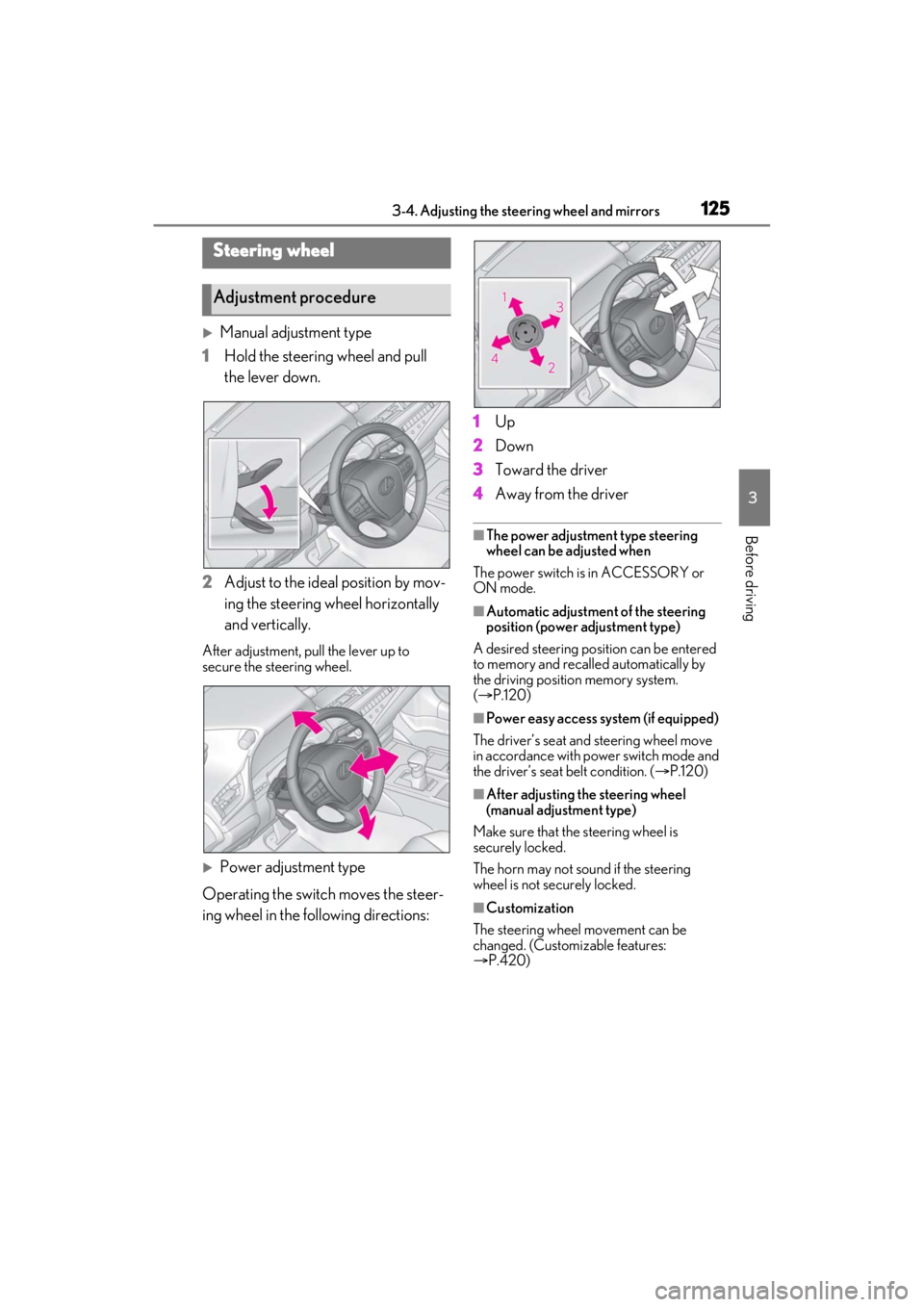
Manual adjustment type
1 Hold the steering wheel and pull
the lever down.
2 Adjust to the ideal position by mov-
ing the steering wheel horizontally
and vertically.
After adjustment, pull the lever up to
secure the steering wheel.
Power adjustment type
Operating the switch moves the steer-
ing wheel in the following directions: 1
Up
2 Down
3 Toward the driver
4 Away from the driver
■The power adjustment type steering
wheel can be adjusted when
The power switch is in ACCESSORY or
ON mode.
■Automatic adjustment of the steering
position (power adjustment type)
A desired steering posi tion can be entered
to memory and recalled automatically by
the driving position memory system.
( P.120)
■Power easy access system (if equipped)
The driver’s seat and steering wheel move
in accordance with power switch mode and
the driver’s seat belt condition. ( P.120)
■After adjusting the steering wheel
(manual adjustment type)
Make sure that the steering wheel is
securely locked.
The horn may not sound if the steering
wheel is not securely locked.
■Customization
The steering wheel movement can be
changed. (Customizable features:
P.420)
Steering wheel
Adjustment procedure
Page 126 of 464
1263-4. Adjusting the steering wheel and mirrors
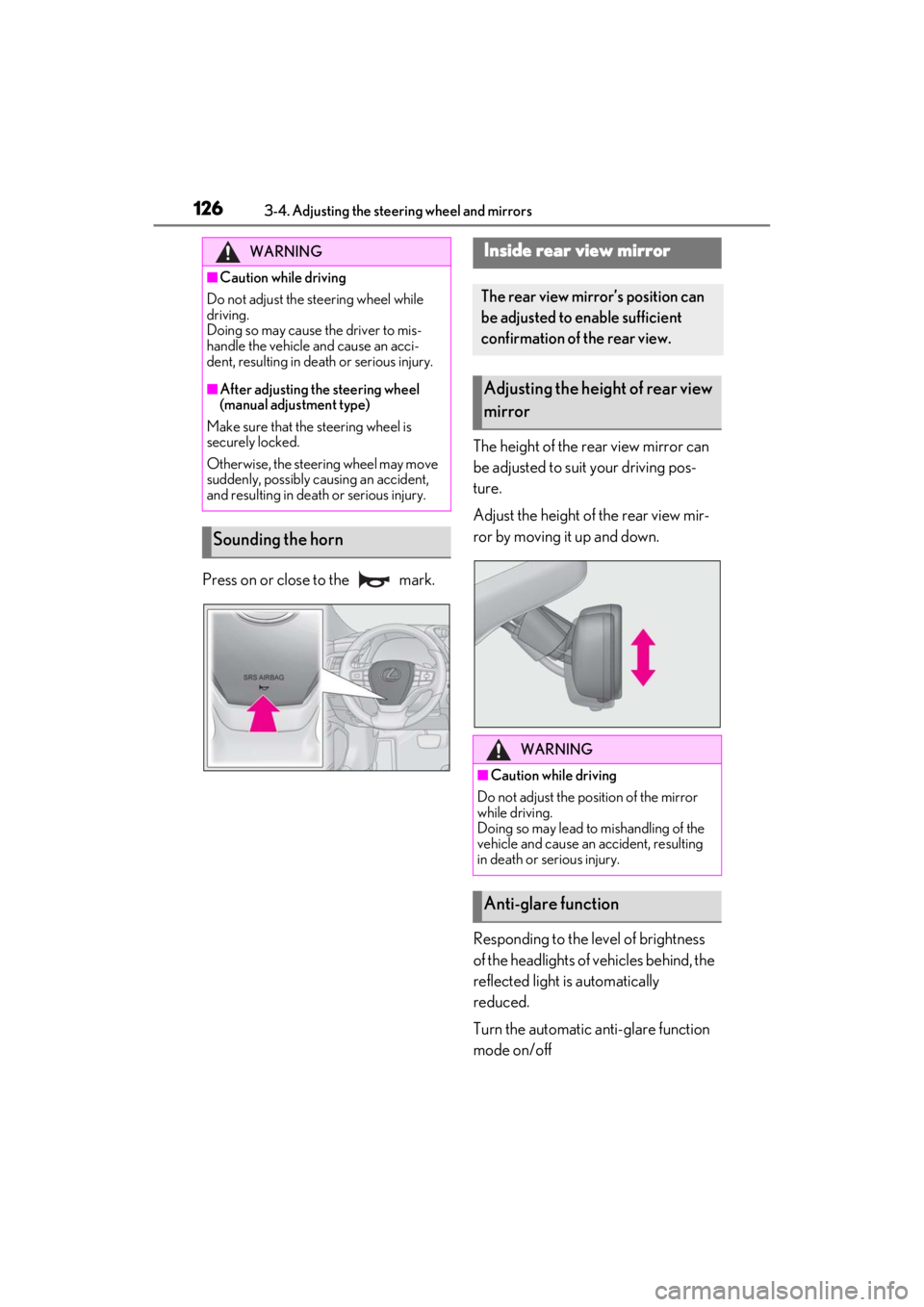
Press on or close to the mark.The height of the rear view mirror can
be adjusted to suit your driving pos-
ture.
Adjust the height of the rear view mir-
ror by moving it up and down.
Responding to the level of brightness
of the headlights of vehicles behind, the
reflected light is automatically
reduced.
Turn the automatic anti-glare function
mode on/off
WARNING
■Caution while driving
Do not adjust the steering wheel while
driving.
Doing so may cause the driver to mis-
handle the vehicle and cause an acci-
dent, resulting in death or serious injury.
■After adjusting the steering wheel
(manual adjustment type)
Make sure that the steering wheel is
securely locked.
Otherwise, the steering wheel may move
suddenly, possibly causing an accident,
and resulting in deat h or serious injury.
Sounding the horn
Inside rear view mirror
The rear view mirror’s position can
be adjusted to enable sufficient
confirmation of the rear view.
Adjusting the height of rear view
mirror
WARNING
■Caution while driving
Do not adjust the position of the mirror
while driving.
Doing so may lead to mishandling of the
vehicle and cause an accident, resulting
in death or serious injury.
Anti-glare function
Page 219 of 464
2194-5. Using the driving support systems
4
Driving
and other factors, the detection distance
may shorten, or detection may be impos-
sible.
• There will be a short delay between object detection and display. Even at low
speeds, there is a possibility that the
object will come within the sensor’s
detection areas before the display is
shown and the warning beep sounds.
• It might be difficult to hear the buzzer due to the volume of the audio system or air
flow noise of the air conditioning system.
• It may be difficult to hear the buzzer if buzzers for other systems are sounding.
■Conditions under which the function
may not function correctly
Certain vehicle conditions and the sur-
rounding environment may affect the ability
of a sensor to correctly detect objects. Par-
ticular instances where this may occur are
listed below.
●There is dirt, snow or ice on a sensor.
(Cleaning the sensors will resolve this
problem.)
●A sensor is frozen. (Thawing the area will
resolve this problem.)
In especially cold weather, if a sensor is
frozen the sensor display may be dis-
played abnormally, or objects, such as a
wall, may not be detected.
●A sensor is covered in any way.
●When a sensor or the area around a sen-
sor is extremely hot or cold.
●On an extremely bumpy road, on an
incline, on gravel, or on grass.
●The vicinity of the vehicle is noisy due to
vehicle horns, motorcycle engines, air
brakes of large vehicles, or other loud
noises producing ultrasonic waves.
●There is another vehicle equipped with
parking assist sensors in the vicinity.
●A sensor is coated with a sheet of spray
or heavy rain.
●If a sensor is hit by a large amount of
water, such as when driving on a flooded
road.
●If the vehicle is significantly tilted.
●The vehicle is approaching a tall or
curved curb.
●If objects draw too close to the sensor.
■Objects which may not be properly
detected
The shape of the object may prevent the
sensor from detectin g it. Pay particular
attention to the following objects:
●Wires, fences, ropes, etc.
●Cotton, snow and other materials that
absorb sound waves
●Sharply-angled objects
●Low objects
●Tall objects with upper sections project-
ing outwards in the direction of your vehi-
cle
People may not be de tected if they are
wearing certain types of clothing.
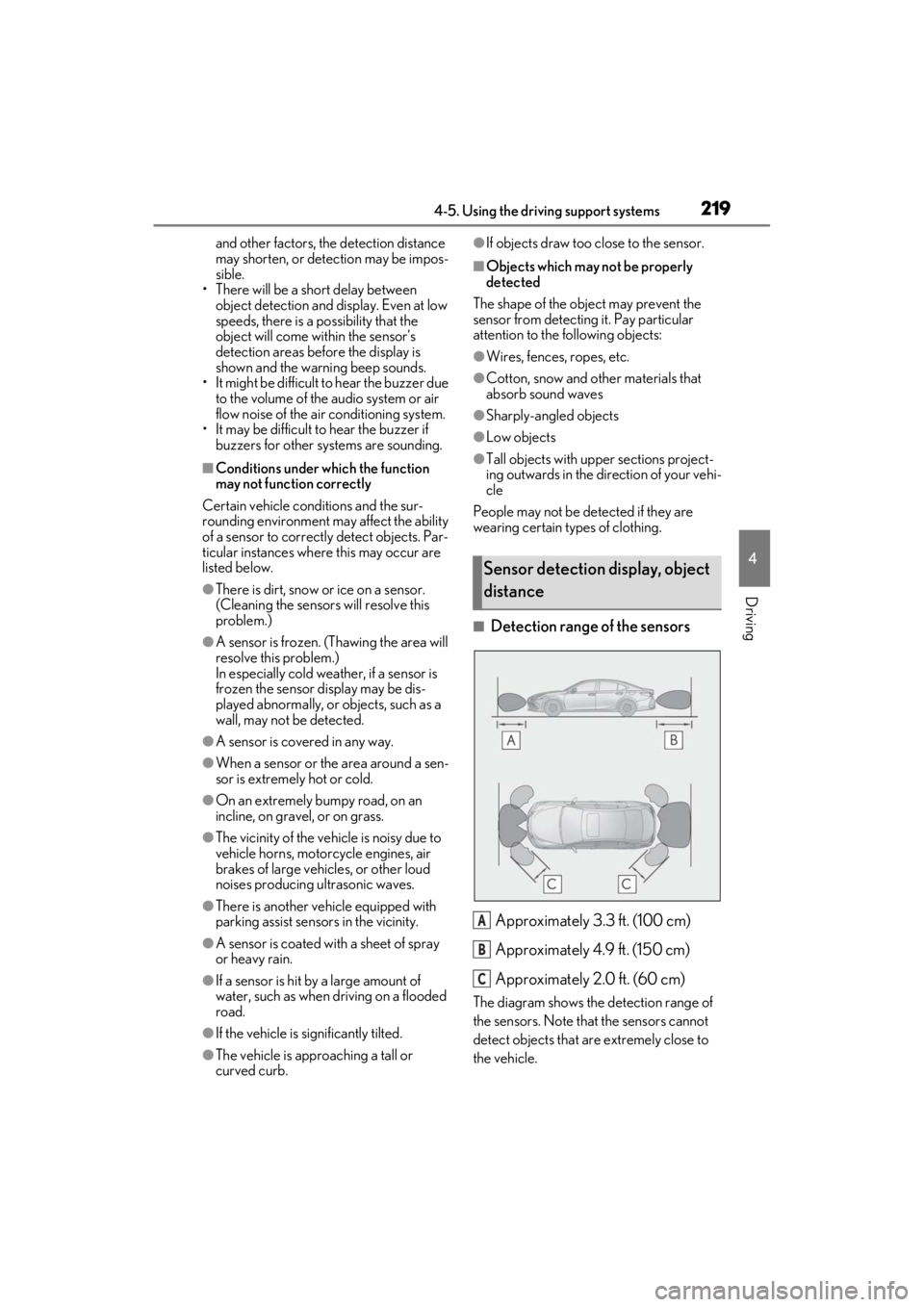
■Detection range of the sensors
Approximately 3.3 ft. (100 cm)
Approximately 4.9 ft. (150 cm)
Approximately 2.0 ft. (60 cm)
The diagram shows the detection range of
the sensors. Note that the sensors cannot
detect objects that are extremely close to
the vehicle.
Sensor detection display, object
distance
A
B
C
Page 239 of 464
2394-5. Using the driving support systems
4
Driving
• When parallel parking
• When there is a rut or hole in the surface of the road
• When driving on a metal cover (grating), such as those used for drainage ditches
• When driving on a steep slope
• If a sensor is hit by a large amount of
water, such as when driving on a flooded
road
●Weather
• If a sensor is covered with ice, snow, dirt,
etc. (when cleared, the system will return
to normal)
• If heavy rain or water strikes a sensor
• When driving in incl ement weather such
as fog, snow or a sandstorm
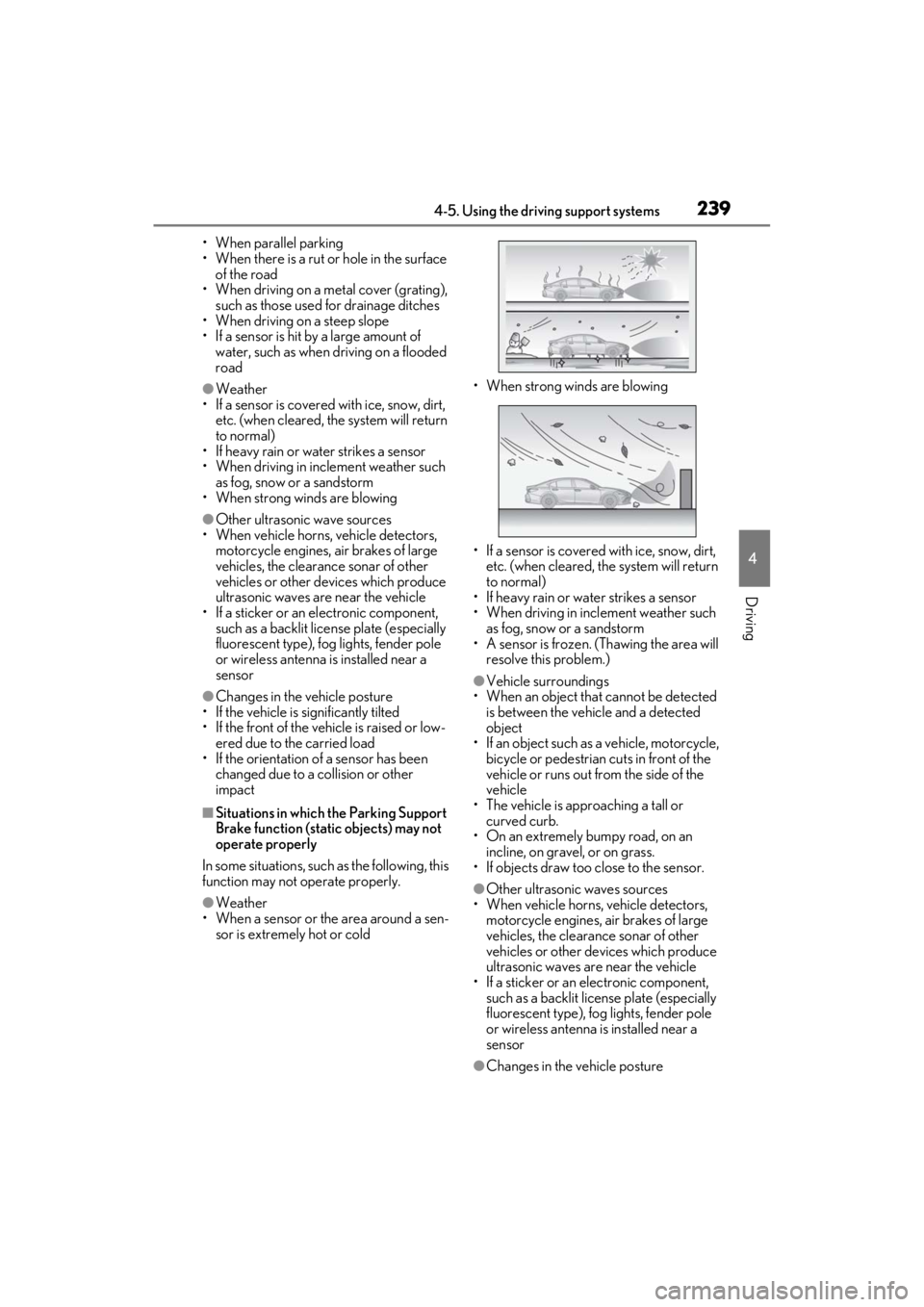
• When strong winds are blowing
●Other ultrasonic wave sources
• When vehicle horns, vehicle detectors,
motorcycle engines, air brakes of large
vehicles, the clearance sonar of other
vehicles or other devices which produce
ultrasonic waves are near the vehicle
• If a sticker or an el ectronic component,
such as a backlit license plate (especially
fluorescent type), fog lights, fender pole
or wireless antenna is installed near a
sensor
●Changes in the vehicle posture
• If the vehicle is significantly tilted
• If the front of the vehicle is raised or low-
ered due to the carried load
• If the orientation of a sensor has been
changed due to a collision or other
impact
■Situations in which the Parking Support
Brake function (stati c objects) may not
operate properly
In some situations, such as the following, this
function may not operate properly.
●Weather
• When a sensor or the area around a sen- sor is extremely hot or cold • When strong winds are blowing
• If a sensor is covered with ice, snow, dirt,
etc. (when cleared, the system will return
to normal)
• If heavy rain or water strikes a sensor
• When driving in incl ement weather such
as fog, snow or a sandstorm
• A sensor is frozen. (Thawing the area will
resolve this problem.)
●Vehicle surroundings
• When an object that cannot be detected is between the vehicle and a detected
object
• If an object such as a vehicle, motorcycle, bicycle or pedestrian cuts in front of the
vehicle or runs out from the side of the
vehicle
• The vehicle is approaching a tall or curved curb.
• On an extremely bumpy road, on an incline, on gravel, or on grass.
• If objects draw too close to the sensor.
●Other ultrasonic waves sources
• When vehicle horns, vehicle detectors,
motorcycle engines, air brakes of large
vehicles, the clearance sonar of other
vehicles or other de vices which produce
ultrasonic waves are near the vehicle
• If a sticker or an electronic component, such as a backlit license plate (especially
fluorescent type), fog lights, fender pole
or wireless antenna is installed near a
sensor
●Changes in the vehicle posture
Page 387 of 464
3877-2. Steps to take in an emergency
7
When trouble arises
One of the following may be the cause
of the problem:
The 12-volt battery may be dis-
charged. ( P.391)
The 12-volt battery terminal con-
nections may be loose or corroded.
( P.328)
One of the following may be the cause
of the problem:
The 12-volt battery may be dis-
charged. ( P.391)
One or both of the 12-volt battery
terminals may be disconnected.
( P.328)
Contact your Lexus dealer if the problem
cannot be repaired, or if repair procedures
are unknown.
When the hybrid system does not start,
the following steps can be used as an
interim measure to start the hybrid sys-
tem if the power switch is functioning
normally.
Do not use this starting procedure
except in cases of emergency. 1
Press the parking brake switch to
check that the parking brake is set.
(P.157)
Parking brake indicator will come on.
2 Shift the shift lever to P.
3 Turn the power switch to ACCES-
SORY mode.
4 Press and hold the power switch for
about 15 seconds while depressing
the brake pedal firmly.
Even if the hybrid system can be
started using the above steps, the sys-
tem may be malfunctioning. Have the
vehicle inspected by your Lexus
dealer.
The interior lights and head-
lights are dim, or the horn does
not sound or sounds at a low vol-
ume.
The interior lights and head-
lights do not turn on, or the horn
does not sound.
Starting the hybrid system in an
emergency
Page 447 of 464

447What to do if... (Troubleshooting)
In this case, the hybrid system can be
started in a temporary way. ( P.390)
Is the 12-volt battery discharged?
( P.391)
Is the power switch in ON mode?
If you cannot release the shift lever
by depressing the brake pedal with
the power switch in ON mode
( P.153)
It is locked automatically to prevent
theft of the vehicle. ( P.146)
Is the window lock switch pressed?
The power window except for the one at
the driver’s seat cannot be operated if the
window lock switch is pressed. ( P.131)
The auto power off function will be
operated if the vehicle is left in
ACCESSORY or ON mode
(hybrid system is not operating) for
a period of time. ( P.149)
The seat belt reminder light is flash-
ing
Are the driver and the passengers wearing
the seat belts? ( P.368)
The parking brake indicator is on
Is the parking brake released? ( P.157)
Depending on the situation, other
types of warning buzzer may also
sound. ( P.365, 375)
Did anyone inside the vehicle open
a door during setting the alarm?
The sensor detects it and the alarm sounds.
( P.71)
To stop the alarm, turn the power
switch to ON mode, or start the hybrid
system.
Is the message displayed on the
multi-information display?
Check the message on the multi-informa-
tion display. ( P.375)
When a warning light turns on or a
warning message is displayed, refer
to P.365, 375.
The shift lever cannot be shifted
from P even if you depress the
brake pedal
The steering wheel cannot be
turned after the hybrid system is
stopped
The windows do not open or
close by operating the power
window switches
The power switch is turned off
automatically
A warning buzzer sounds during
driving
An alarm is activated and the
horn sounds
A warning buzzer sounds when
leaving the vehicle
A warning light turns on or a
warning message is displayed
Page 453 of 464

Alphabetical index453
...........................................................................163
Automatic High Beam system..............164
Light switch ...................................................... 161
Replacing light bulbs................................ 352
Headlights aim ................................................351
Head restraints ...............................................123
Head-up display.............................................. 86 Driving information display area........... 86
Driving support system display area ..88
HUD (Head-up display) switch............ 87
Hybrid System Indicator ........................... 89
Navigation system-linked display ........ 86
Pop-up display...............................................88
Settings .............................................................. 87
Heated steering wheel .............................. 273
Heaters Air conditioning system.......................... 265
Heated steering wheel............................ 273
Outside rear view mirrors .................... 266
Seat heaters .................................................. 273
High mounted stoplight Replacing light bulbs................................ 352
High-voltage components ......................... 64
Hill-start assist control ............................... 248
Hood ...................................................................319 Open .................................................................319
Hooks Cargo hooks................................................ 283
Coat hooks ................................................... 295
Grocery bag hooks ................................. 283
Retaining hooks (floor mat)......................22
Horn .................................................................... 126
HUD (Head-up display) switch................ 87
Hybrid battery (traction battery) Location............................................................. 64
Specification .................................................404
Warning message........................................ 67
Hybrid battery (traction battery) air vents ..............................................................................67
Hybrid system .................................................... 61 Acoustic vehicle alerting system .......... 63
Emergency shut off system ..................... 67 Energy monitor/consumption screen90
EV drive mode............................................. 150
High voltage components ....................... 64
Hybrid system precautions...................... 64
Hybrid vehicle driving tips .................... 252
If the hybrid system will not start ....... 386
Overheating ................................................. 397
Power (ignition) switch ............................ 145
Regenerative braking ................................. 62
Starting the hybrid system ...................... 145
Hybrid System Indicator...................... 79, 89
Hybrid transmission......................................152 Paddle shift switches .......................154, 155
S mode ............................................................. 155
I
I/M test ..............................................................316
IdentificationEngine............................................................. 403
Vehicle ............................................................402
Ignition switch (power switch) .................145
Auto power off function........................... 149
Changing the power switch modes . 148
If your vehicle has to be stopped in an emergency ................................................ 358
Starting the hybrid system ...................... 145
Immobilizer system........................................ 69
Indicators ........................................................... 75
Initialization Items to initialize ...........................................431
Maintenance.......................................312, 323
Power windows ........................................... 130
Tire pressure warning system .............335
Inside rear view mirror ................................126
Instrument panel light control ................... 80
Interior lights...................................................277
Intuitive parking assist........................215, 216 Function ............................................................216
Warning message ...................................... 218