instrument cluster LEXUS ES300h 2021 Owners Manual
[x] Cancel search | Manufacturer: LEXUS, Model Year: 2021, Model line: ES300h, Model: LEXUS ES300h 2021Pages: 464, PDF Size: 9.55 MB
Page 2 of 464
2TABLE OF CONTENTS
For your information ......................................6
Reading this manual .................................... 10
How to search ................................................. 11
Pictorial index ................................................. 12
1-1. For safe use Before driving .................................... 22
For safe driving.................................. 23
Seat belts ............................................. 24
SRS airbags ....................................... 28
Front passenger occupant classifi- cation system ................................. 37
Exhaust gas precautions ............... 42
1-2. Child safety Riding with children........................ 43
Child restraint systems ................. 43
1-3. Lexus Enform Lexus Enform Safety Connect .. 55
1-4. Hybrid system Hybrid system features ................... 61
Hybrid system precautions ......... 64
1-5. Theft deterrent system Immobilizer sy stem ........................ 69
Alarm...................................................... 71
2-1. Instrument cluster Warning lights and indicators ..... 74
Gauges and meters ....................... 78
Multi-information display.............. 81
Head-up display .............................. 86
Energy monitor/consumption screen ............................................... 903-1. Key information
Keys ...................................................... 98
3-2. Opening, closing and locking the doors and trunk
Doors .................................................. 101
Trunk .................................................. 105
Smart access system with push- button start...................................... 112
3-3. Adjusting the seats Front seats.......................................... 119
Driving position memory ........... 120
Head restraints ............................... 123
3-4. Adjusting the steering wheel and mirrors
Steering wheel ................................ 125
Inside rear view mirror ................ 126
Outside rear view mirrors.......... 127
3-5. Opening and closing the windows and moon roof
Power windows ............................. 130
Moon roof ......................................... 132
4-1. Before driving Driving the vehicle........................ 136
Cargo and luggage........................ 141
Vehicle load limits.......................... 143
Trailer towing................................... 144
Dinghy towing ................................. 144
4-2. Driving procedures Power (ignition) switch ............... 145
EV drive mode ............................... 150
1For safety and security
2Vehicle status information and
indicators
3Before driving
4Driving
Page 73 of 464
73
2
2
Vehicle status information and indicators
Vehicle status informationand indicators
2-1. Instrument cluster
Warning lights and indicators . 74
Gauges and meters .................... 78
Multi-information display........... 81
Head-up display ........................... 86
Energy monitor/consumption screen ............................................ 90
Page 74 of 464
742-1. Instrument cluster
2-1.Instrument cluster
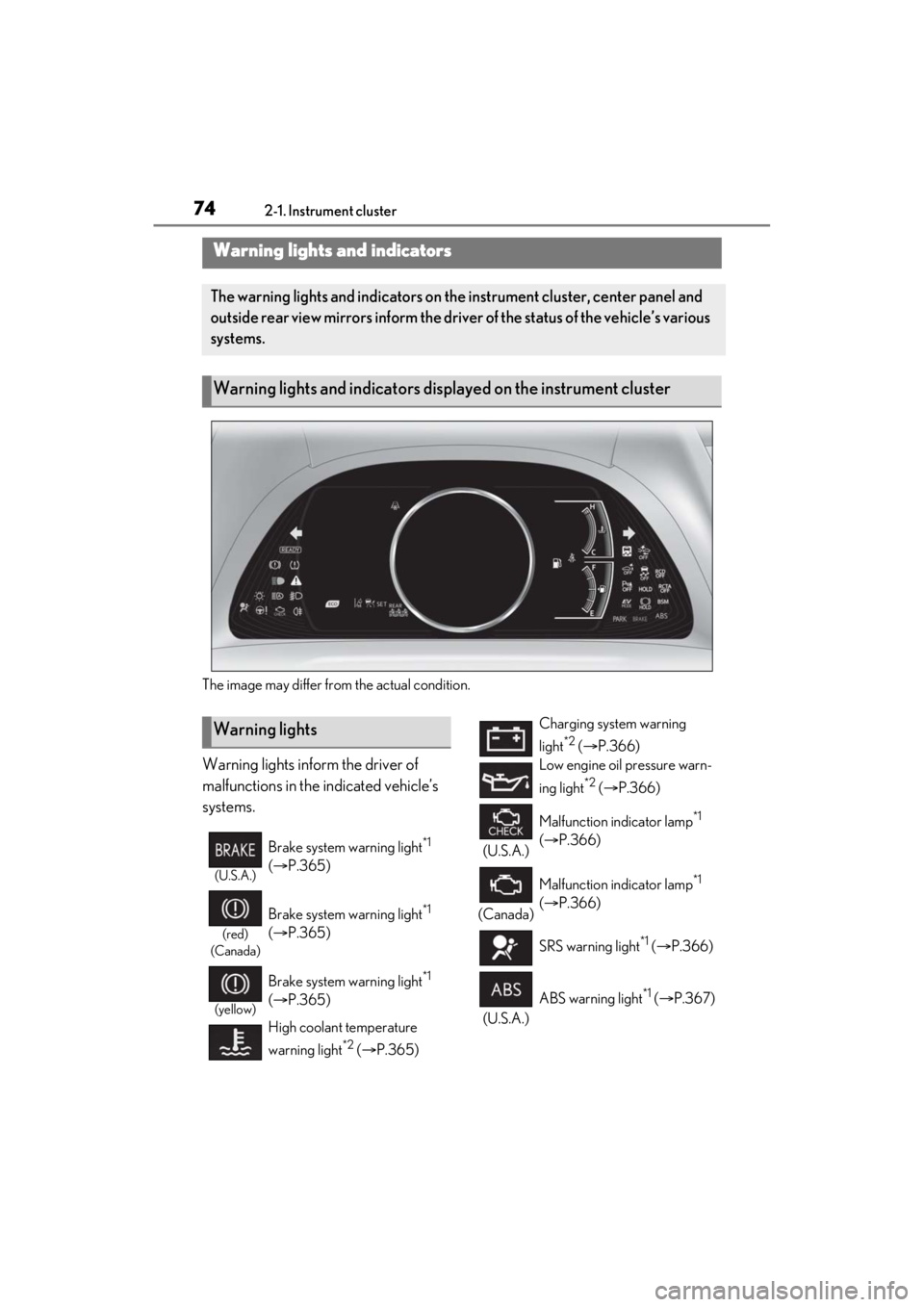
The image may differ from the actual condition.
Warning lights inform the driver of
malfunctions in the indicated vehicle’s
systems.
Warning lights and indicators
The warning lights and indicators on the instrument cluster, center panel and
outside rear view mirrors inform the driver of the status of the vehicle’s various
systems.
Warning lights and indicators displayed on the instrument cluster
Warning lights
(U.S.A.)
Brake system warning light*1
( P.365)
(red)
(Canada)
Brake system warning light*1
( P.365)
(yellow)
Brake system warning light*1
( P.365)
High coolant temperature
warning light
*2 ( P.365)
Charging system warning
light
*2 ( P.366)
Low engine oil pressure warn-
ing light
*2 ( P.366)
(U.S.A.) Malfunction indicator lamp
*1
( P.366)
(Canada) Malfunction indicator lamp
*1
( P.366)
SRS warning light
*1 ( P.366)
(U.S.A.) ABS warning light
*1 (
P.367)
Page 75 of 464
752-1. Instrument cluster
2
Vehicle status information and indicators
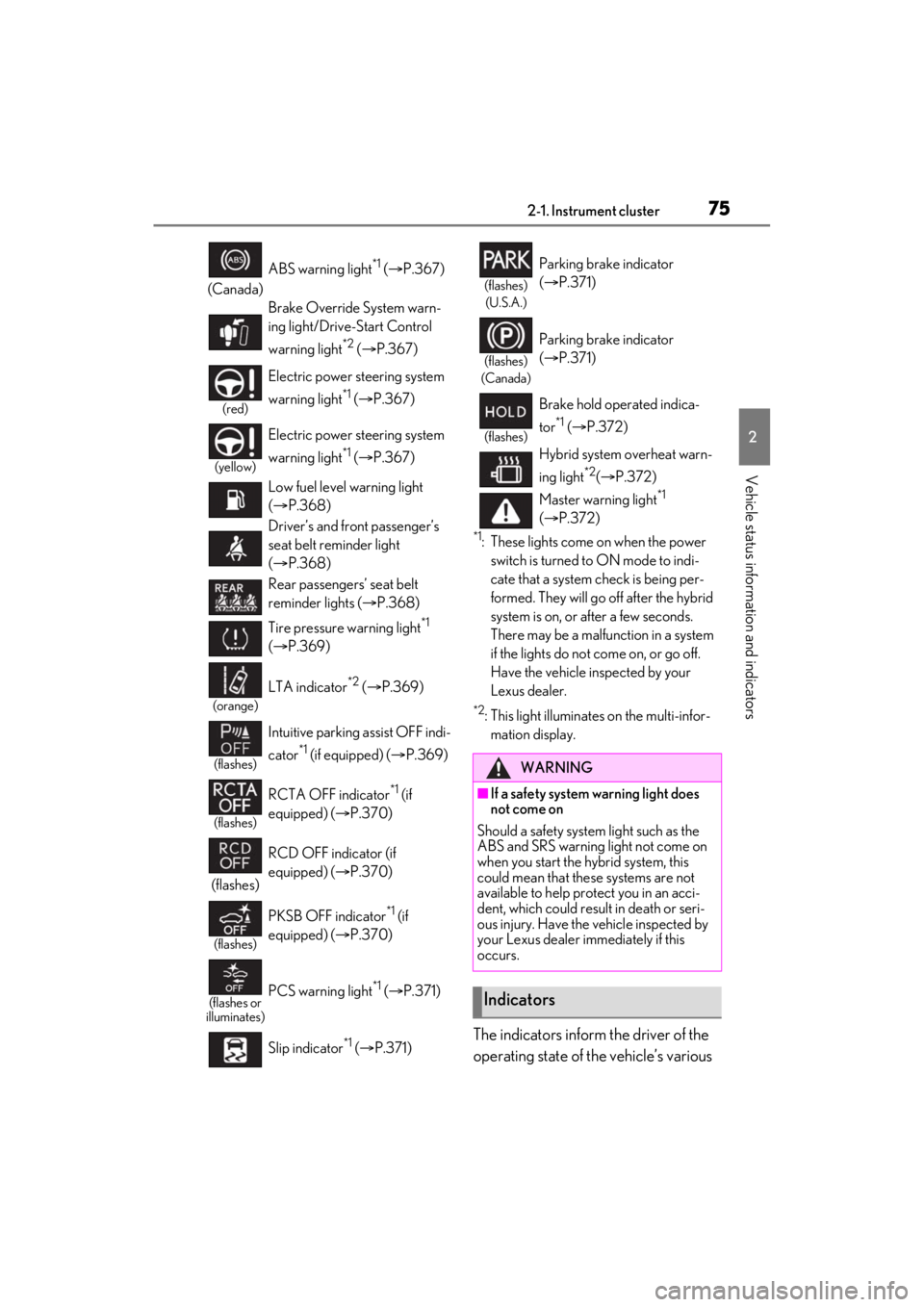
*1: These lights come on when the power switch is turned to ON mode to indi-
cate that a system check is being per-
formed. They will go off after the hybrid
system is on, or after a few seconds.
There may be a malfunction in a system
if the lights do not come on, or go off.
Have the vehicle inspected by your
Lexus dealer.
*2: This light illuminates on the multi-infor-mation display.
The indicators inform the driver of the
operating state of the vehicle’s various
(Canada) ABS warning light
*1 (
P.367)
Brake Override System warn-
ing light/Drive-Start Control
warning light
*2 ( P.367)
(red)
Electric power st eering system
warning light
*1 ( P.367)
(yellow)
Electric power st eering system
warning light
*1 ( P.367)
Low fuel level warning light
( P.368)
Driver’s and front passenger’s
seat belt reminder light
( P.368)
Rear passengers’ seat belt
reminder lights ( P.368)
Tire pressure warning light
*1
( P.369)
(orange)
LTA indicator*2 ( P.369)
(flashes)
Intuitive parking assist OFF indi-
cator
*1 (if equipped) ( P.369)
(flashes)
RCTA OFF indicator*1 (if
equipped) ( P.370)
(flashes) RCD OFF indicator (if
equipped) (
P.370)
(flashes)
PKSB OFF indicator*1 (if
equipped) ( P.370)
(flashes or
illuminates)PCS warning light*1 ( P.371)
Slip indicator
*1 ( P.371)
(flashes)
(U.S.A.)
Parking brake indicator
( P.371)
(flashes)
(Canada)
Parking brake indicator
( P.371)
(flashes)
Brake hold operated indica-
tor
*1 ( P.372)
Hybrid system overheat warn-
ing light
*2( P.372)
Master warning light
*1
( P.372)
WARNING
■If a safety system warning light does
not come on
Should a safety system light such as the
ABS and SRS warning light not come on
when you start the hybrid system, this
could mean that these systems are not
available to help protect you in an acci-
dent, which could result in death or seri-
ous injury. Have the vehicle inspected by
your Lexus dealer immediately if this
occurs.
Indicators
Page 76 of 464
762-1. Instrument cluster
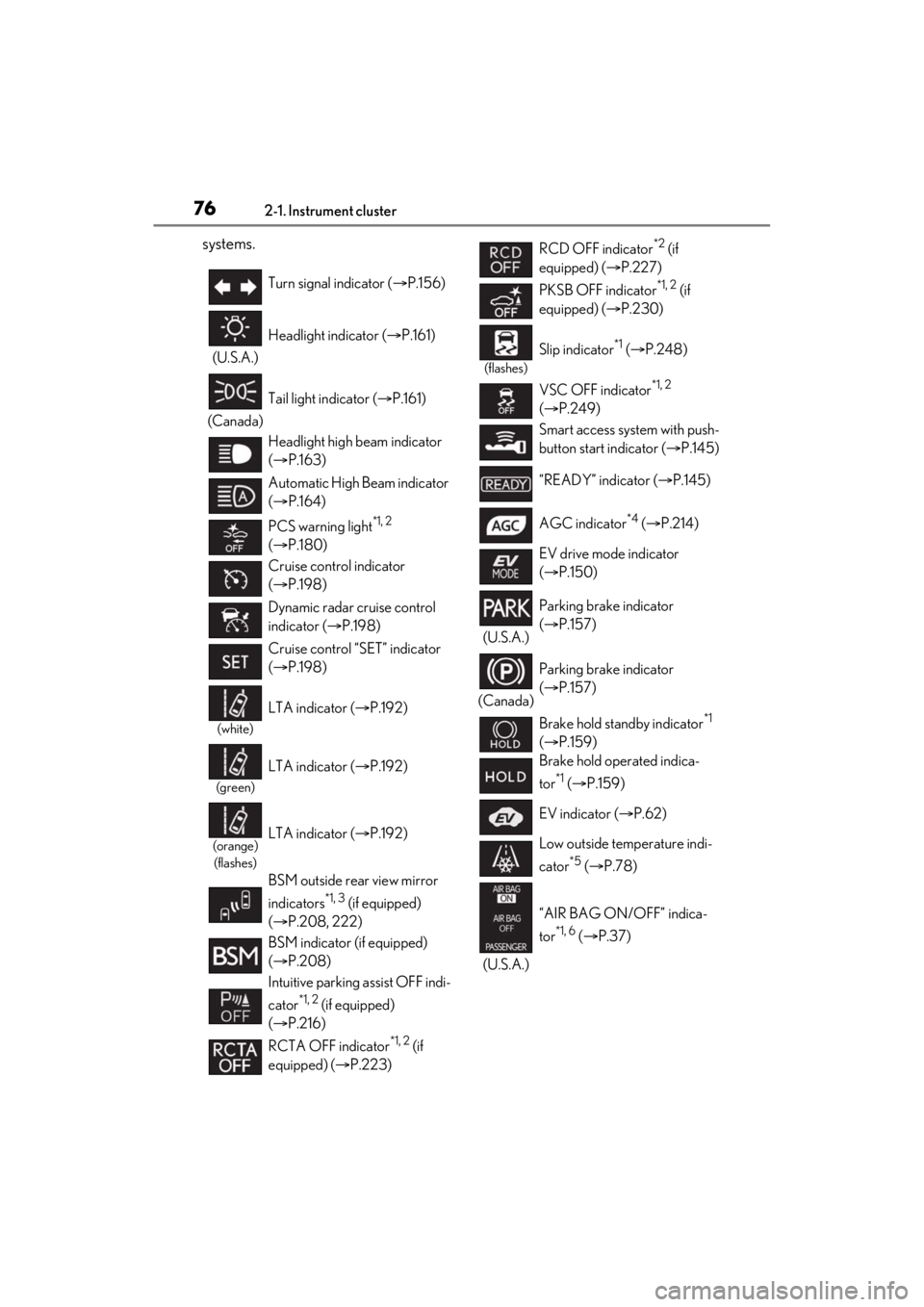
systems.
Turn signal indicator (P.156)
(U.S.A.) Headlight indicator (
P.161)
(Canada) Tail light indicator (
P.161)
Headlight high beam indicator
( P.163)
Automatic High Beam indicator
( P.164)
PCS warning light
*1, 2
( P.180)
Cruise control indicator
( P.198)
Dynamic radar cruise control
indicator ( P.198)
Cruise control “SET” indicator
( P.198)
(white)
LTA indicator ( P.192)
(green)
LTA indicator ( P.192)
(orange)
(flashes)LTA indicator ( P.192)
BSM outside rear view mirror
indicators
*1, 3 (if equipped)
( P.208, 222)
BSM indicator (if equipped)
( P.208)
Intuitive parking assist OFF indi-
cator
*1, 2 (if equipped)
( P.216)
RCTA OFF indicator
*1, 2 (if
equipped) ( P.223)
RCD OFF indicator*2 (if
equipped) ( P.227)
PKSB OFF indicator
*1, 2 (if
equipped) ( P.230)
(flashes)
Slip indicator*1 ( P.248)
VSC OFF indicator
*1, 2
( P.249)
Smart access system with push-
button start indicator ( P.145)
“READY” indicator ( P.145)
AGC indicator
*4 ( P.214)
EV drive mode indicator
( P.150)
(U.S.A.) Parking brake indicator
(
P.157)
(Canada) Parking brake indicator
(
P.157)
Brake hold standby indicator
*1
( P.159)
Brake hold operated indica-
tor
*1 ( P.159)
EV indicator ( P.62)
Low outside temperature indi-
cator
*5 ( P.78)
(U.S.A.) “AIR BAG ON/OFF” indica-
tor
*1, 6 (
P.37)
Page 77 of 464

772-1. Instrument cluster
2
Vehicle status information and indicators
Drive mode indicators
*1: These lights come on when the power
switch is turned to ON mode to indi-
cate that a system check is being per-
formed. They will go off after the hybrid
system is on, or after a few seconds.
There may be a malfunction in a system
if the lights do not come on, or go off.
Have the vehicle inspected by your
Lexus dealer.
*2: This light comes on when the system is turned off.
*3: This light illuminates on the outside rear view mirrors.
*4: This light illuminates on the multi-infor- mation display.
*5: When the outside temperature is approximately 37°F (3°C) or lower,
this indicator will flash for approxi-
mately 10 seconds, then stay on.
*6: This light illuminates on the center panel.
(Canada)
“AIR BAG ON/OFF” indica-
tor
*1, 6 (
P.37)
Traction battery status indica-
tor
*4 ( P.90)
Eco drive mode indicator
( P.213)
Sport mode indicator ( P.213)
Page 78 of 464
782-1. Instrument cluster
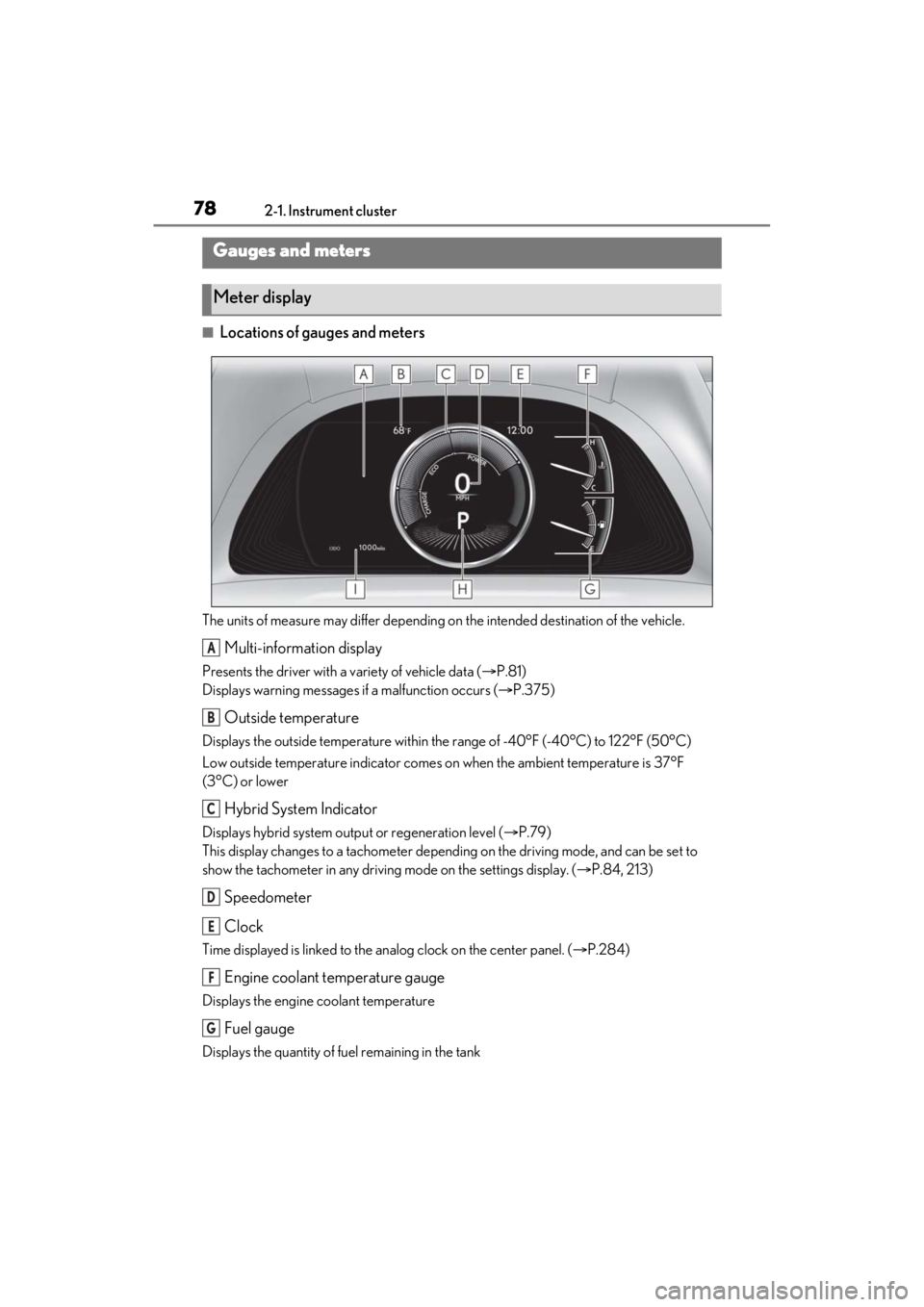
■Locations of gauges and meters
The units of measure may differ depending on the intended destination of the vehicle.
Multi-information display
Presents the driver with a variety of vehicle data ( P.81)
Displays warning messages if a malfunction occurs ( P.375)
Outside temperature
Displays the outside temperature within the range of -40°F (-40°C) to 122°F (50°C)
Low outside temperature indicator comes on when the ambient temperature is 37°F
(3°C) or lower
Hybrid System Indicator
Displays hybrid system outp ut or regeneration level (P.79)
This display changes to a tachometer depending on the driving mode, and can be set to
show the tachometer in any driving mode on the settings display. ( P.84, 213)
Speedometer
Clock
Time displayed is linked to the analog clock on the center panel. (P.284)
Engine coolant temperature gauge
Displays the engine coolant temperature
Fuel gauge
Displays the quantity of fuel remaining in the tank
Gauges and meters
Meter display
A
B
C
D
E
F
G
Page 79 of 464
792-1. Instrument cluster
2
Vehicle status information and indicators
Shift position and shift range (P.152)
Odometer and trip meter display ( P.80)
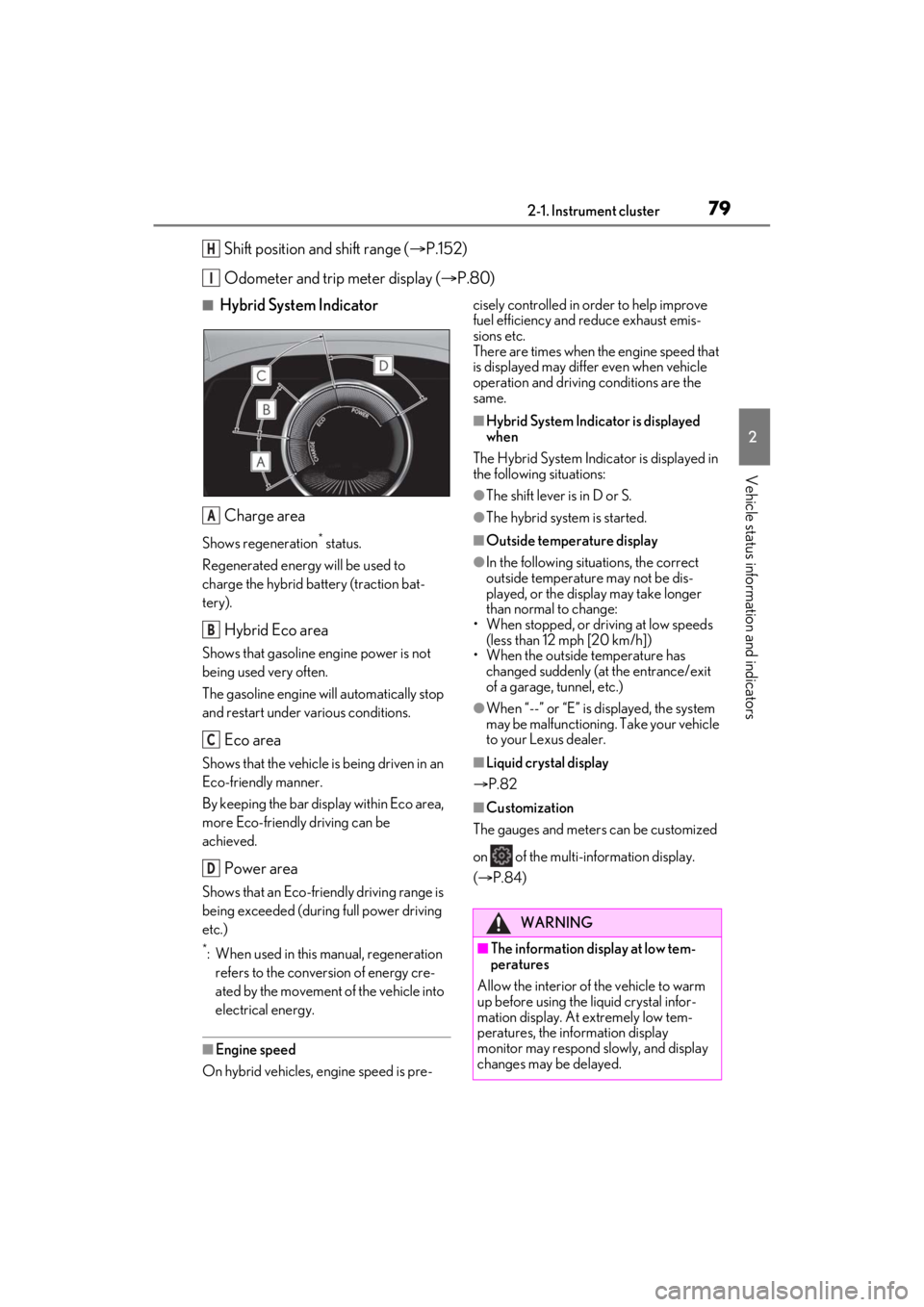
■Hybrid System Indicator
Charge area
Shows regeneration* status.
Regenerated energy will be used to
charge the hybrid battery (traction bat-
tery).
Hybrid Eco area
Shows that gasoline engine power is not
being used very often.
The gasoline engine will automatically stop
and restart under various conditions.
Eco area
Shows that the vehicle is being driven in an
Eco-friendly manner.
By keeping the bar display within Eco area,
more Eco-friendly driving can be
achieved.
Power area
Shows that an Eco-friendly driving range is
being exceeded (durin g full power driving
etc.)
*: When used in this manual, regeneration refers to the conversion of energy cre-
ated by the movement of the vehicle into
electrical energy.
■Engine speed
On hybrid vehicles, engine speed is pre- cisely controlled in order to help improve
fuel efficiency and reduce exhaust emis-
sions etc.
There are times when the engine speed that
is displayed may differ even when vehicle
operation and driving
conditions are the
same.
■Hybrid System Indicator is displayed
when
The Hybrid System Indicator is displayed in
the following situations:
●The shift lever is in D or S.
●The hybrid system is started.
■Outside temperature display
●In the following situations, the correct
outside temperature may not be dis-
played, or the display may take longer
than normal to change:
• When stopped, or driving at low speeds (less than 12 mph [20 km/h])
• When the outside temperature has changed suddenly (at the entrance/exit
of a garage, tunnel, etc.)
●When “--” or “E” is displayed, the system
may be malfunctioning. Take your vehicle
to your Lexus dealer.
■Liquid crystal display
P.82
■Customization
The gauges and meters can be customized
on of the multi-information display.
( P.84)
H
I
A
B
C
D
WARNING
■The information display at low tem-
peratures
Allow the interior of the vehicle to warm
up before using the liquid crystal infor-
mation display. At extremely low tem-
peratures, the information display
monitor may respond slowly, and display
changes may be delayed.
Page 80 of 464
802-1. Instrument cluster
■Display items
Odometer
Displays the total distance the vehicle has
been driven.
Trip meter A/trip meter B
Displays the distance the vehicle has been
driven since the meter was last reset. Trip
meters A and B can be used to record and
display different distances independently.
Distance until next engine oil
change
Displays the distance the vehicle can be
driven until an oil change is necessary.
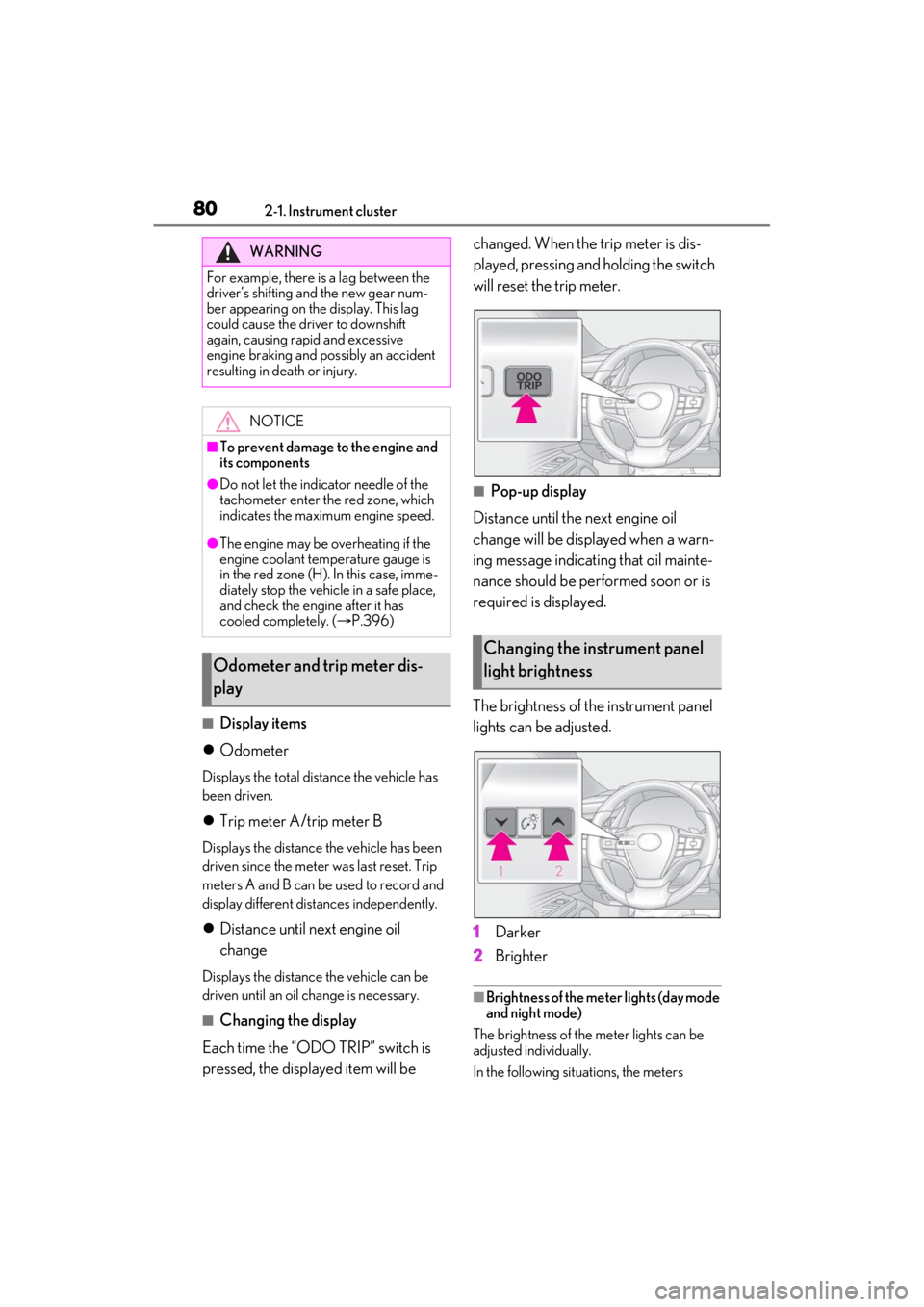
■Changing the display
Each time the “ODO TRIP” switch is
pressed, the displayed item will be changed. When the trip meter is dis-
played, pressing and holding the switch
will reset the trip meter.
■Pop-up display
Distance until the next engine oil
change will be displayed when a warn-
ing message indicating that oil mainte-
nance should be performed soon or is
required is displayed.
The brightness of the instrument panel
lights can be adjusted.
1 Darker
2 Brighter
■Brightness of the meter lights (day mode
and night mode)
The brightness of the meter lights can be
adjusted individually.
In the following situations, the meters
WARNING
For example, there is a lag between the
driver’s shifting and the new gear num-
ber appearing on the display. This lag
could cause the driver to downshift
again, causing rapid and excessive
engine braking and possibly an accident
resulting in death or injury.
NOTICE
■To prevent damage to the engine and
its components
●Do not let the indicator needle of the
tachometer enter the red zone, which
indicates the maximum engine speed.
●The engine may be overheating if the
engine coolant temperature gauge is
in the red zone (H). In this case, imme-
diately stop the vehicle in a safe place,
and check the engine after it has
cooled completely. ( P.396)
Odometer and trip meter dis-
play
Changing the instrument panel
light brightness
Page 81 of 464
812-1. Instrument cluster
2
Vehicle status information and indicators
changes between day mode and night
mode.
●Day mode: When the tail lights are off or
when the tail lights are on but the sur-
rounding area is bright
●Night mode: When the tail lights are on
and the surrounding area is dark■Display
By selecting menu icons on the multi-
information display, a variety of driv-
ing-related information can be dis-
played. The multi-information display
can also be used to change display set-
tings and other vehicle settings.
Warning or suggestion/advice pop-up
displays are also displayed in certain
situations.
■Menu icons
The menu icons will be displayed by
pressing or of the meter con-
trol switches.
Multi-information display
Display and menu icons
Driving information display
( P.82)
Navigation system-linked dis-
play (if equipped) ( P.83)
Audio system-linked display
( P.83)
Driving support system infor-
mation display ( P.83)
Warning message display
( P.375)
Settings display ( P.84)