brake light LEXUS ES300h 2022 Owner's Manual
[x] Cancel search | Manufacturer: LEXUS, Model Year: 2022, Model line: ES300h, Model: LEXUS ES300h 2022Pages: 480, PDF Size: 27.63 MB
Page 209 of 480
2074-5. Using the driving support systems
4
Driving
The vehicle travels at the speed set by the driver.
Example of deceleration cruising and follow-up cruising
When a preceding vehicle driving slower than the set speed appears
When a vehicle is detected running ahead of you, the system automatically decelerates
your vehicle. When a greater reduction in vehicle speed is necessary, the system applies
the brakes (the stop lights will come on at th is time). The system will respond to changes in
the speed of the vehicle ahead in order to maintain the vehicle-to-vehicle distance set by
the driver. Approach warning warns you when the system cannot decelerate sufficiently to
prevent your vehicle from closing in on the vehicle ahead.
When the vehicle ahead of you stops, your vehicl e will also stop (vehicle is stopped by sys-
tem control). After the vehicle ahead starts off, pressing the “+RES” switch or depressing
the accelerator pedal (start-off operation) will resume follow-up cruising. If the start-off
operation is not performed, system contro l continues to keep your vehicle stopped.
When the turn signal lever is operated and your vehicle moves to an overtaking lane while
driving at 50 mph (80 km/h) or more, the vehicle will accelerate to help to overtake a
passing vehicle.
The system’s identification of what is an overtaking lane may be determined solely based on
the location of the steering wheel in the vehicl e (left side driver position versus right side
driver position.) If the vehicle is driven to a region where the overtaking lane is on a differ-
ent side from where the vehicle is normally driven, the vehicle may accelerate when the
turn signal lever is operated in the opposite direction to the overtaking lane (e.g., if the
driver normally operates the vehicle in a region where the overtaking lane is to the right but
then drives to a region where the overtaking lane is to the left, the vehicle may accelerate
when the right turn signal is activated).
Example of acceleration
When there are no longer any preceding vehicles driving slower than the set
speed
The system accelerates until the set speed is reached. The system then returns to constant
speed cruising.
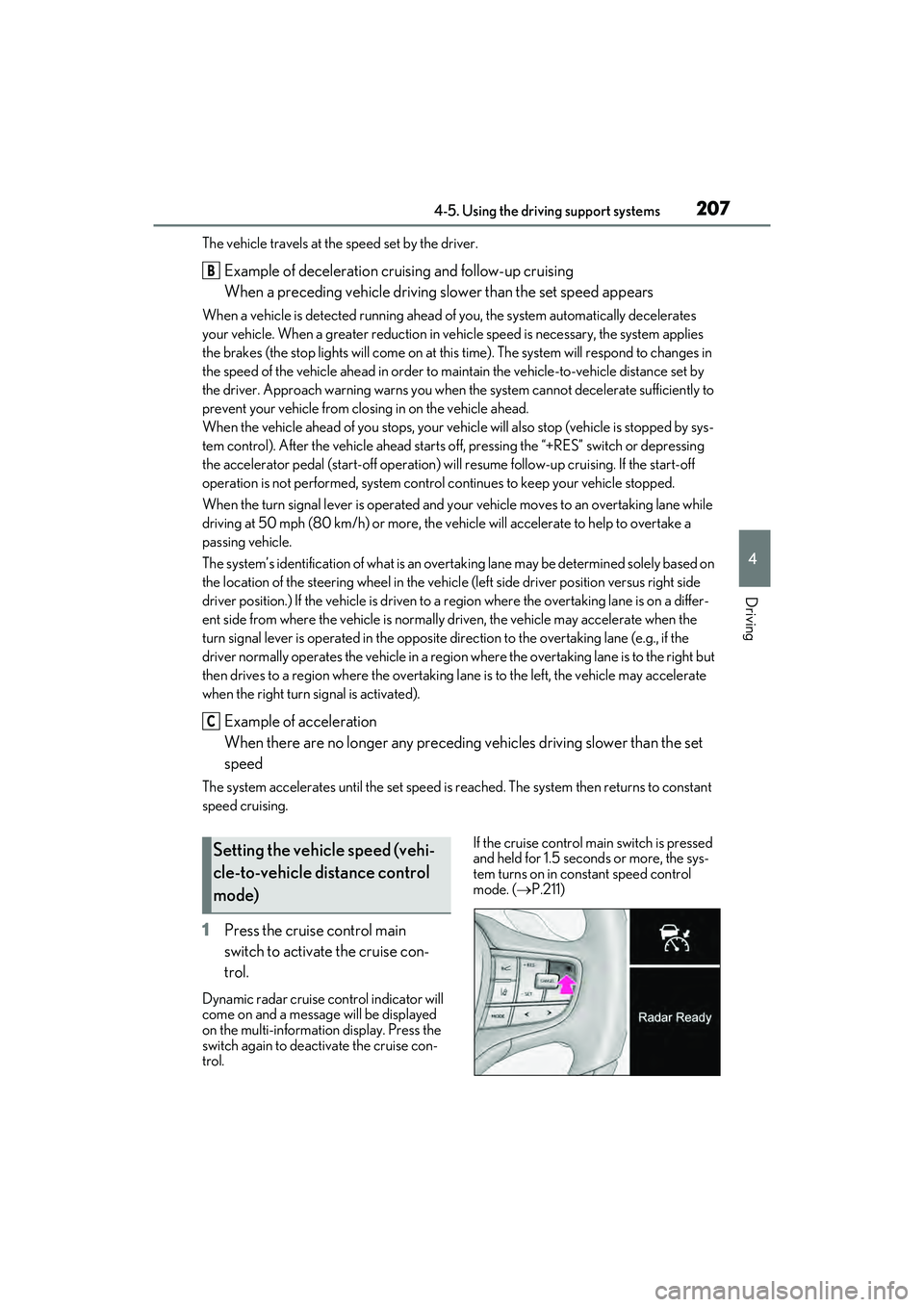
1 Press the cruise control main
switch to activate the cruise con-
trol.
Dynamic radar cruise control indicator will
come on and a message will be displayed
on the multi-information display. Press the
switch again to deactivate the cruise con-
trol. If the cruise control main switch is pressed
and held for 1.5 seconds or more, the sys-
tem turns on in constant speed control
mode. (
P.211)
B
C
Setting the vehicle speed (vehi-
cle-to-vehicle distance control
mode)
Page 222 of 480
2204-5. Using the driving support systems
tions set to your preferred settings.
Custom mode settings can only be
changed on the drive mode customization
display of Center Display. (P.266)
2 Eco drive mode
Helps the driver accelerate in an eco-
friendly manner and improve fuel economy
through moderate throttle characteristics
and by controlling the operation of the air
conditioning system (heating/cooling).
When not in Eco drive mode, if the Driving
Mode Select switch is turned toward you,
the “Eco” indicator comes on.
3Sport mode
•SPORT S mode
Controls the hybrid system to provide
quick, powerful acceleration. This mode is
suitable for when agile driving response is
desired, such as when driving on roads
with many curves.
When not in SPORT S mode, if the Driving
Mode Select switch is turned away from
you, the “SPORT S” indicator comes on.
•SPORT S+ mode
Helps to ensure steering performance and
driving stability by simultaneously con-
trolling the steering and suspension in
addition to the transmission and engine.
Suitable for sportier driving.
When in SPORT S mode, if the Driving
Mode Select switch is turned away from
you, the “SPORT S+” indicator comes on.
QOperation of the air conditioning sys-
tem in Eco drive mode
Eco drive mode contro ls the heating/cool-
ing operations and fan speed of the air con-
ditioning system to enhance fuel efficiency.
To improve air conditioning performance,
perform the following operations:
OTurn off eco air conditioning mode
( P.275)
OAdjust the fan speed ( P.271, 273)
OTurn off Eco drive mode ( P.219)
QAuto Glide Control
OWhile driving in Eco drive mode with D
position, selected, releasing the accelera-
tor pedal will activate Auto Glide Con-
trol under certain conditions. (Auto
Glide Control may activate before the
accelerator pedal is fully released.)
When Auto Glide Control operates, the
electric motor (traction motor) will be
controlled, reducing the deceleration
force and allowing the vehicle to coast,
enhancing fuel economy.
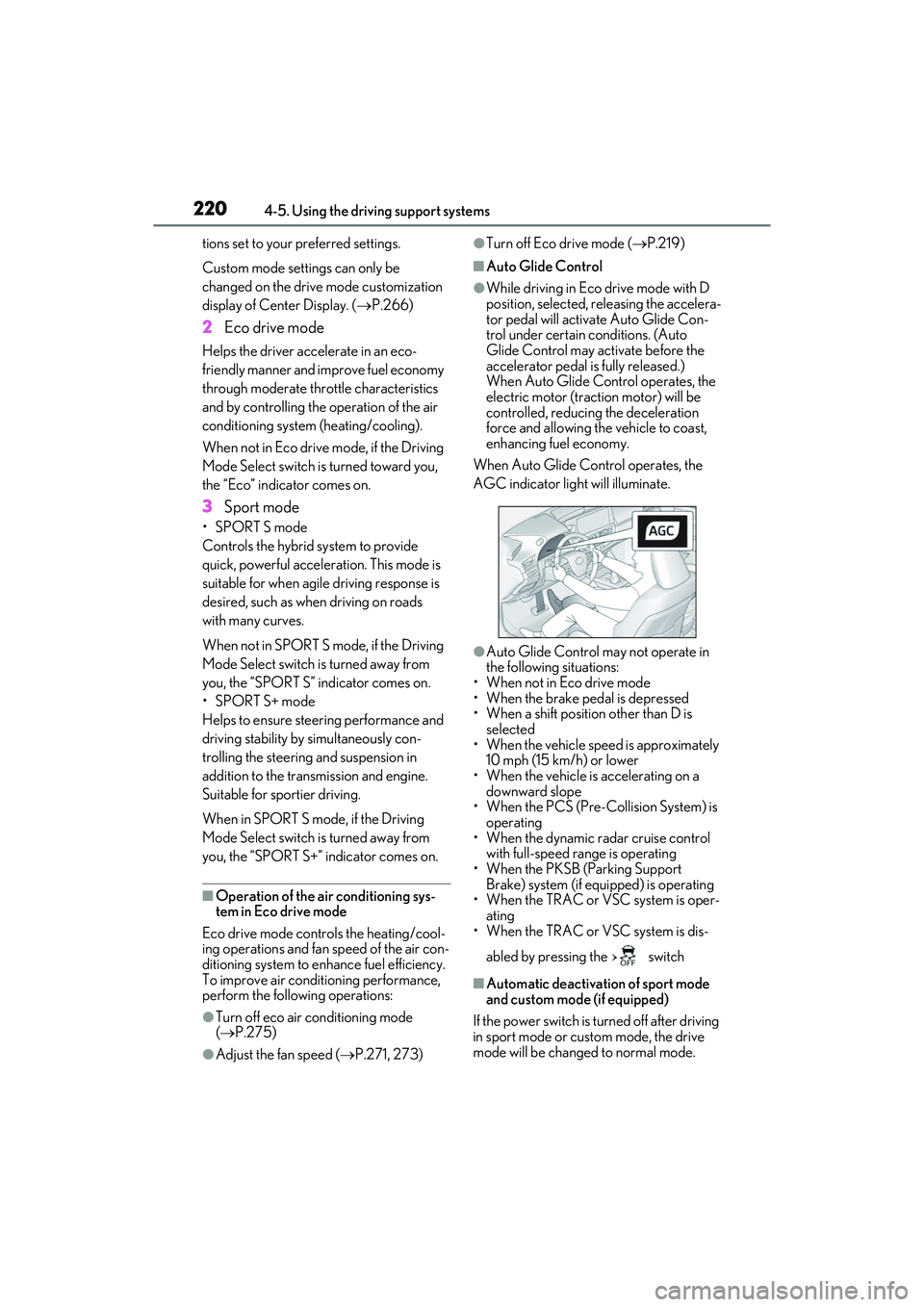
When Auto Glide Control operates, the
AGC indicator light will illuminate.
OAuto Glide Control may not operate in
the following situations:
• When not in Eco drive mode
• When the brake pedal is depressed
• When a shift position other than D is selected
• When the vehicle speed is approximately 10 mph (15 km/h) or lower
• When the vehicle is accelerating on a
downward slope
• When the PCS (Pre-Collision System) is operating
• When the dynamic radar cruise control with full-speed range is operating
• When the PKSB (Parking Support
Brake) system (if equipped) is operating
• When the TRAC or VSC system is oper- ating
• When the TRAC or VSC system is dis-
abled by pressing the switch
QAutomatic deactivation of sport mode
and custom mode (if equipped)
If the power switch is turned off after driving
in sport mode or custom mode, the drive
mode will be changed to normal mode.
Page 255 of 480
2534-5. Using the driving support systems
4
Driving
QECB (Electronically Controlled
Brake System)
The electronically controlled system
generates braking force correspond-
ing to the brake operation
QABS (Anti-lock Brake System)
Helps to prevent wheel lock when the
brakes are applied suddenly, or if the
brakes are applied while driving on a
slippery road surface
QBrake assist
Generates an increased level of brak-
ing force after the brake pedal is
depressed when the system detects a
panic stop situation
QVSC (Vehicle Stability Control)
Helps the driver to control skidding
when swerving suddenly or turning on
slippery road surfaces.
QEnhanced VSC (Enhanced Vehi-
cle Stability Control)
Provides cooperative control of the
ABS, TRAC, VSC and EPS. Helps to maintain directional stability
when swerving on slippery road sur-
faces by controlling steering perfor-
mance.
QSecondary Collision Brake
When the SRS airbag sensor detects a
collision and the system operates, the
brakes and brake lights are automati-
cally controlled to reduce the vehicle
speed and help reduce the possibility
of further damage due to a secondary
collision
QTRAC (Traction Control)
Helps to maintain drive power and
prevent the drive wheels from spinning
when starting the vehicle or accelerat-
ing on slippery roads
QActive Cornering Assist (ACA)
Helps to prevent the vehicle from drift-
ing to the outer side by performing
inner wheel brake control when
attempting to accelerate while turning
QHill-start assist control
Helps to reduce the backward move-
ment of the vehicle when starting on an
uphill
QEPS (Electric Power Steering)
Employs an electric motor to reduce
the amount of effort needed to turn the
steering wheel
QAVS (Adaptive Variable Suspen-
sion system) (if equipped)
By independently controlling the
damping force of the shock absorbers
for each of the 4 wheels according to
the road and driving conditions, this
Driving assist systems
To keep driving safety and perfor-
mance, the following systems oper-
ate automatically in response to
various driving situations. Be
aware, however, that these systems
are supplementary and should not
be relied upon too heavily when
operating the vehicle.
Summary of the driving assist
systems
Page 256 of 480
2544-5. Using the driving support systems
system helps riding comfort with supe-
rior vehicle stability, and helps good
vehicle posture
Also, the damping force changes
depending on the selected driving
mode. (P.219)
QWhen the TRAC/VSC/ABS systems
are operating
The slip indicator light will flash while the
TRAC/VSC/ABS systems are operating.
QDisabling the TRAC system
If the vehicle gets stuck in mud, dirt or snow,
the TRAC system may reduce power from
the hybrid system to the wheels. Pressing
the switch to turn the system off may
make it easier for you to rock the vehicle in
order to free it.
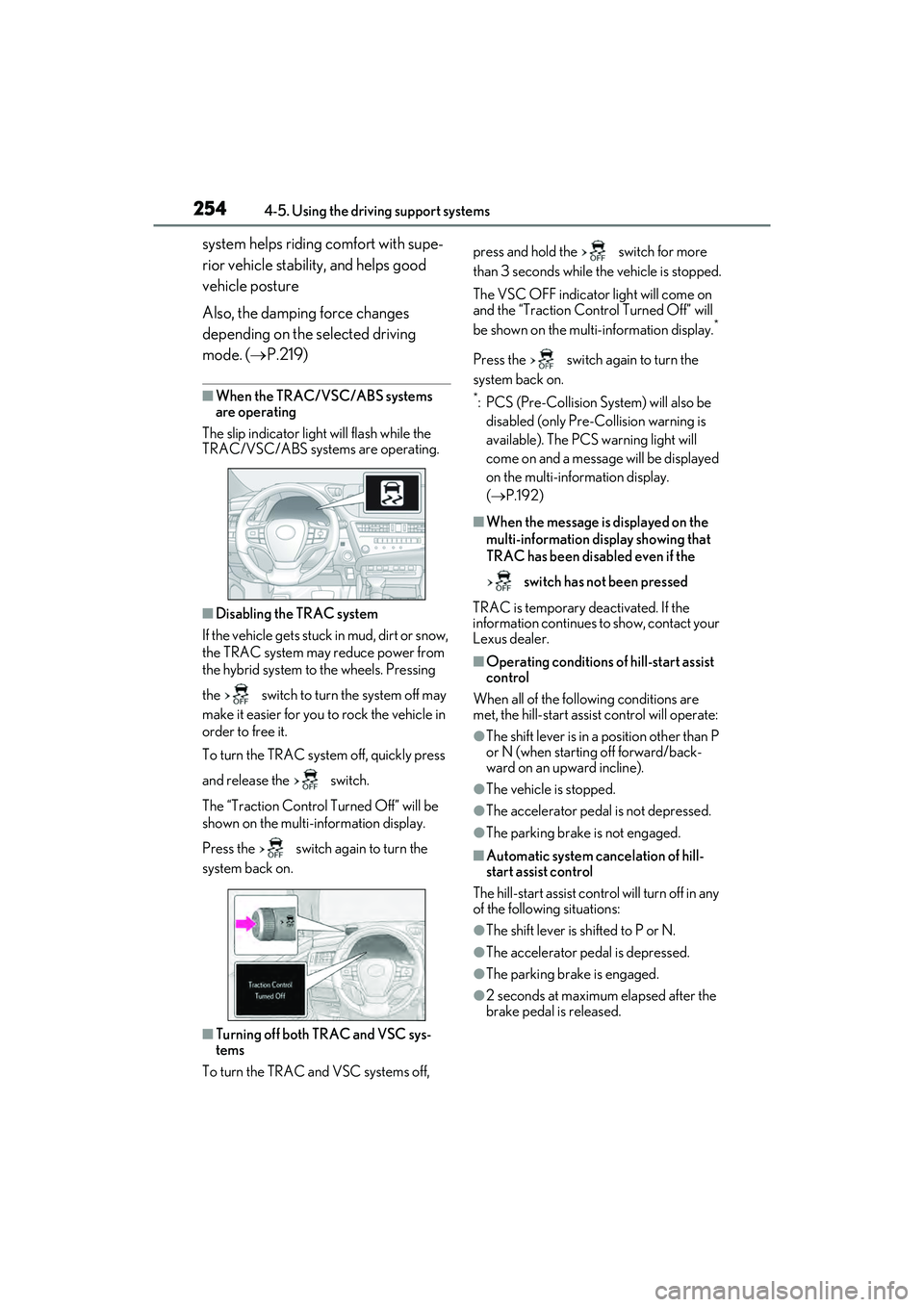
To turn the TRAC system off, quickly press
and release the switch.
The “Traction Control Turned Off” will be
shown on the multi-information display.
Press the switch again to turn the
system back on.
QTurning off both TRAC and VSC sys-
tems
To turn the TRAC and VSC systems off, press and hold the switch for more
than 3 seconds while the vehicle is stopped.
The VSC OFF indicator light will come on
and the “Traction Control Turned Off” will
be shown on the multi-information display.
*
Press the switch again to turn the
system back on.
*: PCS (Pre-Collision System) will also be
disabled (only Pre-Collision warning is
available). The PCS warning light will
come on and a message will be displayed
on the multi-information display.
( P.192)
QWhen the message is displayed on the
multi-information display showing that
TRAC has been disabled even if the
switch has not been pressed
TRAC is temporary deactivated. If the
information continues to show, contact your
Lexus dealer.
QOperating conditions of hill-start assist
control
When all of the following conditions are
met, the hill-start assist control will operate:
OThe shift lever is in a position other than P
or N (when starting off forward/back-
ward on an upward incline).
OThe vehicle is stopped.
OThe accelerator pedal is not depressed.
OThe parking brake is not engaged.
QAutomatic system cancelation of hill-
start assist control
The hill-start assist control will turn off in any
of the following situations:
OThe shift lever is shifted to P or N.
OThe accelerator pedal is depressed.
OThe parking brake is engaged.
O2 seconds at maximum elapsed after the
brake pedal is released.
Page 258 of 480
2564-5. Using the driving support systems
WARNING
QThe ABS does not operate effectively
when
OThe limits of tire gripping performance
have been exceeded (such as exces-
sively worn tires on a snow covered
road).
OThe vehicle hydroplanes while driving
at high speed on wet or slick roads.
QStopping distance when the ABS is
operating may exceed that of normal
conditions
The ABS is not designed to shorten the
vehicle’s stopping distance. Always
maintain a safe distance from the vehicle
in front of you, especially in the following
situations:
OWhen driving on dirt, gravel or snow-
covered roads
OWhen driving with tire chains
OWhen driving over bumps in the road
OWhen driving over roads with pot-
holes or uneven surfaces
QTRAC/VSC may not operate effec-
tively when
Directional control and power may not
be achievable while driving on slippery
road surfaces, even if the TRAC/VSC
system is operating.
Drive the vehicle carefully in conditions
where stability and power may be lost.
QActive Cornering Assist does not
operate effectively when
ODo not overly rely on Active Corner-
ing Assist. Active Cornering Assist
may not operate effectively when
accelerating down slopes or driving on
slippery road surfaces.
OWhen Active Cornering Assist fre-
quently operates, Active Cornering
Assist may temporarily stop operating
to ensure proper operation of the
brakes, TRAC and VSC.
QHill-start assist control does not oper-
ate effectively when
ODo not overly rely on hill-start assist
control. Hill-start assist control may
not operate effectively on steep
inclines and roads covered with ice.
OUnlike the parking brake, hill-start
assist control is not intended to hold
the vehicle stationary for an extended
period of time. Do not attempt to use
hill-start assist control to hold the vehi-
cle on an incline, as doing so may lead
to an accident.
QWhen the TRAC/ABS/VSC is acti-
vated
The slip indicator light flashes. Always
drive carefully. Reckless driving may
cause an accident. Exercise particular
care when the indicator light flashes.
QWhen the TRAC/VSC systems are
turned off
Be especially careful and drive at a
speed appropriate to the road condi-
tions. As these are the systems to help
ensure vehicle stability and driving force,
do not turn the TRAC/VSC systems off
unless necessary.
QSecondary Collision Brake
Do not rely solely upon the Secondary
Collision Brake. This system is designed
to help reduce the possibility of further
damage due to a secondary collision,
however, that effect changes according
to various conditions. Overly relying on
the system may result in death or serious
injury.
Page 260 of 480

2584-6. Driving tips
4-6.Driving tips
When using Eco drive mode, the
torque corresponding to the accelera-
tor pedal depression amount can be
generated more smoothly than it is in
normal conditions. In addition, the
operation of the air conditioning sys-
tem (heating/cooling) will be mini-
mized, improving the fuel economy.
( P.219)
The Eco-friendly driving is possible by
keeping the bar display of Hybrid Sys-
tem Indicator within Eco area. ( P.77,
82)
Shift the shift lever to D when stopped
at a traffic light, or driving in heavy traf-
fic etc. Shift the shift lever to P when
parking. When using the N, there is no
positive effect on fuel consumption. In
the N, the gasoline engine operates
but electricity cannot be generated.
Also, when using the air conditioning
system, etc., the hybrid battery (trac-
tion battery) power is consumed.
Drive your vehicle smoothly. Avoid
abrupt acceleration and decelera-
tion. Gradual acceleration and
deceleration will make more effec-
tive use of the electric motor (trac-
tion motor) without having to use
gasoline engine power.
Avoid repeated acceleration.
Repeated acceleration consumes
hybrid battery (traction battery)
power, resulting in poor fuel con-
sumption. Battery power can be
restored by driving with the acceler-
ator pedal slightly released.
Make sure to operate the brakes gen-
tly and in a timely manner. A greater
amount of electrical energy can be
regenerated when slowing down.
Repeated acceleration and decelera-
tion, as well as long waits at traffic
lights, will lead to bad fuel economy.
Check traffic reports before leaving
and avoid delays as much as possible.
When driving in a traffic jam, gently
release the brake pedal to allow the
vehicle to move forward slightly while
avoiding overuse of the accelerator
pedal. Doing so can help control
excessive gasoline consumption.
Hybrid vehicle driving tips
For economical and ecological
driving, pay attention to the follow-
ing points:
Using Eco drive mode
Use of Hybrid System Indicator
Shift lever operation
Accelerator pedal/brake pedal
operation
When braking
Delays
Page 263 of 480
2614-6. Driving tips
4
Driving
or move a wiper that is frozen. Pour
warm water over the frozen area to
melt the ice. Wipe away the water
immediately to prevent it from
freezing.
To ensure proper operation of the
climate control system fan, remove
any snow that has accumulated on
the air inlet vents in front of the
windshield.
Check for and remove any excess
ice or snow that may have accumu-
lated on the exterior lights, vehicle’s
roof, chassis, around the tires or on
the brakes.
Remove any snow or mud from the
bottom of your shoes before getting
in the vehicle.
QTo protect the windshield wipers
P.172
Accelerate the vehicle slowly, keep a
safe distance between you and the
vehicle ahead, and drive at a reduced
speed suitable to road conditions.
Park the vehicle and move the shift
lever to P without setting the park-
ing brake. The parking brake may
freeze up, preventing it from being
released. If the vehicle is parked
without setting the parking brake,
make sure to block the wheels.
Failure to do so may be dangerous
because it may cause the vehicle to move unexpectedly, possibly lead-
ing to an accident.
When the parking brake is in automatic
mode, release the parking brake after shift-
ing the shift lever to P. (
P.159)
If the vehicle is left parked with the
brakes damp in cold temperatures,
there is a possibility of the brakes
freezing.
If the vehicle is parked without set-
ting the parking brake, confirm that
the shift lever cannot be moved out
of P
*.
*: The shift lever will be locked if it is
attempted to be shifted from P to any
other position without depressing the
brake pedal. If the shift lever can be
shifted from P, there may be a problem
with the shift lock system. Have the vehi-
cle inspected by your Lexus dealer
immediately.
Vehicles with 17-inch tires
Use the correct tire chain size when
mounting the tire chains.
Chain size is regulated for each tire
size.
When driving the vehicle
When parking the vehicle
WARNING
QWhen parking the vehicle
When parking the vehicle without apply-
ing the parking brake, make sure to
chock the wheels. If you do not chock the
wheels, the vehicle may move unexpect-
edly, possibly resulting in an accident.
Selecting tire chains
Page 312 of 480
3106-1. Maintenance and care
WARNING
QPrecaution regarding the rear
bumper with Blind Spot Monitor
If the paint of the rear bumper is chipped
or scratched, the system may malfunc-
tion. If this occurs, consult your Lexus
dealer.
NOTICE
QTo prevent paint deterioration and
corrosion on the body and compo-
nents (aluminum wheels etc.)
OWash the vehicle immediately in the
following cases:
• After driving near the sea coast
• After driving on salted roads
• If coal tar, pollen or tree sap is present on the paint surface
• If dead insects, insect droppings or bird droppings are present on the
paint surface
• After driving in an area contaminated with soot, oily smoke, mine dust, iron
powder or chemical substances
• If the vehicle becomes heavily soiled with dust or mud
• If liquids such as benzene and gasoline are spilled on the paint surface
OIf the paint is chipped or scratched,
have it repaired immediately.
OTo prevent the wheels from corroding,
remove any dirt and store in a place
with low humidity when storing the
wheels.
QCleaning the exterior lights
OWash carefully. Do not use organic
substances or scrub with a hard brush.
This may damage the surfaces of the
lights.
ODo not apply wax to the surfaces of the
lights.
Wax may cause damage to the lenses.
QWhen using an automatic car wash
(vehicles with rain-s ensing windshield
wipers)
Set the wiper switch to the off position.
If the wiper switch is in “AUTO”, the wip-
ers may operate and the wiper blades
may be damaged.
QWhen using a high pressure car wash
OWhen washing the vehicle, do not
spray the camera or its surrounding
area directly with a high pressure
washer. Shock applied from high pres-
sure water may cause the device to not
operate normally.
ODo not spray water directly on the
radar which is equipped behind the
emblem. Otherwise it may cause the
device to be damaged.
ODo not bring the nozzle tip close to
boots (rubber or resin manufactured
cover), connectors or the following
parts. The parts may be damaged if
they come into contact with high-pres-
sure water.
• Traction related parts
•Steering parts
• Suspension parts
• Brake parts
OKeep the cleaning nozzle at least 11.9
in. (30 cm) away from the vehicle
body. Otherwise resin section, such as
moldings and bumpers, may be
deformed and damaged. Also, do not
continuously hold the nozzle in the
same place.
ODo not spray the lower part of the
windshield continuously.
If water enters the air conditioning sys-
tem intake located near the lower part
of the windshield, the air conditioning
system may not operate correctly.
ODo not wash the underside of the vehi-
cle using a high pressure car washer.
Page 318 of 480
3166-2. Maintenance
Radiator/con-
denser
The radiator and con-
denser should be free
from foreign objects.
( P.326)
Washer fluid
Is there sufficient
washer fluid?
( P.327)
Trunk
ItemsCheck points
12-volt battery
Check the battery
connections.
( P.328)
Vehicle interior
ItemsCheck points
Accelerator
pedal
• The accelerator
pedal should move
smoothly (without
uneven pedal effort
or catching).
Hybrid transmis-
sion “Park” mech-
anism
•When parked on a slope and the shift
lever is in P, is the
vehicle securely
stopped?
Brake pedal
• Does the brake pedal move
smoothly?
• Does the brake pedal have appro-
priate clearance
from the floor?
• Does the brake pedal have the cor-
rect amount of free
play?
ItemsCheck points
Brakes
• The vehicle should not pull to one side
when the brakes are
applied.
•The brakes should work effectively.
• The brake pedal should not feel
spongy.
• The brake pedal should not get too
close to the floor
when the brakes are
applied.
Head restraints
•Do the head restraints move
smoothly and lock
securely?
Indicators/buzz-
ers•Do the indicators and buzzers function
properly?
Lights
• Do all the lights come on?
• Are the headlights aimed correctly?
Parking brake
•Does the parking brake operate nor-
mally?
•When parked on a slope and the park-
ing brake is on, is the
vehicle securely
stopped?
Seat belts
• Do the seat belts operate smoothly?
• The seat belts should not be damaged.
ItemsCheck points
Page 321 of 480
3196-3. Do-it-yourself maintenance
6
Maintenance and care
6-3.Do-it-yo urself mainte nance
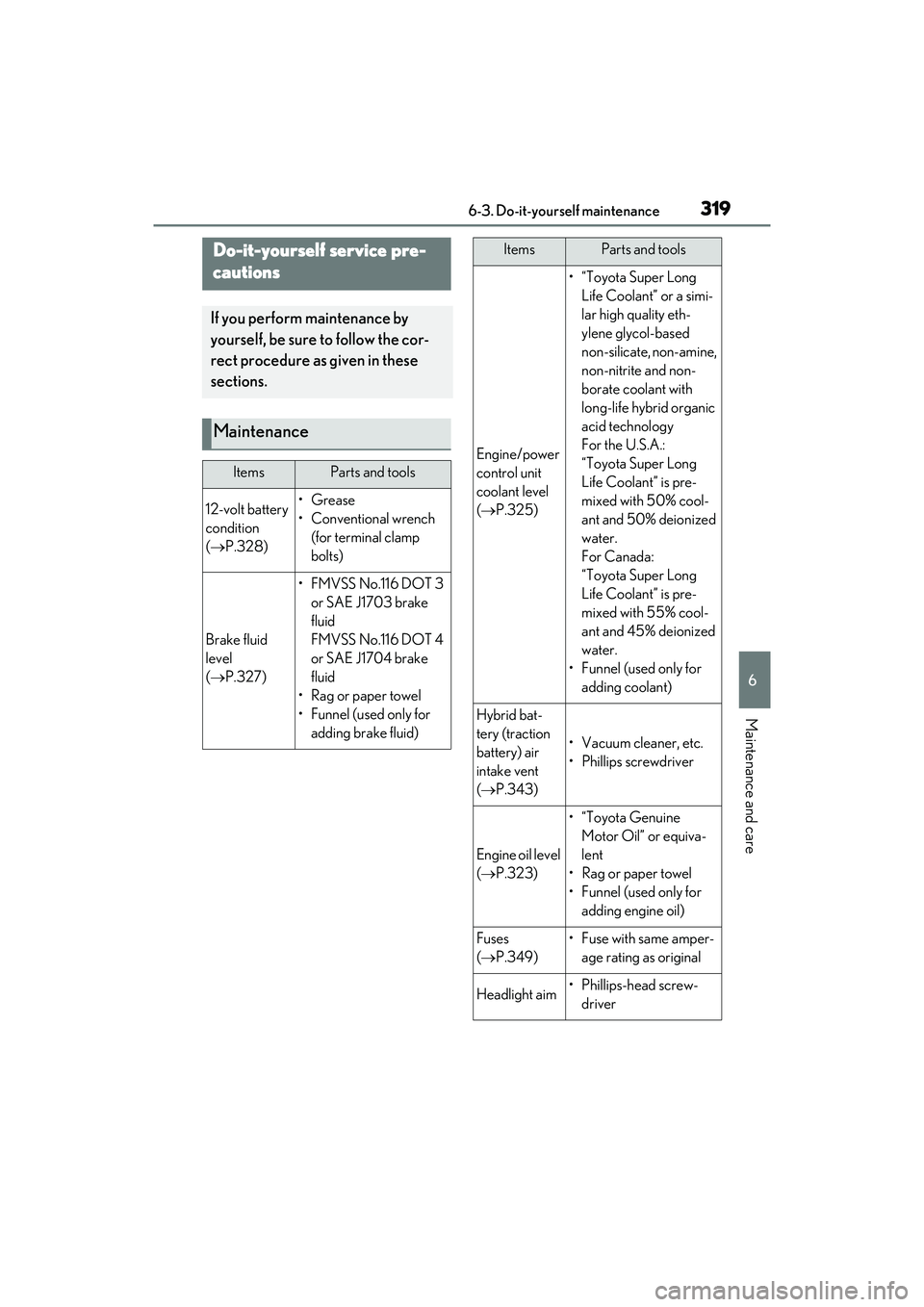
Do-it-yourself service pre-
cautions
If you perform maintenance by
yourself, be sure to follow the cor-
rect procedure as given in these
sections.
Maintenance
ItemsParts and tools
12-volt battery
condition
( P.328)•Grease
• Conventional wrench
(for terminal clamp
bolts)
Brake fluid
level
( P.327)
• FMVSS No.116 DOT 3
or SAE J1703 brake
fluid
FMVSS No.116 DOT 4
or SAE J1704 brake
fluid
•Rag or paper towel
• Funnel (used only for adding brake fluid)
Engine/power
control unit
coolant level
( P.325)
•“Toyota Super Long
Life Coolant” or a simi-
lar high quality eth-
ylene glycol-based
non-silicate, non-amine,
non-nitrite and non-
borate coolant with
long-life hybrid organic
acid technology
For the U.S.A.:
“Toyota Super Long
Life Coolant” is pre-
mixed with 50% cool-
ant and 50% deionized
water.
For Canada:
“Toyota Super Long
Life Coolant” is pre-
mixed with 55% cool-
ant and 45% deionized
water.
• Funnel (used only for adding coolant)
Hybrid bat-
tery (traction
battery) air
intake vent
( P.343)
• Vacuum cleaner, etc.
• Phillips screwdriver
Engine oil level
( P.323)
•“Toyota Genuine
Motor Oil” or equiva-
lent
• Rag or paper towel
• Funnel (used only for adding engine oil)
Fuses
( P.349)• Fuse with same amper-
age rating as original
Headlight aim• Phillips-head screw-driver
ItemsParts and tools